Category: blogs

  • How to Increase Organic Traffic: A Complete SEO Guide for Sustainable Growth

    How to Increase Organic Traffic: A Complete SEO Guide for Sustainable Growth

    Organic traffic is any visit that comes to your website from an unpaid search engine result. When someone types a query into Google, scrolls past the ads, and clicks on a result that’s organic traffic landing on your site.

    Search engines decide which pages to show (and in what order) based on hundreds of ranking signals: relevance to the query, content quality, page speed, authority, and more. Earning that visibility is the whole game of SEO.

    Think of it this way: paid traffic is renting attention. Organic traffic is owning it. The moment you stop paying for ads, paid traffic stops. Organic traffic keeps arriving as long as your content ranks.

    Organic Traffic vs. Direct, Paid, and Referral Traffic

    It’s easy to mix these up in your analytics. Here’s how they’re different:

    Traffic TypeWhat It Means
    OrganicVisitors from unpaid search engine results (Google, Bing, DuckDuckGo)
    DirectVisitors who typed your URL directly or came from an untracked source
    PaidVisitors from Google Ads, Meta Ads, or other paid campaigns
    ReferralVisitors who clicked a link on another website
    SocialVisitors from social media platforms (Facebook, LinkedIn, X, etc.)

    One important note: direct traffic is often misclassified. When GA4 can’t identify where a visitor came from for example, someone clicking a link in a PDF, a mobile app, or an email without tracking parameters it gets bucketed as direct. This means your organic numbers might actually be higher than they appear.

    Why Organic Traffic Is Worth the Investment
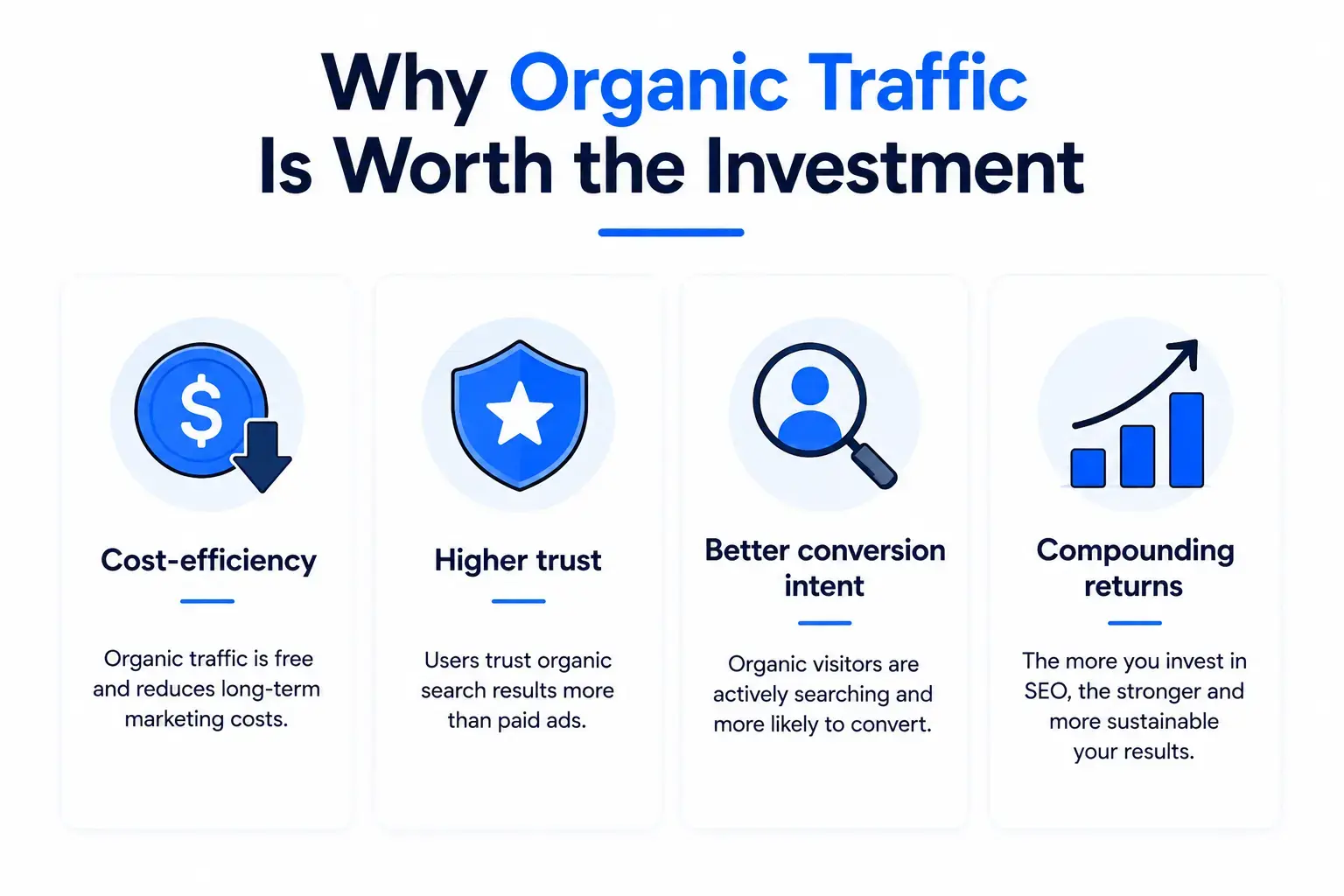
    Organic traffic SEO benefits infographic with cost-efficiency, trust, conversions, and long-term growth.
    Unlike paid advertising, where visibility disappears the moment a budget runs out, organic traffic provides a more durable online presence. Think of it as investing in a digital asset that appreciates over time  the opposite of renting.

    • Cost-efficiency: Once content ranks, it keeps driving traffic without ongoing spend
    • Higher trust: People click organic results far more than paid ads  they signal authority
    • Better conversion intent: Organic visitors are actively searching for something, making them more likely to convert
    • Compounding returns: Content that ranks keeps ranking, often growing in traffic over months and years

    What Percentage of Your Traffic Should Be Organic?

    There’s no universal benchmark, but here are rough targets by business type:

    Business TypeRealistic Organic Traffic Target
    SaaS / B2B40–60% of total traffic
    eCommerce30–50% of total traffic
    Local Business50–70% of total traffic
    Content / Blog Site70–90% of total traffic
    New Website (< 6 months)10–25% — building phase, be patient

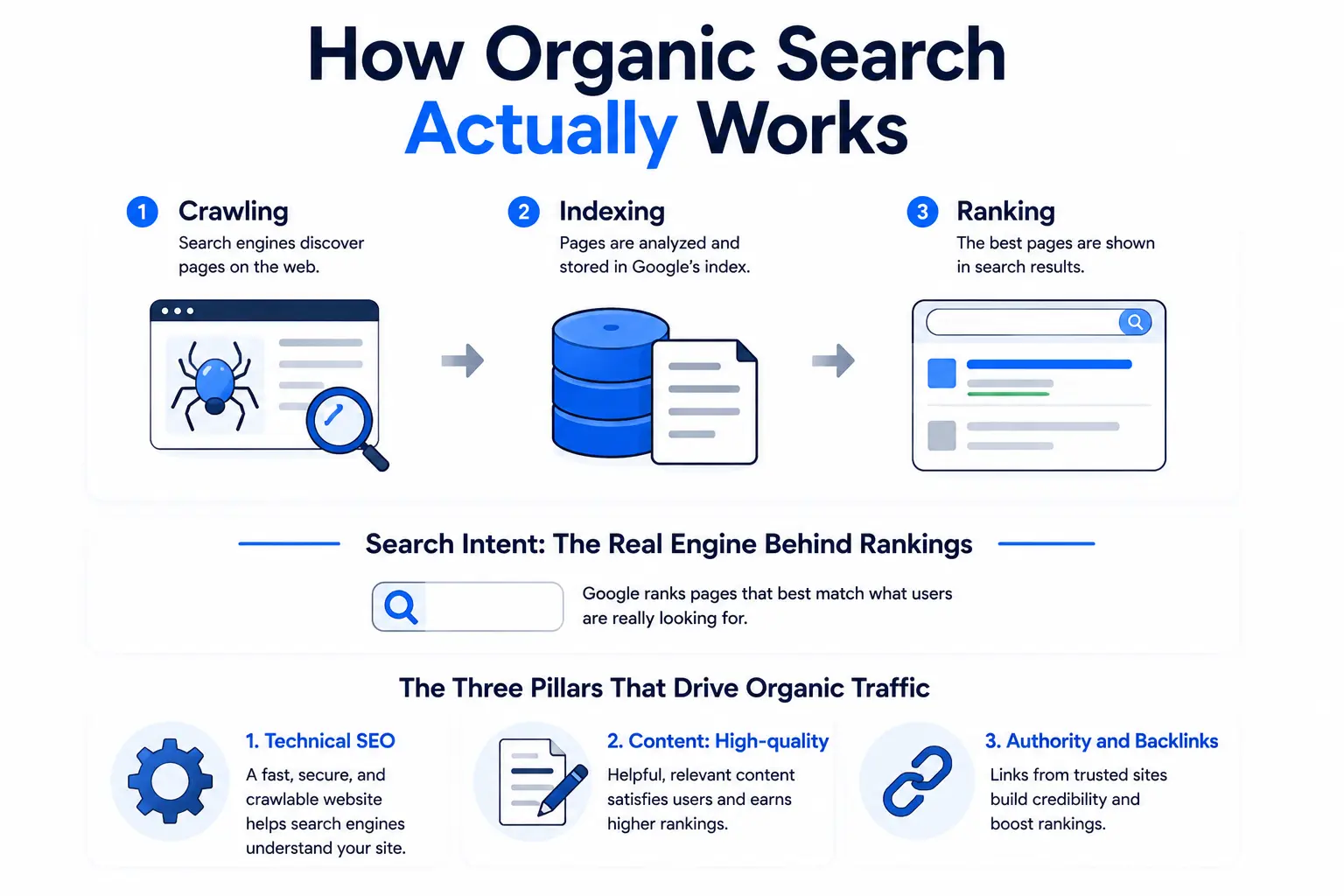
    How Organic Search Actually Works

    how organic search works through crawling, indexing, ranking, search intent, technical SEO, content quality, and backlinks.
    Knowing that organic traffic comes from search engines is one thing. Understanding the mechanics behind why one page ranks and another doesn’t is what separates businesses that grow consistently from those that publish without results.

    Here’s how the whole system actually operates from the moment a page is created to the moment it appears in a search result.

    1. Crawling, Indexing, and Ranking The Basics

    Before a page can receive any organic traffic, it has to go through three steps:

    Crawling: Googlebot (and other search engine bots) constantly scan the web, following links to discover pages. If a page isn’t linked to from anywhere, it may never be found.

    Indexing: Once a page is crawled, Google evaluates it and decides whether to add it to its index the giant database of pages it can potentially show in results. Not every crawled page gets indexed.

    Ranking: When a user searches for something, Google pulls from its index and ranks the most relevant, high-quality pages for that query. This is where your SEO work pays off.

    The most important thing to understand: a page can exist on your site but have zero organic traffic if it’s not indexed, not ranking, or targeting the wrong queries.

    2. Search Intent: The Real Engine Behind Rankings

    Here’s something many people get wrong: SEO is not about stuffing keywords into a page. It’s about understanding what a user actually wants when they type a query, and then delivering exactly that.

    Content quality is one of the most significant variables influencing SEO performance. Search engines increasingly reward content that directly answers user queries rather than content optimized solely around keywords.

    The four main intent types:

    • Informational: ‘How does X work?’ or ‘What is Y?’ users want to learn
    • Navigational: ‘Gmail login’ or ‘Ahrefs pricing page’ users want to find a specific place
    • Commercial: ‘Best project management tools’  users are comparing before they buy
    • Transactional: ‘Buy running shoes online’ users are ready to act

    Before writing any piece of content, ask: what does the person searching this keyword actually want to do? Your content structure, tone, and depth should all answer that question.

    3. The Three Pillars That Drive Organic Traffic

    Every SEO strategy rests on three interconnected foundations:

    • Technical SEO: Your site needs to be crawlable, fast, mobile-friendly, and properly structured. This is the foundation everything else sits on.
    • Content: High-quality, intent-matched content is the fuel that drives rankings. No amount of technical work compensates for thin, generic content.
    • Authority and Backlinks: Search engines use links from other websites as trust signals. The more reputable sites that link to yours, the more authority, and ranking power, you build over time.

    How to Increase Organic Traffic – Strategies That Work in 2026
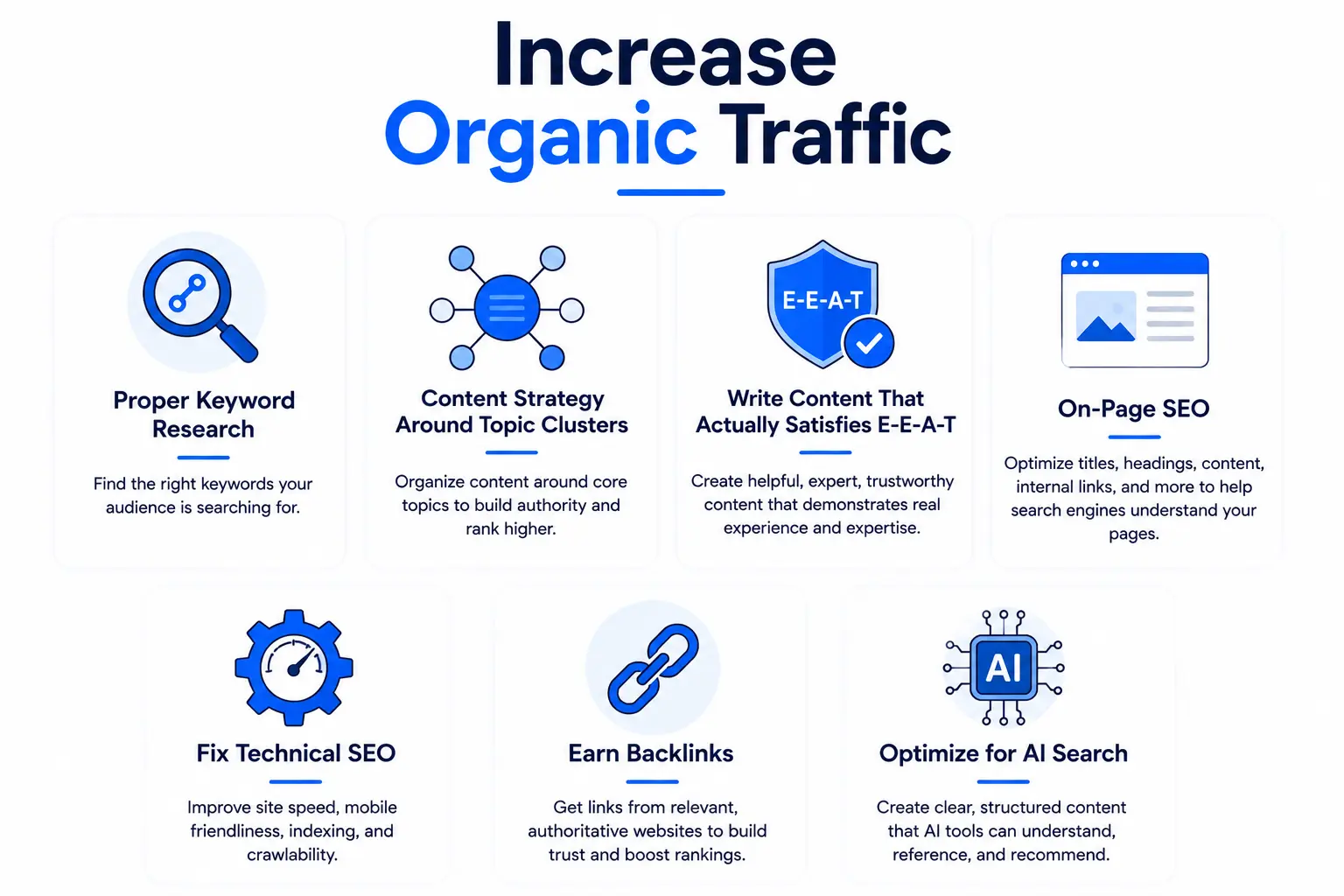
    Infographic showing strategies to increase organic traffic including keyword research, content strategy, E-E-A-T, on-page SEO, technical SEO, backlinks, and AI search optimization
    This is the core of it. Growing organic traffic isn’t about gaming algorithms or publishing content at volume  it’s about doing a handful of foundational things consistently and doing them better than your competitors. These are the strategies that top-ranking sites use right now, updated for how search actually works in 2026.

    Step 1. Start with Proper Keyword Research

    Every piece of content you create should target a specific keyword that real people are searching for. Without keyword research, you’re essentially publishing into the void and hoping someone stumbles across it.

    Here’s how to approach it properly:

    • Map search intent first: Don’t just look at search volume. Ask what kind of content Google is already ranking for that keyword. If the top results are all listicles, a long-form guide probably won’t rank well  and vice versa.
    • Prioritize long-tail keywords: Long-tail keywords (more specific, lower volume phrases) account for around 70% of all search traffic. They’re less competitive and far more targeted which means better conversion rates.
    • Run competitor gap analysis: Use tools like Ahrefs or SEMrush to find keywords your competitors rank for that you don’t. These are ready-made opportunities.
    • Don’t ignore question-based queries: Phrases like ‘how to,’ ‘what is,’ and ‘why does’ are goldmines for informational content and featured snippets.

    Step 2. Build a Content Strategy Around Topic Clusters

    One-off blog posts are becoming less effective. What search engines really reward is topical authority demonstrating that you comprehensively cover a subject area, not just individual keywords.

    The topic cluster model works like this: you create a pillar page that broadly covers a topic (this article is an example organic traffic as a subject), and then you build supporting articles around specific subtopics that link back to the pillar.

    Instead of creating isolated blog posts, build a network of related content around a central topic. This structure helps search engines understand your expertise and improves your chances of ranking for multiple related keywords simultaneously.

    The practical benefit is significant: internally linked clusters pass authority between pages, keep users on your site longer, and signal to Google that you’re a genuine authority on a topic — not just a site that published one article about it.

    Step 3. Write Content That Actually Satisfies E-E-A-T

    Google’s E-E-A-T framework (Experience, Expertise, Authoritativeness, Trustworthiness) continues to be a major factor in how content is evaluated particularly for topics that affect people’s health, finances, or major decisions.

    But here’s the practical reality: E-E-A-T isn’t just about credentials. It’s about whether your content feels like it was written by someone who genuinely knows the subject. Here’s what that looks like:

    • Experience: Include real-world examples, case studies, or firsthand observations
    • Expertise: Cite credible data, link to authoritative sources, go deeper than surface-level explanations
    • Authoritativeness: Have a clear author bio with verifiable credentials or professional background
    • Trustworthiness: Keep content accurate, cite sources, be transparent about limitations

    One thing to watch: publishing large volumes of thin AI-generated content without human editing or original insight is becoming a liability, not an asset. Google is getting better at identifying it, and users bounce off it fast. That’s why many marketers review AI-generated drafts manually or use an AI humanizer to make the content sound more authentic, engaging, and aligned with their brand voice before publication.

    Step 4. On-Page SEO: The Details That Still Move the Needle

    On-page SEO is more about content clarity and structure than keyword placement in 2026. That said, there are fundamentals that still matter a great deal:

    • Title tags: Put your primary keyword near the front. Keep it under 60 characters. Make it compelling it’s competing with 9 other results for the same click.
    • Meta descriptions: These don’t directly affect rankings, but they massively affect click-through rate. Write them like ad copy clear, specific, benefit-focused.
    • Header structure (H1 > H2 > H3): Use headers to create a scannable hierarchy. Both users and crawlers rely on these to understand what a page is about.
    • Internal linking: This is the most underused lever in SEO. Link relevant pages to each other using descriptive anchor text. It passes authority, improves crawlability, and keeps users navigating your site.
    • Semantic keywords: Use related terms and synonyms naturally throughout your content. This helps search engines confirm that your page thoroughly covers a topic.

    Step 5. Fix Technical SEO Before Anything Else

    You can publish the best content in your industry, but if your site is slow, broken, or hard to crawl, you’ll leave a lot of organic traffic on the table. Technical SEO is the foundation.

    Core Web Vitals, Google’s metrics for loading speed, interactivity, and visual stability, remain a meaningful ranking signal in 2026. Here’s where to focus:

    • Page speed: Compress images, use a CDN, and minimize render-blocking JavaScript. Aim for under 2.5 seconds LCP (Largest Contentful Paint).
    • Mobile optimization: Most searches happen on mobile. Your site should be fully responsive and easy to navigate on a phone.
    • Crawlability: Make sure your important pages aren’t blocked by robots.txt, have clean canonical tags, and are linked from somewhere (orphan pages don’t get crawled regularly).
    • Site architecture: Keep important pages within 3 clicks of the homepage. Flat, logical structures are easier for crawlers and users.
    • HTTPS: Non-secure sites are flagged by browsers and can hurt rankings. If you’re still on HTTP, fix this first.

    Step 6. Earn Backlinks the Right Way

    Backlinks remain one of the strongest ranking signals in SEO. A link from a reputable website is essentially a vote of confidence it tells search engines your content is worth referencing.

    The most effective link-building tactic in 2026? Digital PR. Nearly half of all SEOs rate it as the top approach and it makes sense. When you create genuinely useful research, original data, or expert commentary, journalists and bloggers link to you naturally. That’s far more durable than any link scheme.

    Other legitimate strategies:

    • Guest posting on relevant industry publications (with a genuine editorial standard)
    • Creating linkable assets: original studies, free tools, comprehensive guides, templates
    • Competitor backlink analysis: find who links to your competitors, then create better content that earns those same links
    • Broken link building: find broken links on relevant sites and suggest your content as a replacement

    What to avoid: paid link schemes, private blog networks (PBNs), and link exchanges. Google’s manual and algorithmic penalties for these have real teeth.

    Step 7. Optimize for AI Search and Generative Engine Optimization (GEO)

    This is the area that’s changed most dramatically in the past 12 months. AI-powered platforms like ChatGPT, Perplexity, and Google’s AI Overviews are now real discovery channels not just novelties. Brands optimizing for both traditional search and AI visibility are building compounding momentum that single-channel strategies simply can’t match.

    What AI search optimization looks like in practice:

    • Conversational content structure: Write content that directly answers questions in clear, complete sentences. AI models pull these as responses.
    • Entity SEO: Establish who you are, what you do, and what topics you’re authoritative on — consistently, across your site and on other platforms.
    • Structured data and schema markup: Help search engines understand your content structure. FAQPage, HowTo, and Article schema are particularly useful.
    • Featured snippet optimization: Format answers in concise paragraphs (40–60 words), followed by supporting detail. Tables and numbered lists are also commonly pulled.

    How to Beat Competitors on Organic Keywords
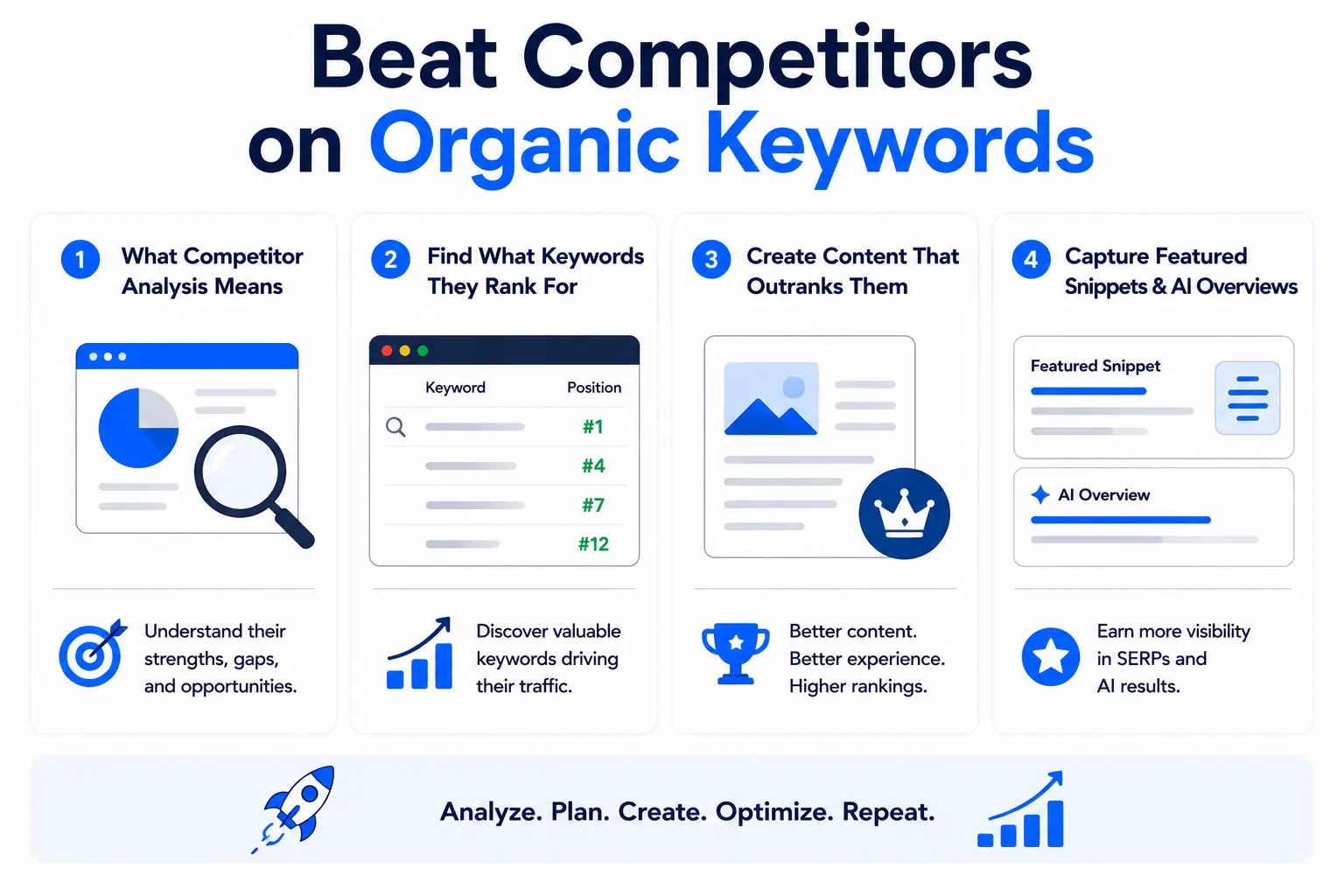
    Capturing Featured Snippets and AI Overviews
    Your competitors are already ranking for keywords your ideal customers are searching. The question is what you do about it. Ethical competitive SEO isn’t about copying — it’s about finding where they’ve left gaps, where their content falls short, and where you can deliver a meaningfully better answer. Done right, this is one of the fastest ways to capture organic traffic that already exists.

    What Competitor Analysis Actually Means in SEO

    Competitive SEO doesn’t mean copying what your competitors do. It means understanding what’s already working in your niche, identifying the gaps they’ve left open, and creating content that’s genuinely more useful.

    There’s a meaningful distinction between content gap analysis and just targeting the same keywords as everyone else. The real opportunity is finding keywords your competitors rank for that you don’t those are uncontested spots waiting to be filled.

    How to Find What Keywords Your Competitors Rank For

    Open Ahrefs or SEMrush, enter a competitor’s domain, and head to their organic keywords report. Filter by keywords they rank in positions 1–10. Then export this list and compare it against your own rankings.

    The overlapping keywords where you both rank are your competitive battles. The keywords they rank for and you don’t are your content opportunities.

    SERP overlap analysis is especially useful for identifying where you’re directly competing for the same audience. If a competitor consistently outranks you on a cluster of related terms, it’s often a sign of stronger topical authority in that area which points to content depth, not just individual page optimization.

    Create Content That Actually Outranks Them

    Here’s the honest truth: publishing ‘better’ content isn’t about word count. It’s about being more useful to the person searching. That can mean:

    • More current data and fresher examples
    • Better UX: cleaner formatting, faster load time, mobile-friendly layout
    • A more complete answer: covering the topic from angles competitors missed
    • Original perspective: actual experience, case studies, proprietary data

    One underrated factor is user experience signals. If visitors land on your page and immediately bounce back to Google, that tells the algorithm your content didn’t satisfy the query. Time on page, scroll depth, and engagement rate all matter.

    Capturing Featured Snippets and AI Overviews

    Featured snippets (the answer boxes at the top of Google results) are disproportionately valuable — they sit above all organic results and can drive significant clicks even with a lower overall ranking.

    To target them: identify queries that currently show a snippet, then format your content to answer the exact question in a clear, concise paragraph (under 60 words). Follow it with supporting detail in a numbered list or table. Mark it up with appropriate schema.

    For AI Overviews, the same principles apply but with additional emphasis on conversational phrasing, clear entity relationships, and comprehensive topic coverage.

    Organic Traffic for SaaS: A Different Playbook

    SaaS companies can’t use the same content playbook as eCommerce stores or local businesses. Your buyers are more sophisticated, the sales cycle is longer, and your competitors have deep pockets. Growing organic traffic for a SaaS product requires a funnel-aware strategy that maps content to intent at every stage — from first discovery to the moment someone signs up.

    Why SaaS SEO Is Different

    SaaS companies face a unique challenge with organic traffic: the people who search for their product are at very different stages of awareness. Someone searching ‘what is project management software’ is nowhere near ready to buy. Someone searching ‘[Your Product] vs [Competitor]’ is probably evaluating right now.

    This means a single content strategy doesn’t work you need content mapped across the entire buying journey, with different goals at each stage.

    Add to this the long sales cycles, highly competitive keywords, and the fact that your competitors are often well-funded companies with mature content operations, and you understand why SaaS SEO requires a distinct approach.

    Best Organic Growth Tactics for SaaS Companies

    • Product-led content: Create content that naturally demonstrates your product’s value tutorials, how-to guides, use case pages. This drives organic traffic AND converts.
    • Comparison and alternative pages: ‘[Your Product] vs [Competitor]’ and ‘Best [Competitor] Alternatives’ pages capture high-intent, bottom-of-funnel traffic from people actively evaluating.
    • Integration pages: ‘[Your Product] + [Tool]’ pages capture queries from users of complementary tools who are looking for integrations often very high conversion intent.
    • Programmatic SEO: Build templated landing pages at scale for variations of a search pattern (e.g., ‘CRM for [Industry]’). When done well, this can generate significant organic traffic efficiently.

    Building an SEO Funnel for SaaS

    A well-structured SaaS content funnel looks like this:

    Funnel StageContent TypeExample QueryGoal
    TOFU (Awareness)Educational guides, blog posts, definitions‘What is customer churn?’Attract relevant audience
    MOFU (Consideration)Comparisons, templates, use cases‘Best CRM for startups’Build trust, stay in consideration
    BOFU (Decision)Case studies, ROI calculators, demo pages‘[Product] pricing’Drive trial signups or demos

    How to Track Organic Traffic in Google Analytics 4

    You can’t improve what you don’t measure. GA4 is the standard tool for tracking organic traffic  but its interface is different enough from Universal Analytics that many marketers aren’t using it to its full potential. This section walks you through exactly where to find your organic data, which metrics actually matter, and how to connect Google Search Console for deeper keyword-level insights.

    Viewing Organic Traffic in GA4

    In GA4, go to Reports > Acquisition > Traffic Acquisition. You’ll see a breakdown of all traffic channels. Look for the ‘Organic Search’ row — this is your organic traffic data.

    For a more granular view, use the Exploration feature (left sidebar) to build a custom report. Filter by Session source/medium = ‘google/organic’ (or whichever search engine you want to analyze) and pull metrics like Sessions, Engaged Sessions, Conversions, and Landing Page.

    To see which landing pages are driving organic traffic: go to Reports > Engagement > Landing Page, then add a secondary dimension for Session default channel group and filter to ‘Organic Search.’

    Metrics That Actually Tell You Something

    Not all organic traffic metrics are equally useful. Here’s what to focus on:

    • Sessions: The baseline volume metric — how many organic visits you’re getting
    • Engagement Rate: Replaces bounce rate in GA4. A higher engagement rate (above 50-60%) means users are finding what they came for.
    • Conversions: Set up conversion events in GA4 for the actions that matter — form fills, purchases, trial signups
    • Average Engagement Time: How long organic visitors are spending on your pages. Low times on content pages are a signal your content isn’t satisfying the query.
    • Landing Pages by organic sessions: Which pages are bringing in traffic — and which high-priority pages are not

    Using Google Search Console Alongside GA4

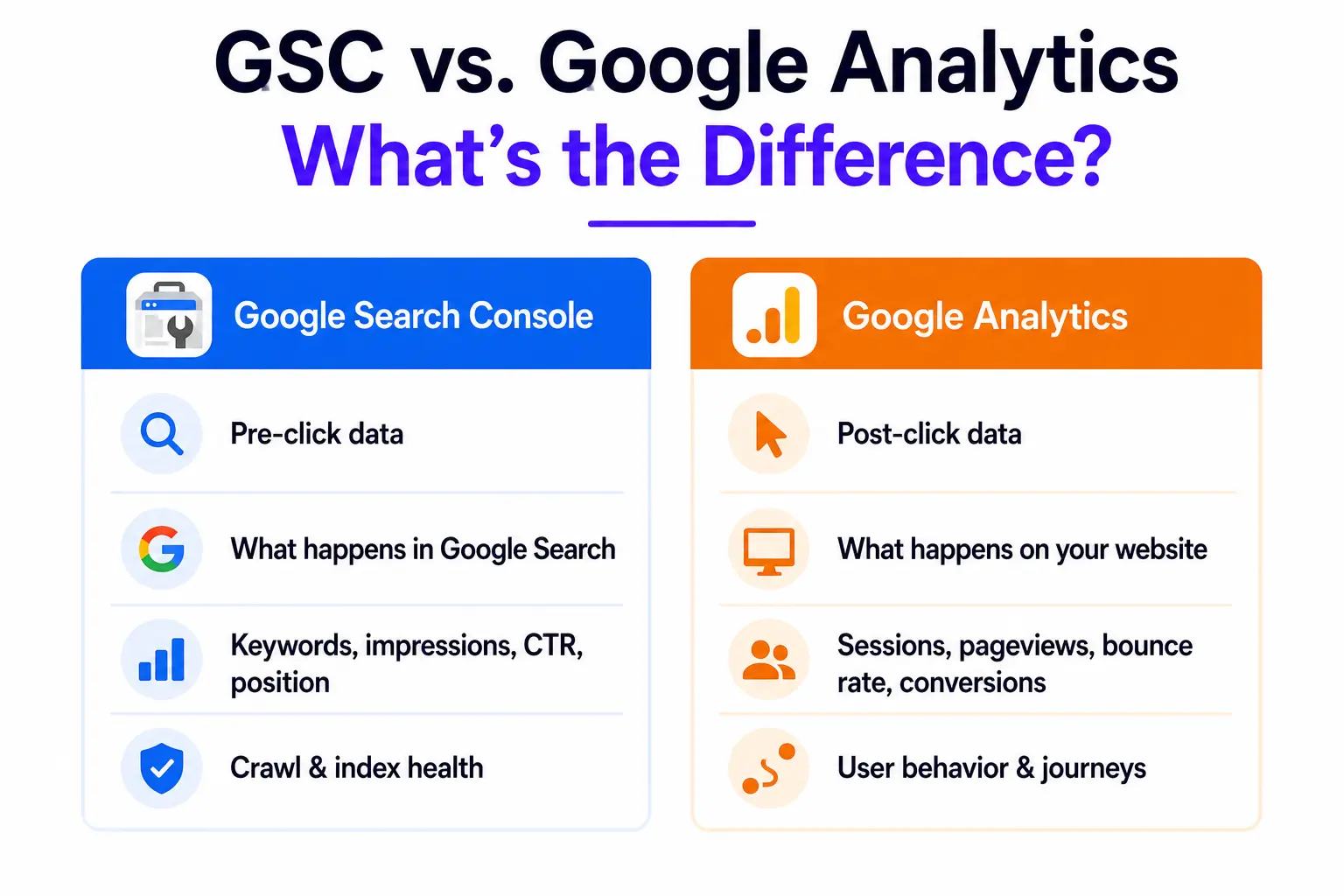
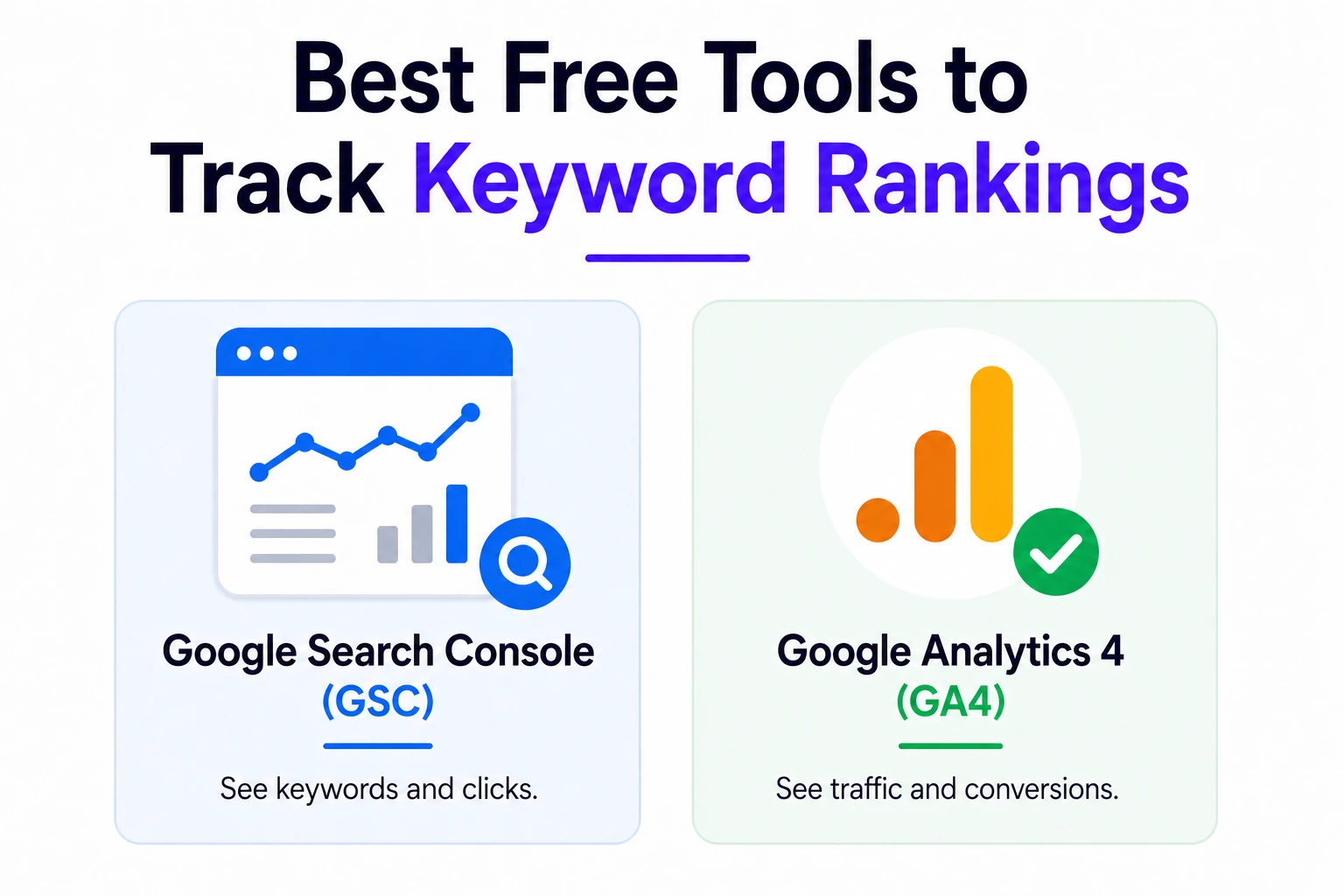
    Google Search Console gives you data GA4 can’t: what queries people searched before clicking through to your site, your average position, impressions, and click-through rate.

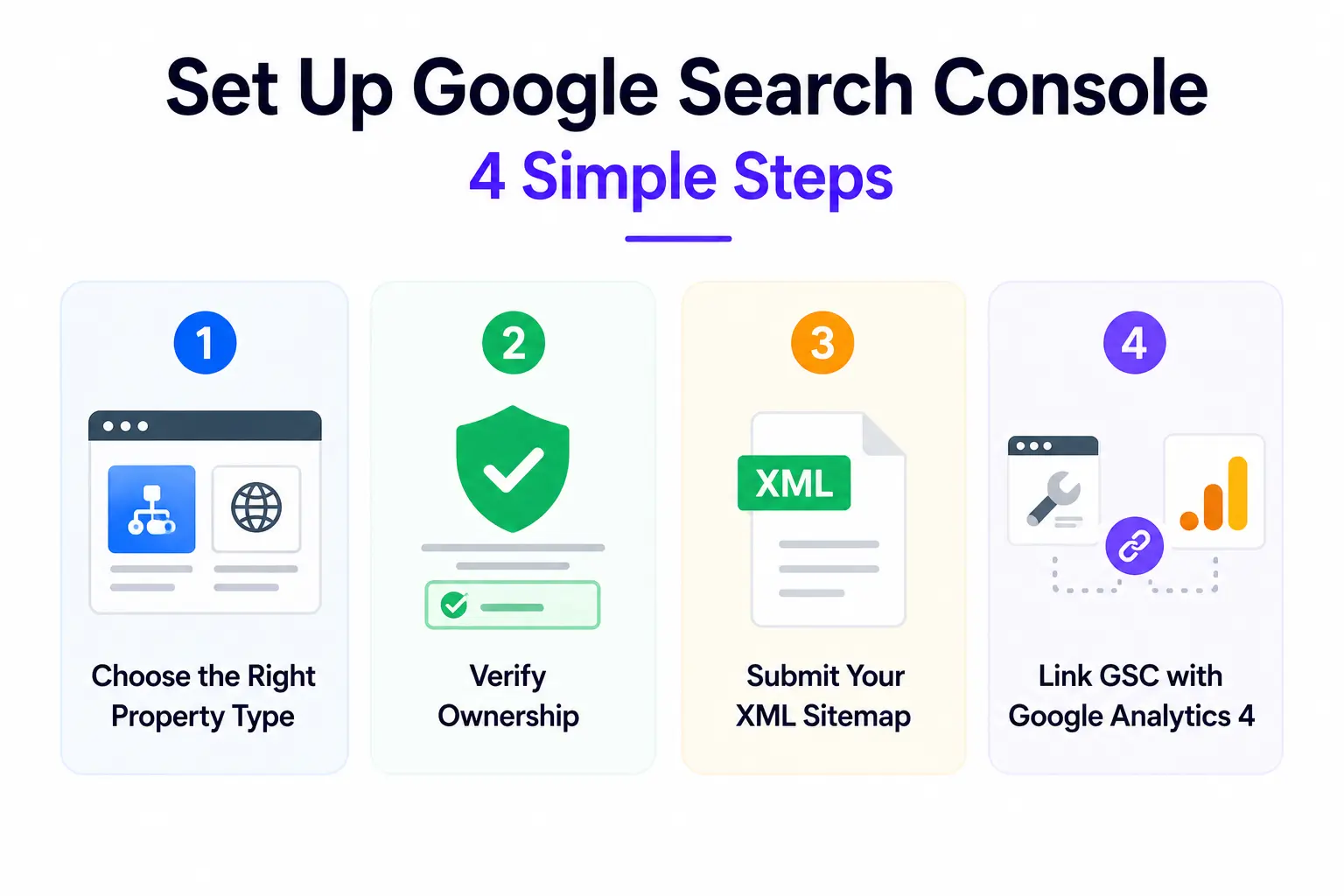
    Connect GSC to GA4 (under Admin > Property Settings > Search Console links) and you can see keyword-level data inside Google Analytics.

    The most valuable GSC report for organic traffic growth: Performance > Queries. Sort by impressions descending and look for queries where you have high impressions but low CTR. These are pages that are showing up in results but not getting clicked — often a title tag or meta description problem, not a ranking problem.

    How Long Does It Take to Grow Organic Traffic?

    One of the most common and frustrating questions in SEO. The honest answer isn’t what most people want to hear, but understanding realistic timelines protects you from making the mistake of abandoning a strategy that’s actually working, or doubling down on one that isn’t. Here’s what to expect, what affects speed, and how to forecast where you’ll be in 6, 12, and 18 months.

    The Honest Answer

    Most new websites won’t see meaningful organic traffic for 3 to 6 months, and it often takes 12 months or more to rank competitively for valuable keywords in contested niches. This isn’t a bug in SEO it’s a feature. The same time investment that makes it slow to start is what makes it hard for competitors to replicate once you’ve built it.

    Organic growth is best thought of as building digital real estate. Each piece of content you create becomes an asset. Over time, those assets compound a post from 18 months ago can still be driving qualified traffic today, often without any ongoing work.

    The timeline varies based on: how competitive your niche is, the age and authority of your domain, the consistency of your content publishing, and the quality of your technical SEO foundation.

    What Slows Down Organic Growth

    If your organic traffic is growing more slowly than expected, the most common culprits are:

    • Thin content: Pages that only partially address what a user is searching for or that cover it at a shallower depth than competing pages
    • Poor technical SEO: Slow page speed, crawl errors, poor mobile experience every day a page sits with technical problems is a day of potential organic traffic lost
    • Weak internal linking: Pages that aren’t linked to from other pages on your site get crawled less frequently and earn less internal authority
    • Slow publishing cadence: Consistency matters. Irregular publishing sends weaker freshness signals than a steady schedule.
    • Targeting keywords that are too competitive too early: New sites need to earn authority before competing for high-volume head terms

    How to Forecast Organic Traffic Growth

    Basic organic traffic forecasting uses three inputs: target keyword search volumes, estimated CTR by position, and a timeline for when you expect to rank.

    For example: if a keyword has 2,000 monthly searches and you expect to rank in position 3 (which typically earns around 10–13% CTR), you can forecast roughly 200–260 monthly organic visits once that page is ranking.

    Scale this across your target keyword list, weight by realistic ranking timelines, and you have a rough traffic forecast. Tools like Ahrefs and SEMrush have built-in forecasting features that automate much of this.

    The most useful use of forecasting isn’t precision it’s goal-setting. It gives you a framework to evaluate whether your current content and keyword strategy will get you where you need to go, or whether you need to adjust scope or timeline.

    Common Mistakes That Kill Organic Traffic Growth
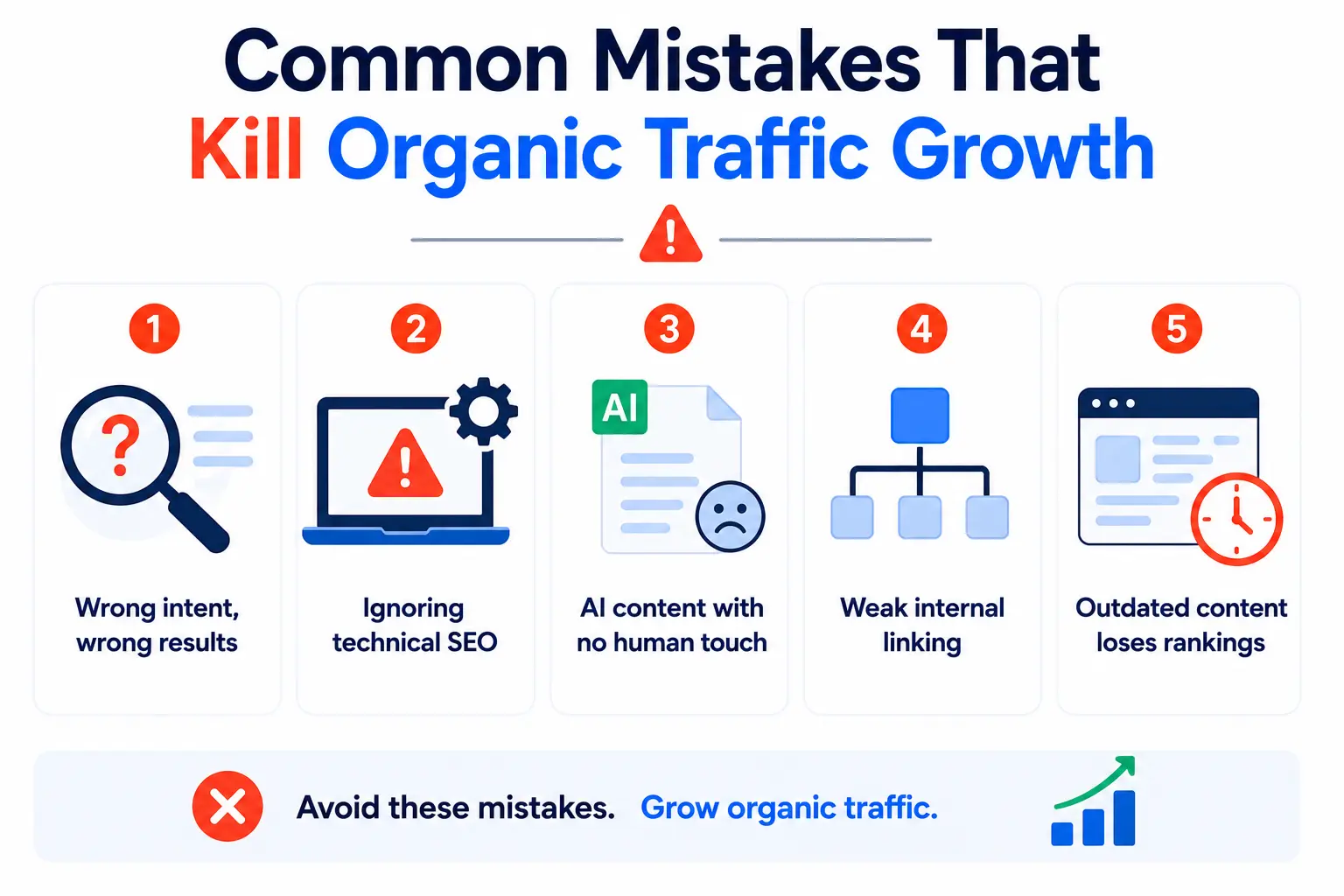
    Infographic showing common mistakes that kill organic traffic growth including wrong intent, technical SEO issues, AI content, weak internal linking, and outdated content.
    Even well-intentioned SEO efforts can plateau or backfire because of a handful of recurring mistakes that are surprisingly easy to make. Knowing what to avoid is just as important as knowing what to do. These are the most common reasons organic traffic stalls, drops, or never takes off in the first place.

    Targeting Keywords Without Understanding Intent

    Publishing a guide when the SERP is full of product pages or a listicle when Google is showing in-depth tutorials almost guarantees you won’t rank well, regardless of how good the content is. Always check the existing results for your target keyword before you write a word.

    Ignoring Technical SEO Until Something Breaks

    Technical issues don’t always produce visible errors. Slow crawl rates, duplicate content from pagination, incorrect canonical tags, or JavaScript rendering problems can quietly suppress your rankings for months before you notice. Schedule regular technical audits  quarterly at minimum.

    Publishing AI Content with No Human Voice or Depth

    AI writing tools are genuinely useful for drafts, outlines, and research. But publishing outputs with no editing, no original insight, and no real-world experience baked in is becoming a liability. Google’s quality evaluators and algorithms are increasingly effective at identifying generic, undifferentiated content  and users bounce off it faster than ever.

    Neglecting Internal Linking Structure

    Most sites have a handful of pages that could rank much better if they received more internal links. Audit your internal link structure periodically: which high-value pages are orphaned or under-linked? Adding 3–5 contextual internal links to a strong page is often faster and more impactful than creating new content.

    Letting Old Content Go Stale

    A post that ranked well 18 months ago isn’t guaranteed to keep ranking. Outdated statistics, broken links, and missing coverage of recent developments all erode content quality over time. Build content refreshes into your editorial calendar updated content often recovers rankings faster than new content earns them.

    The Best Tools to Grow Organic Traffic in 2026

    The right tools don’t replace strategy but they do make execution significantly faster and more precise. From finding the right keywords to auditing your site for technical issues to tracking exactly which pages are driving organic traffic, these tools cover the full SEO workflow. Here’s an honest breakdown of what each one is genuinely good for.

    Keyword Research and Competitive Analysis

    Ahrefs: The most widely used professional SEO tool. Excellent for backlink analysis, keyword research, content gap analysis, and site auditing. Its Keyword Explorer and Content Gap features are particularly powerful.

    SEMrush: Comprehensive suite covering keyword research, competitor analysis, technical auditing, and position tracking. Strong for agencies managing multiple sites. Its Keyword Magic Tool is excellent for building large keyword lists.

    Google Keyword Planner: Free and built directly into Google Ads. Best for validating search volumes and finding keyword ideas. Less depth than paid tools but a solid starting point.

    Analytics and Tracking

    Google Analytics 4 (GA4): The standard for website traffic analysis. Tracks organic sessions, engagement, conversions, and user behavior across your site. Free.

    Google Search Console (GSC): Tracks how your site performs in Google Search — impressions, clicks, CTR, and average position by query. The single most important free tool for organic traffic monitoring.

    Heatmap tools (Hotjar, Microsoft Clarity): Show how users actually interact with your pages — where they click, how far they scroll, where they drop off. Invaluable for diagnosing content quality problems.

    AI SEO and Content Optimization

    Surfer SEO / Clearscope / MarketMuse: These tools analyze the top-ranking pages for your target keyword and recommend the topics, headings, and terms your content should cover to be competitive. Think of them as a structured brief generator backed by SERP data.

    Screaming Frog: The go-to desktop crawler for technical SEO audits. Free up to 500 URLs. Identifies broken links, duplicate content, missing meta tags, and crawl issues faster than any other tool.

    The Future of Organic Traffic

    Search isn’t standing still and neither is what ‘organic traffic’ actually means. AI-generated search results, voice interfaces, zero-click trends, and entity-based ranking signals are reshaping the landscape fast. The businesses that understand where things are heading will be the ones that build lasting visibility, while those still optimizing for 2020 are already falling behind.

    AI Search and Zero-Click Trends

    Zero-click searches now account for around 60% of Google queries overall, and even more on mobile. AI Overviews reduce click-through rates significantly when they appear. This is a real shift that SEO strategies need to account for.

    The response isn’t to abandon SEO it’s to reframe what you’re optimizing for. Brand visibility, AI mentions, and being the source that AI models cite are becoming as important as raw ranking positions. Strategies that optimize for both will outperform those chasing clicks alone.

    Entity-Based SEO

    Search engines are increasingly moving from keyword matching to entity understanding — recognizing that ‘Apple’ the company, ‘apple’ the fruit, and ‘Apple Music’ are distinct things with distinct relationships. Building your brand as a recognized entity (via consistent mentions, knowledge graph presence, structured data, and authoritative content) will continue to grow in importance.

    Voice Search and Conversational Queries

    With the rise of smart speakers and AI assistants, conversational search queries are becoming more common. These tend to be longer, more natural-language phrasing, and often question-based. Structuring content to answer these queries directly in clear, concise language — serves both voice and AI search optimization simultaneously.

    What ‘Organic Traffic’ Will Mean Going Forward

    Organic traffic is evolving beyond just clicks from Google. As more discovery happens through AI chat interfaces, social search, and recommendation algorithms, the definition of ‘earned’ visibility is expanding. The businesses investing in topical authority, brand trust, and high-quality content today are best positioned for wherever search evolves next

    FAQ

    What is considered organic traffic?

    Organic traffic is visitors who come to your website through unpaid search engine results like Google or Bing.

    How can I increase organic traffic fast?

    Improve existing pages ranking on page 2, update outdated content, add internal links, and optimize titles and headings.

    Why is my organic traffic dropping?

    Traffic drops usually happen because of Google updates, technical SEO issues, weaker backlinks, or stronger competitors.

    How much organic traffic is good for a new website?

    A new website may get 100–500 monthly organic visits in the first 6 months with consistent SEO work.

    Can AI tools help improve organic traffic?

    Yes, AI tools help with keyword research, outlines, and optimization, but human editing is still important.

    How do I check organic traffic in Google Analytics 4?

    Go to Reports → Acquisition → Traffic Acquisition and check the “Organic Search” channel.

    How long does SEO take to increase traffic?

    Most websites see SEO improvements within 3–6 months, while competitive rankings can take longer.

    What is the difference between direct and organic traffic?

    Organic traffic comes from search engines, while direct traffic comes from users typing your URL or unknown sources.

    Conclusion

    Organic traffic is still the most sustainable, cost-effective way to grow a website. Paid traffic stops the moment you stop paying. Organic traffic — built on strong technical foundations, genuinely useful content, and real authority — keeps compounding over time.

    The core principles haven’t changed: know what your audience is searching for, create content that better answers those questions than anyone else, make sure your site is technically sound, and build authority through links and consistent expertise. What’s changed is the environment AI search, zero-click results, and higher content standards mean the bar for doing this well has risen.

    The good news: most of your competitors are still doing SEO the old way. There’s a real competitive advantage available to businesses willing to invest in the fundamentals properly.

    Start with an audit. Identify your three biggest technical issues and fix them. Then find your 10 highest-potential content gaps and build a publishing plan. Track everything in GA4 and GSC. Iterate based on what the data tells you.

    Organic traffic isn’t a quick win  but it’s the most durable one available in digital marketing. Every improvement you make reinforces the next one. Start now.
  • Why SEO is Important for Business in NYC?

    Why SEO is Important for Business in NYC?

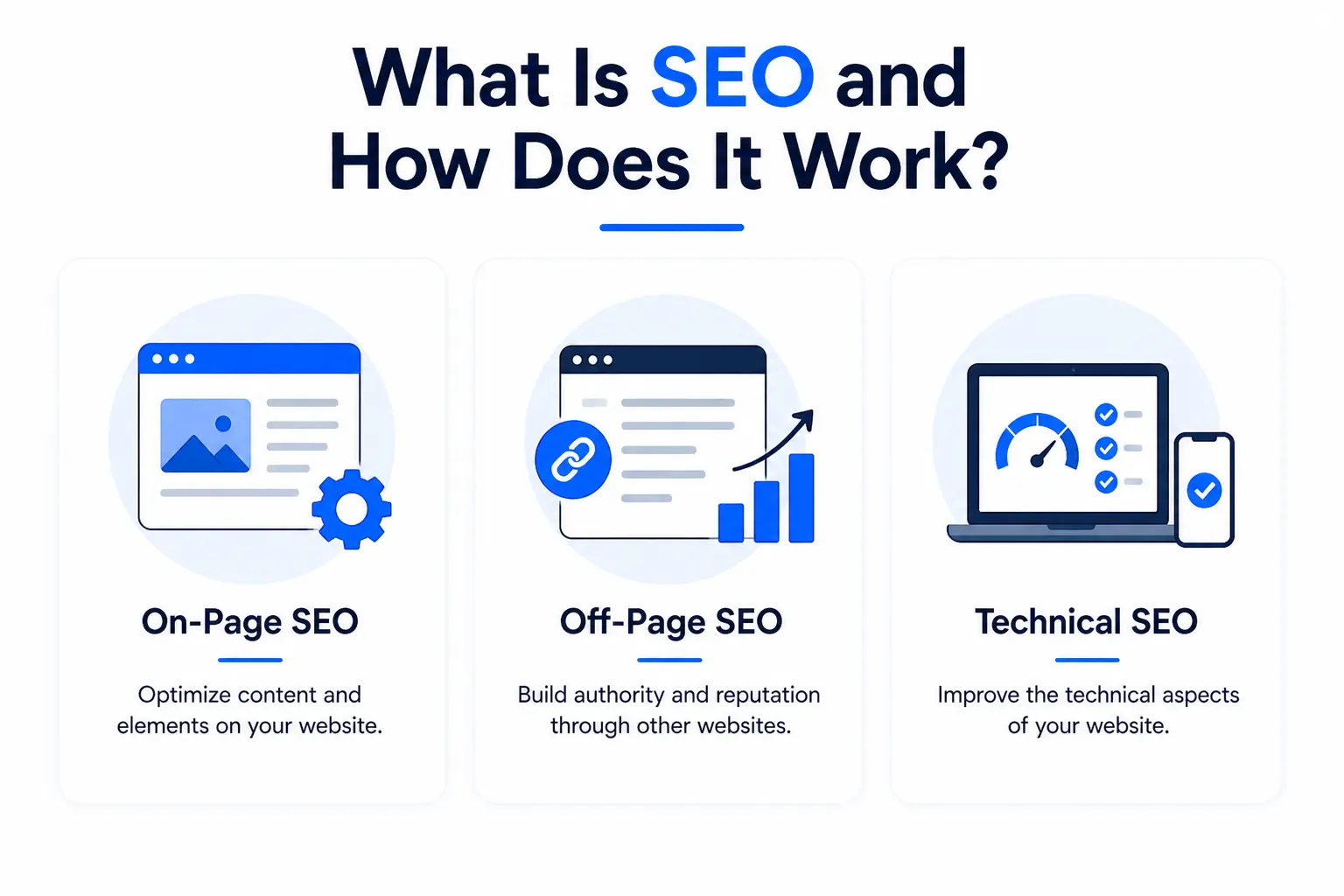
    What Is SEO and How Does It Work?

    SEO  short for Search Engine Optimization is the process of making your website easier for Google (and other search engines) to find, understand, and rank. When someone searches for a product or service you offer, SEO is what determines whether your business shows up at the top of the results, buried on page five, or not at all.

    Think of it this way: your website is your digital storefront. SEO is the equivalent of putting up a bright sign on a busy street, instead of hiding in a back alley with no directions. The goal is simple help the right people find you at the right moment, without paying for every single click.

    SEO works across three core areas:
    Why SEO is Important for Business in NYC?

    • On-Page SEO: Optimizing the content on your website. This includes the words you use, how your pages are titled, your headings, internal links, and meta descriptions. It’s about making your content genuinely useful and easy for both humans and search engines to read.
    • Off-Page SEO: Building your website’s authority and reputation. This happens through backlinks (other reputable websites linking to yours), brand mentions, press coverage, and your presence in local directories.
    • Technical SEO: The behind-the-scenes work. Page speed, mobile-friendliness, secure connections (HTTPS), proper site structure, and fixing broken links all fall here. If your site is slow or hard to crawl, rankings suffer.

    Get all three right, and search engines start treating your business as a credible, authoritative source which means better rankings, more visibility, and more customers walking through your (real or digital) door.

    The NYC Business Landscape: Why It’s Unlike Anywhere Else

    New York City isn’t just another market. It’s one of the most densely competitive, fast-moving, and culturally diverse business environments on the planet. Before you can appreciate why SEO is important for business in NYC, you need to understand what makes this city so uniquely challenging.

    200,000+ Businesses. Five Boroughs. Infinite Competition.

    Every industry you can name  food, fashion, law, real estate, finance, health, tech is saturated in New York. A coffee shop in Williamsburg isn’t just competing with the place next door. It’s competing with dozens of cafes within a five-minute walk. A personal injury law firm in Manhattan is up against hundreds of other firms targeting the exact same clients with the exact same keywords.

    In this environment, businesses that rank on page one of Google have a massive, compounding advantage over those that don’t.

    NYC Consumers Are Fast, Mobile, and Hyper-Local

    New Yorkers don’t browse. They search with intent, on their phones, while they’re already moving. Searches like “urgent care open now near me” or “best Thai food in Astoria” happen millions of times a day across the city. These are high-intent searches from people who are ready to act they just need to find the right business first.

    If your business isn’t optimized for local and mobile search, you’re invisible to this audience no matter how good your product or service actually is.

    High Operating Costs Demand a Better Return on Marketing

    Running a business in New York is expensive. Rent, payroll, insurance, and overhead are higher here than almost anywhere else in the country. That means every marketing dollar has to work harder. Unlike paid ads that stop working the moment your budget runs out, SEO builds long-term visibility that keeps delivering without a recurring cost for every single visitor.

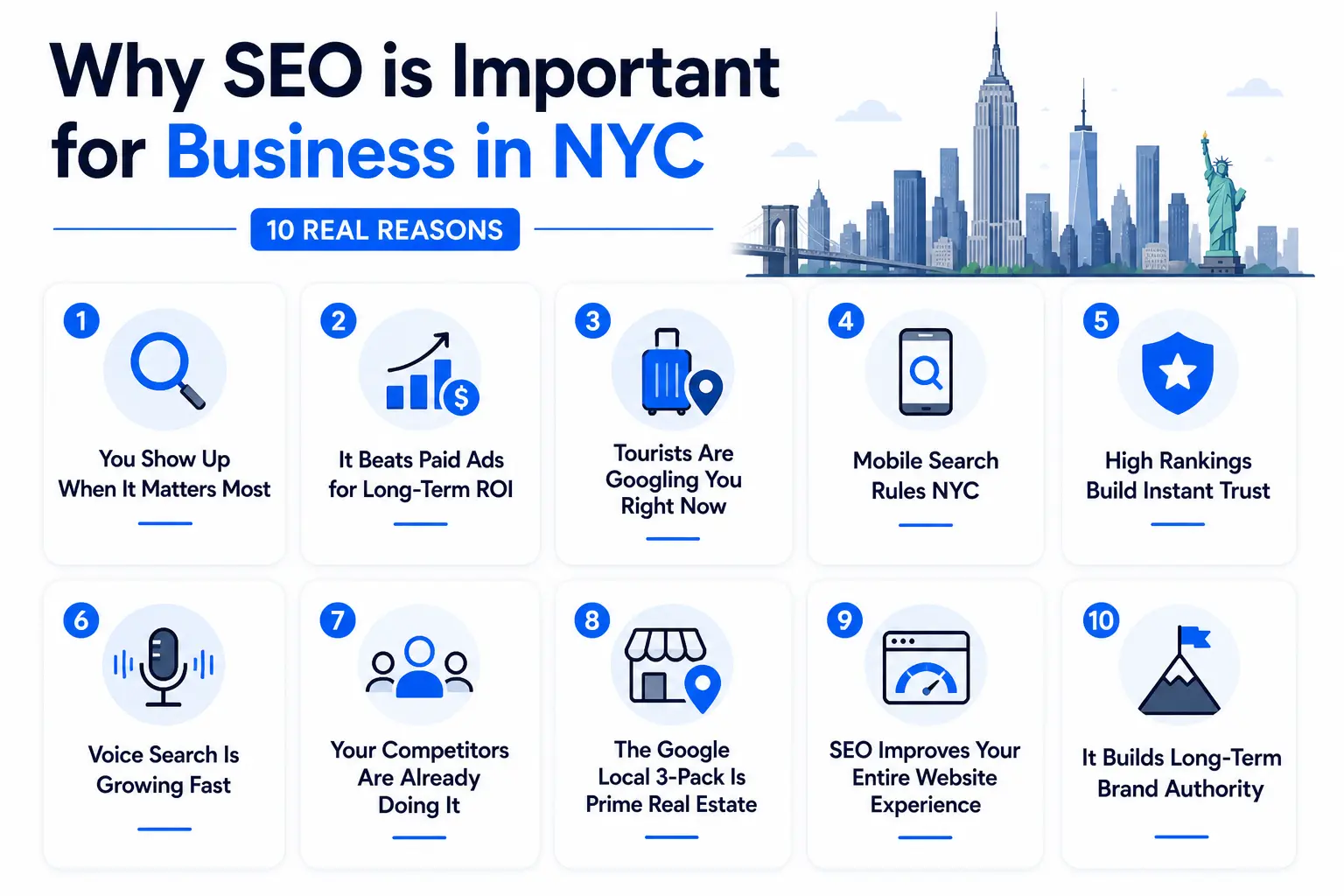
    Why SEO is Important for Business in NYC 10 Real Reasons

    Why SEO is Important for Business in NYC 10 Real Reasons
    Let’s get into the specifics. Here’s exactly why NYC businesses that invest in SEO consistently outperform those that don’t.

    1. You Show Up When It Matters Most

    SEO puts your business in front of people who are actively searching for what you offer not people who happen to scroll past an ad. Someone searching “emergency plumber in Queens” at 11pm is ready to hire right now. That’s the power of organic search: it connects you with customers at the exact moment of need.
    2. It Beats Paid Ads for Long-Term ROI

    Pay-per-click ads are great for short bursts of visibility, but they stop the second you stop paying. SEO is different. A well-optimized page can rank for months or even years, continuing to bring in traffic and leads with no additional spend. For a small business in a high-cost city like New York, that kind of compounding return is invaluable.

    3. Tourists Are Googling You Right Now

    New York City attracts over 60 million visitors every year. Tourists, business travelers, and short-term residents don’t ask locals for recommendations they pull out their phones and search. If your restaurant, shop, or service isn’t optimized for local search, you’re missing out on an enormous, ready-to-spend audience that passes through the city daily.

    4. Mobile Search Rules NYC

    New Yorkers are always on the move, and mobile search reflects that. The majority of local searches happen on smartphones often while people are already in transit or walking to their destination. A website that loads slowly, isn’t mobile-friendly, or is hard to navigate on a small screen will lose these visitors before they even see what you offer.

    5. High Rankings Build Instant Trust

    Think about your own behavior when you Google something. You probably trust the top results more than the ones buried on page three. Your customers think the same way. Ranking near the top of Google signals to potential customers that you’re a credible, established business before they’ve even clicked your link.

    6. Voice Search Is Growing Fast

    “Hey Siri, find a locksmith near Times Square.” Voice searches are increasingly common in NYC, especially among commuters and walkers. These searches tend to be conversational and hyper-local. SEO that incorporates natural-language, question-based keywords helps you capture this growing slice of search traffic.

    7. Your Competitors Are Already Doing It

    Here’s the uncomfortable truth: if you’re not investing in SEO, your competitors are and they’re capturing the customers who would have found you instead. In New York’s competitive market, standing still is the same as falling behind. Every month without an SEO strategy is a month of visibility handed to someone else.

    8. The Google Local 3-Pack Is Prime Real Estate

    When someone searches for a local business in NYC, Google shows a map with three highlighted results the Local 3-Pack. These listings get a disproportionate share of clicks compared to everything below them. Strong local SEO, anchored by an optimized Google Business Profile, is what gets you into that coveted top three.

    9. SEO Improves Your Entire Website Experience

    Good SEO isn’t just about keywords. It pushes you to make your website faster, cleaner, and more useful all things that directly improve the experience for real visitors. Better user experience means people stay longer, engage more, and are far more likely to convert into actual customers.

    10. It Builds Long-Term Brand Authority

    In a city where attention spans are short and competition is fierce, consistently showing up in search results is one of the most powerful ways to build brand recognition over time. The longer your business ranks well, the more familiar your name becomes and the harder it becomes for competitors to displace you.

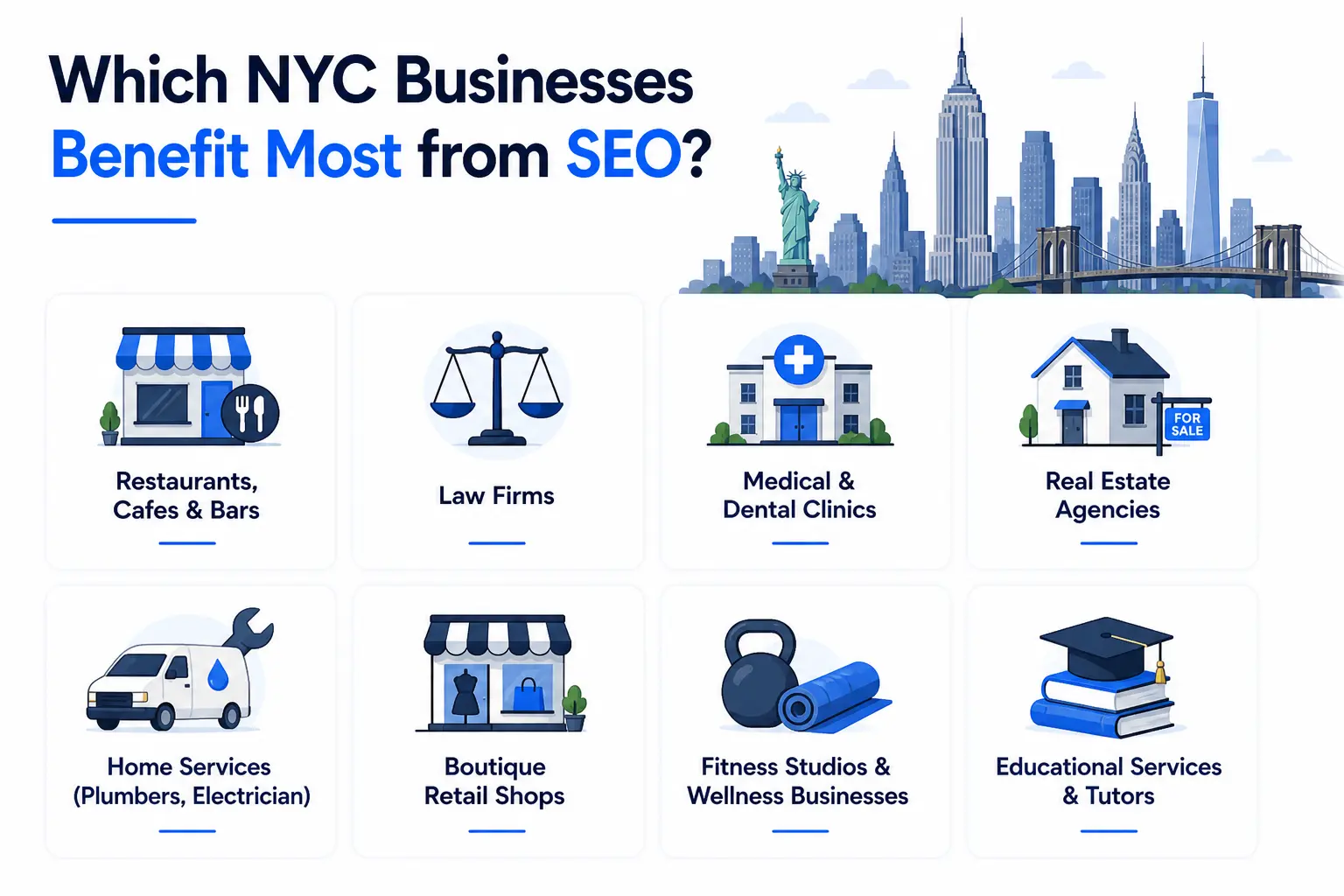
    Which NYC Businesses Benefit Most from SEO?

    Which NYC Businesses Benefit Most from SEO?
    The honest answer is: almost every business in New York can benefit from SEO. But some industries see faster, more dramatic results because of how their customers search. Here are the ones where local SEO makes the biggest difference:

    • Restaurants, Cafes & Bars — People search for “best brunch in Manhattan” or “happy hour in Midtown” constantly. Showing up in those results translates directly to foot traffic and reservations.
    • Law Firms — Personal injury, immigration, and family law attorneys compete fiercely for top spots. Ranking for borough-specific keywords can drive a steady stream of qualified leads.
    • Medical & Dental Clinics — “Dentist accepting new patients in Queens” or “urgent care near me” are searched thousands of times daily across the city. Local SEO helps clinics fill their appointment books.
    • Real Estate Agencies — Hyper-local landing pages targeting specific neighborhoods — Upper East Side apartments, Bushwick rentals connect brokers with buyers and renters who are ready to move.
    • Home Services (Plumbers, Electricians, HVAC) — These searches happen in moments of urgent need. Being visible when someone’s pipe bursts or their heat goes out means getting the call before anyone else.
    • Boutique Retail Shops — Physical stores in neighborhoods like SoHo, Park Slope, or Astoria live and die by local discoverability. Local SEO drives both tourist discovery and repeat neighborhood customers.
    • Fitness Studios & Wellness Businesses “Yoga studio in Chelsea” or “personal trainer near me” are high-value, high-intent searches in a health-conscious city like New York.
    • Educational Services & Tutors — Test prep, language tutoring, and after-school programs all rely heavily on trust and local visibility  both of which SEO helps build.

    Key SEO Strategies That Actually Work for NYC Businesses

    Knowing why SEO matters is one thing. Actually doing it well in a market as competitive as New York is another. Here are the strategies that consistently move the needle for NYC businesses:

    Optimize Your Google Business Profile Fully

    Your Google Business Profile is often the first thing a potential customer sees. Make sure your business name, address, phone number, hours, and category are accurate and complete. Add real photos, respond to reviews (positive and negative), and post updates regularly. Businesses with well-maintained profiles are far more likely to appear in the Local 3-Pack.

    Go Hyper-Local With Your Keywords

    Don’t just target “restaurant NYC.” Go deeper: “vegan brunch in Park Slope” or “family dentist Flushing Queens.” Borough and neighborhood-level keywords have less competition and attract customers who are physically close to you and more likely to visit.

    Create Separate Landing Pages for Each Borough or Neighborhood

    If your business serves multiple areas of the city, build dedicated pages for each one. A cleaning company serving Manhattan, Brooklyn, and Queens should have three separate, unique pages each with locally relevant content, testimonials, and keyword targeting. Don’t duplicate content across them; Google penalizes that.

    Make Your Site Fast and Mobile-Friendly

    Most of your NYC audience is on a phone. If your site takes more than three seconds to load, the majority of mobile visitors will leave before it finishes. Compress images, minimize code, and use a reliable hosting provider. Run a Google PageSpeed test and fix what it flags.

    Actively Manage Your Online Reviews

    Reviews on Google and Yelp aren’t just social proof they directly influence your local rankings. Encourage satisfied customers to leave honest reviews, and respond professionally to negative ones. An average rating above 4.0 stars significantly improves both your visibility and your click-through rate.

    Build Local Backlinks

    Getting links from other reputable NYC websites local news outlets, neighborhood blogs, business associations, chamber of commerce listings tells Google that your business is genuinely embedded in the local community. These local backlinks carry more SEO weight for local rankings than generic links from unrelated sites.

    Create Content That Serves Your Local Audience

    Write blog posts, guides, or neighborhood pages that speak directly to your NYC customers. A real estate agency might write “What to Know Before Renting in Bushwick.” A restaurant could publish “Our Favorite Spots to Eat Near Central Park.” This kind of locally relevant content attracts organic traffic and positions your brand as a genuine community presence.

    Common SEO Mistakes NYC Businesses Make

    Even well-intentioned SEO efforts can fall flat if you’re making the wrong moves. Here are the mistakes we see most often from NYC businesses and what to do instead:

    • Ignoring local SEO entirely — Focusing only on broad, national keywords while neglecting borough-specific and neighborhood-level terms.
    • A neglected Google Business Profile — Incomplete profiles, outdated hours, and zero photos cost businesses local rankings every day.
    • A website that doesn’t work on mobile — A non-mobile-friendly site in 2026 is practically invisible to most NYC searchers.
    • Copy-pasting content across location pages — Using the same content for Manhattan, Brooklyn, and Queens landing pages gets flagged as duplicate content by Google.
    • Ignoring negative reviews — Unanswered negative reviews hurt both your reputation and your local rankings.
    • Chasing the wrong keywords — Targeting high-volume national terms instead of specific, conversion-ready local phrases.
    • Buying cheap backlinks — Spammy link schemes feel like shortcuts but lead to Google penalties that are painful and slow to recover from.
    • Never tracking performance — If you’re not measuring your SEO results with Google Analytics and Search Console, you have no idea what’s working.

    SEO vs. Paid Ads — What Makes More Sense for NYC Businesses?

    This is one of the most common questions NYC business owners ask. The honest answer is: both have their place, but they serve different goals. Here’s a clear comparison:

    FactorSEOPaid AdsWinner
    CostUpfront investment, low ongoingPay per click — ongoing spendSEO (long-term)
    Timeline3–6 months to see resultsImmediate visibilityAds (short-term)
    LongevityCompounds over timeStops when budget stopsSEO
    Trust FactorHigh — organic results feel credibleLower — users often skip adsSEO
    Best ForLong-term sustainable growthShort-term promotions/campaignsDepends on goal

    For most NYC businesses, the smartest approach is a combination — use paid ads to generate immediate visibility while your SEO builds momentum. But if you have to choose one for the long term, SEO wins. It’s the foundation that keeps working even when your marketing budget has a quiet month.

    Frequently Asked Questions

    How long does SEO take to work for NYC businesses?

    Generally, you can expect to see meaningful improvements in rankings and traffic within 3 to 6 months of consistent SEO work. Highly competitive keywords in a market like NYC can take longer. The important thing to understand is that SEO is cumulative — the longer you invest in it, the stronger and more durable your results become.

    Is SEO worth it for small businesses in NYC?

    Absolutely. In fact, local SEO is one of the most level playing fields in marketing. A small Brooklyn boutique with great local SEO can outrank a national chain for neighborhood-specific searches. For small businesses with limited marketing budgets, SEO offers some of the best long-term return on investment available.

    What’s the difference between local SEO and regular SEO?

    Regular SEO targets broad search terms and aims for visibility across a wide audience. Local SEO is specifically designed to help your business appear in location-based searches — like “plumber in the Bronx” or “coffee shop near Grand Central.” For most NYC businesses, local SEO is the higher priority.

    How much does SEO cost for an NYC business?

    Costs vary widely depending on the scope of work and who you hire. Freelancers typically charge between $75 and $150 per hour. Agencies usually work on monthly retainers starting around $1,000 to $3,000 for smaller campaigns, with larger competitive campaigns running $5,000 to $10,000 or more per month.

    Can I do SEO myself for my NYC business?

    You can absolutely handle the basics yourself claiming your Google Business Profile, doing simple keyword research, writing helpful content, and collecting reviews. But in a market as competitive as New York, the technical and strategic depth of SEO often requires professional expertise to see real results. Starting with the basics and bringing in help as you grow is a smart approach.

    Conclusion

    New York City doesn’t slow down and neither does the competition. Every day, potential customers search Google for exactly what your business offers. The question is simple: are they finding you or your competitor?

    That’s why SEO is important for business in NYC. Unlike paid ads that stop the moment your budget runs out, SEO keeps working compounding month after month, building visibility that’s hard to take away.

    Claim your Google Business Profile. Target local keywords. Build from there.

    The customers are already searching. Make sure they find you first.

  • A Visual Guide to Keyword Targeting and On-Page SEO

    A Visual Guide to Keyword Targeting and On-Page SEO

    Most pages don’t fail because of bad content they fail because no one ever finds them. Keyword targeting and on-page SEO are what bridge the gap between a page that exists and a page that ranks. This shows you exactly where to place your keywords, how to structure your page, and what Google actually looks for in 2026.

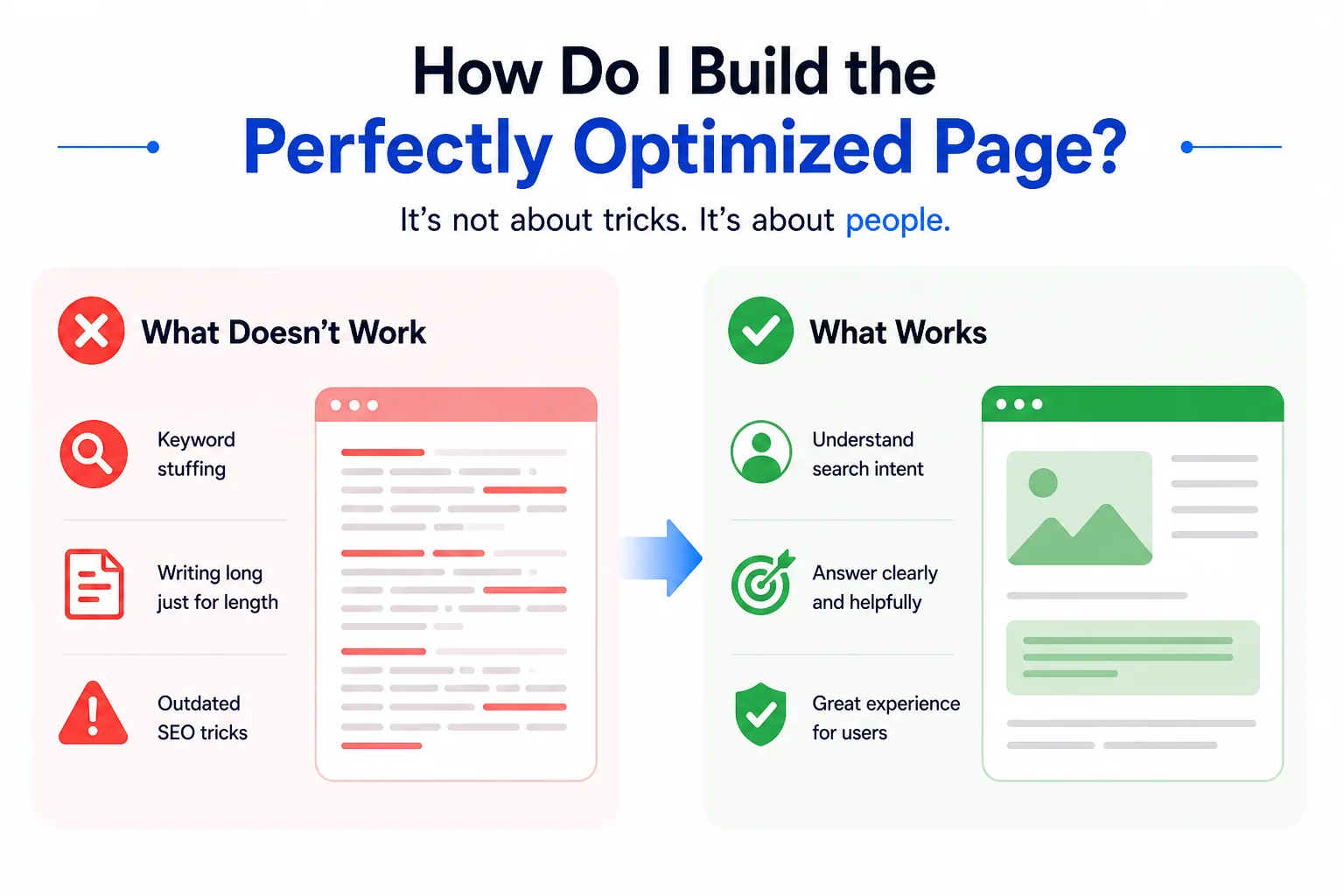
    How do I build the perfectly optimized page?

    build the perfectly optimized page
    This is a question almost every website owner, blogger, and digital marketer asks at some point. There are hundreds of “best practices” lists floating around for keyword targeting and on-page SEO but as search engines have grown smarter, and as user behavior has shifted, the very definition of “perfectly optimized” keeps moving.

    Stuffing your keyword into every paragraph? That used to work in 2010. Today, it gets you penalized. Writing long content just for the sake of word count? Also a trap. The truth is, great keyword targeting and on-page SEO is less about rules and more about understanding what a real person is looking for and making sure your page delivers exactly that, clearly and quickly.

    This guide walks you through every element of an optimized page visually, practically, and in plain language so you can stop guessing and start ranking.

    What exactly is keyword targeting, and why does it matter so much?

    What exactly is keyword targeting, and why does it matter so much?
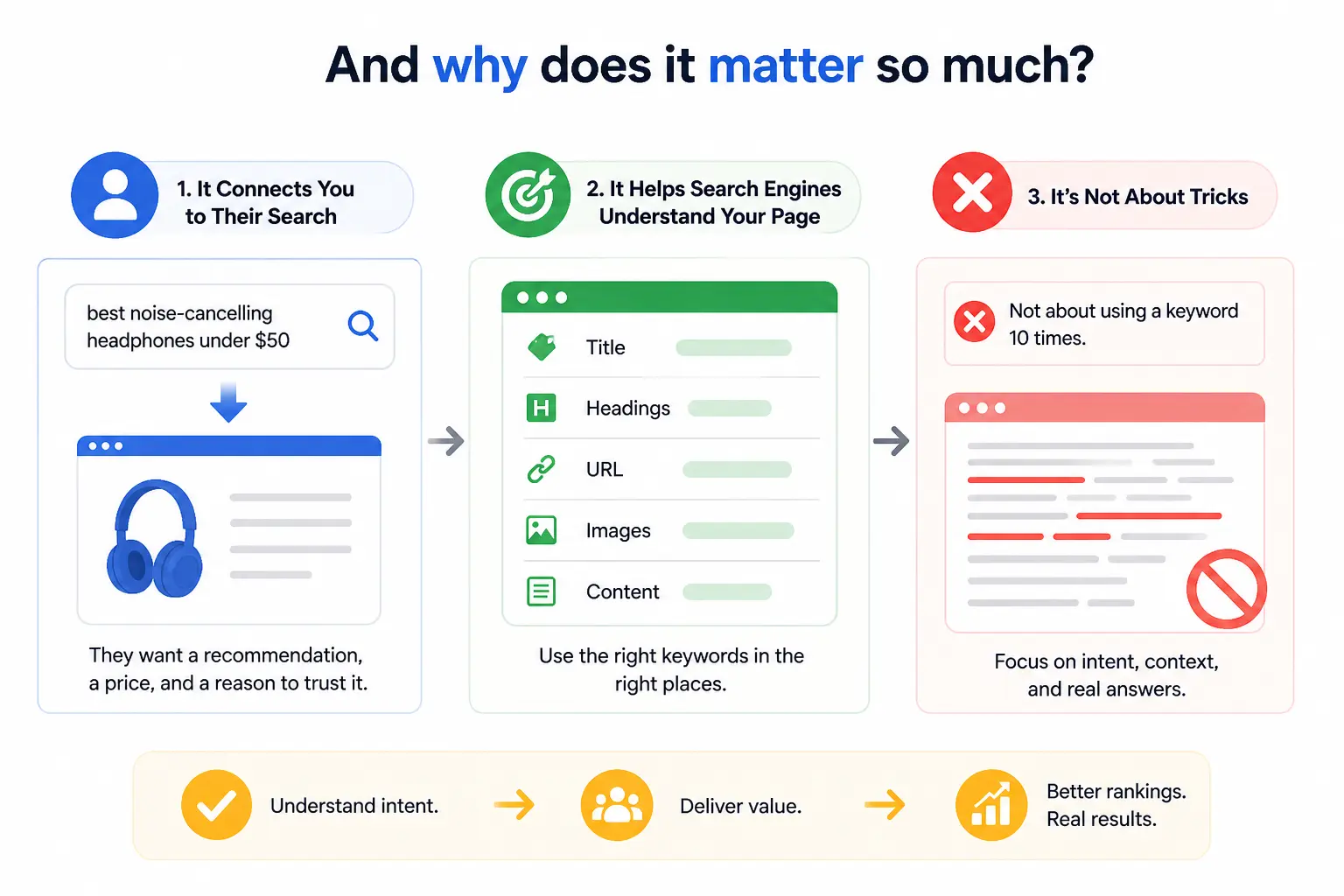
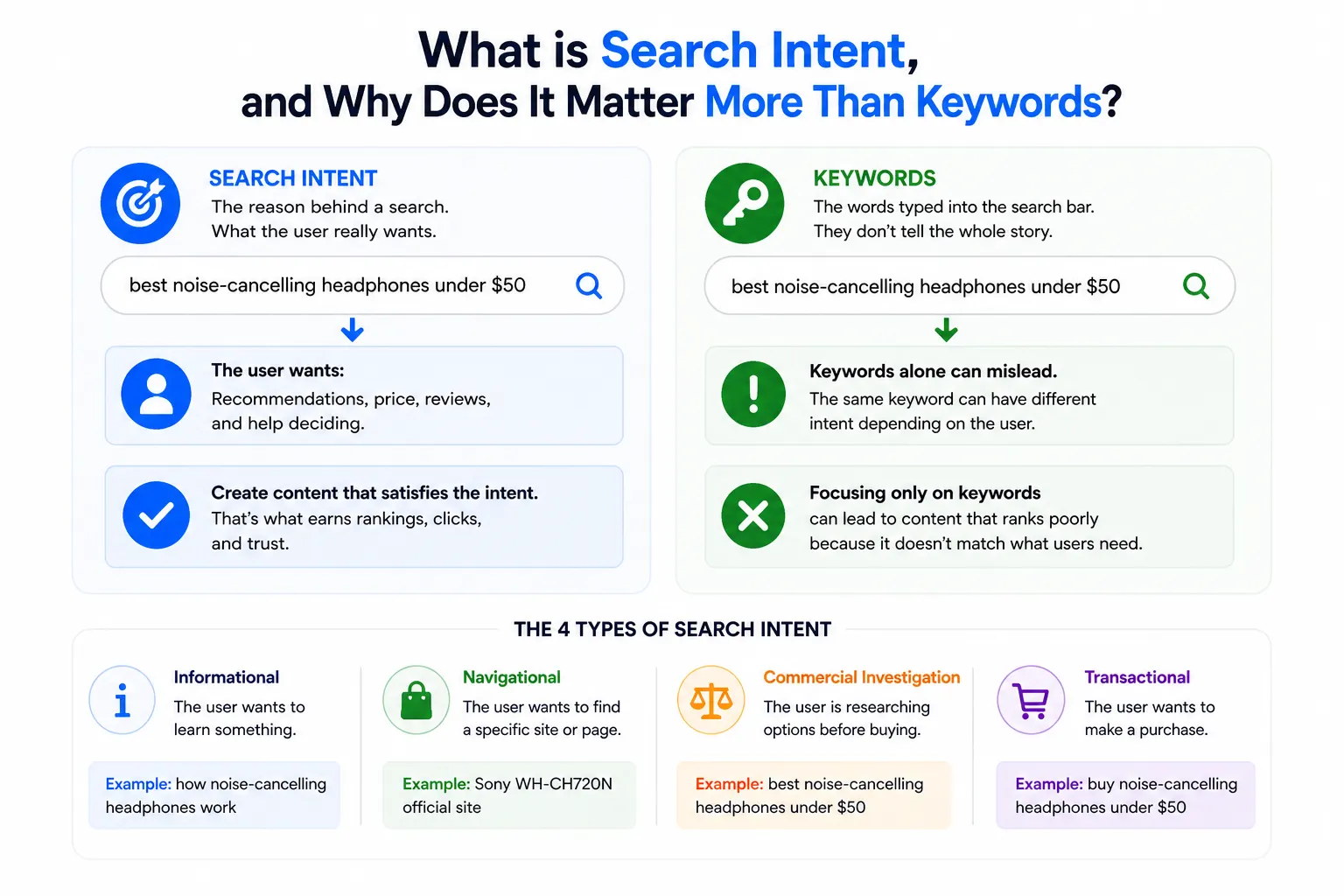
    Imagine someone opening Google and typing “best noise-cancelling headphones under $50.” They’re not looking for a history of headphone technology. They want a recommendation, a price, and a reason to trust it. Keyword targeting is what connects your page to that exact moment.

    Keyword targeting is the process of selecting and placing specific search terms throughout your content so that search engines understand what your page is about and serve it to the right people at the right time. Done well, it shapes everything: your page title, your headings, your URL, even the name of your images.

    The mistake most people make is treating keyword targeting as a numbers game “use this keyword 10 times and you’ll rank.” That hasn’t been true for years. Google’s algorithm is sophisticated enough to understand context, synonyms, and intent. What it really wants to see is a page that genuinely answers the question behind the keyword.

    What is on-page SEO, and how is it different from off-page SEO?

    What is on-page SEO,
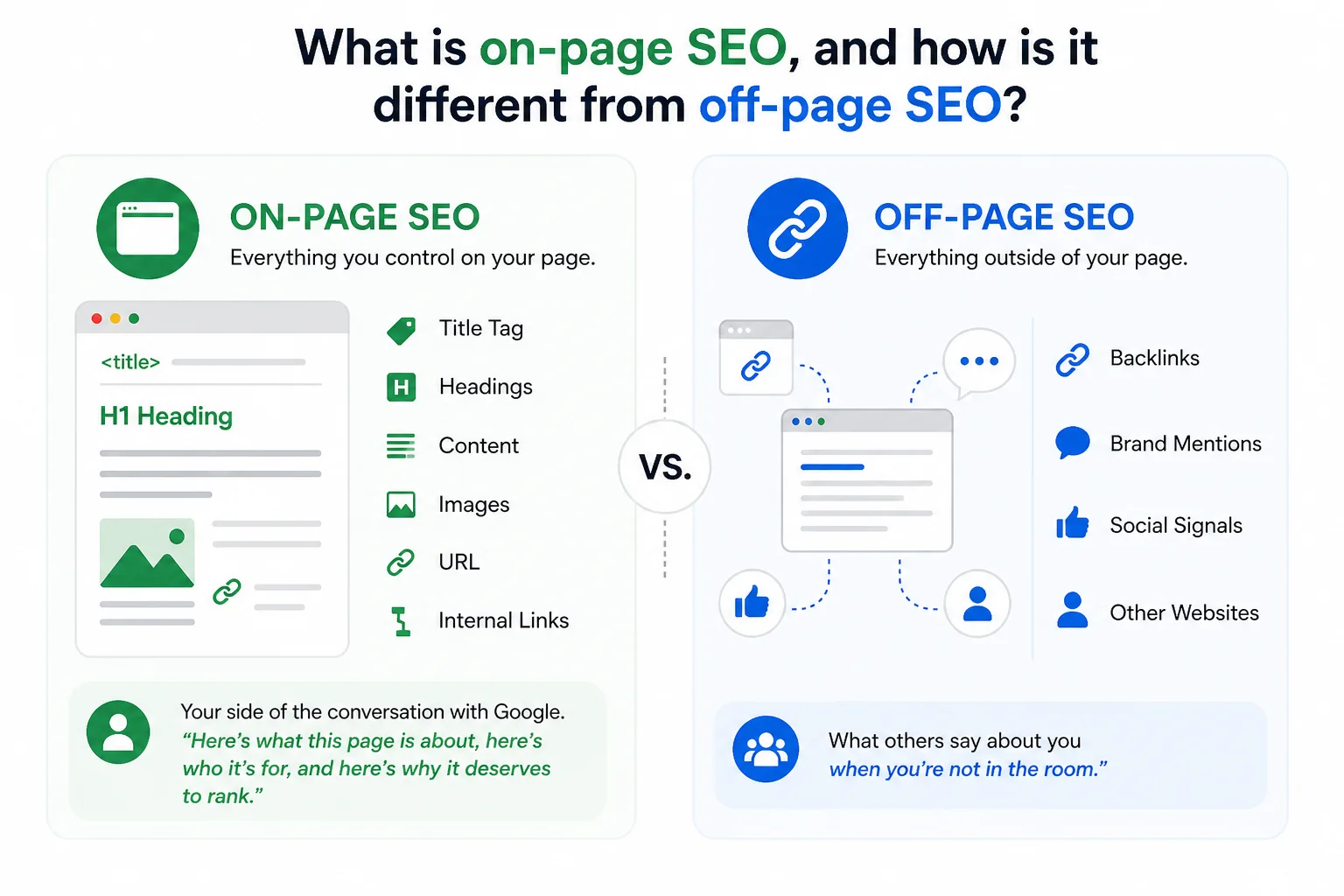
    On-page SEO refers to everything you do directly on your page to help it rank better. That includes your title tag, your content, your headings, your images, your URL, and your internal links. You control all of it.

    Off-page SEO, by contrast, is what happens elsewhere other websites linking to you, brand mentions, social signals. You influence it, but you don’t fully control it.

    Think of it this way: on-page SEO is your side of the conversation with Google. You’re telling the search engine, “Here’s what this page is about, here’s who it’s for, and here’s why it deserves to rank.” Off-page SEO is what other people say about you when you’re not in the room.

    Getting keyword targeting and on-page SEO right is the foundation. Without it, even the best backlink profile won’t save a page that’s confusing to both users and search engines.

    Where exactly should you place your target keyword on the page?

    target keyword on the page
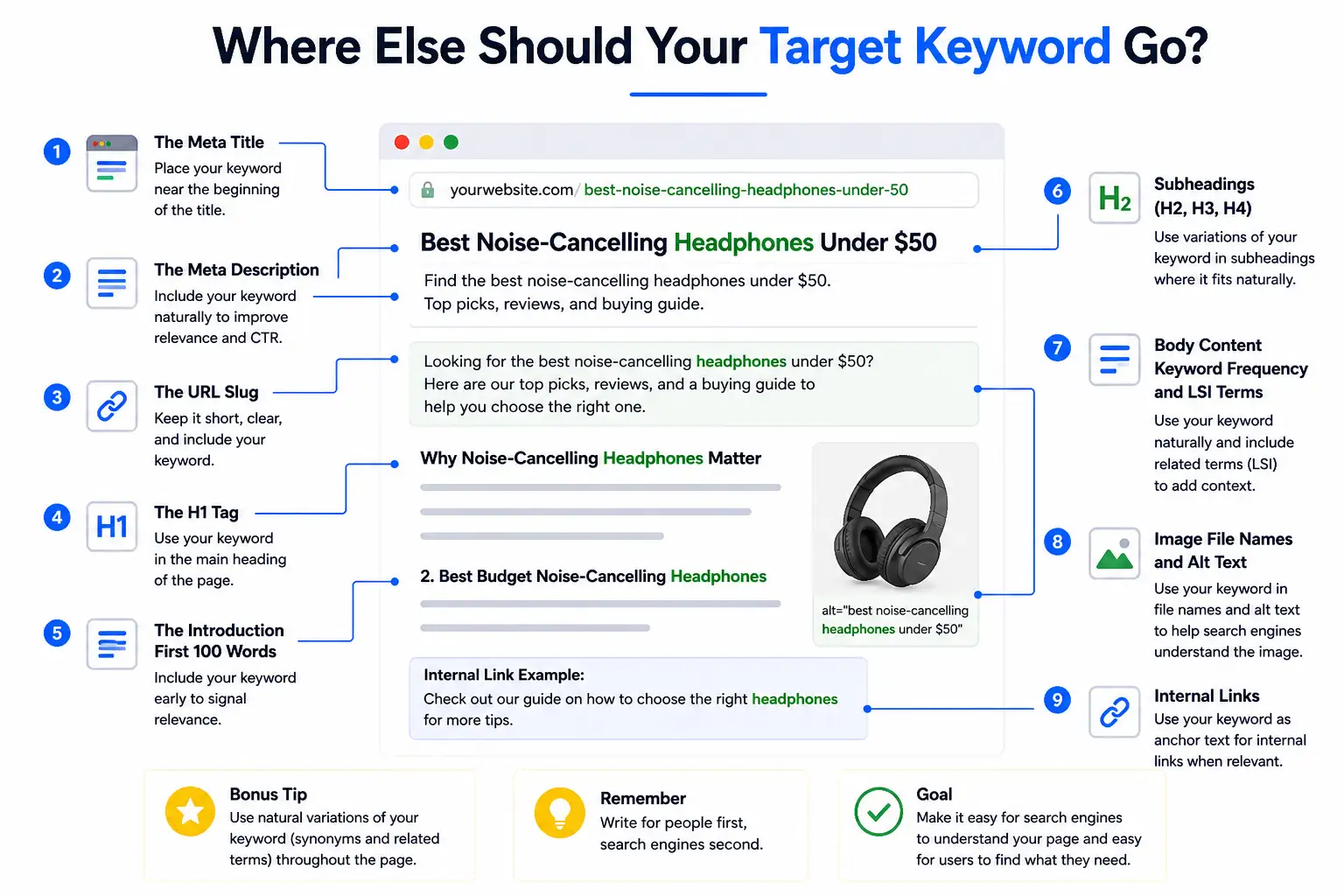
    This is where most guides dump a checklist and call it a day. Instead, let’s walk through a real page element by element and show you precisely where your keyword needs to live, and why.

    1. The Meta Title (Title Tag)

    Your title tag is the single most important on-page SEO element. It’s what appears as the clickable link in Google search results, and it’s the first thing both users and crawlers read.

    Your focused keyword should appear as close to the beginning of the title tag as possible. Keep it under 60 characters so it doesn’t get cut off on smaller screens. Add a modifier a year, a power word, or a qualifier to increase click-through rate.

    Weak: On-Page SEO Tips for Websites

    Strong: Keyword Targeting and On-Page SEO: A Visual Guide [2026]

    The second version front-loads the keyword, signals freshness with the year, and tells the reader exactly what format to expect.

    2. The Meta Description

    Your meta description doesn’t directly affect ranking but it directly affects clicks. And clicks affect rankings. Include your focused keyword naturally, write it like a human talking to another human, and end with a soft call to action.

    Keep it between 150–160 characters. Write it for the reader, not the algorithm.

    Example: Learn keyword targeting and on-page SEO with our visual guide. Discover where to place keywords, how to structure pages, and rank higher in 2026.

    3. The URL Slug

    Your URL should be short, lowercase, and descriptive. Use hyphens to separate words. Include your keyword, but keep it clean no dates, no ID numbers, no stop words unless they’re part of the keyword itself.

    Wrong: /blog/post?id=4527

    Right: /visual-guide-to-keyword-targeting-and-on-page-seo

    A clean URL also builds trust. People glance at URLs before clicking. A readable URL tells them immediately that the page is relevant.

    4. The H1 Tag

    Every page gets exactly one H1. It’s the headline readers see when they land on your page, and it should contain your focused keyword ideally near the front.

    Your H1 and title tag don’t have to be identical, though they often are. The title tag is for search results; the H1 is for the page itself.

    Example H1: A Visual Guide to Keyword Targeting and On-Page SEO (Updated 2026)

    5. The Introduction First 100 Words

    Drop your keyword naturally within the first 100 words of your content. Not forced. Not twice. Just once, early, in a sentence that actually makes sense to read.

    This tells Google immediately what the page is about. It also reassures readers that they landed in the right place which reduces bounce rate and improves time on page.

    6. Subheadings (H2, H3, H4)

    Your H2s and H3s give your page structure. They help readers scan, and they help crawlers understand the depth of your coverage. Use keyword variations, related questions, and semantic terms in your subheadings not the same exact phrase repeated over and over.

    7. Body Content Keyword Frequency and LSI Terms

    In 2026, keyword density is less about hitting a number and more about natural coverage. If you’re writing a 1,500-word article, mentioning your primary keyword 4–6 times is reasonable. Going beyond that starts to look forced to both readers and algorithms.

    More importantly, use related terms. If you’re writing about keyword targeting, Google expects to also see terms like “search intent,” “meta description,” “title tag,” “organic traffic,” and “SERP.” These are called LSI (Latent Semantic Indexing) keywords, and they signal topical depth.

    8. Image File Names and Alt Text

    Most people upload images named “screenshot-2026-01-04.png.” That’s a wasted opportunity. Rename your image files to describe what they show, using hyphens and including your keyword where it fits naturally.

    Wrong file name: IMG_00483.jpg

    Right file name: keyword-targeting-page-diagram.jpg

    Alt text describes the image for screen readers and for search engine crawlers. Write it as a natural description of what’s in the image. Include your keyword if it fits — if it doesn’t, don’t force it.

    What is search intent, and why does it matter more than keywords?

    What is search intent,
    Here’s a scenario: two people search Google on the same day. One types “keyword targeting.” The other types “how to do keyword targeting for a new blog.” Same general topic. Completely different intent.

    The first person might be looking for a definition, a tool, or a course. The second person wants a step-by-step guide. If your page tries to serve both with the same content, it’ll likely satisfy neither.

    Search intent is the “why” behind a search query. Google categorizes it into four types:

    • Informational: the user wants to learn something (“what is on-page SEO”)
    • Navigational: the user wants to find a specific site (“Moz on-page SEO guide”)
    • Commercial: the user is researching before buying (“best SEO tools 2026”)
    • Transactional: the user is ready to act (“buy Ahrefs subscription”)

    Before you write a single word, Google the keyword you’re targeting. Look at the top 5 results. Are they blog posts? Product pages? Videos? That tells you what Google believes users want — and your content needs to match that format.

    How do LSI keywords and semantic SEO fit into on-page optimization?

    Google stopped reading pages like a keyword-matching machine a long time ago. Today it reads more like a knowledgeable editor evaluating whether your content genuinely covers a topic, or just repeats the same phrase in different sentences.

    That’s where semantic SEO comes in. Instead of targeting a single keyword in isolation, you build content that covers a topic comprehensively. LSI keywords  terms that are conceptually related to your main keyword are the building blocks of this.

    If you’re writing about keyword targeting and on-page SEO, semantically related terms include: title tags, meta descriptions, header tags, anchor text, crawlability, keyword density, SERP, organic traffic, and search intent. Work these in naturally, and your page sends stronger relevance signals without ever feeling keyword-stuffed.

    Tools like Google’s “People Also Ask” section, the “Related Searches” at the bottom of a SERP, and keyword research platforms like Ahrefs or Semrush all help you find these related terms quickly.

    What on-page SEO mistakes quietly kill your rankings?

    You can do everything right and still rank poorly if you’re making one of these common errors without realizing it.

    Keyword cannibalization happens when two or more pages on your site target the same keyword. Instead of both pages ranking, they compete against each other and neither wins. The fix is to consolidate them into one comprehensive page, or clearly differentiate the keyword focus of each.

    Keyword stuffing is the practice of forcing your keyword into content at an unnatural frequency. Google’s algorithms detect it easily, and it also makes your content unpleasant to read. Natural placement beats repetition every time.

    Thin content — pages with very little substance don’t rank well in 2026. A 200-word page targeting a competitive keyword isn’t going to cut it, no matter how well-optimized the title tag is. Depth signals authority.

    Duplicate title tags and meta descriptions across multiple pages confuse crawlers and dilute your relevance signals. Every page should have a unique title and description.

    Ignoring mobile UX is increasingly costly. Google indexes the mobile version of your site first. If your page is difficult to read or navigate on a phone, your rankings will reflect that.

    How do page speed and Core Web Vitals affect on-page SEO?

    On-page SEO isn’t only about text. The technical health of your page plays a direct role in rankings and in whether users stick around long enough to read what you’ve written.

    Core Web Vitals are Google’s set of measurable, user-experience metrics:

    • LCP (Largest Contentful Paint) — how quickly the main content loads. Aim for under 2.5 seconds.
    • CLS (Cumulative Layout Shift) — how stable the page layout is as it loads. Avoid elements that jump around.
    • INP (Interaction to Next Paint) — how quickly the page responds to user input.

    A slow page with great content will rank below a fast page with equally great content. Compress your images. Use a reliable host. Minimize render-blocking scripts. These aren’t glamorous tasks, but they matter.

    You can check your Core Web Vitals for free using Google Search Console and Google PageSpeed Insights.

    What does a complete on-page SEO checklist look like in 2026?

    Before you hit publish on any page, run through this checklist. After you publish, revisit it every few months to make sure the page is still performing.

    Pre-Publish Checklist

    • Focused keyword identified and mapped to a single page
    • Keyword in meta title (within 60 characters, near the front)
    • Keyword in meta description (150–160 characters, includes CTA)
    • Keyword in H1 (one H1 only)
    • Keyword in the first 100 words of the introduction
    • Keyword variations in at least 2–3 H2 subheadings
    • LSI keywords distributed naturally throughout the body
    • URL is short, lowercase, hyphens only, includes keyword
    • All images have descriptive file names and alt text
    • Internal links added from relevant existing pages
    • Descriptive anchor text used (not “click here”)
    • No duplicate title or meta tags on other pages
    • Page loads in under 3 seconds on mobile
    • Content fully answers the search intent behind the keyword

    Post-Publish Checklist

    • Page indexed in Google Search Console
    • Impressions and clicks monitored over first 30 days
    • Page updated if rankings plateau after 60–90 days
    • Broken links checked and repaired
    • Schema markup added if eligible for featured snippets (FAQ, How-To)

    FAQ

    What is the difference between keyword targeting and on-page SEO?

    Keyword targeting is the process of choosing which search terms to focus on. On-page SEO is the broader practice of optimizing your page so it ranks for those terms. They work together — keyword targeting tells you what to optimize for, and on-page SEO is how you do it.

    How many keywords should I use per page?

    Target one primary keyword (or keyword theme) per page. You can also include secondary keywords and LSI terms, but avoid targeting multiple unrelated keywords on a single page — that dilutes your relevance signals.

    Where exactly should the focus keyword appear?

    At a minimum: the meta title, the meta description, the H1, the URL slug, and the first 100 words of the body. From there, use it naturally throughout the content without forcing it.

    Does keyword density still matter in 2026?

    It matters less than it used to. There’s no magic number. What matters is that your keyword appears naturally, at a frequency that makes the content readable and relevant — typically 3–6 times per 1,000 words for the primary keyword.

    How do I know if my on-page SEO is working?

    Check Google Search Console. Look for impressions, clicks, average position, and CTR for your target keyword. If impressions are growing but clicks are low, your title or meta description may need work. If you’re not appearing at all, check indexing and content depth.

    Conclusion

    Keyword targeting and on-page SEO aren’t one-time tasks they’re ongoing habits. The pages that hold their rankings in 2026 are the ones that were built thoughtfully, updated regularly, and written for real people first.

    Start with one page. Run it through the checklist above. Look at how your focused keyword sits in the title, the H1, the introduction, the subheadings. Make sure the content actually answers the question your keyword represents. Then move to the next page.

    Small, consistent improvements compound over time. That’s the real secret to keyword targeting and on-page SEO that lasts.

  • What Is Traffic Analysis? And Why It Matters

    What Is Traffic Analysis? And Why It Matters

    Traffic analysis, in the context of digital marketing, is the practice of collecting and interpreting data about how visitors interact with your website. Think of it as your website’s health check  it tells you what is working, what is not, and what needs attention.

    Here is the key distinction that most beginners miss: traffic numbers and traffic insights are very different things. Knowing that you got 10,000 visits last month means nothing on its own. Knowing that 8,000 of those visits came from one blog post, and 60% of those visitors clicked through to your pricing page that is insight.

    Why Traffic Analysis Matters for Every Business

    • It shows you where your marketing budget is actually paying off
    • It reveals which content your audience finds valuable
    • It helps you spot problems before they become expensive
    • It gives you data to justify decisions to stakeholders
    • It uncovers growth opportunities your competitors might be missing

    Types of Website Traffic You Need to Know

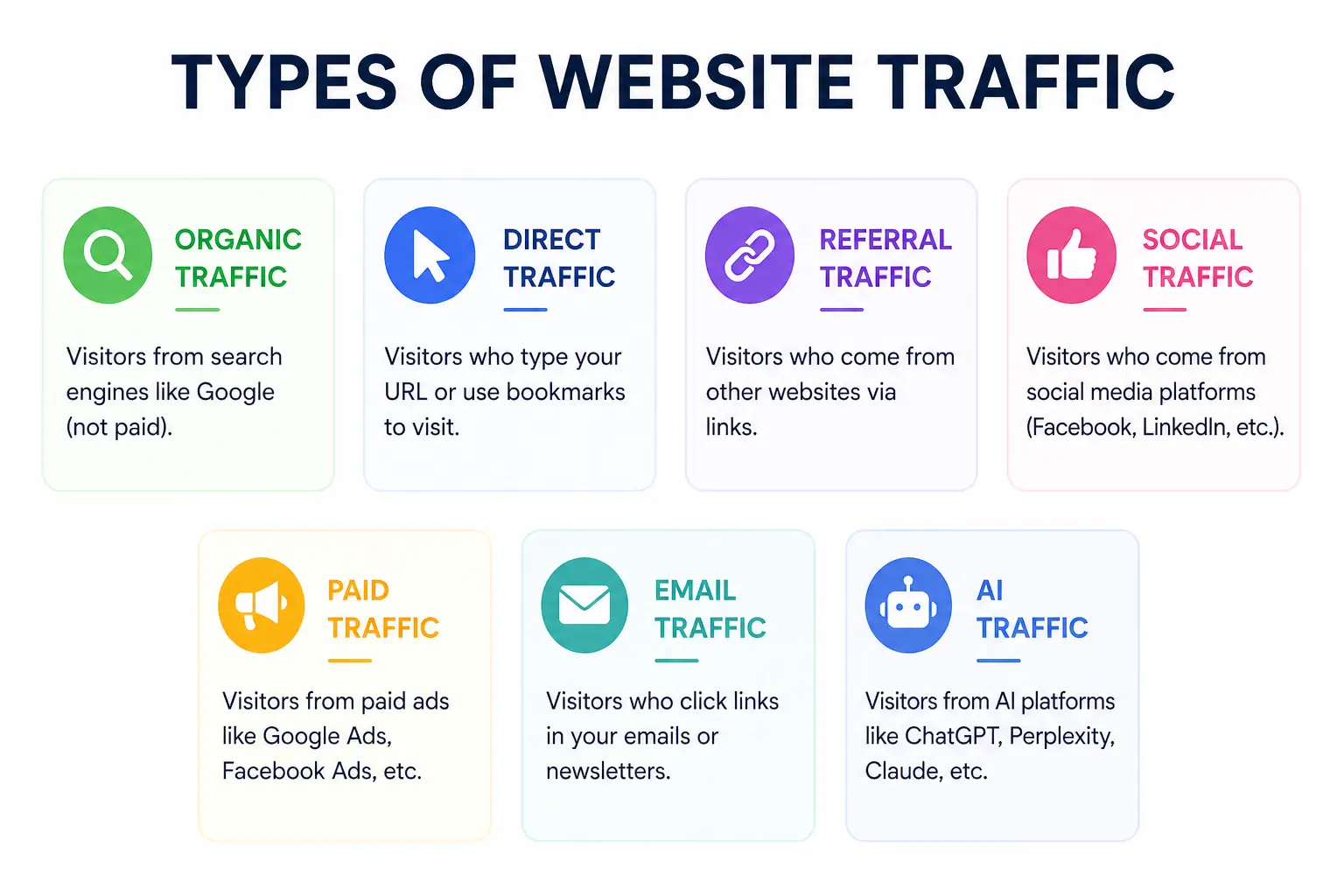
    TYPES OF WEBSITE TRAFFIC
    Before diving into analysis, you need to understand the different types of traffic your website can receive. Each source tells a different story about how people are finding you.

    1. Organic Traffic

    This is visitors who found your website through a search engine like Google or Bing without clicking on an ad. Organic traffic is the gold standard it’s free, sustainable, and signals that your content is genuinely valuable. Strong organic traffic is the result of good SEO, quality content, and a technically healthy website.

    2. Direct Traffic

    Direct traffic comes from people who typed your URL directly into their browser or clicked a saved bookmark. This often indicates strong brand recognition. However, it can also include traffic that cannot be properly attributed to another source.

    3. Referral Traffic

    Referral traffic arrives when another website links to yours and a visitor clicks that link. Getting referral traffic from high-authority sites is excellent for both traffic and SEO it signals that others trust your content enough to share it.

    4. Social Traffic

    Visitors from social media platforms like Facebook, Instagram, LinkedIn, Twitter/X, TikTok, or Pinterest fall into this category. Social traffic can be great for awareness, but it often has higher bounce rates compared to organic traffic.

    5. Paid Traffic

    Paid traffic, also known as PPC (pay-per-click), comes from ads you run on Google, Meta, or other platforms. It can bring in visitors quickly, but the moment you stop paying, the traffic stops too.

    6. Email Traffic

    When subscribers click a link in your email newsletter or campaign and visit your site, that’s email traffic. This tends to be some of the highest-quality traffic because these visitors already know and trust your brand.

    7. AI Traffic (The New Channel to Watch)

    This is one of the most exciting developments in 2025. Platforms like ChatGPT, Perplexity, Gemini, and Copilot are now sending referral traffic to websites they recommend. If you see traffic from these sources, your content is being used by AI assistants to answer real questions a powerful signal of authority.

    Key Traffic Metrics You Should Actually Track

    There are dozens of metrics available in any analytics platform. Tracking all of them leads to confusion, not clarity. Here are the metrics that genuinely move the needle and what each one is trying to tell you.

    MetricWhat It Tells YouGood Benchmark
    SessionsTotal number of visits to your siteDepends on industry & goals
    Bounce Rate% of visitors who left without engagingUnder 40% is strong
    Avg. Session DurationHow long visitors stay on your site2+ minutes is healthy
    Pages/SessionHow many pages each visitor views2-4 pages per session
    CTR% who click after seeing you in search3-5% for organic search
    Conversion Rate% of visitors who complete a goal2-5% industry average

    A Closer Look at the Metrics That Matter Most

    Sessions & Users: A session is a single visit to your website, which can include multiple page views. A user is an individual visitor. Tracking both helps you understand how many unique people are visiting and how often they return.

    Bounce Rate: This measures the percentage of visitors who leave after viewing only one page. A high bounce rate is not always bad if someone reads your entire blog post and then leaves, that is a successful visit. Context matters.

    Click-Through Rate (CTR): Your CTR in search results tells you how attractive your title and meta description are. Even if you rank on page one, a weak CTR means you are missing out on traffic that is rightfully yours.

    Conversion Rate: This is the metric that connects traffic to revenue. It measures the percentage of visitors who complete a desired action a purchase, a form submission, a newsletter signup. Traffic without conversions is just a vanity number.

    How to Do Traffic Analysis Step by Step

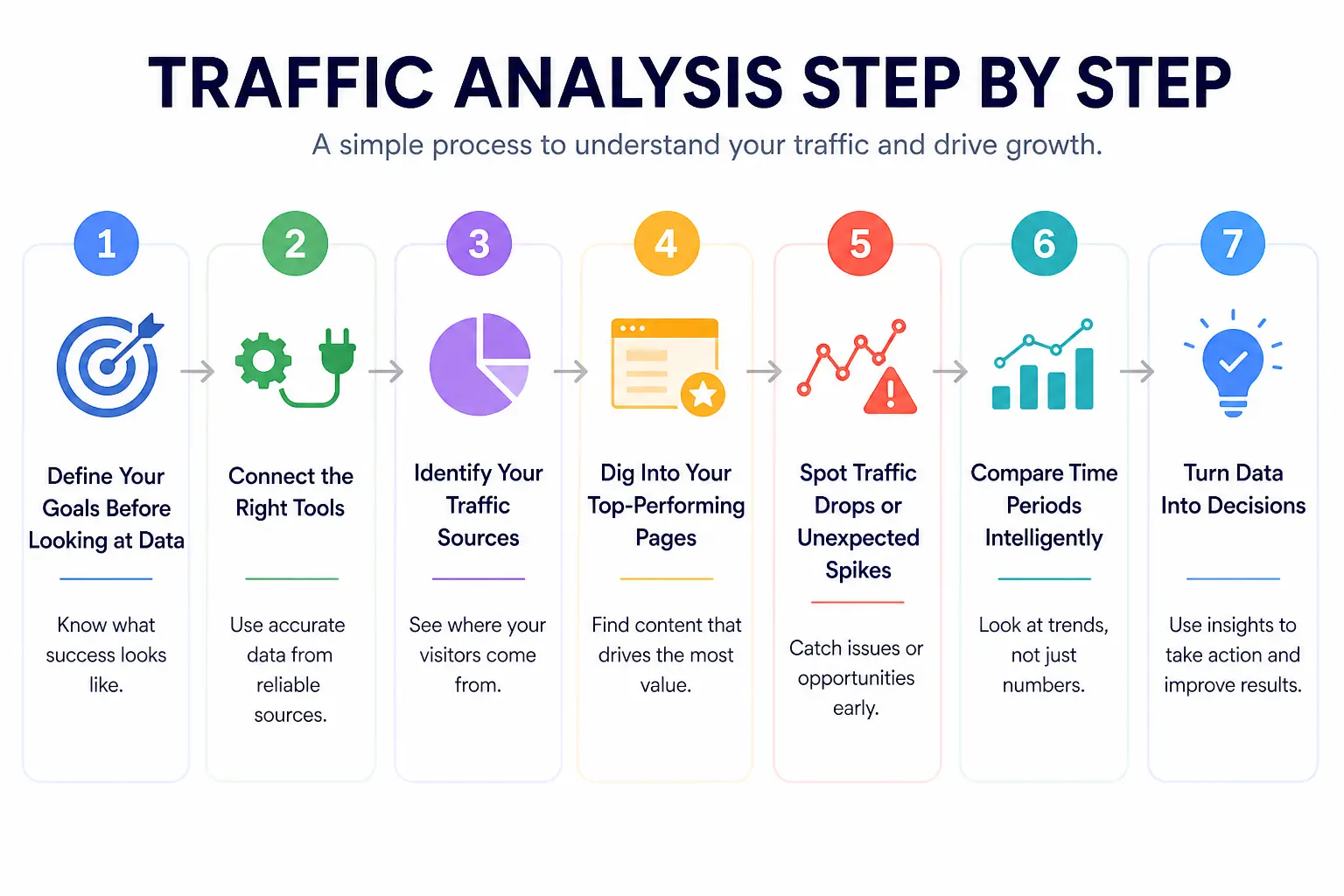
    TRAFFIC ANALYSIS STEP
    Traffic analysis is not a one-time task it is an ongoing process. Here is a practical, repeatable framework you can follow every month.

    Step 1: Define Your Goals Before Looking at Data

    This is the step most people skip, and it is the most important. Before opening any analytics tool, ask yourself: what does success look like for my website right now? Are you trying to grow organic traffic, improve conversions, reduce bounce rate, or understand where your audience comes from? Your goals determine which metrics matter and which are noise.

    Step 2: Connect the Right Tools

    At a minimum, you need Google Analytics 4 (GA4) and Google Search Console. GA4 tells you what happens on your website after visitors arrive. Search Console tells you how your site performs in Google search — which keywords bring traffic, how often your pages appear, and what your CTR looks like. Together, they give you a complete picture of your organic performance.

    Step 3: Identify Your Traffic Sources

    Head to your acquisition reports and look at where your visitors are coming from. Which channels are growing? Which are declining? If social traffic is dropping while organic is rising, that tells you something very specific about where to invest your time and resources.

    Step 4: Dig Into Your Top-Performing Pages

    Look at which pages are bringing in the most traffic and why. Is there a pattern? Do long-form guides outperform short posts? Do product pages convert better when they have more images? Understanding what already works gives you a repeatable formula for creating more content that performs.

    Step 5: Spot Traffic Drops or Unexpected Spikes

    Unusual traffic patterns are signals, not just statistics. A sudden spike might mean a piece of content went viral or someone with a large audience linked to you. A drop could signal a Google algorithm update, a technical issue like broken pages, or seasonal shifts in search demand. Always investigate before drawing conclusions.

    Step 6: Compare Time Periods Intelligently

    Never evaluate traffic in isolation. Compare month-over-month to spot trends, and year-over-year to account for seasonality. A 20% drop in traffic in December may look alarming until you realize the same thing happened last December — and the year before that.

    Step 7: Turn Data Into Decisions

    This is where most traffic analysis fails. People collect the data, stare at the charts, and then nothing changes. Every traffic analysis session should end with at least one specific action item: update a page that is losing traffic, improve the meta title on a page with low CTR, or double down on a channel that is outperforming expectations.

    Best Traffic Analysis Tools in 2025

    The tool you use matters less than how consistently you use it. That said, using the right tool for the job makes a real difference. Here is a breakdown of the best traffic analysis tools available today.

    ToolBest ForFree?Skill Level
    Google Analytics 4Complete traffic tracking & user behaviorYesBeginner
    Google Search ConsoleOrganic search data & keyword performanceYesBeginner
    SemrushCompetitor traffic analysis & keyword gapsPaidBeginner
    AhrefsBacklink profile & organic traffic estimatesPaidBeginner
    HubSpot AnalyticsMarketing & traffic reporting combinedFreemiumBeginner
    Looker StudioCustom dashboards & shareable reportsYesBeginner
    DashThisAutomated client reporting & KPIsPaidBeginner

    How to Choose the Right Tool

    If you are just starting out, Google Analytics 4 and Google Search Console are all you need — and both are completely free. Once you want to understand competitor traffic or find keyword gaps, tools like Semrush or Ahrefs add real value. For reporting and client dashboards, Looker Studio (free) and DashThis (paid) are excellent choices.

    Best Combo: GA4 + Google Search Console gives you the most complete and accurate picture of your own website traffic and it costs nothing.

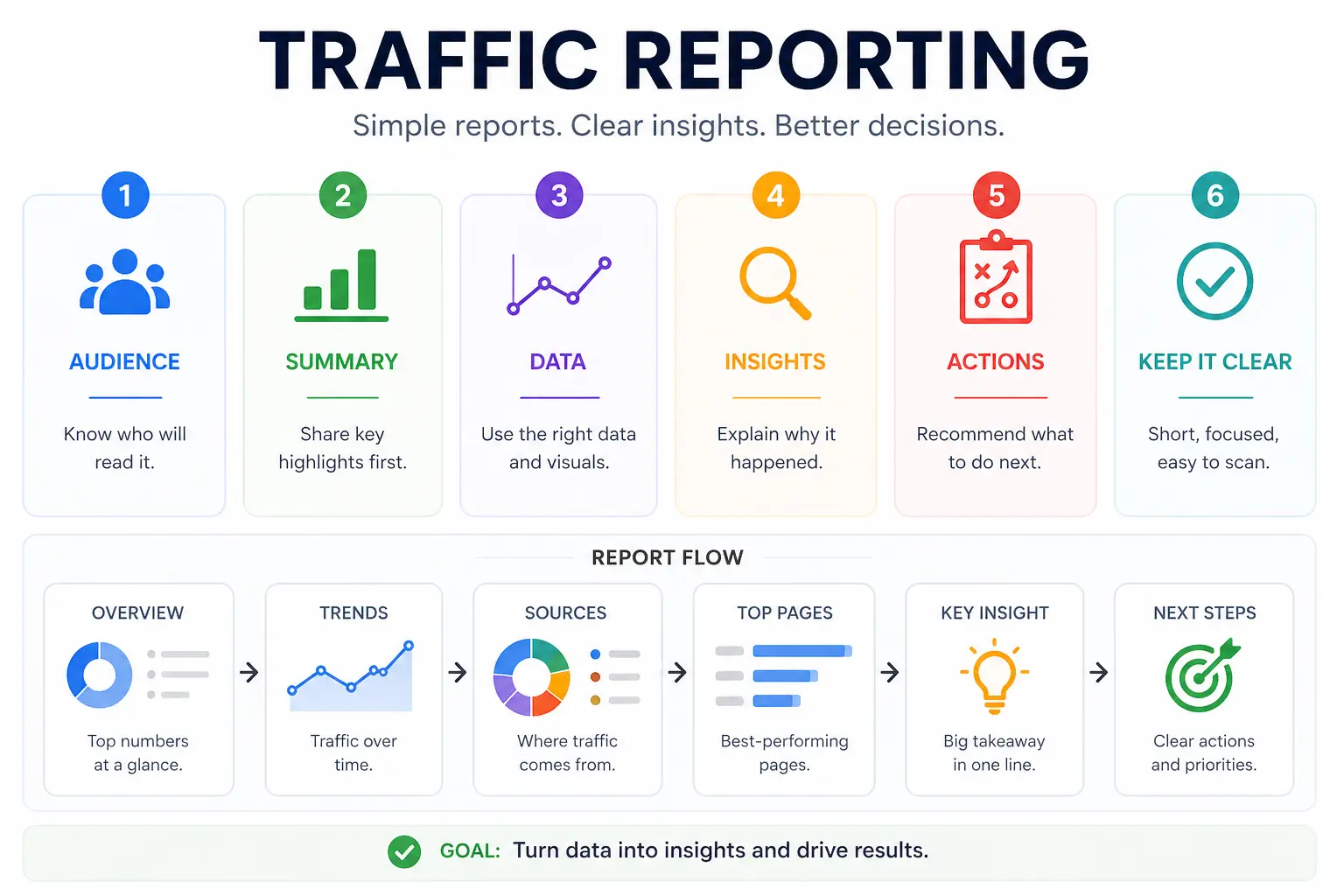
    Traffic Reporting How to Build Reports People Actually Read

    TRAFFIC REPORTING
    Here is an uncomfortable truth: most traffic reports are ignored. They are either too long, full of numbers that mean nothing to the reader, or they present data without any story behind it. A great traffic report does not just show what happened it explains why it happened and what to do next.

    The Anatomy of a Strong Traffic Report

    Every solid traffic report should include these core sections:

    • Executive Summary: a plain-English overview of the key takeaways in 3-5 sentences
    • Traffic Overview: total sessions, users, and comparison to the previous period
    • Traffic by Source: which channels drove the most visits and how each is trending
    • Top Pages: which content performed best and why it worked
    • Keyword Performance: which search terms are driving organic traffic
    • Conversions: how many visitors completed a goal, broken down by source
    • Recommended Actions: specific next steps, not vague suggestions

    Tailor Your Report to Your Audience

    A marketing manager wants to see channel performance and content metrics. A CEO wants to see how traffic is connecting to revenue. A developer cares about technical issues that might be impacting load speed and crawlability. The same data, packaged differently, resonates with different people. Know who you are writing for.

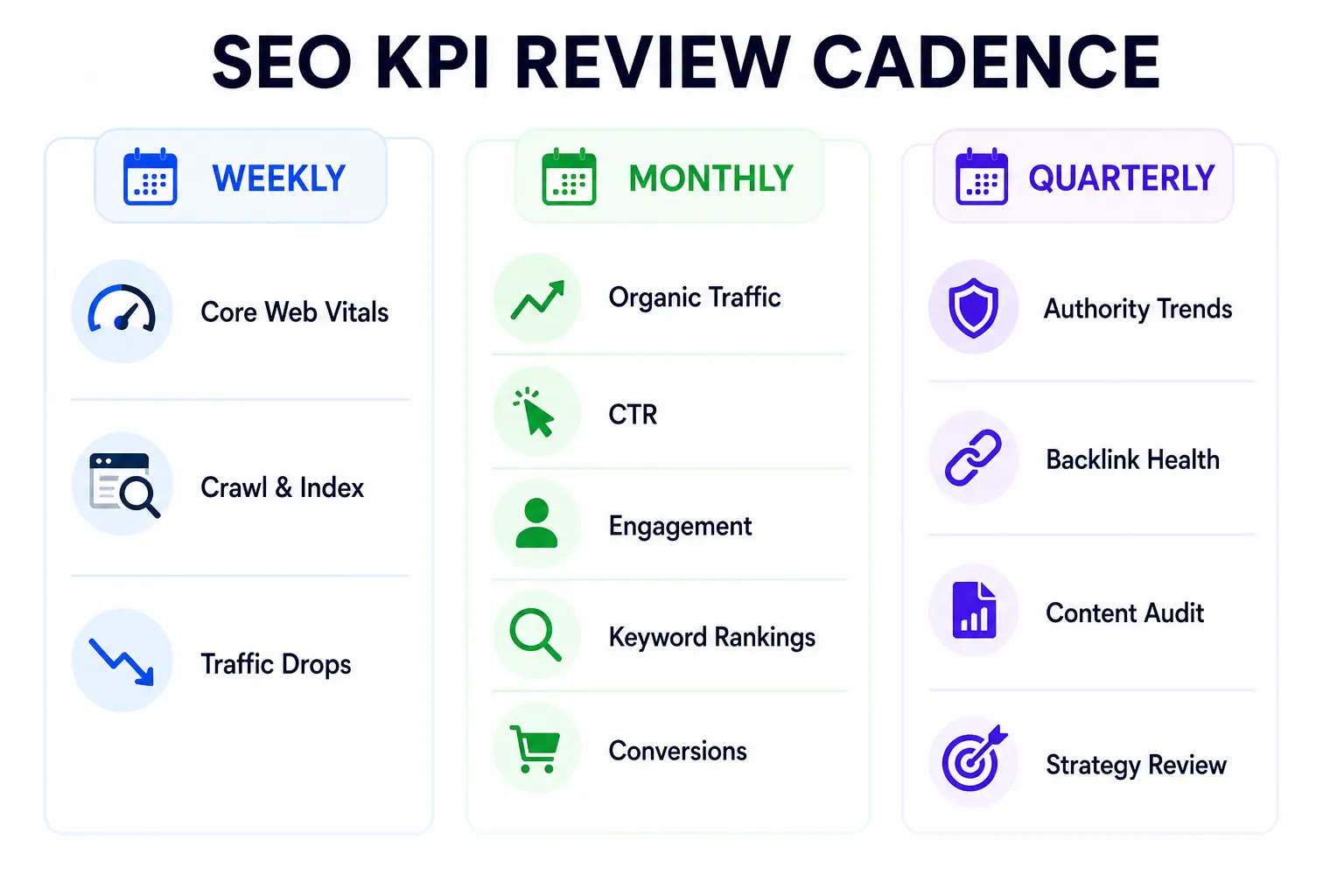
    How Often Should You Run Traffic Reports?

    • Weekly: for fast-moving campaigns or new website launches
    • Monthly: the standard for most businesses tracking ongoing performance
    • Quarterly: ideal for strategic reviews and stakeholder presentations
    • Year-over-year: essential for understanding seasonal patterns

    Common Traffic Analysis Mistakes to Avoid

    Even experienced marketers fall into these traps. Here is what to watch out for and how to avoid each one.

    Mistake 1: Chasing Vanity Metrics

    Page views feel impressive, but they rarely tell you anything useful. One page view from a highly targeted visitor who converts is worth more than a hundred random visits. Always ask: what does this number actually mean for my business?

    Mistake 2: Not Filtering Out Bots and Internal Traffic

    If your team visits your website constantly while developing or testing it, that traffic will inflate your numbers and skew your data. Make sure to exclude your own IP addresses and filter known bot traffic from your reports in GA4.

    Mistake 3: Ignoring Mobile Traffic

    Around 59% of all internet traffic now comes from mobile devices. If you are not looking at how your mobile visitors behave differently from desktop users different bounce rates, different conversion paths you are missing a huge piece of the picture.

    Mistake 4: Comparing the Wrong Time Periods

    Comparing this December to last November will give you meaningless data. Always compare equivalent periods this month vs. the same month last year, or this quarter vs. the same quarter last year. Seasonal shifts are real and they will mislead you if you are not accounting for them.

    Mistake 5: Analyzing Traffic Without Tying It to Goals

    Traffic is a means to an end, not the end itself. If your traffic doubles but your revenue stays flat, something is wrong. Always connect traffic trends to business outcomes leads generated, products sold, sign-ups completed.

    Traffic Analysis in the Age of AI Search (2025 Update)

    The search landscape is changing faster than at any point in the last decade. AI-powered features like Google’s AI Overviews are reshaping how people find information and how traffic flows across the web. Here is what every marketer needs to understand right now.
    Zero-Click Searches Are on the Rise

    Around 60% of searches now end without a click, because Google answers the question directly in the search results. This means rankings alone no longer guarantee traffic. Your traffic analysis needs to account for impressions alongside clicks a page can be performing well in search even if CTR appears to drop.

    AI Tools Are Becoming Referral Sources

    ChatGPT, Perplexity, Gemini, and similar tools are increasingly sending traffic to websites they recommend. If your content is showing up as a source in AI-generated answers, you will start to see these as referral traffic sources in GA4. This is a strong signal that your content has earned real authority.

    How to Adapt Your Traffic Analysis Strategy

    • Track AI referral traffic as a separate source and watch it grow over time
    • Monitor impressions in Google Search Console, not just clicks
    • Focus on content that directly answers specific questions — the format AI tools prefer
    • Measure brand awareness metrics alongside standard traffic data
    • Diversify your traffic sources so you are not dependent on any single channel

    Forward Thinking: AI Visibility how often your brand is mentioned in AI-generated answers — is becoming as important as traditional keyword rankings. Start tracking it now.
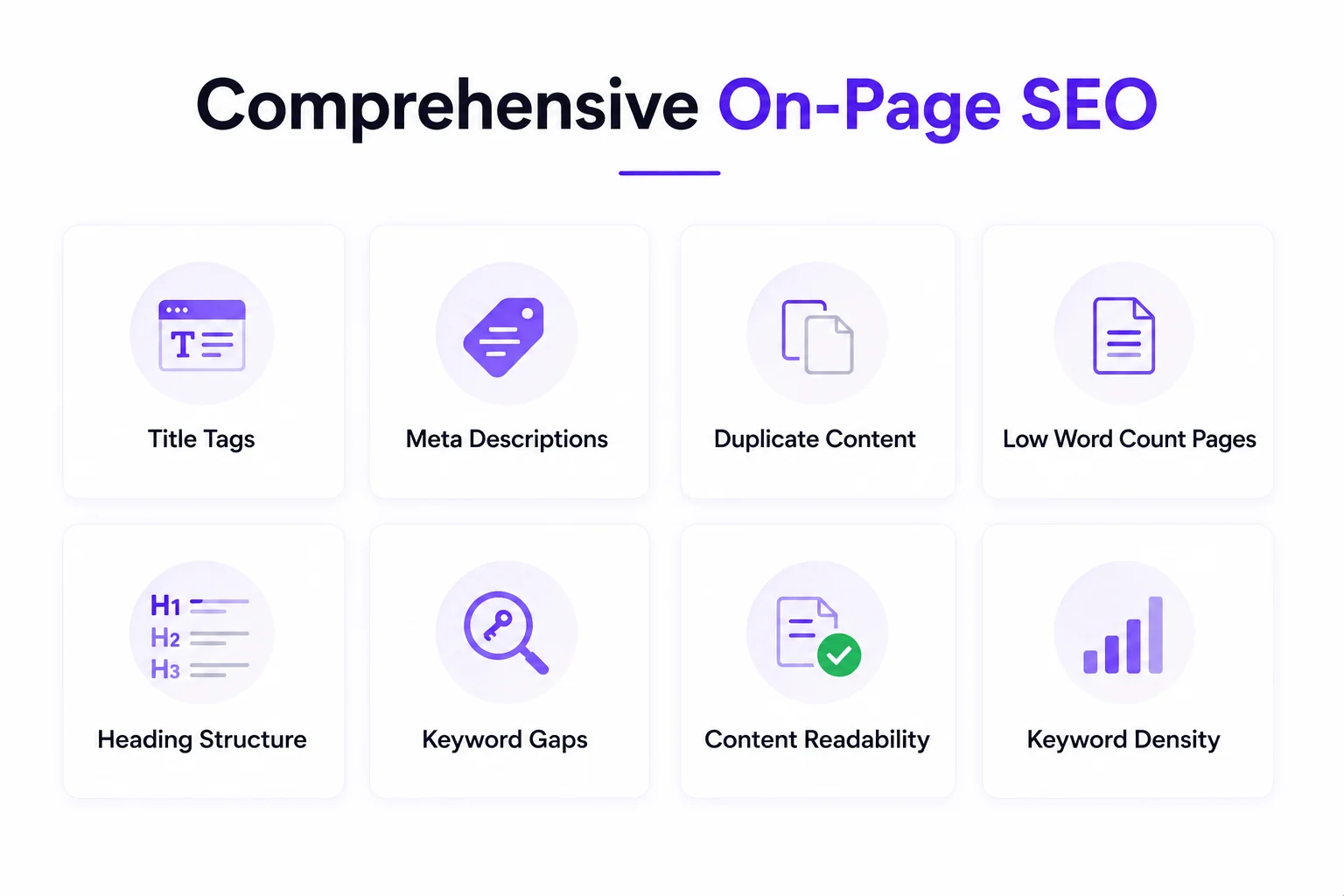
    Traffic Analysis vs. SEO Reporting What Is the Difference?

    These two terms are often used interchangeably, but they are not the same thing and understanding the difference will make your reporting much sharper.

    Traffic Analysis is the broad study of all visitor behavior across all channels. It covers where people come from, what they do on your site, how long they stay, and whether they convert. It looks at organic, paid, social, direct, and referral traffic equally.

    SEO Reporting is specifically focused on how your website performs in search engines. It dives into keyword rankings, organic click-through rates, crawlability, backlinks, and technical health all the factors that determine how well Google ranks your pages.

    You need both. Traffic analysis tells you whether your overall digital presence is healthy. SEO reporting tells you whether your investment in organic search is paying off. When used together, they give you a complete view of where your audience is coming from and how to attract more of the right people.

    Frequently Asked Questions

    Q: What is traffic analysis in digital marketing?

    A: Traffic analysis in digital marketing is the process of collecting and interpreting data about how visitors find and interact with your website. It covers traffic sources, user behavior, engagement metrics, and conversions — helping you make smarter decisions about content, advertising, and SEO.

    Q: How do I analyze website traffic for free?

    A: You can do thorough traffic analysis completely for free using Google Analytics 4 and Google Search Console. GA4 tracks on-site behavior, traffic sources, and conversions. Google Search Console shows you keyword performance, impressions, and click-through rates from organic search.

    Q: What are the most important traffic metrics to track?

    A: The most important metrics are: sessions and users (volume), traffic by source (where visitors come from), bounce rate (engagement quality), conversion rate (business impact), top landing pages (content performance), and CTR from search (SEO effectiveness). Start with these before adding complexity.

    Q: How often should I do traffic analysis?

    A: For most businesses, monthly traffic analysis is the sweet spot it gives you enough data to spot meaningful trends without getting lost in daily noise. Add weekly check-ins during active campaigns and do a thorough quarterly review for strategic planning.

    Q: What is a good amount of website traffic?

    A: There is no universal benchmark it completely depends on your industry, business model, and goals. A B2B SaaS company converting 5% of 500 monthly visitors into enterprise clients can be far more successful than an e-commerce store with 50,000 visitors but a 0.1% conversion rate. Focus on traffic quality and conversion, not volume alone.

    Q: What is the difference between sessions and users in GA4?

    A: In GA4, a user is a unique individual who visits your site, while a session is a single visit. One user can have multiple sessions for example, if someone visits your site on Monday and again on Friday, that counts as one user but two sessions. Tracking both gives you a fuller picture of your audience size and engagement frequency.

    Conclusion

    Traffic analysis is not about drowning in dashboards and spreadsheets. At its core, it is about asking the right questions and finding clear answers in your data then using those answers to make better decisions.You do not need to track every metric or master every tool on day one. Start simple. Pick three to five metrics that directly connect to your business goals, check them consistently, and build your analysis practice from there. Over time, the patterns become obvious, the insights come faster, and the decisions get easier.

    The websites that grow consistently are not the ones with the most traffic they are the ones run by people who understand their traffic. They know what is working, they double down on it, they fix what is broken, and they never stop paying attention. Now you have the framework to do the same. Open your analytics, start with the basics, and let the data guide you.

  • What Are SEO KPIs? And How Are They Different from SEO Metrics?

    What Are SEO KPIs? And How Are They Different from SEO Metrics?

    SEO KPIs are metrics that are tied to a goal. For example, organic conversion rate is a KPI because it tells you whether your organic traffic is turning into customers. Page views alone? That is just a metric.

    Here is a simple way to think about it: imagine you are on a road trip. SEO metrics are your mile markers they tell you how far you have come. SEO KPIs are your destination. You need both, but reaching the destination is what actually matters.

    Leading vs. Lagging Indicators

    SEO KPIs fall into two types:

    • Leading indicators: metrics that show early progress, like keyword rankings, impressions, and organic traffic. These signal whether you are on the right track.
    • Lagging indicators: the real business outcomes, like leads, sales, and revenue from organic. These take longer to move but confirm actual success.

    Strong leading indicators done consistently over time tend to produce strong lagging indicators. Track both.

    How Many SEO KPIs Should You Track?

    The answer most SEO professionals agree on: 5 to 7 core KPIs. Any more than that and you risk analysis paralysis spending more time reading dashboards than actually improving your site.

    How to Choose the Right SEO KPIs for Your Business

    right seo Kpis
    There is no single list of SEO KPIs that works for every business. The right ones depend on your goals, your industry, and where your site is in its growth.

    Match Your KPIs to Your Business Type

    • E-commerce: organic revenue, conversion rate, product page rankings, cart abandonment from organic traffic
    • B2B SaaS: non-branded organic traffic, demo/trial signups, content-assisted deals, cost per acquisition
    • Local business: Google Business Profile visibility, local keyword rankings, direction requests, call clicks
    • Blog/media: organic traffic, engagement rate, email signups, returning visitors

    Use the SMART Framework to Set Targets

    Every KPI should be SMART: Specific, Measurable, Achievable, Relevant, and Time-bound. Instead of saying ‘I want more organic traffic,’ say: ‘I want to increase non-branded organic traffic by 20% over the next 90 days by publishing 8 optimised blog posts.’

    That is a KPI you can act on and measure.

    Consider Your Site’s Stage

    • New site (0–6 months): Focus on indexed pages, impressions, and crawl health. Conversions can wait until you have traffic.
    • Growing site (6–18 months): Shift focus to keyword rankings, CTR, and organic traffic growth.
    • Established site (18+ months): Prioritise conversion rate, revenue from organic, and domain authority trends.

    The 15 Most Important SEO KPIs to Track in 2026

    Below are 15 SEO KPIs organised into four categories. For each one, you will find what it is, why it matters, how to track it, and a benchmark to aim for.

    Visibility KPIs

    KPI 1: Organic Traffic
    What it isThe number of visitors who land on your site through unpaid search results.
    Why it mattersIt is the most direct output of your SEO work. More visibility in search = more organic visitors.
    How to trackGA4 → Reports → Acquisition → Traffic acquisition → Filter by ‘Organic Search’
    BenchmarkHealthy sites see 50–70% of total traffic from organic. Aim for 5–10% month-over-month growth.
    Pro tipSegment by branded vs. non-branded. Growth in non-branded traffic is a stronger SEO signal.
    KPI 2: Keyword Rankings
    What it isWhere your pages appear in Google search results for your target keywords.
    Why it mattersRankings drive traffic — position 1 gets ~27.6% of clicks, position 2 gets ~15.8%, position 3 gets ~11%.
    How to trackAhrefs Rank Tracker, Semrush Position Tracking, or Google Search Console (average position)
    BenchmarkTrack position for 20–50 high-value target keywords. Aim for page 1 visibility within 6 months.
    Pro tipDo not chase every keyword. Focus on the ones that drive qualified traffic and conversions.
    KPI 3: Impressions
    What it isHow many times your pages appeared in Google search results, whether clicked or not.
    Why it mattersHigh impressions with low CTR means your titles and meta descriptions need work. It is a visibility signal before the click.
    How to trackGoogle Search Console → Performance → Total impressions
    BenchmarkGrowing impressions month-over-month is a positive sign, especially for new content.
    Pro tipPair impressions with CTR. Low CTR on high-impression pages is a quick-win optimisation opportunity.
    KPI 4: AI Overview / AI Citation Visibility
    What it isHow often your brand or content is cited inside AI-generated answers (Google AI Overviews, ChatGPT, Perplexity).
    Why it mattersIn 2026, AI answers often replace traditional search results. If your content is not cited, you are invisible — even if you rank well.
    How to trackPrompt-based monitoring tools, brand mention trackers. Cross-reference with Search Console query data.
    BenchmarkTracking this as a trend is more useful than absolute numbers. Aim to appear in AI answers for your top 10–20 target queries.
    Pro tipContent that is clear, authoritative, well-structured, and cites credible sources tends to get picked up by AI systems.
    KPI 5: Branded vs. Non-Branded Traffic Split
    What it isThe ratio of visitors searching for your brand name vs. visitors finding you through generic topic searches.
    Why it mattersBranded spikes from PR campaigns can mask flat organic growth. Non-branded growth is pure SEO performance.
    How to trackSearch Console → Filter queries → Exclude brand name variations
    BenchmarkFor most sites, 60–70% non-branded traffic indicates healthy SEO reach.
    Pro tipIf branded traffic is consistently rising but non-branded is flat, your content strategy needs attention.

    Engagement KPIs

    KPI 6: Click-Through Rate (CTR)
    What it isThe percentage of users who click your listing after seeing it in search results.
    Why it mattersCTR is the bridge between visibility and traffic. A low CTR on a high-ranking page means your title or meta description is not compelling enough.
    How to trackGoogle Search Console → Performance → CTR column (not third-party estimated CTR curves)
    BenchmarkPosition 1: ~27.6% | Position 2: ~15.8% | Position 3: ~11.0% (Backlinko, 2026)
    Pro tipPages with impressions above 1,000 but CTR below 2% are your fastest-win optimisation targets.
    KPI 7: Engagement Rate (GA4)
    What it isThe percentage of sessions that are ‘engaged’ — meaning the user spent 10+ seconds on site, viewed 2+ pages, or completed a conversion event.
    Why it mattersGA4 replaced bounce rate with engagement rate. It is a better measure of whether users found what they were looking for.
    How to trackGA4 → Reports → Engagement → Pages and screens
    Benchmark55%+ for blog pages, 70%+ for landing pages, 80%+ for product pages.
    Pro tipLow engagement rate on a high-traffic page usually signals a content-intent mismatch. The page is ranking for the wrong query.
    KPI 8: Average Session Duration / Pages Per Session
    What it isHow long users spend on your site and how many pages they visit in one session.
    Why it mattersThese engagement signals tell Google that users found your content valuable — which positively influences future rankings.
    How to trackGA4 → Reports → Acquisition → Traffic acquisition → Average engagement time per session
    Benchmark2+ minutes average session duration and 2+ pages per session are healthy signs.
    Pro tipInternal linking is one of the fastest ways to improve pages-per-session and reduce drop-offs.
    KPI 9: Core Web Vitals (LCP, INP, CLS)
    What it isGoogle’s three user experience metrics: Largest Contentful Paint (page load speed), Interaction to Next Paint (responsiveness), and Cumulative Layout Shift (visual stability).
    Why it mattersGoogle uses Core Web Vitals as a ranking signal. More importantly, poor vitals hurt conversions — even when rankings are fine.
    How to trackGoogle PageSpeed Insights, Search Console → Core Web Vitals report
    BenchmarkLCP < 2.5 seconds, INP < 200ms, CLS < 0.1 — all in the ‘Good’ range per Google’s thresholds.
    Pro tipCore Web Vitals impact conversions more than rankings alone. Fix them even if you are not seeing a ranking drop.

    Authority & Technical KPIs

    KPI 10: Domain Authority / Domain Rating
    What it isA third-party score (Moz’s DA, Ahrefs’ DR, Semrush’s AS) that estimates how well your domain could rank based on its backlink profile.
    Why it mattersIt is a useful trend indicator. A rising DR/DA over time signals that your link-building efforts are working.
    How to trackAhrefs Site Explorer (Domain Rating), Moz Link Explorer (Domain Authority), Semrush (Authority Score)
    BenchmarkA gain of 3–5 points per year is solid for a mid-sized site. Compare against direct competitors, not the whole internet.
    Pro tipNever use DA/DR as an absolute number. It is only meaningful relative to your competitors and your own historical trend.
    KPI 11: Referring Domains
    What it isThe count of unique websites linking to your domain (distinct from total backlink count).
    Why it matters50 links from one spammy site is far less valuable than 50 links from 50 different authoritative sites. Referring domains is the metric that actually matters.
    How to trackAhrefs → Referring domains report | Semrush → Backlink Analytics → Referring domains
    Benchmark5–15 new referring domains per month from outreach and digital PR is healthy for most mid-sized sites.
    Pro tipTrack net growth (new vs. lost referring domains). Losing domains fast can indicate a backlink quality problem.
    KPI 12: Indexed Pages
    What it isThe number of your pages that Google has crawled and included in its search index.
    Why it mattersPages that are not indexed cannot rank. This is your most fundamental technical SEO check.
    How to trackGoogle Search Console → Index → Pages report. Check both ‘Indexed’ and ‘Not indexed’ tabs.
    BenchmarkAll important pages should be indexed. A large number of ‘not indexed’ pages signals crawl or content quality issues.
    Pro tipRun a monthly audit. Do not over-interpret single alerts cross-check crawl data with impressions data to separate noise from signal.

    Conversion & Revenue KPIs

    KPI 13: Organic Conversion Rate
    What it isThe percentage of organic visitors who complete a goal a purchase, form submission, free trial signup, or phone call.
    Why it mattersRankings without conversions are vanity. This KPI ties your SEO directly to revenue. It is the most important lagging indicator.
    How to trackGA4 → Conversions → Filter by ‘Organic Search’ traffic source
    BenchmarkE-commerce: 2–3% | B2B: 3–5% | SaaS: 5–7%. Always compare against your own historical baseline first.
    Pro tipExclude spam, bot traffic, and wrong-country sessions to avoid inflating your conversion numbers.
    KPI 14: Organic Revenue & Leads
    What it isThe actual revenue or qualified leads generated through organic search traffic.
    Why it mattersThis is the ultimate proof of SEO ROI. If you cannot connect SEO to revenue, you cannot defend the SEO budget.
    How to trackGA4 with e-commerce tracking or goal completions. Connect to CRM (HubSpot, Salesforce) to track MQL/SQL stages from organic.
    BenchmarkDepends entirely on your business model and average deal size. Set a month-over-month growth target instead.
    Pro tipTrack content-assisted deals as well as direct organic conversions. SEO often plays a role earlier in the funnel than last-click attribution shows.
    KPI 15: Cost Per Acquisition (CPA) from Organic
    What it isTotal SEO investment divided by the number of customers acquired through organic search.
    Why it mattersOrganic CPA is typically 3–5x lower than paid CPA over time. This comparison is your most powerful argument for continued SEO investment.
    How to trackCPA = Total SEO costs for the period / Number of organic conversions in the same period
    BenchmarkB2B common benchmarks: 1–3% conversion rate, 3–5% CTR, and 200%+ ROI from SEO are reference points.
    Pro tipOrganic CPA improves over time as content compounds. Show stakeholders a 12-month trend, not just a single month.

    SEO KPI Quick-Reference Benchmark Table

    Here is a summary of all 15 SEO KPIs with their benchmarks and tracking tools in one place:

    KPIBeginner BenchmarkHealthy RangeTracking Tool
    Organic Traffic500–1k sessions/mo5–10% MoM growthGA4
    Keyword RankingsTop 20Position 1–3 for target KWsAhrefs / Semrush
    CTR1–2%3–5% (position 1 = ~27.6%)Search Console
    Engagement Rate40–55%55–70%+ (blog pages)GA4
    Core Web VitalsNeeds improvementGood (LCP < 2.5s, CLS < 0.1)PageSpeed Insights
    Domain Rating (DR)0–203–5 point gain/yearAhrefs
    Referring Domains< 505–15 new/monthAhrefs / Semrush
    Organic Conv. Rate< 1%E-com 2–3%, B2B 3–5%, SaaS 5–7%GA4

    How to Track SEO KPIs: The Best Tools

    SEO kPI TOOLS
    You do not need to pay for ten different tools. Here is how to cover all 15 KPIs with a lean, efficient setup:

    Free Tools

    • Google Search Console: best for impressions, CTR, keyword rankings, indexation, and Core Web Vitals. If you use one tool, use this one.
    • Google Analytics 4 (GA4): tracks organic traffic, engagement rate, session duration, and conversions. Essential for connecting SEO to revenue.
    • Google PageSpeed Insights: measures Core Web Vitals (LCP, INP, CLS) for any page, on mobile and desktop.

    Paid Tools (Worth the Investment)

    • Ahrefs: keyword rankings, referring domains, domain rating, competitor gap analysis, and backlink monitoring. Best all-rounder for authority KPIs.
    • Semrush: similar to Ahrefs with strong site audit features. Excellent for technical SEO monitoring and position tracking.
    • Moz Pro: good for domain authority tracking and local SEO KPIs.

    Reporting Dashboards

    • DashThis: pulls data from GA4, Search Console, Ahrefs, Semrush, and 30+ sources into a single automated report.
    • AgencyAnalytics: popular for agencies. Includes automated KPI dashboards, GSC integration, and white-label reporting.

    AI Visibility Tracking (2026)

    This is a new category with no dominant tool yet. The most practical approach is prompt-based monitoring: regularly test your brand’s top 10–20 queries in Google AI Overviews, ChatGPT, and Perplexity. Log whether your brand or URL is cited. Over time, this becomes a trackable trend.

    How Often Should You Review SEO KPIs?

    SEO KPI REVIEW
    Checking your rankings every morning is a fast track to anxiety, not insight. SEO moves slowly, and over-monitoring creates noise. Here is a sensible review cadence:

    Weekly

    • Core Web Vitals scores: catch technical regressions early
    • Crawl errors and indexation issues: via Search Console
    • Sudden drops in organic traffic: check for manual penalties or algorithm updates

    Monthly

    • Organic traffic (total and segmented by branded vs. non-branded)
    • CTR by page and query
    • Engagement rate and average session duration
    • Keyword rankings for your top 20–50 target keywords
    • Conversions and organic revenue

    Quarterly

    • Domain authority / domain rating trends
    • Referring domain growth and backlink profile health
    • Content performance audit — which pages grew, which declined, and why
    • Full SEO strategy review — are your KPI targets still aligned with business goals?

    Common SEO KPI Mistakes to Avoid

    Even experienced SEO professionals fall into these traps. Knowing them in advance saves you months of misdirected effort.

    Tracking Too Many KPIs

    If you track everything, you act on nothing. Stick to 5–7 KPIs that directly connect to your business goals. The rest are context metrics useful when diagnosing problems, not for weekly reporting.

    Relying on Rankings Alone

    Keyword rankings are important, but they no longer tell the full story. In 2026, AI Overviews frequently reduce clicks from ranked pages. A page can hold position 1 while organic clicks to it decline. Rankings need to be paired with CTR and traffic data to mean anything.

    Ignoring the Branded vs. Non-Branded Split

    A brand awareness campaign or press mention can spike your organic traffic dramatically but that is not SEO performance. Always separate branded and non-branded traffic before drawing conclusions about your SEO strategy.

    Working with Site-Wide Averages

    Averages hide everything. A 3% site-wide CTR might look fine until you realise that your highest-impression pages have 0.5% CTR. Segment by page, query, device, and country. That is where the real insights live.

    Failing to Connect SEO to Revenue

    If your monthly SEO report shows traffic and rankings but does not mention leads, conversions, or revenue, it will not survive the next budget conversation. Make sure at least one of your core KPIs ties directly to business outcomes.

    Frequently Asked Questions about SEO KPIs

    What are SEO KPIs?

    SEO KPIs (Key Performance Indicators) are measurable values that show whether your SEO strategy is achieving your business goals. Unlike general SEO metrics (which just report data), KPIs are tied to specific outcomes like traffic growth, leads, or revenue.

    What is the most important SEO KPI?

    It depends on your business goal. For most sites, organic conversion rate or organic revenue is the most important because it directly ties SEO to business results. For newer sites still building visibility, organic traffic and keyword rankings take priority.

    How do I set SEO KPI benchmarks?

    Start with your own historical data before comparing to industry averages. Set a baseline for each KPI, then define a realistic target (e.g. 10% traffic growth over 90 days). Use industry benchmarks as a reference, not as a standard you must hit.

    What SEO KPIs should I report to clients?

    Focus on KPIs that connect to their business goals: organic traffic, keyword rankings, conversions, and revenue from organic search. Pair these with a leading indicator (like CTR or engagement rate) to show both progress and outcomes.

    Are keyword rankings still a good SEO KPI in 2026?

    Yes, but only when used intelligently. Rankings need to be paired with CTR and organic traffic data to be meaningful. With AI Overviews reducing clicks from ranked pages, a page can hold position 1 while receiving fewer visits than before. Always look at rankings in context.

    Conclusion: Start Tracking the Right SEO KPIs Today

    SEO without clear KPIs is just guesswork dressed up in charts. The businesses that grow their organic presence consistently are not the ones tracking the most metrics they are the ones tracking the right ones.

    Here is your action plan:

    • Set up Google Search Console and GA4 if you have not already
    • Pick 5–7 SEO KPIs that align with your current business goal
    • Define your baseline for each KPI using the past 3–6 months of data
    • Set SMART targets and a review cadence (monthly for most KPIs)

    Connect at least one KPI directly to revenue or leads

  • What Is Google Search Console And Why Your Workflow Matters

    What Is Google Search Console And Why Your Workflow Matters

    Google Search Console (GSC) is a free tool from Google that shows you how your website performs in Google Search. Think of it as a direct line of communication between your site and Google’s crawlers.

    It tells you:

    1. Which search queries are bringing people to your site
    2. Which pages are indexed and which are being ignored
    3. Whether Google can crawl your site without errors
    4. How your Core Web Vitals are performing
    5. If you have any manual penalties or security issues

    GSC vs. Google Analytics What’s the Difference?

    gsc vs google  analytics
    People mix these up all the time. Here’s the simple version:

    Google Search ConsoleGoogle Analytics
    Pre-click dataPost-click data
    What happens in Google SearchWhat happens on your website
    Keywords, impressions, CTR, positionSessions, pageviews, bounce rate, conversions
    Crawl & index healthUser behavior & journeys

    Both tools are essential. Neither replaces the other. But for understanding what Google thinks of your site, GSC is the one you need.

    The reason a structured workflow matters: most people only open GSC when there’s a problem a traffic drop, a manual action email. By then, you’re already behind. A consistent workflow lets you catch issues early and act on opportunities before your competitors do.

    Setting Up GSC the Right Way (One-Time Foundation)

    set up google search console
    Before any workflow makes sense, your setup needs to be solid. These are one-time steps, but they affect every report you’ll ever look at.

    Step 1: Choose the Right Property Type

    When you add your site to GSC, you’ll pick between two property types:

    1. Domain Property: covers your entire domain including all subdomains (www, http, https, etc.). Best for most sites.
    2. URL Prefix: covers only a specific URL. Easier to verify, but you might miss data from other subdomains.

    Step 2: Verify Ownership

    Google needs to confirm you actually own the site. There are several ways to do this:

    • DNS TXT record: best for Domain properties. Add a TXT record in your domain registrar.
    • HTML meta tag: paste into your site’s <head> section. Works well with WordPress + SEO plugins.
    • HTML file upload: download a file from GSC and upload it to your root directory.
    • Google Analytics / Tag Manager: automatically verifies if you use the same Google account.

    Step 3: Submit Your XML Sitemap

    Your sitemap is like handing Google a map of your entire website. It speeds up discovery and helps ensure important pages don’t get missed.

    Go to Sitemaps in the GSC sidebar, enter your sitemap URL (usually yourdomain.com/sitemap.xml), and hit Submit. Once processed, GSC will show the number of submitted vs. indexed URLs. If those numbers are far apart, that’s your first clue something needs attention.

    Step 4: Set Up User Access

    If you work with a team, you can add users under Settings > Users and Permissions. There are three roles to know:

    • Verified Owner: full access. Can change settings and manage users.
    • Delegated Owner: same permissions as verified owner, granted by one.
    • User: can view data but has limited settings access.

    Step 5: Link GSC with Google Analytics 4

    This is optional but highly recommended. Linking the two tools lets you see organic search performance alongside on-site behavior so you can understand not just who clicked, but what they did after landing on your page. Do this inside your GA4 settings under ‘Search Console links.’

    The Core Google Search Console Workflow

    core google search console
    This is what separates sites that grow steadily from sites that plateau. The Google Search Console workflow below is built around the reports that move the needle. Use it consistently, and you’ll always know where to focus your energy.

    a. Start With the Performance Report

    The Performance Report is the heartbeat of GSC. It shows clicks, impressions, click-through rate (CTR), and average position for all your pages and keywords data you literally cannot get anywhere else for free.

    Here’s how to work through it effectively:

    1. Set your date range to the last 90 days for a meaningful trend view.
    2. Go to the Queries tab and sort by impressions descending.
    3. Filter by average position between 8 and 20. These are your quick wins Google already considers your content relevant enough to show it, but not quite enough to put it on the front page.
    4. Update, expand, or restructure the pages ranking in that zone. You’re polishing, not rebuilding

    b. Check the Indexing / Pages Report

    Under Indexing > Pages, you’ll see every URL on your site that Google knows about split between indexed and not indexed. If a page isn’t indexed, it doesn’t exist in Google’s eyes, no matter how good the content is.

    Common reasons pages get excluded:

    • noindex tag accidentally added (often from a plugin setting)
    • Page blocked by robots.txt
    • Soft 404 errors (page loads but has no real content)
    • Duplicate content (Google chooses one version to index)
    • Crawled but currently not indexed (content may be too thin)

    Go through the ‘Excluded’ section monthly. Fix the avoidable errors first a noindex tag on an important page is a five-second fix that can unlock significant traffic.

    c. Use the URL Inspection Tool

    Think of the URL Inspection Tool as your page-level X-ray. Paste any URL and GSC shows you exactly what Google sees: the last crawl date, how it was rendered, what canonical URL was assigned, and whether the page is indexed.

    Use it after:

    • Publishing new content request indexing to speed things up.
    • Updating an existing article tell Google to come back and recrawl.
    • Fixing a 404 error with a redirect confirm Google processed it correctly.
    • Adding or changing canonical tags verify Google is reading the right one.

    d. Monitor Core Web Vitals

    Google uses Core Web Vitals (CWV) as a ranking signal, and GSC gives you real-world data on how your pages perform for actual visitors. The three metrics to know:

    MetricWhat It MeasuresTarget
    LCPLargest Contentful Paint — how fast the main content loadsUnder 2.5 seconds
    INPInteraction to Next Paint — how fast the page responds to clicksUnder 200ms
    CLSCumulative Layout Shift — how stable the layout is while loadingUnder 0.1

    Workflow for fixing CWV issues: Open the report, click into Poor URLs, note which metric is failing, run those URLs through PageSpeed Insights for specific recommendations, fix the root cause, then use GSC to validate the fix.

    e. Review the Links Report

    The Links Report shows you two types of links: external (other websites linking to yours) and internal (how your own pages connect to each other). Both matter more than people realize.

    For external links: check your top linking sites and ensure they’re relevant to your niche. Spammy or irrelevant links are a red flag. If you spot any, you can disavow them directly through GSC.

    For internal links: look for important pages that have very few internal links pointing to them. If a page you care about isn’t getting linked from other pages on your site, Google’s crawlers will have a harder time finding and prioritizing it.

    f. Check Manual Actions and Security Issues

    This section is easy to overlook until it’s too late. A manual action is a human-reviewed penalty from a Google employee for violating their guidelines. It can suppress your rankings for specific pages or your entire site.

    Security Issues is equally critical. If Google detects your site has been hacked, is serving malware, or used for phishing, it will warn users in search results and that’s devastating for both rankings and trust.

    Your Weekly vs. Monthly GSC Workflow Checklist

    Consistency is the whole game with Google Search Console. Here’s a practical checklist you can follow without it taking over your life.

    Weekly (5-10 minutes)

    • Check for new manual actions or security alerts (these need immediate attention)
    • Review any sudden indexing drops or crawl errors
    • Request indexing for any newly published or updated pages

    Monthly (30-60 minutes)

    • Performance report: identify CTR drops, ranking shifts, and quick-win opportunities (positions 8-20)
    • Index coverage: work through excluded pages and fix avoidable errors
    • Core Web Vitals: check for new ‘Poor’ URLs
    • Links report: review new backlinks and internal link gaps
    • Sitemap: resubmit if you’ve published a significant number of new pages

    Using GSC for Keyword Research

    Most people don’t realize that GSC is also one of the best keyword research tools available and unlike third-party tools, the data comes directly from Google. No estimates. No approximations.

    Here’s the content strategy workflow that pros use:

    1. Open the Performance report and switch the view to Pages.
    2. Sort by impressions and click on a page you want to improve.
    3. Add the ‘Queries’ filter to see every keyword that URL ranks for.
    4. Look for queries that are getting good impressions but low clicks these are your content gaps.
    5. Update the page to better address those queries. Add relevant sections, improve headings, clarify intent.

    Pages that rank for 30 or more queries but average below position 15 for most of them are consolidation candidates they’re spreading authority thin. Consider restructuring or merging content to build stronger topical depth.

    Also: always update an existing page before creating a new one for a similar topic. If you already rank for something, build on that authority rather than starting from scratch.

    Common Google Search Console Mistakes to Avoid

    Even experienced SEOs make these mistakes. Here’s what to watch out for:

    • Not resubmitting the sitemap after publishing new pages Google can discover pages on its own, but a fresh sitemap submission speeds things up significantly.
    • Ignoring the Excluded section this is where hidden traffic killers live. Noindex tags, duplicate content, and redirect issues often hide here for months.
    • Only opening GSC when traffic drops at that point, you’re already losing. A monthly workflow means you spot issues before they compound.
    • Confusing impressions with traffic impressions just mean your page appeared in search results. The click is what matters.
    • Ignoring mobile Core Web Vitals desktop scores are good to know, but mobile CWV is what Google primarily evaluates.
    • Using only one verification method always set up a Website Backup so a plugin update or theme change doesn’t accidentally lock you out.

    Taking Your GSC Workflow to the Next Level

    gsc workflow to the next level
    Once you’re comfortable with the basics, there are a few ways to get even more out of GSC without spending a single dollar.

    Connect GSC to Looker Studio

    Google’s free Looker Studio (formerly Data Studio) lets you pull your GSC data into custom dashboards. You can build reports that show exactly what you care about no manual filtering required every time you log in. Great for teams and agencies who need to share performance data regularly.

    Use the GSC API for Scale

    If you manage multiple sites or need to analyze data in bulk, the Google Search Console API lets you pull queries, impressions, clicks, positions, and sitemap data programmatically. You can feed this into Python scripts, spreadsheets, or custom reporting tools. It’s more technical, but it removes the manual work entirely.

    Set Up Email Alerts

    GSC automatically sends email alerts for critical issues manual actions, security problems, and significant drops. Make sure the email on your Google account is one you actually check. You don’t want to find out about a penalty three weeks later because the alert landed in a tab you never open.

    Automate With Third-Party Tools

    Platforms like n8n and Make (formerly Integromat) let you build automated workflows around GSC data. For example: automatically pull weekly performance reports into a Google Sheet, or get a Slack notification any time a page drops below position 10. These tools don’t require coding knowledge and can save hours of manual reporting each month.

    SEO Optimization Checklist for This Article

    SEO ElementStatus / Recommendation
    Focus Keyword in TitleGoogle Search Console Workflow: A Complete Guide (2026)
    Focus Keyword in Meta DescIncluded in first 20 words of meta description
    Focus Keyword in IntroUsed naturally within first 100 words
    H1 / H2 UsageFocus keyword in H1; secondary keywords in H2s
    Word CountAim for 2,500 – 3,500 words to compete with top results
    Internal LinksLink to related SEO content on your site
    External LinksLink to Google’s official GSC documentation
    Images & Alt TextAdd annotated GSC screenshots with descriptive alt text
    Schema MarkupAdd HowTo or Article schema to help with rich snippets
    Table of ContentsAdd a jump-link TOC near the top for UX and SEO
    FAQ SectionInclude 3-5 questions targeting featured snippet positions

    Frequently Asked Questions

    What is a Google Search Console workflow?

    A Google Search Console workflow is a repeatable, structured process for reviewing GSC reports on a regular schedule. Instead of opening the tool randomly, you follow a defined sequence checking performance data, indexing status, Core Web Vitals, links, and security issues so nothing important slips through the cracks.

    How often should I check Google Search Console?

    A good rule of thumb: do a quick 5-10 minute check weekly for critical issues (manual actions, security alerts, indexing drops), and a deeper 30-60 minute monthly review of performance trends, coverage errors, and CWV. You can also set up email alerts so GSC notifies you about serious problems automatically.

    What’s the difference between Google Search Console and Google Analytics?

    GSC covers everything that happens before a user visits your site keyword rankings, impressions, CTR, crawl and index health. Google Analytics covers what happens after a visitor lands on your site sessions, behavior, conversions. Both are essential, and linking them gives you the full picture.

    How do I fix indexing issues in Google Search Console?

    Go to Indexing > Pages and review the ‘Not Indexed’ section. Click on each exclusion reason to see which URLs are affected. Common fixes include removing accidental noindex tags, fixing robots.txt blocks, improving thin content, and resolving redirect errors. After fixing, use the URL Inspection Tool to request indexing.

    Can beginners use Google Search Console without coding knowledge?

    Absolutely. The core Google Search Console workflow checking the Performance report, reviewing indexing status, monitoring Core Web Vitals, and using the URL Inspection Tool requires zero coding. It does take some time to understand what the data means, but this guide gives you the foundation to start making informed decisions from day one.

    Conclusion

    A solid Google Search Console workflow isn’t about spending hours in the tool every day. It’s about showing up consistently, knowing which reports to look at, and turning data into action.

    The sites that grow steadily in organic search aren’t always the ones with the biggest budgets or the most content. They’re the ones where someone is paying attention catching issues early, spotting opportunities before competitors do, and making small, consistent improvements that compound over time.

    Pick one section from this guide and start there. You don’t have to overhaul everything at once. Check the Performance report. Look at your excluded pages. Run the URL Inspection tool on your last published post. Each small step adds up.

    GSC gives you first-party data straight from Google. That’s something no third-party tool can replicate. Use it wisely, and it will keep paying you back.

  • What Is Keyword Rank Tracking? (And What It’s NOT)

    What Is Keyword Rank Tracking? (And What It’s NOT)

    Keyword rank tracking is the process of monitoring where your web pages appear in Google search results for specific search queries  and watching how those positions change over time. It’s how you answer the question: “Is my SEO actually working?”

    Key metrics that rank tracking covers include:

    • Position: the rank your page holds for a given keyword (e.g., #3 on Google)
    • Impressions: how many times your page appeared in search results
    • Click-through rate (CTR): the percentage of searchers who clicked your link
    • SERP features: whether your page shows in featured snippets, People Also Ask, AI Overviews, etc.

    Why Manually Googling Your Keywords Doesn’t Work

    Googling Your Keywords Doesn't Work
    Most people start by searching for their keywords in an incognito window and checking where they land. It feels logical, but it’s one of the most unreliable methods out there. Here’s why:

    • Google personalizes results based on your location, browsing history, and device
    • What you see in London or Mumbai is completely different from what a user in New York sees
    • Your own browsing patterns can inflate or deflate your perceived ranking

    A proper rank tracking setup removes all that noise. It gives you consistent, location-specific, device-aware data you can actually rely on.

    Why You Need to Track Keyword Rankings (Real Business Reasons)

    Track Keyword Rankings
    Beyond just satisfying curiosity, tracking your rankings delivers measurable business value. Here’s what it actually helps you do:

    Validate Your SEO Investment

    If you’re spending time or money on SEO writing content, building links, fixing technical issues you need proof it’s working. Rank tracking gives you that proof. You can tie specific content actions to specific ranking changes.

    Catch Drops Before They Hurt Revenue

    The first organic result on Google receives around 31.7% of all clicks. Dropping from position 1 to position 5 can cut your traffic from that keyword by more than half. Without rank tracking, you might not notice a drop until your overall organic traffic tanks weeks later.

    Spot ‘Striking Distance’ Keywords

    Some of your most valuable SEO opportunities are hiding in positions 5 through 15 keywords you’re already ranking for, just not quite on page one. A small optimization push can move these to positions 1–3, often without creating new content. Rank tracking makes these visible.

    Track Competitor Movements

    When a competitor suddenly overtakes you for a key term, you want to know about it immediately. Rank tracking lets you run competitor analysis alongside your own data, so you can study what they did and respond strategically.

    Identify Seasonal Patterns

    Keywords behave differently across seasons, news cycles, and industry trends. Tracking rankings over time reveals these patterns so you can plan content and optimization efforts in advance.

    Which Keywords Should You Actually Track?

    The temptation is to track everything. Resist it. A bloated keyword list with 500 terms and no response process is far less valuable than a focused list of 100 keywords with a clear protocol for acting on the data.

    Here are the five keyword categories worth tracking:

    • Branded keywords: Branded keywords  
    • Top non-branded keywords: high-traffic terms that don’t include your brand name, showing your organic reach to new audiences
    • Product or service keywords: specific terms tied to what you sell or offer
    • New initiative keywords: terms related to recent content, campaigns, or product launches you want to gain traction
    • Competitor keywords: terms your competitors rank for that you’re currently missing

    How Many Keywords Per Page?

    A reasonable starting point is 3–8 keywords per important page. This should include your primary target keyword, 2–3 semantic variations (related terms that cover the same intent), and 1–2 long-tail variants. For a site with 50 key pages, that’s roughly 150–400 tracked keywords total.

    Best Free Tools to Track Keyword Rankings

    Best Free Tools to Track Keyword Rankings
    You don’t need to spend money to get started. These free tools give you a solid foundation:

    Google Search Console (GSC)

    This is the most important free tool in any SEO toolkit, and it comes directly from Google. Search Console shows you which queries users searched to find your site, your average position for each query, impressions, and click-through rate going back up to 16 months.

    Limitations to be aware of:

    • Tracks only up to 1,000 keywords per property and you can’t choose which ones
    • No custom keyword grouping or trend segmentation
    • No alerts you won’t be notified of sudden ranking drops
    • No competitor tracking

    Despite these limits, GSC is the most accurate source of ranking data available because it comes straight from Google. It should be your starting point, even if you later add a paid tool.

    Google Analytics 4 (GA4)

    GA4 complements GSC by tracking what happens after someone clicks. It measures sessions, conversions, bounce rate, and user behavior on your site. Used together, GSC + GA4 gives you the full picture: how you rank, how many people click, and what they do once they arrive.

    Google Analytics 4 (GA4)

    Often overlooked, Bing Webmaster Tools provides free ranking data for Bing and Yahoo search results. Depending on your audience, this can represent 5–15% of your search traffic worth monitoring.

    Best Paid Tools to Track Keyword Rankings

    Free tools get you started. Paid tools give you control, history, alerts, and competitor data that free tools can’t match. Here’s how the main players compare:

    ToolUpdate FrequencyMobile/DesktopLocal TrackingCompetitor TrackingBest For
    AhrefsDailyBothYesYesIn-depth history, content teams
    SEMrushDailyBothYesYesAll-in-one SEO suites
    SE RankingDailyBothYesYesMid-budget teams, agencies
    AccuRankerOn-demandBothYesYesHigh-volume rank tracking
    Google Search ConsoleDaily (sample)BothNoNoFree baseline tracking

    For most small to mid-sized businesses, SE Ranking offers the best balance of accuracy, features, and price. For larger teams or agencies managing multiple clients, Ahrefs or SEMrush tend to be worth the investment.

    How to Set Up Keyword Rank Tracking Step by Step

    Here’s the exact process to get a reliable rank tracking system running, whether you use a free or paid tool:

    1. Connect Google Search Console to your site. If you haven’t verified your property in GSC yet, do this first. It’s free and takes about 10 minutes. This gives you a solid baseline of organic performance data.
    2. Build your keyword list. Start with your most important pages your homepage, top service pages, and best-performing content. For each page, add the primary keyword you’re targeting plus 2–3 close variants. Don’t try to track everything at once.
    3. Set up a project in your rank tracking tool. Configure the target location (city, country, or both) and select device types. Always track both mobile and desktop they can show very different results.
    4. Add your top 3–5 competitors to the same project. This turns your rank tracker into a competitive intelligence tool. When a competitor jumps 10 positions overnight, you’ll know about it and can investigate why.
    5. Set up automated alerts for drops of 5+ positions in a single day. These sudden drops almost always indicate a specific, fixable issue and the sooner you catch them, the less damage they cause.
    6. Map each tracked keyword to its target URL. This helps you spot keyword cannibalization when two or more of your own pages compete against each other for the same term. It also makes it easy to identify which URL needs attention when a ranking changes.

    How to Read and Interpret Your Ranking Data

    Once your tracking is set up, the data can feel overwhelming at first. Here’s how to make sense of what you’re seeing.

    Position Numbers Aren’t the Whole Story

    A page ranking #3 with a 12% CTR and strong conversion rate can outperform a #1 ranking that generates zero clicks. Why? Because SERP features AI overviews, featured snippets, shopping ads often appear above organic position #1 and absorb the clicks instead.

    Always evaluate position alongside impressions and CTR. If your ranking is high but CTR is low, your title and meta description need work, not your content.

    Understanding Position Distribution

    Most rank trackers show a “position distribution” chart that breaks your keywords into buckets: top 3, positions 4–10, positions 11–20, and beyond. This is more useful than looking at individual keywords, because it shows the overall health of your SEO at a glance.

    Annotate Your Timeline

    Whenever you make a significant change publishing new content, earning a major backlink, updating a page, or fixing a technical issue add an annotation to your tracking timeline. Without these markers, your ranking charts become almost impossible to interpret after a few months. Future-you will be very grateful.

    Spotting Algorithm Updates vs. Competitor Moves

    If rankings across many different keywords drop at the same time, that usually signals a Google algorithm update or a broad site issue. If only one or two keywords drop, it’s more likely a competitor earned a strong new link or published better content for that specific term.

    Advanced Tracking: Local, Mobile, and SERP Features

    Advanced Tracking
    Once you have the basics down, these advanced tracking areas give you a significant competitive edge.

    Local Keyword Tracking

    If your business serves specific cities or regions, national rankings are almost meaningless. A plumber in Chicago doesn’t care about ranking #1 nationally they need to rank in Chicago. Set up location-specific tracking at the city or postal code level to get data that actually reflects your customers’ experience.

    For local businesses, also connect your Google Business Profile to track map-based visibility separately from your website’s organic rankings they behave differently and need different optimization strategies.

    Mobile vs. Desktop Rankings

    Google primarily indexes and ranks pages based on their mobile version. But mobile and desktop rankings can still differ significantly, especially for local queries. Always track both a page that ranks #2 on desktop but #11 on mobile is a major problem that will only show up if you’re tracking both.

    SERP Feature Tracking

    This is one of the most important and most overlooked parts of modern rank tracking. A page that holds the #1 organic position but loses its featured snippet to a competitor can see a 30–40% drop in clicks without any change in its rank number.

    In 2026, SERP features to monitor include:

    • Featured snippets (Position Zero) answer boxes that appear above organic results
    • AI Overviews Google’s AI-generated summaries that now appear for many informational queries
    • People Also Ask boxes expandable question-and-answer sections
    • Local packs the map + business listing results for local queries
    • Shopping results product carousels that push organic results further down

    Common Keyword Tracking Mistakes (and How to Avoid Them)

    Even experienced SEOs make these errors. Here’s what to watch out for:

    Tracking Too Many Vanity Keywords

    It’s tempting to track broad, high-volume keywords that sound impressive but never actually convert. Focus your tracked list on terms that connect to real business outcomes leads, sales, sign-ups. A keyword ranking #1 that brings in zero buyers is just noise in your reports.

    Using a Browser to Check Rankings Manually

    Searching for your keywords in an incognito window feels like a quick check, but it gives you personalized, location-biased data that doesn’t reflect what your audience actually sees. Always use a dedicated rank tracking tool for reliable data.

    Mixing Branded and Non-Branded Keywords

    Branded keywords (searches that include your company name) behave very differently from non-branded terms. They’re easier to rank for, less volatile, and reflect awareness rather than organic reach. Mix them together and both signals get muddied. Track them in separate groups and report on them separately.

    Not Setting Up Alerts

    The whole point of rank tracking is to catch problems early. If you’re only checking rankings once a month, a drop that happened on day 2 has already cost you 28 days of traffic before you noticed. Set up automated alerts for significant drops — most tools let you configure these to arrive by email or Slack.

    Collecting Data Without Acting on It

    This is the biggest waste in SEO. Many teams spend time and money tracking hundreds of keywords, generate weekly reports, and then do nothing differently. Ranking data is only valuable when it drives decisions. Set a monthly review rhythm and come in with a list of questions: What moved? Why? What are we doing about it?

    How to Turn Ranking Data Into Real SEO Action

    Data without action is just noise. Here’s a simple decision framework for responding to what your rank tracker tells you:

    Rankings Trending Up

    Double down. Add more internal links pointing to that page from other relevant content. Update the page to keep it fresh. Look for long-tail variations of the keyword to target in related content. Momentum is valuable — capitalize on it.

    Rankings Plateauing (Stuck in Positions 5–15)

    This is your striking-distance opportunity. Audit the page for content depth, page speed, and internal linking. Compare it side-by-side with the pages ranking above you: what are they covering that you’re not? Even small improvements to a page in this position can push it to page one.

    Rankings Dropping Quickly

    Act immediately. Check that the page is still indexed (search site:yourwebsite.com/page-url in Google). Review Google Search Console for any manual actions or coverage issues. Check if a competitor recently published stronger content or earned a significant new backlink. If the drop coincides with a broad Google algorithm update, review your content quality against Google’s helpful content guidelines.

    Monthly Review Rhythm

    Set a recurring monthly SEO review with a consistent structure:

    • Review overall ranking trends across all tracked keywords
    • Identify your top 3 movers (improved) and top 3 losers (dropped)
    • Check competitor movements — did anyone overtake you on key terms?
    • Set 2–3 specific optimization priorities for the next 30 days
    • Annotate any significant actions from the past month on your tracking timeline

    Frequently Asked Questions

    How often should I check my keyword rankings?

    Set up daily automated alerts for sudden drops (5+ positions) and do a thorough weekly or monthly review of overall trends. Checking rankings every single day manually tends to cause anxiety without producing insight — small daily fluctuations are normal and usually meaningless.

    Can I track keyword rankings for free?

    Yes. Google Search Console gives you ranking data for free, directly from Google. The main limitations are that you can’t choose which keywords to track (Google picks them based on your site’s search activity), you’re limited to around 1,000 queries, and there are no alerts. For a small site just getting started, GSC is perfectly sufficient.

    How long does it take to see ranking improvements after optimization?

    For new content targeting low-competition keywords, you might see movement in 4–8 weeks. For more competitive terms or established sites working to improve existing pages, realistic timelines are 3–6 months. SEO is a long-term investment — the data from rank tracking is what helps you stay patient and strategic rather than reactive.

    Should I track branded and non-branded keywords in the same report?

    No. Always separate them. Branded rankings reflect how well-known your brand is. Non-branded rankings reflect your SEO program’s effectiveness at reaching new audiences who haven’t heard of you yet. Mixing them makes it hard to evaluate either one clearly.

    Does ranking #1 always guarantee the most traffic?

    Not anymore. AI Overviews, featured snippets, local packs, and other SERP features appear above organic position #1 for many queries. A page ranking #1 but competing with three SERP features above it may receive less traffic than a page ranking #4 for a query with a clean SERP and no features. This is why tracking CTR alongside position is so important.

    Conclusion

    Learning how to track keyword rankings is one of the most valuable skills you can build as an SEO practitioner or business owner. It transforms SEO from a vague, hope-and-wait exercise into a measurable, actionable system.

    Start simple — connect Google Search Console, identify your 10–20 most important keywords, and set up a basic review rhythm. As you grow more comfortable with the data, layer in a paid rank tracking tool, add competitor tracking, and start monitoring SERP features.

    The goal was never to obsess over ranking numbers. The goal is to build a system that tells you what’s working, what needs attention, and where your next opportunity is — so every SEO decision you make is grounded in evidence rather than instinct.

    Now go set it up. Your future self will thank you.

  • How Rankller Helps Improve Google Rankings Fast

    How Rankller Helps Improve Google Rankings Fast

    Most website owners know the frustration all too well. You publish content, wait, check your rankings, and nothing. Days turn into weeks, weeks into months, and your site is still buried on page two or three of Google.

    Here’s the truth: slow rankings aren’t always about what you’re doing wrong. Most of the time, they’re about what you haven’t fixed yet. Hidden technical issues, weak metadata, broken links, and slow page speeds quietly drag your rankings down  and without the right tool, you won’t even know they’re there.

    That’s exactly where Rankller comes in. If you want to improve Google rankings fast, Rankller gives you the precise, actionable insights you need to fix the right problems quickly, affordably, and without hiring an expensive SEO agency.

    we’ll cover why so many sites struggle to rank, how Rankller directly addresses those issues, and how you can start seeing real results in less time than you might think.

    Why Most Sites Struggle to Rank on Google

    rank on google
    Before we get into the solution, it helps to understand the problem. If your site isn’t ranking where it should be, one or more of these common culprits is likely to blame:

    • Slow page speed: Google treats page speed as a direct ranking factor. If your pages take more than three seconds to load, you’re already at a disadvantage.
    • Weak on-page SEO: Missing or poorly written title tags and meta descriptions reduce your click-through rate and signal to Google that your pages aren’t fully optimised.
    • Broken links: Both internal and external broken links hurt user experience and waste your crawl budget.
    • Duplicate content: When Google finds the same content on multiple pages, it struggles to decide which one to rank so it often ranks neither.
    • Thin or irrelevant content: Pages that don’t match what users are actually searching for get pushed down, regardless of how well everything else is set up.

    On top of these technical issues, Google’s 2026 ranking signals are more demanding than ever. The algorithm now heavily weighs relevance, user experience, and topical authority. A site that loads fast, answers questions clearly, and earns trust from other credible sources will always outperform one that doesn’t even if that other site has been around longer.

    The real problem? Most people try to fix these issues by guessing. They tweak a title tag here, add a keyword there, and hope for the best. Without a systematic audit, you’re working in the dark. That’s exactly what Rankller was built to solve.

    How Rankller Helps You Improve Google Rankings Fast

    improve google ranking
    Rankller is a fast, accurate on-page SEO crawler and website audit tool designed to surface exactly what’s holding your site back. Instead of giving you mountains of data you don’t know what to do with, it gives you clear, prioritised recommendations you can act on immediately.

    Here’s a closer look at the key features that make a real difference to your rankings:

    1. Instant On-Page SEO Audits

    Rankller crawls your entire website and generates a detailed report in minutes not hours. It checks every page for on-page SEO issues that affect how Google reads and ranks your content. Whether you have ten pages or ten thousand, the crawler works fast and delivers results you can actually understand.

    This is the foundation of improving your Google rankings fast: knowing exactly what’s broken before you start fixing things.

    2. Metadata Optimisation

    Your title tag and meta description are the first things people see in Google’s search results. They directly influence whether someone clicks on your page or scrolls past it. Rankller audits every page’s metadata and flags issues like missing titles, duplicate meta descriptions, or tags that are too long or too short.

    Getting your metadata right is one of the quickest wins you can achieve and Rankller tells you exactly where the problems are.

    3. Page Speed Insights

    Page speed is both a ranking factor and a user experience issue. Rankller identifies slow-loading pages on your site and tells you what’s causing the slowdown. Whether it’s uncompressed images, render-blocking scripts, or a missing CDN, you’ll know what to fix instead of guessing.

    4. Duplicate Content Detection

    Duplicate content is one of the sneakiest ranking killers. You might not even know it’s there — it often happens when CMS systems generate multiple URLs for the same page, or when product descriptions are copied across multiple pages. Rankller automatically flags duplicate content so you can consolidate it and give Google a clear signal about which page to rank.

    5. Broken Link Finder

    Broken links frustrate users and waste your crawl budget. Rankller scans your site for both internal and external broken links and lists them in your report, making it easy to fix or redirect them. One of Rankller’s users noted that the tool “saved hours of manual checking across hundreds of pages” and that’s the kind of time saving that adds up fast.

    6. Real-Time, Actionable Recommendations

    This is where Rankller really stands out from generic SEO tools. It doesn’t just dump raw data on you. It provides clear, prioritised recommendations that tell you what to fix first and why. No SEO degree required. The interface is clean, the insights are straightforward, and the recommendations actually make sense.

    Rankller vs. Manual SEO Audits: What’s the Difference?

    You might be wondering: can’t I just audit my site manually? Technically, yes. But here’s what that actually looks like in practice:

    FeatureManual AuditRankller
    SpeedHours or daysMinutes
    ConsistencyVaries by personAlways consistent
    CostAgency fees applyFraction of the cost
    Broken link detectionEasy to missAutomated & complete
    Duplicate content checkRequires extra toolsBuilt-in
    Real-time fix suggestionsNoYes
    Suitable for beginnersDifficultYes — very easy

    Manual audits are time-consuming, inconsistent, and easy to get wrong — especially when you’re managing a large site. Rankller automates the process, catches things humans miss, and delivers consistent results every single time you run it.

    And the cost? You get premium-level SEO insights at a fraction of what you’d pay an agency. That’s not just a feature it’s the whole point of Rankller.

    Step-by-Step: How to Use Rankller to Rank Higher on Google

    rank higher on google
    Getting started with Rankller is straightforward, even if you’ve never run an SEO audit before. Here’s the process:

    1. Sign up and add your website URL at rankller.com. The setup takes just a few minutes.
    2. Run a full site crawl audit. Rankller’s crawler will go through every page on your site and gather data.
    3. Review your detailed crawl report. You’ll see a breakdown of every issue found, categorised by type and priority.
    4. Prioritise your fixes. Start with the high-impact issues first  typically page speed, missing metadata, and broken links.
    5. Implement the recommended changes. Rankller’s suggestions are specific enough that you can act on them immediately, even without a developer.
    6. Re-audit to confirm improvements. Once you’ve made your fixes, run another audit to verify the issues are resolved and check for anything new.
    7. Repeat weekly. Consistency is key. Running regular audits keeps your site in top shape and catches new issues before they hurt your rankings.

    Extra SEO Habits That Speed Up Your Rankings

    Rankller handles the technical audit side of SEO, but rankings are also influenced by the content and strategy decisions you make. Here are a few habits worth building alongside your Rankller audits:

    Match your content to search intent

    Google’s algorithm is very good at understanding what people actually want when they search for something. If you’re writing a blog post targeting a keyword, make sure the content format and depth match what’s already ranking. How-to guides, listicles, and comparison articles each serve different intents.

    Build smart internal links

    Linking between related pages on your site helps Google understand your site’s structure and passes authority from your stronger pages to your newer or less visible ones. Use descriptive anchor text and link naturally within the flow of your content.

    Earn backlinks from trusted sources

    Links from other reputable websites in your niche act as votes of confidence in your content. Guest posting, creating original research, and producing genuinely useful resources are reliable ways to earn quality backlinks over time.

    Optimise for mobile

    Google uses mobile-first indexing, which means it primarily evaluates the mobile version of your site when deciding how to rank it. Make sure your pages load fast on mobile, buttons are easy to tap, and pop-ups don’t block content.

    Use schema markup

    Adding schema markup to your pages makes your content eligible for rich results in Google — things like star ratings, FAQ boxes, and featured snippets. These don’t just look good; they increase your click-through rate significantly.

    All of these habits become much easier to maintain when Rankller is handling the technical audit work in the background. You spend less time troubleshooting and more time on the things that move the needle.

    Frequently Asked Questions

    How fast can I improve Google rankings with Rankller?

    It depends on how many issues your site currently has and how quickly you act on the recommendations. Many users report seeing measurable improvements within a few weeks of fixing the issues Rankller identifies. Technical fixes like page speed and metadata updates tend to have the fastest impact.

    Is Rankller suitable for beginners with no SEO experience?

    Absolutely. Rankller is built with clarity in mind. You don’t need to know what a canonical tag is or how to read server logs to benefit from it. The reports are written in plain language, and the recommendations are specific enough to act on without any prior SEO knowledge.

    How often should I run a site audit?

    At a minimum, once a week. Sites change constantly new pages get published, links break, and content gets updated. Running a weekly audit with Rankller ensures you catch issues early before they have a chance to drag your rankings down.

    Does Rankller replace the need for an SEO agency?

    For many small and medium-sized businesses, yes. Rankller gives you the same level of on-page SEO insight that agencies provide, but at a fraction of the cost and without the waiting. You stay in control, you move at your own pace, and you don’t need to pay a monthly retainer for basic technical fixes.

    What makes Rankller different from free SEO tools?

    Free tools often give you partial data, outdated insights, or limit the number of pages they’ll crawl. Rankller provides fast, accurate, and complete crawl reports with actionable recommendations not just raw numbers. It’s built for people who want to fix problems, not just find them.

    Conclusion

    If you want to improve Google rankings fast, the answer isn’t to publish more content and hope for the best. It’s to find out exactly what’s holding your site back and fix it.

    Rankller makes that process fast, affordable, and genuinely straightforward. From instant on-page audits to duplicate content detection, broken link scanning, and clear prioritised recommendations, it gives you everything you need to stop guessing and start climbing.

    No expensive agency. No confusing data. Just the insights you need, when you need them.

  • Advantages of Rankller: Why It’s the Smart SEO Tool Your Website Actually Needs

    Advantages of Rankller: Why It’s the Smart SEO Tool Your Website Actually Needs

    Let’s be honest managing your website’s SEO can feel overwhelming. You publish content regularly, you try to keep things organized, and yet your Google rankings barely budge. You know something is wrong, but figuring out exactly what is another story entirely.

    Maybe your pages are loading slowly. Maybe there are broken links you never noticed. Maybe your meta descriptions are missing on half your posts, or your content is accidentally duplicated across multiple URLs. These are the kinds of silent issues that drag your rankings down without giving you any obvious warning signs.

    Most website owners resort to one of two options: either they hire an expensive SEO agency to run audits for them, or they try to manually comb through their site themselves which takes forever and still misses things. Neither option is ideal.

    That’s exactly why Rankller exists. Rankller is a fast, intelligent on-page SEO crawler and website audit tool designed to take the guesswork out of SEO entirely. With Rankller, you enter your website URL and within seconds, you get a complete, prioritized breakdown of every issue that could be hurting your rankings along with clear guidance on how to fix it.

    we’re breaking down the key advantages of Rankller in detail what it does better than other tools, why it matters for your rankings, and who it’s best suited for. Whether you’re a solo blogger, a growing business, or a digital marketing agency, there’s a reason over 250 websites trust Rankller as part of their SEO workflow.
    What Is Rankller? (Understanding the Tool Before the Benefits)

    what is rankller
    Before we talk about advantages, it’s worth understanding what Rankller actually is and what problem it was built to solve.

    Rankller is an all-in-one on-page SEO analysis and website audit platform. It uses an intelligent crawler that visits every page of your website  much like how Google’s own bots crawl the web  and collects detailed data about each page’s SEO health. It then organizes that data into clear, actionable insights so you know exactly what to fix and in what order.

    The platform is built around three core principles:

    • Analyze  get a comprehensive picture of your website’s current SEO health
    • Optimize  receive specific, prioritized recommendations to fix what’s hurting your rankings
    • Rank  implement those fixes and watch your search engine visibility improve over time

    Rankller is trusted by 250+ website owners, marketers, SEO professionals, and digital agencies globally. It boasts a 95% client satisfaction rate a number that reflects not just the quality of its data, but the clarity of how that data is presented and acted upon.

    Unlike many tools that require technical knowledge to interpret, Rankller was designed to be accessible. You don’t need to know what a canonical tag is before using Rankller the tool explains it to you and tells you exactly what to do about it. That accessibility is one of its greatest strengths.

    Now, let’s get into the specific advantages that make Rankller stand out.

    Lightning-Fast Website Crawling That Saves You Hours Every Week

    Fast Website Crawling
    Speed is one of the first things users notice about Rankller and for good reason. In the world of SEO, every hour you spend waiting for an audit is an hour your rankings could be slipping. Rankller’s crawler is engineered for speed, scanning your entire website in a matter of seconds and delivering a full diagnostic report almost instantly.

    How Fast Is Rankller Really?

    To put it in perspective: manually auditing a 100-page website checking meta tags, looking for broken links, reviewing heading structures, testing page speeds could take an experienced SEO professional anywhere from 4 to 8 hours. That’s a full working day for one website.

    Rankller handles the same audit in seconds. For larger sites with hundreds or thousands of pages, Rankller still completes the crawl in minutes a task that would otherwise require days of manual work or an expensive team of people.

    Why Audit Speed Matters for Your SEO

    You might wonder does it really matter how fast the audit runs, as long as the results are accurate? The answer is yes, for several important reasons:

    • Faster audits mean faster fixes. Every day a technical SEO issue sits unresolved is a day search engines may be penalizing your rankings. Speed eliminates this delay.
    • You can audit more frequently. Many website owners avoid regular audits because they’re time-consuming. With Rankller’s speed, a weekly audit becomes completely realistic which is exactly how often it should be done.
    • You can react to changes instantly. Just updated your site structure? Launched new pages? Migrated to a new CMS? A fast tool lets you run an immediate post-change audit to make sure nothing broke.
    • It fits into your workflow. With Rankller, SEO auditing stops being a major project and becomes a regular part of your weekly routine like checking your email or reviewing analytics.
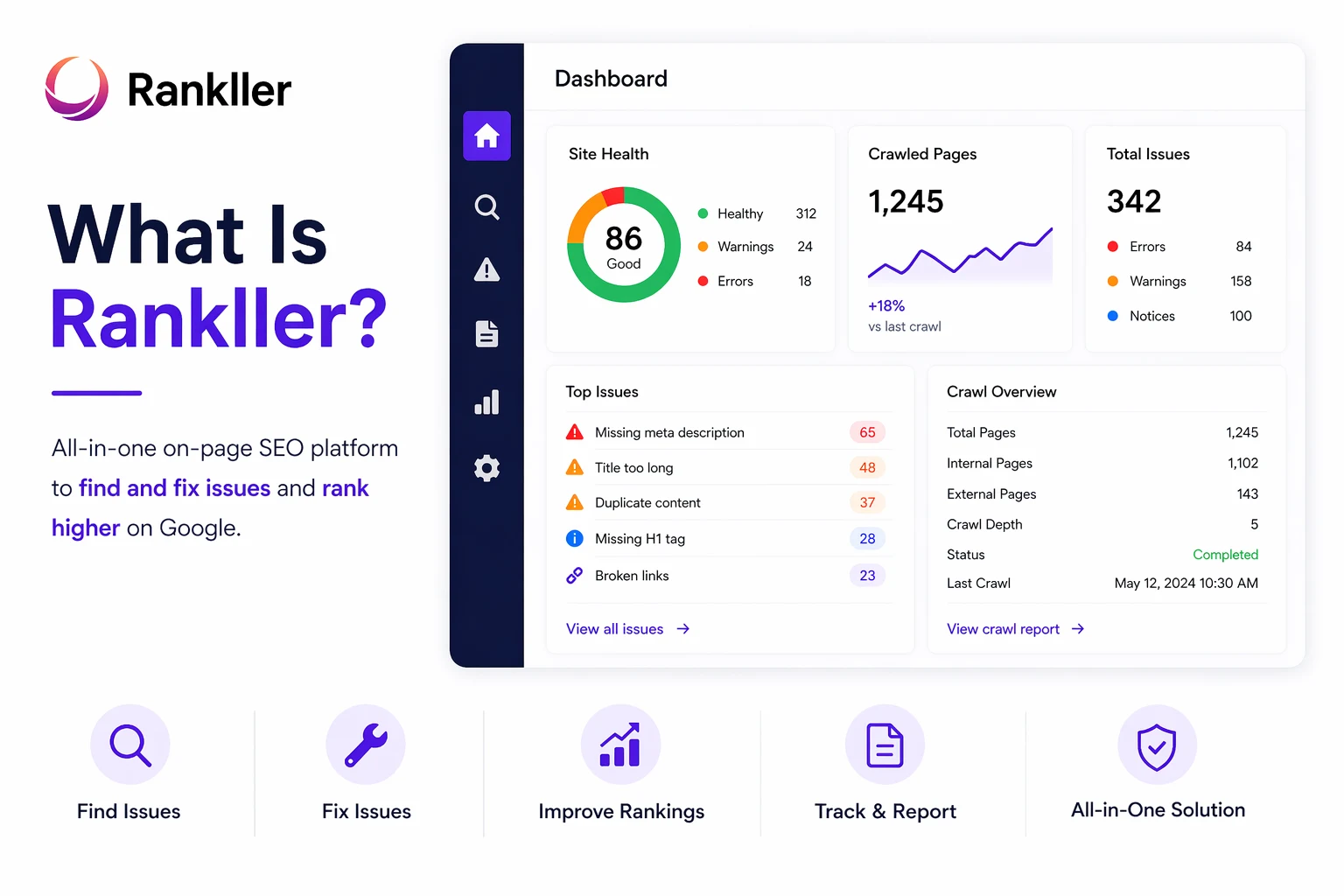
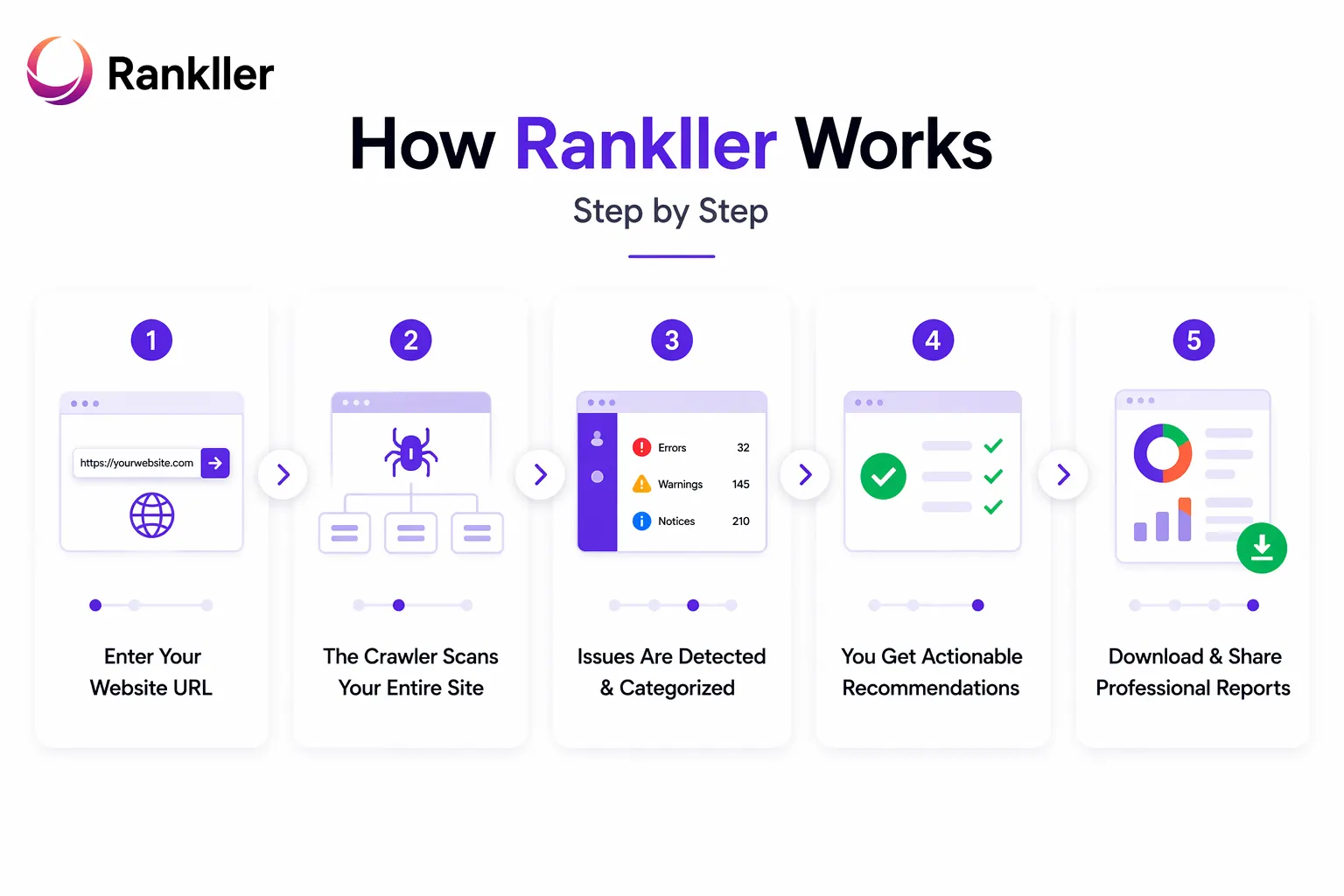
    The speed advantage alone is enough reason to switch to Rankller from manual auditing. But the tool doesn’t stop there  fast results are only valuable if they’re also thorough and accurate, which brings us to the next advantage.

    Comprehensive On-Page SEO Detection That Misses Nothing

    Comprehensive On-Page SEO
    Speed without depth is useless. That’s why Rankller’s second major advantage is the sheer comprehensiveness of its on-page SEO detection. It doesn’t just skim your pages it examines every SEO-relevant element in detail, giving you a complete picture of what’s working and what’s costing you rankings.

    What Rankller Checks on Every Page

    When Rankller crawls your website, it analyses a wide range of on-page elements across every single URL:

    • Title Tags: Detects missing, duplicate, too-long, or too-short title tags — all of which impact click-through rates and ranking signals
    • Meta Descriptions: Identifies missing or duplicate meta descriptions, which affect how your pages appear in search results
    • Duplicate Content: Flags pages with near-identical content that may be competing against each other in search results
    • Broken Links: Discovers all internal and external links returning 404 errors, which damage user experience and crawlability
    • Low Word Count Pages: Highlights thin content pages that may not meet search engine standards for relevance and depth
    • Heading Structure: Checks H1, H2, and H3 usage for proper hierarchy, missing headings, and duplicate H1 tags
    • Keyword Gaps: Identifies pages where on-page keyword optimization opportunities have been missed
    • Content Readability: Evaluates whether your content is structured and written in a way that’s easy to read and navigate
    • Keyword Density: Checks if your target keywords appear at the right frequency not too little, not over-optimized

    Why Comprehensive Detection Matters

    Here’s the thing about on-page SEO issues: they rarely announce themselves. A missing meta description on one of your most important pages won’t throw an error. A piece of duplicate content won’t send you a notification. These are silent problems that slowly erode your rankings over time without any obvious warning.

    Rankller brings all of these hidden issues to the surface in one scan. Instead of discovering problems months later when you notice a traffic drop, you catch them immediately while they’re still easy to fix and before they cause serious damage.

    This is the kind of thorough, systematic checking that separates websites that rank consistently from those that seem stuck no matter how much content they publish.

    Technical SEO Audits That Go Beneath the Surface

    On-page content is only one layer of SEO. Beneath the content, your website has a technical structure that either helps or hurts how search engines crawl, index, and rank your pages. This is the realm of technical SEO and it’s where many websites have serious problems they don’t even know about.

    Rankller’s technical audit capabilities are one of its most powerful features, and they’re designed to make technical SEO accessible to everyone, not just developers.

    Redirect Analysis and Link Structure

    Redirect chains are a common and often overlooked technical problem. When one URL redirects to another, which then redirects to another, search engines lose link equity and crawl efficiency with each hop. Rankller identifies these chains and loops so you can consolidate them into direct, clean redirects — preserving your link equity and improving crawl efficiency.

    It also reviews your overall internal link structure, identifying orphaned pages (pages with no internal links pointing to them) that search engines may never discover, and highlighting opportunities to strengthen your site’s internal linking architecture.

    Canonical Tag Verification

    Canonical tags tell search engines which version of a page is the ‘official’ one essential for avoiding duplicate content penalties and making sure link equity is concentrated on the right URLs. Rankller verifies that canonical tags are correctly implemented across your site, and flags any pages where they’re missing, incorrect, or conflicting.

    This is particularly critical for e-commerce websites where the same product may appear on multiple URLs due to filtering, sorting, or parameter-based navigation.

    Indexing and Crawlability Issues

    If search engines can’t crawl or index your pages, those pages simply don’t exist in search results regardless of how good the content is. Rankller checks for:

    • Pages accidentally blocked by robots.txt directives
    • Noindex tags on pages that should be indexed
    • Pages missing from your XML sitemap
    • Crawl depth issues — important pages buried too deep in your site structure for efficient crawling

    Performance and Page Speed Bottlenecks

    Page speed is a confirmed Google ranking factor, and it also directly affects your bounce rate and user experience. Rankller identifies performance bottlenecks that are slowing your pages down from unoptimized images and render-blocking resources to server response time issues so you can prioritize fixes that improve both rankings and user satisfaction.

    What makes Rankller special here is not just that it finds these issues, but that it explains them clearly. You don’t need to know what a redirect chain is or why canonical tags matter before starting Rankller educates you as it guides you through the fixes.

    A Clean, Intuitive Interface with Professional Reports You Can Actually Share

    Here’s a problem with a lot of powerful SEO tools: they’re built for SEO experts, not for the rest of us. The dashboards are cluttered, the terminology is impenetrable, and you need to watch hours of tutorial videos just to understand what you’re looking at. That creates a massive barrier between having an SEO tool and actually using it effectively.

    Rankller was designed with a completely different philosophy: make it simple enough for a beginner, powerful enough for a professional.

    An Interface That Makes Sense From Day One

    When you log into Rankller, you’re not greeted with 50 different graphs and data widgets fighting for your attention. The interface is clean, organized, and logical. Issues are clearly categorized, prioritized by severity, and explained in plain English. You always know what you’re looking at, what it means, and what to do about it.

    This matters enormously for adoption. An SEO tool that’s confusing gets ignored. Rankller’s interface is designed to be used which means you actually fix the issues it surfaces, rather than getting overwhelmed and closing the tab.

    Reports That Impress Clients and Stakeholders

    For agencies and freelancers, the quality of your reports is a direct reflection of your professional credibility. Rankller generates polished, downloadable reports that present SEO findings in a structured, visual, and client-friendly format.

    These reports don’t require the client to have any SEO background. They can see at a glance what issues their website has, how serious they are, and what the potential impact on their rankings might be. That kind of clarity builds client trust and makes your recommendations land with authority.

    Built for Teams and Agencies

    Rankller’s reporting features make it particularly well-suited for agencies managing multiple clients simultaneously. You can run audits for different client websites, generate separate reports for each, and maintain a consistent workflow across your entire client base all within one platform. This consistency is something clients notice and appreciate.

    Real Value at a Price That Actually Makes Sense

    One of the most frustrating things about the SEO tools market is the pricing. Many of the most powerful tools are priced exclusively for large agencies and enterprises, putting them completely out of reach for small businesses, freelancers, and growing websites.

    Rankller breaks that pattern. It was built from the ground up to deliver enterprise-quality SEO insights at a price point that makes sense for every type of user.

    How Rankller Compares to the Alternatives

    To understand Rankller’s value, it helps to compare it to the alternatives:

    • Screaming Frog: A powerful desktop crawler that requires installation, has a steep learning curve, and whose reports are difficult for non-technical users to interpret. It’s excellent for developers but can be alienating for business owners.
    • Semrush / Ahrefs: Comprehensive platforms with many features, but monthly subscription costs often start at $100–$300 per month. Many features go unused by users who only need SEO auditing.
    • Enterprise tools (Lumar, Oncrawl): Excellent for very large websites but priced from $500/month — far beyond the budget of most businesses.
    • Manual auditing: Free in terms of tool cost, but expensive in terms of time and prone to human error.

    Rankller offers a compelling alternative: professional-grade crawling and auditing capabilities at an accessible price, without the complexity of enterprise platforms or the time investment of manual methods.

    The Free Audit: Zero Risk, Immediate Value

    Rankller also offers a completely free website audit to get started. This means you can experience the platform’s capabilities and see real insights about your own website before making any financial commitment. Simply visit audit.rankller.com, enter your URL, and Rankller delivers a full analysis no credit card required.

    This free entry point is a reflection of Rankller’s confidence in its product and its commitment to making great SEO accessible. Most business owners who run their first free audit are immediately converted not because of clever marketing, but because the insights are genuinely useful and the experience is smooth.

    With a 98% client satisfaction rate, Rankller’s value proposition is validated not by its own claims, but by the results its users actually get. That’s the kind of social proof that matters.

    Trusted by 250+ Websites Proven Results at Scale

    It’s one thing for a tool to claim it delivers results. It’s another thing entirely when 250+ website owners, marketers, and agencies rely on it consistently enough that it becomes a core part of their workflow.

    Rankller’s user base spans the full spectrum of the digital world:

    • Bloggers and content creators running personal websites who want to make sure their hard work is visible in search results
    • E-commerce businesses monitoring the SEO health of hundreds of product pages to protect their revenue
    • Marketing agencies managing client portfolios and needing reliable, repeatable audit workflows
    • In-house SEO teams at growing companies who need a fast, accurate tool for weekly monitoring
    • Startups building their first website and wanting to get SEO right from the beginning

    The diversity of Rankller’s user base is itself an advantage. The tool has been tested, refined, and improved based on feedback from thousands of different use cases which means it’s robust enough to handle whatever your website throws at it.

    When a tool achieves this kind of adoption across such a wide range of users, it’s because it consistently delivers on its core promise. Rankller’s promise is simple: give you fast, accurate, actionable SEO insights that help your website rank higher. And based on the numbers, it’s keeping that promise.

    Who Should Use Rankller?

    By now you might be asking: is Rankller right for me? The honest answer is that Rankller was designed to be useful across a very wide range of users. But here’s a quick breakdown of who gets the most value from it:

    Freelance SEO Professionals and Consultants

    If you’re running SEO audits for clients as a freelancer, Rankller gives you a fast, reliable workflow. You can audit a client’s site quickly, generate a professional report, and present findings in a format that impresses even non-technical decision-makers. It makes you look more professional and saves you significant time on every project.

    Digital Marketing Agencies

    Agencies managing multiple client websites need a tool they can rely on consistently and at scale. Rankller’s fast crawls, clear reports, and repeatable workflow make it ideal for agency use. You can onboard a new client, run a full audit, and have a findings report ready to present all within the same day.

    Business Owners and Entrepreneurs

    You don’t need to be an SEO expert to use Rankller effectively. If you run a business and you have a website, Rankller tells you exactly what SEO issues you have and explains what they mean. You get actionable insights without needing to learn the technical language of SEO first.

    E-Commerce Website Owners

    For e-commerce sites, SEO health directly translates to revenue. A broken link to a product page, a duplicate content issue across filter pages, or a slow-loading checkout page can all hurt your rankings and cost you sales. Rankller’s ongoing monitoring capabilities make it easy to stay on top of your site’s health consistently.

    Bloggers and Content Creators

    Even if you’re running a personal blog or a content-focused website, SEO fundamentals matter. Rankller helps you make sure every post you publish is properly optimized right title tags, correct heading structure, no duplicate content so your content has the best possible chance of ranking for the keywords you’re targeting.

    Frequently Asked Questions About Rankller

    What does Rankller do?

    Rankller scans your entire website and checks for SEO issues broken links, missing meta tags, duplicate content, indexing problems, and keyword gaps. It then gives you a clear, prioritized list of fixes so you know exactly what to do and where to start.

    Is Rankller good for beginners?

    Yes. The interface is clean and straightforward, and every issue is explained in plain language. You don’t need any SEO background to understand the results or act on them.

    Is there a free audit available?

    Yes head to audit.rankller.com, enter your URL, and get a full site audit for free. No credit card required.

    How often should I run an audit?

    Once a week is ideal for most websites. Also run one immediately after any major site changes a redesign, new pages, or a CMS update.

    Can I use Rankller for multiple websites?

    Yes. Rankller works well for managing audits across multiple sites, making it a solid choice for agencies and freelancers handling several clients at once.

    Conclusion

    Rankller makes SEO auditing fast, clear, and genuinely actionable. Whether you’re a blogger, a business owner, or an agency managing dozens of client sites, it gives you the insights you need to fix issues and improve your rankings without the complexity of expensive enterprise tools.With 250+ users and a 95% satisfaction rate, the proof is in the results. Try your free audit at rankller.com and see what’s holding your site back.

  • How Rankller Works: A Complete Breakdown of the On-Page SEO Crawler Built to Boost Your Rankings

    How Rankller Works: A Complete Breakdown of the On-Page SEO Crawler Built to Boost Your Rankings

    If you’ve ever felt like your website should be ranking higher but couldn’t figure out why, you’re not alone. Most website owners know something is off with their on-page SEO broken links, missing meta tags, slow load times but tracking down every issue manually is exhausting, time-consuming, and frankly, a bit of a nightmare.

    That’s exactly where Rankller steps in.

    Rankller is a fast, powerful, and surprisingly easy-to-use on-page SEO crawler trusted by 25,000+ website owners, digital marketers, and agencies around the world. It scans your entire website in seconds, pinpoints every issue hurting your rankings, and tells you exactly what to fix no guesswork, no jargon, no technical degree required.

    we’ll walk you through exactly how Rankller works from the moment you enter your URL to the moment you download a professional audit report ready to share with your team or clients. By the end, you’ll understand what makes Rankller different from every other SEO tool out there.

    What Is Rankller?

    what is rankller
    Rankller is an all-in-one on-page SEO analysis platform built to help businesses of all sizes find and fix the issues that are quietly holding their website back from ranking at the top of Google.

    At its core, Rankller is a website crawler a smart tool that visits every page on your site, checks hundreds of on-page SEO factors, and returns a clear, organized report with actionable recommendations. Not raw data you have to decode. Not a spreadsheet full of numbers with no context. Actual, usable guidance.

    The mission behind Rankller is refreshingly simple: make on-page SEO easy, automated, and accessible for every business no technical expertise required. Whether you’re managing a 10-page portfolio site or a 100,000-page e-commerce store, Rankller has you covered.

    How Rankller Works Step by Step

    Rankller Works Step by Step
    Using Rankller doesn’t require any setup, installation, or technical know-how. Here’s exactly what happens from start to finish:

    Step 1: Enter Your Website URL

    Head over to audit.rankller.com and type in your website address. That’s it. No plugin to install, no code to add to your site, no configuration screens to wade through. Rankller is a cloud-based tool, so everything happens on their end you just show up and let it do the work.

    Step 2: The Crawler Scans Your Entire Site

    Once you hit start, Rankller’s crawler gets to work. It moves through your website much like Google’s own Googlebot does following internal links, visiting every URL it finds, checking HTTP status codes, reading your metadata, evaluating your content structure, and flagging anything that doesn’t look right.

    The key difference from Google’s crawler? Rankller does this in seconds and gives you the results in a human-friendly format you can actually act on.

    Step 3: Issues Are Detected & Categorized

    Once the crawl is complete, Rankller organizes everything it found into clear, logical categories. Instead of dumping thousands of rows of data on you, it groups issues like broken links, missing title tags, duplicate content, redirect chains, and low word count pages so you can see at a glance where the biggest problems are.

    You’re not left hunting through raw exports the platform does the sorting for you.

    Step 4: You Get Actionable Recommendations

    This is where Rankller genuinely stands out from most SEO tools. It doesn’t just show you what’s wrong — it tells you what to do about it. Recommendations are tailored based on your website type, your industry, and current SEO best practices, so you’re not getting generic advice that may or may not apply to your situation.

    Clear, specific, and prioritized the kind of guidance that lets you start fixing things right away.

    Step 5: Download & Share Professional Reports

    When you’re ready, Rankller lets you generate clean, client-ready audit reports you can download and share instantly. For agencies, this is a huge time-saver — instead of spending hours building a presentation explaining SEO issues to a non-technical client, you hand them a polished report that makes it all crystal clear.

    What Does Rankller Check? (Core Features Explained)

    how rankller works
    Rankller covers every major area of on-page SEO in one place. Here’s a breakdown of what the platform audits:

    1. On-Page Crawling & SEO Audits

    Rankller checks for all the classic on-page issues that affect your ability to rank missing or poorly written title tags, absent or duplicated meta descriptions, broken internal and external links, thin or duplicate content, and pages that don’t have enough content to compete. These are often the highest-impact fixes you can make.

    2. On-Page Crawling & SEO Audits

    Beyond just finding technical errors, Rankller also helps you identify where keyword gaps exist across your pages. If your target keywords aren’t appearing in the right places — your headings, your page copy, your meta tags Rankller surfaces those opportunities so you can optimize before your competitors do.

    3. Technical SEO Checks

    Rankller digs into the technical side of your site too. It analyzes URL structure, redirect chains, canonical tag usage, and indexing signals to make sure search engines can properly crawl and understand your site. Issues here often go undetected for months but they can quietly tank your rankings.

    4. Page Speed & Core Web Vitals Analysis

    Page speed is a confirmed Google ranking factor, and Core Web Vitals matter more than ever in 2026. Rankller identifies performance bottlenecks slow server response times, unoptimized images, render-blocking scripts that hurt both your rankings and the experience people have on your site.

    5. Content Quality Evaluation

    Good SEO isn’t just about technical fixes. Rankller also evaluates the quality of your content checking readability scores, heading structure, content density, and duplication signals. This helps ensure your pages are built to satisfy both Google’s algorithms and the actual humans reading them.

    6. Complete SEO Reporting & Analytics

    All of this data is compiled into downloadable, shareable reports that are professional enough for client presentations and detailed enough for your technical team. No manual data pulling, no formatting work Rankller handles it.

    Who Is Rankller Built For?

    One of the best things about Rankller is that it’s genuinely useful for a wide range of people, not just seasoned SEO professionals. Here’s who gets the most out of it:

    • Small business owners who need simple but powerful insights without hiring a full-time SEO agency.
    • SEO professionals who want faster, more repeatable audits across multiple client sites.
    • Marketing agencies that need professional client-facing reports at scale, quickly.
    • E-commerce stores managing hundreds or thousands of product pages where manual auditing simply isn’t possible.
    • Bloggers and content creators who want to keep their site technically clean so their content has the best possible chance of ranking.

    If you have a website and you care about where it appears in search results, Rankller was built for you.

    Why Rankller Stands Out From Other SEO Tools

    There’s no shortage of SEO tools on the market. So why do 25,000+ users trust Rankller? Here’s what makes it different:

    • Scans your entire site in seconds, not hours speed matters when you’re managing multiple projects.
    • No technical expertise required. If you can type a URL, you can use Rankller.
    • Works for any website size, from a 10-page brochure site to a 100,000-page platform.
    • Gives you recommendations, not just raw data. Other tools show you the problem. Rankller tells you how to fix it.
    • Affordable and cost-effective. You get premium-level SEO insights at a fraction of what an agency would charge.
    • Reports are clean, professional, and ready to share with clients or stakeholders.
    • 98% client satisfaction rate, built on real results from real websites.

    Compare that to tools like Screaming Frog, which is powerful but desktop-heavy and designed for technical SEO specialists. Rankller is built for clarity and speed so you spend less time interpreting data and more time actually improving your site.

    Real Results — What Rankller Users Say

    “As a small business owner, I needed something simple yet powerful. Rankller delivered exactly that. The insights were accurate, and I started seeing improvements within weeks.” — Emily C.
    “Rankller helped us identify duplicate content and broken links across hundreds of pages. The crawler is fast and saved us hours of manual checking.” — Ahmed K.
    “Our team uses Rankller for every new client. The reports are professional, easy to download, and perfect for explaining SEO issues to non-technical people.” — Sofia M.

    These aren’t just reviews they’re outcomes. Rankller reports a 68% average boost in business visibility for websites that act on its recommendations, and a 42% improvement in conversion rates from better-optimized pages.

    How to Get Started With Rankller (It’s Free)

    Getting started with Rankller takes less than two minutes. Here’s how:

    1. Go to rankller.com
    2. Click the “Start Free Audit” button
    3. Enter your website URL
    4. Let Rankller crawl and analyze your site
    5. Review your report and start fixing the issues that matter most

    Not sure where to start once you have your report? Rankller also offers free consultations for businesses that want expert guidance alongside the tool. You get the data and the support — without the agency price tag.

    Frequently Asked QuestionsQ1:

    Q1: What is Rankller?

    A: Rankller is a fast, cloud-based on-page SEO crawler and website audit tool that scans your site for SEO issues and provides clear, actionable recommendations to improve your rankings

    Q2: Is Rankller free to use?

    A: Yes — Rankller offers a free audit at audit.rankller.com. You can start scanning your website instantly without any credit card or installation

    Q3: How long does a crawl take?

    A: Rankller can scan your entire website in seconds. The exact time depends on the number of pages on your site.

    Q4: Does Rankller work for large websites?

    A: Yes. Rankller is designed to handle websites of all sizes — from small sites with 10 pages to large sites with over 100,000 pages — while maintaining speed and accuracy.

    Q5: Do I need SEO knowledge to use Rankller?

    A: No. Rankller is beginner-friendly and requires no technical SEO knowledge, while still offering powerful insights for professionals

    Q6: What reports does Rankller generate?

    A: Rankller provides clean, downloadable, and client-ready audit reports covering all major on-page SEO issues, making it easy to share with teams or clients.

    Q7: How is Rankller different from Ahrefs or Screaming Frog?

    A: Ahrefs focuses on backlinks and keyword research, while Screaming Frog is a desktop-based technical crawler for advanced users. Rankller, on the other hand, focuses on on-page SEO audits, is cloud-based, requires no installation, and provides actionable recommendations instead of just raw data.

    Conclusion

    SEO doesn’t have to be complicated. For years, on-page optimization felt like something only technical experts could do properly and that left a lot of great websites stuck on page 2 (or worse) through no fault of their own.

    Rankller changes that.

    By automating the entire audit process and turning complex crawl data into plain-language recommendations, Rankller puts professional-grade SEO within reach of every business owner, marketer, and agency. Whether you manage one website or fifty, Rankller gives you the clarity and confidence to fix what’s broken, optimize what’s working, and rank higher faster.