Most pages don’t fail because of bad content they fail because no one ever finds them. Keyword targeting and on-page SEO are what bridge the gap between a page that exists and a page that ranks. This shows you exactly where to place your keywords, how to structure your page, and what Google actually looks for in 2026.
How do I build the perfectly optimized page?
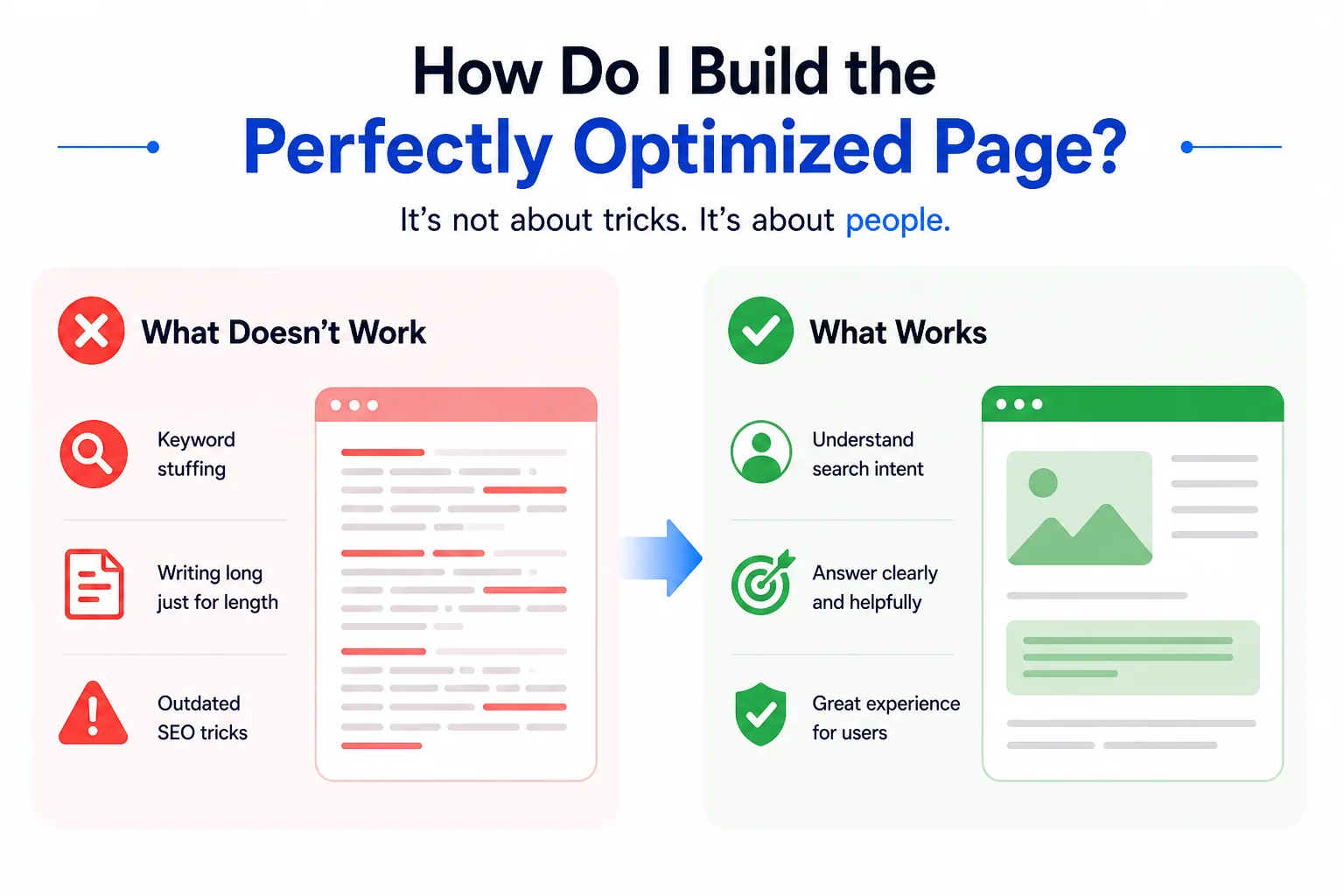
This is a question almost every website owner, blogger, and digital marketer asks at some point. There are hundreds of “best practices” lists floating around for keyword targeting and on-page SEO but as search engines have grown smarter, and as user behavior has shifted, the very definition of “perfectly optimized” keeps moving.
Stuffing your keyword into every paragraph? That used to work in 2010. Today, it gets you penalized. Writing long content just for the sake of word count? Also a trap. The truth is, great keyword targeting and on-page SEO is less about rules and more about understanding what a real person is looking for and making sure your page delivers exactly that, clearly and quickly.
This guide walks you through every element of an optimized page visually, practically, and in plain language so you can stop guessing and start ranking.
What exactly is keyword targeting, and why does it matter so much?
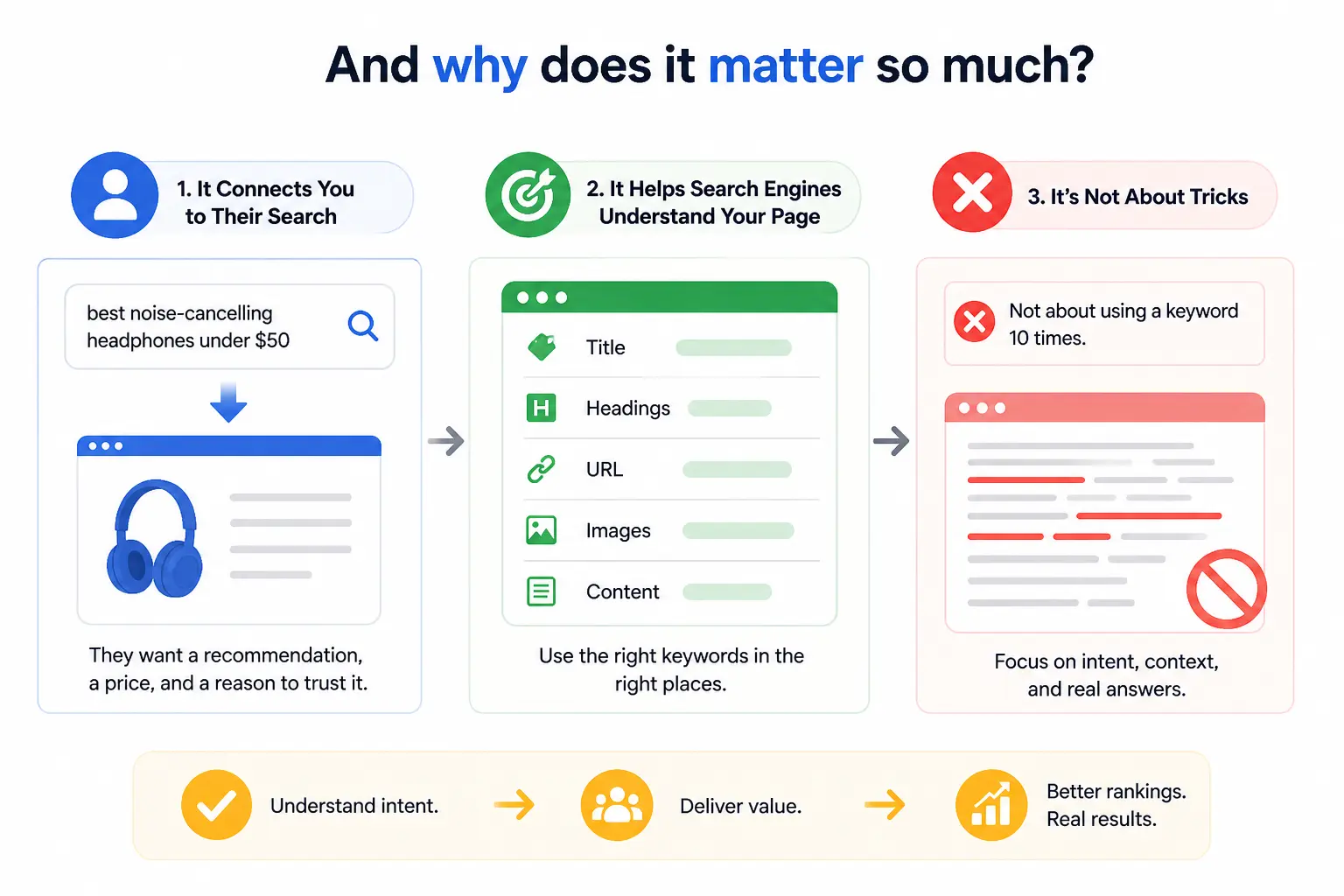
Imagine someone opening Google and typing “best noise-cancelling headphones under $50.” They’re not looking for a history of headphone technology. They want a recommendation, a price, and a reason to trust it. Keyword targeting is what connects your page to that exact moment.
Keyword targeting is the process of selecting and placing specific search terms throughout your content so that search engines understand what your page is about and serve it to the right people at the right time. Done well, it shapes everything: your page title, your headings, your URL, even the name of your images.
The mistake most people make is treating keyword targeting as a numbers game “use this keyword 10 times and you’ll rank.” That hasn’t been true for years. Google’s algorithm is sophisticated enough to understand context, synonyms, and intent. What it really wants to see is a page that genuinely answers the question behind the keyword.
What is on-page SEO, and how is it different from off-page SEO?
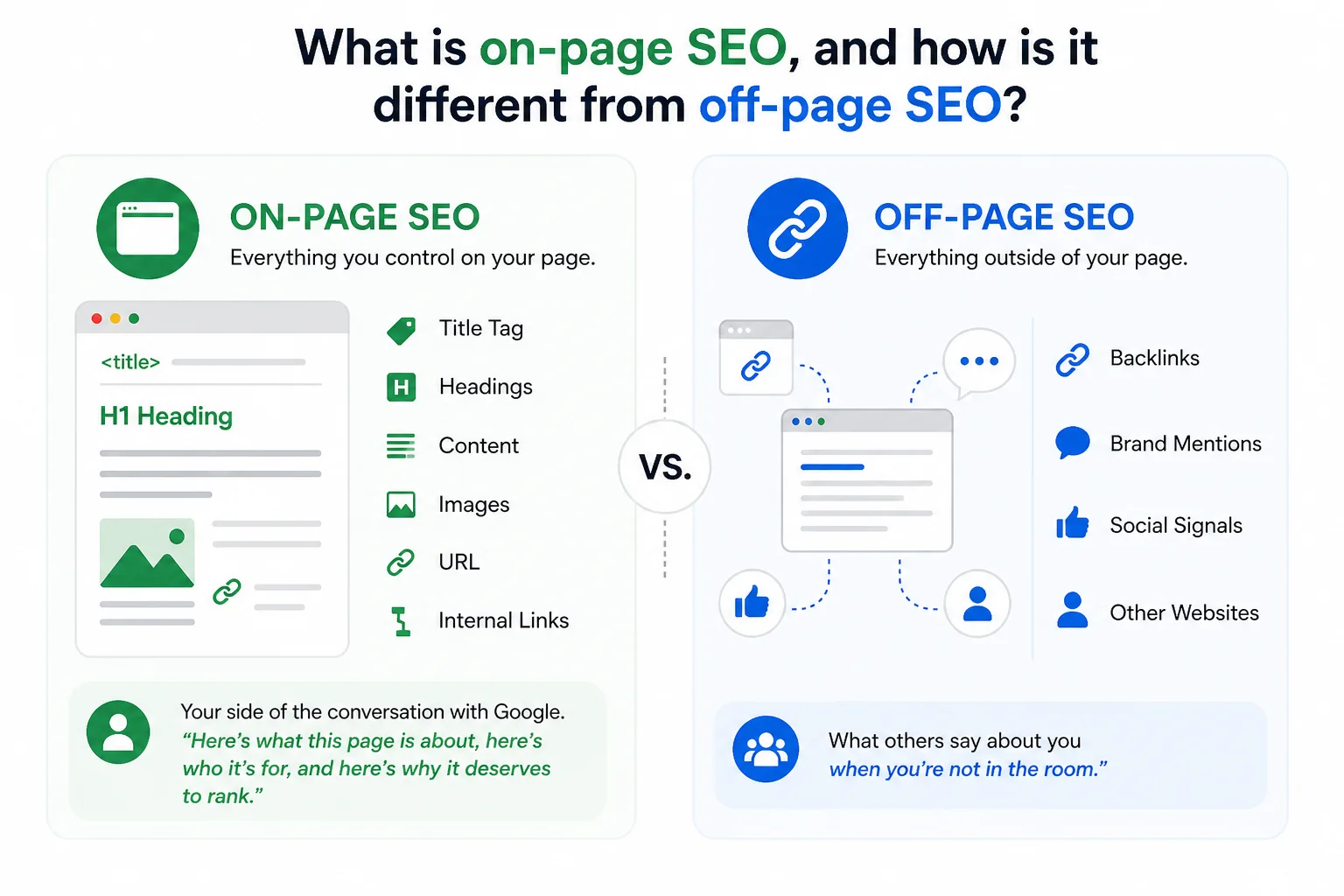
On-page SEO refers to everything you do directly on your page to help it rank better. That includes your title tag, your content, your headings, your images, your URL, and your internal links. You control all of it.
Off-page SEO, by contrast, is what happens elsewhere other websites linking to you, brand mentions, social signals. You influence it, but you don’t fully control it.
Think of it this way: on-page SEO is your side of the conversation with Google. You’re telling the search engine, “Here’s what this page is about, here’s who it’s for, and here’s why it deserves to rank.” Off-page SEO is what other people say about you when you’re not in the room.
Getting keyword targeting and on-page SEO right is the foundation. Without it, even the best backlink profile won’t save a page that’s confusing to both users and search engines.
Where exactly should you place your target keyword on the page?
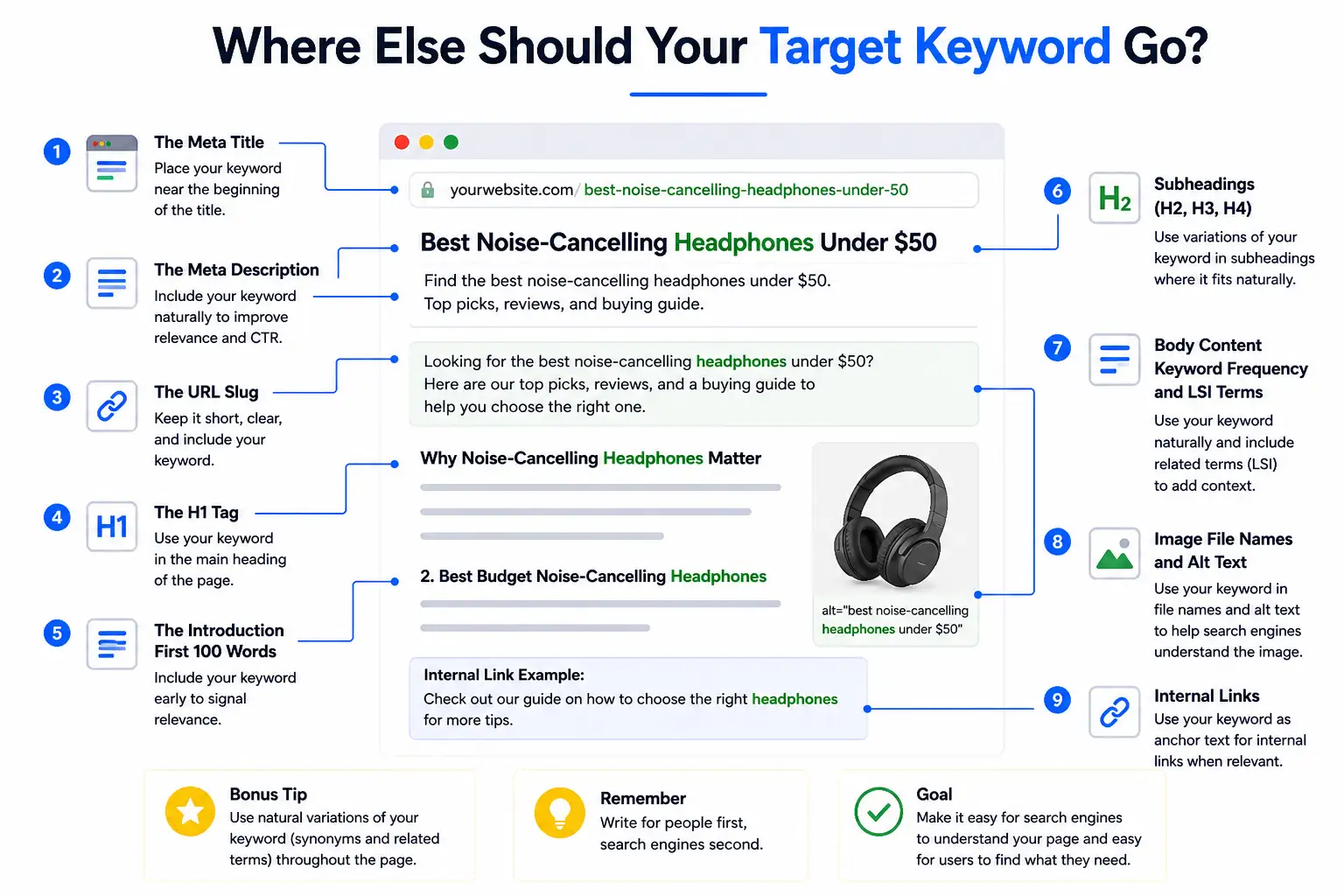
This is where most guides dump a checklist and call it a day. Instead, let’s walk through a real page element by element and show you precisely where your keyword needs to live, and why.
1. The Meta Title (Title Tag)
Your title tag is the single most important on-page SEO element. It’s what appears as the clickable link in Google search results, and it’s the first thing both users and crawlers read.
Your focused keyword should appear as close to the beginning of the title tag as possible. Keep it under 60 characters so it doesn’t get cut off on smaller screens. Add a modifier a year, a power word, or a qualifier to increase click-through rate.
Weak: On-Page SEO Tips for Websites
Strong: Keyword Targeting and On-Page SEO: A Visual Guide [2026]
The second version front-loads the keyword, signals freshness with the year, and tells the reader exactly what format to expect.
2. The Meta Description
Your meta description doesn’t directly affect ranking but it directly affects clicks. And clicks affect rankings. Include your focused keyword naturally, write it like a human talking to another human, and end with a soft call to action.
Keep it between 150–160 characters. Write it for the reader, not the algorithm.
Example: Learn keyword targeting and on-page SEO with our visual guide. Discover where to place keywords, how to structure pages, and rank higher in 2026.
3. The URL Slug
Your URL should be short, lowercase, and descriptive. Use hyphens to separate words. Include your keyword, but keep it clean no dates, no ID numbers, no stop words unless they’re part of the keyword itself.
Wrong: /blog/post?id=4527
Right: /visual-guide-to-keyword-targeting-and-on-page-seo
A clean URL also builds trust. People glance at URLs before clicking. A readable URL tells them immediately that the page is relevant.
4. The H1 Tag
Every page gets exactly one H1. It’s the headline readers see when they land on your page, and it should contain your focused keyword ideally near the front.
Your H1 and title tag don’t have to be identical, though they often are. The title tag is for search results; the H1 is for the page itself.
Example H1: A Visual Guide to Keyword Targeting and On-Page SEO (Updated 2026)
5. The Introduction First 100 Words
Drop your keyword naturally within the first 100 words of your content. Not forced. Not twice. Just once, early, in a sentence that actually makes sense to read.
This tells Google immediately what the page is about. It also reassures readers that they landed in the right place which reduces bounce rate and improves time on page.
6. Subheadings (H2, H3, H4)
Your H2s and H3s give your page structure. They help readers scan, and they help crawlers understand the depth of your coverage. Use keyword variations, related questions, and semantic terms in your subheadings not the same exact phrase repeated over and over.
7. Body Content Keyword Frequency and LSI Terms
In 2026, keyword density is less about hitting a number and more about natural coverage. If you’re writing a 1,500-word article, mentioning your primary keyword 4–6 times is reasonable. Going beyond that starts to look forced to both readers and algorithms.
More importantly, use related terms. If you’re writing about keyword targeting, Google expects to also see terms like “search intent,” “meta description,” “title tag,” “organic traffic,” and “SERP.” These are called LSI (Latent Semantic Indexing) keywords, and they signal topical depth.
8. Image File Names and Alt Text
Most people upload images named “screenshot-2026-01-04.png.” That’s a wasted opportunity. Rename your image files to describe what they show, using hyphens and including your keyword where it fits naturally.
Wrong file name: IMG_00483.jpg
Right file name: keyword-targeting-page-diagram.jpg
Alt text describes the image for screen readers and for search engine crawlers. Write it as a natural description of what’s in the image. Include your keyword if it fits — if it doesn’t, don’t force it.
What is search intent, and why does it matter more than keywords?
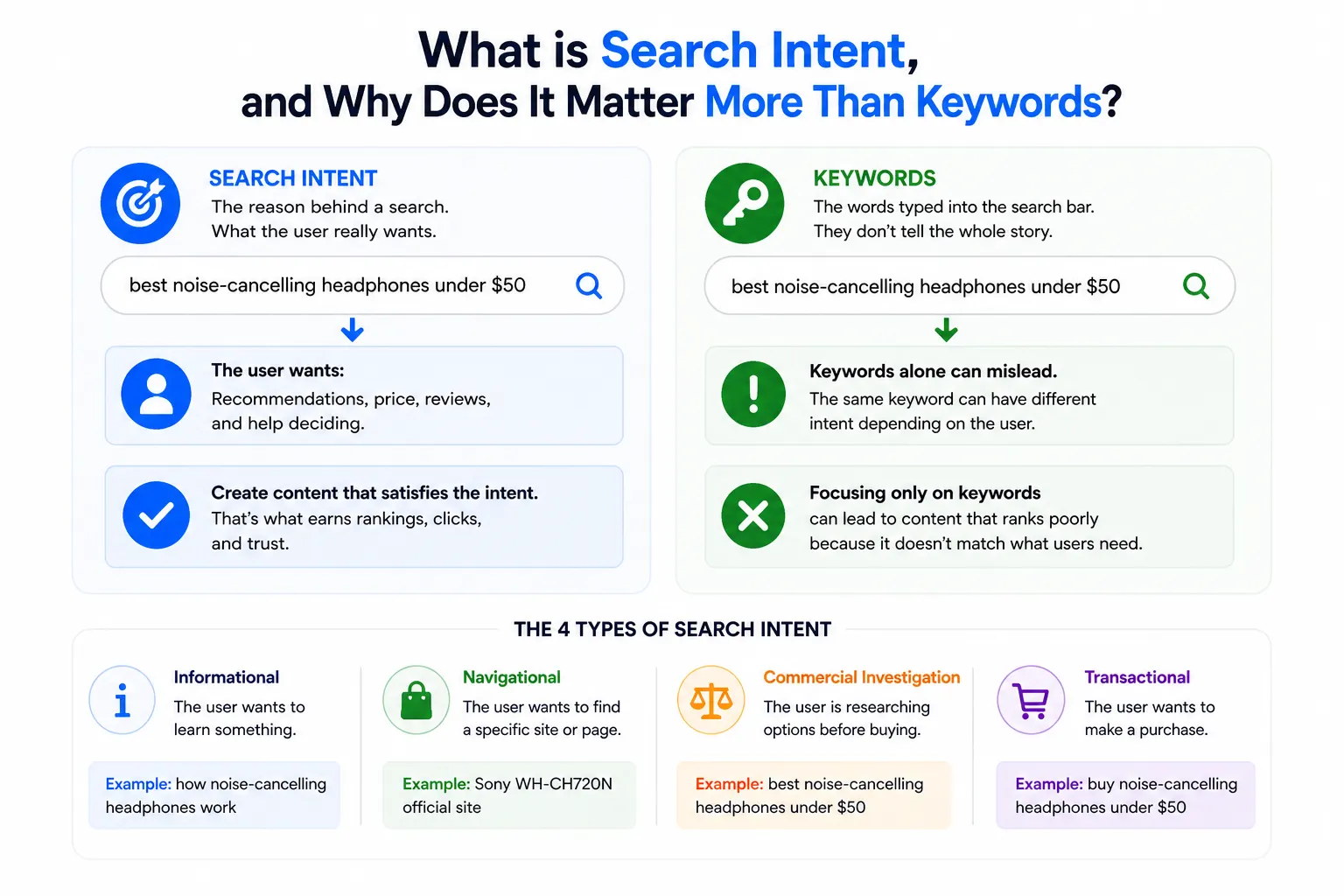
Here’s a scenario: two people search Google on the same day. One types “keyword targeting.” The other types “how to do keyword targeting for a new blog.” Same general topic. Completely different intent.
The first person might be looking for a definition, a tool, or a course. The second person wants a step-by-step guide. If your page tries to serve both with the same content, it’ll likely satisfy neither.
Search intent is the “why” behind a search query. Google categorizes it into four types:
- Informational: the user wants to learn something (“what is on-page SEO”)
- Navigational: the user wants to find a specific site (“Moz on-page SEO guide”)
- Commercial: the user is researching before buying (“best SEO tools 2026”)
- Transactional: the user is ready to act (“buy Ahrefs subscription”)
Before you write a single word, Google the keyword you’re targeting. Look at the top 5 results. Are they blog posts? Product pages? Videos? That tells you what Google believes users want — and your content needs to match that format.
How do LSI keywords and semantic SEO fit into on-page optimization?
Google stopped reading pages like a keyword-matching machine a long time ago. Today it reads more like a knowledgeable editor evaluating whether your content genuinely covers a topic, or just repeats the same phrase in different sentences.
That’s where semantic SEO comes in. Instead of targeting a single keyword in isolation, you build content that covers a topic comprehensively. LSI keywords terms that are conceptually related to your main keyword are the building blocks of this.
If you’re writing about keyword targeting and on-page SEO, semantically related terms include: title tags, meta descriptions, header tags, anchor text, crawlability, keyword density, SERP, organic traffic, and search intent. Work these in naturally, and your page sends stronger relevance signals without ever feeling keyword-stuffed.
Tools like Google’s “People Also Ask” section, the “Related Searches” at the bottom of a SERP, and keyword research platforms like Ahrefs or Semrush all help you find these related terms quickly.
What on-page SEO mistakes quietly kill your rankings?
You can do everything right and still rank poorly if you’re making one of these common errors without realizing it.
Keyword cannibalization happens when two or more pages on your site target the same keyword. Instead of both pages ranking, they compete against each other and neither wins. The fix is to consolidate them into one comprehensive page, or clearly differentiate the keyword focus of each.
Keyword stuffing is the practice of forcing your keyword into content at an unnatural frequency. Google’s algorithms detect it easily, and it also makes your content unpleasant to read. Natural placement beats repetition every time.
Thin content — pages with very little substance don’t rank well in 2026. A 200-word page targeting a competitive keyword isn’t going to cut it, no matter how well-optimized the title tag is. Depth signals authority.
Duplicate title tags and meta descriptions across multiple pages confuse crawlers and dilute your relevance signals. Every page should have a unique title and description.
Ignoring mobile UX is increasingly costly. Google indexes the mobile version of your site first. If your page is difficult to read or navigate on a phone, your rankings will reflect that.
How do page speed and Core Web Vitals affect on-page SEO?
On-page SEO isn’t only about text. The technical health of your page plays a direct role in rankings and in whether users stick around long enough to read what you’ve written.
Core Web Vitals are Google’s set of measurable, user-experience metrics:
- LCP (Largest Contentful Paint) — how quickly the main content loads. Aim for under 2.5 seconds.
- CLS (Cumulative Layout Shift) — how stable the page layout is as it loads. Avoid elements that jump around.
- INP (Interaction to Next Paint) — how quickly the page responds to user input.
A slow page with great content will rank below a fast page with equally great content. Compress your images. Use a reliable host. Minimize render-blocking scripts. These aren’t glamorous tasks, but they matter.
You can check your Core Web Vitals for free using Google Search Console and Google PageSpeed Insights.
What does a complete on-page SEO checklist look like in 2026?
Before you hit publish on any page, run through this checklist. After you publish, revisit it every few months to make sure the page is still performing.
Pre-Publish Checklist
- Focused keyword identified and mapped to a single page
- Keyword in meta title (within 60 characters, near the front)
- Keyword in meta description (150–160 characters, includes CTA)
- Keyword in H1 (one H1 only)
- Keyword in the first 100 words of the introduction
- Keyword variations in at least 2–3 H2 subheadings
- LSI keywords distributed naturally throughout the body
- URL is short, lowercase, hyphens only, includes keyword
- All images have descriptive file names and alt text
- Internal links added from relevant existing pages
- Descriptive anchor text used (not “click here”)
- No duplicate title or meta tags on other pages
- Page loads in under 3 seconds on mobile
- Content fully answers the search intent behind the keyword
Post-Publish Checklist
- Page indexed in Google Search Console
- Impressions and clicks monitored over first 30 days
- Page updated if rankings plateau after 60–90 days
- Broken links checked and repaired
- Schema markup added if eligible for featured snippets (FAQ, How-To)
FAQ
What is the difference between keyword targeting and on-page SEO?
Keyword targeting is the process of choosing which search terms to focus on. On-page SEO is the broader practice of optimizing your page so it ranks for those terms. They work together — keyword targeting tells you what to optimize for, and on-page SEO is how you do it.
How many keywords should I use per page?
Target one primary keyword (or keyword theme) per page. You can also include secondary keywords and LSI terms, but avoid targeting multiple unrelated keywords on a single page — that dilutes your relevance signals.
Where exactly should the focus keyword appear?
At a minimum: the meta title, the meta description, the H1, the URL slug, and the first 100 words of the body. From there, use it naturally throughout the content without forcing it.
Does keyword density still matter in 2026?
It matters less than it used to. There’s no magic number. What matters is that your keyword appears naturally, at a frequency that makes the content readable and relevant — typically 3–6 times per 1,000 words for the primary keyword.
How do I know if my on-page SEO is working?
Check Google Search Console. Look for impressions, clicks, average position, and CTR for your target keyword. If impressions are growing but clicks are low, your title or meta description may need work. If you’re not appearing at all, check indexing and content depth.
Conclusion
Keyword targeting and on-page SEO aren’t one-time tasks they’re ongoing habits. The pages that hold their rankings in 2026 are the ones that were built thoughtfully, updated regularly, and written for real people first.
Start with one page. Run it through the checklist above. Look at how your focused keyword sits in the title, the H1, the introduction, the subheadings. Make sure the content actually answers the question your keyword represents. Then move to the next page.
Small, consistent improvements compound over time. That’s the real secret to keyword targeting and on-page SEO that lasts.