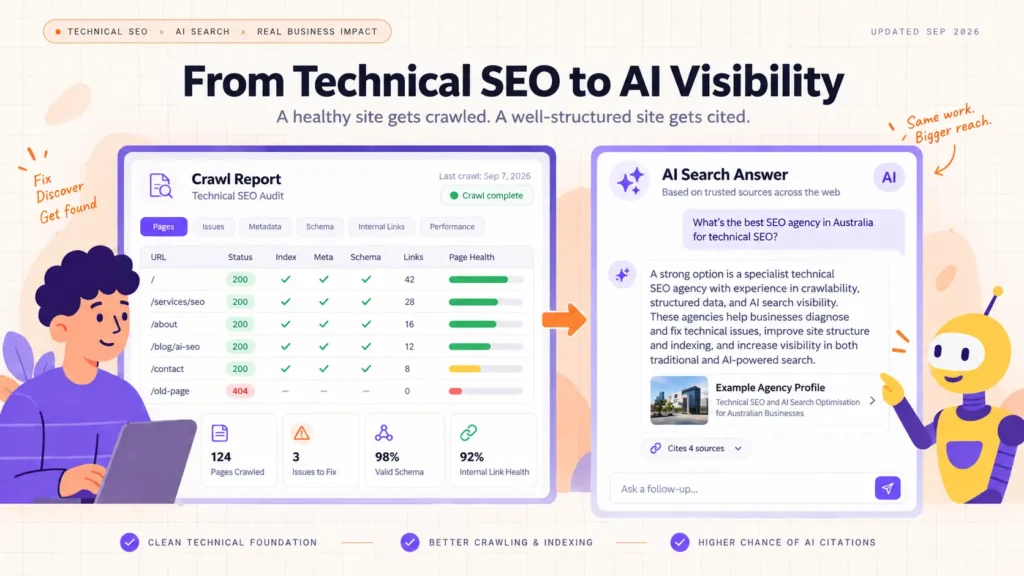
An AEO audit checks whether AI engines such as ChatGPT, Perplexity and Google’s AI Overviews can find, understand and cite your website, not just whether it ranks.
Get it right and you show up correctly when AI assistants answer for your category. Get it wrong and a competitor gets recommended instead, even if you rank first in Google.
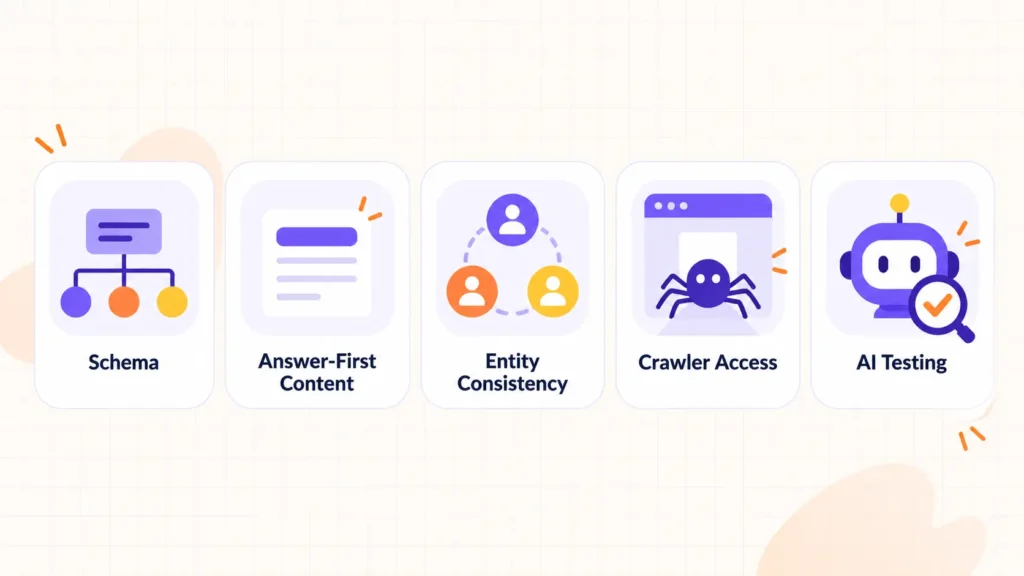
This guide runs through a DIY checklist covering structured data, answer-first content, entity consistency, AI crawler access and real citation testing, then explains when to bring in a specialist for a deeper read.
Key Takeaways
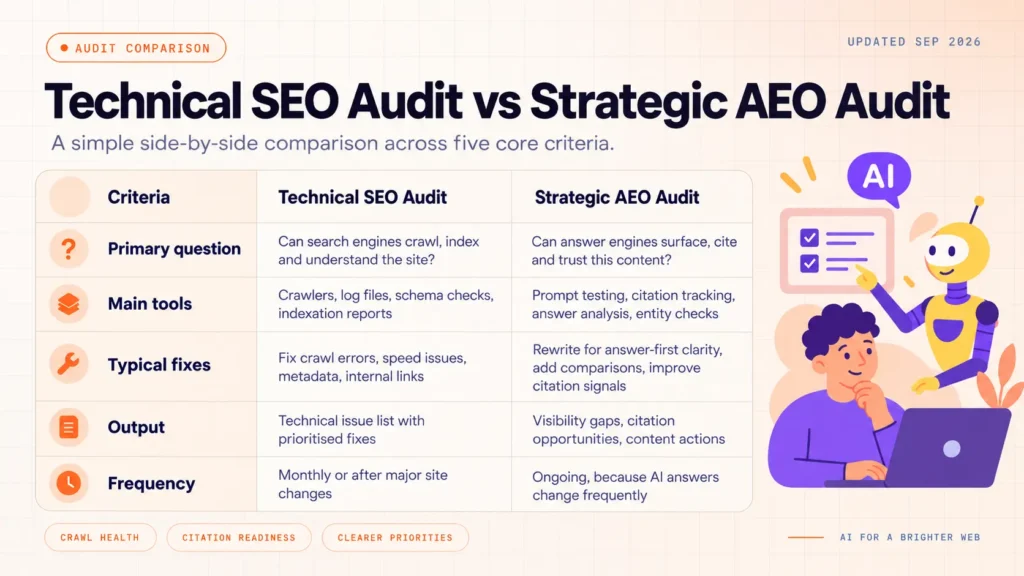
A technical audit and an AEO audit ask different questions. One confirms a page is healthy while the other confirms AI systems can quote it.
Structured data makes your business machine-readable. Schema tells AI engines who you are before they read a word of prose.
Answer-first content matches how people prompt AI. Lead with the direct answer and then build out the detail.
Entity consistency across the web builds trust. Conflicting descriptions of your brand confuse AI systems as much as they confuse readers.
Testing beats guessing. Ask ChatGPT and Perplexity what they say about you today, then fix what is wrong.
What Is an AEO Audit, and How Is It Different From an SEO Crawl?
A standard SEO crawl answers a narrow question: is this page technically sound? It checks metadata, broken links, page speed and duplicate content, then flags what to fix.
Tools likeRankller do this well, scanning hundreds of technical checkpoints, including metadata, canonicals and schema, at scale, in minutes.
An AEO (Answer Engine Optimisation) audit asks a different question: when someone asks an AI assistant for a recommendation in your category, does your business appear, get named correctly and get cited as a source?
A page can pass every technical check and still be invisible in AI-generated answers.
The two audits are not competing tools. A technically clean site is easier for AI systems to crawl and parse in the first place, so the crawl remains the foundation.
The AEO audit builds on top of it. Think of the technical crawl as checking if the front door is unlocked, and the AEO audit as checking whether anyone actually recommends walking through it.
The DIY AEO Audit Checklist
Work through these five checks in order. Each one explains what to look for, why it matters for AI visibility, and the practical fix.
1. Make Your Business Information Machine-Readable
Structured data (schema markup) tells AI systems what your business is, what it offers and where it operates, in a format that machines analyze directly rather than infer from prose.
Add Organization, LocalBusiness and Service schema to your core pages, then check your work with Google’s Rich Results Test.
Most website builders support this through a plugin or code snippet, so it rarely needs a developer.
2. Check for Answer-First Content
People do not type keywords into ChatGPT, they ask full questions.
Your key pages should answer the obvious question in the first two sentences, then expand with evidence and detail.
Open each core page with a direct, quotable answer before the supporting explanation.
3. Confirm Entity Consistency Across the Web
Your brand name, services and locations should be read identically on your website, Google Business Profile, LinkedIn and any directory listing. AI systems cross-reference these sources, and conflicting details lower confidence in every one of them.
A cafe listed as “Bean There Cafe” on its Google Business Profile and “Bean There Coffee Co” on its own website reads as two different businesses to an AI system, even though it is one. Audit your top ten external listings against your website copy.
4. Verify AI Crawlers Can Reach Your Pages
Check robots.txt for accidental blocks on GPTBot, ClaudeBot and Google-Extended. Confirm important content renders in the page’s HTML rather than depending on client-side scripts, since some AI crawlers do not execute JavaScript.
A single missing allow rule has kept otherwise strong content out of AI-generated answers for site owners who never knew how to check. A blocked or invisible page cannot be cited, however a good content is.
5. Test What AI Engines Actually Say About You
Ask ChatGPT, Perplexity and Google’s AI Overview the exact questions your buyers would ask, for example “best [category] provider in [location]”.
Note whether you are named, whether the description is accurate, and which competitors appear instead. Repeat the same set of prompts every time so you can compare results across months rather than reacting to a single snapshot.
This single step tells you more about your AI visibility than any technical score.
The technical audit and the AEO audit work together rather than in competition. A clean technical foundation is what lets AI systems retrieve your content at all.
The AEO layer is what determines whether they choose to use it. Running an automated crawl without ever checking AI citations leaves half the picture missing, and checking AI citations on a technically broken site wastes the exercise.
Strategic AEO auditing is an emerging specialism, and teams like Intelligent Resourcing focus on it full time, sitting above the technical layer rather than replacing it.
Common Mistakes That Undermine an AEO Audit
Treating schema as one-time work. A service change or new location left unmarked keeps AI systems repeating outdated facts.
Testing only one AI engine. ChatGPT, Perplexity and Google’s AI Overview pull from different sources and often answer the same prompt differently.
Optimising for machines at the expense of readers. Answer-first structure should still read naturally to a person, not just parse cleanly for a bot.
How to Prioritise Fixes, and When to Bring in a Specialist
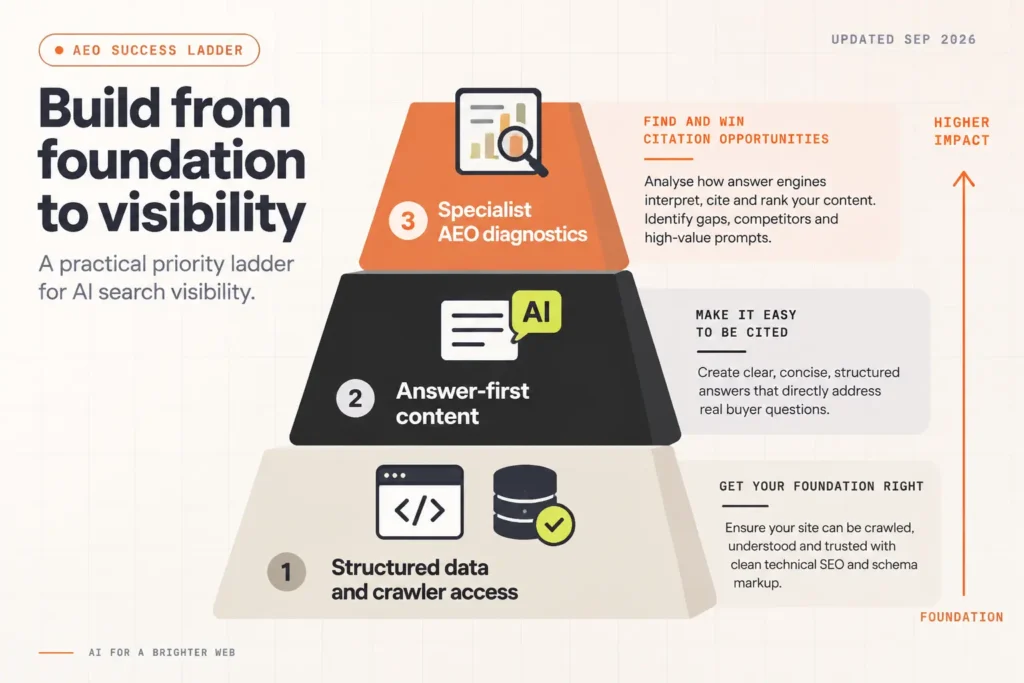
Start with structured data and crawler access, since both are pass or fail technical fixes with no judgement required. Move to answer-first content on your five highest-value pages next, since rewriting an entire site at once rarely happens.
Save entity consistency for an ongoing quarterly check rather than a one-off task. Budget half a day for the technical fixes, then treat AI engine testing as an ongoing five-minute monthly habit rather than a single event.
A DIY audit surfaces the obvious gaps. Diagnosing why AI engines choose a competitor over you, or why a citation exists but the description is wrong, needs prompt-level research most website owners do not have time to run repeatedly.
Once you have worked through the technical checks, the next layer is knowing whether AI engines actually cite you: you can get a free AEO audit from Intelligent Resourcing for a strategic read on your AI visibility.
FAQs on AEO Audits and AI Search Visibility
What is the difference between an SEO audit and an AEO audit?
An SEO audit checks technical health: metadata, links, speed and structure. An AEO audit checks whether AI engines can find, understand and cite your content when answering a buyer’s question, which is a separate and newer measure of visibility.
Do I need structured data if my site already ranks well in Google?
Ranking well in search does not guarantee visibility in AI-generated answers. Structured data gives AI systems a machine-readable summary of your business that a ranking alone does not provide, and it is one of the fastest fixes on this checklist.
How often should I test what AI engines say about my brand?
Monthly is a practical baseline for prompt testing, since AI-generated answers shift as models update and competitors change their own content. A quarterly deeper review catches slower-moving issues like entity drift.
Can I run this whole audit myself?
The checklist above covers what most website owners can complete without specialist tools. Diagnosing why specific citations are missing or inaccurate over time usually needs a repeatable, prompt-based process, which is where a specialist audit adds the most value.
If you’ve spent any time reading about SEO, you’ve run into the same line over and over: backlinks are “votes of confidence” and more of them means better rankings. That’s the short version, and it’s also the version that gets people into trouble.
Backlinks are still important in SEO, but not because Google is running a popularity contest. They matter because a relevant link from a trusted site helps Google discover your pages, understand what those pages are about, and gauge whether other credible sources think they’re worth pointing to.
Quality, relevance, and context decide how much a given link actually helps you. Raw count barely factors in. If you’re looking to improve your overall search visibility, exploring the best SEO services can also help you build a more effective and sustainable link-building strategy.
This guide walks through what backlinks actually do, what separates a good one from a wasted one, and how to build a link profile that holds up in 2026 rather than one that just looks impressive in a dashboard.
What Is a Backlink in SEO?
A backlink is simply a link on someone else’s website that points to a page on yours. If a finance blog links to an article on your site, that’s a backlink. Nothing more mysterious than that.
How it works, in plain terms:
Website A publishes a page. Website B links to that page from its own content. Search engines can follow that link from B to A, which gives them another way to find A’s page and a small signal about how A’s page relates to the topic B was writing about.
For example, a relevant article about how to choose the right SEO agency could naturally link to a useful page on Website A, helping readers discover related content while supporting internal linking.
Backlinks vs. internal links vs. external links
An internal link connects two pages on the same site, say, a blog post linking to your pricing page. An external link is any link pointing away from your site to somewhere else. A backlink is the mirror image of that: a link coming into your site from another domain. Same mechanism, different direction.
Backlinks vs. referring domains
This distinction trips a lot of people up. Backlinks are individual links. Referring domains are the unique websites those links come from. If one site links to you from five different blog posts, that’s five backlinks but one referring domain.
Metric
What it counts
Why it matters
Backlinks
Every individual link
Shows volume
Referring domains
Unique linking websites
Shows breadth of recognition
A site with 500 backlinks from 12 domains usually has a weaker profile than a site with 80 backlinks from 55 different domains. Diversity tends to carry more weight than repetition from the same source.
Why Are Backlinks Important for SEO?
1. They help search engines discover pages
Search engines crawl the web partly by following links from page to page. Google’s own documentation on crawlable links explains that links are one of the ways it finds new content to index. If nobody links to a page and it’s not in a sitemap, it can be much harder for Google to find it at all.
2. They provide relevance and authority signals
When a credible, topically related site links to your content, it’s a signal that your page belongs in that conversation. It’s less about a link being a “vote” and more about context, a cooking blog linking to your recipe carries more weight than a random directory doing the same thing.
3. They can improve organic search visibility
This is the part everyone wants, but it comes with a caveat: backlinks are one input among many in Google’s ranking systems, not a switch you can flip. A strong backlink profile paired with weak content usually won’t rank. A strong page with a handful of relevant links often will.
4. They can send referral traffic
This benefit doesn’t depend on Google at all. If a well-read site links to your page and people click through, you get visitors directly from that link. Some of the most useful backlinks are the ones that send real traffic even if their SEO impact is modest.
5. They increase brand exposure
Every mention on another site, linked or not, puts your name in front of a new audience. Over time, this builds recognition that shows up in branded search volume and direct traffic, not just rankings.
6. They can strengthen topical associations
Getting linked from sites within your niche helps tie your content to that subject area. A cybersecurity company earning links from security researchers builds a different kind of relevance than the same company getting linked from unrelated lifestyle blogs.
7. They can support long-term authority building
None of this happens overnight. A handful of strong, relevant links earned consistently over a year tends to outperform a burst of links acquired in a single week, especially once Google’s spam systems get involved (more on that later).
How Do Backlinks Actually Affect Google Rankings?
The role of links in Google’s ranking systems
Google has been clear that it uses a wide range of ranking systems, not a single formula built around one factor. Its Search ranking systems documentation explains that links are part of the picture, alongside content quality, relevance, and dozens of other systems working together.
What PageRank has to do with backlinks
PageRank is the original Google algorithm for evaluating links, and Google still confirms it’s part of its link-analysis systems today, even though it’s just one signal among many now rather than the whole system it once was. Treat it as historical context that still has some relevance, not as the entire story.
Why one strong backlink can matter more than many weak ones
Picture two SaaS companies. Company A gets 300 links from unrelated business directories. Company B earns 25 links from software review sites, industry newsletters, and a couple of well-known tech blogs. Company B’s links are fewer but sit on pages that are actually read by the target audience, on topics that match the content being linked. That context is usually worth more than sheer volume.
Why backlink count alone is a poor SEO metric
If backlink count decided rankings, gaming the system would be trivial – just buy or generate thousands of links. Google’s spam policies exist precisely because that approach has been tried repeatedly and doesn’t hold up. Count without quality is a vanity number.
What Makes a High-Quality Backlink?
Not every link carries the same weight. Here’s what to actually look at:
Factor
Why it matters
Relevance
Ties your page to a related topic
Linking-page quality
Passes on real credibility
Source reputation
Reads as a genuine endorsement
Placement
Contextual links carry more weight than footer or sidebar links
Anchor text
Helps describe what the destination page is about
Referring-domain diversity
Shows recognition beyond one source
Editorial context
Signals the link was earned, not arranged
Traffic potential
Can bring in real visitors regardless of ranking effect
A link buried in a footer on a site with no traffic and no relevance to your industry is close to worthless. A link in the body of an article on a site your customers actually read is a different thing entirely.
Types of Backlinks You Should Understand
Dofollow links are the default. No attribute tells search engines to treat them differently, so they can pass link equity and relevance signals normally.
Nofollow links carry a rel=”nofollow” attribute, originally meant to tell search engines not to pass ranking credit through the link.
Google has said for years that it treats nofollow as a hint rather than a strict directive, which means it may still use these links for crawling or context in some cases.
Sponsored links use rel=”sponsored” and identify paid or advertising relationships, as required by Google’s guidelines for that kind of link.
UGC links use rel=”ugc” and mark links added by users, such as blog comments or forum posts.
Editorial backlinks are links added naturally by a writer or editor because your content was genuinely useful to reference.
Directory and local backlinks come from business directories and local listing sites, useful in moderation, especially for local SEO, but easy to overdo.
Guest-post backlinks come from articles you write for other publications. Useful when done selectively on relevant sites, risky when done at scale purely for links.
One clarification worth repeating: don’t treat these attributes as a simple good-versus-bad chart. A nofollow link on a high-traffic, relevant page can still send you real visitors and exposure. A dofollow link on a spammy, irrelevant site can still be worse than useless.
Dofollow vs. Nofollow vs. Sponsored vs. UGC
Attribute
Typical use
Main purpose
Follow (default)
Editorial links
Standard linking
Nofollow
Untrusted, commercial, or user content
Qualifies the relationship
Sponsored
Paid or advertising links
Discloses a commercial arrangement
UGC
Comments, forums, user submissions
Flags user-generated content
Are Backlinks Still Important in 2026?
1. What has changed
The bar for what counts as a “good” link has gone up. Quality now matters more than quantity, context matters more than raw domain metrics, and manipulative link schemes get caught faster than they used to. Brand and entity recognition also play a bigger role alongside links than they did a decade ago.
2. What has not changed
Links remain part of Google’s link-analysis systems, PageRank included, according to Google’s own current documentation. The core idea, that a relevant, credible site pointing to your content is a meaningful signal hasn’t gone away.
3. Why backlinks aren’t the entire SEO strategy
Backlinks work alongside content quality, internal linking, technical SEO, and overall page experience. A site with excellent content and weak internal linking, or great backlinks and thin content, is still an incomplete strategy. Backlinks are one piece, not the whole system.
How Many Backlinks Do You Need to Rank?
There’s no fixed number. Anyone who gives you a specific target, “you need 50 backlinks to rank for this keyword”, is guessing.
What actually determines the benchmark:
Keyword competition
Search intent
The strength of pages already ranking
Their referring-domain profiles
Topical relevance of the linking sites
Content quality and depth
Internal linking on your own site
Analyze the SERP instead of guessing
Look at what’s already ranking for your target keyword. Check their referring domains, not just their total backlink count, and look at whether those links come from relevant sources. That tells you far more than any generic benchmark would.
Why 50 relevant links can beat 500 weak ones
Going back to the SaaS example from earlier: Company B’s 25 relevant links from software review sites and industry publications carry more strategic value than Company A’s 300 unrelated directory links, even though Company A’s number looks bigger on paper. Rankings tend to reward the former.
How to Build High-Quality Backlinks
Create link-worthy original research. Data nobody else has published gives writers a reason to cite you.
Publish useful statistics. Even a simple stat roundup on a niche topic gets referenced often.
Build free tools or calculators. People link to things they can actually use.
Use digital PR. Pitch data, trends, or expert commentary to journalists covering your industry.
Do expert outreach. Offer quotes to writers working on relevant stories, sites like HARO’s successor Connectively and journalist requests on platforms like LinkedIn are common ways this happens.
Reclaim unlinked mentions. If a site names your brand without linking, a polite email asking for a link often works.
Find and fix broken links. Locate dead links on relevant sites and suggest your content as a replacement.
Create linkable visual assets. Original charts, diagrams, or infographics get cited when they explain something clearly.
Contribute expert commentary. Answering questions in your field on forums like Reddit or in trade publications can lead to natural citations.
Use guest posting selectively. A handful of well-placed guest articles on relevant sites, not dozens of low-quality ones.
Build real industry relationships. Genuine connections with people in your space lead to links over time without a formal “campaign” at all.
Backlink Strategies to Avoid
Buying links for ranking purposes. Google’s spam policies specifically call out buying or selling links that pass ranking credit as a violation.
Automated link generation. Software that mass-creates links on low-quality sites is one of the fastest ways to attract manual action.
Excessive link exchanges. A few reciprocal links between genuinely related sites is normal. Large-scale “you link to me, I’ll link to you” schemes are not.
Private link networks. Groups of sites built solely to link to each other or to paying clients fall squarely under manipulative link schemes.
Manipulative anchor text. Stuffing exact-match keywords into every anchor across a link campaign looks unnatural and can draw scrutiny.
Low-quality directory campaigns. Submitting to hundreds of generic directories rarely does anything except waste time.
Scaled guest-post spam. Publishing dozens of thin guest posts purely to insert links is treated as a spam pattern, not a legitimate content strategy.
Can Bad Backlinks Hurt SEO?
1. What Google considers link spam
Google’s link spam policies cover things like paid links that pass ranking credit, automated link creation, and excessive exchanges. Genuinely earned links, even from smaller or less polished sites, generally aren’t the concern here.
When working on SEO coding and link-building strategies, the focus should remain on earning relevant, natural links rather than using manipulative tactics to influence search rankings.
2. Algorithmic treatment vs. manual actions
Most spammy links are simply ignored or devalued algorithmically. Manual actions, where a human reviewer at Google flags a specific violation, are less common and usually reserved for more deliberate manipulation.
3. When should you investigate suspicious links?
If you notice a sudden spike in low-quality, irrelevant backlinks (a pattern sometimes called a negative SEO attempt), it’s worth a look. But a handful of odd links pointing at your site is normal and rarely worth panicking over.
4. When should you consider disavowing?
Google’s guidance is to disavow only after identifying links that clearly violate its spam policies, not as a routine cleanup task. Disavowing everything that looks unfamiliar tends to do more harm than good.
How to Check Your Website’s Backlinks
Google Search Console shows this under Links, which breaks down external links by top linking sites and top linked pages. Google’s own Links report documentation notes that this is a sample of the links Google knows about, not a complete list of every link that exists.
Ahrefs and Semrush offer broader backlink databases with metrics like Domain Rating (Ahrefs) or Authority Score (Semrush), useful for competitive comparisons.
Bing Webmaster Tools provides a similar backlink report specific to Bing’s index.
When reviewing your profile, focus on referring domains, anchor text patterns, target pages, link attributes, and any links you’ve recently lost, rather than just the total backlink count.
How to Measure Whether Backlinks Are Actually Helping
Checking whether your link-building work is paying off means looking past the acquisition number itself:
Organic rankings for the pages you’re building links to
Overall organic traffic trends
Referral traffic coming directly from the linking pages
Referring-domain growth over time
Leads or conversions that trace back to referral visits
Branded search volume as a proxy for exposure
How many new links you’re earning per month relative to effort spent
Stopping at “we got 40 new backlinks this quarter” tells you almost nothing on its own. Connecting that number to actual traffic or ranking movement is what makes the work worth tracking.
Backlinks vs. Other SEO Ranking Factors
SEO factor
Primary role
Content
Satisfies search intent
Internal links
Connects and organizes site content
Backlinks
External recognition and context
Technical SEO
Supports crawling and indexing
On-page SEO
Establishes topical relevance
Page experience
Affects usability and engagement
Brand signals
Builds recognition and trust
Backlinks sit alongside these factors. They don’t replace weak content, and strong content doesn’t automatically earn links on its own either, both usually need to work together.
Common Backlink Myths
“The more backlinks, the better.” Volume without relevance is close to meaningless, and a pile of low-quality links can even draw unwanted scrutiny.
“DA is a Google ranking factor.” Domain Authority is a third-party metric from Moz. Domain Rating is Ahrefs’ version. Neither is used by Google’s actual ranking systems, they’re useful for comparing sites, not for predicting rankings.
“Nofollow links are completely useless.” Google treats nofollow as a hint, not a hard rule, and a nofollow link on a high-traffic page can still bring real visitors and exposure.
“Every backlink from a high-authority site is valuable.” Relevance still matters. An unrelated link from a big-name site isn’t automatically better than a relevant link from a smaller one.
“You need thousands of backlinks to rank.” Most competitive keywords are won with a few dozen relevant, high-quality links, not thousands of generic ones.
“Buying links is the fastest way to rank.” It’s also one of the fastest ways to trigger a manual action, per Google’s spam policies.
“All suspicious backlinks must be disavowed.” Google recommends disavowing only links that clearly violate its policies, not every unfamiliar or low-quality link you spot.
Frequently Asked Questions About Backlinks
Why are backlinks important for SEO?
Backlinks help search engines discover your pages, understand their relevance, and gauge credibility through external recognition. They also drive referral traffic and brand exposure independent of rankings.
Are backlinks still important in 2026?
Yes, but the emphasis has shifted toward quality, relevance, and context rather than raw volume.
How many backlinks do I need to rank?
There’s no fixed number. It depends on your keyword’s competitiveness and the strength of the pages already ranking for it.
What makes a backlink high quality?
Relevance to your topic, credibility of the linking site, contextual placement, and natural anchor text.
Do nofollow backlinks help SEO?
They can still send traffic, exposure, and some indirect value, even though they aren’t guaranteed to pass ranking credit.
Can backlinks hurt my website?
Only if they violate Google’s spam policies, such as paid links or automated schemes. A small number of odd or irrelevant links is normal and rarely a problem.
Conclusion
Backlinks are important in SEO, but not because more links automatically mean better rankings. They matter because relevant, credible links can help search engines discover your content, understand its relevance, and connect your website with trusted sources in your industry.
Good backlinks can also bring qualified referral traffic, increase brand exposure, and help strengthen your website’s overall authority over time.
The key is to focus on quality, relevance, and context rather than link count. A few strong links from trustworthy, relevant websites can be more valuable than hundreds of unrelated or low-quality links.
Instead of trying to collect the biggest number of backlinks, focus on creating useful content, building genuine relationships, and earning links that naturally support the pages you want people to discover.
In the long run, a smaller number of meaningful backlinks can contribute far more to your SEO strategy than a large collection of links that provide little real value.
SEO coding is the use or modification of website code to improve crawlability, indexability, rendering, performance, and search engine understanding. SEO does not require advanced programming, but basic HTML and technical coding knowledge make SEO work far more effective.
What Is SEO Coding?
SEO coding covers the parts of search optimization that happen inside a website’s code rather than in its content or link profile. It includes adjusting markup, scripts, and server settings so that search engines can find, read, and rank a page the way it’s meant to be read.
SEO coding vs traditional SEO
Traditional SEO work centers on keywords, content quality, and links. SEO coding sits underneath that layer. A page can have strong content and still underperform if the code around it blocks crawlers, hides text from renderers, or slows the page down enough that visitors and search engines both give up on it.
What SEO coding actually changes
HTML – the tags that define page structure, headings, and links
CSS – how content is displayed and whether it’s hidden from crawlers
JavaScript – content and links that are added or changed after the page loads
Metadata – titles, descriptions, and robots directives
Links – how internal and external links are built into the markup
Structured data – machine-readable descriptions of page content
URLs – how addresses are structured and canonicalized
Server responses – status codes, redirects, and headers
Performance – how quickly a page loads and becomes usable
Is SEO coding the same as web development?
No. Web development builds the site. SEO coding adjusts specific parts of that code so search engines can process it correctly. An SEO working on code is usually diagnosing and fixing a narrow, search-related issue, not building features or maintaining the codebase.
Does SEO Require Coding?
Most day-to-day SEO work doesn’t touch code at all. Coding becomes relevant once the problem moves past content and into how a page is built or served.
Custom implementations a CMS doesn’t support natively
How much coding does an SEO actually need?
The table below reflects a practical baseline, not a ceiling. Someone doing purely content-focused SEO can get by with the lower end; anyone doing technical audits regularly will want more.
Skill
Recommended level
Why
HTML
Working knowledge
Needed to read and edit page markup
CSS
Basic
Helps spot content hidden from crawlers
JavaScript
Working knowledge
Needed to diagnose rendering issues
Python
Optional, useful
Speeds up audits and automation
PHP
Optional
Useful mainly for WordPress-heavy work
SQL
Optional
Useful for querying large SEO datasets
How Coding Affects Google Search
Crawling
Google’s crawler follows links and reads server responses to find pages. Code problems here include blocked resources in robots.txt, broken internal links, and pages that return the wrong status code.
Rendering
Before Google can index a page fully, it has to render it, meaning it runs the page’s JavaScript and CSS to see the final version a visitor would see. If content only appears after scripts run, rendering has to succeed first.
Indexing
Indexing is Google storing a processed version of the page for retrieval later. Rendering problems, noindex tags, and canonical conflicts can all keep a page out of the index even after it’s been crawled.
How a coding problem can break the SEO process
Each stage depends on the one before it. A break at any point stops the page from reaching search results, regardless of how good the content is.
URL → Crawl → Render → Index → Search
Google’s own documentation covers each of these stages in detail, and it’s the most reliable reference when diagnosing where a page is getting stuck.
HTML for SEO: The Coding Basics Every SEO Should Know
<title> elements
The title tag is one of the strongest on-page ranking signals and the text most often shown as the blue link in search results. Each page needs one unique, descriptive title.
Meta robots directives
Tags like noindex and nofollow tell search engines whether to index a page or follow its links. A misplaced noindex is one of the most common ways a page disappears from search without anyone noticing right away.
Heading structure
Headings should follow a logical order, with one H1 per page and H2s and H3s nested underneath it. This helps both readers and search engines understand how a page is organized.
Crawlable <a href> links
Google follows standard anchor tags with a real href attribute. Links built entirely with JavaScript click handlers and no href, or with onclick-only navigation, are often not followed at all.
Image alt attributes
Alt text describes an image for screen readers and for search engines that can’t see images the way people do. It also gives images a chance to rank in image search.
Semantic HTML
Elements like <nav>, <article>, <main>, and <header> describe what a section of a page is for, not just how it looks. This gives search engines and assistive tools extra context that generic <div> tags don’t provide.
Canonical tags
A canonical tag tells search engines which version of a page is the one to index when duplicate or near-duplicate URLs exist, such as with URL parameters or printer-friendly versions.
Example of SEO-friendly HTML
<title>Best Running Shoes for Flat Feet (2026 Guide)</title> <link rel=”canonical” href=”https://example.com/running-shoes-flat-feet” /> <h1>Best Running Shoes for Flat Feet</h1> <img src=”shoe.jpg” alt=”Cross-section of a running shoe showing arch support” /> <a href=”/reviews/asics-gel-kayano”>Read our Asics Gel-Kayano review</a>
JavaScript SEO: Where Coding Becomes More Important
How Google processes JavaScript
Google crawls a page, then queues it for rendering, then runs the JavaScript to see the final content. This second step takes more time and resources than reading static HTML, which is part of why JavaScript-heavy sites can index more slowly.
Client-side vs server-side rendering
Client-side rendering builds the page in the visitor’s browser after the initial HTML loads. Server-side rendering sends a fully built page from the start. Server-side rendering, or a hybrid approach, tends to be more reliable for SEO because search engines see finished content immediately.
JavaScript-generated content
Text and images added to the page only after scripts run need to survive the rendering step to be indexed. If rendering fails or times out, that content is effectively invisible to search engines.
JavaScript-generated links
Links created dynamically through JavaScript frameworks sometimes render as real anchor tags and sometimes don’t. Checking the rendered HTML is the only reliable way to know which case applies.
Dynamic titles and meta descriptions
Single-page applications often update titles and meta tags client-side when a user navigates. If this update doesn’t happen before rendering completes, search engines may index the wrong title for a given URL.
JavaScript-generated canonical URLs
Canonical tags inserted by JavaScript are less reliable than ones present in the initial HTML, since Google has to render the page correctly before it can read them.
Soft 404 problems
A soft 404 happens when a missing page returns a 200 status code with an error message instead of a proper 404 or 410. Search engines can misinterpret these pages as valid content.
SPA routing and the History API
Single-page applications that update the URL with the History API instead of doing full page loads need each route to be independently crawlable and to return the correct content when requested directly.
How to test rendered HTML
Google specifically recommends inspecting the rendered HTML, not just the page source, when diagnosing JavaScript-related search problems. The URL Inspection tool in Search Console and Chrome DevTools are the two most direct ways to see what a crawler actually renders.
Structured Data and SEO Coding
What is structured data?
Structured data is a standardized format that describes page content in a way machines can parse directly, such as marking up a recipe’s ingredients or a product’s price and availability.
Why JSON-LD is commonly used
JSON-LD is a script block that sits separately from the visible page content, which makes it easier to add, edit, and validate without touching the page’s layout or design.
Marking up content that isn’t actually visible on the page
Using the wrong schema type for the content
Leaving required fields empty or filled with placeholder text
Letting markup fall out of sync after a content update
How to validate structured data
Google’s Rich Results Test checks whether markup is eligible for the rich result types Google currently supports, and flags syntax errors before they reach production.
Structured data vs ranking guarantees
Valid structured data does not guarantee a rich result or a ranking boost. It gives Google clearer information to work with, but display in search results depends on Google’s own criteria and availability for that result type.
Website Performance and SEO Coding
Core Web Vitals
Core Web Vitals measure real-world loading speed, responsiveness, and visual stability. They’re part of how Google evaluates page experience.
Largest Contentful Paint (LCP)
LCP measures how long it takes for the largest visible element to load. A slow LCP is often caused by unoptimized images or render-blocking code.
Interaction to Next Paint (INP)
INP measures how quickly a page responds to a click, tap, or key press. Heavy JavaScript execution is the most common cause of a poor score.
Cumulative Layout Shift (CLS)
CLS measures how much content shifts around as a page loads. Images and ads without reserved dimensions are a frequent cause.
Remove unnecessary JavaScript
Unused scripts still get downloaded and parsed. Removing or deferring what isn’t needed for the initial view speeds up loading.
Optimize CSS delivery
Render-blocking stylesheets delay when a page can start displaying content. Inlining critical CSS and loading the rest asynchronously helps.
Optimize images
Compressing images and serving modern formats like WebP or AVIF reduces file size without a visible drop in quality.
Lazy loading
Loading offscreen images and content only as a visitor scrolls to them reduces the initial page weight.
Fonts and third-party scripts
Custom fonts and third-party embeds such as chat widgets or ad scripts often load slowly and block rendering if they aren’t handled carefully.
Caching and CDN considerations
Serving static assets from a CDN and setting proper cache headers cuts down on repeat load times for returning visitors.
URL and Site-Architecture Coding for SEO
SEO-friendly URL structures
Google recommends simple, descriptive, and crawlable URL structures over long strings of parameters or session IDs.
Canonicalization
Consistent canonical signals, both in the HTML and in redirects, prevent duplicate versions of a page from competing against each other.
Internal links
Internal links distribute authority across a site and help crawlers discover pages that aren’t in the main navigation.
XML sitemaps
A sitemap lists the URLs a site wants crawled and indexed. It doesn’t guarantee inclusion, but it helps discovery, especially on larger sites.
Robots.txt
This file controls which parts of a site crawlers are allowed to access. Blocking the wrong directory here can accidentally hide entire sections of a site.
Redirects
A 301 redirect passes most ranking signals to the new URL. Redirect chains and loops waste crawl budget and can break the signal entirely.
HTTP status codes
Status codes tell crawlers what happened when they requested a page. Serving a 200 for a page that should be a 404, or vice versa, causes lasting confusion for search engines.
Which Programming Languages Should SEO Professionals Learn?
HTML — essential foundation
HTML is the baseline. Nearly every technical SEO task eventually involves reading or editing it.
CSS — useful supporting skill
CSS knowledge helps identify content that’s visually hidden but still present in the code, or the reverse.
JavaScript — important for technical SEO
JavaScript is necessary for diagnosing rendering issues on modern, script-heavy websites.
Python — useful for SEO automation
Python is commonly used to automate audits, process large crawl exports, and pull data from SEO tool APIs.
PHP — useful for CMS/WordPress SEO
A working knowledge of PHP helps when troubleshooting plugin conflicts or template issues on WordPress sites.
SQL — useful for large SEO datasets
SQL becomes relevant once SEO data lives in databases too large to manage in a spreadsheet.
Which language should you learn first?
A practical order is SEO fundamentals, then HTML, then basic CSS, then basic JavaScript, then Python for automation once the others are comfortable.
10 Ways Coding Skills Can Improve SEO
1. Diagnose crawlability problems
Reading server responses and robots directives directly is faster than guessing from a tool’s summary.
2. Fix indexing problems
Coding knowledge makes it possible to trace a noindex tag or canonical conflict back to its source in the template.
3. Improve page performance
Understanding what’s actually loading lets you cut the scripts and assets that are slowing a page down.
4. Troubleshoot JavaScript rendering
You can compare source HTML to rendered HTML and pinpoint exactly what’s missing.
5. Implement structured data
Writing and validating JSON-LD directly is faster than relying on a plugin that may not cover every content type.
6. Improve internal linking
Editing templates directly allows linking patterns that a CMS’s default linking tools can’t produce.
7. Fix technical metadata
Bulk title or meta description issues are often template problems that get fixed once in code rather than page by page.
8. Automate repetitive SEO tasks
Scripts can pull rankings, crawl a site, or check status codes across thousands of URLs in minutes.
9. Analyze large datasets
SQL and Python make it practical to work with crawl and log-file data too large for spreadsheets.
10. Communicate better with developers
Being able to describe a fix in the developer’s own terms gets it prioritized and implemented correctly.
Practical SEO Coding Examples
Example 1 – SEO-friendly link
Problem: A navigation link was built with a JavaScript onclick handler and no href attribute.
<a href=”/services/technical-seo”>Technical SEO Services</a>
What it does: Adds a standard href so the link is a real, crawlable anchor.
SEO impact: Search engines can now discover and follow the link to pass internal authority.
Common mistake: Relying on onclick alone, which crawlers don’t execute as navigation.
Example 2 – Canonical URL
Problem: A product page was accessible through several URLs with tracking parameters.
What it does: Describes the recipe’s fields in a format Google can parse directly.
SEO impact: Makes the page eligible for a recipe rich result, though not guaranteed one.
Common mistake: Marking up ingredients that aren’t listed anywhere in the visible content.
Example 5 – Image optimization
Problem: A hero image was a 4MB PNG, slowing down the page’s LCP.
<img src=”hero.webp” alt=”Hikers on a mountain trail at sunrise” width=”1200″ height=”600″ />
What it does: Switches to a compressed WebP file and sets explicit dimensions.
SEO impact: Faster load time and less layout shift as the image loads.
Common mistake: Compressing the image but forgetting width and height attributes, which still allows shift.
Example 6 – Heading hierarchy
Problem: A page used three H1 tags and skipped straight to H4 for subheadings.
<h1>Guide to Home Composting</h1> <h2>Getting Started</h2> <h3>Choosing a Bin</h3>
What it does: Restores a single H1 with properly nested subheadings underneath.
SEO impact: Clearer content structure for both readers and search engines.
Common mistake: Choosing heading levels based on font size instead of document structure.
How to Check Whether Your Website Code Is SEO-Friendly
Google Search Console
Shows indexing status, coverage issues, and how Google is crawling the site.
URL Inspection Tool
Shows the live and rendered version of a specific URL, plus any indexing problems.
Rich Results Test
Checks structured data for errors and rich-result eligibility.
PageSpeed Insights
Reports Core Web Vitals and specific performance recommendations.
Lighthouse
Runs performance, accessibility, and SEO audits directly in Chrome.
Chrome DevTools
Lets you inspect the rendered DOM, network requests, and console errors directly.
Screaming Frog
Crawls a site to surface broken links, duplicate titles, and status code issues at scale.
What to inspect manually
Status code
Indexability
Robots directives
Canonical tag
Title tag
Heading structure
Links
Rendered content
JavaScript behavior
Structured data
Performance metrics
Mobile rendering
How to Troubleshoot an SEO Coding Problem
Step 1 – Identify the symptom
Start with what’s observable: a drop in rankings, a page missing from the index, or a Search Console warning.
Step 2 – Inspect the HTML
Check the page source for the obvious culprits: title, meta robots, canonical, and heading structure.
Step 3 – Compare source HTML with rendered HTML
If content or links only appear after rendering, the issue is likely JavaScript-related.
Step 4 – Check HTTP status
Confirm the page is returning the status code it should, not a soft 404 or an unexpected redirect.
Step 5 – Check robots and indexing directives
Rule out a noindex tag or a robots.txt rule blocking the page or its resources.
Step 6 – Test JavaScript rendering
Use the URL Inspection tool to see exactly what Googlebot renders for the page.
Step 7 – Fix the implementation
Make the change in code, ideally in the template rather than on a single page, so it applies consistently.
Step 8 – Validate the fix
Re-run the same tools used to diagnose the issue to confirm it’s actually resolved.
Step 9 – Monitor crawling and indexing
Watch Search Console over the following days and weeks to confirm Google has picked up the change.
SEO Coding vs Technical SEO vs Web Development
Area
SEO
SEO Coding
Technical SEO
Web Development
Main goal
Search visibility
Code-level SEO fixes
Technical search performance
Build the website
Content
High
Medium
Medium
Low
HTML
Basic
High
High
High
JavaScript
Low
Medium–High
High
High
Python
Optional
Useful
Useful
Optional
SEO strategy
High
High
High
Low–Medium
Do You Need to Be a Developer to Work in SEO?
What SEOs can handle themselves
Title tags, meta descriptions, alt text, basic structured data, and simple redirects are usually within reach without a developer.
What should be handed to developers
Template-wide changes, server configuration, and anything touching site architecture or the build process are safer left to a developer, with the SEO providing exact specifications.
Why SEO-development collaboration matters
Most technical SEO fixes require developer involvement at some stage. An SEO who understands code can write a clear, specific ticket instead of a vague description of the symptom.
The ideal SEO technical skill profile
Enough HTML, CSS, and JavaScript to read code and diagnose problems, with Python or SQL as a bonus for automation and analysis, rather than full development ability.
SEO Coding Learning Roadmap
Stage 1 — Learn SEO fundamentals
Understand how search engines crawl, render, index, and rank pages before going deeper into code.
Stage 2 — Learn HTML
Get comfortable reading and editing tags, attributes, and document structure.
Stage 3 — Learn CSS basics
Understand how content can be visually hidden or shown, and how that affects what crawlers see.
Stage 4 — Learn technical SEO
Study crawling, indexing, canonicalization, and site architecture in more depth.
Stage 5 — Learn JavaScript SEO
Focus specifically on rendering, dynamic content, and how frameworks affect indexing.
Stage 6 — Learn Python for automation
Start with scripts that handle repetitive audit tasks and grow from there.
Stage 7 — Build and audit a real website
Apply everything on an actual site, ideally one you control, so mistakes are low-stakes.
Stage 8 — Create an SEO coding portfolio
Document the audits and fixes you’ve made to show concrete, applied skill.
Common SEO Coding Mistakes
Blocking important resources
Disallowing CSS or JavaScript files in robots.txt can prevent Google from rendering the page correctly.
Incorrect canonical implementation
Canonical tags pointing to the wrong page, or missing entirely, split ranking signals across duplicates.
Non-crawlable JavaScript links
Links that only work through onclick handlers with no href are often never followed.
Hiding important content behind interactions
Content that only loads after a click or hover may not be seen during rendering.
Incorrect redirects
Redirect chains, loops, or 302s used where a 301 belongs waste crawl budget and dilute signals.
Accidental noindex
A noindex tag left over from staging is one of the most common causes of a page vanishing from search.
Invalid structured data
Markup with missing required fields or the wrong schema type can fail validation entirely.
Excessive JavaScript
Heavy scripts slow down rendering and hurt Core Web Vitals scores.
Poor lazy-loading implementation
Lazy loading applied to above-the-fold content can delay what should load immediately.
Assuming code alone improves rankings
Clean code removes obstacles; it doesn’t replace the need for relevant, well-targeted content.
Frequently Asked Questions About SEO Coding
What is SEO coding?
SEO coding is adjusting website code, including HTML, CSS, JavaScript, and server settings, to improve how search engines crawl, render, and index pages.
Does SEO require coding?
Not for most day-to-day tasks. It becomes useful for technical audits, rendering issues, and large-scale sites.
Can I learn SEO without coding?
Yes. Content, keyword, and link-focused SEO can be learned and practiced without writing code.
What coding language is best for SEO?
HTML is the essential starting point, with JavaScript and Python adding the most practical value after that.
Is HTML important for SEO?
Yes. Titles, headings, links, and metadata are all defined in HTML, making it the most directly relevant language for SEO.
Is JavaScript bad for SEO?
Not inherently, but it adds a rendering step that can delay or block indexing if not implemented carefully.
Should SEO professionals learn Python?
It’s optional but valuable for automating audits and analyzing large datasets.
Does coding improve Google rankings?
Coding removes technical obstacles that block good content from ranking; it doesn’t substitute for relevant, well-optimized content.
What is the difference between SEO coding and technical SEO?
SEO coding refers to the actual code changes; technical SEO is the broader strategy and diagnosis around crawling, indexing, and site performance.
Can an SEO specialist fix website code?
Many can handle smaller fixes like metadata and structured data. Larger, template-wide changes are usually better handled with a developer.
Conclusion
Coding isn’t a requirement for working in SEO, but it changes what you’re able to fix on your own. Someone who can read HTML, check rendered output, and recognize a broken canonical or a stray noindex tag catches problems earlier and explains them to developers more precisely than someone relying on tool reports alone. The right amount to learn is whatever lets you diagnose an issue yourself, even if a developer ends up making the actual change.
If Reedoor2.4.6.8 showed up somewhere on your PC, the honest first thing to say is that this isn’t a name Microsoft documents anywhere, and it isn’t tied to a security product most people would recognize. That gap is exactly why search results about it are all over the place: some pages call it a virus, others call it a scan tool, and a few just repeat whatever the last article said without checking.
What matters more than the name is where you saw it. A browser tab, a line in Task Manager, an entry in your installed programs list, a warning from your antivirus, an error message, or a file someone told you to download all point in different directions. The steps below are organized around those situations, because “is Reedoor2.4.6.8 dangerous” doesn’t have one answer that covers all of them.
Before doing anything else: don’t install it, don’t delete anything based on the name alone, and don’t pay for a “Reedoor antivirus” if a pop-up is asking you to. Work out where it came from first.
What Is Reedoor2.4.6.8?
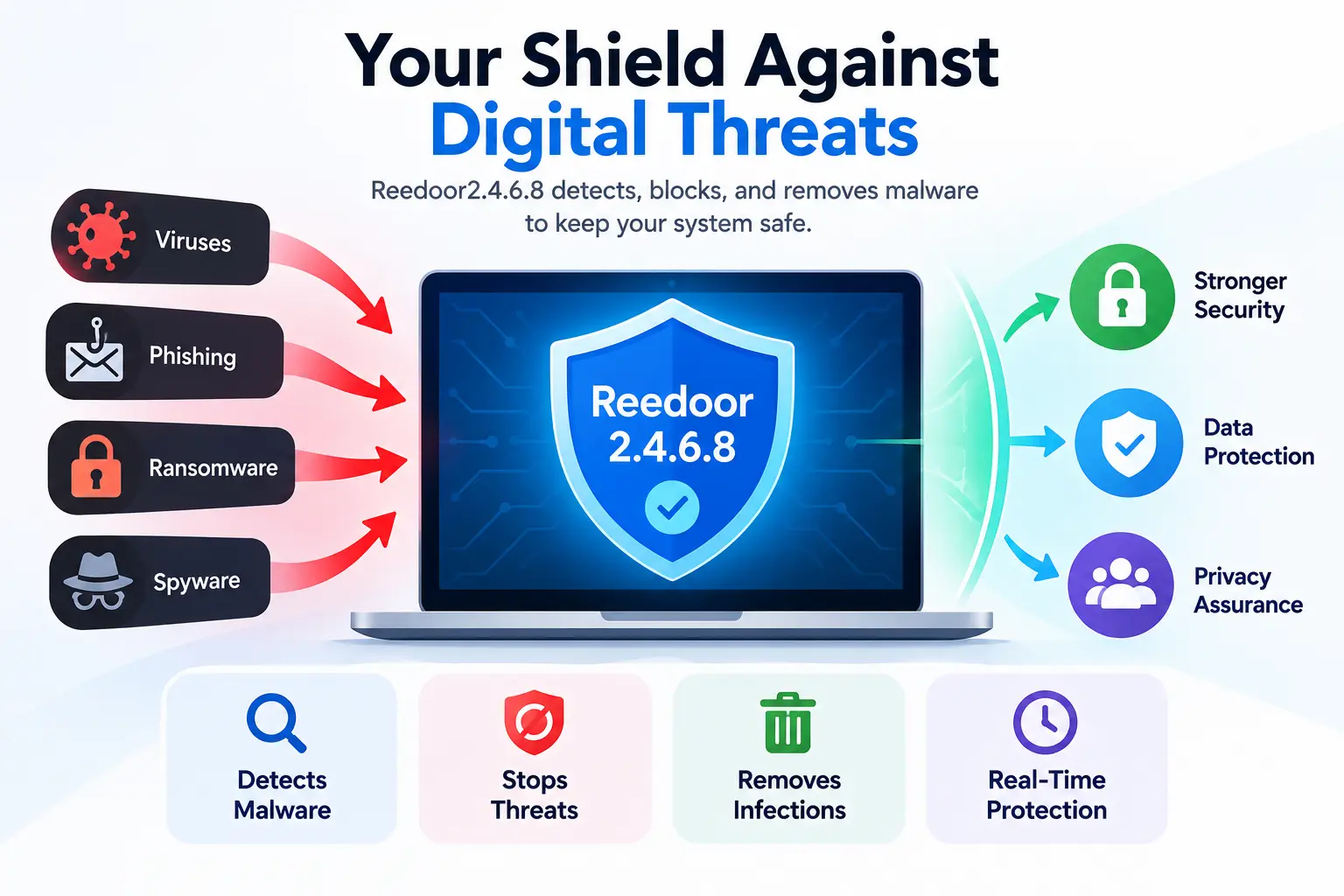
Antivirus Reedoor2.4.6.8 is a security software specifically designed to detect, prevent, and eliminate various types of malware, including viruses, phishing attempts, ransomware, and spyware.
It provides real-time protection, ensuring that all types of threats are neutralized before they compromise the system’s integrity.
Cybercriminals are employing various methods to breach security protocols; however, with the robust framework of Reedoor2.4.6.8, organizations can enhance their security protocols while ensuring privacy and data integrity.
Is Reedoor2.4.6.8 an official Windows component?
No documentation from Microsoft references a component, service, or feature called Reedoor2.4.6.8. Genuine Windows components have consistent naming (things like Windows Defender Antivirus Service, or file names tied to a specific .exe or .dll under System32) and are covered in Microsoft’s own support pages. Reedoor2.4.6.8 doesn’t appear in any of that material.
Is Reedoor2.4.6.8 a legitimate antivirus program?
There’s no evidence of a security company selling or maintaining a product under this name. Legitimate antivirus vendors have a company behind them, a website with a verifiable history, and listings on independent test sites like AV-Comparatives or AV-TEST. None of that turns up for Reedoor2.4.6.8, which is a reason for caution rather than proof of anything malicious on its own.
Why the version-style number can be misleading
The 2.4.6.8 pattern looks like a version number, and that formatting alone makes a name feel more official than it is. Software does use sequences like this for real releases, but the same pattern shows up in randomly generated file names, scan reference IDs, and names invented specifically to look like a legitimate build number. The format tells you nothing about whether the thing behind it is real, safe, or harmful.
What is actually verified about the name?
Very little. No confirmed publisher, no confirmed function, and no consistent description across sources that trace back to a primary source rather than to each other. Treat any claim you read about Reedoor2.4.6.8, including guides that describe it in detail, as unverified until you can see where the information originally came from.
Why Are People Seeing Reedoor2.4.6.8 on Windows?
The term surfaces in a handful of different contexts, and each one has a different likely explanation.
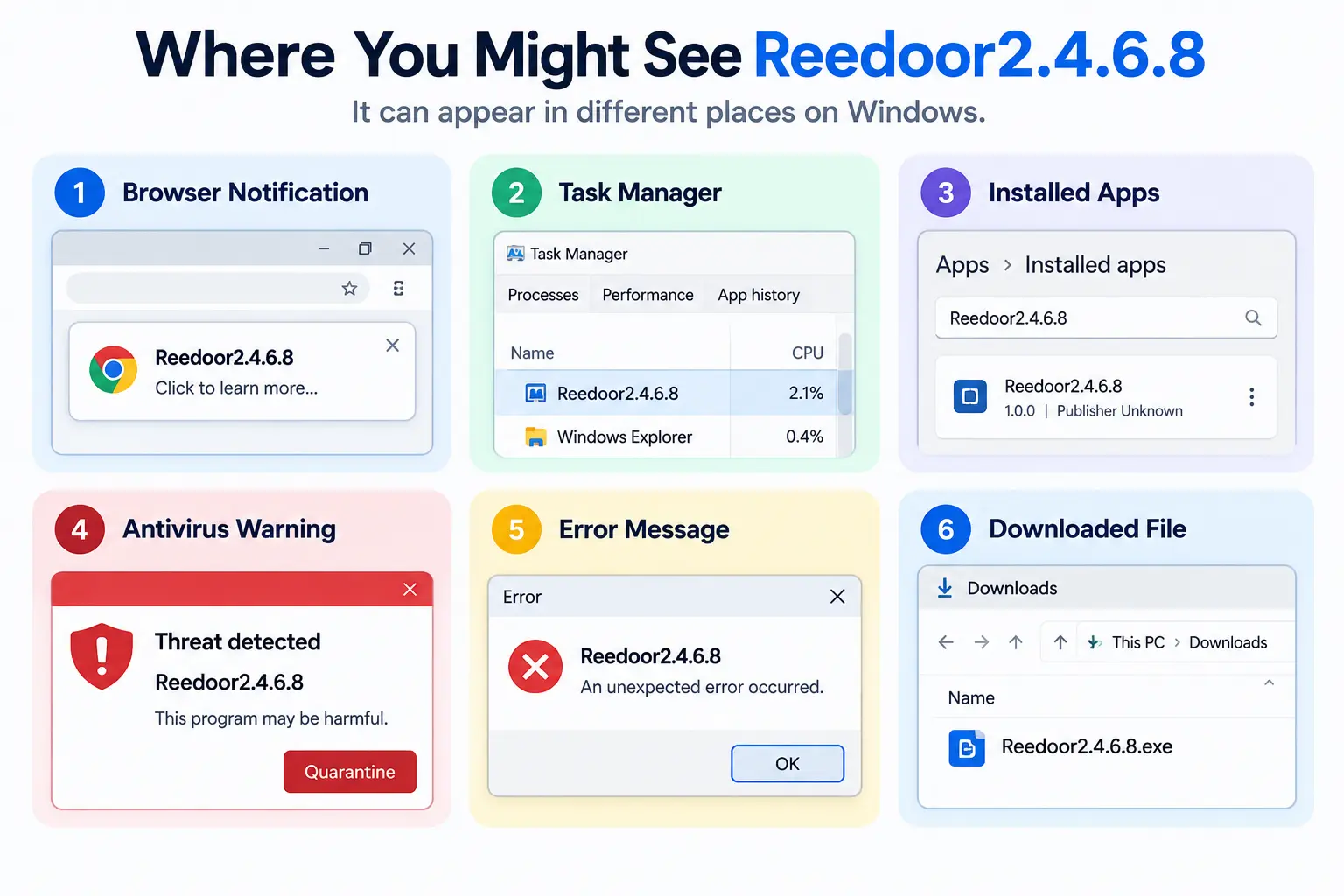
Reedoor2.4.6.8 in a browser notification
If it appeared as a pop-up in the corner of your screen with a website icon next to it, it’s almost certainly a browser notification that a site talked you into allowing at some point. These are commonly used to push fake security alerts, and the wording is designed to look urgent.
Reedoor2.4.6.8 in Task Manager
A process with this name (or something close to it) running in the background could be leftover from bundled software, a browser extension’s helper process, or in rarer cases something unwanted that got installed alongside a free download. The process name by itself doesn’t confirm which.
Reedoor2.4.6.8 in Installed Apps
If it shows up as an app in Settings > Apps, someone (possibly without meaning to) installed it, often bundled with another program during a rushed “Next, Next, Finish” install. Check the listed publisher and install date before deciding what to do.
Reedoor2.4.6.8 in an antivirus warning
Antivirus tools sometimes flag files using an internal, semi-random label rather than a recognizable malware family name. If your antivirus surfaced this string in a detection, that’s a different and more serious situation than seeing it in a browser pop-up, and it’s worth checking the Protection History for details.
Reedoor2.4.6.8 in an error message
An error referencing this name could point to a missing or corrupted file that some other, unrelated program is looking for. This is one of the more confusing scenarios because the name might just be a placeholder or a mistranslated string rather than anything meaningful.
Reedoor2.4.6.8 in a downloaded file
If a website told you to download a file with this name to “fix” something, stop before running it. This is a common pattern for unwanted software: a site manufactures a fake problem, then offers a download as the solution.
Is Reedoor2.4.6.8 a Virus or Malware?
Why the name alone cannot prove malware
A name, even an odd or unfamiliar one, is not evidence of malicious behavior on its own. Plenty of legitimate but obscure software has names that look strange out of context. The name is a starting point for investigation, not a verdict.
What evidence would confirm malware?
Meaningful evidence includes multiple antivirus engines flagging the actual file (checked through a multi-engine scanner such as VirusTotal), unexpected network activity tied to the process, changes you didn’t make, or the file appearing without any install action on your part. One vague online article calling something a virus is not evidence; a file that several independent scan engines detect is.
How antivirus detection names work
Antivirus vendors generate detection names using their own internal conventions, often based on the type of behavior a file exhibits rather than a human-chosen product name. That’s part of why the same suspicious file can get a completely different label depending on which vendor’s engine flagged it.
Virus vs. PUA vs. scareware vs. browser notification scam
These are not interchangeable. A virus or trojan is malicious code that runs on your system. A PUA (potentially unwanted application) is usually legitimate-ish software that’s aggressive, bundled without clear consent, or hard to uninstall, but not necessarily destructive. Scareware is designed purely to frighten you into an action, often a payment, without actually doing anything to your files. A browser notification scam is just an intrusive pop-up permission you granted a website, with no software installed at all. Reedoor2.4.6.8 could plausibly fit any of these categories depending on where you encountered it, which is exactly why the source matters more than the name.
Why you should not assume every occurrence means infection
Because the term shows up in such different contexts, treating every instance as “you have a virus” leads people to take drastic and sometimes harmful steps, like disabling Defender or deleting system files, based on incomplete information. Work through the checks in the next section before assuming the worst.
Is Reedoor2.4.6.8 Safe?
When the term itself is simply an unfamiliar name
If you came across the name only in an article or forum post and haven’t actually seen it anywhere on your own device, there’s nothing to act on yet.
When it appears in a suspicious pop-up
If it showed up as an alarming, full-screen or hard-to-close browser message, treat that as a scam pattern regardless of what it’s named. Close the tab or browser process rather than interacting with the pop-up’s buttons.
When a website asks you to download it
Don’t. Legitimate security tools are not distributed through a pop-up telling you your PC is already infected.
When someone asks you to pay for a “Reedoor antivirus”
This is a clear red flag. No verified company sells a security product under this name, so a payment request tied to it should be treated as a scam attempt.
When Windows Defender actually detects a related file
This is the one scenario where there’s a concrete, checkable event: Defender’s Protection History will show what was found, where the file was located, and what action was taken. That’s the information worth acting on, not the name by itself.
Key takeaway: don’t install, delete, whitelist, or pay for anything until you know what actually generated the Reedoor2.4.6.8 reference on your system.
How to Check What Reedoor2.4.6.8 Actually Is on Your PC
These steps use Windows’ own built-in tools, so you don’t need to download anything new to run them.
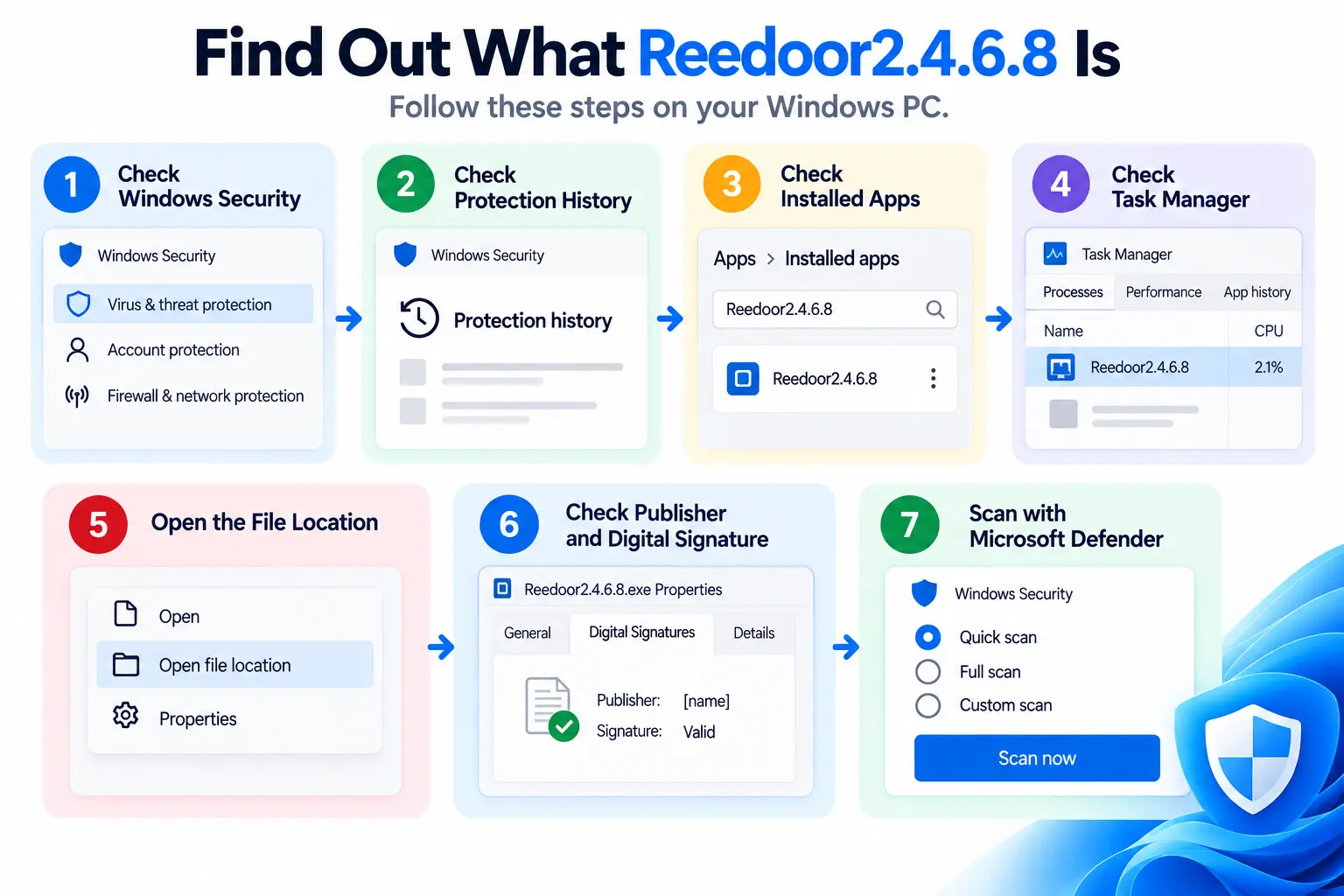
Step 1: Check Windows Security
Open Windows Security from the Start menu and look at Virus & threat protection. If there’s an active threat or recent detection, it will be listed here.
Step 2: Check Protection History
Inside Virus & threat protection, select Protection history. This log shows what Defender has found and quarantined or blocked recently, along with the file path involved.
Step 3: Check Installed Apps
Go to Settings > Apps > Installed apps and search for the name. Note the publisher and install date; an unfamiliar publisher or an install date you don’t recognize is worth investigating further.
Step 4: Check Task Manager
Open Task Manager (Ctrl+Shift+Esc), go to the Details tab, and look for a matching process. Right-click it and choose Open file location to see exactly where it’s running from.
Step 5: Open the file location
A file sitting in your Downloads or Temp folder is a very different situation from one buried inside a legitimate program’s install directory. The folder it lives in is a strong clue.
Step 6: Check publisher and digital signature
Right-click the file, choose Properties, and open the Digital Signatures tab if one exists. A verified, recognizable publisher (like an established software company) is a good sign. No signature at all, or a signature from an unfamiliar name, means you should be more careful.
Step 7: Check the file with Microsoft Defender
Right-click the specific file and choose “Scan with Microsoft Defender” for a targeted check, or run a Quick, Full, Custom, or Offline scan from Windows Security if you want broader coverage. An offline scan runs before Windows fully loads and can catch things that hide from a normal scan.
Reedoor2.4.6.8 in Browser Notifications: What to Do
How malicious website notifications work
A site asks for notification permission, often disguised as a “click allow to continue” prompt, and once granted it can send pop-ups that look like system alerts even when you’re not on that site anymore, and in some cases even after the browser is closed.
How to check Chrome notification permissions
Go to Settings > Privacy and security > Site settings > Notifications, and remove any site you don’t recognize or don’t remember approving.
How to check Microsoft Edge notification permissions
Go to Settings > Cookies and site permissions > Notifications, and revoke access for any unfamiliar site listed there.
How to check Firefox notification permissions
Go to Settings > Privacy & Security, scroll to Permissions, and open the Notifications settings to remove sites you don’t want sending alerts.
How to tell a browser notification from a real Windows security alert
A genuine Windows Security alert opens from the Windows Security app itself and appears in its Protection history. A browser notification carries a small website icon and a site name, and it disappears if you disable notifications for that site. If closing the browser makes the alert stop reappearing, it was a browser notification, not a system-level warning.
How to Remove Reedoor2.4.6.8 Safely
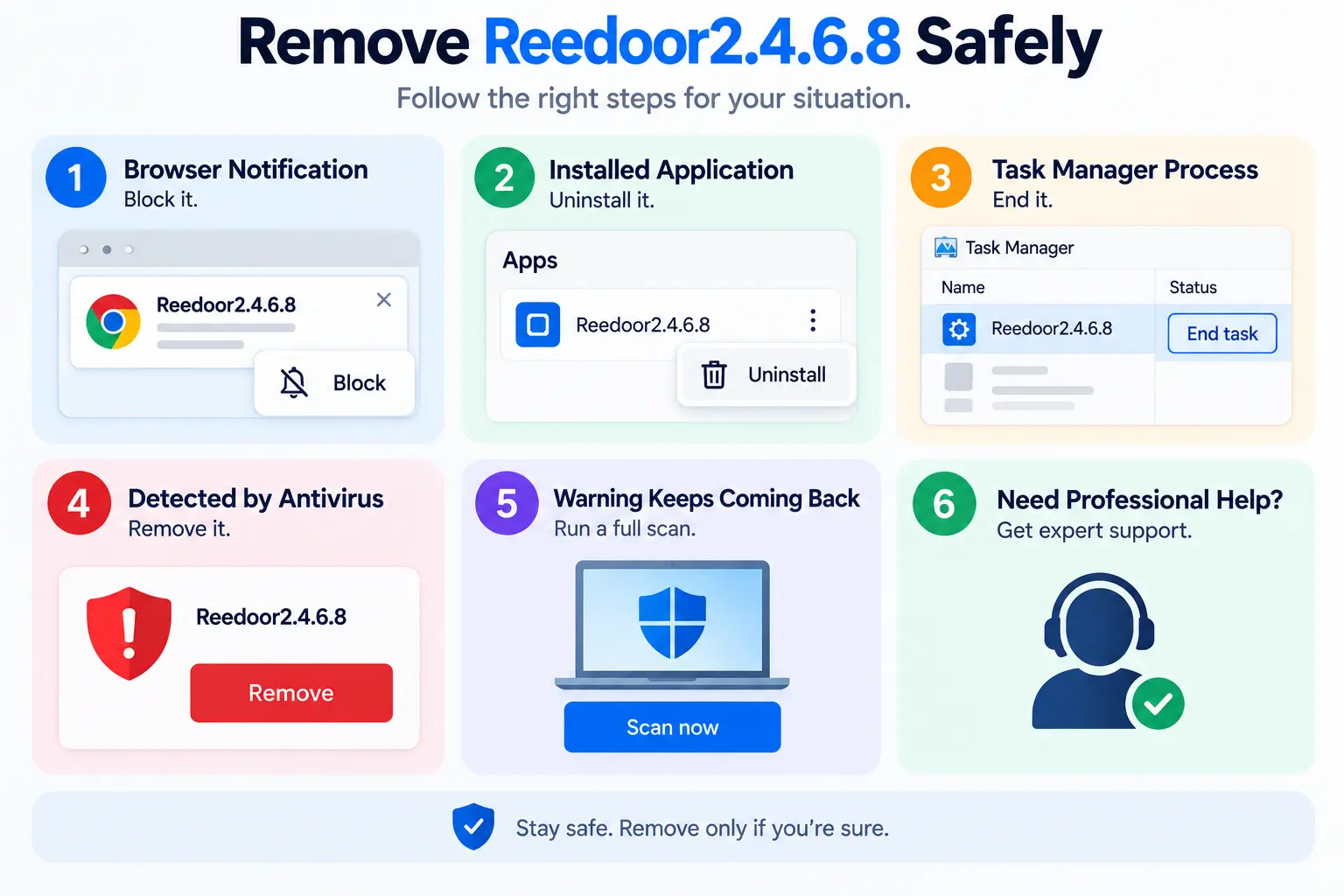
If it is only a browser notification
Remove the site’s notification permission using the steps above. No file removal is needed for this scenario.
If it is an installed application
Uninstall it from Settings > Apps > Installed apps like any other program, then restart your PC.
If it is an unknown Task Manager process
End the process, locate its file using “Open file location,” and if it looks unfamiliar and unsigned, delete the file after confirming it isn’t tied to something you actually use.
If antivirus detects the file
Let Defender (or your installed antivirus) quarantine or remove it directly rather than deleting it manually. The Protection History log will confirm the action taken.
If the warning keeps coming back
Run a Full scan rather than a Quick scan, and check whether a browser extension or a startup program is reinstalling it. Task Scheduler is worth checking too, since some unwanted software recreates itself using a scheduled task.
When you should use Safe Mode
If a process resists being closed or a file refuses to delete while Windows is running normally, restart into Safe Mode (Settings > System > Recovery > Advanced startup) and remove it there, where fewer background processes are active.
When professional help is appropriate
If you’ve run through these checks and still can’t confirm what the file is, or if you’re seeing signs of a broader compromise (unexpected account activity, unfamiliar new user accounts, ransom messages), it’s reasonable to bring in a professional rather than continuing to guess.
Should You Add Reedoor2.4.6.8 to Windows Defender Exclusions?
What a Defender exclusion actually does
An exclusion tells Defender’s real-time protection to skip scanning a specific file, folder, or process entirely. It’s meant for cases where a trusted program is being incorrectly flagged, not as a way to make a warning go away.
Why excluding an unknown file can be dangerous
Excluding something you haven’t verified means Defender will stop checking it, permanently, until you remove the exclusion. If the file turns out to be harmful, you’ve effectively told your antivirus to ignore it.
When an exclusion may be appropriate
Only after you’ve confirmed the file belongs to software you deliberately installed, from a publisher you can verify, and it’s causing a documented false-positive issue that the software’s own support materials describe.
What to verify before creating an exclusion
The exact file path and file name, not just a folder guess
A verified publisher and digital signature
That the file is tied to software you intentionally installed
That other antivirus engines (via a multi-engine scan) don’t flag it as malicious
What If Reedoor2.4.6.8 Is Associated With a Windows Error?
If the name turned up inside an error message rather than a pop-up or process, it may point to a corrupted or missing system file that’s unrelated to anything malicious. These steps use Windows’ built-in repair tools.
Check Windows Update
Go to Settings > Windows Update and install any pending updates first, since some system file issues are already fixed in an update you haven’t applied yet.
Run DISM
Open Command Prompt as administrator and run:
DISM.exe /Online /Cleanup-image /Restorehealth
This repairs the underlying component store that Windows and other repair tools draw from, and it can take several minutes to finish.
Run System File Checker
After DISM completes, run:
sfc /scannow
Running DISM first is generally recommended, because SFC repairs files using that same component store, and a corrupted store can cause SFC repairs to fail or silently not stick.
Restart and test again
Restart your PC after both commands finish, then check whether the error or the Reedoor2.4.6.8 reference still appears.
When DISM/SFC will not solve the problem
If the error is coming from a specific third-party application rather than Windows itself, these tools won’t touch it. In that case the fix is usually reinstalling or updating that particular program.
Reedoor2.4.6.8 Troubleshooting Decision Tree
Use whichever line matches where you actually saw it.
Saw it in a browser: check and revoke notification permissions for the site involved.
Saw it in Task Manager: inspect the process’s file path and digital signature before deciding anything.
Saw it in Installed Apps: check the listed publisher and installation date.
Defender detected it: review Protection History, then run a Full scan.
Saw it in an error message: identify which application generated the error, then try DISM and SFC if it’s a Windows-level issue.
A website told you to download it: don’t, until you’ve independently verified what it is.
Reedoor2.4.6.8 vs. Legitimate Windows Security
Feature
Reedoor2.4.6.8 (as claimed online)
Windows Security (Microsoft Defender)
Official Microsoft documentation
Not established
Yes
Known publisher
Not established
Microsoft
Built into Windows
Not established
Yes
Threat scanning
Depends on what you are actually seeing
Yes
Protection History log
Not established
Yes
Official Windows integration
Not established
Yes
This comparison isn’t meant to declare Reedoor2.4.6.8 malicious. It’s meant to show how little about it can currently be confirmed against a baseline (Microsoft’s own Windows Security) where everything is documented and verifiable.
Common Mistakes to Avoid
Downloading the first “fix” that shows up in a search result
Calling a phone number listed in a pop-up warning
Disabling Windows Defender to make a warning stop
Adding an unverified file to Defender exclusions
Deleting system files manually without knowing what they do
Running commands copied from an unfamiliar website without understanding them
Assuming a page ranking high in search results means it’s accurate
How to Prevent Similar Security Problems
Download software only from the publisher’s own site or well-established stores
Keep Windows and your browser updated
Review your browser’s notification permissions occasionally and remove sites you don’t recognize
Keep Windows Security (or your antivirus of choice) turned on and up to date
Read each screen carefully during software installs, since bundled extras are usually opt-out rather than opt-in
Treat urgent, scary security pop-ups as a prompt to slow down, not to act quickly
Reedoor2.4.6.8 FAQs
What is Reedoor2.4.6.8 for Windows?
An unverified term with no confirmed connection to a Microsoft component or a known antivirus product. What it means in your case depends on where you encountered it.
Is Reedoor2.4.6.8 a Microsoft program?
There’s no documentation from Microsoft referencing it, so it should not be assumed to be an official Windows tool.
Is Reedoor2.4.6.8 a virus?
It might be, depending on what actually triggered the reference on your device, but the name alone doesn’t confirm that. Check Protection History and, if a specific file is involved, scan it directly.
Is Reedoor2.4.6.8 safe?
Safe or not depends entirely on context: a browser pop-up asking for permission is a different risk level than a file your antivirus flagged. Work through the checks in this guide rather than relying on the name.
Should I download Reedoor2.4.6.8?
Not based on a pop-up or a website telling you to. There’s no verified legitimate source offering it as a download.
How do I remove Reedoor2.4.6.8?
It depends on where it’s located: uninstall it if it’s an installed app, revoke the permission if it’s a browser notification, or let your antivirus quarantine it if it’s a detected file.
Why does Reedoor2.4.6.8 keep appearing?
Recurring pop-ups usually mean a browser notification permission wasn’t fully removed, or a startup program or scheduled task is relaunching a process. Check both.
What if Reedoor2.4.6.8 appears in Task Manager?
Check the process’s file location and digital signature before deciding whether to end it or investigate further.
Should I add Reedoor2.4.6.8 to Defender exclusions?
Not unless you’ve independently confirmed the specific file is tied to software you intentionally installed from a verified publisher. Excluding an unverified file turns off scanning for it entirely.
How do I check whether a Reedoor2.4.6.8 file is legitimate?
Check its file location, publisher, and digital signature, then scan it directly with Microsoft Defender or a multi-engine scanner before making a decision.
Conclusion
Reedoor2.4.6.8 isn’t a name with a clear, confirmed identity, and that’s really the core problem with it. It doesn’t map to a documented Microsoft component, it doesn’t map to a known antivirus product, and most of what’s written about it online traces back to guesswork rather than a verifiable source. That uncertainty is exactly why the right response depends on where you actually encountered it rather than on the name itself. A browser pop-up, an unfamiliar process in Task Manager, an entry in your installed apps, and a genuine Defender detection all call for different next steps, and Windows already gives you the tools to tell them apart: Protection History, file location, publisher information, and a direct scan. Work through those before deciding the term means anything in particular, and you’ll end up acting on evidence instead of on an unfamiliar string of characters.
If you’ve started looking for a mobile app development company in the USA, you’ve probably noticed the same problem I keep running into when I research this space: every list looks the same.
Ten logos, a paragraph each, a “contact us” button. None of it tells you how to actually pick the right team for your project.
This guide takes a different approach. Instead of just naming companies, it walks you through how to evaluate them yourself: what to check, what to ask, what a fair price looks like, and what tends to go wrong when businesses skip this homework.
Whether you’re a founder building an MVP or a product manager scoping an enterprise app, the goal here is the same: help you make a hiring decision you won’t regret in six months.
10 Best Mobile App Development Companies in the USA
The best mobile app development company depends on what you’re building, how complex the project is, and how much support you’ll need after launch.
Instead of treating one company as the universal winner, this list highlights firms with different strengths, from startup MVPs to enterprise applications.
1. Red Stag Labs
Best for: Custom mobile apps and business-focused solutions
Red Stag Labs provides mobile app development for iOS and Android, with options for native and cross-platform development.
The company also offers custom software development, cloud services, AI solutions, and post-launch support.
It’s a good option for businesses looking for a development partner that can handle more than just the mobile frontend.
2. WillowTree
Best for: Enterprise digital products
WillowTree is known for working on large-scale digital experiences and mobile products.
It’s particularly suited to organizations that need mature product strategy, UX design, engineering, and enterprise-level delivery.
3. Fueled
Best for: Premium startup and consumer apps
Fueled focuses on designing and developing mobile and digital products, making it a strong fit for startups and consumer-facing businesses that place a high emphasis on product design and user experience.
4. Chop Dawg
Best for: Startups and full-service app development
Chop Dawg provides end-to-end app development services for businesses and startups.
Its offering covers product strategy, design, development, and launch, making it suitable for founders that want a single development partner.
5. TechAhead
Best for: Custom iOS, Android, and cross-platform development
TechAhead works across mobile app development, digital transformation, and emerging technologies.
It’s worth considering when you need a custom application with integrations and room to scale.
6. Dogtown Media
Best for: Mobile products and emerging technology
Dogtown Media specializes in mobile applications and technology-driven digital products.
It can be a good fit for businesses building applications that require custom functionality or newer technologies.
7. Utility
Best for: Enterprise and consumer digital products
Utility works with organizations on custom mobile and web applications. Its experience spans product strategy, UX/UI, engineering, and digital product development.
8. Goji Labs
Best for: Startups and MVP development
Goji Labs focuses on product design and development for startups and growing businesses. It’s a useful option for companies that need help turning an early product idea into a working application.
9. Lickability
Best for: iOS and consumer applications
Lickability has a strong focus on mobile product development, particularly within the Apple ecosystem. It’s a potential fit for companies where iOS experience and polished mobile UX are priorities.
10. 3 SIDED CUBE
Best for: Purpose-driven and socially impactful apps
3 SIDED CUBE specializes in digital products designed to address real-world problems. Its portfolio makes it particularly relevant for organizations working in areas such as humanitarian response, accessibility, and social impact.
How We Selected These Companies
Rather than ranking companies purely by brand recognition, consider factors such as mobile development experience, portfolio quality, independent reviews, technical capabilities, pricing, communication, and post-launch support.
The right company for a startup building an MVP may be completely different from the right partner for a healthcare organization or enterprise with strict security and compliance requirements.
Use this list as a starting point, then evaluate each company against the criteria discussed throughout this guide.
What Is a Mobile App Development Company?
A mobile app development company designs, builds, tests, and maintains software for phones and tablets. That usually covers iOS, Android, or both, plus the backend systems, APIs, and databases that keep the app running after launch.
Some firms specialize in one platform or industry; others handle the full product lifecycle from an idea on a napkin to ongoing support.
The label gets used loosely, though. Some “companies” are a two-person freelance team with a website. Others are 200-person studios with dedicated QA and DevOps departments.
Part of your job as a buyer is figuring out which one you’re actually talking to.
How to Choose a Mobile App Development Company in the USA
Picking a development partner isn’t that different from hiring a key employee.
You’re trusting someone with a big chunk of your budget and your product’s future. Before you commit, it’s worth looking beyond their portfolio and checking how well their own website performs.
A website SEO score checker can help you evaluate important aspects of a company’s online presence, including technical SEO, page performance, and overall website health.
Technical expertise that matches your platform and complexity
A portfolio you can actually verify, not just screenshots
Clear, itemized pricing
A defined process for discovery, design, development, and testing
A written policy on who owns the code and IP
A real plan for what happens after launch
Reviews you can check independently, not just testimonials on their own site
Communication that fits your time zone and working style
We’ll go through each of these in detail, but if you remember one thing from this article, remember this: the cheapest quote and the flashiest portfolio are rarely the safest choice.
US-Based vs. Offshore vs. Nearshore Development Companies
This is where a lot of “top companies in the USA” lists get sloppy. A firm headquartered in Bangalore with a small sales office in Delaware is not the same thing as a company built and run out of Austin or Chicago. Both can build you a good app. But they come with different trade-offs, and you deserve to know which one you’re hiring.
Here’s a simple way to sort them:
Type
What it means
Typical trade-off
US-based
Headquarters and most engineers are in the US
Higher cost, easier time-zone overlap
US presence
A US office or legal entity, engineering elsewhere
Mixed, depends on team split
Nearshore
Development team mostly in Latin America
Good time-zone overlap, mid-range cost
Offshore
Development team mostly in South or Southeast Asia
Lower cost, larger time-zone gap
None of these is automatically “better.” A nearshore team in Mexico City working 9-to-5 Central Time can be far easier to manage than a US company that outsources your project to a subcontractor without telling you.
Ask directly where the engineers who’ll write your code actually sit. If a company hesitates on that question, that’s a signal worth noting.
For deeper discussion on this trade-off from developers who’ve lived it, r/webdev and r/startups on Reddit have long-running threads where founders compare notes on outsourcing experiences, worth a search before you commit a budget.
How Much Does Mobile App Development Cost in the USA?
Most US mobile app projects fall somewhere between $20,000 and $500,000, depending on complexity, platform choice, and how regulated your industry is. That’s a wide range, so here’s a rough breakdown by project type:
App type
Estimated cost
Typical timeline
Simple MVP
$20K–$50K
2–4 months
Moderate-complexity app
$50K–$150K
4–7 months
Complex app
$150K–$300K+
6–12 months
Enterprise or regulated app
$300K–$500K+
9–18+ months
Treat these as planning numbers, not quotes. Your actual cost depends on:
Number of platforms (iOS only vs. iOS and Android)
Backend complexity: a simple content app vs. one syncing real-time data across users
Third-party integrations (payments, maps, AI models, CRMs)
Design complexity and how much custom UI work is involved
Compliance requirements like HIPAA or PCI DSS
Where the development team is based
Ongoing maintenance after launch
What Should a Quote Actually Include?
A number on its own tells you almost nothing. Before comparing two proposals, check whether each one covers:
UX research and prototyping
UI design
Backend and database work
API development and third-party integrations
An admin dashboard, if you need one
QA and manual testing
App Store and Google Play submission
Analytics setup
A maintenance period after launch
I’ve seen two quotes for the same app come in $80,000 apart, and the cheaper one simply left out QA and backend work, planning to bill for it later as a “phase two.” Read the fine print.
How Long Does It Take to Build a Mobile App?
A basic MVP usually takes two to four months. A full-featured consumer app with a custom backend runs closer to six months. Enterprise or regulated apps, think healthcare platforms with audit trails, or fintech apps needing compliance sign-off, can take a year or more.
The rough sequence looks like this:
Discovery → UX/UI design → Architecture → Development → QA → Beta testing → App Store submission → Post-launch monitoring
Discovery and design alone can take four to six weeks if done properly. Rushing this stage is one of the more common reasons projects run over budget later: requirements shift mid-build because nobody nailed them down at the start.
Native vs. Flutter vs. React Native: Which Should You Choose?
This question comes up in nearly every hiring conversation, so it’s worth understanding in plain terms.
Native development means building separately for iOS (in Swift) and Android (in Kotlin). You get the best performance and full access to each platform’s features, but you’re paying for two codebases.
Flutter and React Native are cross-platform frameworks. You write most of the code once and it runs on both platforms. This saves time and money, though very graphics-heavy or hardware-intensive apps sometimes still benefit from native code.
Factor
Native
Flutter
React Native
Performance
Best
Very good
Good
Code shared across platforms
None
High
High
Development speed
Slower
Fast
Fast
Best for
Complex, performance-heavy apps
Startups wanting one codebase
Teams already using JavaScript
Neither cross-platform framework is a downgrade. Companies like Google (Flutter) and Meta (React Native) use them in production at scale. The right choice depends on your team’s existing skills and how demanding your app’s performance needs are. Wikipedia’s overview of cross-platform software is a decent primer if you want the technical background before your first vendor call.
What Services Should a Mobile App Development Company Offer?
A full-service partner should be able to cover the whole build, not just the parts that are fun to talk about in a sales call. Look for:
Product discovery and requirements gathering
UX research and UI design
iOS and Android development, native or cross-platform
Backend and API development
Cloud infrastructure setup (AWS, Google Cloud, or Azure)
QA and automated testing
DevOps and CI/CD pipelines
App Store and Google Play deployment
Post-launch maintenance
AI integration, if relevant to your product
If a company only does design, or only does the frontend and expects you to find a separate backend team, that’s not necessarily a dealbreaker, but you need to know that going in, and price your project accordingly.
How to Evaluate a Mobile App Development Company: A Step-by-Step Process
Step 1: Define what you’re actually building
Write down the core problem your app solves before you talk to anyone. A one-page brief covering the audience, main features, platforms, and rough budget will save you hours of back-and-forth with sales teams.
Step 2: Decide your platform priorities
iOS only? Android only? Both from day one? This affects cost, timeline, and which companies are even a good fit.
Step 3: Set a realistic budget range
Use the cost table above as a starting point, then adjust for your specific features and compliance needs.
Step 4: Shortlist three to five companies
Don’t try to evaluate fifteen agencies in depth. Narrow to a short list based on the criteria in this guide, then go deep.
Step 5: Check their actual apps
Ask for links to apps they’ve shipped and download them yourself. Read the App Store and Google Play reviews. A polished case study page means nothing if the real product has a 2.8-star rating.
Step 6: Verify reviews independently
Check the company on Clutch or GoodFirms rather than relying on testimonials posted on their own site. LinkedIn is also useful here. Look at the profiles of the actual engineers, not just the sales team, and see if their work history matches what the company claims.
Step 7: Interview the technical team, not just sales
Ask to speak with the developer or architect who’d actually work on your project. Sales reps are trained to sound confident. Engineers will tell you honestly what’s hard about your idea.
Step 8: Compare proposals line by line
Match each quote against the “what should a quote include” checklist above.
Step 9: Read the contract before signing anything
Pay close attention to IP ownership, source-code access, and what happens if you want to switch vendors later.
Step 10: Confirm what post-launch support looks like
Ask specifically what’s included after launch, for how long, and at what cost once that period ends.
12 Questions to Ask Before Hiring a Mobile App Development Company
How many apps have you shipped to the App Store or Google Play?
Can you share links to three live apps I can download right now?
Who owns the source code once the project is complete?
Who controls the Apple Developer and Google Play accounts?
Do you handle backend development in-house, or is that subcontracted?
Who performs QA, and is it manual, automated, or both?
What’s your process when requirements change mid-project?
What does your security review process look like?
What’s included in your maintenance agreement, and what costs extra?
Will the same team stay on the project from start to finish?
What happens if we want to move development in-house or to another vendor later?
Can you walk me through a project that didn’t go as planned, and what you did about it?
That last question matters more than people think. Any agency with real experience has had a project go sideways. How they answer tells you more about them than a perfect track record ever could.
Red Flags When Hiring a Mobile App Development Company
Watch for these warning signs during the sales process:
No verifiable live apps, only mockups or screenshots
A quote far below every other bid with no clear explanation
No discovery phase, they’re ready to start coding the day you sign
Vague contract language around IP and code ownership
Reluctance to let you speak with the actual engineering team
One technology recommended for every type of project, regardless of fit
No mention of security or compliance, even when you’ve raised it
No plan for what happens after launch
None of these alone disqualifies a company automatically, but two or three together are worth a serious pause.
App Ownership and Intellectual Property
This gets skipped in a lot of sales conversations, and it shouldn’t. Before you sign, confirm in writing:
You own the source code once final payment is made
You control the Apple Developer and Google Play Console accounts
You have access to design files, documentation, and the repository
Any third-party libraries used are properly licensed for commercial use
There’s a clear handover process if you switch vendors later
If a contract is silent on any of these, ask for it to be added explicitly. Verbal assurances don’t help you much in a dispute.
Security and Compliance Considerations
Depending on your industry, your app may need to meet specific regulatory standards:
HIPAA for health data in the US
PCI DSS for handling payment card information
GDPR if you have users in the EU
CCPA/CPRA for California residents’ data
Beyond regulation, ask how the company handles encryption in transit and at rest, authentication, and secure API design. The OWASP Mobile Top 10 is the standard reference list of common mobile security risks, and a competent development partner should be familiar with it without you having to explain what it is.
What Happens After Your App Launches?
Launch day isn’t the finish line. A serious development partner should help with:
Crash monitoring and bug fixes
Usage analytics
OS updates (new iOS and Android versions come out yearly)
Security patches
Performance tuning as your user base grows
New feature development based on user feedback
Ask upfront what this costs on an ongoing basis. A common model is a monthly retainer covering a set number of hours, with anything beyond that billed separately. It’s also worth asking whether ongoing maintenance includes page speed and Core Web Vitals optimization, especially if your app has a supporting website or web-based components that need to stay fast and responsive.
What Should Be in a Mobile App Development Contract?
At minimum, your contract should spell out:
Scope of work and specific deliverables
Project milestones and payment schedule
Process for handling change requests
IP and source-code ownership
Confidentiality terms
Warranty period for bug fixes after delivery
Maintenance terms
Termination and handover process
If you’re not a lawyer, it’s worth having one review the contract before you sign, particularly the IP and termination clauses.
Best Mobile App Development Companies by Project Type
Rather than a single ranked list, think about what kind of buyer you are:
Startups and MVPs usually do best with a smaller, faster-moving team that can iterate quickly and isn’t precious about scope changes.
Enterprise projects benefit from a company with a proven process for handling larger teams, documentation, and stakeholder sign-off at each stage.
Healthcare and fintech apps need a partner who already understands HIPAA or PCI DSS, not one learning compliance requirements on your dime.
AI-powered apps need engineers who’ve actually integrated language models or machine learning pipelines into production apps, not just added a chatbot widget.
Match the company’s demonstrated experience to your category before you match on price.
Frequently Asked Questions
1. What is the best mobile app development company in the USA?
There’s no single best company. It depends on your budget, industry, and platform needs. A startup building a simple MVP and a hospital system building a HIPAA-compliant app need very different teams.
2.How much does it cost to build an app in the USA?
Most projects range from $20,000 for a simple MVP to $500,000 or more for complex, regulated applications. Get itemized quotes so you know exactly what’s included.
3. How long does it take to build a mobile app?
A simple MVP typically takes two to four months. Complex or enterprise apps can take six months to over a year.
4.Is it better to hire a US-based or offshore company?
US-based teams offer easier time-zone overlap and communication, at a higher cost. Offshore and nearshore teams can lower cost significantly, with more coordination effort required. Neither is objectively better. It depends on your budget and how hands-on you want to be.
5. Should I choose Flutter or React Native?
Both are solid choices for cross-platform apps. Flutter tends to edge out on performance and UI consistency; React Native is a natural fit if your team already knows JavaScript.
Final Thoughts
There’s no universal winner in this category. The right mobile app development company for a healthcare startup in Boston looks nothing like the right one for a consumer social app out of Austin.
What matters is that you go in with a clear brief, a realistic budget, and a checklist for verifying claims instead of taking them at face value.
If you take one thing from this guide, let it be this: spend an extra week vetting a company properly, and you’ll likely save months of rework later.
The businesses that get burned in this space almost always skip the boring parts: the portfolio checks, the contract review, the plain conversation about who owns the code.
Do those, and you’ll be in a strong position to hire well, whether you end up with a small US studio or a larger cross-platform team.
Before making your final decision, you can also use website and SEO audit tools to evaluate a company’s online presence and identify potential technical issues.
When you type “PushWiki Com” into Google you may notice that the results do not line up. The search returns a Wikipedia disambiguation page for the word “push,” a Wiktionary definition, an IMDb entry, several unrelated companies that use “Push” in their names and hidden among them a PushWiki Com page. That mix is confusing. That confusion is why this guide was created.
The purpose of this article is to explain what PushWiki Com really is, what it publishes, how it stacks up against a wiki such as Wikipedia and what you should verify before believing anything you find there. If a claim can be confirmed we will state that. If a claim cannot be confirmed we will also state that.
What Is PushWiki Com?
1. PushWiki Com at a Glance
PushWiki.com shows itself as a place where you can read about SEO, blogging, website building, digital marketing and general online business tips.
PushWiki.com looks more like a content hub or an editorial blog than a classic reference encyclopedia. With PushWiki.com you can read articles without having to log in.
Those are the facts about PushWiki.com. Anything else, who runs PushWiki.com, when PushWiki.com started how many visitors PushWiki.com gets, remains only claimed by PushWiki.com. Has not been proven by an outside source. We will keep that note about PushWiki.com in every part of this write-up.
2. Why the Name “PushWiki” Can Be Misleading
The word “wiki” carries a specific meaning to most people: a site anyone can edit, like Wikipedia. That’s not automatically true just because a domain has “wiki” in its name.
Plenty of sites use “wiki” purely as a branding choice, while functioning as a normal editorial website where a small team (or one person) writes and publishes content.
So before assuming PushWiki Com works like Wikipedia, it helps to separate three different models:
A wiki, where content is community-edited and versioned.
An editorial website, where a staff or single author writes and controls all content.
A blog, which is usually one voice, published chronologically, with less structural organization than a reference site.
Based on what’s publicly visible, PushWiki Com behaves closer to the second category: an editorial site using “wiki” as a name, not as a description of how it operates.
3. What Users Can Find on PushWiki Com
Visitors usually come across articles that explain digital ideas. These articles talk about what some marketing words mean. They also show how functions. There is some advice about SEO.
There is also talk about managing a website or a small online business. The style is meant for people who are just starting out. It is not, for experts.
What Does PushWiki Com Actually Do?
1. Information and Educational Content
Most of the content functions as a plain-English explainer, the kind of article you’d send someone who just heard a term for the first time and wants a quick, low-pressure explanation.
2. Technology and Digital Topics
Coverage extends into general technology and internet-culture topics, again pitched at a non-technical reader rather than someone doing in-depth research.
3. SEO and Online Marketing
A recurring theme across PushWiki-style content is search engine optimization: what it is, why it matters for a website, and basic tactics. If you’re learning how SEO works, our guide to keyword research and analyzing SERP results provides a practical next step. This lines up with the domain’s apparent audience of bloggers and small site owners.
4. Blogging and Website-Related Topics
Expect articles on starting a blog, choosing a content management system, and general website-building advice.
5. Other Categories You May Encounter
Beyond the core topics, some articles touch on broader online business themes. Because a site’s topic list can shift over time, treat any specific category list, including this one, as a snapshot rather than a permanent index.
How Does PushWiki Com Work?
1. How Content Is Organized
Articles appear to be grouped loosely by topic, with standard blog-style navigation rather than the category-and-talk-page structure you’d see on a true wiki. If you want to understand how search engines analyze website structure and links, see our guide on how an SEO crawler works.
2. How Users Find Information
Search and browse work the way they do on most content sites: a search bar, category links, and internal links between related articles.
3. How Articles Are Published
There’s no visible indication of open community submission. Articles read as though they’re written and published by site administrators or a small editorial team, not crowdsourced.
4. Does PushWiki Com Allow User Editing?
This is worth answering directly, since it’s the single biggest source of confusion tied to the name: nothing publicly visible suggests that outside users can edit or submit articles on PushWiki Com. If that changes, or if a specific PushWiki-branded domain does support user contributions, treat that as a feature of that particular site, not a rule that applies to every “PushWiki” domain you come across.
Is PushWiki Com a Real Wiki?
1. What Makes a Website a Wiki?
The term “wiki” originally described a website that lets users add and edit pages collaboratively, usually with version history and open editing rights. Wikipedia’s own overview of the wiki concept is a useful reference point for what the format traditionally involves.
2. Does PushWiki Com Meet Those Characteristics?
Based on the absence of visible edit buttons, contributor accounts, or version history, PushWiki Com doesn’t appear to function as a collaborative wiki in the technical sense. It reads as a standard content website that adopted “wiki” as part of its brand name.
3. PushWiki Com vs Wikipedia
Factor
PushWiki Com
Wikipedia
Primary model
Editorial content site
Collaborative encyclopedia
Community editing
Not evident
Yes, open to registered and anonymous users
Topic scope
Focused on marketing, SEO, blogging
Broad, encyclopedic
Citation model
Not consistently visible
Established citation and sourcing policy
Editorial governance
Unclear, likely small team
Community-based, with documented policies
4. PushWiki Com vs a Traditional Blog
Functionally, PushWiki Com has more in common with a niche blog than with Wikipedia. The difference from a typical blog is mostly cosmetic: broader topic framing and a “wiki” name, rather than a fundamentally different publishing model.
Is PushWiki Com Legit?
Short answer: it appears to be a real, operating website publishing genuine content, not a scam page. That said, “legitimate” and “authoritative” are two different questions, and it’s worth keeping them separate.
1. What Can Be Verified
The site exists, serves content over a working domain, and publishes articles on consistent themes. That much is observable by visiting it directly.
2. What the Website Claims About Itself
Beyond the visible content, any specific claims the site makes about its own reach, expertise, or history should be treated as self-reported until you find independent confirmation elsewhere.
3. Ownership and Operator Transparency
This is where PushWiki Com, like a lot of smaller content sites, falls short of ideal transparency. If the site doesn’t clearly list who owns or operates it, that’s a gap worth noting rather than ignoring.
4. Author and Editorial Information
Check whether individual articles list an author, and whether that author has a bio, credentials, or a linkable profile. A site with no visible authorship across any article is harder to evaluate for expertise.
5. Contact Information
A working contact page or email address is a basic trust signal. Its absence doesn’t prove a site is untrustworthy, but its presence makes verification easier.
6. Editorial Policies and Corrections
Look for an editorial policy, a correction process, or any statement about how the site handles inaccuracies. Most established publishers have one; many smaller sites don’t, and that’s a limitation rather than a red flag on its own.
7. Third-Party Evidence
Independent mentions of a site, on forums, review pages, or social platforms, can help confirm it’s a known, active property rather than a brand-new or low-visibility domain. A quick search on a community platform like Reddit or a professional network like LinkedIn can sometimes surface user experiences that a site’s own pages won’t mention.
Is PushWiki Com Safe to Visit?
1. Website Security vs Content Trustworthiness
These are two separate questions people often mix together. A site can be technically safe to load (no malware, no phishing) while still publishing shallow or unreliable content. Conversely, a well-written article doesn’t guarantee the site is secure. Check both independently.
2. Security Signals to Check
The site loads over HTTPS (a padlock icon in your browser’s address bar).
Your browser doesn’t show a security warning when you visit.
You’re not redirected to an unrelated or unexpected domain.
The site doesn’t push unsolicited downloads.
Pop-ups aren’t aggressive or hard to close.
Forms don’t ask for information unrelated to what you’re doing on the page.
3. Privacy and Data-Collection Considerations
If PushWiki Com uses ads or analytics, which is standard for most content sites, check its privacy policy for what data is collected and how it’s used. No visible privacy policy is worth noting as a gap.
4. What You Should Avoid Entering
Don’t enter payment details, passwords, or sensitive personal information on an informational content site unless there’s a clear, specific reason tied to a service you’re actually signing up for.
5. What to Do If the Site Redirects You
If a link to PushWiki Com sends you somewhere unexpected, stop and check the URL in your address bar before interacting with the page further. Domain confusion, discussed next, is common enough with “wiki”-branded sites that it’s worth a habit of double-checking.
How to Identify the Correct PushWiki Website
This matters more than it sounds, because search results currently show more than one PushWiki-related domain, each describing itself somewhat differently.
1. Check the Exact Domain
Confirm you’re on the specific domain you intended. PushWiki Com is not the same property as any similarly spelled .net, .org, or hyphenated variant, even if the branding looks alike.
2. Look for Official About and Contact Information
A clear About page that explains who runs the site and why is a good sign. Its absence doesn’t confirm anything is wrong, but it does mean you’re relying on the content itself to judge the site.
3. Check the Site’s Branding and Content
Consistent logo use, consistent writing style, and a coherent topic focus suggest a maintained site rather than a copy or clone.
4. Verify Claims Through Independent Sources
If an article makes a specific factual claim you plan to rely on, cross-check it against a primary source, such as a company’s own site, an official statistics page, or an established reference like Wikipedia, rather than taking the article at face value.
5. Beware of Lookalike or Unrelated Domains
Some search results for “PushWiki” lead to entirely unrelated businesses that happen to use “Push” in their name: a marketing agency, a music platform, a streaming service. Read the actual page content, not just the domain name, before assuming you’ve found the right site.
What Topics Does PushWiki Com Cover?
Based on visible content, the site’s focus sits mainly in these areas:
SEO
Blogging
Website development
Digital marketing
Online business
General technology explainers
Treat this as a general map rather than an exhaustive index, since smaller content sites add and remove topics over time.
Who Is PushWiki Com For?
1. Beginners
If you’re new to blogging, SEO, or running a website, PushWiki Com-style content can work as a starting point for basic vocabulary and concepts.
2. Bloggers and Website Owners
The practical, how-to framing suits people building or maintaining their own sites and looking for quick, non-technical explanations.
3. Digital Marketers
Junior marketers or anyone brushing up on terminology may find the articles useful as a refresher, though not as a primary professional resource.
4. Students and General Readers
Anyone researching digital topics casually can use the site as one input among several, not as a sole source for an assignment or report.
5. Who Should Look Elsewhere?
If you’re making a technical, financial, legal, or health-related decision, don’t rely on a general-audience content site like this one. Go to primary sources, official documentation, or a qualified professional instead.
How to Evaluate the Quality of a PushWiki Com Article
This applies to any article on a site like this one, not just PushWiki Com specifically.
1. Check the Author
Is there a named author with any background information? No byline at all is a weaker signal than a named writer with a visible profile.
2. Check the Publication Date
Digital marketing and SEO advice ages quickly. An undated article, or one that’s clearly several years old, deserves extra scrutiny before you act on it.
3. Check the Sources
Does the article link to where its facts came from? Articles with zero outbound references are harder to verify. For a broader look at how content should be optimized for search, see our guide to how to write content that ranks.
4. Look for First-Hand Evidence
Practical advice grounded in a specific example (“here’s what happened when we tried this”) is generally more useful than generic statements with no supporting detail.
5. Compare Important Claims With Primary Sources
For anything you intend to act on, check it against the original source: the platform’s own documentation, an official statement, or a recognized reference site.
6. Check Whether the Information Is Still Current
Screenshots, tool names, and pricing mentioned in an article can go stale fast. If a piece references a specific tool or feature, confirm it’s still accurate today.
PushWiki Com vs Wikipedia vs Other Knowledge Websites
1. PushWiki Com vs Wikipedia
Wikipedia is a community-edited, citation-driven encyclopedia with documented governance and a long track record. PushWiki Com is a smaller, narrower content site with a more informal structure. They’re not really competitors; they serve different purposes.
2. PushWiki Com vs Wiktionary
Wiktionary is a collaborative dictionary focused on word definitions and etymology. PushWiki Com doesn’t function as a dictionary at all, so this comparison mostly matters because both terms show up in the same search results, not because they overlap in purpose.
3. PushWiki Com vs Fandom
Fandom hosts thousands of community-run wikis, each focused on a specific show, game, or franchise, with open editing by fan communities. PushWiki Com has no visible fan-community structure and covers a different subject area entirely.
4. PushWiki Com vs General Blogs
This is the closest real comparison. PushWiki Com functions much like a niche blog with a broader-sounding name: similar publishing model, similar single-author-or-small-team structure, different branding.
Site
Editing model
Governance
Typical use case
PushWiki Com
Editorial, closed
Small team, limited visible policy
Beginner-level digital topics
Wikipedia
Open, collaborative
Documented community policy
General reference
Wiktionary
Open, collaborative
Documented community policy
Word definitions
Fandom wikis
Open, community-run
Per-wiki moderator teams
Fan and franchise content
Typical blog
Editorial, closed
Author or small team
Opinion, tutorials, niche topics
Advantages and Limitations of PushWiki Com
Potential Advantages
Explanations are written in accessible, beginner-friendly language.
Topic coverage spans several practical digital-business subjects in one place.
Content is easy to skim and doesn’t assume prior technical knowledge.
Potential Limitations
Visible sourcing is inconsistent, which makes fact-checking harder.
Broad topic coverage can mean less depth on any single subject.
Ownership and editorial-team transparency isn’t fully clear from the site itself.
Similar domain names in the same space make it easy to land on the wrong site by mistake.
Important claims should be checked against a primary source before you rely on them.
Should You Trust Information From PushWiki Com?
1. When It Can Be Useful
For a quick, low-stakes explanation of a term you just heard, this kind of site can save you time. Think of it as a starting point, not a final answer.
2. When You Should Verify Information
Anytime you’re planning to act on specific advice, such as a marketing tactic, a technical setting, or a business decision, verify it against the original source or documentation first.
3. When You Should Use Primary Sources Instead
For anything involving money, legal obligations, health, or technical accuracy that matters, go directly to the authoritative source rather than a general content site.
A simple way to decide:
Low-stakes learning → fine as a starting point.
Professional decision → verify before you act.
High-stakes decision → use primary, authoritative sources only.
PushWiki Com: Quick Verdict
Question
Verdict
Is it a real website?
Yes, it’s an active, publicly accessible site.
Is it a traditional wiki?
No clear evidence of open community editing.
Is it free to use?
Yes, reading the content doesn’t appear to require payment.
Is it safe to visit?
Standard security checks (HTTPS, no browser warnings) apply as with any site.
Is it trustworthy for research?
Useful as a starting point; verify anything important elsewhere.
Is it useful?
Yes, mainly for beginners looking for plain-English explanations.
Frequently Asked Questions About PushWiki Com
What is PushWiki Com?
It’s an informational website covering topics like SEO, blogging, website development, and digital marketing, written for beginners rather than specialists.
Is PushWiki Com legitimate?
It appears to be a genuine, operating content site rather than a scam. Ownership and editorial transparency aren’t fully clear, so treat claims with some caution.
Is PushWiki Com safe?
Apply the same checks you’d use for any site: HTTPS, no browser warnings, no unexpected redirects, and no requests for sensitive information you weren’t expecting to give.
Is PushWiki Com a wiki like Wikipedia?
Not in the traditional sense. There’s no visible sign of open community editing, so it behaves more like an editorial content site than a collaborative wiki.
Who owns PushWiki Com?
This isn’t clearly disclosed on the visible pages, which is a transparency gap worth noting rather than a confirmed problem.
Conclusion
PushWiki Com is a website that provides content focused on helping beginners learn about SEO, blogging, digital marketing and similar online topics. The site is built to explain things in a simple way. It’s good for people who are just starting out and want to understand terms or get a general idea before diving deeper.
The name can be a bit confusing. Even though it includes the word “Wiki ” PushWiki Com is not like Wikipedia. It’s not a place where users come together to edit articles or build knowledge as a community. Instead it functions more like an informational site with content written and maintained by a single team or few contributors.
This difference is important when it comes to trust and reliability. PushWiki Com can be helpful for learning ideas, finding new topics or getting a broad view of a subject. It should not be seen as a primary source. It’s not meant to replace guides, expert publications or trusted references.
If you’re working on something that involves money, technology, business or your career don’t rely on PushWiki Com. Use it to get your footing. Always verify key facts with reliable sources. Make sure the information is up to date and cross-check with trusted materials before you make any important decisions.
To sum it up, PushWiki Com is a starting point for beginners who are new to online topics. It can help you get your bearings. Don’t let its easy-to-understand format trick you into skipping deeper research when the details really matter.
Residual value at the component level is the price a used part can still command on the secondary market after the system it came out of has been retired. It bears little relation to a percentage of the original purchase price, and it does not decay on a smooth curve. Buyers set it against whatever they happen to need this quarter, filtered through how much work your parts still need before someone else can put them into production.
That second half is the part most decommissioning plans underweight. A pallet of pulled DIMMs and a tested, labelled, matched lot of the same DIMMs are not the same asset, and the gap between them is usually wider than the gap between two adjacent hardware generations.
TrendForce reported in July 2026 that server DRAM contract prices were on track to rise 13 to 18 percent quarter over quarter in the third quarter, with the increases landing hardest on buyers who had not locked in long-term supply agreements. Memory is the extreme case, but every component class in a retired rack is exposed to some version of that cycle. What follows is a component-by-component read on where the value actually sits, and what reliably destroys it.
The Vocabulary That Sets the Price
A few terms carry most of the weight in these conversations, so they are worth pinning down before the numbers start moving.
Harvesting is the practice of stripping a retired system and selling the parts individually or in matched lots, instead of selling the chassis as a working unit. Whole-unit sale is the opposite: the server goes out configured, tested, and ready to rack.
A DIMM is a memory module. Server platforms use registered DIMMs (RDIMM), which put a register between the controller and the DRAM chips to reduce electrical load, and load-reduced DIMMs (LRDIMM), which buffer both address and data lines to allow higher total capacity per channel. Both are ECC modules, meaning they carry the extra chip needed for error correction, which is why server memory and desktop memory are not interchangeable and do not price alike.
Condition grade is the shorthand a buyer uses for how much reconditioning work a part still needs: pulled and untested, tested and functional, or refurbished with warranty backing. Those three states describe the same physical object and command materially different offers.
Completeness is whether the part arrives with the small accessories that make it usable, such as the caddy for a drive, the rail kit for a chassis, the heatsink and retention clip for a processor. It sounds trivial. It is not.
The Drivers That Decide Almost Everything
Across every category, five factors move the number more than anything else.
Generation and platform relevance. Not age in years, but whether the current mainstream socket, memory standard, or interface still wants the part. A three-year-old component on a live platform outperforms a two-year-old component on an orphaned one.
Demand cycle. Secondary hardware prices are set by shortages and gluts in the primary market. When new supply is constrained, used inventory absorbs the overflow demand and prices firm up fast.
Condition and evidence. Not just whether the part works, but whether you can show that it works. Test output, power-on hours, and endurance readings are worth real money because they remove risk from the buyer’s side.
Completeness and volume. Fifty matched modules are worth more per unit than fifty assorted ones. A hundred drives in one lot is a different transaction from a hundred drives in six shipments.
Timing relative to the refresh wave. Every enterprise runs on roughly the same refresh calendar, which means the same parts hit the secondary market in clusters. Selling into the front of that wave beats selling into the middle of it.
Component Value at a Glance
Component class
Primary value drivers
What erodes value fastest
CPUs (Intel Xeon, AMD EPYC)
Generation, core count, whether the socket platform is still being bought
Falling one generation behind the current mainstream socket
Server memory (RDIMM, LRDIMM)
DDR generation, density per module, matched ranks and speeds, where the contract price cycle sits
Mixed ranks and speeds in one lot, untested modules, holding inventory through a peak
Data center GPUs and accelerators
Model, memory capacity and bandwidth, condition grade, test or warranty evidence
No test evidence, thermal wear, waiting out a new architecture launch
Enterprise HDD (SAS, SATA)
Capacity per unit, interface, power-on hours, sanitization documentation
High power-on hours, missing sanitization record
Enterprise SSD and NVMe
Capacity, remaining endurance, form factor, firmware neutrality
Heavy write wear, proprietary carriers or vendor-locked firmware
NICs, HBAs, transceivers
Speed tier, optic coding, quantity in matched lots
Vendor-coded optics with no matching demand, singles instead of lots
PSUs, boards, rails, caddies
Model-specific scarcity, whether they complete a parent unit
Being separated from the chassis they complete
Processors: Generation Is the Whole Argument
Server CPU value tracks the platform, not the silicon. A Xeon or EPYC part is worth what it is worth because buyers are still building and repairing systems on that socket, and the moment the mainstream buying centre moves to the next platform, demand for the previous one thins out quickly, not gradually.
Core count matters within a generation and barely matters across generations. A high core count part from an older family competes against a mid-range part from a newer one, and it usually loses, because the newer part brings memory standard support, PCIe lane counts, and security features that the older one cannot offer at any price.
Two practical notes from the intake side. Processors carry no persistent user data, so there is nothing to sanitize and nothing to certify. And the physical handling is where value evaporates: bent pins on a socket-pin design, missing retention hardware, or a heatsink pulled without thermal paste cleanup will take a functional part down a grade for reasons that have nothing to do with the chip.
Server Memory: The Most Volatile Line on the Whole Sheet
Memory is the component class where market timing outweighs every other driver, and the current market has made that unusually obvious. Contract prices for server DRAM have been climbing quarter over quarter on AI buildout demand, which pulls used DDR4 and DDR5 up with them, because buyers who cannot get new modules at a workable price start looking at tested used inventory instead.
The underlying value drivers are stable even when the price is not. DDR5 modules, defined by the JEDEC JESD79-5 standard family, price above DDR4 for the obvious reason that current platforms take them. Density per module matters more than total capacity in the lot, because a buyer filling channels wants fewer, larger modules. Matched ranks and speeds matter because mismatched configurations force the buyer to break the lot apart and resell it piecemeal, and they will price that labour into the offer. Untested modules get discounted against an assumed failure rate, and that assumption is almost always more pessimistic than reality.
Testing and matching modules is the work that closes most of that discount, and it needs a bench, a supply of known-good boards, and somebody’s week. Buyers who already own the bench absorb that work on intake, which is what Big Data Supply built its memory buyback around: DDR through DDR5, in both RDIMM and LRDIMM form. Nothing is priced from a published rate card. Each lot is quoted against its own configuration and against where the market sits that week, which is why two pallets that look identical on a spreadsheet can come back with different numbers. If the plan is to sell used DDR RAM in bulk, send the density, rank, and speed detail with the request instead of a module count.
One thing about memory is worth stating plainly, because it comes up in almost every decommission: RAM does not retain user data once it loses power. Neither do CPUs or GPUs in any way that survives a shutdown. Drives and tape do. Sanitization budget belongs there, not on the DIMMs.
Accelerators: The Highest Value and the Fastest Leak
Data center GPUs are the highest residual value items in most retired racks, and also the ones where sloppy handling costs the most in absolute terms.
The depreciation pattern is not what most people assume. Silicon Data, which tracks GPU pricing rather than selling hardware, found that used H100 units around two years past launch were trading near 61 percent of current retail while refurbished units held around 85 percent, a condition premium of roughly 15 to 25 percentage points that persisted at the three-year mark. The same analysis noted resale listings sliding from the mid-forties thousands in mid 2024 toward the mid-twenties by late 2025.
Read that gap carefully, because it is the single most actionable number in this entire article. The difference between “used” and “refurbished with test evidence and warranty backing” is larger than the difference between a two-year-old card and a three-year-old one. Time is not your main enemy. Uncertainty is. A buyer paying six figures for a lot of accelerators is pricing the risk that half of them have been running at thermal limits for eighteen months, and every piece of evidence you can hand over reduces that discount.
Practical implications: pull utilization and thermal logs before the cluster comes down, keep the original brackets and power cables with the cards, and do not let accelerators sit in a storeroom waiting for a decision. The launch cadence for new architectures is the clock you are racing, not the calendar.
Storage: Two Obligations Before Any Value Conversation
Drives are the one component class where you cannot go straight to a valuation, because there is a data problem to solve first and a documentation problem right behind it.
The sanitization requirement is not optional, and the method has to be chosen against the media, not against the policy document. Degaussing addresses data recorded as magnetic orientation, which covers spinning hard drives and tape, and a degausser scrambles that orientation past any prospect of recovery. Flash memory records data as trapped charge instead, so the same equipment leaves an SSD or an NVMe drive precisely as it found it, intact and readable. Those drives require manufacturer secure erase, meaning ATA Secure Erase or NVMe Format, or a cryptographic erase in which the encryption key is destroyed and the remaining ciphertext becomes unrecoverable. What makes this particular mistake expensive is that it fails silently. Nothing about a degaussed SSD announces that the data survived. NIST Special Publication 800-88 Revision 2, finalized in September 2025, is the reference document here, and it covers both cryptographic erase and secure erase for current media types.
Once the data question is settled, the value question is mostly about wear. For spinning disks, capacity per unit and power-on hours drive the offer. Backblaze, which publishes failure data from its own fleet, reported an annualized failure rate of 1.36 percent across 344,196 drives spanning 30 models for 2025, down from 1.55 percent the year before. That is a useful anchor for anyone assuming a retired fleet is mostly scrap. Most of it is still serviceable hardware. Buyers will still discount for high hour counts, because the failure curve steepens with age even in a healthy fleet.
For SSDs and NVMe, remaining endurance is the number that matters, expressed as the percentage of rated write capacity still available. A drive at 15 percent remaining endurance and a drive at 85 percent are the same model with very different prices. Pull those SMART attributes before the drives leave the rack, because doing it afterwards means unracking and powering everything a second time.
One more note on drives: the caddy matters. A bare drive without the sled that fits the chassis it came from is a partial product, and buyers price it that way.
The Long Tail: Optics, Adapters, Rails, and the Small Metal
Networking adapters, host bus adapters, transceivers, power supplies, rails, and caddies rarely make anyone’s spreadsheet, and collectively they are often worth more than the boards they were bolted to.
Optics are the interesting case. SFP and QSFP transceivers hold value well because they are consumable, they are constantly needed for repairs and expansions, and they are small enough to ship cheaply. The catch is vendor coding: an optic coded for one switch vendor has a narrower buyer pool than a generic equivalent, so a mixed box of coded optics needs sorting before it prices well. Sorting is boring, and it pays.
NICs and HBAs follow speed tiers. Current-generation and one-back generally move; anything two generations back tends to sit unless it is in a large matched lot for a specific install base.
Power supplies, rails, caddies, and mounting hardware are worth almost nothing individually and quite a lot in aggregate, because they are the parts that make somebody else’s incomplete unit sellable. They are worthless separately and valuable in quantity, which is exactly the situation where a rushed teardown destroys value without anyone noticing.
Switches and full networking stacks carry a data obligation too. A decommissioned switch retains configuration, VLAN definitions, routing tables, and sometimes credentials or encryption keys. Wipe the configuration before it leaves the building.
So Should You Harvest, or Sell the Rack Whole?
An honest answer here has to be conditional, because the marketing on both sides of this question is unhelpfully absolute.
Harvest when the system is on an orphaned platform but carries components that are not. An older chassis with current-generation memory and accelerators is worth more in pieces, sometimes considerably more, because the parts serve a live market that the whole unit no longer does.
Sell whole when the platform is still mainstream, and the configuration is sane. A configured, tested, complete server is a product. A box of the same parts is inventory that somebody else now has to reassemble, and they will charge you for that work in the offer.
The threshold I would use in practice: if the labour cost of teardown, testing, sorting, and documenting exceeds roughly a third of the expected uplift from harvesting, sell whole. That calculation goes against harvesting far more often than the “always harvest” advice suggests, particularly for small fleets. For twenty servers, teardown is rarely worth it. For two hundred, with accelerators or high-density memory involved, it usually is.
There is also a middle path that gets ignored. Pull the two or three highest-value component classes, GPUs and memory being the usual candidates, and sell the remainder as complete units. You capture most of the harvesting uplift without absorbing the full teardown cost, and you keep the chassis, drives, and networking together in one transaction.
What Stays Under Your Control
Nobody can hand you a price list for used server components that will still be accurate in ninety days, and any list that claims otherwise is describing a moment rather than a market. Server DRAM moved double digits in a single quarter this year. Accelerator resale values slid by nearly half over eighteen months while retail pricing barely moved. Both are ordinary behaviour for a market that clears against primary-market shortages.
What you can control is the state your parts are in when they meet that market. Tested beats untested. Matched beats assorted. Documented beats undocumented. Complete beats partial. A decommission planned six months out consistently recovers more than the same hardware pulled in a panic over a lease deadline, and the advantage comes from preparation, not from negotiation.
The deeper reason any of this pays is that component-level demand outlasts the platform it was built for. Long after nobody wants the server, somebody still wants its DIMMs, its accelerators, its optics, its drives, and its caddies, because those parts serve installed bases and repair queues that do not retire on the same schedule the chassis does. That is what keeps the pieces liquid once the whole unit has stopped being wanted.
Conclusion
The number on a decommissioning spreadsheet is never the number that shows up in the settlement. What closes that gap is preparation, not negotiation: pull the utilization logs before the rack goes dark, sanitize with a method that actually matches the media, keep the caddies with the drives and the brackets with the cards, and sort before you ship rather than asking the buyer to sort for you.
None of that changes what the market is doing that week. It changes whether your hardware is positioned to catch the upside when the market is moving your way, and to avoid the worst of the discount when it isn’t. That’s the entire lever available to anyone planning a decommission: not timing the DRAM cycle or guessing the next GPU launch, but making sure that whenever the sale happens, your parts arrive as the asset a buyer wants, not the project they have to finish.
A client books a color correction, blocks three hours of a stylist’s day, then never walks through the door. No call, no text, nothing. The chair sits empty. The product sits mixed. The revenue is gone, and there is no getting it back.
I have run and helped run multi-location salons for the better part of a decade, and I can tell you the empty chair is the single most expensive thing in the building. Peer-reviewed research on missed appointments has measured no-show rates north of 11 percent in busy service settings, and that same body of work shows a simple reminder can pull the number down (BMC Health Services Research, 2013). A salon that skips reminders is quietly writing off a chunk of its calendar every month.
Which is why the software you pick to run your bookings is not a back-office afterthought. It decides whether that chair stays empty. Most owners choose it in a hurry, get seduced by a demo, and then spend two years fighting a tool that does not fit. This guide walks the decision the way I actually walk it with owners: as a set of ordered steps, ending with a one-page checklist you can copy and score vendors against.
Start With Your Shape, Not the Feature List
Before you open a single demo, be honest about what kind of business you are. The salon industry is unusually fragmented. Federal labor data shows that close to half of hairdressers and cosmetologists are self-employed, which tells you the market is full of solo operators and tiny teams, not just chains (U.S. Bureau of Labor Statistics). Software built for a 12-location franchise will drown a booth renter in settings she will never touch. Software built for a solo stylist will crack the moment you open a second location.
So place yourself first.
Solo or single-chair. You need speed, a clean booking page, reminders, and payments. You do not need staff permissions or cross-location reporting. Complexity is your enemy here.
Small salon, two to eight staff. Now, staff calendars, individual working hours, and service-to-staff assignments matter. You are also starting to care about who can see and edit what.
Mid-size, one busy location or two. This is the awkward middle. You need real staff management, packages and memberships, decent reporting, and a payment setup that does not bleed you on fees. This is also where owners most often outgrow the cheap tool they started with.
Multi-location or franchise. Now you are buying scalability above all: shared client records across sites, per-location rostering, consolidated reporting, and permissions that keep a front-desk hire in one branch from seeing everything.
Write your shape down. Every step below reads differently depending on which of these you are.
Step 1: Nail the Booking and Calendar Core
Booking and calendar are the engine. Everything else is a bolt-on.
Booking and calendar mean the client-facing page where people see real-time availability and reserve a slot, plus the back-end calendar where you and your staff see the day. When a client books online, the slot should vanish from availability instantly so no one double-books it. That sounds obvious. Plenty of tools still get it wrong under load.
Here is what actually separates a good core from a mediocre one.
Real-time availability that reflects service duration. A balayage and a bang trim are not the same length. The calendar has to know that and offer slots accordingly.
Login-free booking. Forcing clients to create an account before they can book kills conversions. The best client-facing flows let someone book in a few taps without a password.
Staff-level calendars. Each stylist needs their own hours, their own days off, and their own service list. A shared single calendar falls apart with two people.
Buffers and blocks. You need to block lunch, cleanup time between chemical services, and closed days without fighting the system.
If a platform stumbles on any of these during a trial, stop there. No amount of marketing features fixes a broken calendar.
Step 2: Decide How Hard You Want to Fight No-Shows
The empty chair problem has two proven countermeasures, and any serious tool should offer both.
Deposits and no-show protection mean the software can take a card at booking. It can require full prepayment, collect a partial deposit, or simply store a card on file to hold the slot. The point is to give the client a reason to show up or reschedule instead of vanishing.
Automated reminders are the second lever. As soon as a booking is confirmed, the system sends a confirmation, then follows up with an email or text before the appointment. The research here is not vague. A randomized trial found text-message reminders cut missed appointments about as effectively as staff phoning each patient by hand, at a fraction of the cost (BMC Health Services Research, 2013). For a salon, that means the front desk stops burning an hour a day on reminder calls, and the no-show rate still drops.
When you evaluate this, ask three questions.
Can I set deposit rules per service? A $20 hold on a haircut is silly; a 50 percent deposit on a four-hour extension install is smart. You want that flexibility.
Do reminders go by both email and text? Text gets read. Email gets buried.
Can clients act on the reminder? A reminder that lets someone reschedule with one tap prevents more lost revenue than one that just nags.
Step 3: Give Clients Real Self-Service
What should clients be able to do without calling you?
Self-service means clients can manage their own appointments online: cancel, reschedule, and in the better systems, join a waitlist. This is where software either saves your front desk or buries it.
Push for three specific capabilities.
Cancel and reschedule online. Clients should be able to move their own appointment 24/7 without phoning the salon. Every call your desk does not have to take is time back for the client in the chair.
A grace period on cancellations. Good scheduling tools let you set a window, say 24 or 48 hours, in which a client can cancel or reschedule without losing a deposit or paying a fee. Outside that window, your policy kicks in. This is not just customer-friendly. Consumer-protection regulators are explicit that businesses should state fees and cancellation terms plainly and describe what a charge is for rather than hiding it behind vague labels (U.S. Federal Trade Commission). A clearly stated grace period is how you enforce a no-show policy without ambushing loyal clients.
An automatic waitlist. When a booked client cancels, the slot should not just reopen silently. The system should be able to notify waitlisted clients that a spot has opened, so the chair refills itself. A cancelled slot that gets rebooked automatically is found money.
If a vendor treats self-service as an afterthought, picture your front desk during a Saturday rush, fielding cancellation calls one at a time. That is the cost.
Step 4: Weigh the Revenue Tools, Not Just the Booking Tools
Booking gets clients in the door. The next layer decides how much they spend and how often they come back.
Memberships and packages let you sell ahead of the visit. A package is prepaid credit, for example, five blowouts bought at the price of four, deducted automatically as the client books. A membership is a recurring plan, often with member-only pricing. Both do the same strategic thing: they turn one-off visitors into committed, prepaid regulars and smooth out your cash flow. If retention and predictable revenue matter to you, this is not optional.
POS, retail, and staff commission is the money-handling layer. POS means point of sale, the system that rings up the haircut and the bottle of product at the front desk. Retail tracking manages what you sell off the shelf. Staff commission tracking calculates what each stylist earns per service and per product sold. A salon that pays on commission and cannot pull an accurate commission report from its booking system is doing payroll twice. Ask to see the commission report during the trial, not after.
Integrations are how your scheduling tool talks to the rest of your stack: your accounting software, your email marketing list, your payment processor, your calendar. An integration is a supported connection between two tools, so data flows without you retyping it. Weak integrations mean manual export-import chores forever. Before you commit, list the three tools you cannot live without and confirm each one connects.
Step 5: Get Honest About Pricing Models
This is where salons lose the most money without noticing, so read slowly.
The pricing model is how the software charges you, and there are three common shapes.
Flat monthly fee. You pay a set price per month regardless of how many bookings you take. Costs are predictable, and busy months do not punish you.
Per-user or per-location. You pay by the number of staff logins or sites. Fine when small, expensive as you grow, and a real factor for multi-location math.
Commission or per-booking. The vendor takes a cut of each booking or a percentage of processed payments. This looks cheap at low volume and gets brutal as you scale, because your most successful months hand the most money to your software.
Run the arithmetic on your own numbers. A commission model that costs a quiet solo stylist very little can quietly skim thousands a year from a busy mid-size salon. The question is never just the sticker price. It is the total cost at the volume you actually do, plus whatever your payment processor charges on top.
That processing layer deserves its own scrutiny. Some scheduling platforms add their own commission on payments on top of the standard card-processing fee. Others do not. As a concrete example of the flat-fee approach, Bookeo states on its salon scheduling software page that it does not charge additional commission on payments, so a salon pays only the standard processing fees required by its chosen payment provider, such as Stripe, Square, or PayPal. If you want a dedicated payments layer instead of bolting card fees onto the scheduler alone, look at Whop. It is a business platform for checkout and payouts; domestic card pricing is 2.7% + $0.30 per successful transaction, which is the same line-item clarity you should demand from any vendor before you sign.Whether or not that particular tool fits you, that is exactly the line item to interrogate with every vendor: a commission-free, flat-fee scheduling setup keeps more of each transaction in your till, and over a busy year the difference is not small. Get the answer in writing before you sign.
The consumer-protection principle cuts the same way from the client’s side. Regulators expect the total price and any mandatory fees to be disclosed up front, in plain language (U.S. Federal Trade Commission). A tool that makes it easy for you to show clients an honest total is doing you a favor twice over.
Step 6: Check the Mobile Reality for Both Sides
Mobile matters, but it means two different things, and vendors love to blur them.
Client mobile experience is how someone books on their phone. Most bookings now start on a phone, so the booking page must be genuinely responsive: fast, thumb-friendly, and readable on a small screen. Some platforms deliver this through a mobile-optimized web page with no app to download; others push a dedicated client app. Neither is automatically better. What matters is that a client can book a cut from a bus stop in under a minute.
Staff and owner mobile experience is different. You need to check the day’s schedule, move an appointment, or look up a client from your phone between clients. Some tools offer a full staff app; others give you a responsive admin view in the browser. Test it on your actual phone during the trial. A gorgeous desktop dashboard that is unusable on mobile will frustrate your team every single day.
The trap to avoid: a vendor showing you a slick client-side booking flow while the staff-side mobile tools are an afterthought. Test both.
Step 7: Buy for Where You Are Going, Not Just Where You Are
Scalability and multi-location are the last filter, and it separates a tool you will keep from one you will rip out in 18 months.
Scalability means the software grows with you without forcing a painful migration. Multi-location support means it can run more than one site as one business: shared client records so a regular recognized at your uptown branch is recognized downtown, per-location staff rosters, and reporting that rolls every site into one view or breaks it out by site.
Even if you run one location today, ask the growth questions now.
Can it add a second location without rebuilding everything?
Can I set permissions so a branch manager sees their branch and not the whole company?
Does reporting consolidate across sites, or will I be stitching spreadsheets together?
Migrating client data and retraining a team is expensive and disruptive. The whole point of choosing well the first time is to never do it again. Buy a size up from your current self.
How to Choose Between Two Finalists
Most owners narrow it to two platforms and then stall. Here is how I break the tie.
Run a real week on each trial, not a click-around. Book fake appointments, trigger a reminder, take a test deposit, pull a commission report, cancel something, and watch the waitlist behave.
Score them against your written shape from the top of this guide. A tool that is perfect for a franchise can be wrong for your two-chair studio.
Do the full-year cost math, including payment processing and any per-booking cut, at your real volume.
Put your front desk on it for an afternoon. The person who lives in the software all day has the most useful opinion in the building.
The right answer is rarely the one with the longest feature list. It is the one that fits your shape, protects your calendar, and does not tax your growth.
The One-Page Checklist
Copy this and score each vendor from 1 to 3 on every line. Add it up. The winner is usually obvious.
Booking and calendar. Real-time availability, login-free booking, per-staff calendars, buffers, and blocks.
No-show protection. Per-service deposits, card-on-file, email, and text reminders that let clients reschedule.
Client self-service. Online cancellation and rescheduling, a defined cancellation grace period, and an automatic waitlist.
Revenue tools. Packages, memberships, retail, and POS, with accurate staff commission reporting.
Integrations. Confirmed connections to your accounting, marketing, and payment tools.
Pricing model. Flat fee versus per-user versus commission, clear on payment-processing cuts, total cost run at your real volume.
Mobile. Responsive client booking and a genuinely usable staff and owner view, both tested on a real phone.
Scalability. Handles a second location, permission controls, and consolidated reporting.
Support and onboarding. Real humans, reasonable setup time, and data migration help.
If a platform scores low on booking core, no-show protection, or pricing model, it does not matter how well it does elsewhere. Those three are load-bearing.
Frequently Asked Questions
What features matter most in salon scheduling software?
Start with the non-negotiables: a reliable real-time booking calendar, automated email and text reminders, and some form of deposit or card-on-file to fight no-shows. Those three protect your revenue directly. After that, prioritize based on your business, packages, and memberships if you want retention and predictable cash flow, strong commission reporting if you pay staff on commission, and multi-location features if you plan to grow. A long feature list is worth less than a short list of the right features working reliably.
Is a flat monthly fee better than a commission-based booking tool?
It depends entirely on your volume. A commission or per-booking model can be cheap for a solo stylist doing modest numbers, but it scales badly: the busier you get, the more you pay, because the fee is tied to your success. A flat monthly fee is predictable and usually works out cheaper for busy and mid-size salons. Also check separately whether the platform adds its own commission on top of standard card-processing fees, because that extra cut is easy to miss and adds up fast. Run the full-year math at your actual booking volume before deciding.
How do I choose scheduling software for a multi-location salon?
Lead with scalability. You need shared client records so the same client is recognized at any branch, per-location staff rostering, permission controls so branch staff see only their site, and reporting that both consolidates across locations and breaks out by location. Test these with more than one location set up in the trial, not just one. And weigh the pricing model carefully, since per-location or per-user pricing can climb quickly across sites. Buying for your projected footprint now saves a painful data migration later.
Freight is one of the few industries where the safety record and the compliance record are the same record. A missed pre-trip inspection is a safety problem on Monday and an audit problem in March. Yet most of the people generating that record are drivers, yard crews, and dock workers. Census Bureau figures published in 2019 counted more than 3.5 million people who drive for a living in the United States, almost none of whom sit at a desk or open a corporate inbox. We compared seven platforms that logistics operators actually shortlist for incident and inspection tracking, policy sign-off, and safety training, and we have been blunt about where each one stops being useful.
How We Compared These Platforms
We looked at four things, in this order: whether the platform can capture an incident from a phone and carry it through to a closed corrective action; whether inspections can be scheduled, run away from a desk, and attached to photo evidence; whether a policy or bulletin can be pushed out and signed off with a timestamp that survives an audit; and whether a failed inspection or an incident can trigger a training assignment without someone re-keying it.
Ratings come from public review sites and are stated as plain text with both the source and the review count named, because a 4.6 built on forty reviews and a 4.6 built on five thousand are not the same number. Pricing is the vendor’s published rate where one exists. Where it does not, we say so and give the licensing unit and the usual contract shape instead, which is the most a buyer can work with when the rate card is private. Both sets of numbers, the scores and the rates, were current as of August, and neither kind stays still, so re-check them before a business case goes to finance. Every platform on the list carries at least one limitation we think matters.
One habit is worth carrying into the shortlist itself. Ask where every safety number in a vendor deck came from. If the source is not named and datable, treat the figure as marketing rather than evidence, because injury-rate and ROI claims circulate through this category with no attribution attached, and a number you cannot trace is a number you cannot repeat in front of your own auditor.
What a Logistics Safety and Compliance Platform Has to Do
The category is muddled because four different software histories all claim it. A short definition of each job helps.
Incident Management
Incident management is the full loop, not the form. Capture is the first step: a driver, a loader or a supervisor records what happened, where, and to whom, usually from a phone at the roadside or on the dock. Triage comes next, where someone classifies severity and decides whether it is a recordable injury, a near miss, or a property-damage claim. Then corrective action, which is where most systems quietly fail, because the corrective action needs an owner, a due date and evidence of completion. Closure is the last step, and it is the one auditors ask about. The National Transportation Safety Board describes safety management programs in similar terms, as processes that collect and analyse data on emerging problems and then evaluate whether the fix worked, resting on a nonpunitive reporting cultureso that people report at all.
Inspection Workflows
An inspection workflow is a mobile checklist with a schedule attached. Two kinds matter in freight. Scheduled inspections run on a cadence, such as daily vehicle checks, monthly fire-extinguisher checks or quarterly yard audits. Ad-hoc inspections are raised by a person on the spot, usually after something looks wrong. Both need evidence capture, which in practice means a photo, a GPS stamp and a signature, because a checklist with every box ticked and no photo is the first thing a regulator distrusts.
Policy Acknowledgement
Policy acknowledgement is the record that a named worker read a named document on a named date. It sounds trivial. It is the single most common gap in this category, because policies get distributed by email, printed and taped to a wall, or read out at a shift meeting, none of which produces a defensible audit trail. What you want is a versioned document, a timestamped sign-off per person, a reminder loop for the people who have not signed, and a report you can export when the auditor asks who acknowledged the revised lockout procedure in April.
This is also where contractor-heavy fleets get caught. In 2022, 7.0% of people in a transportation or related occupation were self-employed, roughly 0.9 million workers, based on a federal count of the workforce. Owner-operators still have to acknowledge your policies, and they will never be in your HR system.
Remedial Safety Training
The last piece is the link between a bad event and a learning assignment. A rollover, a repeat inspection defect or an expired certification should be able to push a specific course, toolbox talk or SOP to a specific person, with a completion record that lands back in the same file as the incident. Plenty of platforms do incidents. Fewer do training. Very few do both in one record.
The 7 Best Safety and Compliance Platforms for Logistics
Platform
Best for
Rating
Pricing
SafetyCulture
Inspection-first operations that want fast rollout
4.6 on G2, 264 reviews
Free tier, then 24 USD per seat per month billed annually
iTacit
Frontline crews with no company email address
4.6 on Capterra, 42 reviews
Quote-based, per user on an annual term
VelocityEHS
Regulated multi-site operators with formal EHS programs
4.4 on G2, 174 reviews
Quote-based, per module and per user, annual
Samsara
Fleets that want camera-driven risk detection
4.5 on G2, 4,971 reviews
Quote-based, per vehicle, multi-year with hardware
Motive
Mid-market fleets consolidating ELD and safety
4.4 on G2, 3,254 reviews
Quote-based, per vehicle per month, hardware included
HSI
Teams buying safety training and EHS together
4.6 on G2, 57 reviews
Quote-based, course library and modules priced separately
Whip Around
Inspection and defect tracking on a tight budget
4.7 on Capterra, 577 reviews
Free for one asset, then 5 USD per asset per month
1. SafetyCulture
SafetyCulture started life as a digital checklist tool and never lost that instinct. You build a template, push it to phones, and inspections start producing data almost immediately, which is why it spreads through logistics operations faster than heavier systems. Incidents and corrective actions have been layered on top over the years, and they work, though they feel like a second act rather than the foundation. Training exists as a course-authoring module.
Best for: operations that want inspections live across every terminal within a month.
What it does well:
Template library and drag-and-drop inspection builder that non-technical supervisors can actually use
Photo, signature and location capture built into every checklist item
Actions module that assigns corrective work with due dates and reminders
Scheduled inspections with automatic reminders and missed-inspection reporting
Asset and equipment records tied to inspection history
Rating: 4.6 on G2, from 264 reviews.
Pricing: a free plan for teams up to ten people, a Premium plan at 24 USD per seat per month billed annually, and custom enterprise pricing.
Not great for: policy acknowledgement at scale. Document sign-off is possible but thin compared with the inspection tooling, and per-seat pricing gets uncomfortable once you are licensing several thousand drivers rather than a few hundred supervisors.
2. iTacit
Most of this category assumes the worker has an inbox. iTacit assumes the opposite, which is why it belongs on a logistics list. A frontline app, an LMS and mobile forms sit in one system, so an incident report, a pre-trip inspection, a policy sign-off and the follow-up course attach to the same worker record. Drivers sign in without a corporate email address.
Best for: carriers and 3PLs whose workforce has no corporate email and no reliable desk time.
What it does well:
Mobile forms for pre-trip inspections, tailboards and incident reports
Timestamped policy acknowledgement with reminders for anyone who has not signed
Certification and expiry tracking across sites, including CDLs and medical cards
Training assignment tied to the same record as the form or incident
Rating: 4.6 on Capterra, from 42 reviews.
Pricing: quote-based, licensed per user on an annual term, with no published rate card. Delivering the app through in-cab telematics tablets carries a second per-user licence, worth raising before procurement starts.
Not great for: telematics-driven risk scoring. No cameras, no GPS event feeds, no driver behaviour scores. The platform is cloud-only with no offline mode, so terminals with genuinely dead coverage will need workarounds. Published case studies also skew towards healthcare rather than freight, so freight reference calls take longer to arrange.
3. VelocityEHS
If your organisation has a corporate EHS function, an ISO programme and a regulatory reporting calendar, VelocityEHS is the system built for that job. Incident management includes root-cause analysis and formal CAPA tracking. Audits and inspections come with configurable checklists across sites. There is also chemical management, industrial ergonomics and risk analysis, none of which a small carrier needs and all of which a manufacturer with a distribution arm probably does.
Best for: multi-site regulated operators running a formal EHS programme, not just a fleet.
What it does well:
Incident capture through investigation, root cause and corrective and preventive action tracking
Audits, inspections and behaviour-based observation programmes in one place
Compliance calendar for permits, deadlines and recurring obligations across locations
Safety meeting and toolbox talk records, including attendance and follow-up actions
Hazardous substance registers, SDS lookup and industrial ergonomics assessment
A training and learning module with several hundred prepackaged safety courses
Rating: 4.4 on G2, from 174 reviews.
Pricing: quote-based, priced by module and by user count on an annual subscription, with implementation and configuration quoted as a separate one-off line. Adding modules later reprices the contract, so scope the full module list before you sign.
Not great for: speed. Implementation runs in months rather than weeks, the interface is built for EHS professionals rather than drivers, and frontline adoption is the usual battle. If your safety team is one person with a spreadsheet, this is more system than the problem.
4. Samsara
Samsara sells risk detection first and paperwork second. AI dash cams flag drowsiness, distraction, tailgating, and forward collision risk, alert the driver in the cab, and feed a coaching workflow for managers. Vehicle inspection reports are part of the platform, and the telematics data behind them is genuinely useful for proving a vehicle was where the paperwork says it was. What you do not get is a general-purpose safety management system.
Best for: fleets whose biggest exposure is on-road driver behaviour rather than yard or dock incidents.
What it does well:
AI cameras with in-cab alerts and manager coaching workflows
Driver safety scores and trend reporting across terminals
Vehicle inspection reports linked to telematics and maintenance records
Wide integration ecosystem, including in-cab tablets and third-party apps
Rating: 4.5 on G2, from 4,971 reviews.
Pricing: quote-based, per vehicle per month, normally on a multi-year term with gateway and camera hardware folded into the subscription rather than bought up front. Fleet size moves the per-vehicle rate, so a 30-truck quote and a 500-truck quote are not comparable.
Not great for: anything that is not on wheels. Policy acknowledgement, formal incident investigation, and training assignment sit outside the core product, and warehouse or yard staff are effectively invisible to a vehicle-priced platform.
5. Motive
Motive covers a lot of the same ground as Samsara, with a stronger pull among mid-market carriers consolidating electronic logging, dash cams, and maintenance into one bill. The AI dashcam line is credible, the driver-facing app is well liked, and DVIR workflows are solid. Compliance here means DOT compliance specifically, which is a narrower definition than a safety manager uses.
Best for: mid-market carriers replacing two or three point tools with one fleet platform.
What it does well:
Electronic logging, hours of service, and DOT-oriented compliance reporting
AI dashcams with event detection and driver coaching
Driver vehicle inspection reports with defect routing to maintenance
GPS and asset location history that can be pulled as evidence in a claim
Fuel, maintenance, and asset tracking in the same console
Rating: 4.4 on G2, from 3,254 reviews.
Pricing: quote-based, per vehicle per month on an annual or multi-year term with hardware included. Cameras are usually a separate line from the logging subscription, so confirm which vehicles are being quoted with cameras and which are not.
Not great for: the compliance work that happens off the truck. Policy sign-off, safety training records, and non-vehicle incident management are not the point of the product, and a warehouse-heavy 3PL will find half its workforce unaddressed.
6. HSI
HSI comes at this from the training side. The company built a large safety course library first, then added EHS modules around it, so the shape of the product is the mirror image of VelocityEHS. Incident management, audits and inspections, chemical and SDS management, and contractor management are all there. For an organisation whose immediate pain is “we cannot prove our people were trained,” that ordering makes sense.
Best for: buyers who want a large off-the-shelf safety course catalogue and an EHS system from the same vendor.
What it does well:
Thousands of prebuilt safety and compliance courses, which removes most content-authoring work
Incident and near-miss capture with investigation and reporting
Audit and inspection scheduling across assets and locations
Contractor management, including qualification and document checks
On-site chemical registers, plus SDS authoring and distribution
Rating: 4.6 on G2, from 57 reviews.
Pricing: quote-based, with the course library and the EHS modules priced as separate lines, generally by learner count and by module on an annual term. A free trial is available. Because the catalogue and the system are billed apart, a quote can look cheap until the modules are added.
Not great for: logistics specificity. The course library and the workflows lean towards general industry and manufacturing, so DOT-specific and driver-specific content usually has to be added. Review volume is modest, which makes it harder to find peers running it in freight.
7. Whip Around
Whip Around does one job and does it cheaply. Inspections go out to drivers on a phone, defects route to maintenance, the paper trail is decent, and the reporting is simple enough for a two-person office to keep up with. Buying it as your safety and compliance platform would be a mistake, but buying it as a first step out of paper inspection books is a reasonable decision that plenty of small carriers make.
Best for: small and mid-size fleets replacing paper inspection forms without a large budget.
What it does well:
Fast mobile inspection forms with photo capture and defect flagging
Automatic work-order creation from failed inspection items
Maintenance scheduling tied to inspection history and mileage
Rating: 4.7 on Capterra, from 577 reviews.
Pricing: free for a single asset, 5 USD per asset per month on the Standard plan, 10 USD per asset per month on Pro, and custom pricing for unlimited assets.
Not great for: everything beyond inspections. There is no policy acknowledgement, no training assignment, and no real incident investigation workflow, so most operators outgrow it as soon as an auditor asks a question that is not about a vehicle.
Telematics-Led, EHS-Led, and Frontline-Led: Which Lineage Are You Buying?
The seven platforms above are not really competing on features. They are competing on where they started, and that origin decides what they are good at.
Telematics-led platforms, Samsara and Motive here, began with hardware bolted into the vehicle. What they give you is objective event data: what the truck did, when, and how the driver reacted. The catch is the licence itself, priced per vehicle, so dock staff, mechanics and yard crews sit outside it. Proving a driver was coached is easy. Proving a dock worker read the revised lifting policy is not.
VelocityEHS and HSI come out of the corporate safety department, and it shows in the depth of the record: investigations, root cause, CAPA, regulatory reporting, chemical inventories. Where they struggle is the last hundred metres. These systems were designed for a safety professional sitting at a computer, so getting a driver to file a near miss on a phone at 5am turns into a change-management project rather than a feature you switch on.
Frontline-led platforms start from the worker instead. iTacit sits here, and SafetyCulture partly does. Reach is the payoff: the form gets filled in, the policy gets signed, the training gets completed, because the tool was built for someone holding a phone in one hand. Analytical depth is the trade. No driver risk score, no chemical inventory, and an EHS professional may find the reporting shallower than what they are used to.
Running two of the three is a common outcome and not a failure. What matters is deciding which one is the system of record for people, because that is the one that has to hold the acknowledgement trail.
What Actually Decides It
Workforce shape decides this more often than feature lists do. Count how many of your people have a company email address. If the answer is under half, every platform that provisions users by email is going to cost you an onboarding project you have not budgeted for, and adoption is the thing that kills these deployments.
The second question is what your last audit actually asked for. Audit requests tend to cluster: proof of who was trained and when, proof that inspections were performed on schedule, proof that a corrective action was closed, and proof that a named person acknowledged a named policy. Any platform can demo the first three. Number four is where a shortlist usually thins out.
Price it per person, not per vehicle, when your workforce is bigger than your fleet. A 200-truck carrier with 600 employees will get a very different answer from a per-seat quote than from a per-vehicle one, and that arithmetic often decides the shortlist before any feature comparison happens.
Offline behaviour deserves an explicit question. Some platforms hold data locally and sync later, others require a live connection. Neither is wrong, but you should know which one you are buying before a driver at a rural terminal tells you the form would not submit.
Integration is the part buyers underestimate. If you already run telematics, you are not replacing it, you are deciding what sits next to it. The arrangement that causes least trouble is telematics for vehicle risk and a frontline platform for people records, with a flat file or API moving driver identities between them.
Frequently Asked Questions
Do We Need Incident and Inspection Tracking in the Same System?
Usually yes, because inspections generate the defects that become incidents, and splitting them means someone re-enters data at the exact moment they are least inclined to. The practical test is whether a failed inspection item can be escalated into an incident record without leaving the app.
Which Platforms Are Purpose-Built for Fleet Operations?
Samsara and Motive are built for fleets in the literal sense, because their data model starts with the vehicle. Whip Around is fleet-specific but limited to inspections and maintenance. VelocityEHS and HSI are general industry systems that fleets use. iTacit is workforce-specific rather than fleet-specific, which suits operators whose compliance risk sits with people as much as with trucks.
A Safety Platform and an LMS for Logistics: Where Is the Line?
A safety platform is organised around events and assets: incidents, inspections, hazards, corrective actions. An LMS is organised around people and courses: enrolment, completion, expiry. The overlap matters because a failed inspection should trigger training, and a training record should be visible from the incident file. A few platforms, including iTacit and to some extent HSI, do both in one system. Most do one well and integrate for the other.
How Do We Prove Policy Acknowledgement to an Auditor?
You need four things: the document version that was in force, the list of people it applied to, a timestamp per signature, and an exception report showing who did not sign and what happened next. Screenshots of an email blast will not survive scrutiny. Neither will a signed paper roster that lives in a filing cabinet at one terminal.
Can These Platforms Assign Remedial Training Automatically After an Incident?
Some can. VelocityEHS, HSI, and iTacit can tie a training assignment to an event record. Samsara and Motive route coaching sessions rather than courses, which is a different thing. SafetyCulture and Whip Around generally require an integration or a manual step.
What Does This Software Typically Cost?
Most vendors here will not put a rate on a web page. The two transparent examples on this list are SafetyCulture at 24 USD per seat per month billed annually and Whip Around at 5 USD per asset per month. The rest quote against a unit, usually the vehicle, the user or the module, on annual or multi-year terms. Ask for the three-year total including implementation rather than the monthly figure.
The Bottom Line
There is no single winner here, which is an unsatisfying answer that happens to be true. Inspections as your bottleneck, with something needed this quarter, points at SafetyCulture. A corporate EHS function and a regulator to answer to points at VelocityEHS, which holds the deeper record. Where the exposure sits on the road, the telematics platforms earn their price on camera evidence alone.
The failure that shows up most often is not a missing feature, though. It is a compliance record with a hole in it where the frontline should be. Whoever holds the worker record ends up holding the acknowledgement trail, and a safety and compliance platform for logistics is worth only as much as that record is complete.iTacit was built to hold it for crews who work from a phone and a locker rather than a desk, which is why it belongs beside the telematics quote rather than behind it.
Run the audit test before you sign anything. Ask the vendor to produce, on a demo tenant, a report showing every worker who acknowledged a specific policy revision on a specific date, and watch how long it takes.
If you search “renvoit com” today you will not find one answer. You will find five. One article says it is a file-sharing tool. Another says it is a productivity platform with encrypted vaults. A third says it is a technology consulting firm. A fourth says it is a blog. That is not normal for a website. It is exactly why this article exists: to sort out what is actually true about Renvoit.com, from what has been said online without proof.
What Is Renvoit Com?
Renvoit.com is a website that covers topics. In words I think Renvoit.com works like a blog that shares articles that interest many people. Renvoit.com talks about technology, lifestyle, finance and travel. In the footer of Renvoit.com it says that Renvoit.com is a “Guest Post Marketplace.” That means Renvoit.com accepts articles from writers and puts them on Renvoit.com. Many content sites do this to get links and visitors. Renvoit.com is not according to what we can see a file‑sharing service, a productivity program or a consulting company. Those ideas belong to sites or come from rumors that appear on blogs that do not have much authority.
What the Website Actually Contains
Based on descriptions collected from multiple sources that have reviewed the site directly, Renvoit.com presents itself as a fairly ordinary content website:
Homepage – A landing page listing recent articles, without a detailed “about” statement explaining the site’s mission.
Navigation – A simple menu structure with category links rather than a complex dashboard or app-like interface.
Categories – Coverage spans several unrelated topics instead of one niche, which several reviewers point to as evidence the site functions like a general blog rather than a specialized tool.
Articles/pages – Written, text-based content is the primary output, not downloadable software or file tools.
Visible business information – Reviewers note that ownership, company registration, and author bios are thin or absent, which is common for smaller content sites but still worth flagging.
Contact information – Multiple write-ups mention that a clear, verifiable contact method is hard to find, which limits how much can be independently confirmed.
What Renvoit Com Is Not
Renvoit.com is not the thing, as an encrypted file vault, a cloud storage tool or a business software platform even though some articles describe it that way. Those claims seem to come from AI-generated content not from anything actually seen on the site. This article does not treat those claims as true. Instead it considers them unverified and avoids repeating them as facts.
Why Are There So Many Different Descriptions of Renvoit Com?
The version: Renvoit.com is a small low‑authority domain. When a domain like Renvoit.com starts trending in search results, many content farms rush to publish articles titled “What is X” without checking what Renvoit.com actually does. I find the outcome to be a pile of confident‑sounding but contradictory guesses. To understand Renvoit.com properly I must separate first‑hand observation from speculation.
The File-Sharing Claim
Some articles describe Renvoit.com as a lightweight file-sharing or link-generation tool, similar to services like WeTransfer. This claim seems to stem from the ambiguity of the homepage rather than any documented upload feature, and no source has verified an actual working upload-and-share function on the domain. Until that’s confirmed independently, this description should be treated as speculative.
The Productivity Platform Claim
Other write-ups describe Renvoit.com as a productivity or digital-services hub, sometimes bundling in claims about encrypted identity storage, permission dashboards, or “zero-knowledge” architecture. These are the kinds of specific technical claims that would normally require a security audit, documentation, or a product page to back up, and none of that appears to be publicly available. Readers should be cautious about accepting these claims at face value.
The Consulting Company Claim
A separate domain, TheRenvoit.com, currently describes itself as a technology consulting company offering cloud migration, cybersecurity, and custom software services. This is a different website with a different domain name, and it should not be treated as interchangeable with Renvoit.com just because the names look similar. Confusing the two is one of the most common mistakes people make when researching this topic.
The Blog or Publishing Website Claim
Among all the evidence this description fits the best. Several independent reports, one of which even says it fixes wrong claims, show that Renvoit.com is a blog that covers many topics and also works as a guest‑post platform. Renvoit.com has a clear post archive that goes back to 2023 and more than a dozen pages have been published on Renvoit.com by 2026. The footer on Renvoit.com says the site is a marketplace. That detail can be checked easily. Gives this story more weight, than the claims that Renvoit.com is only a file‑sharing site or a software site.
What Does Renvoit Com Publish?
Main Content Categories
Coverage spans technology, lifestyle, finance and travel according to reports. Coverage does not lock into one niche. This broad‑topic style is common for content‑marketplace blogs that allow guest contributions, on any subject a contributor decides to cover.
Types of Articles
Most pieces appear to be explainer-style articles: “what is X,” “how does X work,” and general how-to content aimed at readers with no background knowledge of the subject.
Writing Style and Content Depth
Reviewers describe the tone as plain, conversational, and light on jargon, closer to a quick explainer than an in-depth technical resource. Paragraphs are short, and headings are used to help readers scan rather than read every line.
Who Appears to Be the Intended Audience?
The content seems aimed at casual readers and students looking for a fast, accessible answer rather than professionals seeking deep technical detail or industry analysis.
How Frequently Is Content Published?
Publishing frequency isn’t clearly documented anywhere verifiable. Based on the archive size mentioned by one source (over 50 pages by early 2026 for a site active since roughly 2023), the pace looks steady but not high-volume, consistent with a small guest-post operation rather than a major media outlet.
Is Renvoit Com Legitimate?
“Legitimate” doesn’t have to mean “large” or “famous.” A small blog can be legitimate in the sense that it does what it appears to do, without being a scam or a security risk. That’s the bar this section applies to renvoit com.
What Can Be Verified
The domain is active and publishes text-based articles.
It covers multiple general-interest topics rather than one narrow niche.
Multiple independent observers describe a similar surface-level structure: simple navigation, category-based content, minimal branding.
What Cannot Be Verified
Ownership and company registration details.
Any advanced technical claims (encrypted vaults, identity management, permission dashboards).
A confirmed, working contact method or support channel.
Independent user reviews on established platforms like Trustpilot.
Why Third-Party Articles Should Be Treated Carefully
A large share of the content written about Renvoit.com reads like it was produced quickly, by multiple different authors, repeating and slightly reshaping claims from earlier articles rather than checking the site directly. When several articles about the same obscure domain make contradictory claims (file tool, security platform, consulting firm, blog), that’s a signal of a content-farm feedback loop, not a signal that the site itself does all of those things. Readers researching any unfamiliar domain should look for first-hand descriptions of the actual homepage and structure, not just recycled summaries.
Verified Facts vs Online Claims
Claim
Status
Basis
Publishes text articles across multiple topics
Verified (consistent across sources)
Repeated first-hand descriptions
Operates as a guest-post marketplace
Likely accurate
Specific, checkable footer detail cited by one source
Multiple sources note thin “about” and contact details
Is Renvoit Com Safe to Visit?
Website Security
There’s no independently verified security audit of Renvoit.com available. As with any lesser-known site, check for a valid HTTPS connection (the padlock icon in your browser) before entering any information, and treat the absence of clear security documentation as a reason for caution rather than alarm.
Downloads and File Uploads
Since the file-sharing claims about Renvoit.com are unverified, there’s no confirmed evidence of a safe (or unsafe) upload system to evaluate. If you do encounter an upload or download feature on the site, treat it the way you would treat any unfamiliar tool: avoid uploading sensitive documents until the feature’s security practices are documented.
Personal Information
Given the limited visible ownership and privacy information, it’s reasonable to avoid submitting personal data (email signups, account registrations, or contact forms) unless a clear, readable privacy policy is present on the page you’re using.
Payments and Account Details
No source describes Renvoit.com as an e-commerce or subscription platform. If a payment request ever appears on the site, that would be inconsistent with its documented purpose as a content blog and should be treated as a red flag.
Warning Signs to Watch For
No visible “About” page or unclear author information
No working contact form or support email
Requests for payment or sensitive personal data
Pop-ups pushing downloads unrelated to the article you’re reading
Claims on third-party articles that aren’t reflected anywhere on the site itself
A Practical Safety Checklist
Confirm you’re on the exact domain (renvoit.com, not a lookalike).
Check for HTTPS before entering any information.
Read any article content on its own merits; don’t assume authority just because a page ranks well.
Avoid uploading sensitive files unless a security policy is clearly published.
Skip account creation or payment unless you can verify the request through independent means.
It’s not possible, based on current public evidence, to declare Renvoit.com definitively “safe” or “unsafe” in a security-audit sense. What can be said is that it presents as a low-risk, low-complexity content blog, and the usual precautions for any small, unfamiliar website apply.
Renvoit Com vs Similar Domains
Part of the confusion around renvoit com comes from a cluster of similarly named domains that are not the same website.
Renvoit.com vs TheRenvoit.com
TheRenvoit.com currently self-identifies as a technology consulting and digital transformation company, offering services like cloud migration, cybersecurity, and custom software development. This is a distinct business identity from the content-blog description associated with Renvoit.com, even though the names overlap almost completely.
Renvoit.com vs Renvoit.org
Renvoit.org has been described in at least one source as an “emerging digital platform” aimed at simplifying online task management, another vague, unverified description that doesn’t clearly match the blog structure documented on the .com domain. Treat the .org as a separate entity until proven otherwise.
Renvoit.com vs Renvoits.com
Renvoits.com (with an added “s”) also positions itself as an informational blog covering a range of topics, similar in tone to Renvoit.com. The overlap in branding style suggests these domains may be part of a similar content network, but that’s an observation, not a confirmed corporate link.
Why Domain Extensions Matter
A single extra letter or a different extension (.com vs .org) can point to a completely unrelated organization. Before trusting any claim about “Renvoit,” confirm which exact domain the claim is describing.
Domain
Self-Described Purpose
Relationship to Renvoit.com
Renvoit.com
Multi-topic blog / guest-post marketplace
N/A
TheRenvoit.com
Technology consulting company
Separate business; name overlap only
Renvoit.org
Vaguely described “digital platform”
Unconfirmed, separate domain
Renvoits.com
General informational blog
Similar style, not confirmed as affiliated
What Does “Renvoit” Mean?
Is Renvoit a French Word?
Not exactly. “Renvoit” isn’t a standard, dictionary-listed French word on its own. It shows up as a conjugated or informal spelling connected to the verb “renvoyer.”
Renvoit vs Renvoyer
“Renvoyer” is a real French verb meaning “to send back,” “to return,” “to dismiss,” or “to refer to” (as in a cross-reference). “Renvoit” appears in casual or older written French as a variant form used in the third person, roughly meaning “sends back” or “refers to,” though the standard modern conjugation is typically written “renvoie.”
Why the Term May Appear in French Search Results
Reverso’s translation database currently returns no standalone dictionary definition for “renvoit,” instead surfacing approximate example sentences where the word appears informally in context. That’s consistent with it being a non-standard spelling rather than a distinct term, and it means the website name likely isn’t meant as a literal French dictionary word, but possibly echoes the “send back / refer to” meaning behind “renvoyer.”
How to Verify Renvoit Com Yourself
You don’t have to take any article’s word for it, including this one. Here’s how to check the site directly.
Check the Exact Domain
Type renvoit.com directly into your browser rather than clicking a link from an article, to avoid landing on a lookalike or outdated version of the site.
Inspect the Homepage
Look at what’s actually displayed: article listings, categories, and menu structure tell you more than any third-party summary.
Check About and Contact Information
Look for a genuine “About” page and a working contact method. Their presence, or absence, is one of the clearest legitimacy signals available.
Look for Privacy and Terms Pages
A content site handling reader data, even just newsletter emails, should have a basic privacy policy. Its absence is worth noting.
Verify Security Signals
Confirm HTTPS is active and look at how the site’s certificate is issued, using your browser’s built-in security information panel.
Compare Claims With First-Party Evidence
If an article claims the site offers “encrypted vaults” or “file-sharing,” see if that feature is actually visible and usable on the site. If it isn’t, treat the claim skeptically.
Check Whether Another Domain Is Being Confused With It
Before accepting any description, make sure the article you’re reading is actually about renvoit.com and not therenvoit.com, renvoit.org, or renvoits.com.
What We Found About Renvoit Com
This section reflects a direct review of what’s publicly documented about the site, rather than a repetition of secondhand claims.
1. Website Structure
The site presents as a straightforward content blog: simple navigation, category-based browsing, and article pages, without any visible dashboard, login system, or file-upload interface.
2. Content and Categories
Coverage spans general-interest subjects (technology, lifestyle, finance, and travel among them), consistent with a guest-post model rather than a specialist publication.
3. Ownership and Author Signals
Ownership details are thin. Articles are attributed to a general “renvoit” author tag rather than named individuals with visible credentials, which is common for smaller guest-post sites but limits how much authority can be assigned to any single piece.
4. Trust Signals
The strongest trust signal is consistency: multiple independent sources describe a similar surface-level structure (blog format, broad topic range, minimal “about” info), and one source specifically cites a footer label identifying the site as a guest-post marketplace, a concrete detail that’s harder to fabricate than a vague description.
5. Potential Red Flags
Limited ownership transparency, no confirmed independent reviews on platforms like Trustpilot, and a surrounding cloud of contradictory, unverified claims from other websites.
6. Evidence That Remains Unclear
Exact publishing frequency, who operates the site, and whether any of the more elaborate technical claims (file transfer, encrypted storage) have any basis at all.
Should You Trust Renvoit Com?
1. For Casual Reading
If you’re just browsing general-interest articles, Renvoit.com appears to function as a low-risk, ordinary content blog. Read it the way you’d read any small, independent blog, with normal skepticism about any single article’s accuracy.
2. For Business Decisions
Don’t rely on Renvoit.com as a primary source for business, financial, or technical decisions. Its content appears aimed at general readers rather than deep, authoritative analysis, and much of the outside commentary about it is unverified.
3. For Downloads or File Transfers
There’s no confirmed evidence that Renvoit.com is a file-sharing service. Don’t use it for that purpose based on third-party claims alone, and don’t upload sensitive files to any unverified upload feature you might encounter.
4. For Citing Information
If you’re citing a source in your own work, prefer the underlying primary sources an article references over the article itself, especially for a low-authority, newly prominent domain like this one.
Frequently Asked Questions About Renvoit Com
1. What is Renvoit.com?
It’s a multi-topic content blog that also appears to function as a guest-post marketplace, publishing general-interest articles across categories like technology, lifestyle, and finance.
2. Is Renvoit.com legitimate?
It appears to be a legitimate, functioning content website, though ownership and contact transparency are limited, which is worth factoring into how much trust you place in it.
3. Is Renvoit.com safe?
There’s no evidence it’s malicious, but there’s also no independent security audit confirming its safety. Standard precautions (checking for HTTPS, avoiding sensitive uploads, and skipping unnecessary account creation) are reasonable.
4. What does Renvoit.com do?
It publishes written articles across a range of general topics and accepts guest contributions, based on the most consistent and verifiable descriptions available.
5. Is Renvoit.com a blog?
Yes. This is the description best supported by direct evidence, including a footer label reportedly identifying it as a guest-post marketplace.
6. Is Renvoit.com a file-sharing service?
No confirmed evidence supports this. It’s a claim that circulates in some articles but hasn’t been verified against the actual site.
7. Is TheRenvoit.com the same website?
No. TheRenvoit.com is a separate domain that currently describes itself as a technology consulting company, distinct from Renvoit.com’s blog format.
8. Is Renvoit.org connected to Renvoit.com?
There’s no confirmed corporate connection. Renvoit.org has been described separately as a vague “digital platform,” and the two should be treated as distinct until proven otherwise.
9. Who owns Renvoit.com?
This isn’t publicly confirmed. Ownership and registration information isn’t clearly displayed on the site, which is a limitation worth keeping in mind.
10. What does “Renvoit” mean?
It’s not a standard standalone French word. It’s likely connected to “renvoyer,” a French verb meaning “to send back” or “to refer to,” appearing as an informal conjugated variant rather than a dictionary entry.
Conclusion
Based on the available evidence, renvoit com is best understood as a small, multi-topic content blog and guest-post marketplace, not a file-sharing tool, not a security platform, and not the same entity as TheRenvoit.com or Renvoit.org. The site’s legitimacy, in the basic sense of “does what it appears to do,” holds up reasonably well, but transparency around ownership and contact information is limited enough that it shouldn’t be treated as an authoritative source for business or technical decisions. If you’re visiting out of curiosity, normal browsing caution is enough. If you’re citing it, verifying it, or considering uploading anything to it, go slower, check the site directly, and don’t take any single article, including this one, as the final word.