

Image search techniques are the methods you use to find, verify, and track down images online whether you’re uploading a photo to trace its source, typing a visual description to find something specific, or using AI tools to match pictures by color, pattern, or object. In 2026, these techniques have evolved from simple reverse-lookup tricks into a sophisticated skill set that professionals across marketing, journalism, design, and e-commerce use every single day.
you’ll learn every major image search technique clearly, see which tools work best for each one, and walk away knowing exactly how to get the result you actually need not a close guess.
Whether you’re a designer hunting for image rights, a marketer protecting your brand visuals, or simply someone who saw a photo and wants to know where it came from, this is the guide for you.
What Are Image Search Techniques?
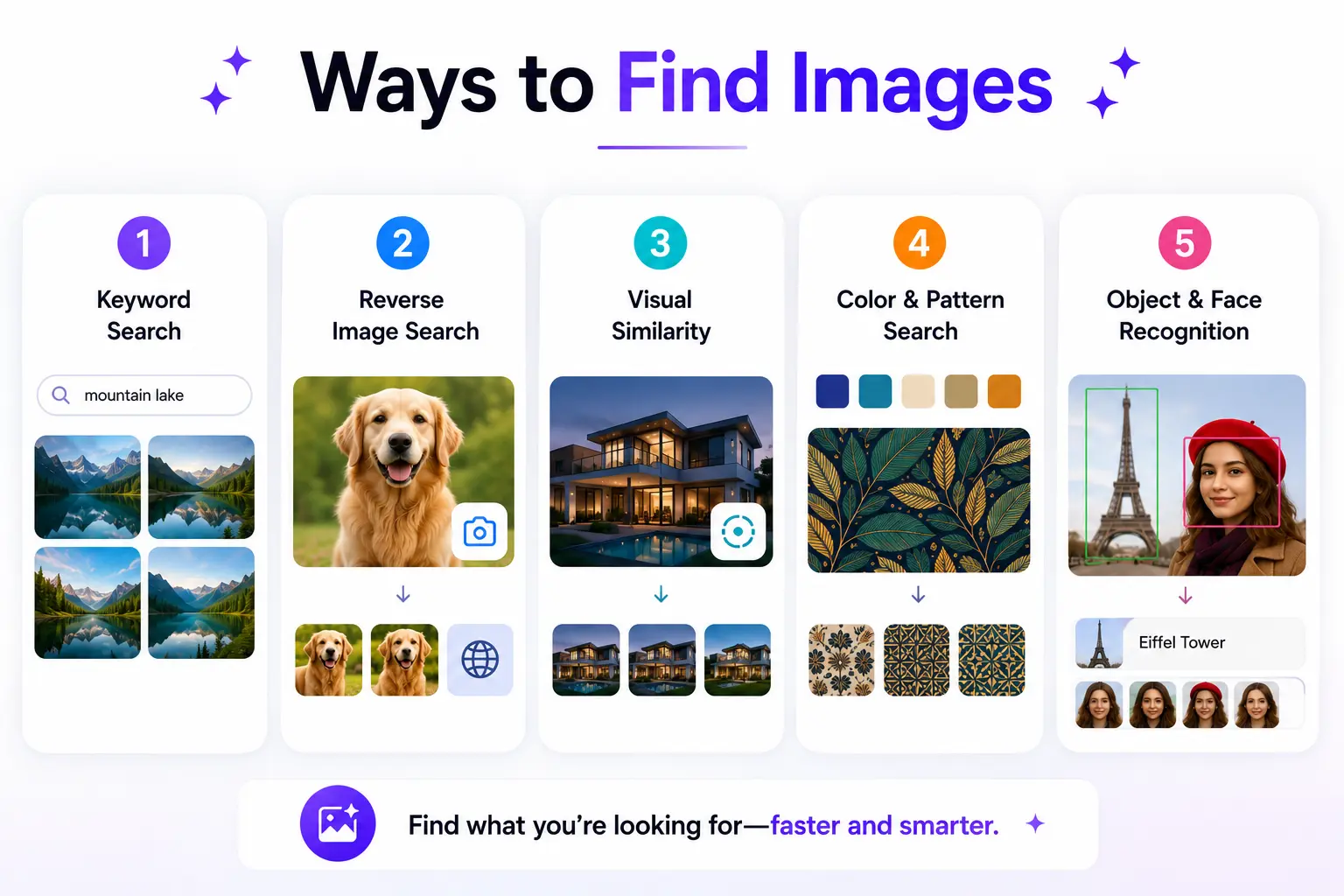
At the most basic level, image search techniques are the different methods you can use to find images or information about images online without having to know the exact file name or URL.
Traditional search works by reading words: you type, the engine reads text. Image search flips that. Instead of describing what you want, you can show it upload a photo, paste a URL, or describe a visual characteristic and the engine figures out the rest.
There are five core approaches people use:
- Keyword-based image search – type words, get images back
- Reverse image search – upload or paste a photo to find its source
- Visual similarity search – find images that look similar in style or feel
- Pattern and color-based search – search by dominant color, texture, or design
- Object and facial recognition search – let AI identify specific items or faces inside a photo
Each technique serves a different purpose. Knowing which one to reach for depending on your goal is what separates a casual image searcher from someone who actually gets results.
How Does Image Search Actually Work?
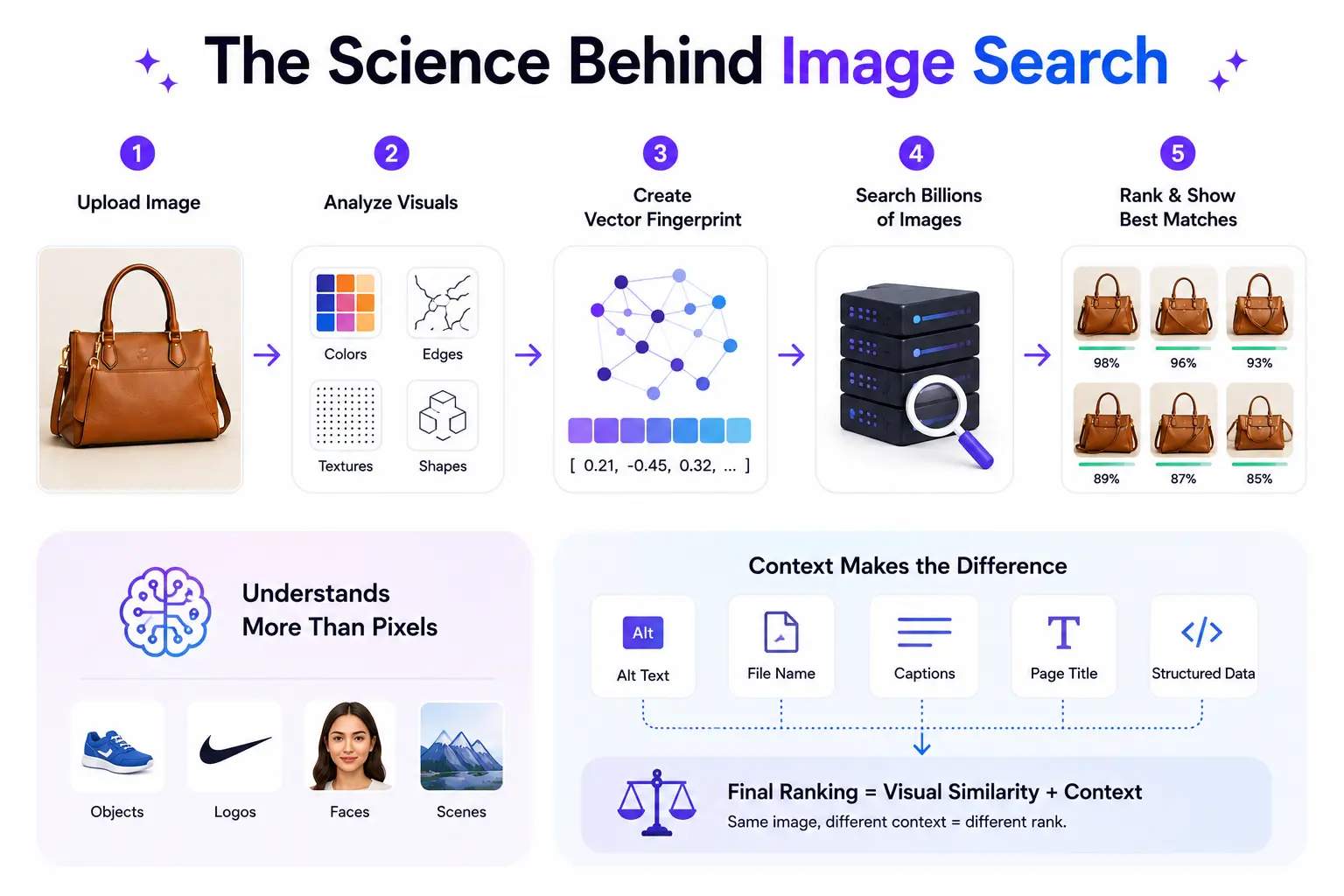
This isn’t magic it’s math. When you submit an image to a search engine, the system doesn’t just look at the file name. It breaks the image down into its fundamental visual components: colors, edges, shapes, textures, and spatial relationships between objects.
These components are converted into a mathematical fingerprint called a vector embedding a compact representation of what the image contains. The engine then compares that fingerprint against billions of indexed images to find matches or similar results.
Here’s where 2026 is different from five years ago: modern image search relies on advanced enterprise ai architecture and deep learning models trained on enormous visual datasets. The system doesn’t just see pixels, it understands what it’s looking at. It recognizes a shoe as a shoe, a logo as a logo, a face as a face.
On top of the visual analysis, the engine also reads surrounding metadata:
- Alt text on the image tag
- The image file name (e.g. red-leather-handbag.jpg)
- Captions and nearby paragraph text
- Page titles and structured data markup
The final ranking of results combines visual similarity scores with relevance signals similar to how text search works, just applied to pictures instead of words. The same image can rank differently on two different pages because the context surrounding it matters just as much as the pixels themselves.
5 Core Image Search Techniques Explained
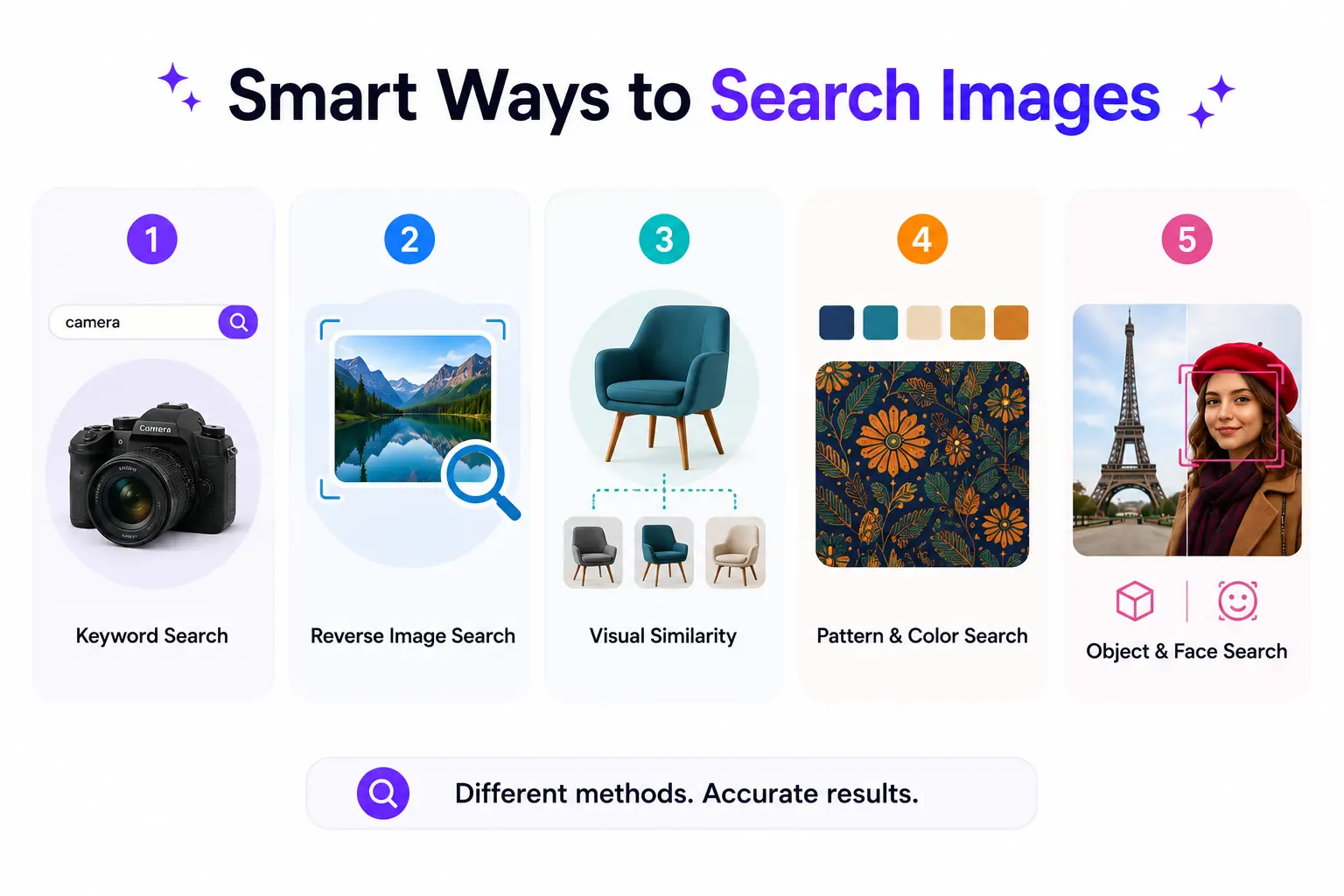
Here is a clear breakdown of each technique, what it does, and exactly when you should use it.
1. Keyword-Based Image Search
This is the method most people use without even thinking about it. You open Google Images, type “minimalist office desk setup,” and scroll through results. The engine returns images that match your words by reading alt text, file names, captions, and nearby page content.
It works well for:
- Finding stock photos and general topic imagery
- SEO-driven content discovery
- Inspirational browsing when you have a vague idea of what you want
Where it falls short: if you already have an image and want to know where it came from, keyword search can’t help. That’s when you need the next technique.
2. Reverse Image Search
Reverse image search is the most powerful of all image search techniques. Instead of typing words, you upload a photo, or paste its URL, and the engine finds matching or visually similar images across the web.
You can use reverse search to:
- Find the original source of a photo
- Verify whether a news image has been manipulated or taken out of context
- Locate a higher-resolution version of a low-quality image
- Track where your own images appear online without permission
- Identify a product from a photo
How to do it on Google Lens: right-click any image in your browser and choose “Search image with Google” — or go to images.google.com, click the camera icon, and upload your file or paste a URL. Google Lens will show you matches, similar images, and pages that contain that image.
3. Visual Similarity Search
This technique doesn’t look for exact matches. Instead, it finds images that share a similar style, mood, composition, or visual vibe, even if the actual file is completely different.
Think of it like telling a friend “I want something that looks like this” rather than asking them to find an identical copy.
Visual similarity search is the go-to technique for:
- Fashion and e-commerce – find items that match a particular aesthetic
- Interior design – find rooms with a similar color scheme or furniture style
- Graphic design – discover layouts that share a structural approach
- Mood board building – gather visual references that share a feeling
Google Lens and Bing Visual Search both offer this as a core feature. When you upload a photo, they don’t just look for that exact picture they return things that belong in the same visual family.
4. Pattern and Color-Based Search
Some search tools let you find images based on a dominant color, a repeating pattern, or a specific texture. You might search for “images with deep teal as the primary color” or “geometric patterned fabric.”
This technique is particularly useful in:
- Brand and logo design – ensuring color consistency across visual assets when creating a brand identity with a logo maker.
- Interior design and home decor – matching fabrics, paints, and furnishings
- Fashion styling – building outfits or collections around a color story
- Marketing and content design – finding images that match your brand palette
Some platforms like Pinterest and Behance have refined this to a near-art form, letting you explore entire visual libraries by aesthetic rather than words.
5. Object and Facial Recognition Search
This is where AI image search techniques get genuinely impressive. Modern search engines can identify specific objects, scenes, landmarks, and even faces within a photograph – and let you search based on just that region.
Google Lens’s “Search inside image” feature lets you draw a box around one part of a photo and search just that portion. Spotted a lamp in a lifestyle photo? Draw a box around it and search. The engine identifies the object and returns product results, similar items, or information about it.
Where this technique shines:
- Product identification – find where to buy an item you spotted in a photo
- Landmark and location research – identify where a photo was taken
- Media verification – verify identity claims in news photographs
- Research – identify plants, animals, artworks, and architecture
Quick Reference: Which Image Search Technique Should You Use?
| Technique | Best For | Accuracy | Top Tool |
| Keyword search | General topic browsing, stock photos | Good | Google Images |
| Reverse image search | Finding sources, detecting edits | Excellent | Google Lens / TinEye |
| Visual similarity | Style matching, mood boards | Very Good | Bing Visual / Pinterest |
| Color & pattern | Brand consistency, design | Good | Pinterest / Canva |
| Object recognition | Product ID, landmarks, research | Excellent | Google Lens |
Best Image Search Tools in 2026 (Honest Reviews)
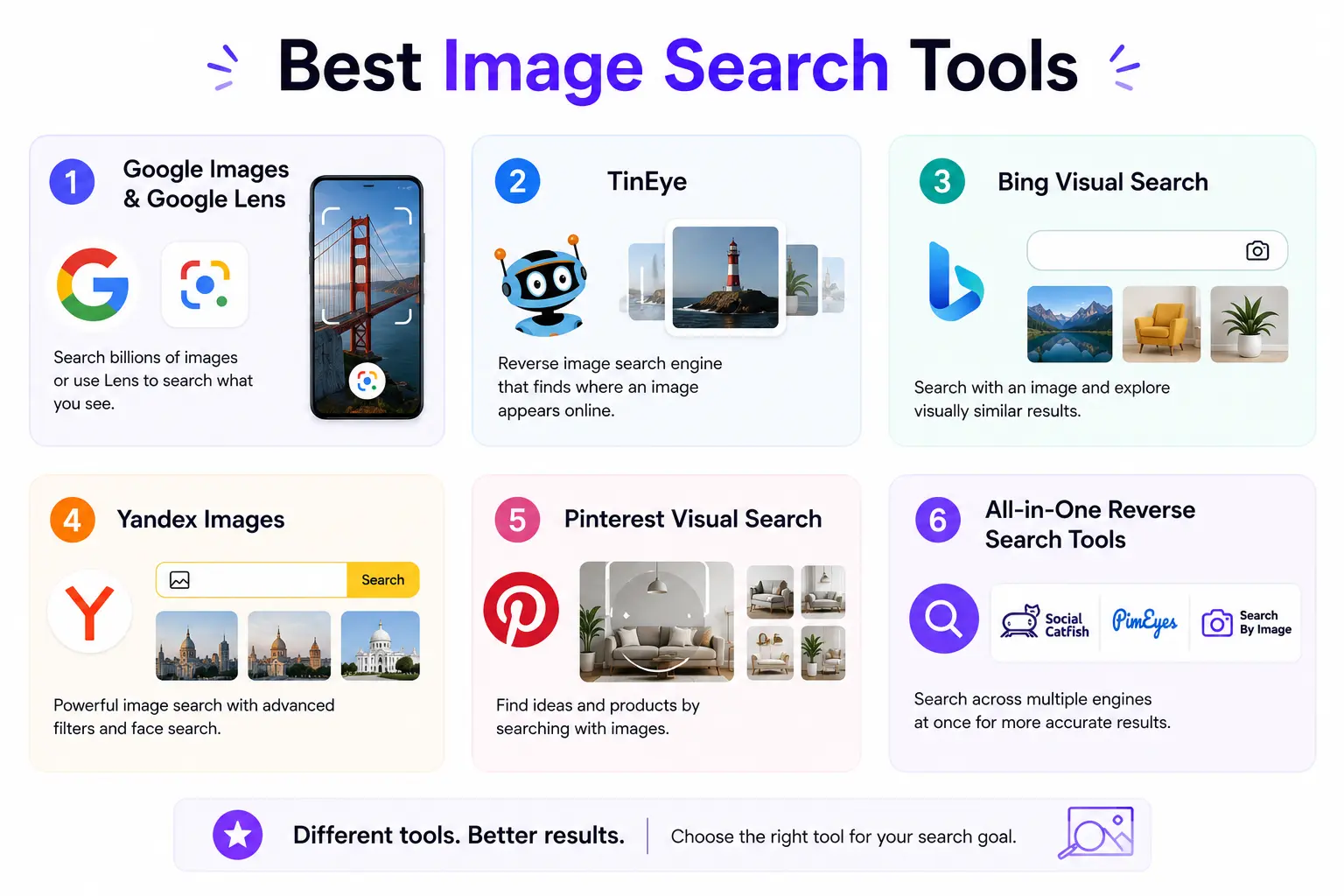
Knowing the techniques is half the battle. The other half is picking the right tool for the job. Here are the six platforms worth knowing with honest takes, not marketing copy.
1. Google Images & Google Lens
Still the gold standard for most people, and for good reason. Google’s visual index is enormous, its AI is the best at identifying objects and scenes, and the Lens feature keeps getting more useful with every update.
Pro tips most users miss:
- Right-click any image in Chrome and choose “Search image with Google” — no uploading needed
- Use “Search inside image” to draw a selection box around one specific object
- Go to Tools > Size > Larger than [custom dimensions] to find high-resolution versions
- Filter by usage rights: Tools > Usage Rights > Creative Commons licenses
2. Lenso.ai
Lenso.ai is a capable image search tool that goes beyond simple reverse lookups – upload any photo, and it searches the web across five focused categories: People, Places, Duplicates, Similar, and Related. The results are cleaner and more organized than most competitors’, making it genuinely faster to find what you’re actually looking for.
Where it pulls ahead is in accuracy. Its AI engine handles tricky searches well – faded images, cropped photos, visually similar but not identical results — and returns matches that other tools routinely miss. For anyone doing copyright checks, photo sourcing, or just trying to track down the original version of an image, it earns a spot in the regular toolkit.
3. TinEye
TinEye has one job and does it exceptionally well: tracking where an image has appeared online and when it was first indexed. If you need to find the original publication date of a photo or prove that an image is being used without permission TinEye is the tool to reach for.
It is less useful for visual similarity searches, but for copyright tracking and source verification, nothing beats it.
4. Bing Visual Search
Bing Visual Search punches above its weight, especially for product identification and shopping queries. Microsoft has integrated it with Copilot, so you can go beyond “where is this image” to “tell me about this object” in a single step. Strong competitor to Google Lens for e-commerce use cases.
5. Yandex Images
Yandex regularly outperforms Google and Bing when searching for faces, people, or images that are more common in Eastern Europe, Russia, and Central Asia. If a reverse image search on Google draws a blank, try Yandex results are often dramatically different, which gives you a second opinion.
6. Pinterest Visual Search
Pinterest is the hidden gem for visual similarity and aesthetic-based searches. The built-in visual search tool lets you crop any saved pin and find visually similar images across the platform’s enormous library. For designers, decorators, and fashion professionals, this is often the most useful tool in the stack.
7. All-in-One Reverse Search Tools
Several free tools run your image simultaneously across Google Lens, Bing Visual, and Yandex in a single click. This saves time when you need comprehensive coverage rather than just one engine’s results. Search for “multi-engine reverse image search” to find current options these tools update frequently.
Advanced Image Search Tips That Actually Work
These are the moves that separate people who get useful results from people who waste 20 minutes getting nowhere.
- Crop before you search. Uploading a full photo of a room when you want to identify a single lamp gives the engine too much noise. Crop to the subject. The result quality improves dramatically.
- Paste the image URL directly. You don’t always need to download and re-upload. Right-click any image online, choose “Copy image address,” and paste that URL directly into your search engine’s image search field.
- Filter by size for print work. If you need a high-resolution version of an image, use Google’s size filter (Tools > Size > Larger than) to weed out low-quality versions immediately.
- Combine keyword and reverse search. Upload your image, then add a keyword in the search bar to narrow results by topic. This is especially useful when reverse search returns too many unrelated matches.
- Check usage rights before you publish. Use the Creative Commons filter in Google Images or TinEye’s licensing data before you use any image commercially. Skipping this step has cost brands real money in copyright disputes.
- Try multiple tools. No single engine indexes everything. If Google Lens draws a blank, try Yandex. If Yandex misses it, try TinEye. A result that doesn’t exist on one platform often surfaces immediately on another.
Image Search Techniques for SEO and Digital Marketing
If you manage a website, run a brand, or produce content professionally, image search techniques are not just a research skill they are an SEO and brand protection tool.
Why Images Are First-Class SEO Assets in 2026
Google Images drives significant organic traffic to websites. Pages that optimize their images properly rank in both standard search results and image search results effectively doubling their surface area in search engines. In 2026, AI-driven search also uses image context to reinforce page relevance, which means well-optimized images help your entire page rank better, not just the image search tab. For websites handling large image libraries and high traffic volumes, low price dedicated servers can help maintain fast load times and a consistent user experience
How to Optimize Your Images for Visual Search
- Descriptive file names: rename image files from IMG_4821.jpg to red-leather-hiking-boots.jpg before uploading.
- Alt text with context: write alt text that describes what is in the image and why it is on the page not just the object name.
- Modern formats: convert images to WebP for smaller file sizes without quality loss.
- ImageObject schema: add structured data markup to help search engines understand what your images depict.
- Contextual placement: place images near the text that describes them engines read both together.
- Captions: write descriptive captions for every image. Captions are read by both users and search engines.
Using Image Search to Research Competitors
Run a reverse image search on your competitors’ most-shared or most-linked photos. You can discover which visual content attracts backlinks, which platforms distribute their images most widely, and which gaps in their visual content strategy you can fill with better original work.
Protecting Your Original Images
Set up a regular check quarterly at minimum where you run your most valuable brand images through TinEye or Google Lens. If you find unauthorized use, you have the documentation to issue a takedown notice or negotiate proper attribution and licensing fees.
FAQ
What are the most effective image search techniques?
The most effective technique depends on your goal. Reverse image search is the most powerful for tracking sources and verifying photos. Visual similarity search is most useful for finding aesthetically related images. Keyword-based search works best for general discovery. For the most thorough result, combine reverse search with at least two different tools.
How does reverse image search work exactly?
When you upload an image, the search engine converts it into a mathematical vector, a compact fingerprint of its visual characteristics including colors, shapes, edges, and textures. This fingerprint is then compared against billions of indexed images to find matches ranked by visual similarity. Modern engines also use deep learning to identify the objects and scenes inside the image, not just the raw pixels.
Can I use image search techniques on my phone?
Yes. Google Lens is built into the Google app on both iOS and Android. You can search by photo from your camera roll, take a live photo search with your phone camera, or long-press any image in Chrome to trigger a Lens search. Bing Visual Search is also available in the Bing mobile app. Most of the core image search techniques work as well on mobile as they do on desktop.
What is the difference between reverse image search and visual similarity search?
Reverse image search looks for exact or near-exact matches of a specific image file it is asking “where has this exact photo appeared?” Visual similarity search looks for images that share the same style, aesthetic, or composition, even if they are completely different photos it is asking “show me things that look like this.” Both are useful, but they answer different questions.
How can image search techniques improve my SEO?
Optimizing your images with descriptive file names, alt text, captions, and structured data helps them rank in Google Images, which drives real traffic. Images also reinforce the topical relevance of the surrounding page content, which can lift overall rankings. Running reverse searches on your own images helps you find and fix unauthorized use, which protects your brand authority.
Which free tool gives the most accurate reverse image search results?
Google Lens delivers the most accurate results for the widest range of images globally. Yandex Images is often more accurate for photos of people and geographically specific content. TinEye is the most accurate for tracking the earliest publication date and usage history of an image. For best coverage, use at least two of these together.
Conclusion
Image search techniques have come a long way from typing words into a search box and hoping for the best. Today, you have five distinct methods at your disposal each purpose-built for a different goal.
If you take one thing from this guide, let it be this: match the technique to the task. Use reverse image search to trace sources and verify authenticity. Use visual similarity search when you’re chasing an aesthetic, not an exact match. Use keyword search for general discovery. Use object recognition when you want to identify something specific inside a photo. And use color and pattern search when you’re building around a visual identity.
Mastering image search techniques is not a one-time lesson it is a habit. The tools update, new AI features roll out, and the engines get smarter every few months. But the core principle stays the same: the more precisely you match your method to your goal, the faster and more accurately you find what you are looking for.