Category: blogs

  • How to Write Content That Ranks A Step-by-Step SEO Guide

    How to Write Content That Ranks A Step-by-Step SEO Guide

    Every week, thousands of well-written articles get published and immediately disappear into the void. No traffic. No shares. No rankings. Not because they were bad but because they were invisible.

    Here’s the hard truth: Google doesn’t care how long you spent writing. It cares whether your content is the best answer to what someone just typed into the search bar. If it isn’t, someone else’s article gets the click and you get nothing.

    Learning how to write content that ranks is a skill and like any skill, it can be learned. This guide breaks it down step by step: from picking the right keywords and matching search intent, to structuring your article, building trust with Google’s E-E-A-T framework, and nailing every on-page SEO detail before you hit publish.

    Whether you’re writing your first blog post or trying to rescue a site full of stagnant content, by the end of this guide you’ll have a clear, repeatable process for creating articles that actually show up and stay there.

    1. What Does It Actually Mean for Content to Rank?

    Content to Rank

    When people say content ‘ranks,’ they mean it appears on page one of Google’s search results for a specific keyword or query. That matters more than most people realize.

    Studies consistently show that the first result on Google gets around 27–30% of all clicks. By page two, traffic drops off dramatically. So if your article isn’t on page one, it’s essentially invisible.

    Here’s the thing Google doesn’t rank content based on how hard you worked on it. It ranks content based on relevance, authority, and how well it satisfies what the searcher actually wants. Once you understand that, everything about SEO starts to make more sense.

    2. Start with Keyword Research (The Right Way)

    Before you write a single sentence, you need to know what your audience is searching for. That’s where keyword research comes in.

    How to find the right keywords

    use tools

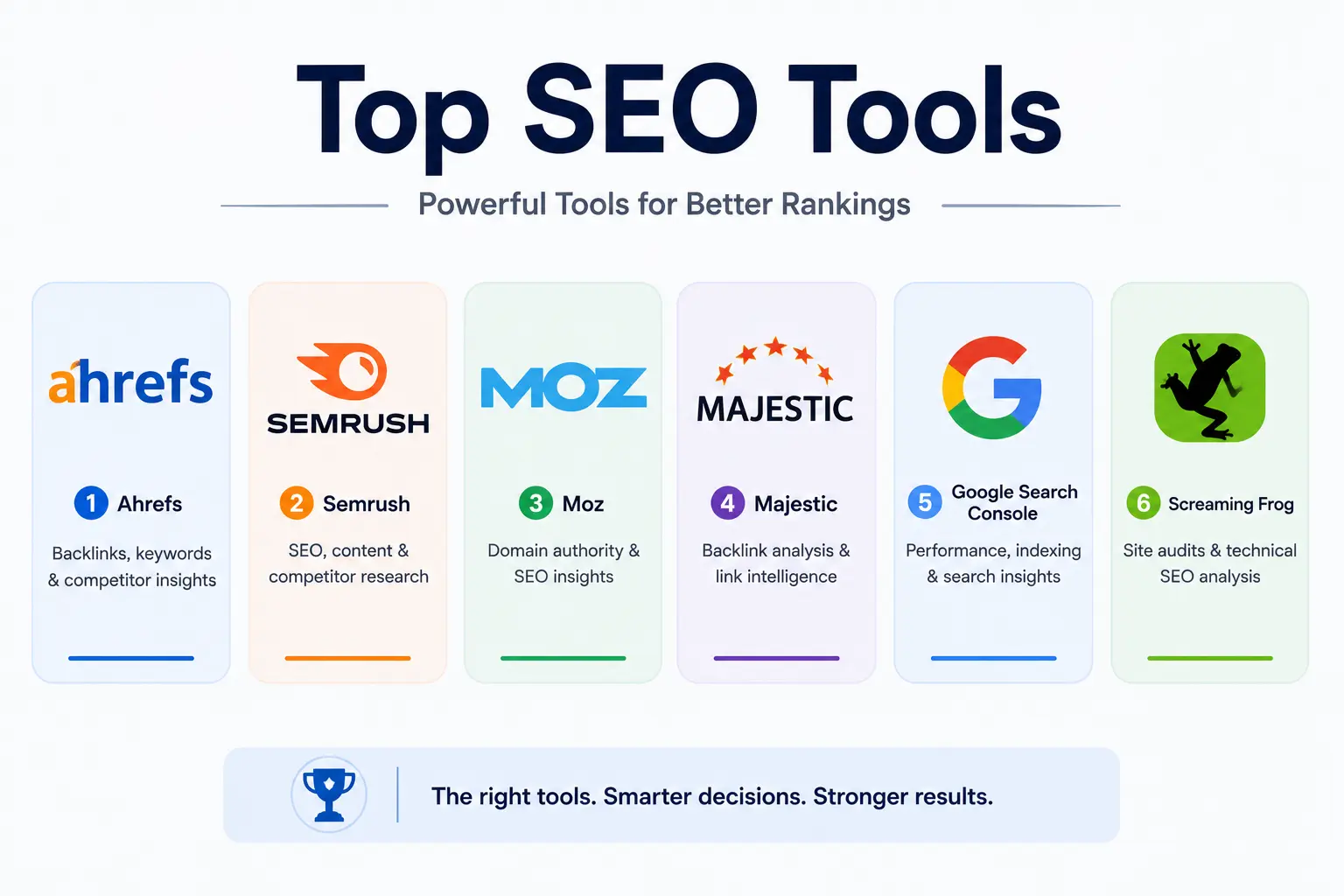
    Use tools like Ahrefs, SEMrush, or even free options like Google Search Console and Ubersuggest to identify keywords related to your topic. Look for terms that:

    • Have a decent monthly search volume (1,000+ for competitive niches, even 100–500 for niche topics)
    • Match your audience’s actual language, not industry jargon
    • Have manageable keyword difficulty, especially if your site is newer

    Short-tail vs. long-tail keywords

    Short-tail keywords (e.g., ‘SEO tips’) are broad and highly competitive. Long-tail keywords (e.g., ‘how to write SEO blog posts for beginners’) are more specific and easier to rank for, especially in the early stages of building your site’s authority.

    3. Understand Search Intent Before You Write a Word

    Keyword research tells you what people are searching for. Search intent tells you why they’re searching for it. Getting this wrong is the single biggest reason good content fails to rank.

    There are four main types of search intent:

    • Informational — The user wants to learn something (e.g., ‘how to write content that ranks’)
    • Navigational — The user wants to find a specific site (e.g., ‘Ahrefs login’)
    • Commercial — The user is comparing options before buying (e.g., ‘best SEO tools 2025’)
    • Transactional — The user is ready to take action (e.g., ‘buy Ahrefs subscription’)

    For the keyword ‘how to write content that ranks,’ the intent is clearly informational. That means your content should be a comprehensive how-to guide — not a product page, not a comparison post.

    4. How to Structure Your Content for Google and Readers

    Great structure helps both readers and search engines understand your content. Think of it like a roadmap — your headings are the signposts.

    Use a clear heading hierarchy

    Your H1 is the article title (use it once). H2s are your main sections. H3s break down sub-topics within each section. Google reads your headings to understand the topic and context of your content.

    Keep it scannable

    Most readers don’t read every word — they scan. Short paragraphs (2–3 sentences), bullet points, and subheadings make your content easy to digest. Walls of text push readers away, which increases your bounce rate and hurts your rankings.

    Where to place your keyword

    • H1 title
    • First 100 words of the introduction
    • At least one H2 subheading
    • Meta title (50–60 characters)
    • Meta description (150–160 characters)
    • URL slug (keep it short and descriptive)

    5. Write for Humans First — Google Will Follow

    Google’s Helpful Content Update made one thing crystal clear: if you write for search engines instead of real people, your rankings will suffer. The algorithm is now smart enough to detect thin, robotic, keyword-stuffed content — and it penalizes it.

    What human-first writing looks like

    • Use plain, conversational language — write like you’re explaining to a smart friend
    • Use active voice wherever possible (‘We improved rankings’ vs. ‘Rankings were improved by us’)
    • Avoid robotic transitions like ‘In conclusion, it is evident that…’ — just say what you mean
    • Cut filler phrases: ‘In today’s fast-paced digital landscape…’ adds nothing and screams AI-generated content
    • Tell stories, use real examples, and share genuine opinions where relevant

    Content density matters more than raw word count. A 1,200-word article that answers every angle of a question beats a 3,000-word piece that repeats itself just to hit a target.

    6. E-E-A-T: How Google Decides If Your Content Is Trustworthy

    E-E-A-T stands for Experience, Expertise, Authoritativeness, and Trustworthiness. It’s Google’s framework for evaluating content quality — especially for topics where accuracy really matters.

    How to demonstrate E-E-A-T in your content

    • Add a clear author byline with credentials and a short bio
    • Include personal experience, first-hand insights, or real-world examples
    • Cite credible external sources (studies, official sites, industry data)
    • Add a ‘last updated’ date to signal freshness
    • Use HTTPS and clearly display your privacy policy and contact info (for site-level trust)

    7. On-Page SEO Checklist — Before You Hit Publish

    Before you publish, run through this checklist to make sure your on-page SEO is solid:

    1. Keyword in H1, meta title, meta description, URL, and first paragraph
    2. LSI/semantic keywords used naturally throughout (not exact repetitions)
    3. All images compressed, with alt text including keyword where natural
    4. 2–4 internal links to relevant pages on your site
    5. 1–2 external links to authoritative sources (open in new tab)
    6. Schema markup added where relevant — FAQ, How-To, or Article schema
    7. Mobile responsiveness checked
    8. Page load speed tested (Google PageSpeed Insights)
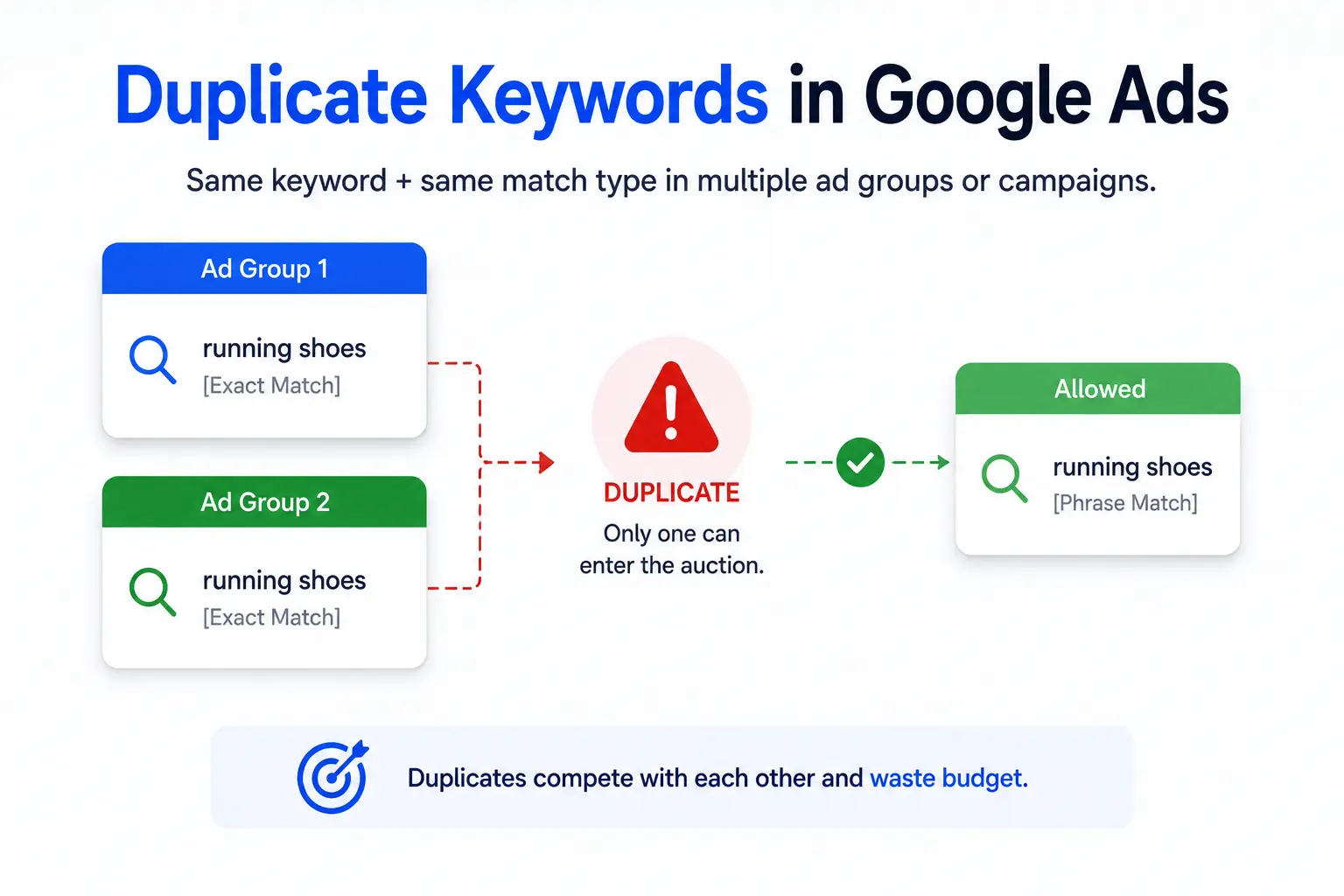
    9. No duplicate content or keyword cannibalization with existing articles

    8. How Long Should Your Content Be to Rank?

    There’s no magic word count that guarantees rankings. But research consistently shows that long-form content (1,500+ words) tends to rank higher and earn more backlinks than short-form content — especially for informational queries.

    The real question isn’t ‘how long?’ — it’s ‘does this fully answer the question?’ Use the Skyscraper Technique: analyze the top-ranking articles for your keyword, identify what they cover, and then write something more complete, more accurate, and more useful.

    9. Building Backlinks Through Content Worth Linking To

    Backlinks remain one of Google’s top ranking signals. But you can’t fake your way to good links — you have to earn them.

    The best way to earn backlinks naturally is to create content that other sites genuinely want to reference:

    • Original research, surveys, or industry data
    • Comprehensive guides that become go-to resources
    • Unique frameworks or methodologies with original names
    • Well-designed infographics or visual explainers

    Once your content is live, do outreach: email relevant bloggers, journalists, or site owners in your niche to let them know your resource exists. A single link from a high-authority domain can move the needle more than dozens from low-quality sites.

    10. Update and Refresh Old Content to Keep Rankings

    Ranking isn’t a one-time achievement — it requires maintenance. Google rewards content that stays fresh and accurate, and it gradually demotes pages with outdated information.

    Signs it’s time to update an article

    • Traffic has dropped over the past 3–6 months
    • Stats, tools, or examples referenced in the article are outdated
    • Competitors have published more comprehensive versions
    • New subtopics have emerged that your article doesn’t cover

    When you update, don’t just fix typos — expand thin sections, replace outdated stats, improve internal linking, and refresh the publish/update date. A solid refresh can recover and even improve rankings within weeks.

    FAQ: How to Write Content That Ranks

    How long does it take for content to rank on Google?

    Most new pages take 3–6 months to reach their peak ranking position. This depends on your domain authority, the competitiveness of the keyword, and the quality of your content and backlinks. Some pages rank faster, especially on established sites or for low-competition keywords.

    How do I know if my content is SEO-optimized?

    Run your article through a tool like Yoast SEO, Surfer SEO, or Clearscope. These tools check keyword placement, readability, content length, internal linking, and more. Also manually verify your meta title, meta description, and URL include your target keyword.

    Does word count affect SEO rankings?

    Indirectly, yes — longer content tends to cover a topic more thoroughly, which Google rewards. But padding an article with fluff just to hit a word count target will hurt your rankings. Focus on content density: every sentence should add value.

    What is the best keyword density for SEO in 2025?

    There’s no fixed rule. Avoid stuffing — aim for your keyword to appear naturally, roughly once every 200–300 words. Focus more on semantic relevance (using related terms and synonyms) than hitting a specific percentage.

    Can I rank on page one without backlinks?

    Yes, especially for long-tail, low-competition keywords. However, for competitive terms, backlinks remain a major ranking factor. Focus first on writing the best possible answer to the query — links will follow if the content is genuinely valuable.

    Conclusion

    Ranking on Google isn’t about gaming the algorithm — it’s about understanding what your audience is searching for and delivering the best possible answer.

    When you know how to write content that ranks, you combine solid keyword research, a deep understanding of search intent, human-first writing, strong E-E-A-T signals, and clean on-page SEO into every article you publish.

    Start with one article this week using this guide. Pick a long-tail keyword, match your format to the search intent, write like a real person, and tick every item on the on-page checklist. That’s all it takes to give your content a fighting chance on page one.

  • SEO Workflow vs SEO Strategy: What’s the Difference and Why It Matters

    SEO Workflow vs SEO Strategy: What’s the Difference and Why It Matters

    If your SEO results have been underwhelming despite putting in real effort, there is a good chance you are mixing up two very different things: SEO workflow vs SEO strategy. One is the plan the big-picture thinking that sets your direction. The other is the system that actually gets things done your SEO workflow process. Most teams have a version of one, but not both, and that imbalance is usually the root cause of stalled rankings and inconsistent output.

    This guide breaks down exactly what each one means, how they are different, and more importantly how to make them work together. Whether you are building your SEO programme from scratch or trying to figure out why your current one is not delivering, understanding the difference between SEO workflow and SEO strategy is the clearest starting point you have got.

    What Is an SEO Strategy? (And What It’s Actually For)
     SEO Strategy

    A proper SEO strategy covers a few key areas. It starts with your goals do you want more traffic, more leads, better visibility for a specific product? From there, it moves into understanding your audience and the keywords they actually search for. Then it layers in competitor research, content themes, and a plan for building your site’s authority over time.

    Here is the honest truth: strategy answers ‘what’ and ‘why.’ It does not tell you how to write a brief, who publishes the article, or what happens after you hit publish. That is what a workflow is for. Without a strategy, your team is working without direction. With strategy and no workflow, you have a great plan that nobody ever executes.

    What Is an SEO Workflow? (And How It’s Different)

    SEO Workflow
    If strategy is the road map, your SEO workflow is the vehicle. It is the step-by-step, repeatable process that turns your strategic priorities into actual work published articles, fixed technical issues, earned backlinks, and monthly performance reports.

    The word that matters most here is repeatable. A workflow is not a one-off to-do list. It is a system your team can follow consistently, week after week, regardless of who is doing the work. It defines who does what, in what order, by when, and to what standard.

    Think about what happens without one. A keyword gets researched but nobody writes the content. An article gets written but sits unoptimised for two weeks because there is no review process. A technical audit gets done but the fixes never get assigned. Sound familiar? That is what life looks like without a proper SEO workflow.

    SEO Workflow vs SEO Strategy: Side-by-Side Comparison

    Here is a simple side-by-side breakdown so you can see exactly how the two differ:

     SEO StrategySEO Workflow
    FocusBig-picture goals and directionDaily tasks, processes, and execution
    Time Horizon6–12 months (long-term)Ongoing — daily, weekly, monthly
    Owned BySEO Manager / Marketing DirectorEntire SEO and content team
    Key Question‘What do we want to achieve and why?’‘How do we actually get it done?’
    ExampleTarget 50 high-intent keywords in 6 monthsContent brief → draft → optimise → publish checklist
    Without ItTeam has no clear directionPlans never leave the spreadsheet

    The short version: strategy gives you direction, workflow gives you execution. You genuinely need both. A strategy without a workflow stays on a slide deck forever. A workflow without a strategy keeps your team busy but produces the wrong results.

    Why Most SEO Efforts Fail: The Gap Between Strategy and Execution

    Here is a scenario that plays out in teams all the time. Someone puts together a thoughtful SEO strategy target keywords are mapped, content pillars are defined, competitors are analysed. The team nods along in the kickoff meeting. Everyone is excited.

    Three months later, two blog posts have been published. The technical audit is still sitting in a shared drive half-finished. Nobody started the link building because it was never assigned to anyone. Rankings have not moved.

    This is not a strategy failure. The strategy was probably fine. It is a workflow failure. There was no repeatable system to translate the plan into tasks, no clear ownership, no checklists, no accountability loop.

    The fix is almost never a better strategy. It is building an SEO workflow that gives every part of the strategy an operational home — a repeatable process with a named owner and a clear sequence of steps.

    Core Components of a Strong SEO Strategy

    A solid SEO strategy does not need to be complicated. But it does need to cover these five areas properly.

    1. Clear Goals and KPIs

    Before anything else, you need to know what success looks like for your business. More organic traffic? Higher rankings for specific commercial terms? Better lead quality from search? Define your targets clearly so every workflow you build has something meaningful to work toward.

    2. Audience and Keyword Research

    Good keyword research is not about generating a long list of terms. It is about understanding the topics your audience genuinely cares about and mapping those topics to the different stages of their buying journey. At the strategy level, you are looking for themes and opportunities — not individual keywords.

    3. Competitor Analysis

    Your competitors have already done a lot of the hard work for you. Look at who is outranking you and why. What content are they producing? Where are their backlinks coming from? What keywords are they winning that you are not targeting yet? This analysis shapes where you focus your energy.

    4. Content Themes and Topic Clusters

    Modern SEO rewards depth. Rather than publishing isolated articles on random keywords, a smart strategy builds topic clusters — a detailed pillar page on a broad subject supported by a set of related sub-pages that link back to it. This signals expertise to search engines and makes your site much easier to navigate.

    5. Authority Building

    No strategy is complete without a plan for earning authority. That means getting quality backlinks from relevant sites, building brand mentions across the web, and generally making your site a trusted, credible source in your niche. It is a long game, but you have to plan for it from the start.

    Core Components of a Strong SEO Workflow

    Once your strategy is in place, you need workflows to execute it. Here are the five SEO workflows every serious team needs to have running.

    Keyword Research Workflow

    This is more than just opening Ahrefs and hunting for keywords. A proper keyword research workflow covers how you identify topics, validate search intent, assess keyword difficulty, prioritise against your strategic goals, and document findings in a format the whole team can actually use.

    Content Creation Workflow

    This is usually the most important workflow in the whole operation. It should move from a keyword-informed brief, through research and outline, to a first draft, then an SEO optimisation pass covering titles, meta descriptions, headings, and internal links, then an editorial review, and finally publish and indexing confirmation. Every step needs a named owner and a deadline.

    Technical SEO Workflow

    Technical SEO is not a one-time project — it is an ongoing maintenance cycle. A solid technical workflow includes a scheduled audit, a prioritised fix list, clear ownership for each fix, and a verification step to confirm the fix actually worked. Without this cycle, technical debt accumulates quietly until it becomes a real rankings problem.

    Link Building Workflow

    Link building without structure quickly falls apart. You need a repeatable process that covers prospect identification, contact research, outreach sequencing, follow-up timing, and results tracking. When this is documented and assigned, your link building becomes consistent and measurable rather than sporadic and unpredictable.

    Performance Tracking Workflow

    You need a regular rhythm for measuring what is working. Set a weekly check-in for key metrics like rankings and traffic, and a monthly review for deeper analysis of conversions and content performance. The data from this workflow feeds directly back into your strategy, keeping it sharp and relevant.

    How SEO Workflow and SEO Strategy Work Together

    Here is the thing most SEO guides miss: strategy and workflow are not separate projects you build once and move on from. They feed each other in a continuous loop.

    Your strategy sets the priorities. Your workflows execute those priorities. The execution generates data — rankings, traffic, engagement, conversions. That data goes back into your strategy and helps you sharpen your goals, drop what is not working, and invest more in what is.

    Plan  →  Execute  →  Measure  →  Refine  →  Plan again

    The practical takeaway is simple: build your strategy first, then design a workflow for each strategic priority. If your strategy says you want to publish twelve long-form articles per quarter, your content creation, keyword research, and performance tracking workflows all need to be built to support that at scale.

    How to Build Your SEO Workflow Around Your SEO Strategy (Step by Step)

    If you have a strategy but no workflow holding it together, here is how to fix that:

    1. Define your goals with specifics. Vague goals like ‘improve our SEO’ will not get you far. Get concrete — ‘rank in the top five for twenty commercial keywords within six months’ gives your team something real to work toward.
    2. Break each goal into task categories. For every strategic goal, list the recurring activities needed to hit it. A content growth goal needs keyword research, writing, optimisation, and promotion. Each of those is the seed of a workflow.
    3. Assign ownership for every step. Every workflow needs a real person responsible for each stage. No owner means no accountability, and no accountability means tasks get dropped. Be specific about who does what.
    4. Set up your tools. Project management platforms like Asana, Notion, Trello, or Monday.com make it much easier to run workflows at scale. Use them to build task templates, set deadlines, and keep the whole team aligned.
    5. Write simple SOPs for each workflow. A one-page standard operating procedure removes guesswork. When everyone knows exactly what a finished optimised article looks like — the checklist of title tag, meta, headings, word count, internal links, and image alt text — quality becomes consistent without micromanagement.
    6. Review and improve regularly. Set a monthly rhythm for checking whether your workflows are delivering. Are tasks finishing on time? Is quality holding up? Are the results matching what your strategy called for? Iterate based on what you find.

    Frequently Asked Questions

    What is the difference between an SEO workflow and an SEO strategy?

    An SEO strategy is your long-term plan the goals, keyword priorities, and overall direction of your SEO programme. An SEO workflow is how you execute that plan day to day, covering the specific steps, task ownership, and processes that get SEO work done consistently. Strategy is the what and why. Workflow is the how.

    Can you have an SEO workflow without a strategy?

    You can, but you probably should not. Without a strategy, your workflows have no clear direction. You might be executing tasks consistently and efficiently, but if they are not connected to the right goals, you are producing activity without meaningful results. Build the strategy first, then create workflows around it.

    Which comes first — the strategy or the workflow?

    Strategy always comes first. You need to know where you are going before you build a system for getting there. Once your strategy is clear, you can design workflows for each core activity content creation, keyword research, link building, technical SEO, and performance tracking.

    What tools help manage an SEO workflow?

    Project management tools like Asana, Notion, Monday.com, and Trello are popular choices for organising SEO workflows. For the SEO-specific tasks within those workflows, tools like Ahrefs, Semrush, Screaming Frog, and Google Search Console handle the research and analysis. The project management tool keeps the workflow running the SEO tools do the actual SEO work.

    How often should you update your SEO strategy vs your workflow?

    Your SEO strategy should be reviewed quarterly, or whenever there is a significant algorithm update, market shift, or business change. Your workflows should be reviewed more frequently ideally monthly since they are operational and need to adapt quickly as your team, tools, or content volume changes.

    Conclusion

    The debate around SEO workflow vs SEO strategy is not really a debate at all. Both are essential, and they serve completely different purposes. Your strategy sets the direction. Your workflow makes sure you actually follow it.

    Most SEO programmes do not fail because of a bad strategy or the wrong tools. They fail because of the gap between planning and doing. Teams that close that gap by building clear, repeatable workflows around every strategic priority consistently outperform those that do not.

    Take an honest look at your own setup. Do you have a strategy with defined goals and clear priorities? And for each of those priorities, do you have a workflow — a real process with ownership and structure? If the answer to either question is no, that is where to start. Fix the gap, and the results will follow.

  • Why Businesses Need an SEO Workflow

    Why Businesses Need an SEO Workflow


    most businesses try SEO the same way. They publish a few blog posts, tweak some meta tags, maybe do a bit of keyword research, and then wait. Weeks pass. Rankings don’t move. Traffic flatlines. And the common conclusion? “SEO just doesn’t work for us.”

    But here’s the thing: SEO does work. What doesn’t work is doing it randomly. That’s exactly why businesses need an SEO workflow a clear, repeatable system that takes every piece of content from idea to ranking, without chaos in between.

    In this guide, we’ll break down what an SEO workflow actually looks like, why it’s a non-negotiable for any business serious about organic growth, and how to build one from scratch even if you’re starting with a small team.

    What Is an SEO Workflow? (And Why Most Businesses Don’t Have One)

    An SEO workflow is a step-by-step process that guides your content from keyword research all the way through to publishing, tracking, and optimization. Think of it like an assembly line — every station has a job, every person knows their role, and nothing falls through the cracks.

    Without a workflow, SEO becomes reactive. You write content when you feel like it, optimize when you remember to, and check rankings when panic sets in. That’s not a strategy — it’s guesswork with extra steps.

    A proper SEO workflow flips this. It gives your team a shared playbook so that every piece of content has the best possible chance of ranking — before it ever goes live.

    Why Businesses Need an SEO Workflow — The Real Reasons

    There are plenty of articles that’ll tell you SEO is important. But fewer explain why the workflow behind it matters just as much as the tactics themselves. Here’s the truth:
    business need an seo workflow

    1. It Makes SEO Repeatable

    One of the biggest silent killers of SEO results is inconsistency. When there’s no workflow, every piece of content gets a different level of effort. Some get properly researched and optimized. Others get rushed out the door. A workflow levels the playing field — every piece goes through the same process, every time.

    2. It Saves Enormous Amounts of Time

    Teams with a defined SEO workflow publish faster. Not because they cut corners — because they don’t waste time figuring out what to do next. When the process is clear, execution is swift. A writer knows exactly what brief to follow. An editor knows exactly what to check. A developer knows exactly when to step in.

    3. It Aligns Your Entire Team

    SEO isn’t a one-person job. It touches writers, designers, developers, and strategists. Without a shared workflow, everyone interprets “good SEO” differently. With one, there’s no confusion about who does what, or when. Everyone pulls in the same direction.

    4. It Keeps Quality Consistent

    When quality depends on individual memory, quality varies. When it’s baked into a checklist, it’s consistent. A good SEO workflow includes quality gates — points in the process where content gets reviewed before moving forward. That’s how you prevent thin content, missing meta tags, and broken internal links from slipping through.

    5. It Turns SEO Into a Revenue Engine

    Here’s the big picture: structured execution is what connects search visibility to actual business outcomes. When your workflow is tight, your content ranks. When it ranks, it drives traffic. When that traffic is well-targeted, it converts. That’s not magic — it’s a process working as designed.

    The 5 Core Stages of a Business SEO Workflow

    Every effective SEO workflow — regardless of business size or industry — runs through these five stages. The details might vary, but the structure stays the same.

    1 Keyword & Topic Research

    This is where it all begins. You identify what your audience is actually searching for, map those terms to stages of the buyer journey (awareness, consideration, decision), and prioritize by business value — not just search volume. A 300-search keyword with high purchase intent can be worth ten times a 5,000-volume keyword with zero conversion potential.

    Stag 2 Content Planning & Brief Creation

    Once you have a keyword, you need a plan. A content brief translates keyword data and search intent into a concrete writing guide — what the article should cover, the ideal structure, target word count, internal linking opportunities, and any competitor gaps worth addressing. Good briefs make good content. Great briefs make content that ranks.

    3 Content Creation & On-Page SEO

    This is where writing happens — but it’s also where on-page optimization gets built in from the start, not added as an afterthought. That means using the focused keyword naturally in the title, intro, H2s, and meta description. It means logical heading structure, internal links to relevant content, image alt text, and schema markup where applicable.

    4 Technical Review & Publishing

    Before anything goes live, it should pass a technical check. Page speed, mobile responsiveness, canonical tags, URL structure, and redirect health all matter. This stage is often skipped in ad-hoc SEO — and it’s often the reason good content fails to rank despite solid writing.

    5 Performance Tracking & Content Refresh

    Publishing is not the finish line. The best SEO teams monitor rankings and organic traffic through tools like Google Search Console and GA4, then revisit underperforming content on a regular refresh cycle. Updating old articles with new data, better targeting, and improved structure can sometimes triple your traffic without writing a single new word.

    What Happens When Businesses Skip an SEO Workflow

    Skipping a workflow doesn’t just slow you down — it actively costs you. Here’s what tends to go wrong when SEO is handled without structure:
    Businesses Need an SEO Workflow

    • Missing on-page elements — no meta descriptions, poor heading hierarchy, zero internal links. These are basic wins left on the table.
    • Inconsistent publishing — sporadic content signals to Google that your site isn’t active or authoritative.
    • Team confusion — when everyone does SEO differently, nothing gets done well.
    • Wasted content budget — articles that aren’t optimized from the start rarely rank, regardless of how well they’re written.
    • No performance loop — without tracking and refreshing, even your best content slowly decays in rankings as competitors update theirs.

    How to Build Your First SEO Workflow (Step-by-Step)

    You don’t need a big team or a big budget to start. You need clarity and commitment to a process. Here’s how to build yours:

    1. Define your goals — what does success look like? More organic traffic? Higher lead quality? Lower cost per acquisition? Your workflow should be designed around a specific outcome.
    2. Assign clear roles — who handles strategy, who writes, who handles technical SEO, and who tracks performance? Document it.
    3. Choose your tools — Ahrefs or Semrush for keyword research, Notion or Asana for task management, Google Search Console and GA4 for tracking. Pick tools your team will actually use.
    4. Create templates — a content brief template, a pre-publish SEO checklist, and a content refresh framework are the three must-haves.
    5. Start small, then scale — build the workflow around one content type (e.g., blog posts) first. Once that’s running smoothly, expand to landing pages, product pages, and beyond.

    SEO Workflow Tips That Actually Move the Needle

    Once your workflow is up and running, these principles will help you get more out of it:

    • Prioritize keyword intent over keyword volume. A 200-search keyword from someone ready to buy is worth more than a 5,000-volume keyword from someone just browsing.
    • Build in a content refresh cycle. Set a calendar reminder to review your top 20 pages every quarter. Small updates — new stats, better headings, fresh internal links — can meaningfully lift rankings.
    • Treat technical SEO as part of the workflow, not a separate project. Build your technical checklist into the pre-publish stage so it gets done every time.
    • Consistency beats volume. Publishing two well-optimized pieces per week, week after week, will outperform a content sprint of 20 rushed articles every time.
    • Track what matters. Focus on organic traffic growth, keyword position changes, and conversions from organic — not vanity metrics like page views in isolation.

    Ready to build your SEO workflow? Book a free SEO audit with our team and we’ll map out a workflow tailored to your business goals.

    Frequently Asked Questions (FAQs)

    What is an SEO workflow?

    A step-by-step process that takes content from keyword research to publishing and tracking — ensuring nothing gets skipped along the way.

    Why do businesses need an SEO workflow?

    Without one, SEO is inconsistent and reactive. A workflow makes it repeatable, saves time, aligns your team, and ties organic search directly to business results.

    How long before an SEO workflow shows results?

    Typically 3 to 6 months. A structured workflow speeds this up by ensuring every piece is fully optimized from the start — reducing wasted effort and compounding gains faster.

    Can small businesses use an SEO workflow?

    Yes. Even a solo marketer can build a simple checklist-based workflow. Consistency with a small workflow beats sporadic bursts of unstructured SEO every time.

    What tools do I need?

    Start with Ahrefs or Semrush for research, Notion or Asana for task management, and Google Search Console + GA4 for tracking. Add more tools as your workflow scales.

    Is technical SEO part of the workflow?

    Absolutely — it should be built into the pre-publish stage, not treated as a separate project. Page speed, mobile-friendliness, and structured data all matter before you hit publish.

    Conclusion

    SEO is not a one-time task — it is an ongoing process. And like any process, it only delivers consistent results when it is structured, documented, and followed through. That is exactly why businesses need an SEO workflow.

    Whether you are a solo founder publishing your first blog post or a marketing team managing hundreds of pages, a workflow gives your SEO the backbone it needs to actually perform. It removes guesswork, closes gaps, and turns your content efforts into a compounding growth engine over time.

    The best time to build your SEO workflow was yesterday. The second best time is right now. Start simple, stay consistent, and let the process do the work.

  • High-Quality Backlinks vs Toxic Links: What Every SEO Should Know

    High-Quality Backlinks vs Toxic Links: What Every SEO Should Know

    you have been building backlinks for months, and your rankings are actually going down. Frustrating, right? You are not alone. Thousands of website owners make the same mistake every day, pouring time and money into links that do more harm than good.

    Here is the truth that most beginners miss: not all backlinks are created equal. The difference between high-quality backlinks vs toxc links is the difference between climbing the rankings and getting penalized by Google. One type earns trust, drives real traffic, and signals authority. The other quietly destroys everything you have worked for.

    In this guide, you will learn exactly what separates a great backlink from a dangerous one, how to spot toxic links before they cause damage, and how to build the kind of link profile that Google genuinely rewards. No jargon, no fluff, just practical SEO you can actually use.

    What Are Backlinks and Why Do They Matter?

    A backlink is simply a link from one website to another. When Website A links to your content, that is a backlink pointing to you. Think of it like a vote of confidence in the digital world, one website saying to Google: “This content is worth reading.
    What Are Backlinks

    Google’s algorithm has always treated backlinks as a core ranking signal. The logic is straightforward: if lots of reputable, relevant websites are linking to your page, it must be good. The more credible the sources vouching for you, the higher Google tends to rank your content.

    But here is where things get interesting. In the early days of SEO, quantity ruled everything. More links meant higher rankings, full stop. Website owners exploited this by building thousands of low-quality links through link farms, comment spam, and paid schemes. Google caught on.

    one high-quality backlink from a trusted, relevant site is worth more than a thousand links from spammy directories. Google has become incredibly good at distinguishing between links that represent genuine editorial endorsements and links that were manufactured to game the system. The ones it does not like? Those can actively hurt you.

    What Makes a Backlink High-Quality?

    Not every link is worth chasing. A high-quality backlink shares a specific set of characteristics that make Google trust it. Here is what you should be looking for:

    1. Relevance to Your Niche

    A link from a website in your industry carries far more weight than a random one. If you run a fitness blog and a respected nutrition website links to your article, that connection makes sense to Google. If a car dealership or a casino website links to you, it raises red flags. Relevance signals that the endorsement is genuine, not manufactured.

    2. Domain Authority and Domain Rating

    Domain Authority (Moz) and Domain Rating (Ahrefs) are third-party metrics that estimate how trusted a website is. Sites with scores above 50 are generally considered strong. A single link from a high-DA publication like Forbes, HubSpot, or a well-established industry blog can outweigh dozens of links from smaller, unknown sites.

    3. Real Traffic on the Linking Page

    A link from a page that actually gets visitors does two things: it tells Google the page is valued by real people, and it can send actual referral traffic to your site. Links from pages that nobody reads offer far less value even if the domain itself scores well.
    real traffic

    4. Natural Anchor Text

    Anchor text is the clickable words used in the link. Healthy link profiles have a natural variety: branded anchors (your company name), generic anchors (click here, learn more), and occasionally topical anchors. When too many links use the exact same keyword-rich phrase, Google treats it as a manipulation signal.

    5. Editorial Placement

    The best backlinks are placed organically within the body of an article because the author genuinely found your content useful. Links buried in footers, crammed into sidebars, or placed in author bio boxes carry significantly less authority than in-content editorial links.

    6. The Linking Site’s Own Trustworthiness

    Links from government domains (.gov), educational institutions (.edu), major news outlets, and well-established industry publications sit at the top of the backlink value pyramid. These sites have earned enormous trust over years, and when they point to you, some of that trust transfers.

    What Are Toxic Links and Where Do They Come From?

    If high-quality backlinks are the fuel that powers your SEO, toxic links are the sand in the engine. Toxic links are backlinks from low-quality, spammy, manipulative, or irrelevant sources that either do nothing for your rankings or actively harm them.

    Here is where toxic links typically come from:

    Link Farms

    Link farms are networks of websites built for one purpose only: to generate and sell backlinks. They have no real content, no real audience, and no editorial standards. Google identified and devalued these long ago, but they still float around causing damage.

    Private Blog Networks (PBNs)

    PBNs are networks of fake or expired domains that a single person controls, used to funnel link authority to a money site. It sounds clever in theory, but Google has become extremely skilled at identifying PBN patterns. Sites caught using them face severe ranking drops.

    Comment and Forum Spam

    Dropping links in blog comments, forum threads, or Q and A sites with no real context used to work in the early 2000s. Now it is one of the clearest spam signals in Google’s book, especially when done at scale.

    Spammy Directories

    There are legitimate directories out there, like Yelp or industry-specific listings. But the thousands of low-quality, “submit your link” directories that accept everything? These are almost always toxic territory.

    Paid Link Schemes

    Buying links, or accepting payment for placing links, is a direct violation of Google’s Webmaster Guidelines. This applies whether you are the buyer or the seller. Google’s quality team actively monitors for these patterns, and getting caught means a manual penalty.

    AI-Generated Link Spam

    A newer and growing threat: automated tools that churn out hundreds of low-quality blog posts loaded with outbound links. These are designed to pass link authority cheaply and at scale. Google’s spam algorithms are increasingly effective at neutralizing them, but they can still create noise in your backlink profile.

    Penalized or Deindexed Domains

    A link from a site that Google has already deindexed or manually penalized is worth nothing, and depending on the volume, could pull you down with it. Checking the health of your linking domains is an important part of any backlink audit.

    High-Quality Backlinks vs Toxic Links: Side-by-Side Comparison

    Here is a clear breakdown of how these two types of links differ across every dimension that matters to your SEO:

    FeatureHigh-Quality BacklinkToxic Link
    Source authorityHigh DA/DR, trusted siteLow DA, spammy domain
    RelevanceSame niche or closely relatedUnrelated or random
    Anchor textNatural, varied, contextualOver-optimized, exact-match spam
    PlacementEditorial, within contentFooter, sidebar, paid widget
    Traffic on linking pageReal visitors, engaged audienceLittle to no real traffic
    Effect on rankingsPositive — boosts authorityNegative or neutral at best
    Google’s responseRewards with higher rankingsIgnores or penalizes

    The simplest way to think about it: high-quality backlinks are earned through great content and real relationships. Toxic links are manufactured shortcuts. Google rewards the first and increasingly ignores or punishes the second. In the long run, there is no substitute for genuine authority.

    How Toxic Links Actually Harm Your SEO

    Some people assume that bad links simply do nothing. The reality is more serious than that. Here is how toxic links can damage your website:

    Algorithmic Penalties

    Google’s Penguin filter runs continuously. If your link profile triggers its spam detection thresholds, your rankings can drop quietly and suddenly without any notification from Google. There is no warning, no appeal window, just a drop in organic traffic that can be difficult to trace back to its source.

    Manual Actions

    Google’s web spam team manually reviews sites suspected of serious violations. If they issue a manual action against your site for unnatural links, you will see a notification in Google Search Console. The consequences range from ranking demotion to complete deindexing from search results. Recovery requires disavowing the links and submitting a reconsideration request, which can take months.

    Negative SEO Attacks

    Here is an uncomfortable reality: competitors can deliberately point toxic links at your website to trigger a penalty. This is called a Negative SEO attack. It is relatively rare, but it happens, particularly in competitive industries. Regular backlink monitoring is your best defense against it.

    Damaged Brand Reputation

    Search engines are not the only ones who notice your link profile. Being associated with spammy, low-quality sites can affect how your brand is perceived by users who stumble across those pages, and by potential link partners who check your profile before collaborating with you.

    How to Identify Toxic Links in Your Backlink Profile

    The first step to cleaning up your link profile is knowing what you are dealing with. Here is a practical process for identifying toxic backlinks:

    Step 1: Run a Backlink Audit with SEO Tools

    Tools like Ahrefs (Site Explorer), SEMrush (Backlink Audit), and Moz (Link Explorer) all offer built-in spam or toxicity scoring. Run a full audit and export your backlink data. These tools flag links based on signals like domain spam score, unnatural anchor text distribution, and the reputation of the linking domain.

    Step 2: Look for These Red Flags

    • High spam score on the linking domain (above 30 in Moz, above 70 toxicity score in SEMrush)
    • Linking sites with irrelevant or unrelated content to your niche
    • Excessive use of exact-match keyword anchors pointing to the same page
    • Links from foreign-language sites with no logical connection to your business
    • Domains that are penalized, deindexed, or show thin AI-generated content
    • Links from known link farms, PBN footprints, or expired domain networks

    Step 3: Manual Review Before Acting

    This step matters. Automated tools are helpful for flagging candidates, but they are not perfect. A link that scores poorly might still be a legitimate mention from a small but genuine site. Before you take any action, manually visit the linking page and ask yourself: does this look like a real website with real content and a real audience? If yes, leave it alone.

    Step 4: Watch for Sudden Link Spikes

    Set up regular monitoring alerts in your SEO tool of choice. A gradual increase in backlinks is healthy growth. A sudden flood of new links, especially all arriving within days from sites you have never heard of, is a warning sign worth investigating immediately.

    How to Remove or Disavow Toxic Links

    Once you have identified the links you want to deal with, you have two options: outreach removal and disavowal. Here is how both work:

    Option 1: Request Removal Directly

    Contact the webmaster of the linking site and politely ask them to remove the link. Keep the email brief and professional. You do not need to explain your entire SEO strategy. A simple message explaining that the link is not a good fit and asking for removal is usually enough. Track your outreach in a spreadsheet and follow up once after a week if you do not hear back.

    Option 2: Use Google’s Disavow Tool

    If outreach fails or the linking site has no contact information, use the Disavow Tool in Google Search Console. This tells Google to ignore specific links when assessing your site. To use it, create a plain text file listing the URLs or domains you want disavowed, formatted exactly as Google requires, and upload it through Search Console.

    A Critical Caution About Disavowing

    The Disavow Tool is powerful, and using it incorrectly can hurt more than help. Disavowing legitimate links can strip away authority you have earned. Use this tool only for links you are genuinely confident are manipulative or harmful. For low-quality links that are simply irrelevant, Google’s algorithm is now sophisticated enough to ignore most of them on its own.

    How to Build High-Quality Backlinks Naturally

    The best way to handle the high-quality backlinks vs toxic links problem is to never rely on shortcuts in the first place. Here are the link-building strategies that actually work in today’s SEO landscape:

    Create Genuinely Link-Worthy Content

    Original research, comprehensive how-to guides, unique data studies, free tools, and interactive content naturally attract backlinks without you having to ask. When you publish something that is genuinely better than everything else on that topic, people link to it because they want to, not because you asked them to.

    Guest Posting on Reputable Sites

    Writing high-quality articles for respected publications in your niche remains one of the most effective link-building tactics available. The key word is reputable. Write for sites that have real readership, editorial standards, and a domain authority that makes the link worth having. Avoid mass guest posting to any site that will accept you.

    HARO and Journalist Outreach

    HARO (Help a Reporter Out) and similar platforms like Qwoted or SourceBottle connect journalists with expert sources. Responding to relevant queries can earn you mentions and backlinks from major publications, including national newspapers, magazines, and high-authority industry sites. These are some of the most valuable links you can earn.

    Broken Link Building

    Find authoritative pages in your niche that link to resources that no longer exist (broken links). Reach out to the site owner, let them know about the broken link, and suggest your content as a replacement. It is a win for them (fixing a dead link on their site) and a win for you (earning a new backlink).

    Digital PR

    Create data-driven stories, original surveys, or interesting takes on industry trends and pitch them to journalists and bloggers. When your content gets picked up and cited in an article, you earn a high-quality editorial backlink without any direct link-building effort. This scales well for brands willing to invest in original research.

    Build Real Relationships in Your Industry

    Collaborate with other content creators, participate in podcasts, speak at industry events, and engage genuinely with other experts in your space. Real relationships lead to natural link opportunities over time, and those links are the most sustainable kind because they are based on mutual trust and value.

    Frequently Asked Questions

    Can toxic backlinks get my website penalized by Google?

    Yes, they can. Google penalizes sites for unnatural link patterns in two ways: algorithmically through the Penguin filter, which demotes your rankings quietly, or through a manual action issued by Google’s web spam team, which appears in your Google Search Console. Manual actions are more severe and require a formal reconsideration request to resolve.

    Should I disavow every low-quality link pointing to my site?

    No. Google’s algorithm now ignores the vast majority of low-quality or spammy links on its own. You should only disavow links that you are genuinely confident are manipulative or links that have coincided with a clear penalty or unexplained ranking drop. Disavowing legitimate links by mistake can actually remove authority you have earned.

    How many high-quality backlinks do I need to rank on the first page?

    There is no fixed number. It depends entirely on your niche, the competitiveness of your target keyword, and the quality of your competitors’ link profiles. In a low-competition niche, a handful of strong links might be enough. In a competitive space, you may need dozens of authoritative backlinks. Quality and relevance always matter more than raw quantity.

    Can a competitor send toxic links to my website to hurt my rankings?

    Yes, this is called a Negative SEO attack, and it does happen, particularly in highly competitive industries. The best defense is regular backlink monitoring so you catch any suspicious spike quickly. If you identify an attack, you can use the Disavow Tool proactively and document the issue in case you need to submit a reconsideration request.

    Are paid backlinks ever acceptable?

    No. Buying or selling links for the purpose of manipulating search rankings is a direct violation of Google’s Webmaster Guidelines regardless of the domain’s authority or the price paid. Google actively monitors for link monetization schemes and the consequences include both algorithmic and manual penalties.

    What is the fastest way to check if my site has toxic links?

    Run a backlink audit using Ahrefs, SEMrush, or Moz. Each of these tools has a spam or toxicity scoring system that flags suspicious links. Look at your top linking domains, check for unusual anchor text concentration, and watch for any recent spike in low-quality links. Also check Google Search Console under Security and Manual Actions for any formal notifications from Google.

    Conclusion

    The debate around high-quality backlinks vs toxic links is not just a technical SEO topic. It is a fundamental question about the kind of website you want to build and how you want to grow it.

    Toxic links are a short-term gamble with long-term consequences. They might seem harmless or even helpful at first, but Google is getting smarter every year, and the sites that cut corners today are the ones facing penalties tomorrow. The algorithm does not forget.

    High-quality backlinks, on the other hand, are compounding assets. Each one you earn adds to your site’s credibility, sends real traffic, and builds a foundation that is genuinely difficult for competitors to replicate. They take more effort to acquire, but that is exactly why they are worth so much.

    Here is your action plan: audit your existing backlink profile for anything suspicious, clean up or disavow the genuinely harmful links, and then shift your focus entirely to building the kind of content and relationships that earn great links naturally. That is the SEO strategy that ages well.

    If you found this guide helpful, share it with someone who is just starting out with SEO, or explore the related articles below for more practical link-building strategies you can put into practice today.

  • Keyword Research: Analyze Top SERP Results to Rank #1

    Keyword Research: Analyze Top SERP Results to Rank #1

    Keyword research is the process of finding what people search for on Google so you can create content that matches their needs. In 2026, SEO is not just about adding keywords it’s about understanding search intent and giving clear, helpful answers that users are looking for.

    Many people only choose keywords, but they don’t analyze SERP results. Google already ranks the best content on the first page, so by studying these results, you can understand what type of content works, how it is structured, and what users expect.

    you will learn how to do keyword research and analyze top SERP results step by step. This will help you create better content, rank higher on Google, and get more organic traffic.

    What is Keyword Research?

    Keyword Research
    Keyword research is the process of finding the words and phrases people type into search engines like Google. It helps you understand what your audience is searching for so you can create content that matches their needs and answers their questions.

    In SEO (2026), keyword research is not just about picking popular keywords. It’s about understanding what users really want and creating content that solves their problem clearly and quickly. When your content matches what people are looking for, Google is more likely to rank it higher.

    Keywords vs Search Intent (Simple Difference)

    Keywords are the exact words people search for, such as “best smartphones” or “learn SEO.”
    Search intent is the reason behind those searches.

    For example:

    • “buy smartphone online” user wants to purchase (transactional intent)
    • “what is SEO” user wants to learn (informational intent)

    Types of Keywords

    1. Short-Tail Keywords

    Short-tail keywords are broad and general terms like “SEO” or “shoes.”
    They have high search volume but also very high competition, which makes them harder to rank for.

    2. Long-Tail Keywords

    Long-tail keywords are more specific phrases like “best SEO tools for beginners” or “running shoes for flat feet.”
    They have lower competition and are easier to rank, especially for new websites.

    3. Transactional Keywords

    Transactional keywords are used when users are ready to take action, like buying or signing up.
    Examples include “buy laptop online” or “best hosting plans price.”
    These keywords are important for conversions.

    4. Informational Keywords

    Informational keywords are used when users want to learn something.
    Examples include “what is keyword research” or “how SEO works.”
    These are great for blog posts and driving organic traffic.

    Why Analyzing Top SERP Results is Critical

    Analyzing Top SERP Results
    Analyzing top SERP (Search Engine Results Page) results is a key part of keyword research and modern SEO. It helps you understand what Google is already ranking for a specific keyword and why those pages are performing well. Instead of guessing what might work, you use real data to guide your content strategy.

    Google Ranks Pages, Not Just Keywords

    Many beginners think adding keywords is enough to rank, but Google actually ranks web pages based on quality, relevance, and usefulness.

    This means:

    • Google looks at the entire content, not just keywords
    • It checks if the page satisfies search intent
    • It compares your page with other top-ranking pages

    Understanding What’s Already Working

    The first page of Google is full of content that is already tested and proven. By analyzing these results, you can clearly see:

    • What type of content ranks (blog, guide, product page)
    • How content is structured (lists, tutorials, comparisons)
    • What topics and subtopics are covered
    • How detailed and updated the content is

    How SERP Analysis Improves Ranking Chances

    When you analyze SERP results, you can create content that is better aligned with Google’s expectations. It helps you:

    • Match the correct search intent
    • Improve content depth and quality
    • Identify missing information in competitor content
    • Use the right format and structure

    Real-World Example

    For example, if you search “best SEO tools,” you will notice that most top results are list-based articles with detailed explanations of each tool.

    If you write a short article without a list or proper structure, it will not match what users and Google expect. But if you create a more detailed list, add updated tools, include pros and cons, and improve readability, your content becomes more competitive.

    Understanding Search Intent (The #1 Ranking Factor)

    Search intent means the reason behind a user’s search query. It explains what the user wants to achieve when they type something into Google. In 2026, understanding search intent is one of the most important factors for ranking because Google focuses on showing results that best match user needs.

    If your content matches the intent, it can rank higher even with low backlinks. But if it doesn’t match, ranking becomes very difficult.

    Types of Search Intent

    1. Informational Intent

    Users want to learn something or get answers.
    Examples: “what is SEO”, “how keyword research works”

    2. Navigational Intent

    Users want to find a specific website or brand.
    Examples: “YouTube login”, “Ahrefs site”

    3. Transactional Intent

    Users are ready to take action like buying or signing up.
    Examples: “buy hosting online”, “best laptop under 50000”

    4. Commercial Investigation

    Users are comparing options before making a decision.
    Examples: “best SEO tools”, “Ahrefs vs SEMrush”

    How to Identify Search Intent from SERP

    The easiest way to understand intent is by analyzing the top Google results:

    • If you see blog posts and guides → Informational intent
    • If you see brand websites → Navigational intent
    • If you see product pages or pricing pages → Transactional intent
    • If you see listicles or comparison articles → Commercial intent

    Matching Your Content with Intent

    To rank higher, your content must match the intent exactly:

    • Choose the right content type (blog, list, product page)
    • Follow the same format as top-ranking pages
    • Provide clear and direct answers
    • Add extra value to make your content better

    If your content matches intent and provides more value than competitors, your chances of ranking increase significantly.

    5. Step-by-Step: How to Analyze Top SERP Results

    Analyzing top SERP results is an essential step in keyword research. It helps you understand what type of content Google ranks for your target keyword and what you need to do to compete. Instead of guessing, you follow a data-driven approach based on real ranking pages.

    By studying the first page of Google, you can identify patterns in content type, structure, keywords, and quality—allowing you to create better and more optimized content.

    1 Search Your Target Keyword

    The first step is to search your target keyword on Google and review the results carefully.

    • Use Google manually to see real-time rankings
    • Open the search in incognito mode to avoid personalized results influenced by your browsing history, location, or previous searches

    2 Analyze Top 10 Results

    Focus on the top 10 results on the first page, as these are the pages Google considers most relevant.

    Pay attention to:

    • Content type: Is it a blog post, product page, landing page, or in-depth guide?
    • Content format: Are the results listicles (Top 10), how-to guides, reviews, or comparisons?
    • Content depth: How detailed is the content? What is the approximate word count? How thoroughly does it cover the topic?

    3 Check Competitors’ Content Structure

    Next, analyze how competitors organize their content to improve readability and SEO.

    • Review heading structure (H1, H2, H3) to understand how information is divided
    • Check topic coverage to see which subtopics are included
    • Look for FAQ sections, tables, lists, or additional elements that enhance the content

    4 Analyze Keywords Used by Competitors

    Top-ranking pages often use a mix of keywords to strengthen their SEO.

    Identify:

    • Primary keyword used in titles and headings
    • Secondary keywords that support the main topic
    • Semantic keywords (LSI) that provide context and improve relevance

    5 Evaluate Content Quality

    Finally, assess the overall quality of the top-ranking pages.

    Ask these questions:

    • Is the content easy to read with clear formatting?
    • Does it fully answer the user’s query and provide value?
    • Is the content engaging, updated, and useful?
    • Are there visuals, examples, or practical insights included?

    Tools to Analyze SERP and Keywords

    Using the right tools makes keyword research and SERP analysis faster, more accurate, and more data-driven. Instead of guessing, these tools help you find the right keywords, understand what your competitors are doing, and analyze what type of content is already ranking on Google. This allows you to create better, more optimized content that has a higher chance of ranking.

    Free Tools

    1. Google Search

    Google itself is the most powerful and reliable free tool for SERP analysis because it shows real-time ranking results.

    • Analyze top-ranking pages for your target keyword
    • Check content type, format, and structure used by competitors
    • Explore People Also Ask, featured snippets, and related searches for more keyword ideas
    • Identify search intent by observing what kind of content ranks

    .

    2. Google Keyword Planner

    Google Keyword Planner is a useful tool for finding keyword ideas and basic SEO data.

    • Discover new keyword opportunities related to your topic
    • Check search volume, competition level, and trends
    • Identify keywords that have potential for traffic
    • Helps in building a basic keyword strategy

    3. Ubersuggest

    Ubersuggest is a simple and beginner-friendly SEO tool that provides useful keyword insights.

    • Provides keyword suggestions and SEO difficulty scores
    • Shows top-ranking pages, backlinks, and estimated traffic
    • Helps analyze basic competitor strategies
    • Offers content ideas based on popular topics

    Paid Tools

    1. Ahrefs

    Ahrefs is one of the most powerful SEO tools for deep keyword research and competitor analysis.

    • Provides detailed keyword data, including difficulty and traffic potential
    • Offers backlink analysis to understand why competitors rank
    • Shows complete SERP overview with metrics
    • Helps find content gaps and ranking opportunities

    2. SEMrush

    SEMrush is an all-in-one SEO and digital marketing tool with a wide range of features.

    • Advanced keyword research with intent and trends
    • Detailed competitor analysis and domain comparison
    • Identifies content gaps and ranking opportunities
    • Tracks keyword rankings and performance over time

    3. Surfer SEO

    Surfer SEO focuses on optimizing content based on real SERP data.

    • Analyzes top-ranking pages for your keyword
    • Suggests ideal content length, structure, and keyword usage
    • Provides real-time optimization score
    • Helps improve on-page SEO performance

    When to Use Which Tool

    Choosing the right tool depends on your goal and experience level:

    • Use Google Search to understand real SERP results and user intent
    • Use Google Keyword Planner for basic keyword ideas and search volume data
    • Use Ubersuggest for quick research, content ideas, and beginner-level analysis
    • Use Ahrefs or SEMrush for deep keyword research, competitor analysis, and strategy building
    • Use Surfer SEO when creating or optimizing content to improve rankings

    Finding Keyword Gaps (Golden Opportunity)

    Keyword gaps are one of the most effective ways to gain a competitive advantage in SEO. A keyword gap refers to topics, questions, or keywords that your competitors have not fully covered or have completely missed. By identifying these gaps, you can create content that fills those missing areas and provides more value to users, increasing your chances of ranking higher on Google.

    What Competitors Missed

    Even top-ranking content is not always complete. Many competitors fail to cover important subtopics, skip user questions, or provide outdated and shallow information. Some articles may rank well but still lack depth or clarity. By carefully analyzing these weaknesses, you can identify opportunities to create more comprehensive and useful content that better satisfies user intent.

    Common gaps include:

    • Missing important subtopics or sections
    • Ignoring user questions and FAQs
    • Providing outdated information
    • Lack of depth or detailed explanations
    • Poor content structure and readability

    How to Find Untapped Keywords

    Finding untapped keywords requires a combination of research and analysis. You can start by reviewing top-ranking pages and identifying missing sections or weak content areas. Google features like “People Also Ask” and related searches are excellent sources for discovering additional keyword ideas. SEO tools such as Ahrefs, SEMrush, and Ubersuggest can also help you uncover keyword gaps and low-competition opportunities. Focusing on long-tail keywords is especially effective, as they are more specific and often easier to rank for.

    Ways to find keyword gaps:

    • Analyze top SERP results for missing content
    • Check People Also Ask and related searches
    • Use tools like Ahrefs, SEMrush, Ubersuggest
    • Look for long-tail keywords with low competition
    • Identify keywords competitors are not targeting

    Adding Unique Value to Outrank Competitors

    Once you identify keyword gaps, the next step is to create content that stands out. Instead of repeating what competitors have already written, focus on adding unique value. This can include providing deeper explanations, adding real examples, updating outdated information, and improving content structure. Clear formatting, better readability, and more complete answers make your content more useful for users and more favorable for search engines. By delivering higher-quality and more comprehensive content, you increase your chances of outranking existing pages.

    How to add unique value:

    • Provide in-depth explanations
    • Add real examples or case studies
    • Update content with latest data
    • Improve structure and formatting
    • Make content more engaging and easy to read

    Creating Better Content Than Competitors

    To rank higher on Google, your goal should not be to copy competitors but to create content that is better, more useful, and more complete. Google rewards content that provides real value and satisfies user intent. By improving what already exists, you can increase your chances of outranking top pages.

    The “Skyscraper Technique” (Simple Explanation)

    The Skyscraper Technique is a popular SEO strategy where you find top-ranking content and create something better than it. Instead of starting from scratch, you analyze what is already working and improve it.

    Basic idea:

    • Find high-ranking content for your keyword
    • Identify its weaknesses or missing points
    • Create a more detailed, updated, and valuable version

    How to Create Better Content

    To outperform competitors, focus on improving key areas of your content:

    • Better structure
      Use clear headings (H1, H2, H3), short paragraphs, and organized sections to improve readability
    • Updated information
      Add the latest data, trends, and insights to keep your content fresh and relevant
    • Clear examples
      Include real-life examples or simple explanations to make your content easier to understand
    • Visual elements
      Use images, charts, or infographics to make content more engaging and user-friendly

    Writing for Humans First, Google Second

    While SEO is important, your main focus should always be the reader. Content that is easy to read, helpful, and engaging performs better in search results.

    Best practices:

    • Write in simple and clear language
    • Avoid keyword stuffing and robotic phrasing
    • Focus on solving the user’s problem
    • Keep paragraphs short and easy to scan

    On-Page SEO Optimization

    On-page SEO optimization focuses on improving different elements within your content to help search engines understand it better and rank it higher. Proper on-page SEO ensures your content is well-structured, relevant, and user-friendly, which directly impacts your rankings and organic traffic.

    Keyword Placement

    Using keywords correctly is essential for SEO, but they should be placed naturally without overstuffing.

    • Title
      Include your primary keyword in the title and keep it clear, engaging, and under 60 characters
    • Meta Description
      Add the main keyword and write a compelling description (150–160 characters) to improve click-through rate
    • Headings (H1, H2, H3)
      Use keywords in headings to structure your content and make it easier for search engines to understand
    • URL
      Keep the URL short, clean, and include your main keyword (e.g., /keyword-research-guide)

    Internal Linking Strategy

    Internal linking helps search engines discover your pages and improves user navigation.

    • Link to relevant pages within your website
    • Use descriptive anchor text (not generic like “click here”)
    • Distribute link authority across important pages
    • Help users find more useful content easily

    Image Optimization

    Optimizing images improves both SEO and user experience.

    • Use relevant images related to your content
    • Add alt text with keywords to describe images
    • Compress images to improve page speed
    • Use proper file names (e.g., keyword-research.png)

    Readability and Formatting

    Well-formatted content keeps users engaged and improves SEO performance.

    • Write short paragraphs (2–3 lines)
    • Use bullet points and lists for easy reading
    • Add headings and subheadings for structure
    • Keep language simple and clear
    • Avoid long, complex sentences

    Common Mistakes to Avoid

    When working on keyword research and SEO content, avoiding common mistakes is just as important as applying the right strategies. Many websites fail to rank not because of lack of effort, but because they overlook basic SEO principles. Understanding these mistakes can help you create better content, improve user experience, and increase your chances of ranking higher on Google.

    Keyword Stuffing

    Keyword stuffing is one of the most common SEO mistakes, where the same keyword is used repeatedly in an unnatural way. While keywords are important, overusing them can make your content look spammy and reduce readability.

    Search engines today are smart enough to detect unnatural keyword usage. Instead of helping your rankings, keyword stuffing can actually harm your SEO performance. It also creates a poor experience for readers, making your content difficult to understand.

    Ignoring Search Intent

    Search intent is the reason behind a user’s query, and ignoring it can significantly impact your rankings. Even if your content is well-written and optimized with keywords, it will not rank if it does not match what users are looking for.

    For example, if users are searching for a product comparison and you provide a general informational article, your content will not satisfy their needs. Google prioritizes content that directly answers user queries.

    Copying Competitors Blindly

    Analyzing competitors is an important part of SEO, but copying their content without adding value is a major mistake. Many websites simply rewrite existing content, which results in duplicate or low-quality pages.

    This approach does not help you stand out in search results. Instead, you should focus on improving what already exists by adding more depth, updated information, and better explanations.

    Writing Robotic Content

    Content written only for search engines often sounds unnatural and lacks a human touch. This type of writing reduces engagement, increases bounce rate, and makes it harder to build trust with your audience.

    Modern SEO is focused on user experience. Google prefers content that is clear, helpful, and easy to read. Writing in a natural tone not only improves readability but also keeps users engaged for longer.

    Not Updating Content

    SEO is not a one-time process. Content that is not updated regularly can become outdated and lose its ranking over time. Information changes, new trends emerge, and competitors may publish better content.

    If your content is outdated, users may not find it useful, and search engines may replace it with fresher results. Regular updates help maintain relevance and improve performance.

    Pro Tips to Rank Faster

    Ranking on Google can take time, but by using smart SEO strategies, you can improve your chances of ranking faster. Instead of targeting highly competitive keywords right away, focusing on the right approach helps you gain quick visibility and steady organic traffic. These proven tips can help you rank your content more efficiently.

    Focus on Long-Tail Keywords First

    Long-tail keywords are more specific search phrases that usually have lower competition and higher intent. Instead of targeting broad keywords like “SEO,” it is better to target phrases like “keyword research for beginners.”

    These keywords are easier to rank for, especially if your website is new or has low authority. 

    Target Low Competition Keywords

    Choosing low competition keywords increases your chances of ranking faster. High competition keywords are often dominated by authority websites, making it difficult for new content to rank.

    By targeting keywords with lower competition, you can:

    • Rank faster
    • Get consistent traffic
    • Build domain authority over time

    Use FAQs for Featured Snippets

    Adding a FAQ section to your content is a powerful way to target featured snippets and improve visibility.

    FAQs help you:

    • Answer common user questions clearly
    • Increase chances of appearing in Position #0
    • Improve content coverage and relevance

    Optimize for Voice Search

    With the rise of voice assistants, optimizing for voice search is becoming increasingly important. Voice searches are usually longer and more conversational.

    To optimize for voice search:

    • Use natural and simple language
    • Focus on question-based queries
    • Provide clear and direct answers

    FAQ Section 

    What is the best tool for keyword research?

    Google Keyword Planner and Ubersuggest are good for beginners, while Ahrefs and SEMrush are best for advanced analysis.

    How long does it take to rank?

    It can take a few weeks for low competition keywords and several months for competitive ones.

    Can I rank without backlinks?

    Yes, especially for low competition keywords, but backlinks help improve rankings faster.

    How many keywords should I target per article?

    Focus on one main keyword and a few related keywords for better results.

    Conclusion

    Keyword research and SERP analysis are essential steps to rank higher on Google. By understanding search intent, analyzing top results, finding keyword gaps, and creating better content, you can improve your chances of success.

    SEO is not a one-time task it requires consistency, updates, and continuous improvement. The more you analyze and optimize your content, the better your results will be over time.

  • Link Building Workflow: A Complete Step-by-Step Guide to Build High-Quality Backlinks

    Link Building Workflow: A Complete Step-by-Step Guide to Build High-Quality Backlinks

    Link building is the process of getting other websites to link to your site. These links are called backlinks. When a trusted website links to your content, it sends a positive signal to search engines that your content is useful and reliable.

    Backlinks still play an important role in SEO in 2026. Search engines like Google use them to understand how trustworthy and relevant your website is. Even with AI and advanced algorithms, websites with strong and high-quality backlinks usually rank higher in search results.

    you will learn a simple and practical link building workflow that you can actually follow. Instead of confusing theory, this step-by-step process will help you find link opportunities, reach out to the right websites, and build high-quality backlinks that improve your rankings and traffic.

    What is a Link Building Workflow?

    link building workflow

    A link building workflow is a clear step-by-step process you follow to get backlinks for your website. Instead of randomly trying different methods, you follow a planned system from finding opportunities to getting links and tracking results.

    Simple Definition

    In simple words, a link building workflow is a planned method to build backlinks in an organized and effective way.

    Random Link Building vs Structured Workflow

    Random Link Building:

    • No clear plan or strategy
    • Sending generic emails to many websites
    • Low success rate
    • Often results in low-quality links

    Structured Workflow:

    • Follows a step-by-step process
    • Targets relevant and high-quality websites
    • Uses personalized outreach
    • Focuses on long-term results

    Benefits of Having a Clear Process

    1. Saves Time
    When you follow a workflow, you know exactly what to do next. This avoids confusion and helps you work faster.

    2. Improves Link Quality
    A structured approach helps you focus on relevant and trusted websites, which leads to better-quality backlinks.

    3. Better Scalability
    With a clear system, you can repeat the process and grow your link building efforts over time without losing quality.

    A proper link building workflow not only makes your work easier but also helps you build strong, reliable backlinks that improve your website’s SEO performance.

    Understanding How Google Evaluates Backlinks

    To build backlinks that actually improve rankings, you need to understand how Google evaluates them. Google’s goal is simple: show users the most helpful and trustworthy content. Backlinks help Google decide which websites deserve higher positions.

    Quality vs Quantity

    In modern SEO, quality always matters more than quantity.

    In the past, websites ranked by getting hundreds of backlinks, even from low-quality sites. But now, Google’s algorithm is much smarter.

    • One backlink from a trusted, high-authority website can boost your rankings significantly
    • Dozens of low-quality or spammy links may have little to no impact
    • Too many poor-quality links can even lead to penalties

    Key Ranking Factors

    1. Domain Authority / Site Trust

    Google checks how trustworthy the linking website is.

    • Websites with strong reputations (popular blogs, news sites, established businesses) pass more value
    • New or low-quality websites pass very little value

    Think of it like a recommendation:
    If a well-known expert recommends you, it matters more than a random person.

    Relevance of the Linking Site

    Relevance is one of the most important factors.

    Google looks at whether the linking website is related to your topic.

    Example:

    • SEO blog linking to your SEO article High value
    • Food blog linking to your SEO article Low value

    Relevant links help Google understand:

    • What your content is about
    • Which audience it should show your page to

    Anchor Text Usage

    Anchor text is the clickable text of a link, and it gives context about your page.

    Good anchor text:

    • Natural and readable
    • Matches the topic of your page
    • Uses a mix of keywords, brand name, and generic text

    Example:

    • “learn link building”
    • “visit our website”
    • your brand name

    Bad practice:

    • Repeating the same exact keyword again and again
    • Forcing keywords unnaturally

    Placement of the Link (Contextual vs Footer)

    Where your link appears on a page also affects its value.

    • Contextual links (inside the main content)
      • Highly valuable
      • Surrounded by relevant text
      • Look natural
    • Footer or sidebar links
      • Less valuable
      • Often repeated across pages
      • Sometimes ignored by search engines

    Avoiding Spammy Links (Important Warning)

    Not all backlinks are good. Some can actually harm your website.

    Avoid:

    • Links from irrelevant or low-quality websites
    • Paid links from link farms
    • Websites created only for backlinks
    • Too many exact-match keyword anchors

    Google can detect unnatural link patterns. If your site has too many spammy links, it may:

    • Lose rankings
    • Get penalized
    • Lose trust

    Step-by-Step Link Building Workflow

    Competitor Backlink Analysis

    Competitor backlink analysis means studying where your competitors are getting their backlinks from. This helps you find proven link opportunities that are already working in your niche.

    How to Find Competitors

    Start by searching your main keywords on Google.

    • Look at the top 5–10 websites ranking for your keyword
    • These are your real SEO competitors
    • Choose websites that have similar content or target the same audience

    Tools to Use

    You can use SEO tools to analyze competitor backlinks:

    • Ahrefs
    • SEMrush
    • Moz or Ubersuggest (optional alternatives)

    These tools show:

    • Who is linking to your competitors
    • Which pages are getting the most backlinks

    What to Identify

    1. Top-Performing Pages

    • Find pages that have the most backlinks
    • These are usually guides, blogs, or useful resources
    • This tells you what type of content attracts links

    2. Link Sources

    • Check which websites are linking to your competitors
    • Look for:
      • Blogs
      • Guest post sites
      • Resource pages
    • These are your potential targets for outreach

    Define Link Building Goals

    Before starting your link building process, it’s important to define clear and realistic goals. Without proper planning, your efforts can become unorganized and ineffective. Setting specific targets helps you stay focused, track your progress, and achieve better results over time. When you know exactly what you want to achieve, your link building becomes more strategic instead of random.

    Key Points to Define

    • Number of backlinks:
      Set a monthly target (e.g., 5–10 high-quality backlinks instead of many low-quality ones)
    • Type of links:
      Decide your strategy, such as:
      • Guest posts
      • Niche edits
      • Resource page links
    • SEO goals alignment:
      Make sure your link building supports your main goals:
      • Improve keyword rankings
      • Increase organic traffic
      • Build website authority

    Create Linkable Content

    To get high-quality backlinks, you need content that people actually want to link to. This is called linkable content content that is useful, valuable, and worth sharing. Without good content, even the best outreach will not give strong results.

    Types of Content That Attract Links

    • Guides:
      Detailed, step-by-step content that explains a topic clearly
    • Statistics Pages:
      Data, facts, and research that others can reference
    • Case Studies:
      Real results, experiments, or experiences that build trust
    • Infographics:
      Visual content that is easy to understand and share

    Why Content Quality Matters More Than Outreach

    Many people focus only on outreach, but content is the real foundation.

    • High-quality content attracts links naturally
    • It increases your chances of getting positive responses
    • People are more likely to link to useful and unique content
    • Poor content will not get links, even with strong outreach

    Prospecting (Finding Link Opportunities)

    Prospecting means finding the right websites where you can get backlinks. Many SEO professionals use a trusted link building marketplace to discover relevant websites, guest posting opportunities, and high-quality backlink sources more efficiently. This step is important because not every site is worth targeting-you need relevant and quality opportunities.

    Methods to Find Sites

    • Google search operators:
      Use searches like “write for us + your niche” to find guest post sites on Google
    • Competitor backlinks:
      Analyze where your competitors are getting links from
    • Resource pages:
      Look for pages that list useful tools, guides, or websites
    • Blogger outreach lists:
      Find bloggers and website owners in your niche

    Qualify Your Prospects

    Before reaching out, check:

    • Relevance: Site should match your niche
    • Traffic: Website should have real visitors
    • Authority: Trusted and established websites are الأفضل

    Outreach Strategy

    Outreach is how you contact website owners to request backlinks. A good outreach strategy increases your chances of success.

    Personalized vs Spam Emails
    • Personalized emails → Higher response rate
    • Generic spam emails → Often ignored
    What to Include in Outreach
    • Clear value proposition: Explain what benefit they get
    • Short and friendly message: Keep it simple and respectful

    Outreach Methods

    • Guest posting: Write content for another website
    • Broken link building: Replace broken links with your content
    • Skyscraper technique: Offer better content than existing links

    Securing the Backlink

    Once the website agrees, your goal is to secure a strong and natural backlink.

    Best Practices

    • Negotiation tips:
      Be polite, flexible, and focus on mutual benefit
    • Content guidelines:
      Follow their rules and provide high-quality content
    • Anchor text strategy:
      Use natural and relevant anchor text (avoid over-optimization)

    Tracking and Monitoring Links

    After getting backlinks, you need to track and monitor them to ensure they stay active and deliver results.

    Tools for Tracking

    • Ahrefs
    • SEMrush
    • Google Search Console

    What to Check

    • Link status: Is the link still live or removed?
    • DoFollow vs NoFollow: DoFollow links pass more SEO value

    Measure Performance

    • Traffic: Are you getting visitors from backlinks?
    • Rankings: Are your keyword positions improving?

    Link Building Techniques That Work in 2026

    To build strong and effective backlinks, you need to focus on techniques that are still working today. Modern link building is all about quality, relevance, and real value—not shortcuts or spammy practices. Search engines now prioritize natural and meaningful links, so using proven strategies can help you improve rankings, increase traffic, and build long-term authority.

    1. Guest Posting

    Guest posting means writing articles for other websites in your niche.

    • You provide valuable content
    • In return, you get a backlink to your site
    • Works best on relevant and trusted blogs

    2. Niche Edits

    Niche edits involve adding your link to existing content on a website.

    • Your link is placed inside already published articles
    • Faster than creating new guest posts
    • Works well if the content is relevant

    3. Digital PR

    Digital PR focuses on getting mentions and links from news sites and high-authority platforms.

    • Share unique stories, data, or insights
    • Reach out to journalists and bloggers
    • Can earn very high-quality backlinks

    4. HARO (Help a Reporter Out)

    HARO connects journalists with experts.

    • You answer questions from reporters
    • If selected, you get featured with a backlink
    • Links usually come from high-authority sites

    5. Broken Link Building

    This method involves finding broken (dead) links on websites and suggesting your content as a replacement.

    • Find pages with broken links
    • Contact the website owner
    • Offer your relevant content as a solution

    .

    Common Link Building Mistakes to Avoid

    While building backlinks, many beginners (and even experienced marketers) make mistakes that can harm their SEO instead of improving it. Link building is not just about getting links—it’s about getting the right links in the right way. If done incorrectly, it can lead to poor results or even penalties. Avoiding these common mistakes will help you build a safe, natural, and high-quality backlink profile that supports long-term growth.

    1. Buying Low-Quality Links

    Buying cheap backlinks from spammy or irrelevant websites may seem like a quick shortcut to improve rankings, but it can seriously damage your website’s credibility.

    • These links often come from link farms, private blog networks (PBNs), or low-trust websites
    • They usually have no real traffic or value
    • Search engines can easily detect unnatural link patterns

    As a result, your website may face ranking drops or even penalties.

    Always focus on earning high-quality, natural links instead of buying cheap ones.

    2. Over-Optimized Anchor Text

    Using the same keyword-rich anchor text repeatedly is a common mistake that makes your backlink profile look unnatural.

    • Example: Using the exact keyword in every backlink
    • This creates an artificial pattern that search engines can detect
    • It may trigger spam signals and reduce your rankings

     Instead, use a natural mix of anchor texts:

    • Brand name
    • Partial keywords
    • Natural phrases
    • Generic anchors (like “click here” or “read more”)

    This keeps your link profile balanced and safe.

    3. Ignoring Relevance

    Relevance is one of the most important factors in link building, yet many people ignore it.

    • Getting backlinks from unrelated websites reduces their SEO value
    • Search engines may not understand the connection between your content and the linking site
    • It can make your link profile look unnatural

     Always aim to get backlinks from websites that are:

    • In your niche
    • Related to your content
    • Relevant to your target audience

    Relevant links carry more weight and improve your rankings effectively.

    4. Sending Generic Outreach Emails

    Sending the same email to hundreds of websites is a common but ineffective approach.

    • It looks spammy and unprofessional
    • Website owners can easily recognize copy-paste emails
    • Results in very low response rates

     Instead, focus on personalized outreach:

    • Mention the website name or specific article
    • Show that you have actually read their content
    • Clearly explain the value you are offering

    A simple, friendly, and personalized message increases your chances of getting a positive response.

    Tools to Improve Your Link Building Workflow

    Using the right tools can make your link building process faster, more organized, and more effective. Instead of doing everything manually, these tools help you find opportunities, manage outreach, and track results in a structured way.

    1. Ahrefs

    Ahrefs is one of the most popular SEO tools for link building.

    • Analyze competitor backlinks
    • Find high-quality link opportunities
    • Track your backlink profile
    • Identify top-performing content

    Best for deep backlink analysis and research.

    2. SEMrush

    SEMrush is an all-in-one SEO tool that also offers strong link building features.

    • Backlink audit and analysis
    • Competitor research
    • Link building tool for outreach campaigns
    • Track keyword rankings

    Great for managing both SEO and link building in one place.

    3. Hunter.io

    Hunter.io helps you find email addresses for outreach.

    • Find verified email addresses of website owners
    • Save time in manual searching
    • Improve outreach efficiency

     Useful for connecting with the right people quickly.

    4. BuzzStream

    BuzzStream is designed to manage and organize your outreach campaigns.

    • Manage contact lists
    • Send and track outreach emails
    • Build relationships with website owners
    • Keep all outreach data in one place

    Best for scaling and organizing outreach efforts.

    Final Tips for Consistent Link Building Success

    To succeed in link building, it’s important to stay consistent and focus on long-term strategies rather than quick wins. Building backlinks is not a one-time task—it requires regular effort, patience, and the right approach. When done correctly, it can steadily improve your website’s authority, rankings, and traffic.

    • Focus on quality over quantity:
      Always prioritize getting backlinks from trusted and relevant websites instead of chasing a large number of low-quality links. A few strong backlinks can have a much bigger impact than many weak ones.
    • Build relationships, not just links:
      Connect with bloggers, website owners, and industry experts. Strong relationships can lead to more natural link opportunities, collaborations, and long-term benefits beyond just backlinks.
    • Be consistent (weekly workflow):
      Link building works best when done regularly. Set a weekly plan for prospecting, outreach, and content creation to maintain steady growth instead of doing everything at once.
    • Track everything:
      Monitor your backlinks, outreach efforts, and performance. This helps you understand what’s working, fix issues, and improve your strategy over time.

    FAQs: Link Building Workflow

    1. What is a link building workflow?

    A link building workflow is a step-by-step process used to find, create, and earn backlinks for your website in an organized and effective way. It helps you stay consistent and achieve better SEO results.

    2. Why is link building important for SEO?

    Link building helps search engines like Google understand the trust and authority of your website. High-quality backlinks can improve rankings, increase traffic, and boost credibility.

    3. How many backlinks should I build per month?

    There is no fixed number, but focusing on 5–10 high-quality backlinks per month is better than building many low-quality links. Quality always matters more than quantity.

    4. What are the best link building techniques?

    Some effective techniques include:

    • Guest posting
    • Niche edits
    • Digital PR
    • HARO
    • Broken link building

    5. How long does it take to see results from link building?

    Link building is a long-term strategy. You may start seeing improvements in 4 to 12 weeks, but strong results usually take a few months of consistent effort.

    6. What is the difference between DoFollow and NoFollow links?

    • DoFollow links: Pass SEO value and help improve rankings
    • NoFollow links: Do not pass direct SEO value but can still bring traffic and visibility

    7. Can bad backlinks harm my website?

    Yes, low-quality or spammy backlinks can harm your rankings and may lead to penalties. That’s why it’s important to focus on natural and relevant links.

    8. Do I need tools for link building?

    Tools are not required but they make the process easier. Tools like Ahrefs and SEMrush help you find opportunities, analyze backlinks, and track performance.


    Conclusion

    Link building becomes much easier when you follow a clear and structured workflow. From analyzing competitors and setting goals to creating quality content, finding opportunities, reaching out, and tracking results—each step plays an important role. Instead of doing things randomly, this process helps you stay organized and focus on what actually works.

    The key is to take action step-by-step. Start small, stay consistent, and improve your strategy over time. You don’t need to do everything at once—just follow the workflow regularly and build links gradually.

    In the long run, a strong link building strategy can improve your website’s rankings, increase organic traffic, and build authority in your niche. With patience and consistency, you can achieve sustainable SEO growth and long-term success.

  • Technical SEO Workflow: A Step-by-Step Guide to Optimizing Your Website

    Technical SEO Workflow: A Step-by-Step Guide to Optimizing Your Website


    Technical SEO is the process of optimizing a website’s technical elements so search engines can easily crawl, understand, and index its pages. Without proper technical optimization, even high-quality content may struggle to rank in search results.

    A structured technical SEO workflow helps identify and fix issues such as crawl errors, slow page speed, poor site structure, and indexing problems. In this guide, you’ll learn a simple step-by-step technical SEO workflow to improve your website’s performance and build a strong foundation for better search rankings.

    What is a Technical SEO Workflow?

    A technical SEO workflow is a structured process used to improve the technical health of a website so search engines can easily crawl, understand, and index its pages. Instead of fixing issues randomly, SEO professionals follow a clear technical SEO process that includes auditing the website, identifying technical problems, and implementing solutions in a logical order.

    Many website owners make the mistake of performing random technical fixes, such as improving page speed or fixing a few broken links without analyzing the overall website structure. While these fixes may help temporarily, they often miss deeper technical issues that affect search visibility. A proper technical SEO checklist ensures that every important element like crawlability, indexing, site architecture, mobile usability, and page performance is reviewed and optimized systematically.

    Search engines rely heavily on technical signals to understand how a website should be crawled and indexed. Factors such as clean URL structures, fast loading pages, secure HTTPS connections, proper internal linking, and optimized XML sitemaps help search engines discover and interpret website content more efficiently.

    By following a consistent website technical optimization workflow, businesses can improve their site’s crawlability, ensure important pages are indexed correctly, and create a stronger technical foundation for higher search rankings. This structured approach not only fixes existing issues but also helps prevent future technical SEO problems.

    Why Technical SEO is Critical for Search Rankings

    technical seo

    Technical SEO plays a crucial role in how well a website performs in search engines. Even if a website has high-quality content, it may struggle to rank if search engines cannot properly crawl, understand, or index its pages. Strong technical optimization ensures that search engines can access your website easily and evaluate its content correctly.

    One of the biggest benefits of technical SEO is that it helps search engines crawl and index pages efficiently. When your website has a clear structure, working internal links, and a properly configured XML sitemap, search engine bots can discover and index important pages faster.

    Technical SEO also improves site speed and overall performance. Faster websites provide a better user experience, reduce bounce rates, and meet Google’s performance standards such as Core Web Vitals. Search engines prefer websites that load quickly because they create a smoother experience for users.

    Another key factor is mobile friendliness. Since Google uses mobile-first indexing, your website must work properly on smartphones and tablets. A responsive design, readable text, and fast mobile loading speeds help ensure that mobile users can easily access your content.

    Technical SEO also helps fix duplicate content issues. Problems like multiple URLs showing the same content, incorrect canonical tags, or parameter-based URLs can confuse search engines. By resolving these issues, you help search engines understand which page should rank in search results.

    Most importantly, technical SEO builds a strong foundation for on-page SEO. Once your website is technically optimized, search engines can better evaluate your keywords, content quality, and internal linking strategy.

    For example, if a website improves its page speed from 6 seconds to under 2 seconds and fixes indexing errors in Google Search Console, search engines can crawl the site more efficiently. This often leads to faster indexing and improved rankings for important pages.

    Complete Technical SEO Workflow (Step-by-Step)

    A successful technical SEO workflow follows a structured process used by professional SEO teams to identify and fix technical issues that affect search performance. Instead of making random fixes, this workflow focuses on key stages such as auditing the website, improving crawlability, fixing indexing problems, and monitoring performance. Following these steps helps ensure that search engines can properly crawl, understand, and rank your website


    Technical SEO Audit in the Technical SEO Workflow

     
    A technical SEO audit is the first step in any technical SEO workflow. The main purpose of an audit is to evaluate the overall technical health of your website and identify issues that may prevent search engines from properly crawling, indexing, or ranking your pages.During a technical SEO audit, you analyze different technical elements of your website to find problems that could affect search performance. These issues may include pages that are not indexed, broken links that lead to errors, or technical problems that confuse search engines.

    Some of the most important things to check during a technical SEO audit include:

    • Crawl errors that prevent search engines from accessing pages
    • Broken links that lead to 404 error pages
    • Duplicate pages that can confuse search engines
    • Indexing problems where important pages are not appearing in search results
    • Redirect chains that slow down crawling and reduce SEO efficiency

    Identifying and fixing these issues helps search engines understand your website better and improves your chances of ranking higher.

    To perform a technical SEO audit effectively, SEO professionals commonly use tools such as Google Search Console, Screaming Frog, Ahrefs Site Audit, and SEMrrush. These tools provide detailed reports that highlight technical issues and help guide the optimization process.


    Ensure Website Crawlability

    Ensure Website Crawlability

    Website crawlability refers to how easily search engines can discover and access the pages on your website. Search engines use automated bots, often called crawlers or spiders, to scan websites and follow links from one page to another. If these bots cannot access your pages properly, those pages may not appear in search results.Improving crawlability ensures that search engines can explore your website efficiently and understand its content. When your website is easy to crawl, search engines can index new pages faster and update existing pages more frequently.

    To improve website crawlability, focus on the following tasks:

    • Optimize the robots.txt file to guide search engine bots on which pages they can or cannot crawl
    • Fix crawl errors that appear in tools like Google Search Console
    • Remove accidentally blocked pages that should be accessible to search engines
    • Improve internal linking so crawlers can easily navigate between pages

    A strong internal linking structure helps search engines discover important content and understand the relationship between different pages on your website.

    Tip:
    Use crawl reports from SEO tools or Google Search Console to identify important pages that may be blocked or difficult for search engine bots to access. Fixing these issues can significantly improve your website’s visibility in search results.

    Fix Indexing Issues

    Indexing is the process where search engines store and organize your web pages in their database so they can appear in search results. If a page is not indexed, it will not show up on search engines, no matter how good the content is. That is why fixing indexing issues is an important step in the technical SEO workflow.

    Indexing problems can occur for several reasons, such as incorrect noindex tags, duplicate pages, or technical errors that prevent search engines from adding pages to their index. When these issues are not fixed, important pages may remain invisible in search results, which can reduce your website’s organic traffic.

    To fix indexing issues, follow this simple checklist:

    • Check the Index Coverage report in Google Search Console to see which pages are indexed and which ones have errors.
    • Fix incorrect noindex tags that may be blocking important pages from appearing in search results.
    • Remove or consolidate duplicate pages so search engines know which version of the page should be indexed.
    • Submit an updated XML sitemap to help search engines discover and index important pages more efficiently.

    Regularly monitoring indexing status ensures that your key pages remain visible in search engines and continue to perform well in search rankings.

    Optimize Website Structure

    Website structure, also called site architecture, refers to how pages are organized and connected within your website. A well-structured website helps search engines understand the relationship between different pages and makes it easier for users to navigate your content.

    When your website has a clear structure, search engines can crawl pages more efficiently and understand which pages are most important. This improves the chances of those pages ranking higher in search results while also providing a better user experience.

    Some best practices for optimizing website structure include:

    • Using clear and descriptive URLs that reflect the content of the page
    • Maintaining a logical page hierarchy so pages are organized from general topics to more specific ones
    • Creating SEO-friendly categories and subcategories to group related content together
    • Improving internal linking between related pages to help both users and search engines navigate the website easily

    A simple and organized structure makes your website easier to crawl, improves user navigation, and strengthens the overall SEO performance of your site.

    Improve Website Speed & Performance

    Website speed is a crucial factor for both search rankings and user experience. If a website takes too long to load, visitors may leave before the page fully opens. Search engines also consider page speed as a ranking factor because fast websites provide a better experience for users.

    A slow website can lead to higher bounce rates, lower engagement, and reduced chances of ranking well in search results. Improving website performance helps users access content quickly and allows search engines to crawl pages more efficiently.

    Here are some common ways to improve website speed and performance:

    • Image compression to reduce the size of images without losing quality
    • Browser caching to store website data so returning visitors can load pages faster
    • CDN (Content Delivery Network) implementation to deliver website content from servers closer to the user
    • Minifying CSS and JavaScript files to remove unnecessary code and reduce file size
    • Using fast and reliable hosting to ensure stable website performance

    To measure and analyze website speed, you can use tools such as:

    • Google PageSpeed Insights
    • GTmetrix
    • Lighthouse

    These tools provide performance reports and recommendations that help identify areas where your website speed can be improved

    Ensure Mobile Friendliness

    Mobile friendliness is a key part of technical SEO because most users now access websites through smartphones. Google uses mobile-first indexing, which means it primarily uses the mobile version of a website to determine rankings in search results. If a website does not perform well on mobile devices, it may struggle to rank even if the desktop version works perfectly.

    A mobile-friendly website provides a smooth browsing experience, allowing users to read content easily, navigate pages, and interact with elements without difficulty. Optimizing for mobile not only improves search visibility but also increases user engagement and satisfaction.

    To ensure your website is mobile-friendly, follow this checklist:

    • Use responsive design so the website automatically adjusts to different screen sizes
    • Choose readable fonts that are easy to view on smaller screens
    • Use optimized images to reduce loading time on mobile devices
    • Add touch-friendly buttons that are easy to tap without zooming
    • Ensure fast mobile load time to provide a smooth user experience

    Regularly testing your website on mobile devices helps identify usability issues and ensures that visitors can access your content easily from any device.

    Implement Structured Data (Schema Markup)

    Structured data, also known as Schema Markup, is a type of code added to your website that helps search engines better understand the content on your pages. It provides extra information about your content, such as articles, products, reviews, or FAQs, making it easier for search engines to interpret and display your pages correctly in search results.

    When structured data is implemented properly, search engines may show enhanced search listings called rich results. These results often include additional information like ratings, FAQs, images, or other details that make your listing stand out in search results.

    Some common types of schema markup include:

    • FAQ Schema – Displays frequently asked questions directly in search results
    • Article Schema – Helps search engines understand blog posts and articles
    • Product Schema – Provides product details such as price, availability, and ratings
    • Review Schema – Shows ratings and review information in search listings

    Implementing structured data provides several benefits, including:

    • Rich results that make your listing more visible in search results
    • Higher click-through rates (CTR) because enhanced listings attract more attention from users

    Adding schema markup helps search engines better understand your content and can improve how your pages appear in search results.

    Fix Duplicate Content Issues

    Duplicate content occurs when the same or very similar content appears on multiple URLs. This can confuse search engines because they may not know which version of the page should appear in search results. As a result, ranking signals can get divided between different versions of the same page, which may weaken your SEO performance.

    There are several common causes of duplicate content on websites. For example, URL parameters used for filtering or tracking can create multiple versions of the same page. Sometimes websites also have multiple versions of pages, such as different URLs that show identical content.

    Another common issue occurs when both HTTP and HTTPS versions of a website are accessible. Similarly, websites may also load with both WWW and non-WWW versions, which can create duplicate pages if not configured properly.

    To fix duplicate content issues, you can use several technical solutions:

    • Canonical tags to indicate the preferred version of a page to search engines
    • Proper redirects (301 redirects) to guide users and search engines to the correct page version
    • Parameter handling to control how search engines treat URL parameters

    By resolving duplicate content problems, you help search engines clearly understand which pages should be indexed and ranked, improving the overall SEO performance of your website.

    Optimize XML Sitemap

    An XML sitemap is a file that lists the important pages on your website and helps search engines discover and crawl them more efficiently. It acts as a roadmap for search engine bots, guiding them to the most important pages you want to appear in search results.

    Optimizing your XML sitemap ensures that search engines can easily find and index your website content. This is especially helpful for large websites, new websites, or sites with many pages that may not be easily discovered through internal links.

    Some best practices for optimizing your XML sitemap include:

    • Including only indexable pages so search engines focus on pages that should appear in search results
    • Updating the sitemap regularly whenever new pages are added or existing pages are removed
    • Submitting the sitemap in Google Search Console to help search engines discover pages faster
    • Removing broken or redirected URLs to prevent crawl errors and unnecessary crawling

    A well-optimized XML sitemap makes it easier for search engines to crawl and index your website efficiently, improving your overall technical SEO performance.

    Monitor Technical SEO Performance

    Technical SEO is not a one-time task. Websites change regularly as new pages are added, updates are made, and technical issues appear over time. That’s why ongoing monitoring is essential to ensure your website continues to perform well in search engines.

    Regular monitoring helps you quickly identify and fix technical problems before they affect your search rankings. By reviewing technical data frequently, you can keep your website optimized and maintain strong search visibility.

    Some key technical SEO metrics you should track include:

    • Crawl stats to understand how often search engine bots crawl your website
    • Indexing status to confirm that important pages are indexed and visible in search results
    • Core Web Vitals to measure user experience factors such as loading speed and visual stability
    • Page speed performance to ensure pages load quickly for users
    • Technical errors like broken links, crawl errors, or redirect issues

    Several SEO tools can help monitor technical performance and detect problems early. Popular tools include:

    • Google Search Console – monitors indexing, crawl errors, and search performance
    • Ahrefs – provides detailed site audit and technical SEO reports
    • SEMrush – identifies technical issues and tracks site health
    • Sitebulb – offers advanced technical SEO analysis and crawl reports

    By regularly monitoring these metrics and tools, you can maintain a healthy website, fix issues quickly, and ensure your site stays optimized for long-term SEO success.

    Technical SEO Workflow Checklist

    A technical SEO checklist helps ensure that all important technical elements of your website are properly optimized. Instead of forgetting key tasks, this checklist provides a quick overview of the essential steps required to maintain a technically healthy website.

    You can use this checklist regularly to review your website and make sure everything is working correctly for search engines and users.

    Technical SEO Workflow Checklist:

    Run a technical SEO audit to identify website issues
    Fix crawl errors that prevent search engines from accessing pages
    Improve indexing so important pages appear in search results
    Optimize website structure for better navigation and crawling
    Improve page speed and performance for better user experience
    Ensure mobile friendliness for mobile-first indexing
    Implement schema markup to enhance search visibility
    Fix duplicate content issues to avoid confusion for search engines
    Optimize the XML sitemap to help search engines discover pages
    Monitor technical SEO performance regularly

    Following this checklist helps maintain a strong technical foundation, making it easier for search engines to crawl, index, and rank your website effectively.

    Best Tools for Technical SEO Workflow

    Using the right tools makes it easier to identify technical issues, analyze website performance, and maintain a healthy site. These tools help SEO professionals run audits, monitor crawlability, and fix technical problems that affect search rankings.

    Here are some of the most useful tools for a technical SEO workflow:

    Screaming Frog
    Screaming Frog is a powerful website crawler that scans your website to find technical SEO issues. It helps identify problems such as broken links, duplicate content, missing meta tags, redirect chains, and crawl errors.

    Ahrefs Site Audit
    Ahrefs Site Audit analyzes the technical health of your website and provides a detailed report of SEO issues. It highlights problems related to crawlability, performance, internal linking, and overall site health.

    SEMrush
    SEMrush offers a comprehensive site audit tool that detects technical SEO errors and prioritizes issues based on their impact. It also provides recommendations to help fix problems and improve website performance.

    Google Search Console
    Google Search Console is a free tool from Google that helps monitor how your website performs in search results. It shows indexing status, crawl errors, Core Web Vitals, and other technical issues that may affect visibility.

    Google PageSpeed Insights
    PageSpeed Insights analyzes website speed and performance on both mobile and desktop devices. It provides detailed suggestions to improve page load time and optimize user experience.

    Common Technical SEO Mistakes to Avoid

    Even well-designed websites can struggle in search rankings if certain technical SEO mistakes are overlooked. Avoiding these common issues helps ensure that search engines can properly crawl, index, and understand your website.

    Here are some technical SEO mistakes you should watch out for:

    Blocking Important Pages in robots.txt
    The robots.txt file controls which pages search engines can crawl. If important pages are accidentally blocked, search engine bots will not be able to access or index them. Always review your robots.txt file to ensure that only unnecessary pages are restricted.

    Missing Canonical Tags
    Canonical tags help search engines understand the preferred version of a page when similar or duplicate pages exist. Without canonical tags, search engines may struggle to determine which page should rank, which can dilute ranking signals.

    Slow Page Speed
    A slow website negatively affects both user experience and search rankings. Pages that take too long to load can increase bounce rates and reduce engagement. Optimizing images, improving hosting, and minimizing unnecessary code can significantly improve page speed.

    Broken Internal Links
    Internal links help search engines discover pages and understand the structure of your website. Broken internal links lead to error pages and can interrupt the crawling process, making it harder for search engines to navigate your site.

    Poor Mobile Experience
    Since Google uses mobile-first indexing, websites that are not optimized for mobile devices may struggle to rank well. A poor mobile experience—such as unreadable text, slow loading pages, or difficult navigation—can harm both SEO performance and user engagement.

    Avoiding these mistakes helps maintain a technically healthy website and improves your chances of ranking higher in search results.

    Frequently Asked Questions (FAQs)

    1. What is a technical SEO workflow?
    A technical SEO workflow is a structured process used to identify and fix technical issues on a website so search engines can easily crawl, index, and rank its pages.

    2. Why is technical SEO important for a website?
    Technical SEO helps improve website performance, crawlability, and indexing. This makes it easier for search engines to understand your content and improves your chances of ranking higher.

    3. How often should you perform a technical SEO audit?
    It is recommended to perform a technical SEO audit every 3–6 months or after major website updates to ensure there are no technical issues affecting rankings.

    4. What tools are commonly used for technical SEO?
    Popular tools include Google Search Console, Screaming Frog, Ahrefs Site Audit, SEMrush, and Google PageSpeed Insights for detecting and fixing technical SEO problems.

    5. What are the most common technical SEO issues?
    Common issues include crawl errors, slow page speed, duplicate content, broken links, indexing problems, and poor mobile optimization.

    6. Does technical SEO improve website rankings?
    Yes. Technical SEO helps search engines crawl and index your website more efficiently, which can improve visibility and support better search rankings.

    conclusion

    Technical SEO is the foundation of a successful SEO strategy. If your website is not technically optimized, search engines may struggle to crawl and index your content properly, which can affect your rankings.

    Following a structured technical SEO workflow helps you consistently identify and fix issues that impact your website’s performance. It ensures that your site remains optimized for both search engines and users.

    Regular technical SEO audits and monitoring are also important for maintaining long-term rankings. By implementing this workflow and reviewing your website regularly, you can build a strong technical foundation and improve your chances of achieving sustainable SEO growth


  • On-Page SEO Improvements: A Complete Guide to Optimizing Your Website Pages

    On-Page SEO Improvements: A Complete Guide to Optimizing Your Website Pages

    On-page SEO means optimizing the elements on a webpage so search engines and users can easily understand the content. This includes improving titles, headings, keywords, images, and internal links on a page.

    Improving on-page SEO is important because it helps your pages rank higher in search results and attract more visitors. When a page is properly optimized, search engines can better understand what the content is about and show it to the right audience.

    In this complete guide to on-page SEO improvements, you will learn proven optimization techniques, keyword strategies, and page structure improvements that help websites rank higher in Google.

    Understanding the Importance of On-Page SEO


    on-page seo optimization

    Search engines analyze different elements on a webpage to understand its content and quality. They look at factors such as keywords, headings, content structure, internal links, and how useful the information is for users. These elements help search engines decide whether a page is relevant to a search query.

    On-page SEO plays an important role in ranking signals because it tells search engines what your page is about. When titles, headings, and content are properly optimized with relevant keywords, search engines can match your page with the right searches.

    On-page SEO is different from technical SEO. On-page SEO focuses on optimizing the content and structure of individual pages, while technical SEO deals with backend factors like website speed, crawlability, mobile friendliness, and indexing.

    Strong on-page optimization also improves user experience. It makes content easier to read, helps visitors find information quickly, and increases the chances of better rankings and more organic traffic.

    Keyword Research for On-Page Optimization

    Keyword research helps you find the words and phrases people use when searching online. Choosing the right keywords allows your content to appear in relevant search results.

    To find good keywords, you can use tools such as:

    • Google Keyword Planner
    • Ahrefs
    • SEMrush
    • Google Autocomplete suggestions
    • Related searches on Google

    It is also important to understand search intent. Some users want information (informational), some want to buy something (transactional), and others are looking for a specific website or brand (navigational). Your content should match the intent behind the search.


    When optimizing a page, include your primary keyword in important places like the title, headings, and introduction. Secondary keywords can be used naturally throughout the content to support the main topic.

    Using long-tail keywords is also helpful because they are more specific and often have less competition. These keywords can attract more targeted visitors who are looking for exactly what your content offers.

    Optimizing Page Titles (Title Tags)

    Page titles, also known as title tags, are one of the most important on-page SEO elements. They tell search engines and users what the page is about. A clear and relevant title can improve your chances of ranking higher in search results.

    Title tags matter for rankings because search engines use them to understand the topic of a page. They also appear as the clickable headline in search results, which means a good title can increase the chances of users clicking on your page.

    When writing SEO titles, follow these best practices:

    • Include your main keyword
    • Keep the title clear and descriptive
    • Maintain a length of 50–60 characters
    • Avoid keyword stuffing
    • Make the title attractive for users

    Writing SEO-Friendly Meta Descriptions

    meta description optimization

    A meta description is a short summary of a webpage that appears below the title in search results. It helps users understand what the page is about before they click on it.

    Meta descriptions play an important role in improving click-through rate (CTR). Even if a page ranks well, a clear and attractive description can encourage more people to click on the link.

    To write a good meta description, briefly explain what the page offers and why it is useful for the reader. Keep the language simple and make it sound natural so users feel interested in visiting the page.

    The recommended length for a meta description is usually 150–160 characters. This helps ensure the full description appears in search results.

    You should also include your main keyword in the description, but use it naturally. Avoid repeating the same keyword too many times, as this can make the text look unnatural and less helpful for users.

    Improving URL Structure

    A clear and simple URL structure helps both users and search engines understand what a page is about. Well-structured URLs make it easier for search engines to crawl your website and improve the overall organization of your content.

    When creating URLs, keep them short, clean, and easy to read. Avoid long and complicated URLs that contain unnecessary words or symbols.

    It is also helpful to include relevant keywords in the URL. This gives search engines a better idea of the page topic and can improve visibility in search results.

    Try to avoid unnecessary numbers, special characters, or long parameters in your URLs, as they can make the link confusing and harder to remember.

    Example:

    Optimized URL:
    yourwebsite.com/on-page-seo-improvements

    Poor URL:
    yourwebsite.com/page?id=12345&category=seo&page=7

    A clean and keyword-focused URL structure improves both user experience and SEO.

    Optimizing Headings (H1, H2, H3 Structure)

    Headings help organize your content and make it easier for both readers and search engines to understand the structure of a page. A clear heading structure improves readability and helps search engines identify the main topics covered in the content.Using the correct heading hierarchy is important. The H1 tag should be used for the main title of the page, while H2 and H3 headings are used for subtopics and supporting sections. This structure keeps the content well organized.

    Including relevant keywords in headings can also help search engines better understand what each section of the page is about. However, the keywords should be used naturally and not forced.Headings should also be clear and helpful for readers. Good headings guide visitors through the content and allow them to quickly find the information they need. This improves user experience and supports better SEO performance.

    Creating High-Quality Content for On-Page SEO Improvements

    High-quality content is one of the most important parts of on-page SEO. Your content should clearly answer the questions users are searching for and provide useful information that solves their problems.When writing content, focus on depth and originality. Explain the topic properly instead of giving very short or incomplete information. Unique and well-researched content helps build trust and improves your chances of ranking higher.

    It is also important to avoid thin or duplicate content. Pages with very little information or copied text from other websites can harm your SEO performance.

    Good content formatting also improves engagement. To make your content easier to read:

    • Use clear headings and subheadings
    • Write short paragraphs
    • Use bullet points and numbered lists
    • Add relevant images or graphics
    • Highlight important information

    Internal Linking Strategy

    Internal links are links that connect one page of your website to another page on the same site. They help users navigate your website and allow search engines to discover and understand your pages more easily.Internal linking also helps distribute link equity across your website. When one page has strong authority, linking it to other relevant pages can help improve their visibility in search results.

    It is important to use clear and descriptive anchor text for internal links. The anchor text should give users and search engines an idea of what the linked page is about.Some good practices for internal linking include linking to relevant pages, avoiding too many links on one page, and making sure important pages receive enough internal links. This helps improve both user experience and overall SEO performance.

    Image Optimization

    Image optimization helps improve website speed and makes your pages easier for search engines to understand. Large or unoptimized images can slow down your website, which can affect both user experience and search rankings.One important step is compressing images so they load faster without losing quality. Faster loading pages help keep visitors on your website.

    You should also use descriptive file names for your images instead of generic names like IMG1234.jpg. For example, a better file name would be on-page-seo-optimization.jpg.Adding alt text is also important. Alt text describes the image to search engines and helps users who cannot see images understand what the image represents.Proper image optimization improves website accessibility, page speed, and overall SEO performance.

    Improving Page Speed and User Experience

    Page speed is an important factor for both search rankings and user experience. If a website loads slowly, visitors may leave before the page fully opens. Faster websites keep users engaged and can help improve search visibility.One way to improve speed is by reducing unnecessary scripts and files. Removing unused plugins, compressing files, and minimizing code can make pages load faster.

    Mobile responsiveness is also very important because many users access websites through smartphones. A website should adjust properly to different screen sizes so users can easily read and navigate the content.Search engines also consider Core Web Vitals, which measure important aspects of user experience such as loading speed, page stability, and interaction. Improving these factors helps create a smoother experience for visitors and supports better SEO performance.

    Schema Markup and Structured Data

    Structured data is a type of code added to a webpage that helps search engines better understand the content of the page. It provides clear information about elements like articles, products, reviews, and FAQs.

    Schema markup improves search visibility by giving search engines more details about your content. This can help your page appear in enhanced search results instead of a simple blue link.

    There are many useful types of schema, such as Article schema, FAQ schema, Product schema, Review schema, and Breadcrumb schema. Each type helps search engines understand different kinds of content.

    One major benefit of using schema markup is the chance to appear in rich snippets. These results can show extra information like ratings, FAQs, or product details directly in search results, which can attract more clicks to your website.

    Optimizing for Featured Snippets

    Featured snippets are special search results that appear at the top of Google’s results page. They provide a quick answer to a user’s question by showing a short part of content from a webpage.

    To increase the chances of appearing in featured snippets, content should be well structured and clearly written. Giving a short and direct answer to common questions can help search engines select your content for the snippet.

    Using lists, tables, and short paragraphs also improves snippet opportunities because search engines prefer content that is easy to extract and display.

    Another helpful strategy is creating question-based headings, such as “What is On-Page SEO?” or “How does On-Page SEO work?”. This format matches the way people search and increases the chances of your content being shown in featured snippets

    Monitoring and Measuring On-Page SEO Performance

    Monitoring your on-page SEO performance helps you understand how well your pages are performing in search results. It also shows which areas need improvement.You can use tools like Google Analytics and Google Search Console to track website traffic, impressions, and user behavior. These tools help you see how visitors are finding and interacting with your content.

    It is also important to monitor keyword rankings to see if your pages are improving in search results for your target keywords.Another useful step is checking user engagement metrics such as bounce rate, time on page, and click-through rate. These metrics show how users respond to your content.Based on this data, you can update and improve your content to keep it relevant, useful, and competitive in search results.

    Common On-Page SEO Mistakes to Avoid

    There are some common mistakes that can negatively affect your on-page SEO and reduce your chances of ranking well in search results.

    Keyword stuffing is one of the most common issues. Repeating the same keyword too many times can make the content unnatural and may harm your rankings. Keywords should always be used naturally.Another mistake is duplicate content. Copying content from other websites or repeating the same content on multiple pages can confuse search engines and affect your SEO performance.

    Many websites also forget to add important elements like title tags and meta descriptions. Missing meta tags can reduce your page’s visibility and click-through rate in search results.Poor internal linking is another problem. If pages are not properly linked together, search engines may have difficulty discovering and understanding your website structure.Lastly, ignoring mobile optimization can hurt both user experience and rankings. Your website should be fully responsive so it works smoothly on all devices, especially smartphones.

    Future Trends in On-Page SEO

    On-page SEO continues to evolve as search engines become smarter and focus more on user experience and content quality.One growing trend is AI and search intent optimization. Search engines are getting better at understanding what users really want when they search, so content must clearly answer their questions and provide helpful information.

    Another important trend is voice search optimization. As more people use voice assistants to search online, content should include natural language and question-based phrases that match how people speak.User experience is also becoming a stronger ranking factor. Websites that load quickly, are easy to navigate, and work well on mobile devices are more likely to perform better in search results.

    Finally, content quality will continue to play a major role. Search engines prefer helpful, well-written, and original content that truly provides value to users. Websites that focus on useful and informative content will have a better chance of ranking well.

    Frequently Asked Questions (FAQs)

    1. What is on-page SEO?
    On-page SEO is the process of optimizing elements on a webpage, such as content, headings, keywords, images, and internal links, to help search engines understand the page and improve its ranking in search results.

    2. Why is on-page SEO important?
    On-page SEO helps search engines understand your content and match it with relevant search queries. Proper optimization can improve rankings, increase website traffic, and provide a better user experience.

    3. What are the most important on-page SEO factors?
    Some key on-page SEO factors include title tags, meta descriptions, keyword optimization, heading structure, high-quality content, internal linking, image optimization, and page speed.

    4. How often should I update my on-page SEO?
    It is recommended to review and update your on-page SEO regularly. Updating content, improving keywords, and fixing SEO issues can help maintain or improve your rankings.

    5. What is the difference between on-page SEO and off-page SEO?
    On-page SEO focuses on optimizing elements within your website, such as content and structure. Off-page SEO refers to activities outside your website, like backlinks and social signals that help improve authority and rankings.

    Conclusion

    Improving on-page SEO involves optimizing key elements such as page titles, headings, keywords, content quality, internal links, images, and page speed. These improvements help search engines better understand your content and make it easier for users to find useful information.

    SEO is an ongoing process, not something done once. Search algorithms and user behavior change over time, so continuous optimization is important to maintain good rankings.

    Regularly auditing your pages, updating content, and fixing SEO issues can keep your website competitive and help attract more organic traffic in the long run


    .


  • The Complete SEO Workflow Process: Step-by-Step Guide

    The Complete SEO Workflow Process: Step-by-Step Guide

    Search engine optimization (SEO) requires more than simply adding keywords or publishing content randomly. To achieve consistent rankings and sustainable organic growth, businesses need a structured system that organizes every SEO activity effectively. In practice, many SEO professionals use structured workflows to manage different stages of optimization.

    An SEO workflow process provides a step-by-step framework for managing tasks such as keyword research, technical SEO, on-page optimization, content creation, link building, and performance tracking. Instead of handling SEO tasks in an unstructured way, a clear workflow helps teams follow a repeatable process that improves efficiency and results.

    By implementing a well-defined SEO workflow, businesses can streamline their optimization efforts, improve search visibility, and drive long-term organic traffic from search engines.

    What is an SEO Workflow?

    seo workflow
    An SEO workflow is a structured process used to manage and execute SEO tasks in a clear and organized way. Instead of doing random SEO activities, a workflow provides a step-by-step system that helps teams plan, implement, andmonitor their SEO efforts efficiently. Many businesses also rely on professional SEO Services to streamline optimization strategies and improve long-term organic search performance, By following a defined workflow, businesses can ensure that every important SEO task from keyword research to performance tracking  is completed in the right order.

    Simple Definition of SEO Workflow

    SEO workflow vs SEO strategy
    SEO Workflow vs SEO Strategy

    • SEO Strategy: The overall plan and direction for achieving long-term SEO goals. It focuses on what you want to achieve and why.
    • SEO Workflow: The operational system used to execute that strategy through specific tasks and processes.

    Example of a Basic SEO Workflow

    A simple SEO workflow usually follows these main stages:

    1. Research – Identify keywords, analyze competitors, and understand search intent.
    2. Planning – Create a content plan, SEO roadmap, and optimization checklist.
    3. Optimization – Implement on-page SEO, technical improvements, and content optimization.
    4. Promotion – Build backlinks, share content, and improve authority.
    5. Tracking – Monitor rankings, traffic, and SEO performance to improve future efforts.

    Why Businesses Need an SEO Workflow

     Businesses Need an SEO Workflow
    An SEO workflow helps businesses manage their SEO efforts in a structured and organized way. Without a workflow, SEO tasks are often done randomly, which can lead to missed opportunities, inconsistent results, and wasted time.

    A clear workflow ensures that every SEO activity from research to optimization and tracking is performed in the right order. This improves efficiency, keeps teams aligned, and helps businesses achieve better long-term results from their SEO campaigns.

    Consistent SEO Results

    One of the biggest advantages of an SEO workflow is consistency.

    When teams follow a repeatable process, every SEO task is completed using the same standards and best practices. This reduces mistakes and ensures that important steps like keyword research, on-page optimization, and technical checks are never skipped.

    As a result, businesses can achieve more predictable and stable SEO performance over time.

    Better Team Collaboration

    SEO often involves multiple team members such as content writers, SEO specialists, developers, and marketers.

    An SEO workflow clearly defines who is responsible for each task. This improves communication between teams and makes it easier to manage projects.

    When everyone understands their role in the workflow, tasks are completed faster and with fewer delays.

    Scalable SEO Campaigns

    As a business grows, its SEO needs also increase. Managing dozens or even hundreds of pages becomes difficult without a proper system.

    An SEO workflow allows businesses to scale their SEO efforts efficiently. The same process can be applied to multiple pages, campaigns, or websites while maintaining quality and consistency.

    This makes it easier for agencies and companies to handle large SEO projects.

    Improved ROI from SEO

    improved RIO
    SEO requires time, effort, and resources. A well-defined workflow helps businesses use these resources more efficiently.

    By following a structured process, teams can focus on the most impactful SEO tasks, reduce wasted effort, and track performance more effectively. This leads to better search rankings, increased organic traffic, and higher return on investment (ROI) from SEO activities.

    Example:

    An SEO workflow helps businesses manage their SEO efforts in a structured and organized way. Without a workflow, SEO tasks are often done randomly, which can lead to missed opportunities, inconsistent results, and wasted time.

    A clear workflow ensures that every SEO activity from research to optimization and tracking is performed in the right order. This improves efficiency, keeps teams aligned, and helps businesses achieve better long-term results from their SEO campaigns.

    1. Consistent SEO Results

    One of the biggest advantages of an SEO workflow is consistency.

    When teams follow a repeatable process, every SEO task is completed using the same standards and best practices. This reduces mistakes and ensures that important steps like keyword research, on-page optimization, and technical checks are never skipped.

    As a result, businesses can achieve more predictable and stable SEO performance over time.

    2. Better Team Collaboration

    SEO often involves multiple team members such as content writers, SEO specialists, developers, and marketers.

    An SEO workflow clearly defines who is responsible for each task. This improves communication between teams and makes it easier to manage projects.

    When everyone understands their role in the workflow, tasks are completed faster and with fewer delays.

    3. Scalable SEO Campaigns

    As a business grows, its SEO needs also increase. Managing dozens or even hundreds of pages becomes difficult without a proper system.

    An SEO workflow allows businesses to scale their SEO efforts efficiently. The same process can be applied to multiple pages, campaigns, or websites while maintaining quality and consistency.

    This makes it easier for agencies and companies to handle large SEO projects.

    4. Improved ROI from SEO

    SEO requires time, effort, and resources. A well-defined workflow helps businesses use these resources more efficiently.

    By following a structured process, teams can focus on the most impactful SEO tasks, reduce wasted effort, and track performance more effectively. This leads to better search rankings, increased organic traffic, and higher return on investment (ROI) from SEO activities.

    Example: Many professional SEO agencies follow a structured workflow that includes keyword research, technical audits, content optimization, link building, and performance tracking.

    Key Stages of the SEO Workflow Process

    key stages of seo workflow
    A successful SEO workflow is built around several key stages that guide the entire optimization process. Each stage focuses on a specific part of SEO, ensuring that all important activities are completed in the right order.

    Most SEO workflows usually include the following stages:

    1. SEO Planning and Research

    This is the foundation of the entire SEO process. In this stage, businesses analyze their website, competitors, target audience, and overall SEO goals. Proper planning helps create a clear roadmap for future SEO activities.

    2. Keyword Research

    Keyword research identifies the search terms people use in search engines. By targeting the right keywords, businesses can create content that matches user intent and attracts relevant organic traffic.

    3. Technical SEO Optimization

    Technical SEO focuses on improving the website’s structure and performance. This includes fixing issues related to site speed, crawlability, indexing, mobile friendliness, and overall site architecture to ensure search engines can easily access and understand the website.

    4. On-Page SEO Improvements

    On-page SEO involves optimizing individual pages to make them more search engine friendly. This includes optimizing titles, meta descriptions, headings, internal links, and content structure.

    5. Content Optimization

    Content plays a major role in SEO success. In this stage, businesses improve existing content or create new content that targets specific keywords while providing valuable information to users.

    6. Link Building

    Link building focuses on acquiring high-quality backlinks from other websites. These links help increase website authority and improve search engine rankings.

    7. SEO Monitoring and Reporting

    The final stage involves tracking SEO performance using metrics such as keyword rankings, organic traffic, and conversions. Regular monitoring helps identify what is working and what needs improvement in the SEO strategy.

    SEO Keyword Research Workflow (Step-by-Step)

    keyword research
    Keyword research is the foundation of any successful SEO strategy. It helps businesses understand what their target audience is searching for and which topics they should create content around.

    A well-structured keyword research workflow ensures that you target the right keywords with the right intent, helping you attract relevant traffic and improve search rankings.

    Below is a step-by-step keyword research workflow.

    Identify Target Audience

    The first step in keyword research is understanding who your audience is and what they are searching for online. This includes identifying their needs, problems, and search behavior.

    By understanding your audience, you can create content that directly answers their questions.

    Example:
    If you run a fitness blog, users may search for topics such as:

    • home workout plan
    • weight loss exercises
    • beginner fitness tips

    These searches reflect the interests and goals of your target audience.

    Find Seed Keywords

    Seed keywords are basic topic ideas that form the starting point of your keyword research. These keywords help you discover more related keyword opportunities.

    Example:
    If your main topic is SEO, your seed keywords might include:

    • SEO tools
    • SEO workflow
    • SEO strategy

    From these seed keywords, you can expand into many related long-tail keywords.

    Analyze Keyword Metrics

    Once you have a list of keywords, the next step is evaluating their potential using SEO tools such as keyword research platforms.

    Important metrics to analyze include:

    • Search Volume – The number of times a keyword is searched each month.
    • Keyword Difficulty – How hard it is to rank for the keyword.
    • Search Intent – The purpose behind the user’s search.
    • CPC (Cost Per Click) – The advertising value of the keyword.

    These metrics help determine which keywords are worth targeting.

    Keyword Clustering

    Keyword clustering involves grouping similar or closely related keywords together. This helps you target multiple keywords within a single piece of content.

    Example cluster:

    • SEO workflow
    • SEO process
    • SEO steps
    • SEO optimization process

    Since these keywords have a similar intent, they can often be targeted in one comprehensive article.

    Keyword Mapping

    Keyword mapping is the process of assigning specific keywords to specific pages on your website.

    This ensures that each page targets a clear keyword topic and prevents multiple pages from competing for the same keyword a problem known as keyword cannibalization

    Technical SEO Workflow

    technical seo
    Technical SEO focuses on improving the technical foundation of a website so that search engines can easily crawl, index, and understand its content. Even high-quality content may struggle to rank if technical issues prevent search engines from accessing the site properly.

    A structured technical SEO workflow helps identify and fix problems that can affect website performance and search visibility.

    Website Crawling

    The first step in technical SEO is crawling the website to analyze its structure and identify technical issues. Crawling tools scan your website in a similar way that search engine bots do.

    These tools help detect issues such as broken links, missing metadata, duplicate pages, and indexing problems.

    Common tools used for website crawling include:

    • Screaming Frog
    • Google Search Console

    These tools provide valuable insights into how search engines view your website.

    Improve Site Speed

    Website speed is an important ranking factor and also affects user experience. Faster websites keep users engaged and reduce bounce rates.

    One important concept related to site speed is Core Web Vitals, which are performance metrics used by Google to evaluate user experience.

    Core Web Vitals mainly measure:

    • Loading speed (Largest Contentful Paint – LCP)
    • Interactivity (First Input Delay – FID)
    • Visual stability (Cumulative Layout Shift – CLS)

    Optimizing images, reducing unnecessary scripts, and using efficient hosting can significantly improve site speed.

    Mobile Optimization

    Google uses mobile-first indexing, meaning it primarily evaluates the mobile version of a website for ranking and indexing.

    Because of this, websites must work smoothly on smartphones and tablets. Partnering with professionals for web design in Auckland can help ensure these requirements are properly implemented from the ground up. Important aspects of mobile optimization include:

    • Responsive website design
    • Fast loading speed on mobile devices
    • Easy navigation and readable content

    A mobile-friendly website improves both SEO performance and overall user experience.

    Fix Technical Errors

    Technical errors can prevent search engines from properly crawling and indexing your pages. Regular audits help identify and fix these issues.

    Common technical SEO issues include:

    • Broken links
    • Duplicate pages
    • Redirect errors
    • Missing meta tags

    Fixing these problems improves site health and helps search engines understand the website more effectively.

    Add Schema Markup

    Schema markup is a type of structured data that helps search engines better understand the content on a webpage.

    By adding schema markup, websites can provide additional context about their content, such as articles, products, reviews, or FAQs.In some cases, structured data can also help pages appear with rich results in search engines, which may improve visibility and click-through rates.

    On-Page SEO Workflow

    ON-PAGE SEO Workflow
    On-page SEO focuses on optimizing individual web pages so they can rank higher in search engines and provide a better experience for users. It involves improving elements on the page such as titles, headings, content, images, and internal links.

    A well-structured on-page SEO workflow ensures that every page is properly optimized for both search engines and readers.

    Title Tag Optimization

    The title tag is one of the most important on-page SEO elements. It tells both search engines and users what the page is about.

    A good title should include the main keyword naturally and clearly describe the content of the page.

    Example:

    Bad title:
    SEO Guide

    Good title:
    Complete SEO Workflow Process (Step-by-Step Guide)

    The optimized title is more descriptive and includes the target keyword.

    Meta Description

    A meta description is a short summary that appears in search engine results below the page title.

    Although it is not a direct ranking factor, a well-written meta description can increase click-through rate (CTR) by encouraging users to click on your result.

    The description should be clear, engaging, and relevant to the page content.

    Heading Structure

    Using headings correctly helps organize content and makes it easier for both users and search engines to understand the page.

    A logical heading structure should look like this:

    • H1 → Page title
    • H2 → Main sections
    • H3 → Subtopics

    This structure improves content readability and helps search engines understand the hierarchy of information on the page.

    Internal Linking

    Internal linking means linking to other relevant pages within your website.

    Benefits of internal linking include:

    • Improves website navigation
    • Distributes link authority across pages
    • Helps search engines understand the site structure

    It also encourages users to explore more content on your website.

    Image Optimization

    Images can enhance content, but using an image enhancer can help improve their quality while ensuring they are optimized for SEO and performance.

    Important image optimization practices include:

    • Adding alt text to describe the image
    • Using compressed images to improve page speed
    • Using descriptive file names instead of generic names

    Proper image optimization helps search engines understand images and improves overall page loading performance.

    Content Optimization Workflow

    Content is the core of SEO because search engines rank pages that provide valuable and relevant information to users. A strong content optimization workflow ensures that your content is useful, well-structured, and aligned with what people are searching for.

    Optimizing content helps improve search rankings, user engagement, and organic traffic.

    Match Search Intent

    One of the most important steps in content optimization is understanding search intent. Search intent refers to the reason behind a user’s search query what the user is actually looking for.

    When your content matches the user’s intent, it is more likely to rank higher and satisfy the reader.

    There are three main types of search intent:

    • Informational Intent – The user is looking for information or answers to a question.
      Example: “What is an SEO workflow?”
    • Transactional Intent – The user intends to take an action, such as buying a product or signing up for a service.
      Example: Best SEO tools pricing
    • Navigational Intent – The user is trying to find a specific website or brand.
      Example: “Ahrefs login”

    By identifying the correct intent, you can create content that directly meets the needs of your audience and improves SEO performance

    Create Content Briefs

    Before writing or optimizing content, it is important to create a content brief. A content brief acts as a guideline that helps writers and SEO teams understand what the article should cover and how it should be structured.

    A well-prepared content brief ensures that the content is focused, optimized for SEO, and aligned with the target search intent.

    A typical SEO content brief should include:

    • Target Keyword
      The primary keyword the article aims to rank for. This keyword should appear naturally in the title, headings, and throughout the content.
    • Secondary Keywords
      Related keywords or variations that support the main topic. Including these keywords helps the content rank for multiple search queries.
    • Competitor Analysis
      Reviewing top-ranking pages to understand what type of content is already performing well. This helps identify content gaps and opportunities to create better or more comprehensive content.
    • Article Structure
      A clear outline of the headings and sections that the article should include. A structured layout improves readability and ensures the content covers the topic thoroughly.

    Write High-Quality Content

    Creating high-quality content is essential for successful SEO. Search engines prioritize content that provides real value to users and answers their questions clearly.

    When writing SEO content, the focus should always be on helping the reader, not just adding keywords.

    Effective SEO content should be:

    • Helpful – Provide useful information that solves the user’s problem or answers their query.
    • Easy to Read – Use simple language, short paragraphs, and clear explanations so readers can understand the content easily.
    • Well Structured – Organize the content with headings, subheadings, bullet points, and logical sections.
    • Human-Focused – Write naturally for people first, while keeping search engine optimization in mind.

    High-quality content improves user engagement, time on page, and search rankings.

    Update Old Content

    Updating existing content is an important part of the content optimization workflow. Over time, information can become outdated, and search rankings may decline if content is not refreshed regularly.

    Refreshing old content helps keep it relevant, accurate, and competitive in search results.

    Content updates may include:

    • Adding new statistics to keep the information current and credible
    • Improving headings to make the structure clearer and more SEO-friendly
    • Including additional information to make the content more comprehensive and valuable for readers

    Regular content updates can help improve rankings, increase organic traffic, and maintain content freshness.

    Link Building Workflow

    link building workflow
    Link building is an important part of SEO because backlinks remain a major ranking factor for search engines. When other websites link to your content, it signals to search engines that your website is trustworthy and authoritative.

    A proper link building workflow focuses on earning high-quality and relevant backlinks rather than using risky or spammy tactics.

    Competitor Backlink Analysis

    One of the best ways to find link opportunities is by analyzing competitor backlinks. This means checking which websites are linking to your competitors.

    By studying competitor backlinks, you can discover websites that may also be willing to link to your content.

    You can analyze competitor backlinks using SEO tools that show:

    • Websites linking to your competitors
    • The type of content earning backlinks
    • High-authority domains in your niche

    This analysis helps you identify potential link building opportunities and develop a more effective backlink strategy.

    Outreach Campaigns

    Outreach campaigns are an important part of the link building workflow. In this process, SEO professionals contact website owners, bloggers, or editors to request backlinks or collaboration opportunities.

    The goal of outreach is to build relevant and high-quality backlinks that improve a website’s authority and search engine rankings. Successful outreach usually involves building genuine relationships with other websites in the same niche.

    Common outreach methods include:

    • Guest Posts – Writing and publishing an article on another website in exchange for a backlink to your site.
    • Link Insertions – Adding your link naturally within an existing article on another website.
    • Collaborations – Working with other website owners on content partnerships, mentions, or joint resources.

    SEO Monitoring & Reporting

    SEO does not end after publishing content or optimizing a website. To achieve long-term success, it is important to continuously monitor performance and analyze results.

    SEO monitoring and reporting help businesses understand what is working, what needs improvement, and how their SEO efforts are contributing to overall growth.

    Track Rankings

    Tracking keyword rankings helps measure how well your website is performing in search engine results.

    By monitoring keyword positions regularly, you can identify:

    • Improvements in rankings
    • Keywords that are losing positions
    • Opportunities for further optimization

    Rank tracking tools allow SEO professionals to evaluate the effectiveness of their optimization efforts.

    Monitor Organic Traffic

    Organic traffic refers to visitors who arrive at your website through search engines.

    Using analytics tools, businesses can monitor how much traffic their SEO strategy is generating and whether it is increasing over time.

    This data helps identify which pages attract the most visitors and where improvements are needed.

    Track Conversions

    SEO success is not only about traffic and rankings. It should also contribute to real business results.

    Tracking conversions helps measure actions such as:

    • Form submissions
    • Product purchases
    • Newsletter sign-ups
    • Service inquiries

    By analyzing conversions, businesses can determine how SEO efforts are impacting revenue and lead generation.

    Perform Regular SEO Audits

    Regular SEO audits help identify technical issues, content gaps, and optimization opportunities.

    Many businesses perform monthly SEO audits to review website health and maintain strong performance in search results.

    These audits ensure that the website remains optimized, competitive, and aligned with current SEO best practices.

    Best SEO Workflow Tools

    SEO workflows become much more efficient when the right tools are used. SEO involves many tasks such as keyword research, technical analysis, content optimization, and performance tracking. Using specialized tools helps automate these processes, improve accuracy, and save time.Professional SEO teams and agencies rely on different tools at each stage of the workflow to analyze data, identify opportunities, and measure results. Below are some of the most widely used SEO tools organized by category.

    Keyword Research Tools

    Keyword research tools help identify relevant keywords, search volume, and competition levels. They also provide keyword suggestions and insights into search trends.

    Popular keyword research tools include:

    • Ahrefs
    • SEMrush
    • Ubersuggest

    These tools help SEO professionals find high-potential keywords and plan effective content strategies.

    Technical SEO Tools

    Technical SEO tools help analyze website structure and detect technical issues that may affect search engine crawling and indexing.

    Common technical SEO tools include:

    • Screaming Frog
    • Sitebulb

    These tools help identify problems such as broken links, duplicate pages, and crawl errors.

    Content Optimization Tools

    Content optimization tools help improve content quality and ensure that it is properly optimized for target keywords and search intent.

    Popular content optimization tools include:

    • Surfer SEO
    • Clearscope

    These tools provide suggestions for keyword usage, content structure, and topical coverage.

    Analytics Tools

    Analytics tools help track SEO performance, traffic growth, and user behavior.

    Important analytics tools include:

    These tools allow businesses to monitor organic traffic, keyword performance, and website health.


    Frequently Asked Questions (FAQ)

    Q: What is an SEO workflow?
    A: SEO workflow is a structured process used to manage SEO tasks from research to monitoring.

    Q: Why is an SEO workflow important?
    A: It helps businesses organize SEO activities and improve search rankings efficiently.

    Q: What are the steps in an SEO workflow?
    A: Planning, keyword research, technical SEO, on‑page optimization, content creation, link building, and monitoring.

    Q: What tools help manage SEO workflows?
    A: Popular tools include Ahrefs, SEMrush, Screaming Frog, Surfer SEO, and Google Analytics.

    Conclusion

    SEO success does not come from random tactics or isolated efforts. It requires a clear and structured workflow that guides every stage of the optimization process. From keyword research and technical SEO to content optimization, link building, and performance tracking, each step plays an important role in improving search visibility.

    By following a well-defined SEO workflow process, businesses can stay organized, maintain consistency, and focus on the activities that deliver the best results. Over time, this structured approach helps increase organic traffic, improve search rankings, and build sustainable growth in search engines.

  • How to Do an SEO Audit for Your Website?

    How to Do an SEO Audit for Your Website?

    Are you wondering how to boost your website’s visibility on search engine results pages (SERPs)? This blog will guide you on how to perform an SEO audit for your website. With the right auditing approach, you can ensure your website stays on track for better visibility and higher ROI.

    Online competition is intense, with millions of websites fighting for attention. On top of that, Google’s algorithms constantly evolve, making it even more challenging to maintain strong rankings. One foolproof way to stay ahead is by conducting a proper SEO audit.

    SEO is a vital element of inbound marketing. An SEO audit highlights the areas where your website’s performance can be enhanced, ultimately leading to better SERP rankings. This guide will walk you through how to perform a thorough SEO audit on your site and implement the necessary improvements to attract more visitors and strengthen engagement.

    Why is an SEO audit necessary for a website?

    An SEO audit is crucial because it uncovers weaknesses or gaps in your current SEO strategy. It analyses your website content, along with internal and external links, including backlinks. 

    It also examines your webpage titles, headings, structure, and other elements that influence search engine optimization. This evaluation helps you fine-tune and optimise your site for better search visibility and long-term traffic growth.

    How Do You Conduct an SEO Audit?

    Search Engine Optimization (SEO) plays a major role in improving a website’s visibility. If you want more organic traffic and higher search rankings, conducting an SEO audit is essential. Below are the steps involved in performing an effective SEO audit for your website:

    1. Analyse Your Website’s Technical Structure

    Start by reviewing your website’s technical setup from a backend perspective. This includes examining the underlying code, HTML markup, and other backend components to ensure everything is properly structured. Confirm that all HTML tags are correctly formatted, as this impacts how easily search engines can crawl and index your site.

    To check if a website’s code is correctly implemented, you can use the following methods:

    • Validation tools: Use services like the W3C Markup Validation Service to detect any HTML, CSS, or JavaScript issues that could impact performance or SEO.
    • Audit tools: Tools such as Rank Tracker can scan your website and detect technical issues like broken links, duplicate content, incorrect meta tags, slow page speeds, and more.
    • Browser DevTools: Most browsers offer developer tools that let you inspect code and analyse website structure in real time.

    • Code editors: Editors like Sublime Text or Visual Studio Code highlight syntax and errors, making it easier to spot code issues.
    • Page speed tools: GTmetrix, Google PageSpeed Insights, and Pingdom can identify performance problems and load-time issues.
    • User experience testing: Testing the website through actual user interactions helps uncover issues related to navigation, load times, or broken elements.

    2. Check Your Site Speed and Page Load Times

    A slow website can harm both user experience and search rankings. Ensuring that your webpages load quickly is essential. Here are ways to measure website load time:

    • Browser DevTools: Most browsers display detailed load-time information. In Chrome, open DevTools via right-click → Inspect or press Ctrl + Shift + I, then check the Network tab.
    • Online tools: GTmetrix, PageSpeed Insights, Pingdom, and WebpageTest provide in-depth speed reports.

    Command-line tools:

    curl -o /dev/null -s -w “Total time: %{time_total}\n” https://example.com

    •  This command returns the exact time it takes for a webpage to load.

    No matter the method, always test your website on different devices and from various locations to get an accurate performance overview.

    3. Monitor Your Website’s Security and Performance

    Beyond speed, ensure your website uses secure protocols like HTTPS with SSL certificates. Regularly review performance metrics like error rates and response times using platforms such as Pingdom or WebPageTest. Here’s how you can keep your site secure:

    • Use monitoring tools like Uptime Robot, Pingdom, or New Relic.
    • Keep CMS, plugins, and themes up to date.
    • Schedule regular backups.
    • Use security plugins like Sucuri, Wordfence, or Cloudflare.
    • Enable HTTPS.
    • Review access and error logs regularly.
    • Stay updated on the latest security threats.

    Consistent monitoring keeps your website protected and running efficiently.

    4. Analyse Your Page URLs, Titles, and Meta Descriptions

    Ensure that each page title is keyword-rich and accurately reflects page content. Also confirm that each page has a unique meta description summarising the page while including relevant keywords.

    To analyse these components:

    • Check URLs: They should be short, descriptive, consistent, and keyword-friendly.
    • Review titles: Keep them under 60 characters with relevant keywords.
    • Evaluate meta descriptions: Keep them under 155 characters and aligned with page content.
    • Use tools: Google Search Console, Ranktracker, SEMrush, and Ahrefs are helpful for reviewing these elements.

    Consistent optimisation improves search visibility and enhances user experience.

    5. Audit Your Content Quality and Focus on Keywords

    Content quality is a major ranking factor. Search engines evaluate how relevant and valuable your content is to users. A few steps to audit content quality include:

    • Conducting a full content inventory.
    • Checking relevance and updating outdated information.
    • Identifying duplicate content using Ranktracker, SEMrush, or Ahrefs.
    • Ensuring content has clear structure with headers, bullet points, and visuals.
    • Reviewing content length to ensure sufficient depth.
    • Checking keyword usage without over-optimising.
    • Updating content regularly.

    A thorough content audit ensures your website remains relevant and competitive.

    6. Examine URL Structure and Internal Linking

    Ensure all pages are internally linked where relevant so crawlers can easily navigate and index your website. Clean, readable URLs benefit both users and search engines, helping improve SERP rankings.

    A well-planned internal linking structure also helps distribute page authority across your website, allowing important pages to rank higher. Make sure each page is only a few clicks away from the homepage and avoid orphan pages with no incoming links. 

    Use keyword-focused anchor text naturally, and maintain short, descriptive URLs that reflect the content of each page. Proper URL hierarchy not only improves user experience but also supports better crawl depth and indexation.

    7. Keep an Eye on Organic Traffic and Rankings

    Organic performance is one of the best indicators of SEO success. Monitoring weekly trends in rankings, CTR, traffic, and visibility helps identify what’s working and what needs attention.

    Regular tracking allows you to spot fluctuations caused by algorithm updates, competitors’ activities, or content performance issues. Analyzing keyword movement, user behavior metrics, and page-level traffic patterns can highlight which content pieces need optimization or expansion. 

    Consistent monitoring ensures your SEO strategy stays aligned with search intent and helps you react quickly to any performance drops.

    8. Implement Tracking Tools Like Google Analytics

    Tools like Google Analytics help measure improvements across all metrics and reveal how users interact with various pages. This makes it easier to track progress and refine strategies over time.

    Using advanced reports, you can evaluate engagement metrics such as bounce rate, session duration, and user flow to understand which pages deliver value and which may need optimization. 

    Integrating Google Search Console alongside Analytics gives a complete view of impressions, clicks, indexing issues, and keyword performance. These insights help you make data-backed decisions, strengthen content strategies, and improve overall website health.

    What Are the KPIs of an SEO Website Audit?

    Key performance indicators help evaluate the success of your SEO strategy. Common KPIs include:

    • Organic traffic
    • Keyword rankings
    • Bounce rate
    • Pages per session
    • Time on site
    • Conversion rate
    • Mobile friendliness

    Tracking these KPIs regularly ensures continued growth and visibility.

    What Technical Tools Should We Use to Identify Red Flags?

    If you’re learning how to perform an SEO audit, these popular free tools can help:

    • Google Search Console
    • Google Analytics
    • Google PageSpeed Insights
    • Moz Link Explorer
    • Screaming Frog SEO Spider
    • SEMrush Site Audit
    • Ahrefs Site Explorer
    • Google Mobile-Friendly Test
    • Google Schema Markup Validator

    These tools highlight technical issues and opportunities for improvement.

    How Often Should You Conduct an SEO Audit?

    It’s recommended to audit your website every 6–12 months, depending on its size and complexity. Factors like page speed, indexing, content optimization, and keyword strategy should be reviewed regularly. You may need more frequent audits if algorithm updates or major site changes occur.

    Large or dynamic websites should perform quarterly audits to keep technical issues under control. Regular audits also ensure that new pages are optimized properly, outdated content is updated, and backlink profiles remain clean and healthy. Proactive auditing prevents ranking drops and helps maintain consistent organic growth.

    What Impact Does Good or Bad SEO Have on Website Traffic?

    Strong SEO significantly increases website traffic by improving your visibility in search results. This leads to more visitors and higher conversion opportunities. Poor SEO, outdated tactics, or stronger competitors can lead to reduced organic traffic and fewer leads.

    Good SEO builds long-term credibility, boosts brand awareness, and creates a steady channel of qualified traffic without paid advertising. On the other hand, neglecting SEO can lead to indexing issues, lower rankings, and missed opportunities—especially in competitive niches. Maintaining strong SEO practices ensures you stay ahead of competitors and consistently attract potential customers.

    Conclusion

    Trying to figure out how to perform an SEO audit for your website? This blog covers the basics. An SEO audit involves identifying existing issues and crafting a plan to fix them. Begin by learning the fundamentals of SEO and identifying the right keywords.

    Then analyse your rankings, evaluate backlinks, review technical factors, update content, and set up tracking tools to monitor progress. With consistent updates and monitoring, your website can achieve sustained visibility and growth.