If you want to buy text links, you’re stepping into one of the most argued-over corners of SEO. Some marketers swear by paid placements. Others have watched a site’s visibility slide after a bad batch. Both groups are describing something real, and the gap between them usually comes down to how the buyer chose the sites, what they paid for and how the link was labeled.
This guide treats buying text links as a purchasing decision, not a shortcut. You’ll see what a text link is, where Google draws its line, how pricing works, how to check a website before you pay, and how to score any offer on a 100-point scale. It also covers red flags, a step-by-step buying process, an ROI example and the alternatives worth considering when buying isn’t the right call.
One point before we start: no paid link guarantees a ranking. A good placement can send visitors, introduce your brand to the right audience and support a wider campaign. That is the realistic upside, and everything below is built around it.
What Are Text Links?
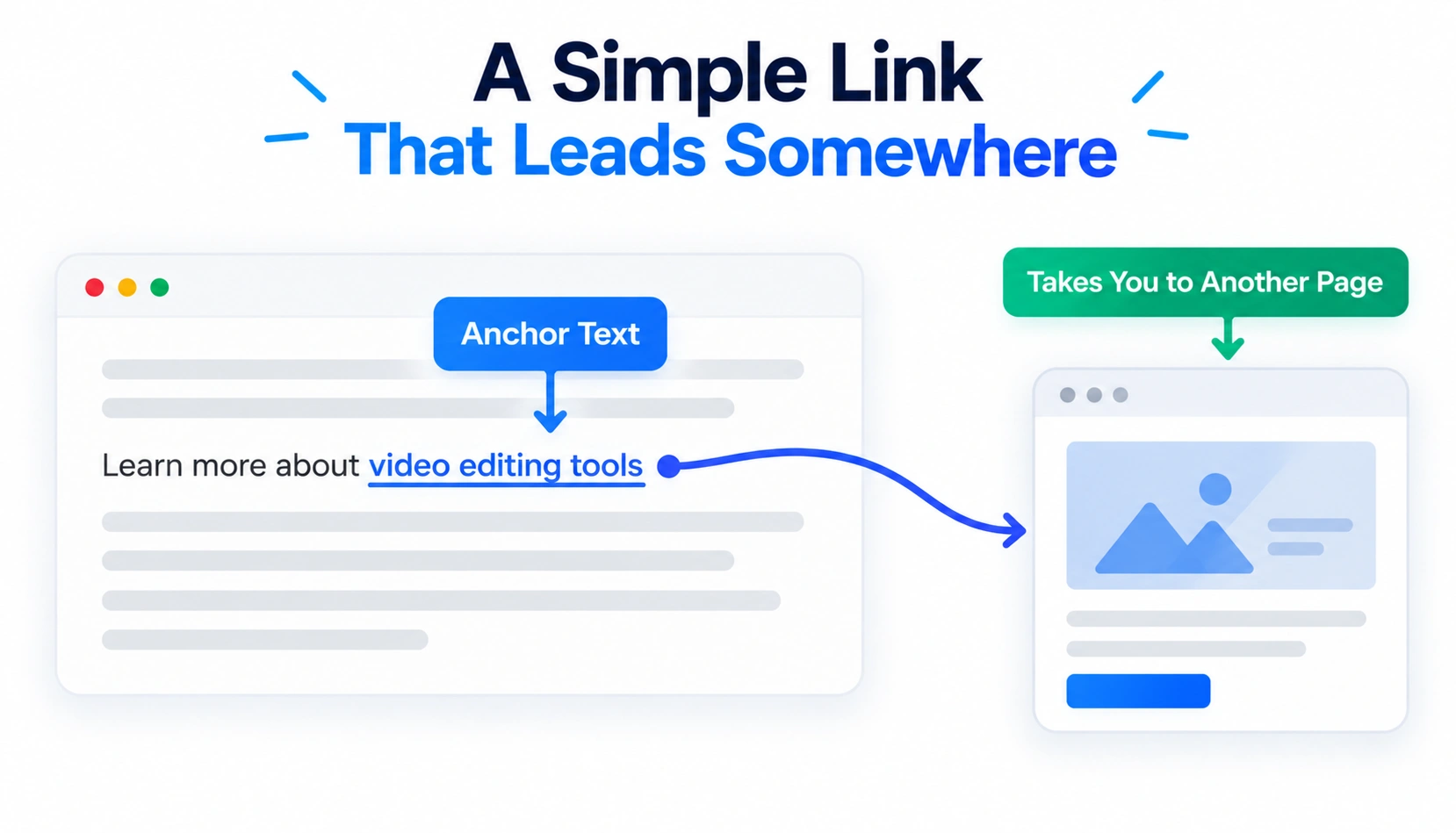
A text link is a clickable word or phrase in the body of a page that sends the reader to another URL. The clickable words are called anchor text. Text links are the most common link format on the web because they sit naturally inside sentences and tell both readers and search engines what the destination is about.
Text links vs backlinks
A backlink is any link from one website to another. A text link is one format a backlink can take. Image links, logo banners and buttons are also backlinks, but they don’t use words as the clickable part. When people say they want to buy backlinks, they usually mean text links placed in articles, which is why the two terms get swapped so often.
What is a paid text link?
A paid text link is a text link placed in exchange for money or another form of payment, such as free products or a service swap. The arrangement matters more than the format. For paid link placements, Google recommends qualifying the link with rel="sponsored" or rel="nofollow". The rel="sponsored" attribute is the preferred option for paid placements., which we cover in the safety section.
Contextual text links vs sitewide text links
A contextual text link sits inside the body of an article, surrounded by sentences on a related topic. A sitewide text link appears on every page of a site, usually in the footer, sidebar or header. One sitewide placement can create thousands of links from a single domain. That pattern looks unnatural and rarely adds more value than one good contextual link would.
Paid links vs organic editorial links
An organic editorial link happens when a writer or editor links to a page because they found it useful. Nobody pays for it. A paid link is arranged in advance. Readers often can’t tell the difference, but search engines look at patterns across many links, and you can feel the difference in your budget: editorial links take time to earn, while paid links are quick and priced.
Why Do People Buy Text Links?
People buy text links for practical reasons, and most of them have little to do with a quick ranking jump. Here are the motivations that come up most often.
Save time compared with manual outreach
Cold outreach is slow. You might email forty publishers to land two placements. A paid arrangement skips the guessing, since the publisher already sells placements and tells you the terms upfront. For small teams, that time saving is often the main reason to pay.
Gain exposure to relevant audiences
A link inside an article your buyers already read puts your page in front of the right people. A well-matched placement can send more useful visitors than a stronger-looking link on a site nobody in your market visits.
Support authority-building campaigns
Paid placements can sit beside other work such as content, PR and partnerships. Used that way, they add to a broader effort to get your brand mentioned in credible places. They work poorly as a stand-alone tactic.
Generate referral traffic
Referral visitors arrive with context. They have just read something related to your topic and chose to click. If your landing page matches that intent, those visits can turn into sign-ups, enquiries or sales, whatever the link does for your rankings.
Build relationships with publishers
A first paid placement can open a longer conversation with an editor. Some publishers later offer quotes, interviews or unpaid mentions to brands they’ve worked with and trust. Treat the first transaction as an introduction.
A caution belongs here. Buying links does not automatically improve rankings, and anyone who promises otherwise is selling hope. Google’s systems evaluate links at scale, and many paid links pass little or no ranking credit. The sensible way to buy is to make sure the placement is worth the price even if the SEO effect turns out to be zero.
Is Buying Text Links Safe for SEO?
Buying text links can be done safely, or it can be done in a way that puts your site at risk. The answer comes down to what Google’s rules say and how closely your purchase follows them.
What Google considers link spam
Google’s spam policies define link spam as creating links to or from a site mainly to manipulate search rankings. The policy names buying or selling links that pass ranking signals, excessive link exchanges, automated link creation and large-scale guest posting with keyword-rich anchors. It also covers contracts that force a publisher to carry a link they can’t qualify. Because the policy says “to or from,” sellers are covered as much as buyers.
Buying links for rankings vs buying advertising
Google does not treat all paid links as spam. It describes buying and selling links as a normal part of online advertising and sponsorship. Those links are fine when they’re qualified with rel=”sponsored” or rel=”nofollow”. So the real question is not paid versus free. It’s whether the link is labeled as advertising or disguised as an editorial vote meant to move rankings.
rel=”sponsored” vs rel=”nofollow”
The sponsored value was created for ads, sponsorships and other compensated links. The nofollow value is the general option for links you don’t want to vouch for. Google says both are acceptable, but sponsored is preferred for paid links. Don’t imply that attribute choice itself guarantees no penalty. A third value, ugc, covers links in user-generated content such as comments and forum posts.
Use sponsored only on genuinely paid links. If you tag a free editorial link that way, you may block whatever value it would have passed.
When a paid link creates SEO risk
Risk rises when a paid link carries no qualifying attribute and is clearly meant to pass ranking credit. The warning signs around it tend to repeat: many links bought in a short window, exact-match anchors, unrelated host sites, sites that exist to sell links and networks that share footprints. Smaller sites with thin link profiles feel the damage faster. Outcomes range from links being neutralized to ranking drops after an algorithm change to a manual action for unnatural links in Search Console.
Can Google simply ignore a paid link?
Often, yes. Google has said its systems, including SpamBrain, are built to detect sites that buy links and sites that sell them, and to neutralize the effect of unnatural links. In practice that means some paid links pass nothing. It doesn’t mean they’re harmless, because manual actions still exist. The safe approach is to buy only placements that justify their cost through traffic, exposure or conversions, so an ignored link doesn’t turn the purchase into a loss.
Google updates its spam policies from time to time. Before you commit budget, read the current link spam policy and the guide on qualifying outbound links in Google Search Central.
Types of Text Links You Can Buy
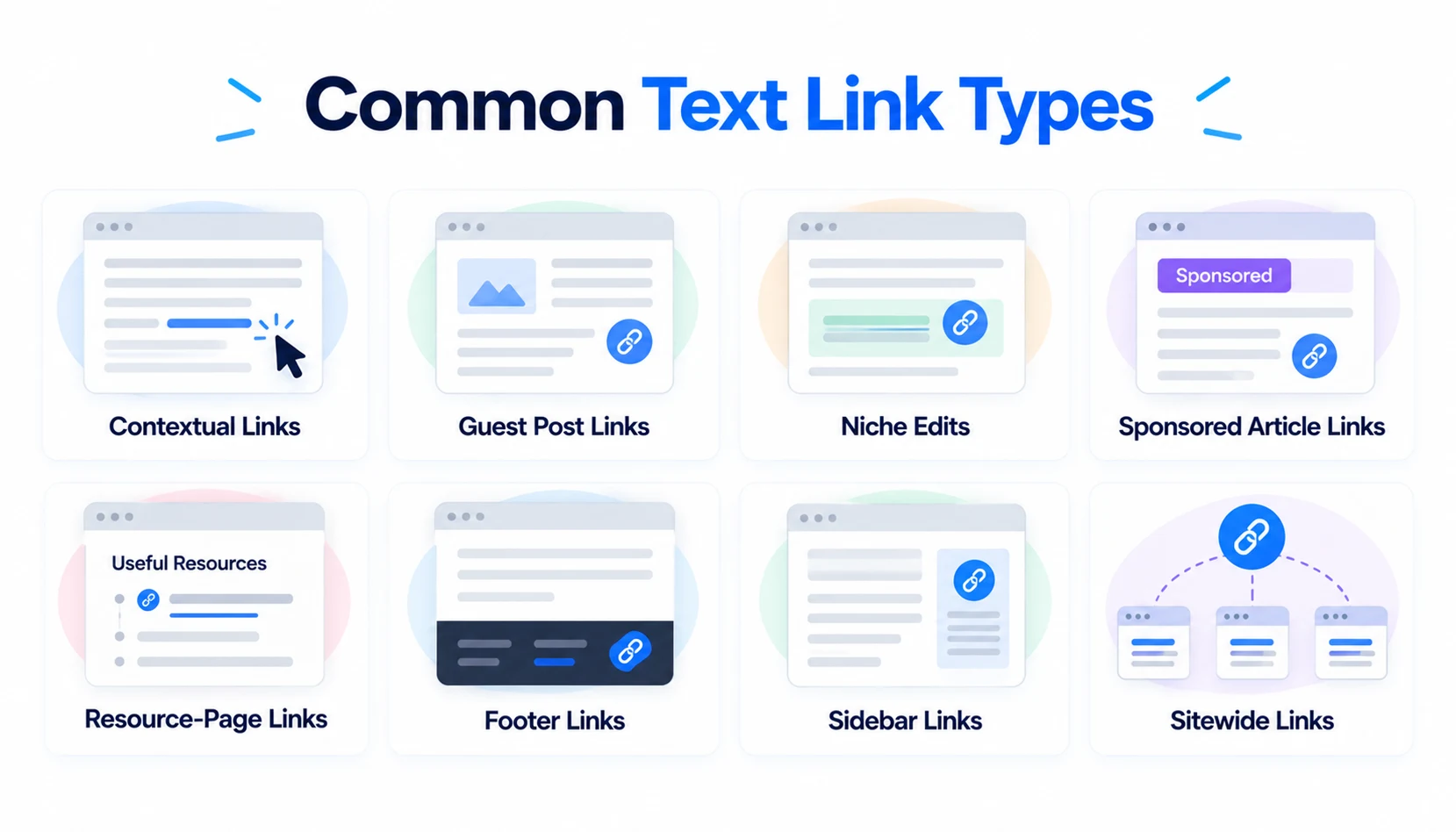
Sellers use different names for similar things, so it helps to know what each format actually is before you compare quotes.
Contextual links
A contextual link sits in the body of an article, within a paragraph that discusses a related topic. It’s the format most buyers want, because it looks like a normal citation and gets read. Quality depends almost entirely on how well the surrounding text matches your page.
Guest post links
With a guest post, you write an article and the publisher hosts it with a link back to you. Some publishers charge a placement fee. Google has warned about large-scale guest posting campaigns that use keyword-rich anchors, so keep volume low and the content genuinely useful.
Niche edits / link insertions
A niche edit adds your link to an article that is already published. The host page may already have age, traffic and links of its own, which is the appeal. The risk is a forced fit. If the sentence reads as though it was edited to carry your link, readers and search engines may both notice. Ask to see the exact wording before you pay.
Sponsored article links
A sponsored article is content the publisher labels as sponsored, either written by their team or supplied by you. It’s the most transparent option, since the paid relationship is out in the open. The link should carry rel=”sponsored”, and its value comes from readers and brand exposure.
Resource-page links
Resource pages collect useful links on one topic. Earned inclusion is excellent. Paid inclusion on pages that list anyone who pays is a different matter, since those pages tend to be weak and heavily commercial. Look at the other links on the page before deciding.
Footer links
Footer links sit at the bottom of every page. They’re cheap, rarely read and often tied to sitewide exposure. Unless the link is a clearly labeled sponsor or partner credit, they’re hard to justify.
Sidebar links
Sidebar links work like footer links with a bit more visibility. They’re usually sitewide too, they sit outside the editorial content and they send little traffic. Treat them as advertising and qualify them as such.
Sitewide links
A sitewide link appears across the entire site, so one purchase creates a huge number of links from one domain. That volume adds little and can look manipulative. If you want a sitewide credit for a real sponsorship, use a qualified link and don’t expect ranking value.
Which type should you choose?
Start with contextual placements on pages that already attract the audience you want. Use guest posts when you can offer content the publisher’s readers would genuinely value. Consider niche edits when the host page has real traffic and a natural spot for your link. Keep sponsored articles for brand exposure, and treat footer, sidebar and sitewide links as advertising only.
How Much Do Text Links Cost?
There’s no standard rate card. Two links that look similar can differ in price by a factor of ten, and the cheaper one isn’t always the weaker one. Price makes sense only when you know what drives it.
Typical factors that determine link price
Sellers price links using a mix of the following factors:
- Website authority: publishers with strong link profiles charge more, although the score they quote isn’t a Google metric.
- Organic traffic: a site that really ranks and gets visitors is worth more than one that only looks strong in a tool.
- Relevance: a niche match usually costs more because fewer sites qualify.
- Placement: body links cost more than footer or sidebar links.
- Content quality: a carefully edited article costs more to produce than a short post.
- Link duration: permanent links cost more than 6-month or 12-month placements.
- Publisher reputation: well-known outlets charge a premium for their name.
- Industry or niche: finance, health, legal and software links are usually pricier than links in low-competition topics.
Cheap vs expensive text links
Very cheap links usually come in bulk from thin sites, networks or pages made to sell links. Expensive links aren’t automatically good either. A high price can simply reflect a publisher’s confidence. Ask what the price includes: the writing, the editing, the duration, a replacement if the page changes and an honest traffic figure.
Price-per-link vs actual value
Price per link is the wrong number to optimize. A $300 link on a page that sends 40 qualified visits a month for two years is a better buy than a $50 link on a page nobody reads. Compare cost per expected visit, cost per lead and the brand exposure you’ll get instead.
Calculate the total cost of a link-building campaign
The invoice is rarely the whole bill. A fair total includes placement fees, content creation, vetting time, tool subscriptions and monitoring. Here’s a simple example for ten links:
| Cost item | Calculation | Amount |
| Placement fees | 10 links at $200 | $2,000 |
| Content creation | 10 articles at $80 | $800 |
| SEO tool subscription | 1 month | $150 |
| Vetting and reporting time | 12 hours at $30 | $360 |
| Total campaign cost | $3,310 | |
| Effective cost per link | $3,310 divided by 10 | $331 |
The effective cost per link is about 65% higher than the quoted price. Budget with that number, not the sticker price.
How to Evaluate a Website Before Buying a Text Link
This is where most of the savings happen. A twenty-minute check can keep you from paying for links that were never going to help. Run every candidate through the twelve checks below, and keep notes so you can compare offers fairly.
1. Check topical relevance
Look at the site’s main categories and recent articles. Would a reader of that page plausibly want your page next? A plumbing blog linking to an analytics tool is a mismatch no matter how strong its numbers look. Relevance carries the most weight in the scoring framework later in this guide.
2. Check organic search traffic
Use an SEO tool such as Ahrefs, Semrush or SE Ranking to see estimated organic traffic and the keywords the site ranks for. The figures are estimates, so read them as direction, not fact. Check that the ranking keywords match the site’s topics. A site ranking for random, unrelated terms is a bad sign.
3. Check traffic trends
Look at the last 12 to 24 months. Steady or rising traffic is healthy. A sharp, sustained drop can point to a penalty or a core update that hit the site. A sudden spike followed by a collapse usually means something went wrong or was manipulated.
4. Check indexation
Search site:example.com in Google and confirm the site has indexed pages, including recent posts. The count is approximate, but zero or near-zero results is a clear warning. Also search for the brand name. A real publication usually appears for its own name.
5. Review recent content
Read a handful of recent articles. Look for named authors, original thinking and a consistent publishing rhythm. Be wary of thin posts, scraped text, spun content and pages that all read like sponsored posts. If the site’s main purpose looks like selling links, it probably is.
6. Analyze outbound links
Open ten articles and look at where they link. Count the commercial links, check how many are labeled, and note whether the destinations are unrelated: loans, casinos, supplements, software and travel in the same blog. If nearly every article links to a different commercial site using exact-match anchors, you’re looking at a link farm.
7. Check referring domains
See who links to the site. Real publications, industry sites and mentions in news pieces are good signs. Dozens of sudden links from unrelated or foreign-language pages are not. Compare the number of referring domains with organic traffic. Many links and almost no visitors rarely add up to a healthy site.
8. Review the site’s history
Use the Wayback Machine to see what the domain used to be. Expired domains rebuilt for link selling often carry an old topic that has nothing to do with the new one. A site that was a pharmacy store three years ago and a marketing blog today is not the clean history you want.
9. Check where the link will appear
Ask for the exact spot. A link in the middle of a relevant paragraph is far better than one tucked into an author bio, a footer or a block of links at the bottom. Request a screenshot or a draft before payment.
10. Evaluate the target page
Your own page needs to deserve the link. It should be indexable, load quickly, answer a real query and convert referral visitors. Paying for a link to a thin or broken page wastes the whole purchase, whatever the host site is worth.
11. Check anchor-text requirements
The publisher shouldn’t force an exact-match keyword on you, and you shouldn’t push for one. Natural anchors, such as a brand name or a short descriptive phrase, look better and carry less risk. If a seller insists on a specific commercial anchor, treat it as a warning.
12. Check link duration and replacement policy
Find out how long the link stays live and what happens if the page is deleted, redirected or edited. Get the policy in writing. A good seller will replace a lost link with a comparable one or refund the fee. A seller who says nothing about this is telling you something.
Don’t Choose a Text Link Based on DR or DA Alone
Domain Rating and Domain Authority are popular shortcuts, and sellers love quoting them. They’re useful for a first filter but poor as a final decision.
What Ahrefs DR tells you
Domain Rating is Ahrefs’ 0 to 100 score for the strength of a site’s backlink profile compared with other sites in its index. It’s based on links only. It says nothing directly about traffic, content quality, topical focus or whether the site sells links.
What Moz DA tells you
Domain Authority is Moz’s 1 to 100 score, built to estimate how likely a site is to rank compared with others. It’s calculated from Moz’s own link data and works as a comparative score, not a measure of quality.
Why third-party metrics aren’t Google rankings
Google doesn’t use DR or DA. Both are estimates built from one company’s crawl and methods. Both can be inflated by links, and both can sit high on sites with almost no organic traffic. Use them to screen out weak sites quickly, then judge the rest with signals that reflect real visibility.
A better website evaluation formula
Weighing several factors gives a much clearer picture than a single score. The table below is the weighting used in the scoring framework in the next section.
| Factor | Weight |
| Topical relevance | 20% |
| Organic visibility | 20% |
| Content quality | 15% |
| Editorial quality | 15% |
| Outbound-link profile | 10% |
| Website history | 10% |
| Placement quality | 5% |
| Traffic potential | 5% |
Those weights turn into a score you can calculate for every offer. That is the Text Link Quality Score.
Text Link Quality Score: A Practical 100-Point Framework
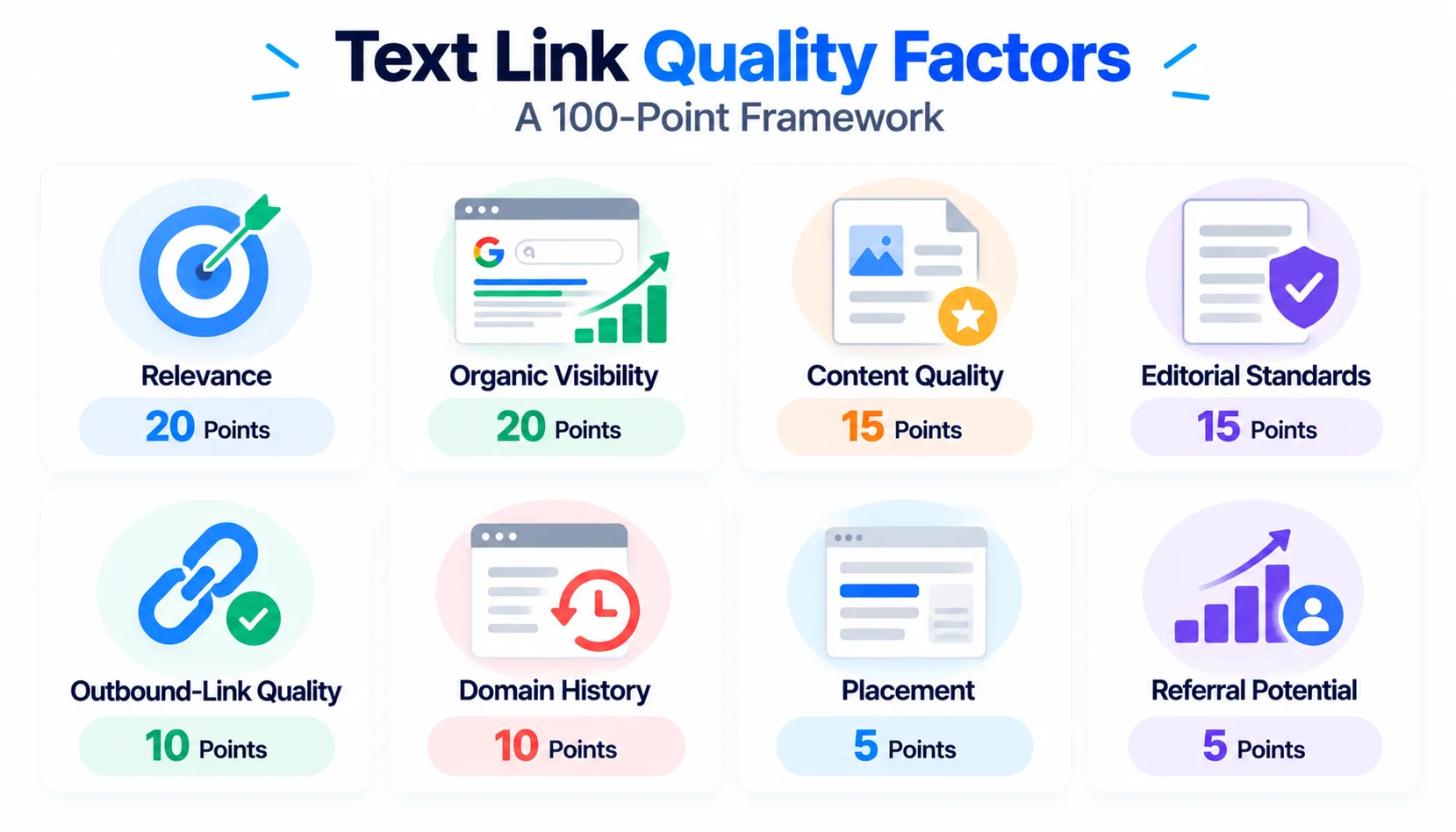
The Text Link Quality Score gives every offer a number out of 100 so you can compare sites that look different on the surface. Score each category honestly, add them up and apply one rule: 80 or above is a strong candidate, 60 to 79 is worth negotiating or testing, and anything below 60 is a pass.
Relevance: 20 points
Give 17 to 20 points when the site and the host page cover your exact topic. Give 10 to 16 for an adjacent topic where a reader would still see the connection. Anything unrelated gets under 10.
Organic visibility: 20 points
Award high marks to sites with steady or growing organic traffic and rankings on topics they actually cover. Lose points for flat lines, sharp declines or traffic that comes from irrelevant keywords.
Content quality: 15 points
Score the writing, depth and originality of recent articles. Strong sites have named authors, clear structure and real expertise. Weak ones publish thin posts with little to say.
Editorial standards: 15 points
Look for signs that an editor is in charge: an about page, author bios, a contact route, consistent formatting and a clear policy on sponsored content. A site that accepts anything from anyone scores low.
Outbound-link quality: 10 points
Check the pages the site links to. A modest number of relevant, labeled outbound links earns full marks. Dense commercial links to unrelated sites cost you points quickly.
Domain history: 10 points
Reward domains with a stable topic and a clean past. Deduct for ownership changes, topic switches, expired-domain rebuilds and any history of spam.
Placement: 5 points
A link in the middle of a relevant paragraph scores 5. A link in a sidebar, footer or author bio scores 0 to 2.
Referral potential: 5 points
This is the traffic potential factor from the earlier table. Score it by how likely real readers are to click, based on the page’s visits, the topic fit and how prominent the link is.
Example: scoring two potential websites
Imagine two offers for the same target page. Site A is a niche marketing blog that charges $250. Site B is a general blog with a “write for us” page that charges $60.
| Category | Max | Site A | Site B |
| Relevance | 20 | 18 | 8 |
| Organic visibility | 20 | 15 | 6 |
| Content quality | 15 | 13 | 6 |
| Editorial standards | 15 | 12 | 5 |
| Outbound-link quality | 10 | 8 | 3 |
| Domain history | 10 | 9 | 4 |
| Placement | 5 | 4 | 3 |
| Referral potential | 5 | 4 | 2 |
| Total | 100 | 83 | 37 |
Site A scores 83 and is worth the higher price. Site B scores 37, and its low price is exactly what makes it tempting. At $60 it looks like a bargain, but a link nobody sees from a site Google may ignore is expensive at any price.
Contextual Link vs Guest Post vs Niche Edit vs Footer Link
Each format suits a different goal. This table compares them side by side.
| Factor | Contextual link | Guest post | Niche edit | Footer link |
| Placement | Body of an article | Body of a new article you supply | Body of an existing article | Footer of every page |
| Typical cost | Medium to high | Medium to high, plus content cost | Medium | Low |
| Relevance | High when matched well | High if the site is chosen well | Depends on the host page | Usually low |
| Referral traffic potential | Medium | Medium to high | Medium, tied to the host page | Very low |
| Sitewide exposure | No | No | No | Yes |
| Risk | Medium | Medium | Medium, higher if forced | High |
| Best use case | Supporting a relevant page | Reaching a new audience with original content | Getting onto a page that already has traffic | Clearly labeled sponsor or partner credit |
If you only test one format, make it a contextual link on a relevant page with real traffic. It’s the format with the best balance of relevance, readership and risk.
Red Flags When Buying Text Links
Most bad purchases show their problems before you pay. If an offer shows three or more of the signs below, walk away.
Guaranteed Google rankings
Nobody controls Google’s results, and no seller can promise a ranking. A guarantee means the seller is either careless or hoping you won’t check.
Extremely cheap bulk links
Packages offering hundreds of links for a small fee rely on thin sites, networks or automation. These are the links most likely to be neutralized, and some can do damage.
Huge numbers of unrelated websites
If a seller’s catalog covers every topic from pet food to payday loans, the sites exist to sell links, not to serve readers. Relevance disappears when one seller covers everything.
High DR but no organic traffic
High DR + low traffic is a warning sign, not proof of link selling.or one Google has already stopped trusting. Always check traffic before you trust a metric.
Excessive commercial outbound links
If the site links out to dozens of unrelated commercial pages, yours will be one of many and carry little weight. It also puts you in questionable company.
Exact-match anchor requirements
Sellers who insist on a particular commercial keyword as the anchor are pushing a pattern Google’s systems know well. Natural anchors are safer.
PBN or network footprints
Private blog networks share patterns: the same hosting, similar themes, near-identical author pages and links to the same group of clients. If several sites from one seller look related, assume they’re connected.
Sitewide links
A seller offering footer or sidebar placement across a whole site is selling volume, not value. It’s rarely worth the money, and sometimes it’s a risk.
No transparency about placement
If the seller won’t tell you which page, which paragraph and which URL, you can’t evaluate the link. You shouldn’t pay for something you can’t inspect.
No replacement or refund policy
Links disappear. Pages get deleted, edited or deindexed. A reputable seller has a stated policy for those cases. If there isn’t one, you’re carrying all the risk.
How to Buy Text Links Step by Step
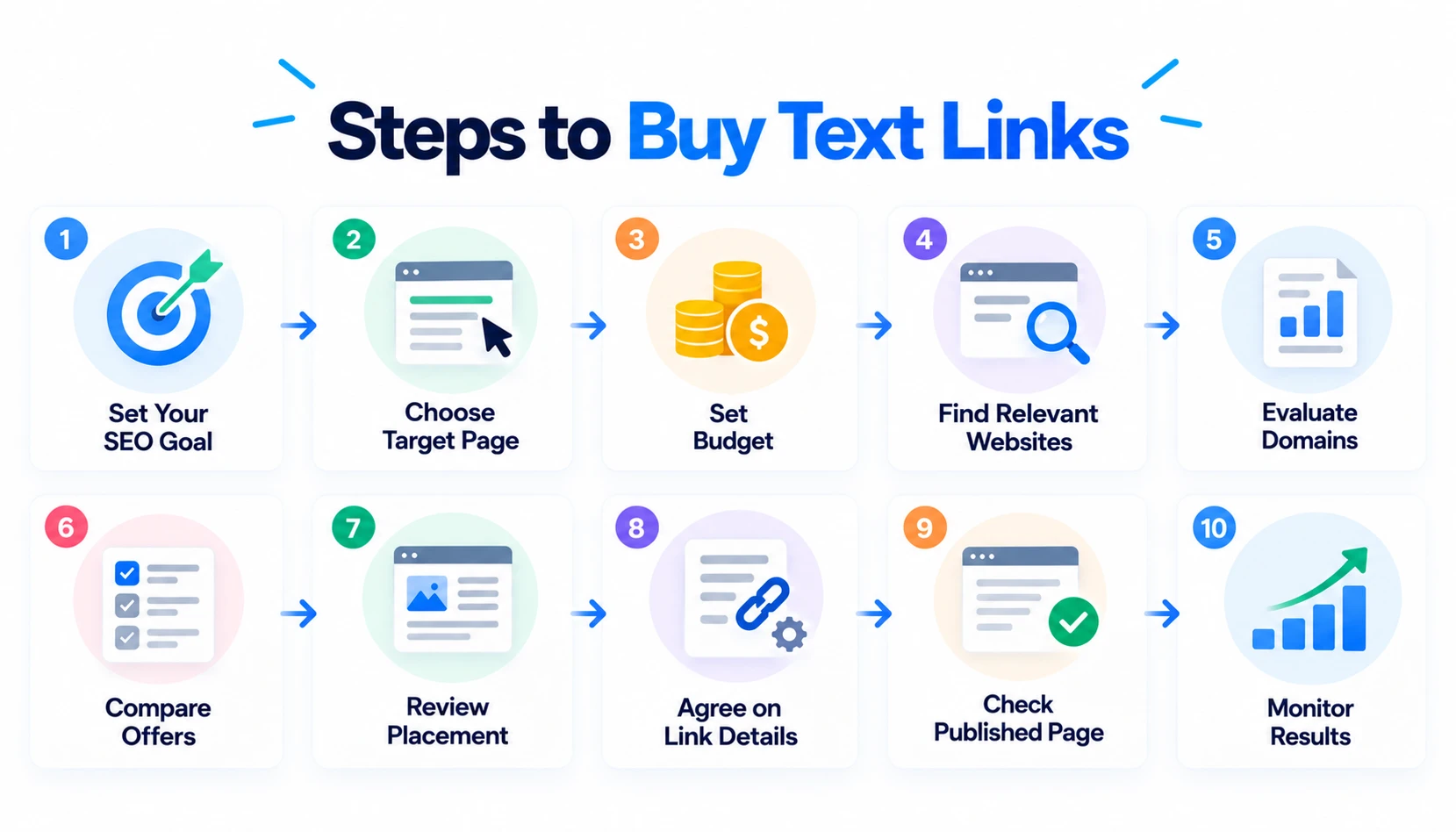
Follow this process and you’ll avoid most of the mistakes that cost buyers money.
Step 1 – Define your SEO goal
Decide what the link is for: referral traffic, brand exposure, support for a specific page or part of a wider campaign. A clear goal lets you judge each offer against something real.
Step 2 – Select the target page
Pick the page you want to send readers to. It should be useful, indexable, quick to load and ready to convert visitors. Fix weak pages before spending anything on links.
Step 3 – Set your budget
Set a total budget that includes content, tools and time, not just placement fees. Decide in advance how much you’ll pay for one link so you aren’t negotiating from emotion.
Step 4 – Find relevant websites
Search for sites that already publish on your topic. Look at who links to competitors, search for your topic along with phrases like “sponsored post” or “write for us”, and ask publishers you already know. Build a shortlist of 15 to 20 and expect to cut it in half.
Step 5 – Evaluate each domain
Run every site through the twelve checks earlier in this guide and score it with the 100-point framework. Drop anything that scores below 60.
Step 6 – Compare the offer
Line up the survivors by price, placement type, link duration, content requirements and replacement policy. Compare cost per expected visit, not only the headline price.
Step 7 – Review the proposed placement
Ask for the exact URL, the paragraph and the wording around your link. For new articles, read the draft. For niche edits, see the sentence before it goes live.
Step 8 – Agree on link attributes and duration
Confirm in writing how the link will be qualified, such as rel=”sponsored”, and how long it will stay live. Agree on what happens if the page changes. Don’t leave any of this to assumption.
Step 9 – Review the published page
Check the live page against what you agreed. Confirm the link, anchor, URL, surrounding text and attribute before you release the final payment where terms allow.
Step 10 – Monitor the link
Set a recurring check, monthly at first and quarterly later. Links get removed, pages get redirected and attributes get changed. Monitoring is what protects the money you’ve already spent.
What Anchor Text Should You Use?
Anchor text tells readers and search engines what the linked page is about. Use a mix, and let the context decide. These examples use a made-up brand called Northwind Analytics.
Branded anchors
Branded anchors use your company or product name, such as “Northwind Analytics”. They look natural, carry little risk and usually make up most of a healthy link profile.
Naked URLs
A naked URL is the raw address, such as “northwindanalytics.com”. It looks unforced and reads like a citation, which makes it a common pattern in real editorial links.
Partial-match anchors
Partial-match anchors include part of your topic inside a longer, natural phrase, such as “a checklist for evaluating link sellers”. They give context without over-optimizing.
Exact-match anchors
Exact-match anchors use the precise keyword you want to rank for, such as “buy text links”. Used heavily, they form a pattern search engines recognize as manipulation. Use them rarely and only when the sentence calls for them.
Generic anchors
Generic anchors include phrases like “this guide”, “read more” or “here”. They carry little context, but they appear all the time in real writing, and a few help your profile look normal.
Why anchor diversity matters
Naturally earned links come with a messy mix of anchors: brand names, bare URLs, descriptive phrases and generic words. A profile dominated by one commercial keyword looks engineered. Google doesn’t publish an ideal ratio, but a natural profile usually leans toward brand names and URLs, with a smaller share of descriptive and exact phrases.
How to Check a Purchased Text Link After Publication
Don’t treat publication as the finish line. A short checklist after the link goes live protects your investment.
Is the link live?
Open the page in a private browser window and find the link. Confirm it’s visible and clickable, and click it to see where it goes.
Is the correct URL being linked?
Check the destination address carefully. A wrong URL, a redirect chain or a tracking parameter added by the publisher can send readers somewhere you didn’t plan.
Is the anchor correct?
Compare the anchor text with what you agreed. Publishers sometimes change the wording during editing, and that can change the link’s meaning.
Is the page indexable?
View the page’s source or use a crawler to confirm there’s no noindex tag and that robots.txt isn’t blocking it. A link on a page that can’t be indexed offers little beyond direct referral visits.
Is the link contextual?
Read the paragraph around the link. It should match what you were shown, with natural sentences and a clear reason for the link to exist.
Is the page still indexed?
A few days after publication, search for the page’s URL or title in Google. Recheck at intervals. Pages can drop out of the index without any notice.
Has the link attribute changed?
Inspect the link’s HTML and confirm it carries the attribute you agreed on, whether sponsored, nofollow or none for an editorial link. If the attribute changes later, tell the publisher and ask for it to be restored.
How to Calculate Whether a Text Link Is Worth Buying
An honest ROI calculation keeps you from paying for hope. Put numbers on each factor below, then ignore the SEO benefit. If the link still pays for itself, it’s a safe purchase.
Link cost
Add the placement fee, any content cost and the time you spent vetting and managing it. Use the full figure, not the quote.
Referral traffic value
Estimate monthly visits to the host page, multiply by a realistic click-through rate and multiply again by the number of months the link will live. Be conservative, since most links in body copy get clicked by a small share of readers.
Lead-generation potential
Multiply referral visits by your landing page’s conversion rate to estimate leads. Then multiply by what a lead is worth to your business.
Brand exposure
Some value doesn’t show up as clicks. Readers who see your name in a trusted publication may search for you later or remember you when they’re ready to buy. It’s hard to measure, so treat it as a bonus, not the basis.
SEO campaign value
If the link contributes to a broader effort, such as content, PR and partnerships working together, it may add some value there. Since Google may discount paid links, never count on it.
Lifetime value of the placement
A permanent link on a stable page keeps sending visitors for years. A 12-month placement ends and takes its value with it. Always multiply by the real duration.
Example ROI calculation
These numbers are illustrative. Say a link costs $250 for the placement, plus $50 for vetting and content support, so the total is $300. The host page gets 1,200 visits a month and 1% of readers click the link, which means 12 referral visits a month. Your landing page converts 2% of visitors, and each lead is worth $120 to you.
| Scenario | Referral visits | Leads | Lead value | Net return | ROI |
| Link stays 24 months | 288 | 5.76 | $691 | $391 | 130% |
| Link stays 12 months | 144 | 2.88 | $346 | $46 | 15% |
The same link looks excellent over 24 months and barely profitable over 12. Duration matters as much as price, and the calculation works before you give any weight to rankings.
Buy Text Links vs Build Links Organically
Buying isn’t the only route, and it isn’t always the best one. This table compares the main approaches.
| Method | Cost | Control | Speed | Risk | Traffic potential |
| Paid placement | $$ | High | Fast | Medium/High | Medium |
| Guest outreach | $ | Medium | Medium | Lower | Medium |
| Digital PR | $$$ | Medium | Slow | Lower | High |
| Linkable assets | $$ | High | Slow | Low | High |
| Partnerships | $ | Medium | Medium | Low | Medium |
Paid placements give you control and speed, but they carry the most risk. The slower methods cost less in risk and often produce better long-term traffic. Most healthy strategies mix them, with paid placements making up a small share.
Alternatives to Buying Text Links
If a score comes back low or the risk feels too high, these alternatives deserve a look.
Digital PR
Digital PR means creating stories, data or campaigns that journalists want to cover. It’s slow and costs more, but the links come from real publications and usually arrive without payment for placement.
Linkable assets
Tools, calculators, templates, studies and guides give people a reason to link to you. A strong asset can attract links for years with no extra spending.
Expert commentary
Journalists and bloggers constantly look for quotes from people who know the topic. Answer queries quickly with a useful, specific comment and you’ll often earn a link and a mention.
Original research
A survey, a data analysis or a benchmark report gives writers something new to cite. Original numbers are among the easiest things to earn links for.
Resource-page outreach
Find resource pages in your topic and suggest your page where it genuinely belongs. A short, honest note to the page owner can earn a link with no payment at all.
Strategic partnerships
Suppliers, customers, event hosts and complementary businesses often link to partners. These links tend to be relevant and durable, and the relationship usually brings other benefits too.
Unlinked brand mentions
Search for mentions of your brand that don’t link to you. A friendly email asking the writer to add a link is quick and often works.
Broken-link opportunities
Find dead links on relevant sites, then offer your own page as a replacement if it fits. You help the site owner fix a problem, and they have a reason to say yes.
FAQ
What are text links?
A text link is a clickable word or phrase inside a page’s copy that points to another URL. It differs from an image or button link because the anchor is plain text. When a publisher places one for you in exchange for payment, it becomes a paid text link and should be labeled that way.
Is buying text links safe?
It depends on how you buy. Paid links labeled rel=”sponsored” or rel=”nofollow” are treated as advertising and fit Google’s rules. Unlabeled links bought to pass ranking credit count as link spam. Risk also rises with bulk orders, unrelated sites, exact-match anchors and link networks, so vet every publisher individually.
How much does a text link cost?
Prices vary with the publisher’s traffic, relevance, placement, content quality and how long the link stays live. A link on a small niche blog can cost far less than one in an established publication. Judge the price against expected traffic, leads and campaign value, not the sticker price alone.
Does buying backlinks improve rankings?
Not reliably. Google’s systems try to neutralize unnatural links, so a paid link may pass little or no ranking credit. A relevant placement on a real page can still send visitors and build awareness. Justify the purchase on those returns first and treat any ranking effect as a bonus.
Are paid links against Google’s guidelines?
Buying or selling links to manipulate rankings is link spam under Google’s spam policies. Paid links used for advertising or sponsorship are acceptable when they carry rel=”sponsored” or rel=”nofollow”. The line sits between qualified advertising and unqualified links meant to pass ranking signals.
What is the difference between sponsored and nofollow links?
Both attributes qualify the relationship between the linked page and your website, and generally prevent the link from being treated as a normal editorial endorsement or ranking signal. Sponsored is the specific label for ads, sponsorships and other paid arrangements. Nofollow is the general-purpose value for links you don’t want to vouch for. Google accepts either for paid links, though sponsored describes the relationship more precisely.
Are niche edits better than guest posts?
Neither wins every time. A niche edit puts your link on a page that may already have traffic and age, while a guest post lets you control the content and reach a new audience. Choose by the host page’s relevance, traffic and context, not by the format’s reputation.
How do I identify a high-quality backlink?
A high-quality backlink comes from a relevant site with genuine organic traffic, real editorial standards and a clean history. It sits inside useful body content, uses a natural anchor and appears on an indexed page. Check outbound links and traffic trends too, since a high DR score alone can hide a weak site.
Should I buy backlinks based on DR?
No. DR is Ahrefs’ estimate of a site’s backlink strength, and Google doesn’t use it. Some sites show a high DR with almost no organic traffic. Use DR as a rough filter, then judge relevance, traffic, content quality, outbound links and placement before you pay.
Can paid backlinks hurt SEO?
Yes, when they’re unlabeled, bought in bulk or placed on irrelevant or network sites. Possible outcomes include neutralized links, ranking drops after algorithm changes and manual actions for unnatural links. Relevant, well-vetted, properly qualified placements carry much lower risk, though never zero.
Final Verdict: Should You Buy Text Links?
Buying text links can make sense, but only when the placement earns its keep without help from a ranking boost. Use this checklist to decide.
Consider a placement when:
- The website is genuinely relevant to your topic.
- The page has real search visibility.
- The placement offers potential referral value.
- The publisher is transparent about the page, the paragraph and the terms.
- The cost makes business sense once content and time are included.
- The paid relationship is properly qualified where required.
Walk away when the seller guarantees rankings, hides placement details, pushes exact-match anchors or sells links in bulk across unrelated sites.
The safest approach is to buy slowly and rarely, score every offer, qualify paid links honestly and keep earning links through content, research and relationships. Do that, and a paid text link becomes a small, well-measured part of your marketing instead of a gamble with your site’s visibility.