Creating a professional video involves much more than placing clips one after another on a timeline. Modern videos often combine multiple elements, including footage from different cameras, voiceovers, background music, sound effects, graphics, captions, animations, and visual effects.
Managing all these elements effectively requires a structured editing approach. This is where multi-track editing becomes important.
Multi-track editing allows creators to work with multiple layers of video and audio within the same timeline. Instead of replacing one element with another, editors can arrange different components together and control how they interact throughout the video.
From YouTube creators and filmmakers to marketing teams and businesses, multi-track editing has become an essential part of producing polished, engaging videos.
What Is Multi-Track Editing?
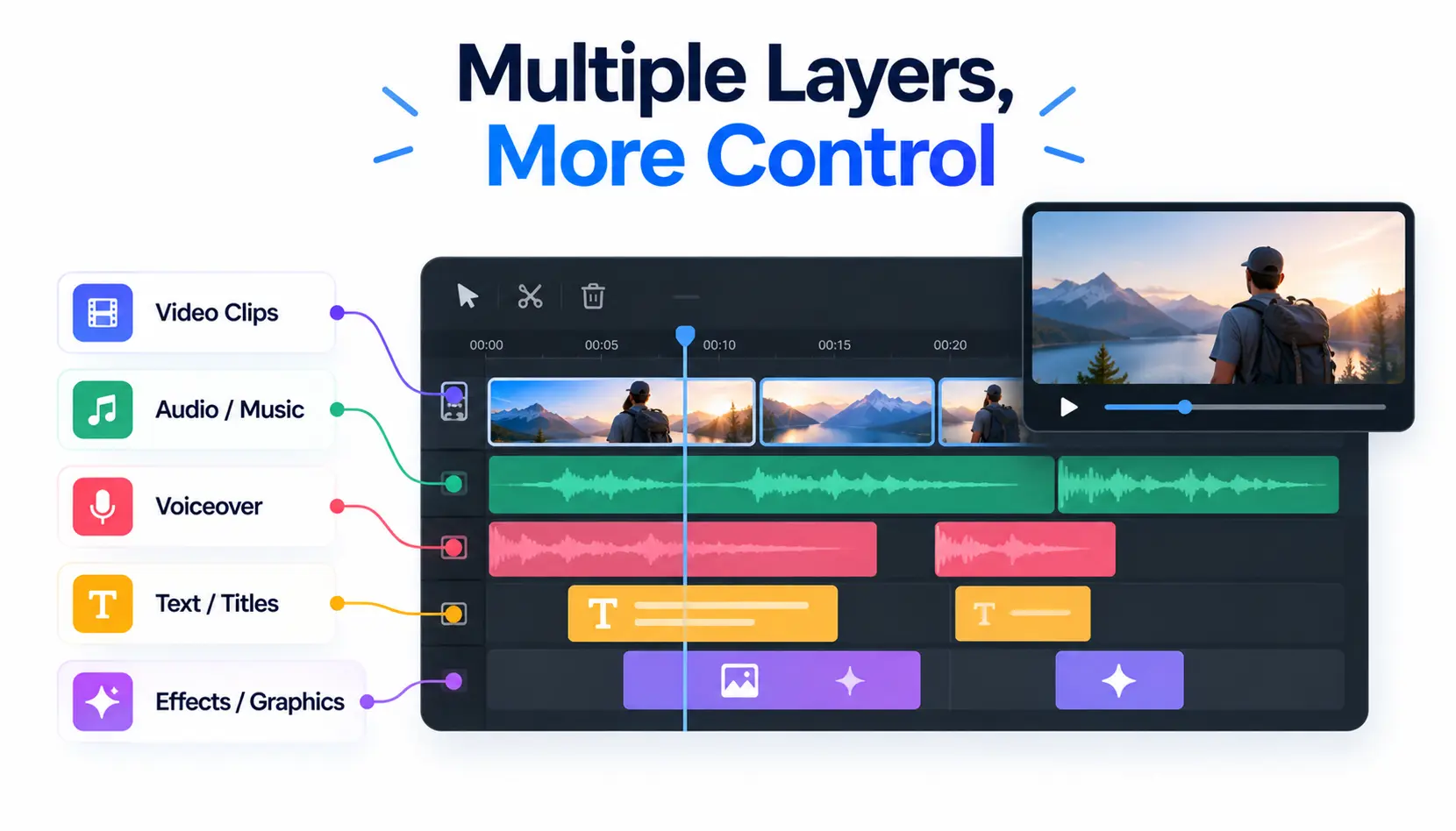
Multi-track editing is a video editing method where multiple layers of video, audio, and visual elements are placed on separate tracks within a timeline.
Each track represents a different element of the project. For example, one track may contain the main video footage, another may contain background music, while additional tracks may include voiceovers, text overlays, animations, or supporting visuals.
This approach gives editors more control over how the final video is built.
Instead of making changes to a single combined file, editors can adjust individual elements separately. They can lower the music volume without affecting dialogue, replace a clip without changing the rest of the timeline, or add new visuals while keeping existing edits intact.
This flexibility is what makes multi-track editing essential for professional video production.
Why Is Multi-Track Editing Important for Professional Videos?
Professional videos often require multiple creative elements working together. A product advertisement, documentary, online course, or social media campaign may involve several types of media that need to be carefully arranged.
Multi-track editing provides the control needed to manage these elements efficiently.
For example, a marketing video may include:
- Product footage
- Voice narration
- Background music
- Customer testimonials
- Text graphics
- Brand animations
With separate tracks, editors can refine each part independently and create a more polished final result.
Without multi-track editing, making even small changes can become time-consuming because adjusting one element may affect the entire project.
How Does Multi-Track Editing Improve Creative Control?
One of the biggest advantages of multi-track editing is the creative freedom it provides.
Editors can experiment with different combinations of visuals, sounds, and effects without permanently changing the original content.
For example, a filmmaker may test different music tracks to see which one creates the right emotional impact. A social media creator may compare multiple opening shots to find the strongest hook. A brand team may create different versions of an advertisement for different audiences.
This ability to experiment is especially valuable because video quality often depends on small creative decisions, such as timing, pacing, and visual flow.
Multi-Track Editing Makes Complex Projects Easier to Manage
As video projects become more advanced, managing everything in a single timeline layer becomes difficult.
Imagine editing a podcast video with:
- Two camera angles
- Guest and host audio
- Background music
- Intro graphics
- Captions
- Promotional clips
A single-track workflow would make these adjustments complicated. Editors would have to constantly replace or rearrange elements.
Multi-track editing keeps projects organized by separating different components. Editors can quickly locate specific elements, make adjustments, and maintain a cleaner workflow.
This is especially useful for teams working on larger projects where multiple people may need to review or modify the timeline.
How Does Multi-Track Editing Improve Audio Quality?
Audio plays a major role in how professional a video feels.
A video can have excellent visuals but still feel low quality if the sound is unclear or poorly balanced.
Multi-track editing allows editors to manage different audio sources separately. They can adjust dialogue levels, reduce background noise, add sound effects, and balance music without affecting other parts of the project.
For example, in an interview video, the editor can keep the speaker’s voice clear while lowering background music during important moments.
This level of control helps create a smoother viewing experience.
How Does Multi-Track Editing Help With Video Versions?
Modern creators rarely produce only one version of a video.
A single project may need variations for:
- YouTube
- Instagram Reels
- TikTok
- Advertisements
- Websites
- Presentations
Multi-track editing makes this process easier because creators can modify individual elements while keeping the main project structure intact.
For example, a brand can create multiple advertisement versions by changing the intro, call-to-action, or supporting visuals while keeping the core footage unchanged.
This saves time and makes content production more efficient.
How AI Is Improving Multi-Track Editing Workflows
AI is changing how creators approach video editing by reducing repetitive tasks and helping them manage complex projects more efficiently.
Traditional editing requires creators to manually review footage, organize clips, identify useful moments, and build sequences. While these steps are important, they can take significant time, especially when working with large amounts of content.
AI-assisted editing workflows can help creators speed up parts of this process by analyzing footage, identifying relevant sections, generating captions, and supporting timeline organization.
For creators looking to edit videos online with AI, these tools can make professional editing workflows more accessible by combining automation with creative control.
Platforms like invideo Editor also follow this approach by combining AI assistance with an editable timeline. Creators can work with raw footage, provide direction on the type of edit they need, and use AI support to help review clips, organize content, and create a starting point that can be refined manually.
This allows creators to benefit from faster workflows while still making the final creative decisions themselves.
Multi-Track Editing for Different Types of Creators
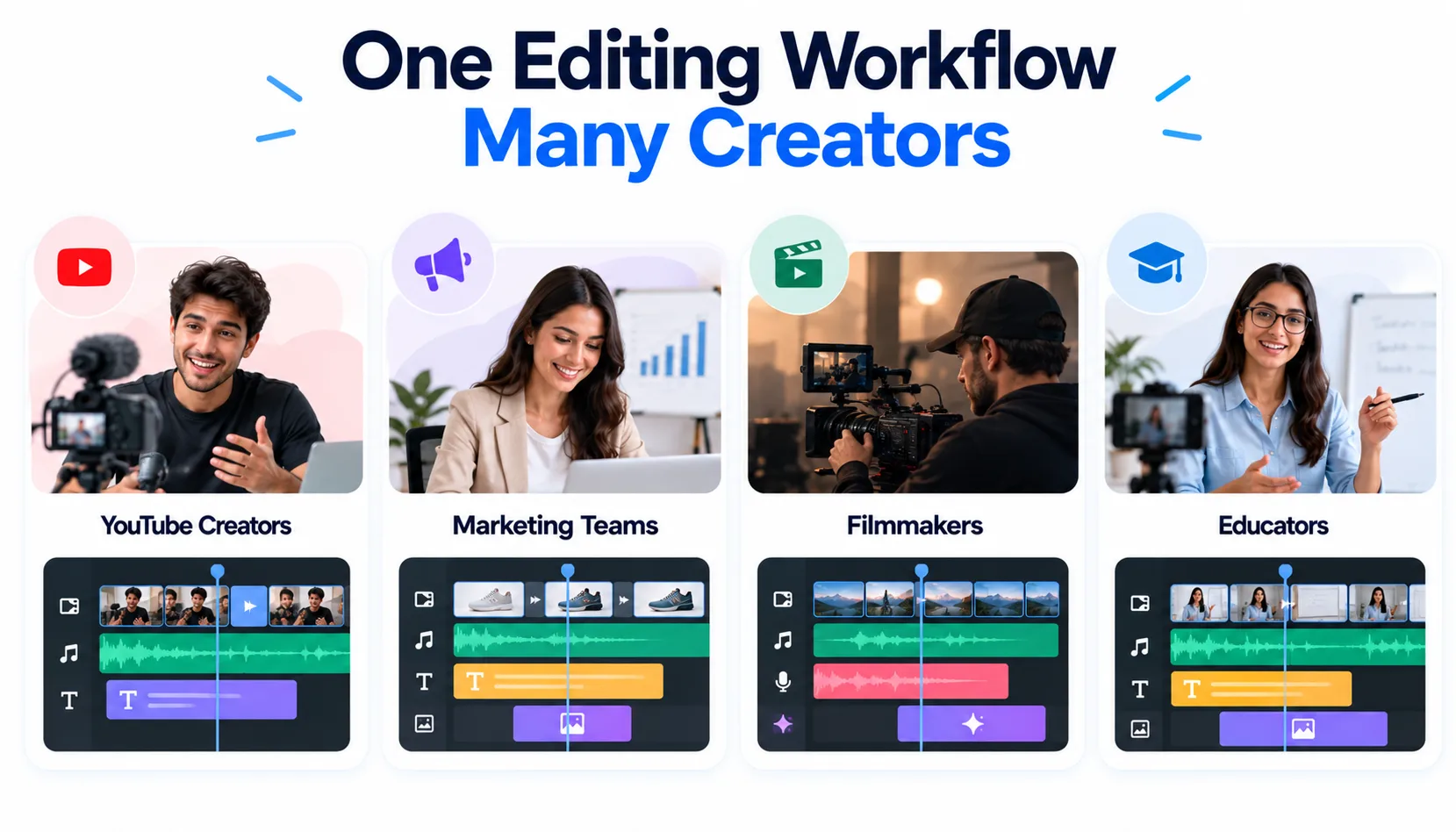
Multi-track editing is useful across many types of video production.
YouTube Creators
Creators can combine gameplay footage, camera recordings, voiceovers, music, and graphics to create engaging videos.
Marketing Teams
Businesses can use multiple tracks to build advertisements, product videos, and social media campaigns with consistent branding.
Filmmakers
Professional productions rely on multi-track workflows to manage complex scenes, dialogue, sound design, and visual effects.
Educators
Teachers and trainers can combine presentations, screen recordings, narration, and supporting visuals for online learning content.
Common Mistakes When Using Multi-Track Editing
While multi-track editing provides more control, poor organization can make projects harder to manage.
One common mistake is adding too many unnecessary layers. Editors should keep tracks organized and remove unused elements to maintain a clean timeline.
Another mistake is ignoring file organization. Naming clips properly and maintaining an organized media library can save significant time during editing.
Editors should also avoid focusing only on visual elements. Good videos require balance between visuals, storytelling, pacing, and sound.
The Future of Multi-Track Editing
Multi-track editing will continue to evolve as AI becomes more integrated into creative workflows.
Future editing systems will likely make it easier to organize complex projects, find specific moments in footage, and create initial edits while keeping professional-level control.
However, the role of the editor will remain important. AI can assist with repetitive tasks, but decisions about storytelling, emotion, timing, and creative direction still require human judgment.
Final Thoughts
Multi-track editing is one of the foundations of professional video production. By allowing creators to manage different video, audio, and visual elements separately, it provides the flexibility needed to create polished and engaging content.
As video production becomes more demanding, multi-track workflows combined with AI assistance are helping creators work faster without sacrificing creative control.
For beginners, understanding multi-track editing is an important step toward creating better videos. For professionals, it remains an essential workflow for managing complex projects and delivering high-quality results.