You can see a lot of what your competitor’s run on Google’s display network. You can’t see their budgets or conversion rates, but you can see the ads themselves: the images, headlines, offers and buttons they put in front of people.
This guide shows you how to spy on competitor’s Google Display Ads with a free tool first, then with paid tools if you need more. It also covers what to do with what you find, because collecting screenshots is the easy part.
Quick answer: To spy on competitor’s Google Display Ads, search for the advertiser in the Google Ads Transparency Center, filter to image ads, and record each ad’s message, offer and call to action.
Use a paid tool such as Adbeat if you need placement data or longer history. Then turn the patterns you spot into test ideas for your own campaigns.
A quick note on the word “spy.” Everything here is public. You’re reading ads that anyone can see, not breaking into anyone’s account.
What Does It Mean to Spy on Competitor’s Google Display Ads?
It means using public ad libraries and ad intelligence tools to study the display ads your competitors run. You look at their creative, their messaging, their offers and, with some tools, where those ads show up. The goal is to get ideas and spot gaps, not to assume that every ad you find is working.
This is a form of competitive intelligence, applied to one ad format.
1. What Google Display Ads Are
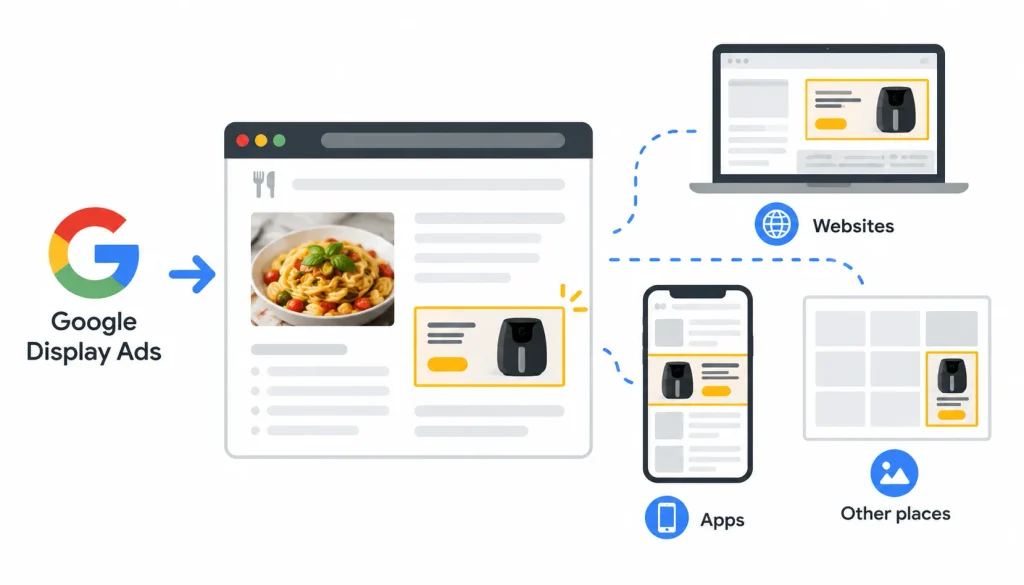
Google Display Ads are visual ads: banners, images and responsive formats that Google can show on websites, apps and other places in its display network. If you’ve ever read a recipe and seen a banner for a kitchen gadget, that was display advertising.
Responsive display ads are worth knowing about. The advertiser uploads images, headlines and descriptions, and Google mixes them into different sizes and layouts. So the version you see may be one of many combinations.
2. What You Can Find Out
Public research can show you:
- Which advertisers are running ads
- Example creatives, with their images and text
- The offers and calls to action in those ads
- Dates or time ranges, depending on the source
- Landing pages, when the ad links to one you can open
- Placement details, if you use a tool that collects them
3. What You Can’t Find Out
Public tools generally can’t tell you an advertiser’s exact budget, targeting settings, conversion rate, return on ad spend (ROAS) or profit. Some paid tools publish spend estimates, but those are modeled guesses. Treat them as rough direction, not fact.
| You can usually see | You usually can’t verify |
| Public ad creatives | Exact budget |
| Visible messages and offers | Conversion rate |
| Some dates or history | ROAS or profit |
| Landing pages | Full targeting setup |
| Placements (tool dependent) | The advertiser’s account data |
4. Display Ads vs. Search Ads
Many “Google Ads spy” guides are really about search ads. That’s a different research job, so it helps to separate the two.
| Search ads | Display ads | |
| Format | Mostly text | Images and responsive visual formats |
| Where they appear | Search results | Websites, apps and other display inventory |
| What you study | Keywords and ad copy | Visuals, offers, messaging, placements |
| Best research tools | Paid search tools | Ad libraries and display-focused tools |
A tool built around keywords won’t show you the banner a competitor put on a news site. Pick the tool for the job.
Why Look at Competitor’s Display Ads at All?
Because you don’t have to start every campaign from a blank page. Competitor ads show you what your market is already hearing.
Here is what you can get out of it:
- Creative ideas. You’ll notice which visual styles and benefits show up again and again.
- Positioning gaps. If every competitor leads with price, maybe you lead with speed or support.
- Offer ideas. Free trials, demos, consultations and discounts each attract a different kind of buyer.
- Timing clues. Repeated checks can reveal seasonal promotions and launch periods.
One caution. A handful of ads is a snapshot, not a strategy. Don’t build a theory on three screenshots.
How to Spy on Competitor’s Google Display Ads Step by Step
This is the core workflow. Plan on about an hour for your first competitor and less for each one after that.
Step 1: List Your Advertising Competitors
Start with a list of 5 to 10 names. Your direct product rivals go on it, but so do companies that chase the same customers with a different product.
You can also use a competitor keyword research strategy to identify competing businesses, understand their market positioning, and discover additional opportunities for your marketing campaigns.
A local accountant, for example, may compete for the same small business owner as a bookkeeping app. Both want that person’s attention on the same websites.
For each name, write down the company, website, product category and main offer. You’ll use this later.
Step 2: Search the Google Ads Transparency Center
The Google Ads Transparency Center is Google’s free public tool for looking up ads by advertisers. It’s the best place to begin.
- Open the Transparency Center.
- Search for the advertiser by name or by website domain.
- Pick the right advertiser from the results. Large brands can have several accounts, so check the name and domain carefully.
- Narrow the results with the filters on the page. At the time of writing these include options such as region, time period and ad format, but filters change, so use what you see.
- Look at the image-based ads first, since those are closest to display creative.
- Save a screenshot of each ad, with the date and the advertiser name.
Two limits to expect. Not every advertiser will have easy-to-find display ads, and the library won’t show you where an ad appeared on the web. If you find nothing, that doesn’t prove the competitor isn’t advertising.
If you sell to businesses, also check the LinkedIn Ad Library. Many B2B companies run campaigns there that never appear on Google.
Step 3: Study Each Ad
Now slow down and read each ad like a customer, then like a marketer. Ask these questions:
- What is the main message? What problem or benefit leads?
- What is the offer? A discount, a free trial, a demo, a consultation?
- What does the button say? “Get a quote” and “Start free” attract different people.
- Where does your eye go first? Check the headline, the image and the logo.
- Do the variations differ? Compare headlines, images and offers across the ads you found.
Don’t assume that two similar ads are an A/B test. They might be, or they might be different campaigns, or a responsive ad that Google shuffled.
Step 4: Add Placement and History Data (Optional)
If the free tool leaves gaps, a display-focused platform may fill some of them. Adbeat is a well-known example built for display ad research. Depending on the plan, tools in this category may show where ads appeared, how creatives changed over time, and estimated activity.
Coverage varies by tool, country and time period. Before you pay, check the vendor’s current feature list and ask whether the data covers your market. And remember that observed data (an ad was seen) is not the same as estimated data (a tool guesses the spend).
Step 5: Visit the Landing Pages
An ad is half the story. Click through, or open the page in a private browser window, and look at what the visitor gets.
Check whether the page repeats the ad’s promise. Then look at what the visitor is asked to do: buy, sign up, book a call or download something. Finally, note the trust signals, such as reviews, case studies, guarantees and client logos.
To improve your own landing pages, follow this keyword targeting and on-page SEO guide to optimize page content, headings, metadata, and internal links for search visibility.
A mismatch is useful to spot. If the ad promises a free demo and the page pushes a paid plan, that’s a weakness you can use.
Step 6: Compare Competitors
Line up everything you collected. Look for what repeats. If six of eight competitors run “free trial” ads, that’s the market standard, and a different offer may help you stand out.
Also look for what’s missing. Maybe nobody mentions customer support, delivery speed or a guarantee. Those gaps are good places to test.
One observation is a data point. Repeated observations across several competitors and several weeks start to look like a pattern.
Step 7: Turn Findings Into Tests
This step is where research pays off. Convert each observation into a hypothesis, then a test.
| Part | Example |
| Observation | Three competitors keep promoting a free consultation |
| Hypothesis | A low-commitment offer may win people who aren’t ready to buy |
| Test | Run a consultation ad against a product demo ad, same audience, same budget |
| Measure | Qualified leads, conversion rate and cost per qualified lead |
Judge the test on your own results. Click-through rate (CTR) alone can mislead, because an ad can get plenty of clicks and still bring in people who never buy. If you’re new to testing, A/B testing is the method to learn first.
Write your own ads. Borrow the insight, not the wording or the images.
Best Tools to Spy on Competitor’s Google Display Ads
The best tool depends on what you need. Some tools show public creatives. Others estimate activity or focus on paid search. Mixing those up leads to bad purchases.
| Tool | Best for | Cost | Display ad research | Main limit |
| Google Ads Transparency Center | Finding an advertiser’s public ads | Free | Yes, for ads in the library | No performance or placement data |
| Adbeat | Display ad intelligence | Paid | Built for it; verify market coverage | Cost, and coverage varies |
| Semrush | Broader marketing and ad research | Paid | Check whether your plan includes display data | Strongest on search and SEO |
| Ahrefs | Paid search and SEO competitor research | Paid | Not a display ad library | Search-focused |
| SpyFu | Competitor keywords and search ads | Paid | Don’t count on display coverage | Search-focused |
| Similarweb | Traffic and market context | Paid, with free views | Some plans include ad intelligence; verify | Broad data, not creative detail |
Features and pricing change often. Confirm everything on each vendor’s own site before you buy.
Google Ads Transparency Center
Best free starting point. It answers one question well: what ads is this advertiser running? It won’t tell you how well they work.
Adbeat
A good fit if display is a big part of your spend or your clients’ spend. It’s aimed at agencies and advertisers who want creative history and placement information. Check whether the data covers your country and industry before committing.
Semrush, Ahrefs and SpyFu
These three are mostly useful for search. They help you find competitor keywords and paid search copy. That research can inform your display targeting ideas, but it won’t replace a display ad library.
Similarweb
Useful for context: where a competitor’s traffic comes from and how big the market is. Use it next to ad research, not instead of it.
How to Choose
Ask five questions:
- Do I need current ads only, or history too?
- Do I need placement data?
- How many competitors will I track?
- Do I need exports or reports for clients?
- Does the tool cover my country?
If the honest answers are “current ads, no, a few, no, yes,” the free tool is probably enough.
Free vs. Paid Tools for Google Display Ads Research
Free is enough when you check a few competitors now and then, or you only need creative inspiration. The Transparency Center handles that.
Paid is worth considering when you track many competitors, need placement or history data, or report to clients. Time saved counts as real value here. If a tool saves you ten hours a month, its price should be judged against those hours.
A higher price doesn’t guarantee better campaigns. The tool gives you information. Your testing turns it into results.
How to Analyze Competitor Display Ads Like a PPC Specialist

Paid media people tend to run the same checks on every ad. Here’s a simple version you can reuse. For a broader understanding of competitor research, learn how to analyze top SERP results and conduct keyword research to identify content gaps and uncover additional opportunities to reach your target audience.
- Audience. Who is this ad written for? A beginner, an expert, a buyer ready to act? This is your guess, since you can’t see their targeting.
- Value proposition. What is the one thing the ad wants you to remember?
- Visual hierarchy. What do you notice first, second and third?
- Offer and CTA. Price, trial, demo, guarantee, or something else?
- Landing page match. Does the page keep the promise?
- Funnel stage. Does the ad look aimed at awareness, consideration or purchase? Retargeting ads, which follow earlier website visitors, often push a stronger offer.
Then label every note with a confidence level:
| Level | Meaning | Example |
| Observed | You saw it directly | The ad says “Start free for 14 days” |
| Interpreted | A reasonable reading | The ad targets small businesses |
| Assumed | A guess you haven’t checked | The ad converts well |
This habit stops you from treating guesses as facts.
Worked Example: Analyzing a Competitor’s Display Ad
This example is fictional. The company, ad and findings are invented to show the method, not to describe a real campaign.
Say you run marketing for a small invoicing app. A competitor, “LedgerLeaf,” shows up in the Transparency Center with a banner that reads “Send invoices in 60 seconds.” The button says “Start free.”
What the ad says. The main benefit is speed. The offer is a free start. The image is a phone showing a finished invoice, with the headline in large text on the left.
What the landing page adds. The page repeats the speed claim, shows three customer logos and asks for an email address before anything else. A pricing table sits further down.
What you can reasonably conclude. LedgerLeaf wants new users to try the product quickly, and it positions itself for busy owners of small businesses. Both points are interpretations, not facts.
What you can’t know. You don’t know their budget, their targeting, how many people sign up, or whether the ad makes them any money. It may be an old campaign they forgot to turn off.
Your test. If you compete on speed too, you’d be one of many. So test a different angle, such as “Get paid faster,” which focuses on what the user gets after sending the invoice. Run it against your current ad and compare cost per signup.
Competitor Display Ads Research Template
Copy these columns into a spreadsheet and fill one row per ad.
| Column | What to record |
| Competitor | Company name |
| Research date | When you saw the ad |
| Source | Tool or library used |
| Creative reference | Screenshot file or link |
| Format | Banner, responsive, or other |
| Main message | The central benefit |
| Offer | Discount, trial, demo and so on |
| CTA | Button text |
| Landing page | URL, if available |
| Placement | Only if your tool shows it |
| Dates | First and last seen, if available |
| Observation | What the evidence shows |
| Test idea | Your hypothesis |
| Confidence | Observed, interpreted or assumed |
| Follow-up date | When to check again |
Once you have 20 or more rows, sort by offer and message. Group the rows that point to the same idea, pick the two or three most promising hypotheses, and schedule tests for those.
Common Mistakes When You Spy on Competitor’s Google Display Ads
Assuming a visible ad is a winning ad. An ad can run for months because nobody checked it. Long run time is a hint, not proof.
Mixing up search and display data. Keyword tools answer keyword questions. They won’t show you banners.
Treating estimates as facts. If a tool says a competitor spends a certain amount, read it as an approximation.
Copying instead of learning. Copied ads blur your brand and may raise intellectual property problems. Use the idea and write your own version.
Skipping the landing page. The ad tells you what they promise. The page tells you what they deliver.
Judging from one screenshot. Collect more than one observation before you draw a conclusion.
Forgetting your own data. Competitor research gives you ideas. Your campaigns tell you which ideas work for your audience.
How Often Should You Check Competitor’s Display Ads?
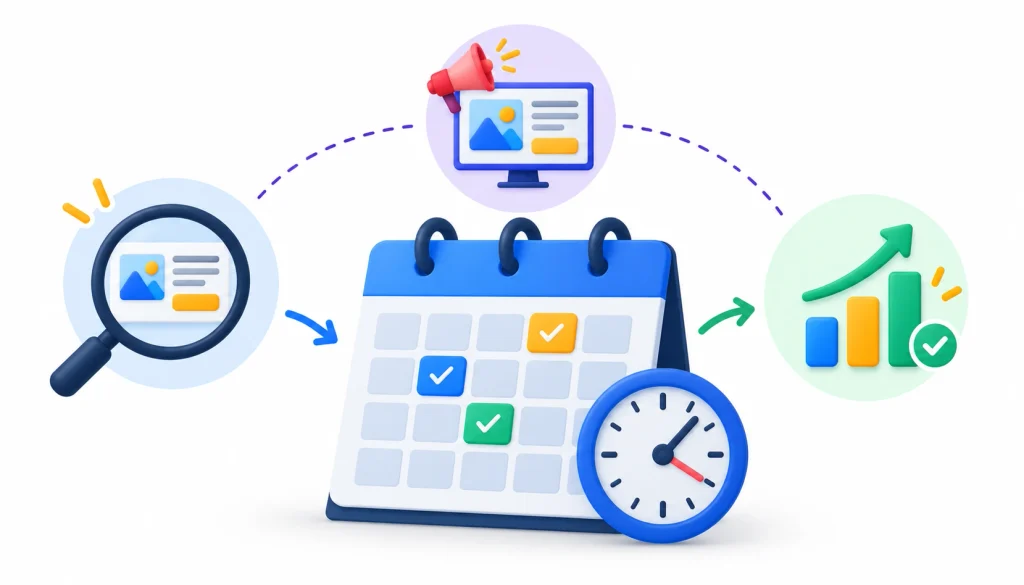
There’s no universal rule, but this schedule works as a starting point.
- Weekly for fast-moving markets, such as ecommerce during a sale season.
- Monthly for most businesses. This is enough to spot new offers and changes in messaging.
- Around events, such as product launches, holidays and big sales periods.
Between checks, log new creatives, changed offers and updated landing pages. Compare against your earlier rows so you can see what actually changed.
If you want to compare notes with other marketers, communities such as PPC on Reddit often discuss research tools and tactics. Treat advice there as opinion and test it yourself.
Frequently Asked Questions
1. How can I spy on competitor’s Google Display Ads for free?
Use the Google Ads Transparency Center. Search for the advertiser, filter to image ads where the filter is available, and save what you find. It’s free, but it doesn’t show placements or performance.
2. Can I see my competitor’s ad budgets?
Not exactly. Budgets are private. Some paid tools publish spend estimates, which are modeled rather than confirmed.
3. Can I find out where their display ads appear?
Sometimes. The Transparency Center doesn’t focus on placements, but some paid display tools do collect that data. Coverage differs from tool to tool.
4. Can I see how well their ads perform?
No. Conversion rates, CTR and ROAS stay inside the advertiser’s own account. You can only see what they run, not what it earns.
5. What is the best tool for Google Display Ads competitor research?
Start with the Transparency Center. If you need placements, history or reporting at scale, look at a display-focused paid tool such as Adbeat and check its coverage for your market.
6. Is it legal to research competitor’s ads?
Looking at publicly available ads is a normal part of competitive research. Copying someone’s creativity, breaking a tool’s terms of use, or collecting personal data are different matters. This isn’t legal advice, so ask a lawyer if you’re unsure.
7. Can I copy a competitor’s display ad?
Don’t. Copying can create legal risk and weakens your brand. Learn from their positioning and write something original.
8. Why can’t I find a competitor’s display ads?
There are a few likely reasons. You may have the wrong advertiser name or account. The ads may not be in the library for your region or time period. They might also run on other channels, or the competitor may not be advertising right now.
Final Verdict
Learning how to spy on competitor’s Google Display Ads comes down to a simple routine. Find the ads in the Transparency Center, study the message and offer, check the landing page, and add a paid tool only when the free one runs out. Then write everything down in one place.
The last step matters most. Turn what you saw into a hypothesis, run a test with your own budget, and read your own numbers. Competitor ads can tell you what to try. Only your results tell you what works.