If you’ve spent any time browsing AI art communities lately, you’ve probably come across Krea AI the browser-based creative suite that lets you generate images, video, and even 3D assets without juggling a dozen separate tools. It’s grown fast, and for good reason: instead of picking one AI model and living with its limits, Krea AI bundles dozens of the best image and video generators into a single workspace.
In this review, we’ll walk through exactly what Krea AI does well, where it falls short, how the pricing actually works, and whether it’s the right fit for your workflow. Everything here is based on hands-on testing and real user feedback, not marketing copy so you can decide if it earns a spot in your toolkit.
What Is Krea AI?
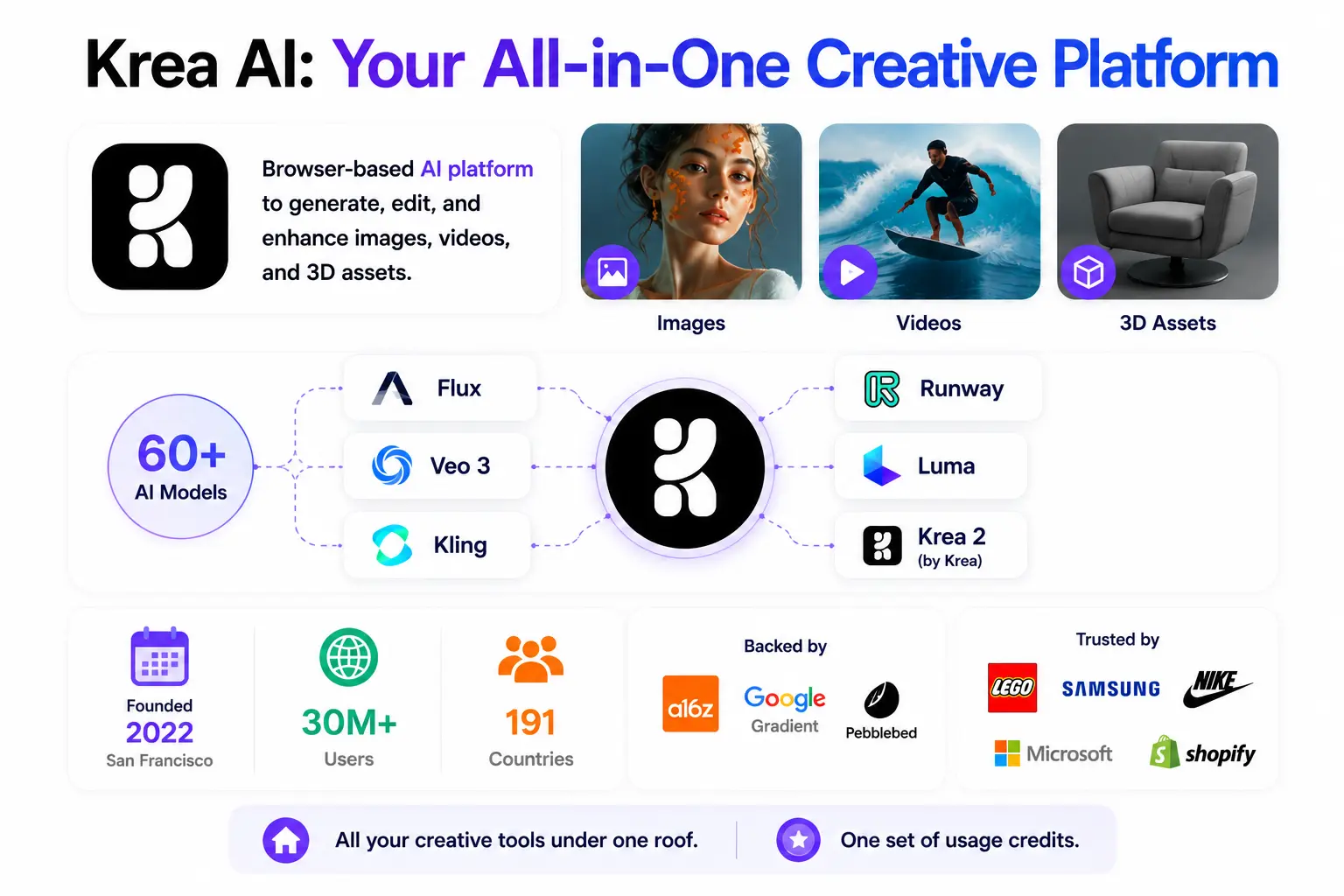
Krea AI is a browser-based AI creative platform for generating, editing, and enhancing images, videos, and 3D assets. Rather than building a single closed model, Krea takes more of an “all-in-one control room” approach: it gives you access to over 60 third-party and proprietary AI models – including Flux, Veo 3, Kling, Runway, Luma, and Krea’s own Krea 2 model – all inside one interface.
The company was founded in San Francisco in 2022 and has grown quickly. It now serves more than 30 million users across 191 countries, with backing from investors like a16z, Google Gradient, and Pebblebed. Enterprise clients reportedly include Lego, Samsung, Nike, Microsoft, and Shopify, which says a lot about how production-ready the platform has become.
In short: instead of subscribing separately to an image generator, a video tool, and an upscaler, Krea AI tries to put all of it under one roof and one set of usage credits.
Key Features of Krea AI
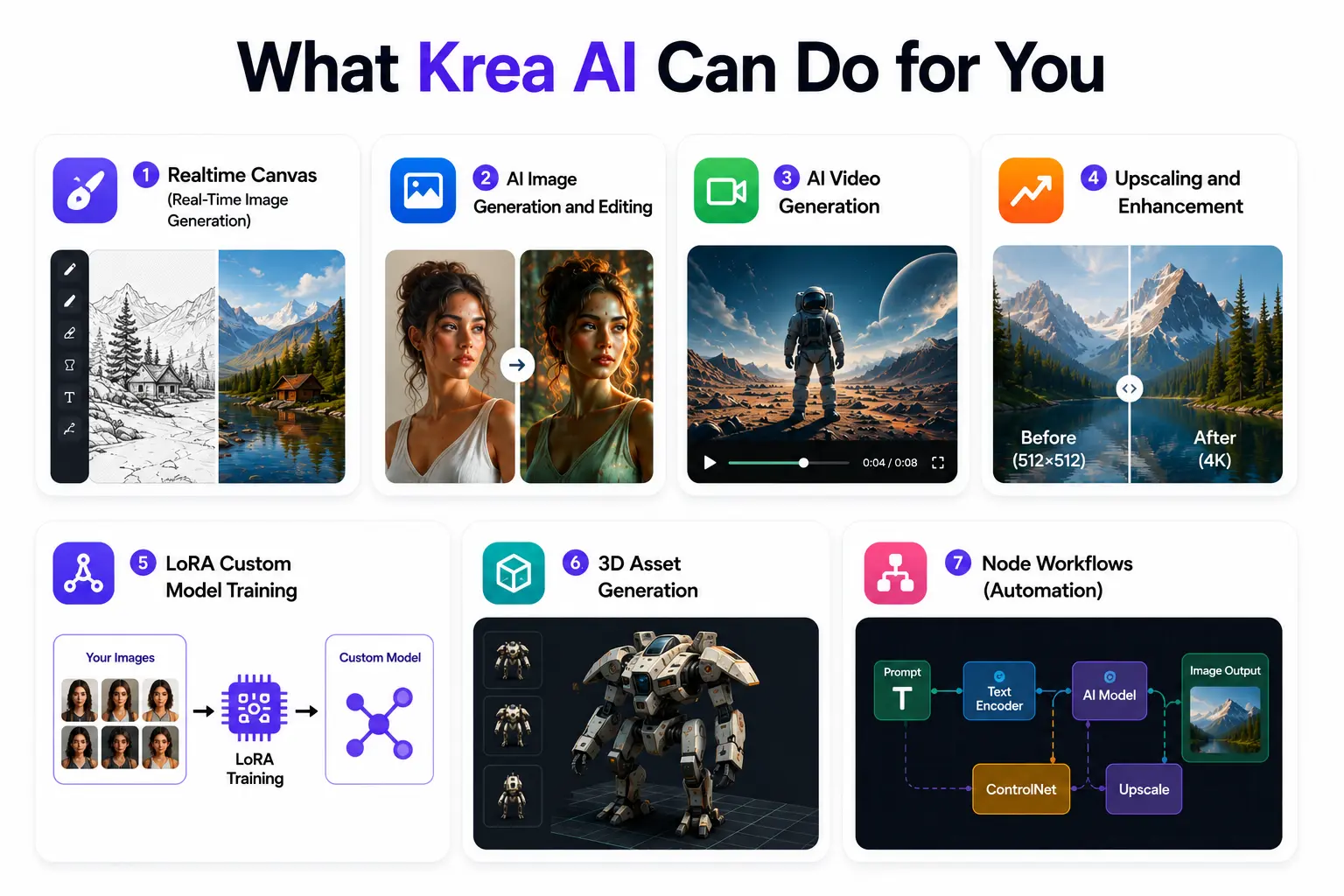
Here’s a closer look at the tools that make up the Krea AI experience, and how each one actually performs in practice.
Realtime Canvas (Real-Time Image Generation)
This is Krea’s signature feature, and it’s genuinely different from how most AI image tools work. Instead of typing a prompt and waiting for a result, you sketch rough shapes or type prompt words on one side of the canvas, and the AI renders a photorealistic image on the other side in well under a second. As of early 2026, a voice mode was added too, letting you speak instructions while you draw.
For concept artists, architects, and product designers who think visually and iterate quickly, this tight feedback loop is hard to beat it removes the usual “prompt, wait, repeat” cycle entirely.
AI Image Generation and Editing
Krea’s own image model, Krea 2, ships in two versions: a RAW model built for flexibility and fine-tuning, and a Turbo model optimized for fast, high-quality results. Alongside that, you can generate with popular third-party models like Flux, Nano Banana, and Qwen, all from the same prompt box.
Editing is where opinions get more mixed. Krea’s image editor handles simple instructions- color changes, background swaps -reliably. But more complex, multi-part edit requests (matching faces across several figures, repositioning multiple elements at once) tend to get only partially applied, and sometimes introduce new errors elsewhere in the image. If your edits are simple, you’ll likely be happy. If you need precise, multi-step edits, expect to redo a few attempts.
AI Video Generation
Krea pulls in most of the major video models in one place – Veo 3.1, Kling, Hailuo, Wan, and Runway – wrapped in an interface that’s noticeably simpler than most dedicated video tools. There’s no intimidating timeline or multi-step setup: you describe what you want, choose a model, and generate.
One standout feature is Motion Transfer, which lets you apply movement from a reference video clip onto a static image. It’s a great way to add believable motion to product shots or portraits without filming anything new. Worth noting: because Krea doesn’t own these video models, output quality is ultimately capped by whatever Veo, Kling, or Runway can deliver Krea controls the experience, not the underlying model performance.
Upscaling and Enhancement
Krea’s enhancer can upscale images up to 22K resolution on higher-tier plans, and video up to 8K with 120fps frame interpolation useful for turning old footage or low-res phone shots into something more usable. In testing, results were a mix: strong on detail recovery, but enhancement settings can sometimes drift the original composition or introduce a slight color shift, so a bit of trial and error is normal before you land on settings that work for your image.
LoRA Custom Model Training
On Pro plans and above, you can train a custom model on your own images – uploading a handful of photos of a face, product, or visual style and teaching Krea to reproduce it on demand. This is especially useful for brand asset generation, consistent character art for comics or webtoons, and product photography at scale. The Max plan supports fine-tuning with up to 2,000 images, which opens the door to more serious commercial use cases.
3D Asset Generation
Krea can generate 3D objects directly from text prompts, or convert a 2D image into a 3D mesh. It’s available starting on the Basic plan, making it accessible even for solo creators who want to dip into 3D without a separate, specialized tool.
Node Workflows (Automation)
For repeatable creative pipelines, Krea’s Node system lets you chain steps together – generate, edit, upscale – without writing code. A newer Node Agent feature can even build and refine these workflows for you based on a plain-language description, which is a meaningful time-saver if you’re producing the same type of asset over and over.
How to Use Krea AI: Step-by-Step
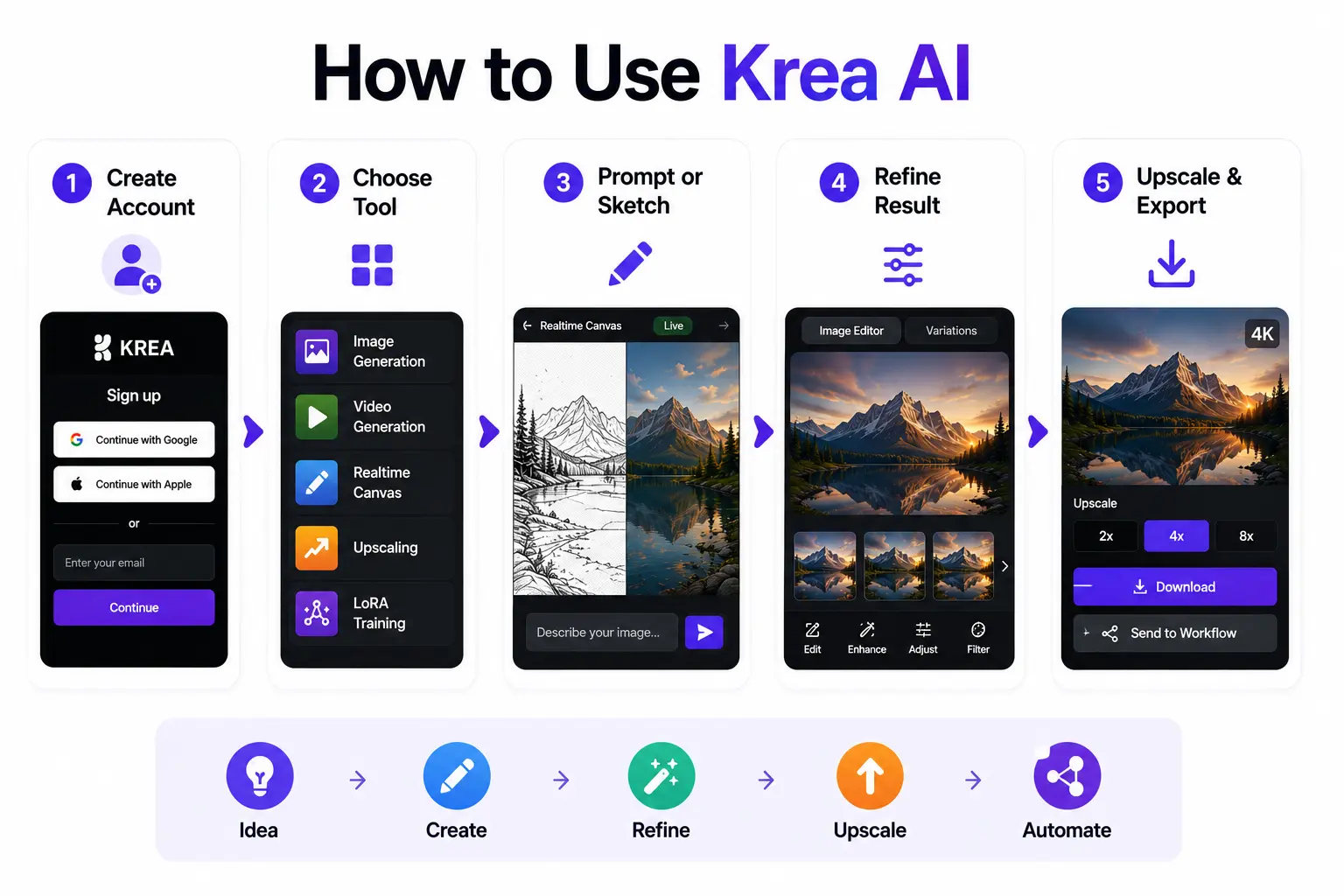
Getting started with Krea AI takes only a few minutes. Here’s the basic workflow:
- Create a free account at krea.ai no credit card required.
- Choose the tool that matches your goal: image generation, video generation, the Realtime Canvas, upscaling, or LoRA training.
- Type a prompt or start sketching. With the Realtime Canvas, the image updates as you draw or type.
- Refine your result using the Image Editor, or generate a few variations to compare.
- Upscale the final output if needed, then download it or send it straight into a Node workflow.
Krea AI Pricing Explained
Krea AI doesn’t use the simple “credits” system you’ll see on most AI tools. Instead, it runs on compute units — a currency that different actions draw from at different rates depending on the model and task complexity. A quick sketch-to-image generation might cost very little; a high-resolution video render will cost considerably more.
Here’s how the current plans break down:
| Plan | Price/mo | Compute Units | Best For |
| Free | $0 | 100/day | Testing the platform before committing |
| Basic | $9 | 5,000/mo | Freelancers and hobbyists who need commercial rights |
| Pro | $35 | 20,000/mo | Active creators who need video models and 8K upscaling |
| Max | $105 | 60,000/mo | Heavy daily use and commercial production |
| Business | $200 | 80,000/mo | Growing teams (up to 50 seats) |
| Enterprise | Custom | Custom | Large organizations needing SLAs and audit logs |
Annual billing saves roughly 20–40% across all paid plans.
Is Krea AI Free?
Yes – Krea AI offers a genuinely usable free tier with 100 compute units per day and no credit card required. That’s enough to explore the Realtime Canvas and basic image tools. The catch: the free plan doesn’t include a commercial license, so anything you generate is for personal or testing use only, and video, 3D, and lipsync tools are locked behind paid plans. If you need to use your outputs commercially, you’ll need at least the Basic plan.
Krea AI Pros and Cons
| Pros | Cons |
| Realtime Canvas delivers genuinely fast, fluid iteration | Compute unit costs for edits and enhancements aren’t shown upfront |
| Access to 60+ models (Flux, Veo 3, Kling, Runway, and more) in one place | Complex, multi-part image edits are often only partially applied |
| Easy to learn — no steep setup curve even for beginners | Enhancement results can be inconsistent depending on settings |
| Useful free tier with no credit card required | Free tier has no commercial license and limited tool access |
| LoRA training makes brand- or character-consistent output possible | Some users report slow or limited customer support response |
Is Krea AI Safe and Trustworthy?
Yes, Krea AI is a legitimate, well-funded company rather than a fly-by-night tool. It’s backed by recognized investors including a16z, Google Gradient, and Pebblebed, and serves a large, active global user base. Its privacy policy outlines standard practices around encryption and data handling, and business-tier accounts get explicit no-training clauses, meaning your proprietary uploads aren’t used to train Krea’s general models.
As with any cloud-based AI tool, it’s worth avoiding uploading highly sensitive personal data, and reviewing the privacy policy if you plan to use it for client or brand work. But from a legitimacy standpoint, there’s no indication Krea AI is unsafe to use.
Krea AI vs. Top Alternatives
No single AI creative tool wins on every front. Here’s how Krea AI stacks up against the platforms people compare it to most.
Krea AI vs. Midjourney
Midjourney is known for producing some of the most aesthetically refined, stylized images available, and it’s now accessible through both its website and Discord. It generally has a higher image-quality ceiling than Krea for editorial and artistic output. Krea, on the other hand, wins on range — bundling image, video, 3D, and upscaling tools in one subscription, and it offers a free tier, while Midjourney does not.
Krea AI vs. Leonardo AI
Leonardo AI is built around deep model customization and fine-tuning, with a strong community of shared assets – making it a favorite among game designers and concept artists. Choose Leonardo if fine-tuning depth for character and game art is your priority. Choose Krea if you want one platform that also covers video and 3D.
Krea AI vs. Freepik AI (Magnific)
Freepik, now expanded under the Magnific AI brand, combines a massive stock asset library with AI generation across 40+ models. It’s a strong pick for teams who need both stock content and generated visuals in one place. Krea doesn’t offer a stock library, but its Realtime Canvas and model variety give it an edge for from-scratch creative work.
Krea AI vs. Adobe Firefly
Adobe Firefly is tightly integrated into the Adobe ecosystem (Photoshop, Illustrator, Premiere), which makes it the more natural choice if your workflow already lives inside Creative Cloud. Krea is platform-agnostic and arguably faster to start with for creators who don’t already pay for Adobe tools.
Who Is Krea AI Best For?
Krea AI fits naturally into a few specific workflows:
- Concept artists and illustrators who want to iterate visually in real time instead of waiting on prompt queues
- Architects and product designers turning 3D renders into photorealistic visuals for client presentations
- Marketers and social content creators who need both image and video generation without separate subscriptions
- Indie brands and small teams who want LoRA-trained models for consistent product or character visuals
It’s less suited to e-commerce teams that need specialized virtual try-on or ghost-mannequin tools, or to anyone who needs guaranteed, predictable costs for every single edit — the compute unit system takes some getting used to.
FAQ
Is Krea AI free to use?
Yes. Krea AI’s free plan includes 100 compute units per day with no credit card required, though it doesn’t include a commercial license or access to video, 3D, and lipsync tools.
Is Krea AI safe and trustworthy?
Yes. Krea AI is backed by investors including a16z, Google Gradient, and Pebblebed, serves over 30 million users globally, and offers no-training data policies on business-tier accounts.
Is Krea AI better than Midjourney?
It depends on your priority. Krea AI wins on range, offering image, video, 3D, and upscaling in one subscription plus a free tier. Midjourney generally wins on raw image quality for stylized, artistic output.
What is the best alternative to Krea AI?
Midjourney is the top pick for image quality, Leonardo AI for deep model fine-tuning, and Adobe Firefly for teams already working inside Creative Cloud.
Does Krea AI offer a commercial license?
Yes, but only on paid plans. The Basic plan ($9/month) and above include a commercial license for generated content; the free tier does not.
How much does Krea AI cost per month?
Paid plans start at $9/month for Basic and scale up to $200/month for Business, with custom Enterprise pricing available. A free plan is also available with daily usage limits.
Conclusion
Krea AI earns its growing user base. The Realtime Canvas genuinely changes how fast you can move from idea to finished visual, and having 60+ image and video models under one subscription is a real convenience most competitors can’t match. The trade-offs are real too — editing precision and enhancement consistency don’t always match the speed, and compute costs aren’t always clear until after you’ve run a task.
For creators, designers, and marketers who value speed and variety over pixel-perfect editing control, Krea AI is one of the strongest all-in-one AI creative platforms available in 2026. If your work depends on precise, repeatable edits every time, it’s worth pairing Krea with a more specialized tool for that specific step.