If you’ve spent any time scrolling YouTube Shorts or TikTok lately, you’ve probably seen a wave of AI-animated kids’ stories, faith videos, and explainer clips. A good chunk of them were built with MagicLight AI, a text-to-video platform that promises something most AI video tools can’t: long, coherent videos with characters that actually look the same from scene to scene.
I spent time digging through MagicLight AI’s own documentation, its app store listings, independent reviews, and real user feedback on Trustpilot and Reddit to put together this honest, no-fluff breakdown. Whether you’re a YouTuber, a teacher, or a marketer trying to decide if this tool is worth your credits (literally), this guide covers everything: how it works, what it costs, where it shines, and where it falls short.
What Is MagicLight AI?
MagicLight AI is an AI-powered video generation platform built specifically for long-form, story-driven content. Instead of spitting out a random four-second clip like many text-to-video tools, <cite index=”1-1″>it turns ideas, scripts, or stories into finished videos up to 50 minutes long</cite>. That’s a big deal, because most competing tools cap out at a few seconds per generation.
The platform bundles several tools into one workflow: script generation, character design, scene creation, voiceovers, music, and export, all under one roof. <cite index=”1-1″>Rather than producing choppy motion or disconnected clips, it aims for smooth, multi-scene animations where characters move naturally and visuals stay consistent throughout the story</cite>.
Who Created MagicLight AI?
MagicLight AI is developed and operated by MAGICLIGHT(HK)LIMITED, a company based in Hong Kong, according to its listing on the Apple App Store. Like most fast-moving AI startups, it doesn’t publish a detailed corporate history, and there’s no dedicated Wikipedia page for the company at the time of writing worth keeping in mind if you’re trying to verify its long-term track record. Its public footprint is mostly through its website, app store listings, and social media.
Who Should Use It?
Based on how the product is positioned and what actual users report, MagicLight AI tends to work best for:
- Faceless YouTube channel operators who need a steady stream of narrated story content
- Independent authors and storytellers turning written work into visual form
- Educators who want to animate lessons without hiring an animation studio
- Small marketing teams producing explainer or promo videos on a budget
If you’re a professional animator or a studio with strict quality control needs, it’s worth tempering expectations more on that in the pros and cons section.
How MagicLight AI Works

Text-to-Video Workflow
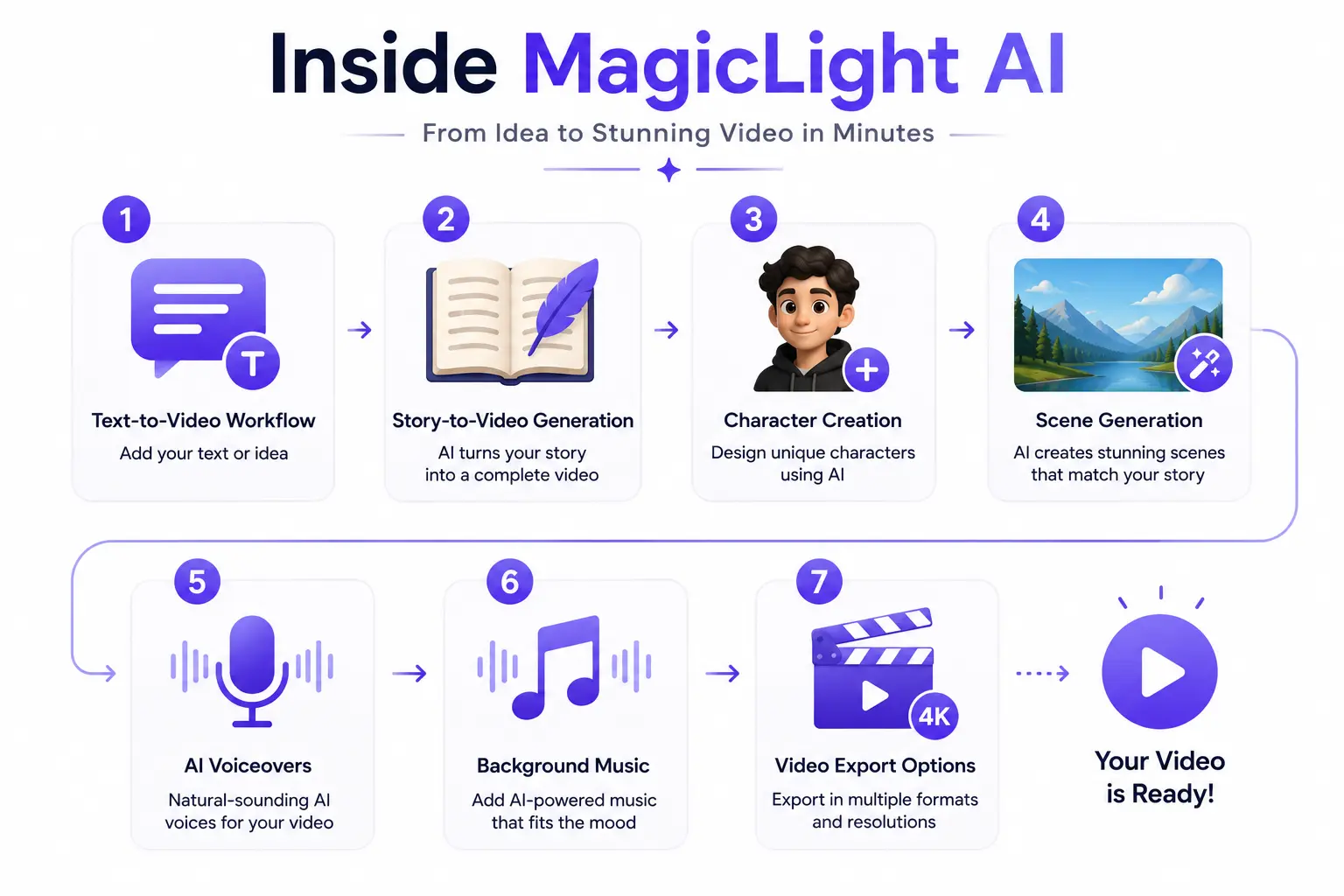
At its core, MagicLight AI follows a simple pipeline: you type a prompt, idea, or topic, the AI expands it into a structured narrative, and then it renders that narrative as a sequence of animated scenes. You don’t need any editing background — <cite index=”7-1″>if you can write a sentence, the platform is designed to handle the heavy lifting from there</cite>.
Story-to-Video Generation
This is where MagicLight tries to differentiate itself from typical clip generators. <cite index=”6-1″>You can feed it raw text, complex outlines, or multi-chapter material, and it will attempt to render full-motion, high-definition scenes automatically</cite>. Think of it less like a video generator and more like an automated storyboard-to-screen pipeline.
Character Creation
You can design a cast from scratch or upload reference photos to build a “character profile.” <cite index=”4-1″>The platform then tries to align voiceovers with lip movement and expressions</cite>, and lets you adjust details like hair, outfits, and accessories.
Scene Generation
Once your characters exist, MagicLight builds scenes around them using your prompt or script. <cite index=”1-1″>It automatically adjusts lighting, perspective, and style to try to create smoother, more cinematic transitions between segments</cite>.
AI Voiceovers
<cite index=”10-1″>The platform offers dozens of voice options, plus voice cloning, and supports around 11 languages</cite> so creators can localize content for international audiences without re-recording anything.
Background Music
You can pair generated visuals with mood-matched background tracks. <cite index=”1-1″>One of the tools even lets you turn a music track into a visual video that matches its mood and rhythm</cite>, which is handy for lyric videos or music-driven content.
Video Export Options
Export quality and length depend on your plan. Free users are typically limited to short clips, while <cite index=”4-1″>paid subscribers can generate long-form videos up to 30 or 50 minutes depending on the tier</cite>, with HD resolution and no watermark.
Key Features of MagicLight AI
This is the headline feature. <cite index=”5-1″>Most AI video tools max out around 60 seconds, but MagicLight is built specifically for creators who need more room to tell a complete story</cite>, stitching together many shorter generated clips into one continuous narrative.
Consistent Characters
<cite index=”1-1″>MagicLight’s AI is designed to understand character continuity across scenes, aiming to keep a protagonist’s look and personality consistent throughout an entire video</cite>. This is the single most-marketed feature and also, based on user reviews, the one that generates the most mixed results in practice (more on that in the “Common Problems” section).
AI Storyboarding
Before rendering, the platform can lay out a structured storyboard from your idea, so you can see the narrative arc before committing credits to full rendering.
Multiple Visual Styles
<cite index=”3-1″>Creators can choose from 20-plus visual styles inspired by popular aesthetics associated with tools like PixVerse, Sora, Luma, Viggle, and Hailuo</cite>, while MagicLight positions its own output as original rather than a direct clone of any one of them.
AI Script Assistance
You don’t need a finished script. <cite index=”5-1″>The AI can flesh out a story’s skeleton, aiming to keep the narrative paced appropriately for long-form video</cite>, even if you only start with a single sentence.
Image-to-Video
<cite index=”3-1″>You can generate visuals and animate them through image-to-video and photo-to-animation workflows</cite>, useful if you already have artwork or reference stills you want to bring to life.
Voice Cloning
Beyond stock voices, MagicLight lets creators clone a voice for use across a project, which is useful for maintaining a consistent narrator identity across a whole series.
Multilingual Support
With support for roughly a dozen languages, the platform is aimed at creators who want to publish the same story across multiple regional audiences without redoing the whole production.
Collaboration Features
Team-oriented plans reportedly include shared workspaces and account management, though these features are less documented publicly than the core generation tools treat this as an area to confirm directly with MagicLight before committing a team to it.
How to Create Your First Video with MagicLight AI
Step 1: Sign Up
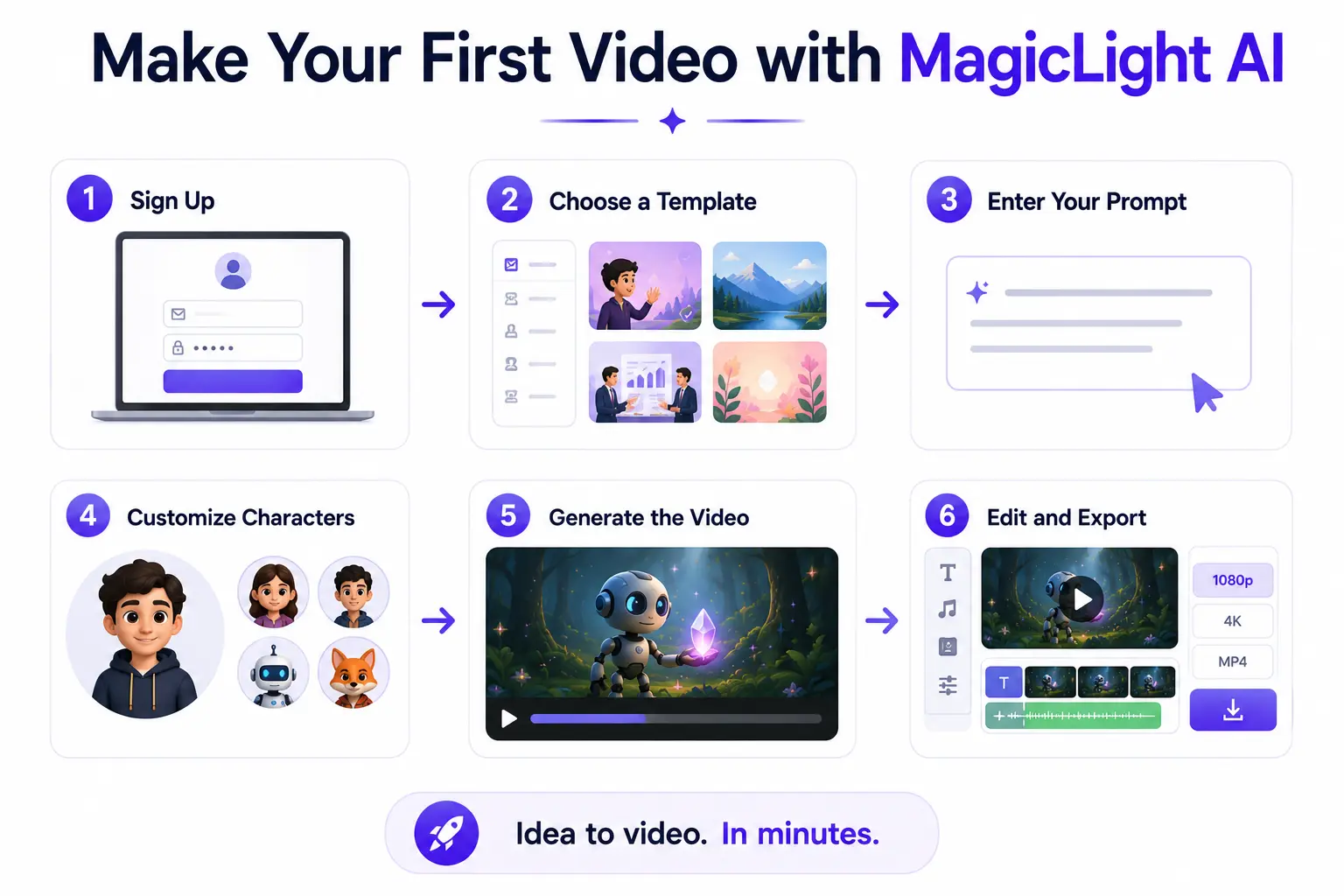
Head to the official site and create a free account. <cite index=”5-1″>No credit card is required to get started</cite>.
Step 2: Choose a Template
<cite index=”10-1″>Pick from story templates like kids’ stories, music, religious, or commentary formats</cite> to give your project a working structure instead of starting from a blank page.
Step 3: Enter Your Prompt
Type your idea, topic, or full script. <cite index=”10-1″>Specify the tone, audience, and core message you want the video to carry</cite> the more specific you are here, the fewer surprises you’ll get later.
Step 4: Customize Characters
<cite index=”10-1″>Adjust each character’s age, gender, accent, and voiceover tone so every character feels distinct</cite>, then lock in their appearance for the rest of the project.
Step 5: Generate the Video
Reviewing the AI-generated prompt or storyboard before committing MagicLight typically shows you what it plans to render first. Once approved, rendering begins, generally taking a few minutes per scene.
Step 6: Edit and Export
<cite index=”10-1″>Replay the finished video to check for awkward details, then download it or publish it directly to social platforms</cite>.
Best Prompting Tips for Better AI Videos
Writing Effective Prompts
Be specific about setting, mood, and action in every scene description. Vague prompts like “a boy walks in a forest” leave too much room for the AI to improvise instead, describe lighting, camera angle, and emotional tone.
Maintaining Character Consistency
Lock character details early (hairstyle, outfit, color palette) and reuse the exact same character profile across every scene rather than re-describing them each time. This reduces the drift that many users report.
Creating Better Story Flow
Break long stories into clearly labeled scenes with a beginning, middle, and end for each chapter, rather than dumping one giant paragraph into the prompt box. Structured input tends to produce a more structured output.
Improving Visual Quality
Stick to one visual style per project instead of switching styles mid-story, and use the storyboard preview step to catch off-model scenes before you spend credits rendering them in full.
MagicLight AI Pricing
Pricing information for MagicLight AI varies noticeably between sources, which is worth flagging upfront to always confirm current numbers on the official pricing page before subscribing, since AI tool pricing changes frequently.
Free Plan
<cite index=”9-1″>New users typically receive around 300 free credits upon signup</cite>, enough to test the core workflow and generate a short sample video with no credit card required.
Paid Plans
Reported entry-level pricing generally starts <cite index=”11-1″>around $8 to $12 per month for a Standard tier</cite>, scaling up through Plus and Pro tiers that <cite index=”18-1″>can run $26–$35 per month and unlock tens of thousands of monthly credits along with access to premium underlying models</cite>. Annual billing across most tiers tends to offer a meaningful discount over paying monthly.
Credit System Explained
MagicLight runs on a credit-based system rather than a flat per-video price. <cite index=”16-1″>Credits are consumed based on video length, complexity, and resolution</cite>, and <cite index=”16-1″>unused credits typically cannot be refunded once consumed, since server and computation costs are incurred immediately during processing</cite>. This matters a lot in practice; several reviewers note that regenerating a failed or off-model scene still costs credits, so mistakes get expensive fast.
Is It Worth the Cost?
For casual creators testing the waters, the free tier is a reasonable way to kick the tires. For serious, high-volume production, the math gets trickier: if a chunk of your generations need re-rendering due to consistency issues (a common complaint, discussed below), your effective cost per finished minute climbs quickly. Budget for some trial and error before you commit to an annual plan.
Pros and Cons
Advantages
- Genuinely built for long-form video, not just short clips
- All-in-one workflow: script, characters, voice, and music in one place
- Free tier lets you test before paying
- Large template library for niches like kids’ content, faith-based videos, and explainers
- Multilingual voice support for global audiences
Limitations
- Character consistency is inconsistent in practice, despite being the headline feature <cite index=”9-1″>multiple users report the “default character looks different in every scene” and changes clothing unexpectedly</cite>
- <cite index=”19-1″>Customer support responsiveness has drawn repeated complaints</cite>
- Credits can be consumed quickly, especially on failed or unsatisfactory generations
- <cite index=”3-1″>Some users report slow generation times, with renders stuck on a loading state for extended periods</cite>
- Output quality can vary significantly depending on prompt complexity and chosen style
Real Use Cases
1. YouTube Automation
Faceless channels use MagicLight to batch-produce narrated story content, historical retellings, mystery narrations, or fictional shorts without hiring a full production team.
2. Children’s Stories
<cite index=”6-1″>The platform includes dedicated Kids Story templates</cite>, aimed at parents, educators, and children’s content channels that want gentle, age-appropriate animation.
3. Educational Videos
<cite index=”8-1″>Static training manuals or classroom material can be transformed into animated lessons with characters that walk students through complex topics</cite>.
4. Marketing Videos
<cite index=”8-1″>Small teams use the all-in-one suite to convert text or images into branded spokesperson videos and explainer ads</cite> without hiring outside animators.
5. Social Media Content
Short, styled clips exported from longer projects work well for TikTok, Reels, and YouTube Shorts, particularly with the platform’s built-in caption and subtitle tools.
6. Business Presentations
Some teams use AI avatars and voice narration to turn static slide decks or scripts into more engaging internal or external presentation videos.
MagicLight AI Output Quality Review
Visual Quality
Output quality is genuinely style-dependent. Stylized, cartoon-like visuals tend to hold up better than attempts at photorealism, where inconsistencies are more noticeable.
Voice Quality
Voice narration and lip-sync are generally serviceable for narrated story content, though results can feel mechanical on longer or emotionally complex dialogue.
Animation Smoothness
MagicLight tends to perform best in short, contained scenes. Ambitious, multi-character action sequences are where most quality complaints originate.
Rendering Speed
<cite index=”7-1″>According to MagicLight’s own figures, a 5-minute video typically takes about 3 to 6 minutes to render, while a 30-minute video takes roughly 10 to 15 minutes</cite>. Independent user reports suggest actual times can run longer during peak demand.
Editing Flexibility
The built-in editor allows scene-level tweaks camera moves, lighting, pacing but it isn’t a substitute for a full non-linear editor like Premiere or DaVinci Resolve if you need frame-precise control.
MagicLight AI vs Other AI Video Generators
MagicLight AI vs Runway
Runway is geared more toward short, high-fidelity cinematic clips and professional VFX-style work, while MagicLight focuses on stitching together long narrative sequences. If you need one polished 10-second shot, Runway is the stronger pick; if you need a 20-minute story, MagicLight’s workflow is purpose-built for that.
MagicLight AI vs Pika
Pika leans into short, stylized clips and quick creative experimentation. MagicLight’s structured template and character-lock system make it more suited to repeatable, series-style content.
MagicLight AI vs Google Veo
Veo generally produces higher raw visual fidelity per clip, but it isn’t designed as an end-to-end story platform. MagicLight <cite index=”6-1″>integrates models like Veo alongside its own engine</cite> rather than competing purely on frame quality.
MagicLight AI vs OpenAI Sora
Sora is strong for cinematic realism in short bursts. MagicLight’s advantage is duration and the built-in story-structuring layer that Sora doesn’t provide out of the box.
MagicLight AI vs InVideo AI
InVideo leans more toward templated marketing and social videos built from stock and AI footage, while MagicLight is more animation- and character-driven. If your priority is fast-turnaround marketing content, InVideo may fit better; for narrative storytelling, MagicLight is the closer match.
MagicLight AI vs Kling AI
<cite index=”10-1″>MagicLight integrates several third-party models, including Kling, into its workflow</cite> rather than positioning itself purely as a competitor on raw model quality. Kling alone can produce impressive standalone clips, but lacks MagicLight’s story-assembly and character-locking layer.
Common Problems and Solutions
Poor Character Consistency
Problem: Characters shift appearance or outfits between scenes. Solution: Lock character profiles early, avoid changing prompts mid-project, and use the storyboard preview to catch drift before full rendering.
Slow Rendering
Problem: <cite index=”9-1″>Generations can get stuck on a loading state for extended periods, especially during high demand</cite>. Solution: Render during off-peak hours where possible, and keep individual scene lengths shorter to reduce per-render load.
Credit Consumption
Problem: <cite index=”18-1″>Regenerating a failed scene still costs credits, and high-quality models burn through them quickly</cite>. Solution: Use the storyboard/preview step before committing to full renders, and start with lower-resolution test runs before scaling up.
Prompt Errors
Problem: Overly broad or contradictory prompts produce muddled scenes. Solution: Break prompts into scene-by-scene instructions rather than one long paragraph.
Export Issues
Problem: <cite index=”4-1″>Some users report losing access to in-progress projects</cite> or hitting export limits tied to their plan. Solution: Export and back up finished scenes as you go rather than waiting until the entire project is complete.
Privacy, Licensing & Commercial Use
1. Copyright Ownership
<cite index=”5-1″>According to MagicLight’s own FAQ, paid plans include full commercial usage rights, meaning creators generally own the content they generate and can monetize it</cite>. That said, ownership of AI-generated content is a genuinely unsettled legal area worldwide, so it’s worth reading MagicLight’s current terms of service directly and, for high-stakes commercial projects, consulting a lawyer rather than relying solely on a platform’s marketing claims.
2. Commercial Licensing
<cite index=”16-1″>Commercial usage rights are bundled with paid plans and generally cover content for various commercial contexts</cite>, though specifics can vary by plan tier — always check the exact terms tied to your subscription.
3. Data Privacy
<cite index=”4-1″>Apple’s App Store listing notes that MagicLight may collect data linked to a user’s identity as well as data used for tracking across other apps and websites</cite>. If data privacy is a major concern, review the platform’s privacy policy in detail before uploading personal photos for character creation.
Content Policies
4. Like most AI generation platforms, MagicLight enforces content restrictions around explicit, violent, or infringing material expect uploads and prompts to be filtered accordingly.
Expert Tips for Getting Better Results
1. Prompt Engineering
Treat your prompt like a mini shot list: subject, action, setting, lighting, and camera framing, in that order, for each scene rather than one sprawling paragraph.
2. Planning
Outline your full story arc before touching the prompt box. Knowing your beginning, middle, and end in advance prevents wasted credits on scenes that don’t fit the final cut.
3. Storyboard Optimization
Always review the AI’s proposed storyboard or prompt breakdown before full rendering; it’s the cheapest checkpoint to catch a misinterpreted idea.
4. Post-Editing Workflow
Use MagicLight for the heavy lifting (script, characters, base animation), then bring the export into a dedicated editor if you need tighter pacing, sound mixing, or color correction.
Frequently Asked Questions
1. Is MagicLight AI free to use?
<cite index=”5-1″>Yes, you can create a sample video for free with no credit card required</cite>, though free accounts come with limited credits and shorter export lengths.
2. How long can MagicLight AI videos be?
<cite index=”5-1″>Depending on your plan, you can generate videos up to roughly 50 minutes long</cite>.
3. Does MagicLight AI keep characters consistent?
It’s designed to, using character-locking technology, but real-world results are mixed; some users report strong consistency, while others report noticeable drift, particularly in complex scenes.
4. Can I use MagicLight AI videos commercially?
<cite index=”5-1″>Paid plans generally include full commercial usage rights</cite>, but confirm the exact terms for your specific plan before monetizing content.
5. What models power MagicLight AI?
<cite index=”10-1″>The platform integrates a mix of proprietary and third-party models</cite>, rather than relying on a single engine for every generation type.
6. Is customer support reliable?
\Based on independent reviews on Trustpilot, support responsiveness is a recurring pain point factor in some self-troubleshooting time if you hit an issue.
Conclusion
MagicLight AI solves a real problem: most AI video tools cap out at a few seconds, and MagicLight is one of the few genuinely built around long-form, narrative-driven output. If you’re a solo creator or small team that needs a steady pipeline of story content without hiring an animation studio, it’s worth testing on the free tier.
That said, go in with realistic expectations. The character consistency feature of the platform’s biggest selling point doesn’t always hold up under real-world testing, and credit consumption on failed generations can eat into your budget fast. My honest take: start free, test with a short project in your actual niche, and only commit to a paid plan once you’ve confirmed the output quality matches what you need. For long-form AI storytelling specifically, MagicLight AI remains one of the more purpose-built options on the market just budget for some trial and error along the way.