If you have spent a lot of time looking at the status “Crawled – currently not indexed” in Google Search Console you already know how annoying it can be. Google came to your page, read every word and then just decided not to include it in the index. There is no error message. There is no reason. Just nothing.
I have dealt with this problem on client websites that range from small blogs to big ecommerce sites with 50,000 pages and the situation is usually the same: Google is not confused, it is not convinced. This guide explains why that happens, how to find out what is going on and what really helps fix it, not general advice but the steps that actually make a difference, in real life.
What Does “Crawled – Currently Not Indexed” Mean?
Definition
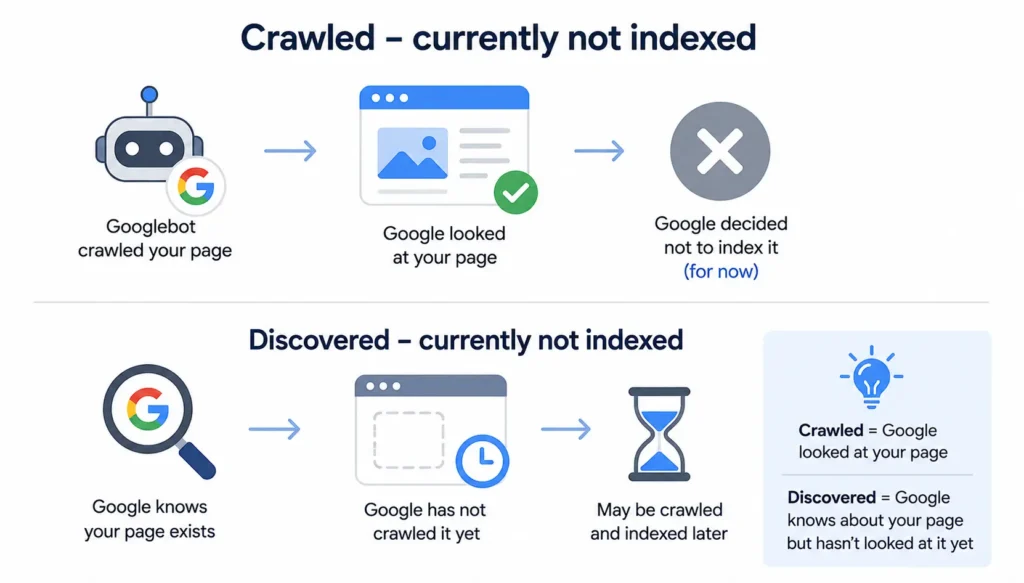
The message “Crawled – currently not indexed” shows up in the Page Indexing report on Google Search Console. This message means that Googlebot was able to get to your page. Google decided not to put it in the search index. At least not for now.
Google Search Consoles Page Indexing report has another message that’s similar it is “Discovered – currently not indexed”. This one is different because Google knows your page is there but it has not looked at it yet. In the case of “Crawled – currently not indexed” Google did look at your page. Google saw Google Search Consoles Page Indexing report for your page. Then it decided not to add it to the search index or it might add Google Search Consoles Page Indexing report, for your page later.
How Google Processes Pages
Think of Google’s system as a two-stage filter. Stage one is technical: can the page be reached and read? Stage two is a judgment call: is this page worth showing to searchers? A page can pass stage one perfectly and still fail stage two.
Google itself has confirmed that indexing is not guaranteed for every crawled URL it’s a selective process, not an automatic one, as explained in Google’s own <a href=”https://developers.google.com/search/docs/crawling-indexing/indexing” target=”_blank” rel=”noopener”>Search Central documentation</a>.
Is This an Error or a Normal Status?
It’s not a bug, and it’s rarely a technical error. It’s Google’s way of saying “not yet” or “not good enough.” Many site owners panic when they see it, but for a brand-new page it can simply mean Google needs more time or more signals before committing index space to it.
How Google’s Indexing Process Works
Understanding the pipeline helps you spot exactly where things break down for your pages.
1. URL Discovery
Google discovers URLs using links, sitemaps, external backlinks and RSS feeds. If a page has no links from, on your site it can take a long time to be found or might be found by chance.
2. Crawling
Googlebot requests the page and downloads the HTML (and often the rendered JavaScript). This step alone doesn’t guarantee indexing, it’s just data collection.
3. Rendering
For JavaScript-heavy sites, Google has to execute the code to see the final content, similar to what a browser does. This step runs on a separate queue and can lag behind crawling by hours or days.
4. Canonicalization
Google figures out which version of a page is the version when there are copies of the same page. This happens when the pages are a little different like when one has a slash at the end and the other does not or when one uses HTTP and the other uses HTTPS or when they have parameters and so on. If Google chooses a main version of the page, then the one you wanted the version of the page you like might not be included in the Google search results. Google decides this. It can affect your page, the Google page version that is.
5. Quality Evaluation
Google assesses whether the page offers unique value compared to what’s already indexed. This is where thin, templated, or unoriginal content usually gets filtered out.
6. Index Selection
Only pages that pass the quality bar get stored in the index and become eligible to rank. Everything else stays crawled but excluded.
Why Google Crawled Your Page but Didn’t Index It
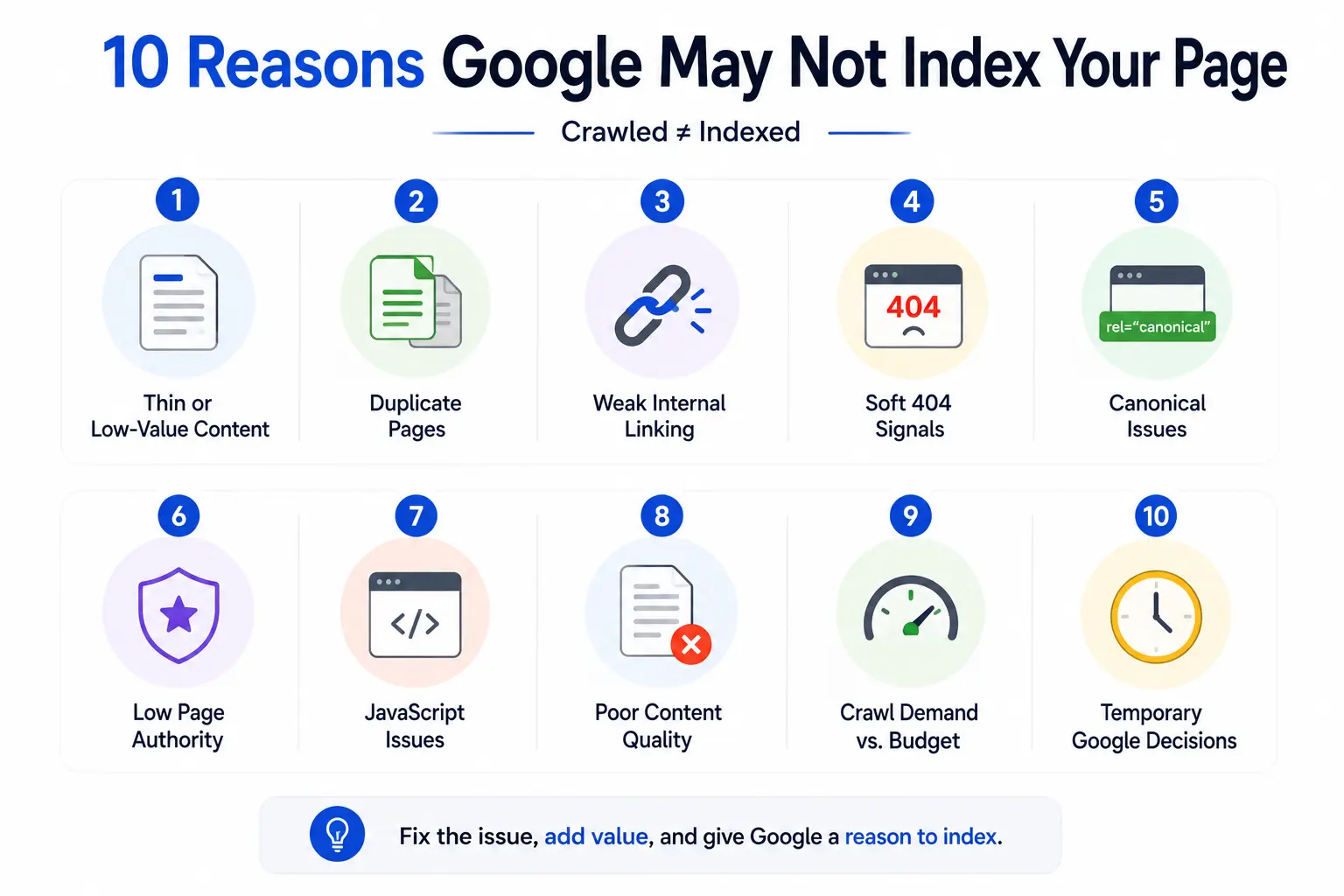
This is the core question, and in my experience it almost always comes down to one or more of the following.
1. Thin or Low-Value Content
Pages with very little unique text, or content that just restates what’s already well covered elsewhere, rarely make the cut. Google wants pages that add something to the web, not another copy of the same information.
2. Duplicate or Near-Duplicate Pages
If your page looks a lot like another page on your site or someone Site Google might think it is not worth adding to their list. This happens a lot, with online store category pages and blog posts that are copied from others. Google does this because your page does not have anything to offer so they will not add it to their search results. This is something that people who run stores and bloggers need to think about when they are making their pages. Your page and ecommerce category pages should be unique. Google will not want to index them.
3. Weak Internal Linking
Pages that are buried three or four clicks deep, with few or no internal links pointing to them, send a weak signal about their importance. Google tends to prioritize pages that your own site treats as important.
4. Soft 404 Signals
If a page looks empty, broken, or like a placeholder even if it technically returns a 200 status Google can treat it as a soft 404 and decline to index it.
5. Canonical Issues
A misconfigured rel=”canonical” tag pointing to a different URL tells Google not to index the current page at all. This is one of the most common self-inflicted causes.
6. Low Page Authority
New sites or pages with no backlinks and little topical authority often sit in “crawled, not indexed” limbo simply because Google hasn’t yet decided the site is trustworthy enough to expand its index.
7. JavaScript Rendering Problems
If critical content only appears after JavaScript execution, and rendering fails or times out, Google may only see a blank shell. Community discussions on <a href=”https://www.reddit.com/r/SEO/” target=”_blank” rel=”noopener”>r/SEO on Reddit</a> are full of real examples where this exact issue caused mass indexing drops on JS-heavy frameworks.
8. Poor Content Quality
Beyond thinness, quality also covers grammar, structure, factual accuracy, and whether the page actually answers the query it targets. Google’s helpful content guidance is explicit about rewarding content created for people first.
9. Crawl Demand vs. Crawl Budget
Large sites compete for a limited crawl and indexing budget. Google allocates more resources to sites it deems important, so lower-priority pages on huge sites can get skipped even if they’re decent quality.
10. Temporary Google Decisions
Sometimes it really is just timing. New pages, recently updated pages, or pages published during a slow crawl period can sit unindexed for days or weeks before Google circles back.
How to Diagnose the Problem
Before fixing anything, figure out which of the causes above applies to your page.
1. Google Search Console
Start in the Page Indexing report under Indexing > Pages. Filter by “Crawled – currently not indexed” to see the full list of affected URLs.
2. URL Inspection Tool
Run the specific URL through the URL Inspection tool. It shows the last crawl date, the discovered canonical, and whether mobile usability issues exist.
3. Site Search
Use a site:yourdomain.com “exact phrase” search to confirm whether the page is genuinely absent from the index, or just ranking poorly.
4. Server Logs
Log file analysis shows you exactly how often Googlebot visits a page and what it does there. This is the most reliable way to separate a crawl-frequency problem from a quality problem.
5. Crawl Analysis
Tools like Screaming Frog can crawl your site the way Googlebot does, flagging orphan pages, broken canonicals, and thin content at scale.
6. Index Coverage Reports
Look at trends over time, not just a single snapshot. A sudden spike in “crawled, not indexed” URLs often points to a site-wide issue like a template change or a canonical bug, rather than individual page problems.
How to Fix Crawled – Currently Not Indexed
Once you know the cause, here’s what actually works.
1. Improve Content Quality
Rewrite thin sections, add depth, and make sure the page fully answers the search intent it’s targeting. Aim for content that could stand on its own as a genuinely useful resource.
2. Add Original Information
Include data, examples, screenshots, or opinions that competitors don’t have. Original insight is one of the strongest signals for getting a page over the indexing threshold.
3. Strengthen Internal Linking
Link to the page from relevant, already-indexed pages, and place it closer to your site’s main navigation or hub pages. Internal links are still one of the most underrated indexing levers.
4. Optimize Technical SEO
Check page speed, mobile usability, and crawlability using robots.txt and meta robots tags. A slow or partially blocked page is easy to overlook but easy to fix.
5. Fix Canonicals
Make sure the canonical tag points to itself (or to the correct preferred URL) and that it’s consistent across the sitemap, internal links, and the page’s HTML head.
6. Improve Structured Data
Valid schema markup won’t force indexing on its own, but it helps Google understand the page’s purpose and content type more precisely.
7. Update XML Sitemap
Keep your sitemap current, remove dead URLs, and resubmit it in Search Console after major content updates.
8. Request Indexing
Use the “Request Indexing” button in the URL Inspection tool after making meaningful improvements. This nudges Google to recrawl sooner, though it’s not a guarantee.
9. Build Authority Signals
Earn backlinks, get mentions on relevant industry sites, and build topical authority through a cluster of related content. Sites discussed positively on platforms like <a href=”https://www.linkedin.com/” target=”_blank” rel=”noopener”>LinkedIn</a> or cited in niche communities tend to earn Google’s trust faster.
When You Should Not Try to Index a Page
Not every “crawled, not indexed” page needs to be fixed. Some shouldn’t be indexed at all.
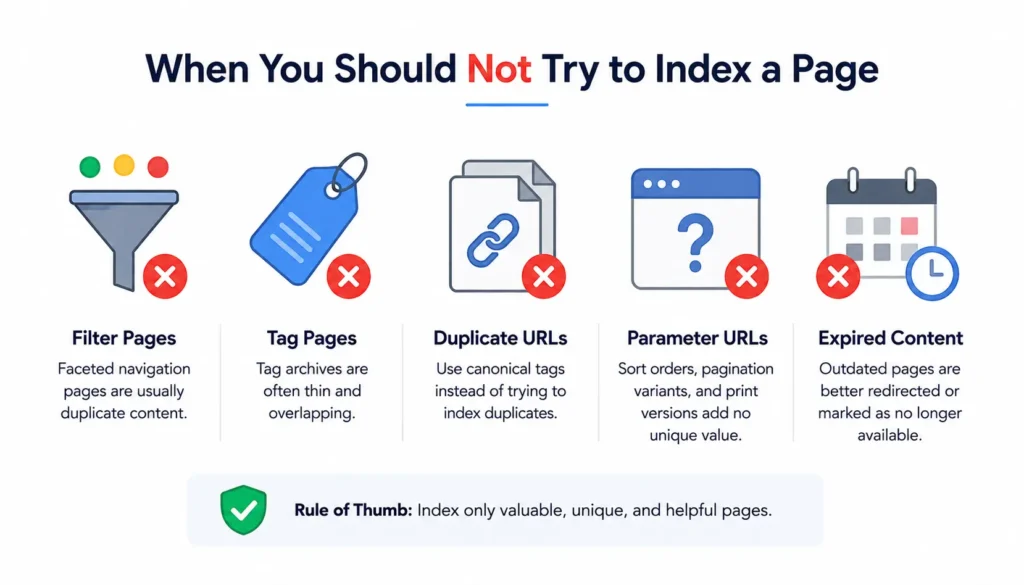
Filter Pages
Faceted navigation URLs (color, size, price filters) usually create near-duplicate content and are better left out of the index with noindex or blocked via parameters.
Tag Pages
Blog tag archives with thin, overlapping content rarely deserve their own index entry. Consolidate or noindex them instead.
Duplicate URLs
If a page exists only because of tracking parameters or session IDs, canonicalize it rather than trying to force indexing.
Parameter URLs
Sort orders, pagination variants, and print-friendly versions typically add no unique value and should be handled with canonical tags, not indexing requests.
Expired Content
Old promotions, outdated event pages, or discontinued products are often better retired with a proper redirect or a clear “no longer available” status than kept in indexing limbo.
Advanced Fixes for Large Websites
Bigger sites face this issue at scale, and the fixes need to scale too.
1. Ecommerce Sites
Focus on differentiating product descriptions instead of relying on manufacturer copy, and prioritize internal linking from category pages to your best sellers.
2. SaaS Websites
Feature pages and comparison pages often overlap heavily. Consolidate near-duplicates and make sure each page targets a genuinely distinct query.
3. News Websites
Freshness and internal linking from the homepage matter enormously. Make sure new articles are linked prominently within minutes of publishing, not hours.
4. Programmatic SEO
Auto-generated pages (location pages, “best X for Y” templates) are the most common victims of this status. Add unique, page-specific data points rather than swapping a single variable into a template.
5. Enterprise SEO
At enterprise scale, log file analysis and crawl budget management become essential. Work with development teams to prioritize crawl paths toward your highest-value URLs.
Does AI-Generated Content Affect Indexing?
This question comes up constantly, so it deserves a direct answer.
Google’s Position
Google has repeatedly stated that it doesn’t penalize content simply because it was produced with AI assistance. What matters is whether the content is helpful, original, and demonstrates real expertise; the production method is secondary.
Helpful Content Signals
Google’s guidance rewards content built for people first: accurate, well-organized, and genuinely useful. Content that reads as generic, repetitive, or unedited AI output tends to underperform regardless of how it was created.
Best Practices for AI-Assisted Content
If you use AI tools in your workflow, always edit for accuracy, add first-hand examples or data, and fact-check claims before publishing. Treat AI as a drafting assistant, not the final author.
Common Myths About Crawled – Currently Not Indexed
Myth vs. Reality
A lot of bad advice circulates around this status. Here’s a quick reality check on the most common ones:
- Myth: “Requesting indexing repeatedly will force Google to index the page.” Reality: Repeated requests don’t override a quality decision; they can even slow down crawling of other pages.
- Myth: “This status means my site is penalized.” Reality: It’s a page-level decision, not a site-wide penalty.
- Myth: “More sitemaps will fix it.” Reality: Sitemaps help discovery, not quality evaluation.
- Myth: “It will resolve itself if I wait long enough.” Reality: Sometimes true for new pages, but usually the underlying issue needs to be fixed.
Tools to Troubleshoot Indexing Issues
Google Search Console
The primary source of truth for indexing status, crawl stats, and canonical decisions free and directly from Google.
Screaming Frog
A desktop crawler that mimics Googlebot, useful for finding thin content, broken canonicals, and orphan pages at scale.
Sitebulb
Offers visual crawl maps and prioritized issue reports, which make it easier to explain problems to non-technical stakeholders.
Ahrefs
Strong for backlink and authority analysis, helping you understand whether low authority is contributing to indexing delays.
Semrush
Useful for site audits and tracking indexing trends alongside keyword and traffic data over time.
Real Case Studies
1. Blog Recovery
A niche blog had 40% of its posts stuck in “crawled, not indexed.” After consolidating thin posts, rewriting intros, and adding internal links from top-performing pages, most URLs were indexed within three to five weeks.
2. Ecommerce Recovery
An online retailer with duplicate product descriptions across variants fixed canonicals and rewrote descriptions for its top 500 SKUs, recovering indexing on roughly 70% of previously excluded product pages.
3. Large Website Recovery
An enterprise site with programmatic location pages added unique local data points (pricing, availability, testimonials) to each template, which lifted indexing rates from under 30% to over 65% across the affected page set.
Preventing Future Indexing Problems
1. Content Quality Standards
Set a minimum bar for depth and originality before anything gets published, especially for templated or programmatic content.
2. Internal Linking Strategy
Build a deliberate linking structure so new and important pages are never more than two or three clicks from your homepage.
3. Technical SEO Audits
Run crawl audits regularly, not just when problems appear. Catching canonical or rendering issues early prevents mass indexing drops.
4. Monitoring Index Coverage
Check the Page Indexing report monthly and watch for trend changes, not just current totals. Early detection makes fixes far cheaper than after-the-fact recovery.
Frequently Asked Questions
1. How long does “Crawled – currently not indexed” usually last?
\It varies widely anywhere from a few days for a strong new page to several months for weak or duplicate content that never gets fixed.
2. Does requesting indexing in Search Console actually help?
It can speed up a recrawl, but it won’t override a quality-based decision. Fix the underlying issue first.
3. Can this status hurt my whole site’s rankings?
Not directly. It’s a page-level status, though a high volume of unindexed pages can signal broader quality issues to Google over time.
4. Is thin content the most common cause?
In most audits I’ve run, yes thin or duplicate content is the single biggest driver of this status.
5. Should I delete pages that never get indexed?
If they add no unique value and can’t realistically be improved, redirecting or removing them is often better than leaving them in limbo.
Conclusion
“Crawled – currently not indexed” isn’t a punishment, it’s Google telling you a page hasn’t yet earned its place in the index. The fix is rarely a technical trick; it’s almost always about content quality, internal linking, and giving Google a clear reason to trust the page.
Work through the diagnosis steps above, fix what’s actually broken, and be patient with genuinely new content. Most sites that treat this status as a signal to improve rather than a bug to hack around see their pages move into the index within weeks, not months.