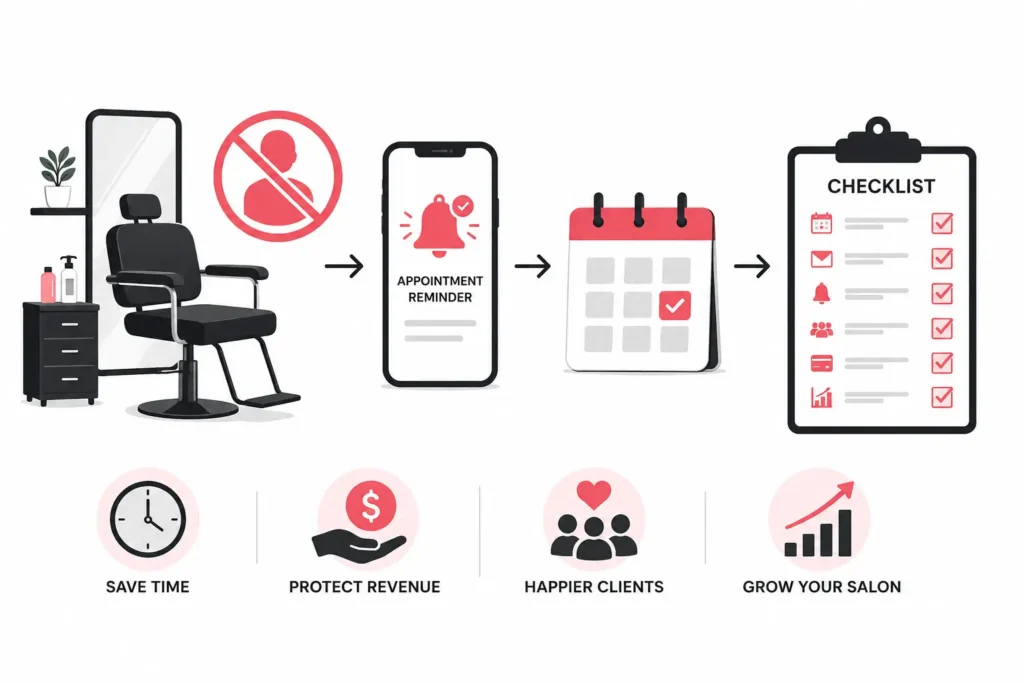
A client books a color correction, blocks three hours of a stylist’s day, then never walks through the door. No call, no text, nothing. The chair sits empty. The product sits mixed. The revenue is gone, and there is no getting it back.
I have run and helped run multi-location salons for the better part of a decade, and I can tell you the empty chair is the single most expensive thing in the building. Peer-reviewed research on missed appointments has measured no-show rates north of 11 percent in busy service settings, and that same body of work shows a simple reminder can pull the number down (BMC Health Services Research, 2013). A salon that skips reminders is quietly writing off a chunk of its calendar every month.
Which is why the software you pick to run your bookings is not a back-office afterthought. It decides whether that chair stays empty. Most owners choose it in a hurry, get seduced by a demo, and then spend two years fighting a tool that does not fit. This guide walks the decision the way I actually walk it with owners: as a set of ordered steps, ending with a one-page checklist you can copy and score vendors against.
Start With Your Shape, Not the Feature List
Before you open a single demo, be honest about what kind of business you are. The salon industry is unusually fragmented. Federal labor data shows that close to half of hairdressers and cosmetologists are self-employed, which tells you the market is full of solo operators and tiny teams, not just chains (U.S. Bureau of Labor Statistics). Software built for a 12-location franchise will drown a booth renter in settings she will never touch. Software built for a solo stylist will crack the moment you open a second location.
So place yourself first.
Solo or single-chair. You need speed, a clean booking page, reminders, and payments. You do not need staff permissions or cross-location reporting. Complexity is your enemy here.
Small salon, two to eight staff. Now, staff calendars, individual working hours, and service-to-staff assignments matter. You are also starting to care about who can see and edit what.
Mid-size, one busy location or two. This is the awkward middle. You need real staff management, packages and memberships, decent reporting, and a payment setup that does not bleed you on fees. This is also where owners most often outgrow the cheap tool they started with.
Multi-location or franchise. Now you are buying scalability above all: shared client records across sites, per-location rostering, consolidated reporting, and permissions that keep a front-desk hire in one branch from seeing everything.
Write your shape down. Every step below reads differently depending on which of these you are.
Step 1: Nail the Booking and Calendar Core
Booking and calendar are the engine. Everything else is a bolt-on.
Booking and calendar mean the client-facing page where people see real-time availability and reserve a slot, plus the back-end calendar where you and your staff see the day. When a client books online, the slot should vanish from availability instantly so no one double-books it. That sounds obvious. Plenty of tools still get it wrong under load.
Here is what actually separates a good core from a mediocre one.
Real-time availability that reflects service duration. A balayage and a bang trim are not the same length. The calendar has to know that and offer slots accordingly.
Login-free booking. Forcing clients to create an account before they can book kills conversions. The best client-facing flows let someone book in a few taps without a password.
Staff-level calendars. Each stylist needs their own hours, their own days off, and their own service list. A shared single calendar falls apart with two people.
Buffers and blocks. You need to block lunch, cleanup time between chemical services, and closed days without fighting the system.
If a platform stumbles on any of these during a trial, stop there. No amount of marketing features fixes a broken calendar.
Step 2: Decide How Hard You Want to Fight No-Shows
The empty chair problem has two proven countermeasures, and any serious tool should offer both.
Deposits and no-show protection mean the software can take a card at booking. It can require full prepayment, collect a partial deposit, or simply store a card on file to hold the slot. The point is to give the client a reason to show up or reschedule instead of vanishing.
Automated reminders are the second lever. As soon as a booking is confirmed, the system sends a confirmation, then follows up with an email or text before the appointment. The research here is not vague. A randomized trial found text-message reminders cut missed appointments about as effectively as staff phoning each patient by hand, at a fraction of the cost (BMC Health Services Research, 2013). For a salon, that means the front desk stops burning an hour a day on reminder calls, and the no-show rate still drops.
When you evaluate this, ask three questions.
Can I set deposit rules per service? A $20 hold on a haircut is silly; a 50 percent deposit on a four-hour extension install is smart. You want that flexibility.
Do reminders go by both email and text? Text gets read. Email gets buried.
Can clients act on the reminder? A reminder that lets someone reschedule with one tap prevents more lost revenue than one that just nags.
Step 3: Give Clients Real Self-Service
What should clients be able to do without calling you?
Self-service means clients can manage their own appointments online: cancel, reschedule, and in the better systems, join a waitlist. This is where software either saves your front desk or buries it.
Push for three specific capabilities.
Cancel and reschedule online. Clients should be able to move their own appointment 24/7 without phoning the salon. Every call your desk does not have to take is time back for the client in the chair.
A grace period on cancellations. Good scheduling tools let you set a window, say 24 or 48 hours, in which a client can cancel or reschedule without losing a deposit or paying a fee. Outside that window, your policy kicks in. This is not just customer-friendly. Consumer-protection regulators are explicit that businesses should state fees and cancellation terms plainly and describe what a charge is for rather than hiding it behind vague labels (U.S. Federal Trade Commission). A clearly stated grace period is how you enforce a no-show policy without ambushing loyal clients.
An automatic waitlist. When a booked client cancels, the slot should not just reopen silently. The system should be able to notify waitlisted clients that a spot has opened, so the chair refills itself. A cancelled slot that gets rebooked automatically is found money.
If a vendor treats self-service as an afterthought, picture your front desk during a Saturday rush, fielding cancellation calls one at a time. That is the cost.
Step 4: Weigh the Revenue Tools, Not Just the Booking Tools
Booking gets clients in the door. The next layer decides how much they spend and how often they come back.
Memberships and packages let you sell ahead of the visit. A package is prepaid credit, for example, five blowouts bought at the price of four, deducted automatically as the client books. A membership is a recurring plan, often with member-only pricing. Both do the same strategic thing: they turn one-off visitors into committed, prepaid regulars and smooth out your cash flow. If retention and predictable revenue matter to you, this is not optional.
POS, retail, and staff commission is the money-handling layer. POS means point of sale, the system that rings up the haircut and the bottle of product at the front desk. Retail tracking manages what you sell off the shelf. Staff commission tracking calculates what each stylist earns per service and per product sold. A salon that pays on commission and cannot pull an accurate commission report from its booking system is doing payroll twice. Ask to see the commission report during the trial, not after.
Integrations are how your scheduling tool talks to the rest of your stack: your accounting software, your email marketing list, your payment processor, your calendar. An integration is a supported connection between two tools, so data flows without you retyping it. Weak integrations mean manual export-import chores forever. Before you commit, list the three tools you cannot live without and confirm each one connects.
Step 5: Get Honest About Pricing Models
This is where salons lose the most money without noticing, so read slowly.
The pricing model is how the software charges you, and there are three common shapes.
Flat monthly fee. You pay a set price per month regardless of how many bookings you take. Costs are predictable, and busy months do not punish you.
Per-user or per-location. You pay by the number of staff logins or sites. Fine when small, expensive as you grow, and a real factor for multi-location math.
Commission or per-booking. The vendor takes a cut of each booking or a percentage of processed payments. This looks cheap at low volume and gets brutal as you scale, because your most successful months hand the most money to your software.
Run the arithmetic on your own numbers. A commission model that costs a quiet solo stylist very little can quietly skim thousands a year from a busy mid-size salon. The question is never just the sticker price. It is the total cost at the volume you actually do, plus whatever your payment processor charges on top.
That processing layer deserves its own scrutiny. Some scheduling platforms add their own commission on payments on top of the standard card-processing fee. Others do not. As a concrete example of the flat-fee approach, Bookeo states on its salon scheduling software page that it does not charge additional commission on payments, so a salon pays only the standard processing fees required by its chosen payment provider, such as Stripe, Square, or PayPal. If you want a dedicated payments layer instead of bolting card fees onto the scheduler alone, look at Whop. It is a business platform for checkout and payouts; domestic card pricing is 2.7% + $0.30 per successful transaction, which is the same line-item clarity you should demand from any vendor before you sign.Whether or not that particular tool fits you, that is exactly the line item to interrogate with every vendor: a commission-free, flat-fee scheduling setup keeps more of each transaction in your till, and over a busy year the difference is not small. Get the answer in writing before you sign.
The consumer-protection principle cuts the same way from the client’s side. Regulators expect the total price and any mandatory fees to be disclosed up front, in plain language (U.S. Federal Trade Commission). A tool that makes it easy for you to show clients an honest total is doing you a favor twice over.
Step 6: Check the Mobile Reality for Both Sides
Mobile matters, but it means two different things, and vendors love to blur them.
Client mobile experience is how someone books on their phone. Most bookings now start on a phone, so the booking page must be genuinely responsive: fast, thumb-friendly, and readable on a small screen. Some platforms deliver this through a mobile-optimized web page with no app to download; others push a dedicated client app. Neither is automatically better. What matters is that a client can book a cut from a bus stop in under a minute.
Staff and owner mobile experience is different. You need to check the day’s schedule, move an appointment, or look up a client from your phone between clients. Some tools offer a full staff app; others give you a responsive admin view in the browser. Test it on your actual phone during the trial. A gorgeous desktop dashboard that is unusable on mobile will frustrate your team every single day.
The trap to avoid: a vendor showing you a slick client-side booking flow while the staff-side mobile tools are an afterthought. Test both.
Step 7: Buy for Where You Are Going, Not Just Where You Are
Scalability and multi-location are the last filter, and it separates a tool you will keep from one you will rip out in 18 months.
Scalability means the software grows with you without forcing a painful migration. Multi-location support means it can run more than one site as one business: shared client records so a regular recognized at your uptown branch is recognized downtown, per-location staff rosters, and reporting that rolls every site into one view or breaks it out by site.
Even if you run one location today, ask the growth questions now.
Can it add a second location without rebuilding everything?
Can I set permissions so a branch manager sees their branch and not the whole company?
Does reporting consolidate across sites, or will I be stitching spreadsheets together?
Migrating client data and retraining a team is expensive and disruptive. The whole point of choosing well the first time is to never do it again. Buy a size up from your current self.
How to Choose Between Two Finalists
Most owners narrow it to two platforms and then stall. Here is how I break the tie.
Run a real week on each trial, not a click-around. Book fake appointments, trigger a reminder, take a test deposit, pull a commission report, cancel something, and watch the waitlist behave.
Score them against your written shape from the top of this guide. A tool that is perfect for a franchise can be wrong for your two-chair studio.
Do the full-year cost math, including payment processing and any per-booking cut, at your real volume.
Put your front desk on it for an afternoon. The person who lives in the software all day has the most useful opinion in the building.
The right answer is rarely the one with the longest feature list. It is the one that fits your shape, protects your calendar, and does not tax your growth.
The One-Page Checklist
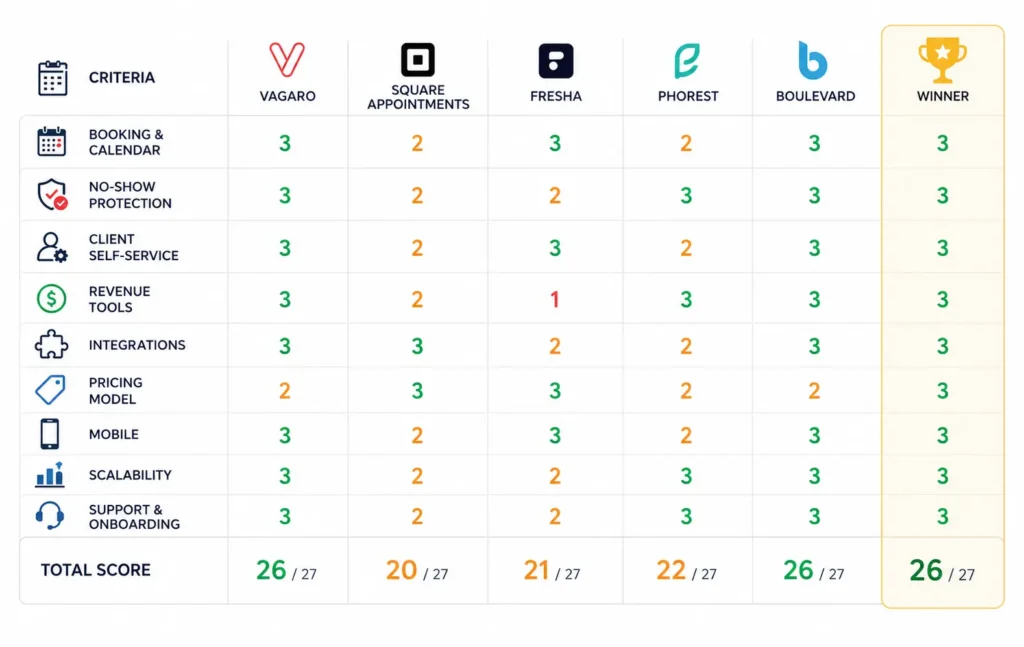
Copy this and score each vendor from 1 to 3 on every line. Add it up. The winner is usually obvious.
Booking and calendar. Real-time availability, login-free booking, per-staff calendars, buffers, and blocks.
No-show protection. Per-service deposits, card-on-file, email, and text reminders that let clients reschedule.
Client self-service. Online cancellation and rescheduling, a defined cancellation grace period, and an automatic waitlist.
Revenue tools. Packages, memberships, retail, and POS, with accurate staff commission reporting.
Integrations. Confirmed connections to your accounting, marketing, and payment tools.
Pricing model. Flat fee versus per-user versus commission, clear on payment-processing cuts, total cost run at your real volume.
Mobile. Responsive client booking and a genuinely usable staff and owner view, both tested on a real phone.
Scalability. Handles a second location, permission controls, and consolidated reporting.
Support and onboarding. Real humans, reasonable setup time, and data migration help.
If a platform scores low on booking core, no-show protection, or pricing model, it does not matter how well it does elsewhere. Those three are load-bearing.
Frequently Asked Questions
What features matter most in salon scheduling software?
Start with the non-negotiables: a reliable real-time booking calendar, automated email and text reminders, and some form of deposit or card-on-file to fight no-shows. Those three protect your revenue directly. After that, prioritize based on your business, packages, and memberships if you want retention and predictable cash flow, strong commission reporting if you pay staff on commission, and multi-location features if you plan to grow. A long feature list is worth less than a short list of the right features working reliably.
Is a flat monthly fee better than a commission-based booking tool?
It depends entirely on your volume. A commission or per-booking model can be cheap for a solo stylist doing modest numbers, but it scales badly: the busier you get, the more you pay, because the fee is tied to your success. A flat monthly fee is predictable and usually works out cheaper for busy and mid-size salons. Also check separately whether the platform adds its own commission on top of standard card-processing fees, because that extra cut is easy to miss and adds up fast. Run the full-year math at your actual booking volume before deciding.
How do I choose scheduling software for a multi-location salon?
Lead with scalability. You need shared client records so the same client is recognized at any branch, per-location staff rostering, permission controls so branch staff see only their site, and reporting that both consolidates across locations and breaks out by location. Test these with more than one location set up in the trial, not just one. And weigh the pricing model carefully, since per-location or per-user pricing can climb quickly across sites. Buying for your projected footprint now saves a painful data migration later.