
A search can feel temporary. A user enters a query, scans several results then closes the browser. Behind that simple action, a search engine receives technical and behavioral signals needed to process the request. Those signals can include an IP address, device details, language settings, search terms and interactions with results. Search engines know more when repeated activity forms a recognizable pattern. Privacy therefore depends on far more than clearing browser history.
Clearnym highlights a useful privacy lesson. Personal information removed from one database can return after public or commercial sources refresh their records. That makes data scrubbing an ongoing privacy practice rather than a single cleanup task. A website profile may disappear from one source while copies remain elsewhere. That gap matters when old information appears during a job search, housing review, security check or simple name lookup.
What a Search Engine Can Collect
A search engine processes information each time a user sends a request. The exact data collection depends on the service, device settings, browser configuration and account status.
Common signals include an IP address, browser type, device category, language preference, search history and query text. Cookies can connect several visits within the same browser session. A click on a search result adds another clue about interests. Repeated searches can create a broader picture of habits.
The individual pieces often look harmless. Their value changes when systems combine them.
| Signal | What it can reveal | Privacy response |
| Search terms | interests and current concerns | limit saved history |
| IP address | rough location | use privacy tools |
| Cookies | repeat visits and sessions | review browser storage |
| Click activity | content preferences | reduce tracking |
| Device data | technical profile | restrict unnecessary permissions |
A search company does not need a complete biography to infer useful patterns. A sequence of travel queries can suggest an upcoming trip. Repeated finance searches can reveal interest in loans or investments. Health related research can expose sensitive concerns even when a user never enters a real name.
How Search History Becomes a Personal Profile
One query reveals little. Fifty related searches can reveal much more.
Imagine a user researching apartments, commuting routes, schools and moving companies. Each query looks ordinary in isolation. Together they suggest a likely relocation. Add map activity, website visits and repeated searches from the same browser and the pattern becomes clearer.
This process explains why search history matters. Search engines collect signals over time when their settings and policies allow it. They can use search data to improve ranking, personalize results, detect abuse or support advertising systems.
Personalization often feels useful. A browser remembers preferences. A search engine returns familiar topics. An ad reflects earlier browsing. Convenience grows through context.
Privacy risk grows through the same mechanism.
How Browsers and Search Engines Track Different Things
A browser and a search engine perform different jobs.
The browser stores local information such as cookies, cached files, saved passwords and browsing history. A search engine processes queries sent to its servers. Clearing browser history can remove local records. It does not automatically erase information already received by an online service.
Private browsing creates another common misunderstanding. An internet browser in private mode usually avoids keeping standard local history after the session closes. It does not create anonymity. Websites still receive connection information. Network providers can still see traffic metadata. A search engine can still process a query sent through that session.
A VPN changes part of the picture. It can hide a direct public IP address from destination websites and replace it with the address of the VPN server. A VPN does not erase cookies. It does not stop tracking inside accounts. It does not delete earlier records. Privacy works through layers rather than one switch.
Why Public Website Visibility Matters
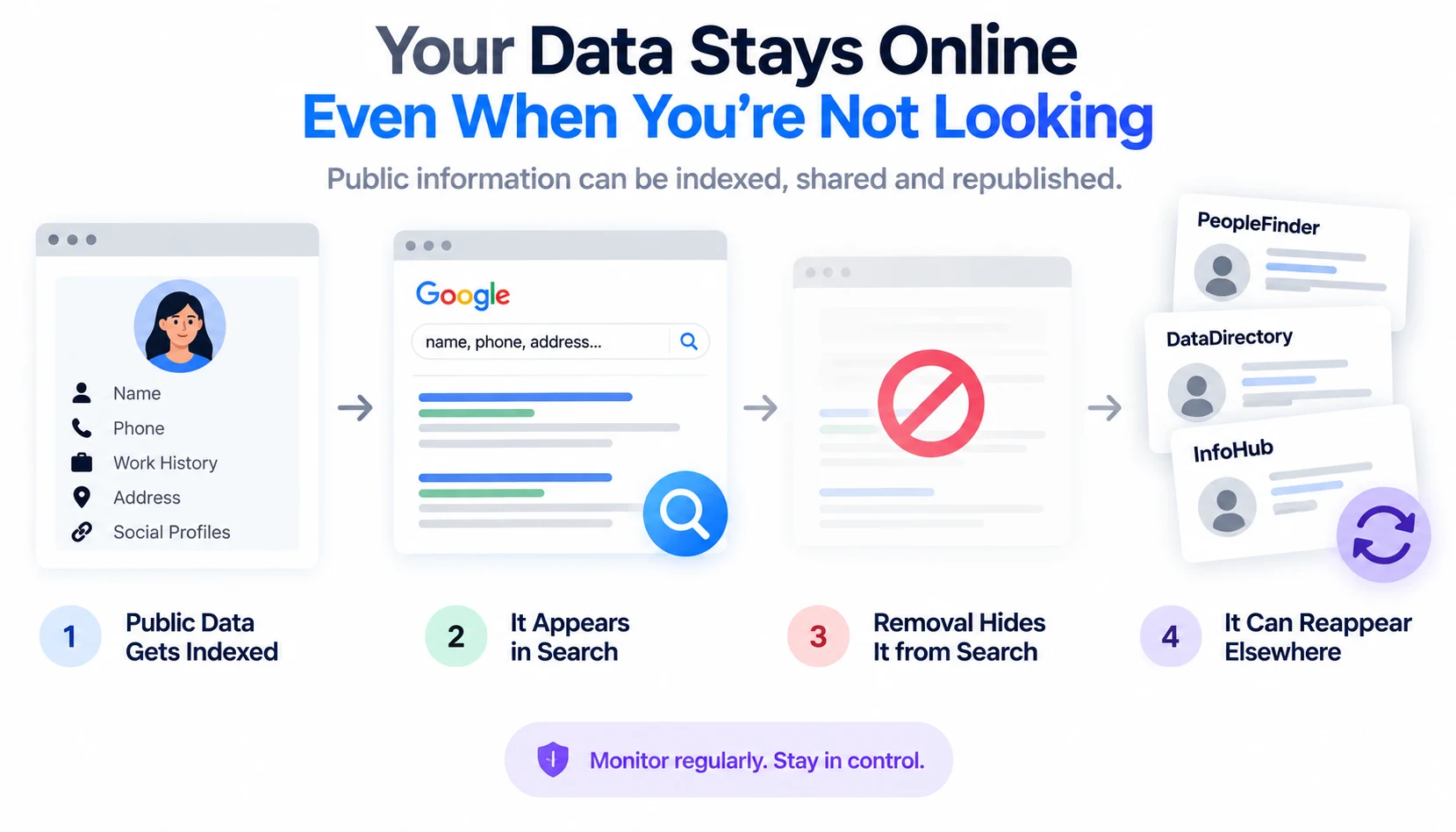
Search privacy extends beyond queries. Personal information already published on a website can become searchable through indexing. Names, phone numbers, work history, social profiles and address records can surface through people search pages, directories or archived databases.
Removing a page from search results does not always remove the original source. That distinction is critical. Search visibility concerns whether information appears through a search engine. Source removal concerns whether the information still exists in the database that published it. Protecting personal data often requires attention to both layers.
Consider a fictional case. Elena finds an outdated profile listing a previous address and phone number. The page disappears from one search result after removal work. Weeks later, another directory republishes similar information from a refreshed public dataset. The original privacy problem has returned through another route. That is why monitoring matters.
How to Protect Your Privacy
A practical privacy routine does not require technical expertise. It requires consistency.
- Review browser cookies and clear unnecessary stored data.
- Check whether search history is being saved.
- Remove old public profiles from websites that expose personal data.
- Review app permissions for location data and GPS access.
- Use a VPN when network privacy matters.
- Separate sensitive research from accounts used for routine browsing.
- Search for personal information periodically to find new exposure.
A user should also review ad personalization settings where available. Targeted ads often rely on behavioral signals. Reducing personalization can limit how activity shapes advertising profiles.
No single setting creates perfect anonymity. Strong privacy comes from reducing unnecessary data collection across several systems.
Search Engines Know Patterns More Easily Than People Expect
The surprising part of search tracking is not one recorded query. The real value comes from patterns. A query about running shoes means little. Searches about marathon plans, knee pain, local races and nutrition create a richer story. Search engines know more when activity accumulates across time. This is similar to seeing footprints in snow. One footprint says that someone passed by. A long trail shows direction, pace and destination. Digital traces work the same way.
Privacy Requires Ongoing Attention
Users often treat privacy as a cleanup project. That approach misses how digital records change. Websites update databases. Browsers create new cookies. Apps request permissions. Search habits create new traces. Public sources republish information.
Protect your privacy by treating exposure as something that changes over time. Check what appears publicly. Review browser settings. Limit tracking where practical. Remove stale records. Revisit the process later.
Conclusion
Search engines make information easy to find. That convenience comes with a flow of data from each user request. Search terms, IP information, cookies, browser signals and click activity can reveal patterns that become more meaningful over time. Personal privacy therefore depends on two tasks. Limit what online systems collect and reduce what public websites expose. A cleaner digital footprint rarely comes from one action. It comes from repeated attention to search history, browser settings, tracking controls and public records.
FAQ
Can a search engine identify someone without a real name?
Sometimes. Repeated technical and behavioral signals can distinguish one browser or device from another even without a typed name.
Does deleting browser history erase search engine records?
No. Clearing local browser history affects information stored on the device. Records already sent to an online service follow that service’s retention rules.
Can cookies reveal identity?
Cookies usually identify a browser session or stored profile rather than a person directly. Connected account activity can make that profile more specific.
Does a VPN stop all tracking?
No. A VPN mainly changes the network path and visible IP address. Cookies, browser identifiers and signed-in activity can still support tracking.
Why does personal information return after removal?
Some websites refresh records from public databases, commercial datasets or other sources. A removed profile can therefore reappear when those sources update.