Rankings tell you where a page sits in a list. They don’t tell you if anyone can actually see it. A page ranked third might sit below three ads, a shopping carousel, and an AI Overview, pushed so far down the screen that almost nobody scrolls that far. That gap between “ranked well” and “seen at all” is what pixel tracking is built to close.
This guide covers what pixel tracking is, how it differs from traditional rank tracking, and how to pair it with SERP visibility metrics to get an honest read on search performance in 2026.
What Is Pixel Tracking?
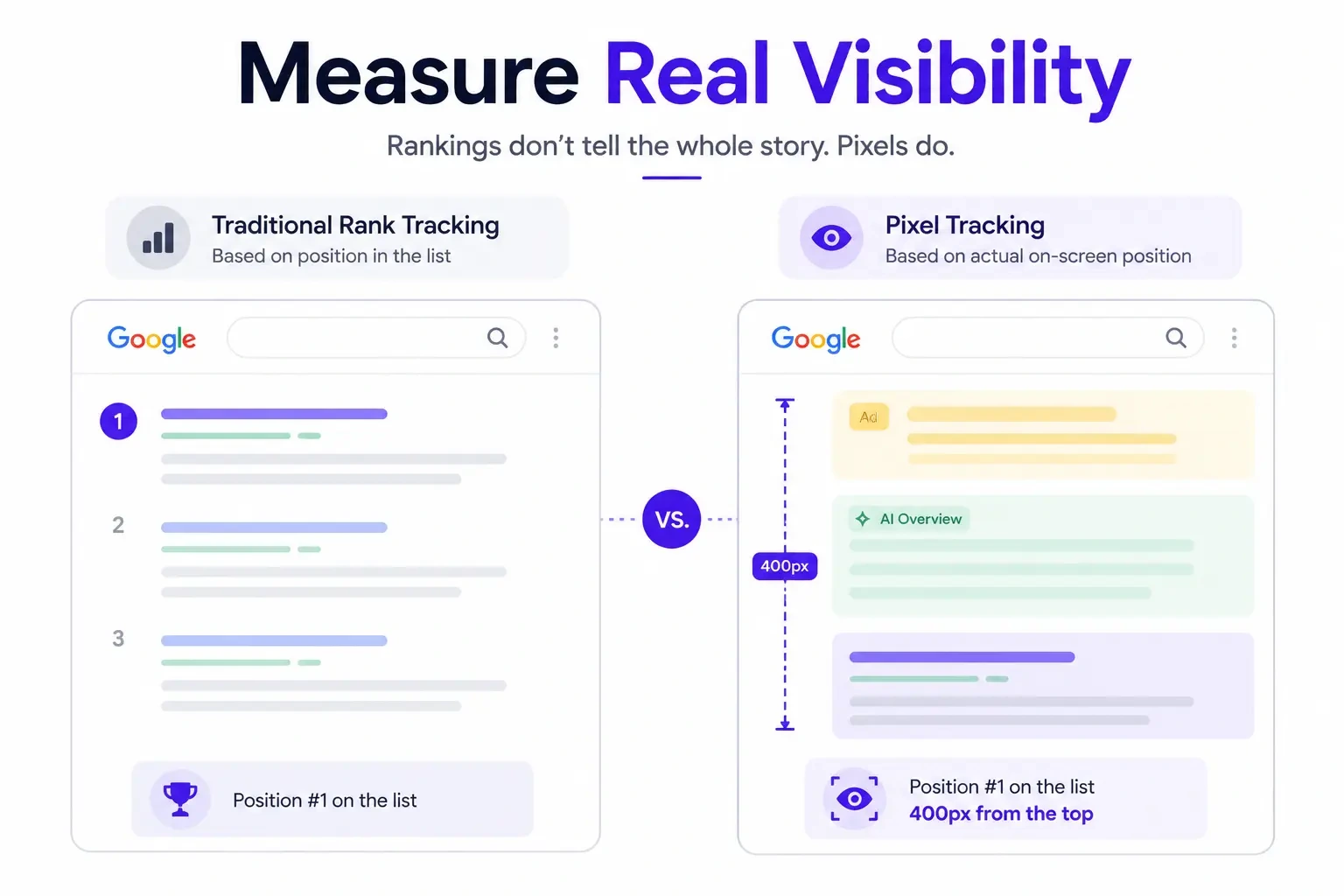
Pixel tracking measures where a search result physically lands on the screen, counted in pixels from the top of the page, instead of just counting its position number in a list. A result at position one could sit 400 pixels down if it’s buried under ads and an AI Overview, or 90 pixels down if the page above it is clean.
How Pixel Tracking Works
Tools that support pixel tracking load a real search results page, render it the way a browser would, and measure the vertical distance from the top of the page to your listing. Some tools measure the full page height; others cap the measurement at what’s visible without scrolling, since that’s the part people actually see first.
The output usually looks like a distance, not a rank: “your page sits at 1,240 pixels” rather than “your page ranks fourth.” Lower numbers are better, since they mean less scrolling before your result shows up.
Why Pixels Matter More Than Rankings
Two pages can share the same rank and still get very different amounts of attention. If a featured snippet, three ads, and a video carousel sit above position one, that top spot might take several scrolls to reach. Pixel depth captures that; rank position alone doesn’t.
What Is SERP Visibility?
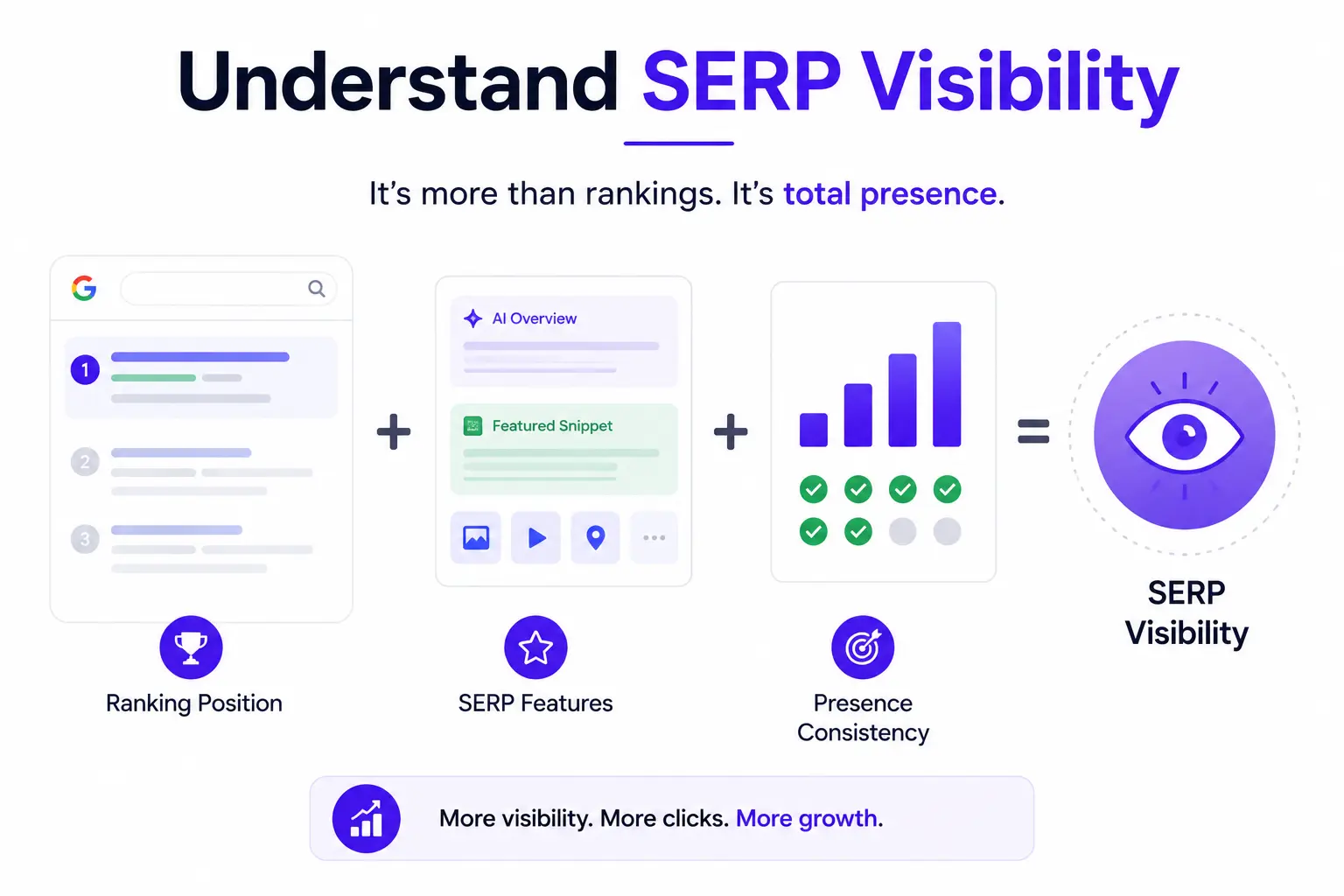
SERP visibility describes how much space and attention a page or domain commands across search results. It combines ranking position, the SERP features a domain has won, and how consistently that domain shows up for its target keywords.
Visibility Score Explained
A visibility score rolls several signals into one number, usually a percentage or index, so teams can compare performance over time or against competitors without checking every keyword by hand. Most tools calculate it from the count of tracked keywords a domain ranks for, the average position across those keywords, and an estimated click-through rate at each position, weighted by search volume.
How Google Measures Search Visibility
Google doesn’t publish an official visibility score of its own. Search Console gets closest with impressions, average position, and click-through rate, but those figures are query-level and don’t account for pixel depth or SERP features the way third-party visibility scores do. The visibility metrics most SEO teams rely on come from tools like Semrush, Ahrefs, or AccuRanker, not from Google directly.
Pixel Tracking vs Traditional Rank Tracking
Key Differences
| Factor | Traditional Rank Tracking | Pixel Tracking |
| What it measures | Position number (1, 2, 3…) | Vertical distance from top of page |
| Accounts for SERP features | No | Yes |
| Reflects real visibility | Only loosely | Directly |
| Device sensitivity | Same number across devices | Changes by device and screen size |
| Best used for | Long-term rank trends | CTR forecasting, above-the-fold reporting |
Advantages
- Shows real above-the-fold visibility, not just a rank number
- Accounts for ads, AI Overviews, and other SERP features that push results down
- Gives more accurate click-through rate predictions
- Separates two pages that share a rank but not screen space
Limitations
- Needs more processing power than a standard rank check
- Pixel depth shifts with screen size, so desktop and mobile need separate tracking
- Personalized and localized results mean pixel depth can vary between users
- Fewer tools support it compared to standard rank tracking
Which Metric Should You Prioritize?
Use rank position for long-term trend reporting, since it’s simple and consistent. Use pixel depth when you need to explain why traffic didn’t move even though rankings did, or when you’re forecasting click-through rate for a client or stakeholder. Most agencies end up tracking both side by side rather than picking one.
How Modern SERPs Changed SEO
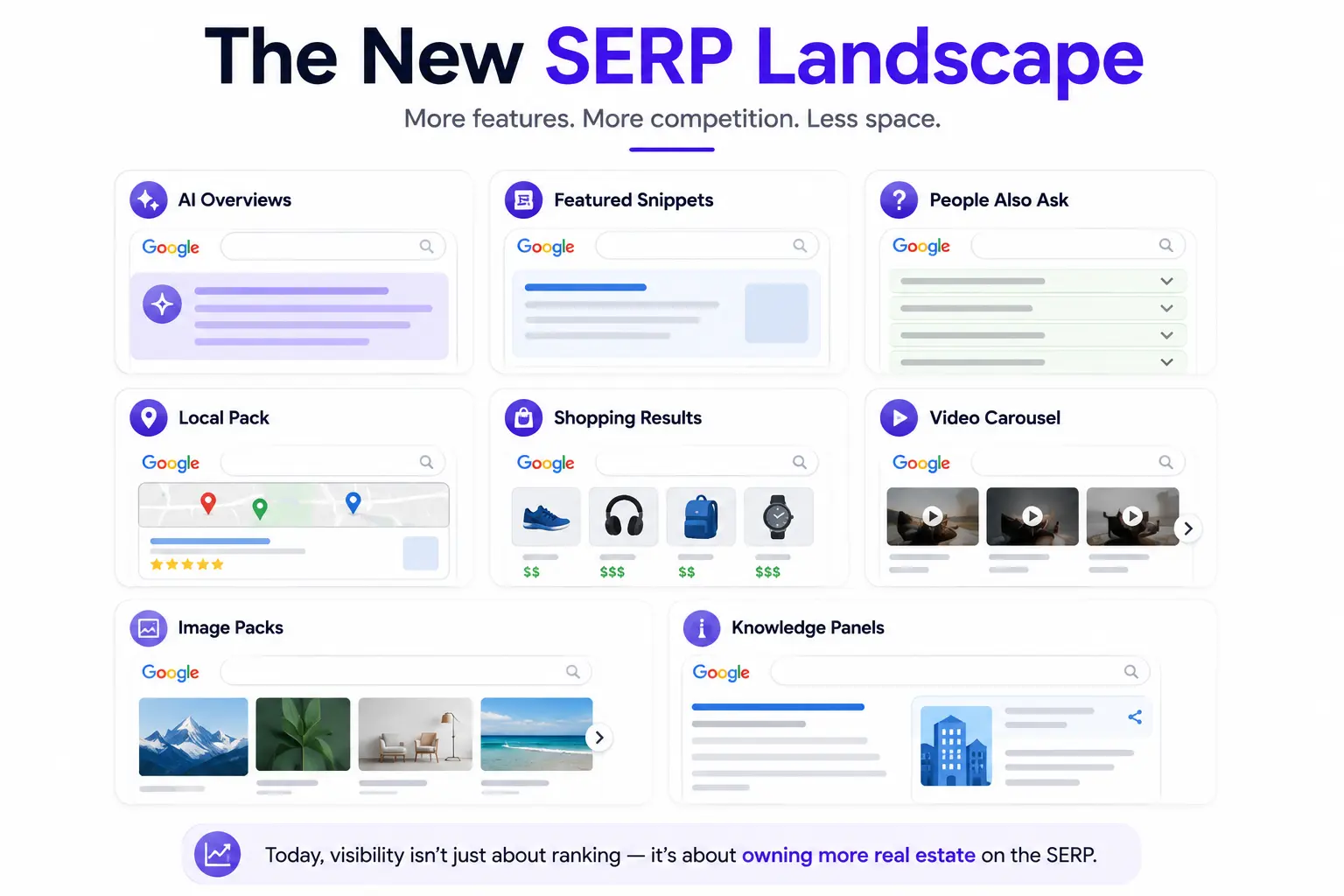
Search results pages used to be ten blue links. Now the page can be dominated by features that push organic listings down before a user scrolls at all. Here’s what’s competing for that space.
AI Overviews
AI-generated summaries can occupy several hundred pixels at the top of the page, often before any organic result appears. A page can rank first and still sit below the fold.
Featured Snippets
A snippet box sits above position one and answers the query directly, which can reduce clicks to the organic results below it, including the page the snippet was pulled from.
People Also Ask
These expandable question boxes can appear multiple times on one page, adding pixel height each time and shifting organic listings further down as users interact with them.
Local Pack
For queries with local intent, a map and three business listings often take the top slot, ahead of any organic result, including the target website itself.
Shopping Results
Product carousels with images and prices are common for commercial queries and take up more vertical space than a standard text listing.
Video Carousel
Video thumbnails, often from platforms outside your control, can claim a full row of screen space and pull attention away from text-based results.
Image Packs
A row of images can appear mid-page for visually driven queries, adding height and breaking up the flow of organic listings.
Knowledge Panels
For branded and entity queries, a knowledge panel can occupy a large block on the right side of desktop results, or stack above organic results on mobile.
How Pixel Tracking Works in Real Life
Desktop Example
On a standard 1920×1080 desktop screen, the visible area without scrolling is roughly 950 pixels tall after the browser chrome is accounted for. A result sitting at 700 pixels is visible without scrolling. One sitting at 1,400 pixels requires a scroll and a half.
Mobile Example
Mobile screens are narrower and taller relative to their viewport, but SERP features like AI Overviews and People Also Ask boxes take up a larger share of that smaller screen. A result that’s visible on desktop without scrolling may require two or three scrolls on mobile.
Above-the-Fold Visibility
“Above the fold” refers to anything visible without scrolling. Pixel tracking tools typically flag whether a result falls above or below this line for a given device, which is a more useful signal than rank position alone for predicting whether a user will actually see it.
Viewport Calculations
Viewport height varies by device, browser, and whether the address bar is expanded or collapsed. Good pixel tracking tools test against a set of common viewport sizes rather than a single fixed number, since real users don’t share one screen size.
Why Pixel Tracking Improves SEO Decisions
Better CTR Predictions
Click-through rate correlates more closely with pixel depth than with rank position, since a result buried under SERP features gets fewer eyes on it regardless of its rank. Forecasting traffic from pixel depth tends to be more accurate than forecasting from rank alone.
More Accurate Visibility Reporting
Reporting rank position without context can overstate performance. A page ranked first that sits below three SERP features tells a different story than a page ranked first on a clean SERP, and pixel data shows the difference.
Competitor Monitoring
Pixel tracking shows which competitors are winning SERP features, not just which ones outrank you. That distinction matters when deciding whether to chase a featured snippet, a local pack listing, or a standard ranking improvement.
Agency Reporting
Clients often ask why traffic didn’t grow despite a rank improvement. Pixel depth gives agencies a concrete answer, since it’s common for a page to move up in rank while a new SERP feature keeps it just as buried.
Enterprise SEO Benefits
Large sites with thousands of tracked keywords use pixel data to prioritize which pages to optimize first, focusing on ones sitting just below the fold where a small improvement could push them into view.
Pixel Tracking and AI Search
AI Overviews
AI Overviews sit above traditional organic results and can push even a first-ranked page down by several hundred pixels. Tracking pixel depth is one of the few ways to quantify how much visibility a page lost to an AI Overview appearing on its query.
LLM Visibility
Being cited inside an AI Overview or an answer from a chat-based assistant is a form of visibility that rank tracking and pixel tracking don’t capture on their own, since there’s no traditional listing to measure. Tracking whether and how often a brand is mentioned inside these answers is becoming a separate discipline, sometimes called answer engine visibility.
Entity-Based Search
Search engines increasingly match queries to entities, people, places, and things with defined attributes, rather than matching strings of text. A page that’s well understood as representing a specific entity has a better chance of being pulled into a knowledge panel or an AI-generated summary, both of which affect pixel layout.
Future of Search Measurement
As more SERP real estate goes to AI-generated content, expect visibility metrics to expand beyond pixel depth and rank position to include citation frequency inside AI answers and share of voice across zero-click features.
Pixel Tracking vs SERP Visibility
What’s the Difference?
Pixel tracking measures one result’s position in physical space on one page. SERP visibility rolls up performance across many keywords into a single score. One is a measurement; the other is a summary built from many measurements, pixel depth included, when the tool supports it.
When to Use Each Metric
Use pixel tracking when you need to explain the performance of one page on one query, especially when a client asks why a top ranking isn’t driving clicks. Use a visibility score when you need to summarize performance across a whole site or compare your domain to competitors at a glance.
Combining Both Metrics
The two work best together. A rising visibility score with flat pixel depth on your top pages suggests you’re winning on volume, ranking for more keywords, rather than on prominence. A falling visibility score with worsening pixel depth on core pages points to SERP features eating into your best real estate.
Factors That Affect Pixel Visibility
Ads
Paid search ads sit above organic results on commercial queries and can push the first organic listing down by 300 to 600 pixels depending on how many ads appear.
SERP Features
AI Overviews, featured snippets, People Also Ask, and other features each add their own pixel height, and multiple features often stack on the same query.
Screen Size
A wider, taller screen shows more content above the fold without scrolling, so the same pixel depth can be visible on one screen and hidden on another.
Device Type
Mobile layouts stack SERP features vertically in ways desktop doesn’t, which usually means more scrolling is needed to reach the same organic result on a phone.
Search Intent
Commercial and local queries tend to carry more SERP features, ads, shopping results, and map packs, than informational queries, which often show a cleaner list of organic results.
Personalization
Search history and account settings can change which features appear for a given user, which means two people searching the same term may see different pixel layouts.
Location
Local intent queries pull in map packs and local business listings that vary by the searcher’s location, changing pixel depth from one city to the next.
Best Pixel Tracking Tools
Not every rank tracker supports pixel measurement. Here’s where the major platforms stand.
| Tool | Pixel Tracking Support | Best For |
| AccuRanker | Yes, native pixel depth reporting | Agencies tracking large keyword sets across devices |
| Advanced Web Ranking | Yes, with above-the-fold flags | Teams wanting granular SERP feature breakdowns |
| Similarweb | Limited, focused on traffic estimation | Competitive traffic and visibility benchmarking |
| Rank Monitor | Yes, basic pixel tracking | Smaller sites wanting a lightweight setup |
| Semrush | Partial, via Position Tracking SERP features | Visibility scoring and keyword-level SERP feature data |
| Ahrefs | No native pixel depth | Backlink analysis and broad keyword research |
| Google Search Console | No pixel data | Free, first-party impression and click data |
How to Improve SERP Visibility

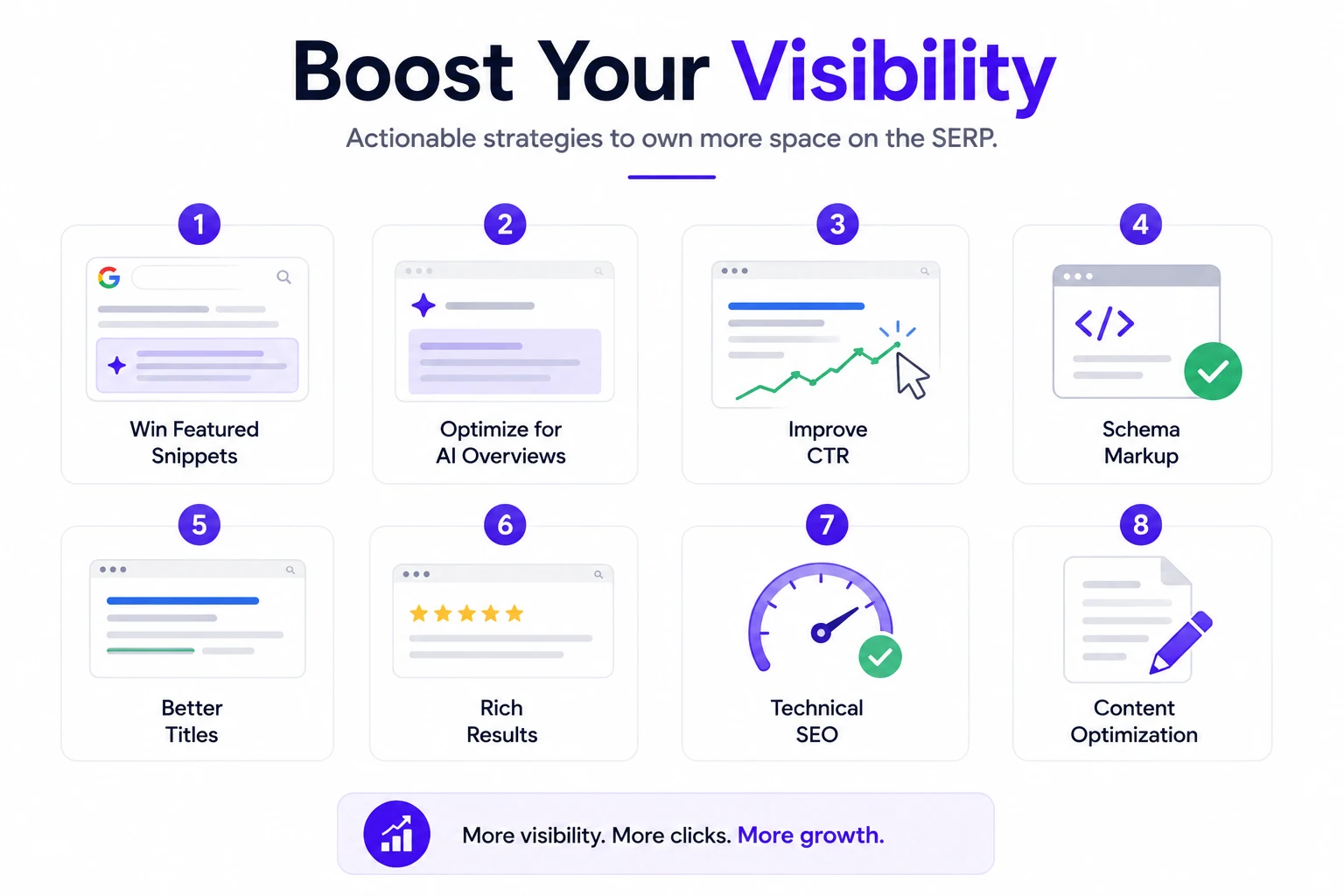
Win Featured Snippets
Structure content with a direct, concise answer near the top of the page, followed by supporting detail. Snippets tend to favor content formatted as a clear definition, numbered list, or short table.
Optimize for AI Overviews
Write content that answers a query plainly and cites specific facts or data, since AI Overviews tend to pull from pages that state information clearly rather than pages that bury the answer in narrative text.
Improve CTR
A stronger title tag and meta description won’t change your pixel depth, but they can improve the odds someone clicks once your result is visible, which is the other half of the visibility equation.
Schema Markup
Structured data can qualify a page for rich results, star ratings, FAQs, breadcrumbs, that take up more space and stand out visually against plain blue links.
Better Titles
Titles that match search intent directly, rather than relying on vague phrasing, tend to earn more clicks at the same rank and pixel position.
Rich Results
FAQ markup, review stars, and how-to formatting all increase the visual footprint of a listing, which can offset a modest pixel disadvantage.
Technical SEO
Fast load times and clean mobile rendering affect whether a page is eligible for certain SERP features in the first place, since Google favors pages that render reliably across devices.
Content Optimization
Comprehensive, well-organized content increases the odds of qualifying for multiple SERP features on one query, snippet, PAA inclusion, and a strong organic listing, rather than just one.
Common Pixel Tracking Mistakes
Focusing Only on Rankings
Reporting rank position without pixel context can make a page look like it’s performing well when it’s actually buried under SERP features.
Ignoring SERP Features
Skipping SERP feature tracking means missing the reason behind traffic changes that rank position alone can’t explain.
Tracking Desktop Only
Mobile and desktop SERPs often look nothing alike. Tracking one and assuming the other matches leads to inaccurate visibility reporting.
Not Monitoring Visibility Trends
A single snapshot of pixel depth doesn’t show whether a SERP is getting more crowded over time. Regular tracking is what reveals that pattern.
Real-World Case Study
Initial Rankings
A mid-sized SaaS client ranked #2 for their primary product keyword, a strong position by traditional standards, but organic traffic to that page had been flat for two quarters.
Pixel Visibility Analysis
Pixel tracking showed the page sitting at 1,180 pixels from the top on desktop, below three ads, a shopping carousel, and a People Also Ask box. On mobile, it required four scrolls to reach.
Optimization Strategy
The team restructured the page to target a featured snippet with a clear definition near the top, added FAQ schema to qualify for rich results, and tightened the title tag to improve click-through rate at the existing position.
Results
Within six weeks, the page won the featured snippet, which sits above the ads on that query. Pixel depth dropped from 1,180 to 240. Organic clicks rose 34 percent without any change in rank position.
Pixel Tracking Workflow for SEO Teams
Weekly Monitoring
Check pixel depth and SERP feature changes for priority keywords weekly, since features like AI Overviews and shopping carousels can appear or disappear from one week to the next.
Monthly Reporting
Roll weekly data into a monthly report that pairs rank position, pixel depth, and visibility score side by side, so trends are visible at a glance rather than buried in raw numbers.
Competitor Analysis
Track which competitors are winning SERP features on shared keywords, not just who outranks whom, since feature wins often explain traffic gaps that rank comparisons miss.
KPI Dashboard
Build a dashboard that tracks average pixel depth, visibility score, and SERP feature win rate for priority keywords, giving stakeholders a fuller picture than rank position alone.
FAQ
Is pixel tracking the same as rank tracking?
No. Rank tracking counts position in a list. Pixel tracking measures the physical distance from the top of the page, which reflects how SERP features affect real visibility.
Do I need pixel tracking if I already track rankings?
Not strictly, but pixel data explains traffic changes that rank position alone can’t, especially when SERP features are shifting.
Which tools offer pixel tracking?
AccuRanker, Advanced Web Ranking, and Rank Monitor offer native pixel depth reporting. Semrush offers partial support through SERP feature tracking.
Does pixel depth differ between desktop and mobile?
Yes, significantly. Mobile screens are smaller and SERP features stack differently, so the same page often sits deeper on mobile than on desktop.
Can a page rank #1 and still have poor visibility?
Yes. If enough SERP features appear above it, a first-ranked result can sit well below the fold.
How often should pixel tracking be checked?Weekly for priority keywords, since SERP features change more often than rank position does.
Conclusion
A rank number doesn’t tell you what’s sitting above it on the page. Pixel depth measures actual screen position, ads, AI Overviews, and other features included, while a visibility score is useful for the big picture and pixel depth is useful for explaining one page’s traffic, so the strongest reporting uses both rather than picking one. SERP layouts have shifted more in the last two years than in the previous decade combined, and as AI-generated answers claim more of the page, expect visibility to keep expanding past pixels and rank to include how often a brand gets cited inside those answers. To put this into practice, choose a tool with native pixel depth support rather than estimating it manually, track desktop and mobile separately since they rarely match, report pixel depth alongside rank position rather than instead of it, check SERP feature changes on priority keywords every week, and use pixel depth to decide which pages get optimized first.