If you have been taking care of a website for more than ten years you probably remember putting lots of words in the meta keywords tag. You would put every version of the words you wanted people to find your website with. It is hard to stop doing things you have been doing for a time. I still get asked by clients every month: does Bing look at the meta keywords tag or is it just extra stuff in your website code?
The simple answer is: no Bing does not look at the keywords tag to decide how to rank websites.. There is more to the story that is worth understanding especially if you are in charge of an older website or a system that still makes this tag automatically.
Does Bing Use Meta Keywords?
No, Bing does not think the meta keywords tag is a thing to help with ranking. Microsoft has said this before and they said it again recently. They made it clear that the meta keywords tag does not help with search engine optimization for Bing today. The meta keywords tag is just not important to Bing.
What Microsoft’s Official Documentation Says
Bing’s public statements have shifted over time, which is part of why confusion persists. In 2011, Bing acknowledged it did look at the meta keywords tag, mostly as a spam-detection signal rather than a ranking boost. By 2014, Microsoft’s Bing blog stated flatly that the tag was <cite index=”4-1″>worthless for Bing SEO</cite>. Then in 2020, Christi Olson, who led search and AI evangelism at Microsoft, <cite index=”1-1″>said on social media that the meta keyword tag is dead in terms of SEO value for Bing, and that Bing excludes and ignores it entirely</cite>.
That said, Bing’s Frédéric Dubut added some nuance around the same time, <cite index=”1-1″>noting he wouldn’t rule the tag out forever because ranking signals shift constantly, and something that predicts quality today could become a spam predictor tomorrow if it gets exploited</cite>. In practice, treat “dead” as the operating assumption, but understand Bing reserves the right to reuse old signals for spam detection if abuse patterns return.
What Are Meta Keywords?
According to entry on the meta element, the keywords meta tag is an HTML attribute placed in a page’s <head> section that lists terms meant to describe the page’s content to search engines. It’s invisible to visitors and only readable in the page’s source code.
How They Worked Historically
Back in the 1990s search engines did not have power to look at everything on a webpage. So they had to rely on the people who made the websites to say what their pages were about. You would make a list of the words you wanted people to find your page with and the early search engines would use that list to figure out if your page was relevant. This method worked well for a while until people found out they could cheat.
People who owned websites started putting in a lot of words that had nothing to do with their pages. They would add names of companies and popular search words just to get more visitors. The search engines could not tell what was true and what was not so the whole system became useless quickly. Search engines and website owners were having problems with this system and search engines were not getting the information from website owners.
Example HTML Code
Here’s what the tag looks like in raw HTML:
<meta name=”keywords” content=”bing seo, meta tags, search optimization”>
Simple, self-reported, and — as you’ll see below — largely ignored by every major search engine today.
Does Bing Still Use Meta Keywords?
Official Bing Position
Bing says that meta keywords do not matter when it comes to ranking. The people who work on Microsoft’s search team said this in 2020. It is still true today. Bing has not changed its position on keywords since then. Meta keywords are still not important to Bing.
How Bing Treats Meta Keywords Today
Bing’s crawler can still technically read the tag if it’s present in your HTML. Reading a tag and using it for ranking are two different things, though. Multiple former Bing team members, including former Senior Product Manager Duane Forrester, have described the tag as something Bing’s systems might glance at purely as a spam-detection input, not a quality or relevance input.
Think of it like a smoke detector rather than a thermostat. It doesn’t help set the temperature (your ranking), but it might trigger an alarm if something looks off, like keywords that have zero relation to your visible page content.
Can They Hurt Your SEO?
Here’s where it gets interesting for anyone tempted to add the tag back “just in case.” If your meta keywords list terms that don’t appear anywhere in your actual content, that mismatch can read as a manipulation attempt. That’s a bigger risk than the tag’s non-existent upside. My advice to clients: either leave it out entirely, or make sure it only lists terms genuinely reflected in the page and never treat it as a place to sneak in extra targets.
Does Google Use Meta Keywords?
Google’s Official Position
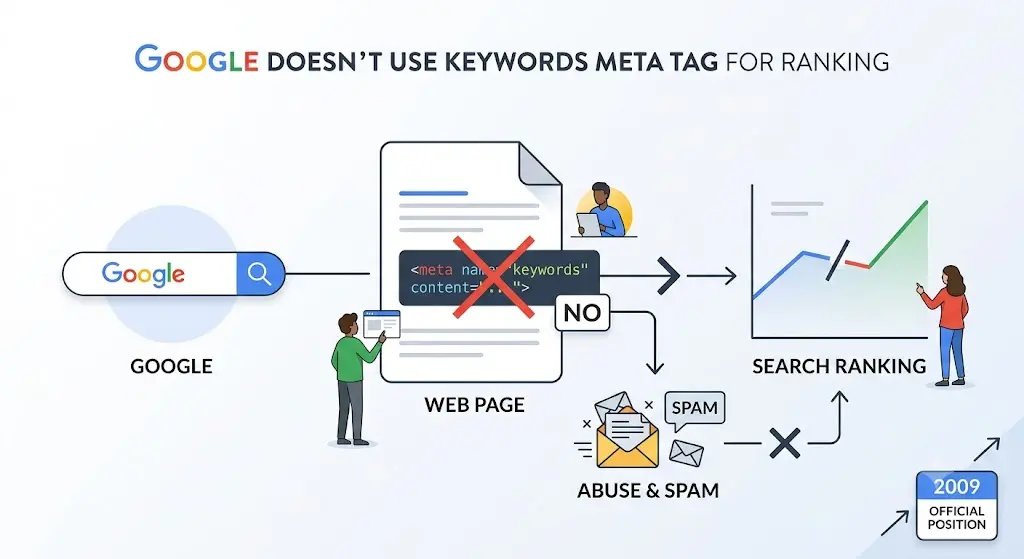
Google settled this question years before Bing did. Google made it clear in a post on the Google Search Central blog back in 2009. Google said it does not use the keywords meta tag in web ranking all. Google gave a reason for this: there was a lot of spam and abuse. This was one of the clearest statements from a major search engine, like Google.
Google vs Bing Comparison
| Aspect | Bing | |
| Uses tag for ranking | No (since 2009) | No (since at least 2014, reaffirmed 2020) |
| Reads the tag at all | No stated use, even for spam | May scan it as a spam signal |
| Public confirmation | Official blog post | Public statements from Bing team members |
Both engines land in the same place, just by slightly different roads. Google closed the door outright. Bing left it cracked open for spam-flagging purposes only.
Meta Keywords vs Other Meta Tags
It helps to see meta keywords next to the tags that actually matter, so you know where to spend your time instead.
1. Title Tag
The title tag is the thing that you see as a blue link when you look at search results. This is an important thing that Google and Bing look at when they decide what is relevant. You should make sure you get the title tag right before you think about anything, on this list. The title tag is really important so take your time to get it right.
2. Meta Description
This is the short summary under your title in search results. It doesn’t directly influence rankings, but it strongly affects click-through rate, which indirectly matters for performance.
3. Meta Robots
This tag is important for search engines. It helps them decide if they should look at a page and if they should look at the links on that page. This tag is used for things it does not tell search engines if a page is a good page or not.. If you use this tag incorrectly you might accidentally stop search engines from looking at pages that you want them to look at and you want those pages to show up in search results when people search for something.
4. Canonical Tag
Canonical tags are important for search engines because they help figure out which version of a page is the one. This is really important for shopping sites that have lots of pages with similar products. For example when you have category pages that can be filtered in ways you need to tell search engines which one is the main page. Canonical tags do that job, for ecommerce sites. They say which page is the deal, the master copy, when there are lots of pages that are pretty much the same.
5. Open Graph Tags
When you share a page on Facebook or LinkedIn Open Graph tags decide how your page will look. These tags do not change how you show up in search results. However Open Graph tags are important because they control how your content appears when someone shares a link. For example Open Graph tags will determine what picture and words people see when you share a link in a post or a group discussion on Facebook or LinkedIn. Open Graph tags are really about making your content look good when people share it on platforms, like Facebook or LinkedIn.
6. Structured Data
Structured data (schema markup) helps search engines understand entities, relationships, and page types more precisely. It’s one of the more impactful technical additions you can make today, especially with how much AI-driven search now depends on entity understanding.
What Ranking Signals Matter More to Bing?
1. High-Quality Content
Bing has said over and over that the quality of the content and how deep it is are more important than any tag. If you have pages that’re thin and generic they will not do well no matter how you write the metadata. Bing has made it clear that content quality is what really matters and meta tags are not as important as people think. Bing says that if your pages are not good it does not matter what you put in the tags because thin and generic pages just do not perform well.
2. Search Intent
Bing’s algorithm tries to match a page to what the searcher actually wants to accomplish, not just the words they typed. A page written for the wrong intent won’t rank well even with perfect keyword placement.
3. Authority
Bing still thinks that backlinks and brand mentions are very important when it comes to ranking a website. The overall reputation of a site is also a deal for Bing. This is pretty similar to how Google does things. Backlinks and brand mentions matter, to Google too.
4. Content Freshness
Bing looks at how a page was updated. This is especially true for topics where the information is changing all the time. The search engine Bing gives some importance to this because it wants to show people the recent information on the internet. This is really important for things like news and current events where things are happening every day. Bing wants to make sure that people see the information on these topics so it checks when a page was last updated.
5. Internal Linking
A clear internal linking structure helps Bing’s crawler understand which pages on your site matter most and how they relate to each other.
6. User Engagement
So when you search for something on Bing they look at things like how people click on a result and how long they stay on that page. This helps Bing figure out if the result was what the person was looking for. They use things like click-through rate and time on page to decide if a result is good or not. Bing wants to know if a result satisfied the person who did the search. Signals like click-through rate and time on page are important to Bing.
7. Page Experience
Bing looks at usability factors: is the page easy to navigate, free of intrusive pop-ups, and reasonably fast to load.
8. Mobile Optimization
With most searches happening on mobile devices, a site that isn’t mobile-friendly is at a real disadvantage in Bing’s results.
9. Technical SEO
Clean, crawlable code, proper use of headings, and a logical site structure all support how well Bing can process and rank your pages.
How Bing’s Ranking Algorithm Differs from Google
1. Similarities
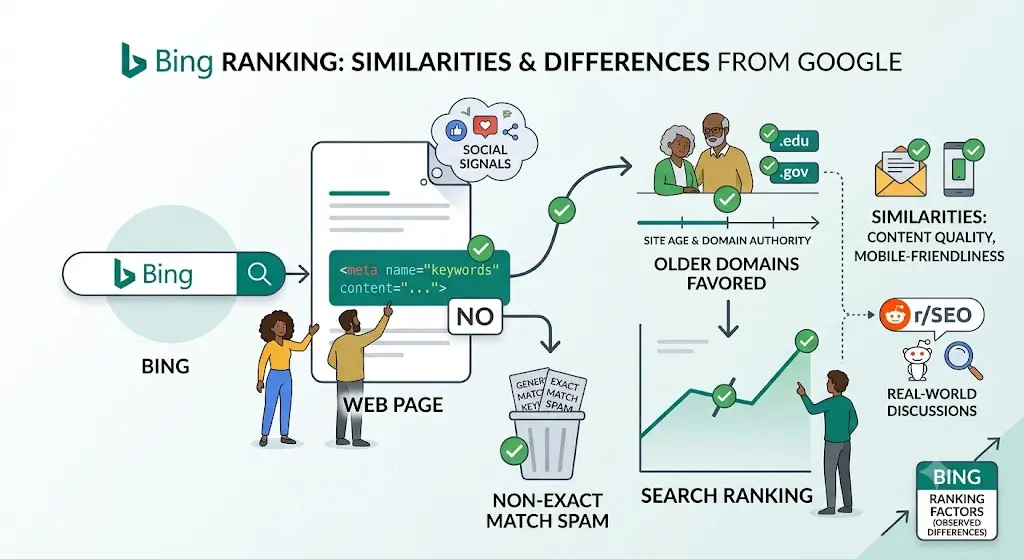
Both engines prioritize content quality, backlinks, mobile-friendliness, and page experience. If you’re already optimizing well for Google, you’re covering most of what Bing wants too.
2. Differences
Bing has historically weighted certain factors a bit differently: social signals and site age have shown more visible correlation with Bing rankings in various SEO community discussions, though Bing has never confirmed exact weighting publicly. Bing also tends to favor exact keyword matches in titles and content a bit more literally than Google, which relies more heavily on semantic and contextual matching.
3. When Bing May Rank Pages Differently
You’ll sometimes see older, well-established domains rank higher on Bing than on Google for the same query, and Bing has traditionally shown a slight lean toward .edu and .gov domains for authority signals. Discussions on communities like r/SEO on Reddit regularly surface real-world examples of this divergence from webmasters comparing their own ranking data across engines.
How AI Search and Microsoft Copilot Impact Bing SEO
1. AI-Powered Search Results
Bing was among the first major search engines to fold generative AI answers directly into its results, through its Copilot integration. This shifts some of the optimization focus from ranking in a list of ten blue links to being cited as a source inside an AI-generated summary.
2. Semantic Search
Bing’s systems increasingly parse content by meaning and context rather than exact keyword matches. Writing naturally, with clear explanations and logically organized headings, tends to serve you better than trying to hit a keyword density target.
3. Entity-Based Ranking
Bing, powered in part by Microsoft’s knowledge graph, tries to understand real-world entities (people, places, brands, concepts) and how they connect. Structured data and clear, factual content help Bing map your page to the right entities.
How to Optimize Your Website for Bing
1. Use Bing Webmaster Tools
Bing Webmaster Tools is free and gives you crawl data, indexing status, and keyword performance reports specific to Bing, separate from what you’d see in Google Search Console.
2. Submit XML Sitemap
Submitting a sitemap through Bing Webmaster Tools helps Bing discover and crawl your pages more efficiently, especially on larger sites.
3. Enable IndexNow
IndexNow is a protocol co-developed by Microsoft and Yandex that lets you instantly notify search engines when a page is added, updated, or removed, rather than waiting for the next crawl cycle.
4. Implement Schema Markup
Adding structured data helps Bing understand your content’s context, which matters even more now with AI Overview-style results pulling from structured, well-organized sources.
5. Optimize Technical SEO
Fast load times, clean HTML, proper canonical tags, and mobile responsiveness all support how well Bing can crawl and evaluate your site.
6. Create Helpful Content
This sounds obvious, but it’s the single biggest lever you have. Bing, like Google, has increasingly aligned its guidelines around rewarding content that genuinely helps the reader rather than content built primarily to rank.
Should You Keep the Meta Keywords Tag?
1. Older Websites
If your CMS auto-generates the tag and it’s not causing any harm (meaning the keywords listed actually match your content), there’s no urgent need to strip it out. It’s simply inert.
2. New Websites
For new builds, skip it. There’s no upside, and it’s one less thing to maintain or accidentally misuse.
3. Enterprise CMS Considerations
Larger organizations sometimes have legacy workflows where marketing teams still fill in meta keywords fields out of habit. If that’s the case, it’s worth a quick internal conversation to redirect that time toward title tags, meta descriptions, and structured data instead, where the effort actually pays off.
Common Myths About Meta Keywords
Myth vs Fact Table
| Myth | Fact |
| Meta keywords help you rank on Bing | Bing has confirmed the tag carries no ranking value |
| Adding more keywords increases relevance | Excessive or irrelevant keywords can look like spam |
| Removing the tag will hurt existing rankings | The tag has no ranking influence, so removing it changes nothing |
| Bing and Google handle the tag differently in a meaningful way | Both ignore it for ranking; Bing may glance at it only for spam detection |
| Yahoo still uses it heavily | Yahoo publicly stated years ago that the tag carries no ranking weight either |
Real-World Example: Auditing an Old Website with Meta Keywords
Before
A client came to me with a site built in 2009 that had never been touched since a redesign in 2015. Every page had a meta keywords tag stuffed with 40 to 50 terms, several of which were competitor brand names and completely unrelated phrases left over from an old marketing push.
After
We stripped the tag from the templates entirely, redirected that effort into rewriting title tags and meta descriptions, and added schema markup for their product pages. Rankings didn’t move because of the meta keywords removal specifically, but cleaning up the technical debt made the rest of the optimization work easier to execute and track.
Lessons Learned
The meta keywords tag itself wasn’t hurting or helping. The real value came from using the audit as an excuse to fix the tags that actually matter. If you’re already in your CMS template files, that’s the moment to prioritize title tags, descriptions, and structured data.
Modern Bing SEO Checklist
- Set up and verify your site in Bing Webmaster Tools
- Submit an XML sitemap
- Enable IndexNow for faster indexing
- Write unique, descriptive title tags for every page
- Craft compelling meta descriptions to improve click-through rate
- Add structured data (schema markup) where relevant
- Ensure mobile responsiveness and fast load times
- Build a logical internal linking structure
- Focus on content that directly answers search intent
- Skip the meta keywords tag, or leave it out of new templates entirely
Frequently Asked Questions
1. Does Bing ignore meta keywords?
Yes. Bing has publicly confirmed it excludes and ignores the meta keywords tag as a ranking factor, though it may still read the tag as a potential spam signal.
2. Should I remove the tag?
You can, but it’s not urgent. It has no ranking effect either way, as long as the keywords listed genuinely reflect your page content.
3. Can keyword stuffing hurt rankings?
Yes, generally. Whether it’s in meta keywords, body content, or alt text, stuffing irrelevant or excessive terms can trigger spam signals across most modern search engines.
4. Does Yahoo still use meta keywords?
No. Yahoo has publicly stated the tag carries no ranking weight for its search results, aligning with both Google and Bing’s positions.
5. Which meta tags actually matter?
Title tags, meta descriptions, canonical tags, meta robots, and structured data all carry real functional or performance value. Meta keywords do not.
6. What is IndexNow?
IndexNow is a protocol that lets website owners instantly notify participating search engines, including Bing, when content changes, instead of waiting for the next scheduled crawl.
Conclusion
Does Bing use keywords? No, it does not use them for ranking. This has been the case for years. The team at Microsoft has said this time and they were very clear about it in 2020.
The meta keywords tag might still be looked at in some cases to check for spam.. Trying to use it to improve your search engine ranking is a waste of time. You should focus on things like title tags and structured data. Creating content is also very important.
If you are looking at a website you do not have to worry about the meta keywords tag. You can leave it there. You can remove it. Either way it will not affect your ranking on Bing.
You should put your time into things that Bing says are important. This includes making sure your content is good and your website is working properly. That it has what people are searching for. Bing wants websites that are built around what people need when they search for something.