Power BI works well for creating customer dashboards, but sharing them under your own brand is a different challenge. Customers shouldn’t have to navigate Power BI workspaces or use your company’s Microsoft accounts just to view their reports. Managing access also becomes difficult when every customer needs a different set of dashboards.
White-label Power BI reporting solutions address these problems by letting businesses deliver reports through branded customer portals or existing applications. Some provide ready-made portals, while others offer embedding tools for companies that want more control over the reporting experience.
This article covers ten white-label Power BI reporting solutions for 2026, focusing on branding, customer access, security, and how each platform handles external dashboard delivery.
Top 10 White-Label Power BI Reporting Solutions
- Reporting Hub – Branded Power BI delivery with tenant-level access control and AI governance.
- PowerBI Portal – Centralized external report sharing.
- Embedsy – Customer-owned Azure deployment.
- Skald BI – Simple white-label access.
- InterWorks Curator – One branded portal for Power BI.
- DataTako – Separate branded reporting environments.
- Embedportal – Customer-specific dashboard.
- Entelexos – Embedded Power BI reporting.
- EmbeDash – White-label Power BI analytics.
- EmbedFAST – API-based Power BI embedding.
1. Reporting Hub – Governed White-Label Power BI Reporting
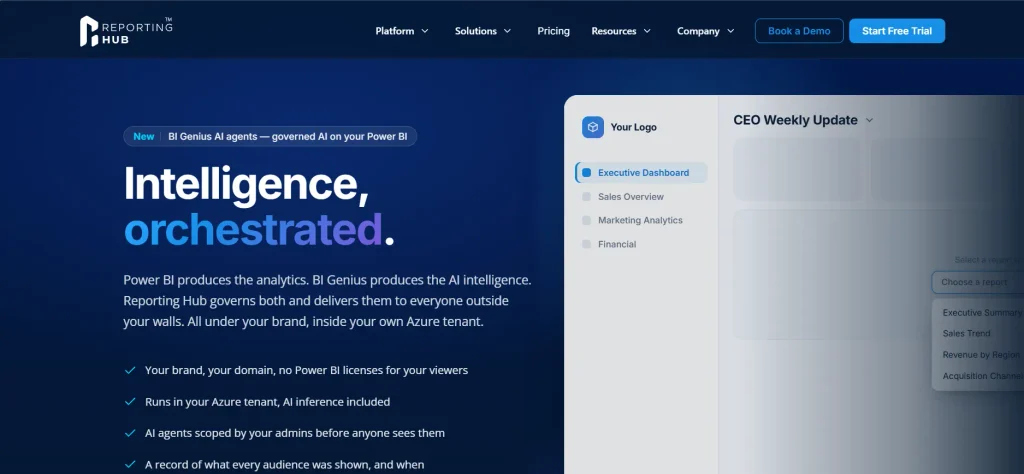
Reporting Hub is a white-label Power BI delivery platform that lets businesses publish customer dashboards through their own branded portals. It works with existing Power BI reports, so teams don’t need to rebuild their dashboards or develop a separate reporting application.
Businesses can customize the portal’s domain, colors, and layout while giving each customer access to their assigned reports. Reporting Hub runs inside the customer’s Azure environment and supports external viewers without individual Power BI licenses under its embedded delivery model.
Reporting Hub also gives businesses control over how Power BI content reaches different customers. Administrators can manage separate tenants, apply Power BI row-level security (RLS), and connect authentication providers such as Microsoft Entra ID, Okta, or Auth0.
Its BI Genius feature adds AI agents that answer questions using Power BI semantic models, with administrators controlling what each agent can access. The platform also keeps audit records of reporting and AI delivery activity, making it suitable for companies that need more than a branded dashboard interface.
2. PowerBI Portal – Centralized Power BI Report Sharing
PowerBI Portal, developed by DevScope, provides a central portal where businesses can share interactive Power BI dashboards with customers who don’t have individual Power BI licenses. Administrators can assign reports to users and manage access through a back-office interface. The platform supports row-level security, report exports, and automated report delivery.
3. Embedsy – White-Label Power BI Portals in Your Azure Environment
Embedsy provides a ready-made Power BI reporting portal that businesses can deploy within their own Azure environment. Customers access dashboards through a branded website with the company’s domain, logo, and login page rather than the Power BI service. The platform includes report navigation, user permissions, and Power BI row-level security to manage what each customer can view.
4. Skald BI – Branded Sharing for Existing Power BI Dashboards
Skald BI lets businesses share existing Power BI reports through a white-label portal without changing how their reporting teams create dashboards. Administrators can manage external users, assign reports, and apply row-level security while customers access their data through a separate interface. The platform supports Microsoft SSO, report filters, and PDF or Excel exports.
5. InterWorks Curator – Branded Dashboards Across Multiple BI Platforms
InterWorks Curator is a white-label analytics portal that brings Power BI dashboards together with content from other reporting platforms. Businesses can create customer-facing reporting pages with their own branding and control which dashboards each user can access. Curator supports Power BI, Tableau, and Sigma, letting organizations present reports from different tools through a single interface.
6. DataTako – White-Label Power BI Reporting for Multiple Clients
DataTako is a Power BI sharing platform that lets businesses publish dashboards through branded customer portals without requiring viewers to have Microsoft accounts. Its sub-organization feature lets agencies create separate reporting environments for different clients while managing them from a single account. Each customer can have their own users, assigned reports, and branding settings, including custom domains and email templates.
7. Embedportal – Multi-Platform White-Label Embedded Analytics
Embedportal lets businesses present Power BI dashboards inside branded customer portals alongside reports from other analytics platforms. It supports tools such as Tableau and Amazon QuickSight, so businesses don’t have to build a separate reporting interface for each system. Developers can connect existing reporting sources and manage customer access through authentication and row-level security controls.
8. Entelexos – White-Label Power BI With Self-Service Reporting
Entelexos, developed by Carlo Solutions, is a Power BI Embedded solution that provides a ready-made reporting environment for external customers. Businesses can deploy a branded application with built-in user management, multi-tenant access controls, and report administration. Unlike portals that focus mainly on viewing existing dashboards, Entelexos also supports self-service reporting features.
9. EmbeDash – Customer-Facing Power BI Analytics for SaaS Applications
EmbeDash, developed by iLink Digital, helps software companies add Power BI reporting to their customer-facing applications. It provides an embedded analytics solution that can run as a standalone reporting environment or appear inside an existing application. Businesses can apply tenant-specific branding and authentication, allowing different customers to access reports through their own reporting experience.
10. EmbedFAST – API-Based White-Label Power BI Integration
EmbedFAST, developed by MAQ Software, provides an API-based approach to adding Power BI reports to customer-facing applications. Instead of requiring developers to build the full Power BI embedding process, EmbedFAST handles access tokens, tenant management, and role-based permissions. Businesses can connect reports to existing applications and customize the reporting experience to match their product design.
What to Look for in a White-Label Power BI Reporting Solution
Not every white-label Power BI platform provides the same level of control. Some let businesses change a logo and domain, while others support a different reporting experience for each customer. The important differences usually become clearer when you consider how customers access dashboards and how much work administrators must handle.
Customer Branding and Portal Customization
White-label reporting should make the dashboard experience feel like part of your company’s product or service. A custom domain and logo are a starting point, but businesses with multiple customers may also need separate themes or login pages. Platforms such as Reporting Hub, DataTako, and Embedsy support customer-specific branding, though options vary by product and subscription plan.
Power BI Licensing and Reporting Costs
White-label reporting doesn’t automatically remove Microsoft licensing costs. Under the embed-for-your-customers model, external viewers can access reports without individual Power BI licenses, but the business still needs sufficient embedding capacity and licensed report authors. Microsoft’s Power BI licensing documentation explains the differences between per-user licenses and capacity-based options.
Customer Access and Data Security
A customer portal needs to control both which reports users can open and what information they can see inside those reports. Power BI row-level security can restrict data within a shared semantic model, while portal permissions control access to reporting content. Businesses serving multiple organizations should also check how each platform handles tenant separation and customer authentication.
Which White-Label Power BI Reporting Solution Should You Choose?
For businesses that want to deliver Power BI dashboards to customers without building their own portal, Reporting Hub offers a strong combination of branded reporting and access management. Its support for multi-tenant delivery and AI governance also makes it relevant for organizations that offer analytics as part of a paid product.
Other platforms address more specific requirements. DataTako and Skald BI focus on sharing reports externally, while Embedsy offers a customer-owned Azure deployment. InterWorks Curator and Embedportal support businesses using multiple analytics platforms, and EmbedFAST provides an API-based approach for development teams.
The choice depends on how customers will use your dashboards. A ready-made portal can reduce the work of managing external reporting, while an embedded solution may make more sense when dashboards need to appear inside an existing software product.