Duplicate keywords are one of the quietest ways a Google Ads account loses money. No warning banner flags them, no policy violation gets triggered, and the campaigns keep running as if nothing is wrong. But underneath the surface, your own keywords are bidding against each other, splitting data, and confusing Smart Bidding. This guide walks through what duplicate keywords actually are, why they matter, and exactly how to find and remove them without losing performance history.
What Are Duplicate Keywords in Google Ads?
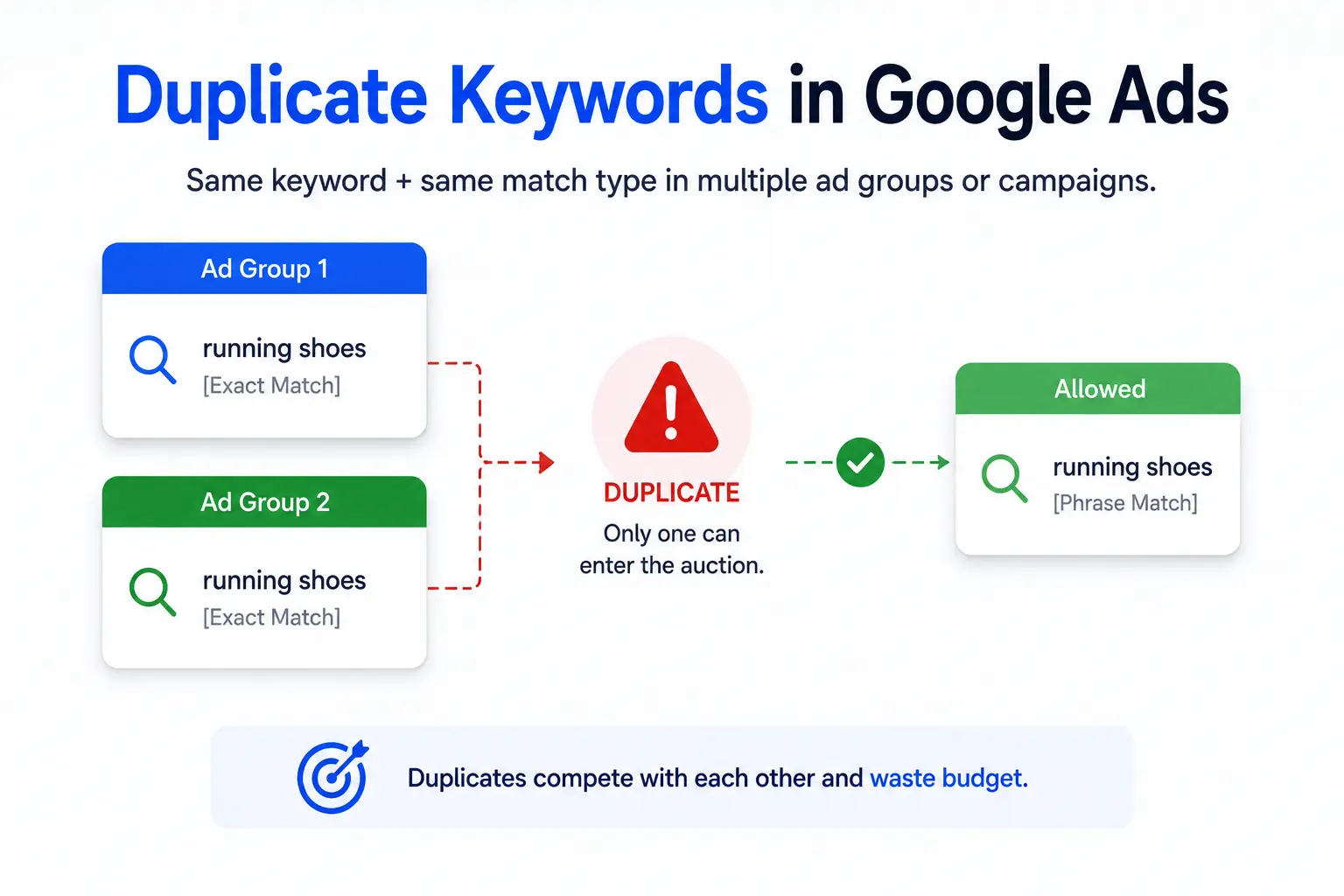
A duplicate keyword is the same word or phrase, using the same match type, added to more than one ad group or campaign in the same account. Google Ads only allows one instance of a keyword and match type combination to actually enter the auction at a time, so any duplicates you’ve added are sitting idle or actively competing with each other behind the scenes.
Examples
- “running shoes” (exact match) added to both an Ad Group A and an Ad Group B in the same campaign.
- “buy running shoes online” (phrase match) placed in a Brand campaign and a separate Shopping-support campaign.
- The same broad match keyword added twice by two different account managers who weren’t aware of each other’s changes.
Duplicate vs Redundant Keywords
A redundant keyword isn’t identical, it’s just unnecessary. “Running shoes” (broad match) and “running shoes for men” (broad match) aren’t duplicates, but the broader term may already cover the narrower one, making the second keyword redundant rather than truly duplicated. Duplicates are exact matches on both text and match type. Redundancy is a judgment call about coverage.
Duplicate vs Keyword Overlap
Keyword overlap happens when different keywords, often different match types, can both be triggered by the same search query. “Running shoes” (broad) and “running shoes” (exact) aren’t duplicates by Google’s definition, since the match types differ, but they still overlap in the queries they can win. Overlap is worth reviewing, but it isn’t cleaned up the same way as a true duplicate.
Why Duplicate Keywords Matter
Internal Competition Explained
When the same keyword and match type exist in two places, only one of them is eligible to serve for any given auction, decided by Google’s internal system rather than by you. You lose control over which ad group, which ad copy, and which landing page actually gets shown, which makes testing and optimization unreliable.
Reporting Issues
Impressions, clicks, and conversions for a duplicated keyword often end up attributed to whichever instance Google happened to select, not necessarily the one you intended to track. This skews ad group and campaign-level reporting, making it look like one ad group is underperforming when the traffic actually went somewhere else.
Budget Allocation
Budget pacing tools and campaign-level budgets assume that traffic for a keyword flows to the campaign you assigned it to. Duplicates break that assumption, letting spend drift toward whichever campaign wins the internal selection, sometimes the one with the lower daily budget or the less profitable landing page.
Smart Bidding Impact
Smart Bidding strategies like Target CPA and Target ROAS learn from conversion data at the campaign and ad group level. Split data from a duplicated keyword means each instance has a thinner history to learn from, which slows down how quickly the algorithm finds a stable bid.
Quality Score Considerations
Quality Score is calculated per keyword instance, factoring in expected CTR, ad relevance, and landing page experience. A duplicated keyword with split traffic accumulates less click history in each location, which can hold Quality Score lower than it would be if all the data were consolidated in one place.
How Google Handles Duplicate Keywords
Ad Rank Selection
When a search query matches more than one identical keyword and match type in your account, Google’s system picks a single instance to enter the auction, generally the one with the strongest Ad Rank at that moment. The other instance sits out of that specific auction entirely.
Match Type Priority
Google does not treat different match types of the same word as duplicates. An exact match, phrase match, and broad match version of “running shoes” can all exist and all compete for the same query, with exact match generally winning the selection when it’s eligible, since it signals the closest intent match.
Auction Behavior
Your own duplicate keywords never bid against each other in a literal price-war sense, since Google filters true duplicates out before the auction runs. The practical cost isn’t wasted ad spend on a self-bidding war, it’s the data fragmentation and lost control described above.
Common Myths
- Myth: duplicate keywords double your chances of showing an ad. Reality: only one instance is ever eligible per auction.
- Myth: duplicates always raise your costs directly. Reality: the cost is indirect, through weaker data and slower bidding optimization.
- Myth: keyword overlap and keyword duplication are the same problem. Reality: they require different fixes.
- Myth: Google will automatically clean up duplicates for you. Reality: Google Ads Editor can find them, but removal is a manual decision.
How to Find Duplicate Keywords
Using Google Ads Editor
Google Ads Editor is the fastest way to run a full account-wide duplicate check, since it works offline against a downloaded copy of your account and includes a built-in duplicate finder.
Download & Install
Install Google Ads Editor from Google’s official site and sign in with the same credentials used for your Google Ads account.
Sync Your Account
Open the account inside Editor and select “Get Recent Changes” to pull the latest live data. Working from a stale copy risks reviewing keywords that have already been changed or paused in the live account.
Open “Find Duplicate Keywords”
Under the Tools menu, select the duplicate keyword finder. It scans every campaign and ad group in the account you’ve synced and lists every keyword and match type combination that appears more than once.
Configure Search Options
Choose whether to search within a single campaign, across selected campaigns, or across the entire account, and whether to ignore differences in match type. For most cleanup projects, running the account-wide scan first gives the clearest picture before narrowing down.
Review Results
Editor lists each duplicate group with its ad group and campaign location. Export this list before making any changes, so you have a record of exactly what existed before cleanup started.
Using Google Ads Interface
Inside the standard Google Ads interface, go to the Keywords page, add the Campaign and Ad Group columns, then sort alphabetically by keyword text. Duplicates surface as adjacent rows with matching text and match type, though this method is slower and easier to miss on large accounts than Editor’s dedicated tool.
Manual Audit
For smaller accounts, exporting the keyword list to a spreadsheet and using a formula like COUNTIF against the keyword-plus-match-type combination flags duplicates quickly. This approach also makes it easy to pull in performance columns like CTR and conversion rate for the decision step that follows.
How to Remove Duplicate Keywords
Review Performance Metrics
Before removing anything, pull at least 90 days of history for each duplicate instance: impressions, clicks, CTR, conversion rate, CPA, and Quality Score. Removing a keyword deletes its individual performance history from that ad group, so this step is your only chance to compare the two instances side by side.
Decide Which Keyword to Keep
Keep the instance sitting in the ad group with the tighter theme, the more relevant ad copy, and the landing page that best matches search intent for that term. Performance history matters, but it shouldn’t override a better structural fit if the account is being reorganized.
Delete or Pause?
Pausing keeps the keyword and its history intact but invisible, useful when you’re not fully certain about the decision. Deleting removes it permanently. For a genuine duplicate where you’ve already chosen which instance to keep, deleting the other one is cleaner and avoids future confusion during audits.
Apply Changes
In Google Ads Editor, select the duplicate rows to remove and use “Make multiple changes” or delete them directly from the account map. Editor lets you review every pending change in one list before anything goes live, which is safer than editing keyword by keyword inside the browser interface.
Post Changes to Google Ads
Once the change list looks correct, click Post to push the updates to the live account. Changes typically take effect within minutes, and Editor keeps a change history log you can reference if anything needs to be reversed.
Which Duplicate Keyword Should You Keep?
When performance data is close between two instances, use these factors in order to break the tie.
Highest CTR
A meaningfully higher CTR signals the ad copy in that ad group resonates better with people searching that term, which also supports a stronger Quality Score going forward.
Highest Conversion Rate
Clicks matter less than what happens after them. The instance converting visitors at a higher rate is generally paired with the more relevant landing page.
Highest Quality Score
A higher Quality Score usually means lower costs per click going forward for the same position, so it’s worth weighing even when CTR and conversion rate are close.
Lowest CPA
If the account is optimizing toward a cost-per-acquisition target, keep the instance already closer to that number rather than the one with the better top-line metrics alone.
Highest ROAS
For ecommerce accounts tracking revenue, return on ad spend often overrides CPA as the deciding factor, since a slightly higher CPA can still be worth keeping if average order value is stronger.
Strongest Search Intent Match
When historical data is thin or inconclusive, fall back on which ad group’s theme, ad copy, and landing page most directly answer what someone searching that term is looking for.
Duplicate Keywords Across Campaigns
When They’re Acceptable
A small number of intentional exceptions exist where the same keyword genuinely needs to live in more than one place, and these are addressed with campaign-level controls rather than treated as errors to remove.
When They’re Harmful
Outside of the exceptions below, duplicates across campaigns cause the same reporting and budget problems as duplicates within a single campaign, often with a bigger impact since campaign-level budgets and bid strategies are involved rather than just ad groups.
Brand Campaign Exceptions
Branded terms are sometimes duplicated on purpose between a dedicated Brand campaign and a general campaign, then separated using campaign-level negative keywords so only the Brand campaign actually serves. This is a controlled setup, not an accidental duplicate.
Geographic Campaign Exceptions
Accounts running separate campaigns per region sometimes need the same keyword in each one. Location targeting settings, not the keyword list, should be doing the separating here, so it’s worth confirming each campaign’s location settings are actually restricting delivery as intended.
Duplicate Match Types Explained
Broad Match
Broad match casts the widest net, matching related searches beyond the exact words entered. It generates the most volume and the most variability in relevance, so it needs closer monitoring for wasted spend and requires strong negative keyword lists.
Phrase Match
Phrase match requires the meaning of the phrase to be present in the query, giving more control than broad match while still capturing reasonable variation in word order and surrounding terms.
Exact Match
Exact match targets the closest possible variations of a specific query, giving the tightest control over which searches trigger the keyword and typically the highest CTR and conversion rate of the three types.
Mixed Match Strategies
Running all three match types for a core keyword isn’t duplication, since match type is part of what makes a keyword unique. It becomes a problem only when the account isn’t actively using negative keywords to prevent broad and phrase match from cannibalizing traffic that exact match should be capturing.
| Match Type | Typical Use | Control Level |
| Broad Match | Discovery and volume, paired with strong negatives | Low |
| Phrase Match | Balanced reach with meaning-based relevance | Medium |
| Exact Match | High-intent terms with proven performance history | High |
Best Practices After Removing Duplicates
Restructure Ad Groups
Use the cleanup as an opportunity to group keywords by tight theme rather than simply deleting duplicates and leaving the existing structure untouched. Ad groups built around a single, specific theme make future duplication far less likely.
Improve Landing Pages
If the keyword you kept was chosen partly for its landing page, confirm that page still matches the exact intent of the term now that it’s the sole entry point for that traffic.
Add Negative Keywords
Add the removed keyword as a negative in the ad group it was deleted from, when appropriate, to make sure broad or phrase match variants in that ad group can’t accidentally start matching the same query again.
Update Bidding Strategy
Consolidated keywords bring more complete data to whichever campaign remains. Revisit Target CPA or Target ROAS values for that campaign once a few weeks of consolidated data come in, rather than assuming the old bid targets still fit.
Refresh Ad Copy
Update the surviving ad group’s ad copy to speak directly to the consolidated keyword theme now that it’s carrying the full weight of that term’s traffic.
Common Mistakes to Avoid
Deleting High Performers
Deleting the instance with better metrics simply because it happens to be in the ad group being reorganized undoes the point of the cleanup. Always compare performance before deciding which one goes.
Ignoring Search Intent
Keeping a keyword purely on past metrics while ignoring which ad group actually fits the term’s intent sets up the same relevance problems the cleanup was meant to fix.
Forgetting Negative Keywords
Skipping the negative keyword step after deletion leaves the door open for the same overlap to reappear the next time broad or phrase match keywords are added to the account.
Removing Data Too Quickly
Making the removal decision on a week or two of data risks acting on noise rather than a real performance trend. Waiting for a fuller data window, generally 30 to 90 days depending on traffic volume, produces a more reliable comparison.
Ignoring Conversion History
CTR alone doesn’t tell the full story. A keyword instance with a lower CTR but a meaningfully higher conversion rate may be the one worth keeping, especially in accounts optimizing for cost per acquisition.
Real Example: Cleaning a Google Ads Account
The scenario below illustrates a typical mid-size account cleanup and the kind of results this process tends to produce. Figures are illustrative rather than pulled from a specific named client.
Before Cleanup
A 40-campaign ecommerce account had grown over three years with multiple managers adding keywords independently. An Editor scan turned up 210 duplicate keyword instances spread across 28 ad groups, most concentrated in the account’s oldest and highest-spending campaigns.
Duplicate Audit
Ninety days of performance history were pulled for every duplicate pair. Roughly 60 percent of the duplicates were near-identical performers, meaning the decision came down to ad group theme and landing page fit rather than a clear metrics winner.
Cleanup Process
Using Editor’s bulk tools, the weaker or less relevant instance from each pair was deleted, negative keywords were added to the losing ad groups, and thirty-one ad groups were restructured around tighter keyword themes over a two-week rollout.
Results After 30 Days
| Metric | Before | After 30 Days |
| Average CPA | $38.20 | $31.75 |
| Account Quality Score (avg) | 6.1 | 6.8 |
| Wasted spend on overlapping terms | ~9% of budget | ~2% of budget |
Duplicate Keyword Audit Checklist
| Run through this before closing out a cleanup project:Sync the account and run Google Ads Editor’s duplicate keyword finder.Export the full duplicate list before making any changes.Pull 90 days of performance data for each duplicate pair.Decide which instance to keep using CTR, conversion rate, Quality Score, CPA, and intent fit.Delete or pause the losing instance and add it as a negative where appropriate.Post changes in Editor and confirm they’ve gone live.Update ad copy, landing pages, and bid targets on the consolidated keyword.Re-check the account for new duplicates 30 days later. |
Recommended Google Ads Tools
Google Ads Editor
The core tool for this entire process. Beyond duplicate detection, it supports bulk edits, offline review, and a full change history for every account you manage.
Keyword Planner
Useful before adding new keywords post-cleanup, to check whether a term you’re considering already has close variants elsewhere in the account’s search volume data.
Google Analytics 4
Cross-checking landing page behavior in GA4 helps confirm which ad group’s destination page genuinely performs better once traffic is consolidated onto a single keyword instance.
Looker Studio
Build a recurring keyword audit dashboard in Looker Studio pulling directly from your Google Ads data source, so duplicate risk is visible on an ongoing basis instead of only during periodic manual reviews.
Frequently Asked Questions
Do duplicate keywords hurt Quality Score?
Indirectly, yes. Splitting clicks and impressions across two instances of the same keyword means each one builds a thinner performance history, which can keep Quality Score lower than it would be if all the data were consolidated in one place.
Can duplicate keywords trigger the same ad twice in one search?
No. Google Ads filters out true duplicates before the auction runs, so only one instance of a given keyword and match type is ever eligible to serve for a specific search.
Should I use the same keyword across a Brand and a general campaign?
Only with campaign-level negative keywords in place to control which campaign actually serves it. Without that control, the two instances compete for the same internal selection and split reporting.
Is keyword overlap the same problem as keyword duplication?
No. Duplication means identical text and match type in two places. Overlap means different keywords or match types that can still be triggered by the same search query. Overlap is addressed with match type strategy and negatives, not deletion.
Do duplicate negative keywords cause problems too?
They’re generally harmless, since a negative keyword’s job is only to block matching, but cleaning them up during an audit still keeps the account easier to read and maintain.
How often should I audit an account for duplicates?
Monthly for accounts with multiple people making changes, quarterly for smaller, single-manager accounts. Any time a new manager or agency takes over an account is also a good trigger for a full audit.
Conclusion
Duplicate keywords rarely cause an obvious problem you can point to in a single report, which is exactly why they tend to sit unaddressed for years in growing accounts. A structured audit using Google Ads Editor, a clear-eyed comparison of performance data, and a bit of cleanup discipline afterward, negatives, ad group structure, refreshed ad copy, is enough to close the gap. Run the checklist above, and put a recurring audit on the calendar so the problem doesn’t quietly rebuild itself.