If you’ve searched for APK downloads or ways to earn money online lately, chances are Apkek.org showed up in your results. It’s one of dozens of tech content sites competing for the same traffic, and its pages cover everything from app reviews to side-hustle guides.
But before you download anything or trust its earning advice, it’s worth asking the obvious question: is Apkek.org actually safe and legitimate? I dug into the site’s structure, its public information, and how it compares to established platforms to give you an honest answer.
What Is Apkek.org?
Platform overview
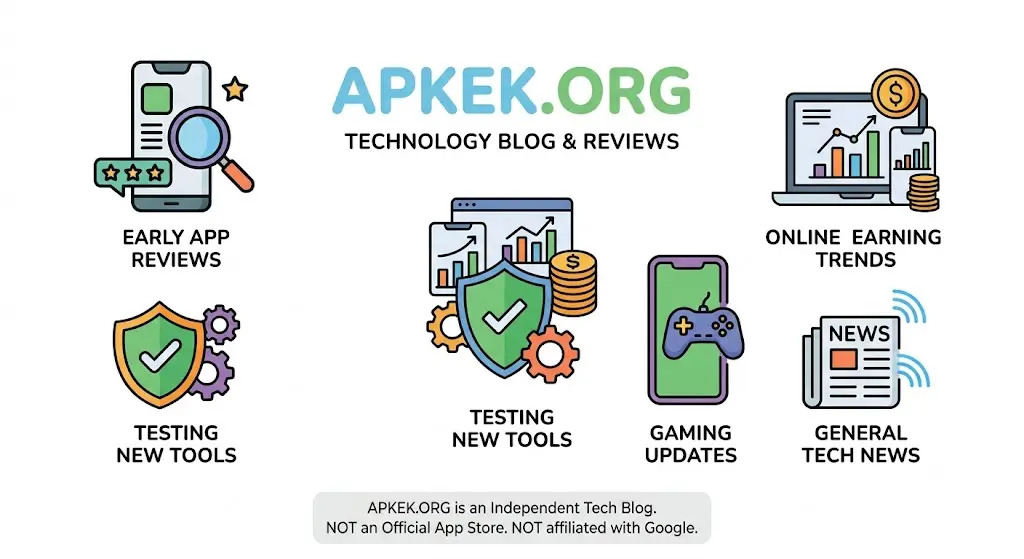
Apkek.org positions itself as a technology blog rather than an official app store. Its “About” messaging describes a team that tests new tools, writes reviews, and publishes early on emerging apps and online-earning trends.
In practice, it functions like most niche content sites: articles built around search-friendly topics, organized into categories like Android apps, online earning, gaming, and general tech news. It isn’t affiliated with Google, and it isn’t a registered app marketplace.
Who is it designed for?
The site targets everyday Android users looking for app recommendations, people curious about side income ideas, and casual readers who want quick tech explainers. It’s not built for developers or enterprise IT. There’s no SDK documentation, no developer console, nothing you’d expect from a professional distribution platform.
What type of content does it publish?
Coverage spans a wide range: reviews of Android apps (entertainment, utility, productivity), articles about online earning methods (affiliate marketing, content writing, short-video monetization), and general tech updates. Some pages also touch on insurance-related topics, which is unusual for a site that started as an app-focused blog and suggests it’s expanding into broader “make money and use tech” content.
How Does Apkek.org Work?
APK downloads
This is where things get murky. Some pages on the site frame Apkek.org purely as an informational resource that writes about apps without hosting installable files. Other content associated with the site describes it as a direct APK distribution point, offering package files you install manually.
That inconsistency matters. A legitimate download platform should be unambiguous about whether it hosts files or not. If you land on a page offering an actual APK file, treat it the same way you’d treat any third-party download: verify it independently before installing.
Online earning app recommendations
Apkek.org publishes guides on earning money through apps, think reward apps, ad-watching platforms, and reselling tools. These articles read like general roundups rather than tested, first-hand reviews with verifiable payout data. That’s common across this content category, so it’s not unique to Apkek.org, but it does mean you should treat earnings claims as unverified until you check them yourself.
Tech news and reviews
The tech news side covers OS updates, app feature rollouts, and general industry commentary. It’s aggregation-style content, summarizing what’s already been reported elsewhere rather than breaking original stories.
Key Features of Apkek.org
APK resources
Categorized listings for different app types, with articles describing features, use cases, and (in some cases) direct links.
App recommendations
Curated lists organized by purpose, such as live TV apps or ringtone makers, aimed at helping readers narrow down options quickly.
Online earning content
A steady stream of “how to make money” articles covering freelance writing, social media monetization, and app-based earning.
Website navigation
Reviewers generally describe the site as easy to browse, with clear categories and a simple layout. Clean navigation is a genuine usability plus, but it says nothing about content accuracy or file safety; those are separate questions.
Is Apkek.org Safe?
This is the core Apkek.org question, and the honest answer is: it depends on what you mean by “safe.”
Website security
Browsing the site to read articles carries relatively low risk, similar to visiting any content blog. The bigger risk category is anything you download from it, not the reading experience itself.
HTTPS and SSL
Public reviews note that Apkek.org uses standard HTTPS encryption, which protects data in transit between your browser and the server. That’s a baseline expectation for any modern website in 2026, not a special safety guarantee. HTTPS tells you the connection is encrypted; it tells you nothing about whether a downloadable file is safe.
APK download safety
If you download an APK file from the site, you’re relying entirely on that site’s file-vetting process, which isn’t independently verifiable from the outside. Unlike Google Play, there’s no published app-review pipeline, no developer verification system, and no public malware-scanning report you can check. That doesn’t automatically mean a file is unsafe but it does mean the burden of verification falls on you.
Google Play Protect compatibility
Sideloaded APKs, from Apkek.org or any third-party source, get scanned by Google Play Protect if it’s enabled on your device Google’s built-in malware-checking service for Android (more on Play Protect from Google’s official Android documentation). This is one of the simplest safety nets available and should be turned on regardless of where you download from.
Privacy considerations
There’s limited public information about what data Apkek.org collects, how long it’s retained, or whether it’s shared with advertising partners. In the absence of a clear, detailed privacy policy, the safest assumption is that standard ad-supported blog tracking applies cookies, analytics, and possibly ad-network data sharing.
Is Apkek.org Legitimate or a Scam?
“Legitimate” and “scam” aren’t the same axis. A site can be a real, non-fraudulent blog while still being low-authority and not fully transparent. Based on available public information, Apkek.org falls closer to that middle ground than to either extreme.
Ownership transparency
Several independent write-ups on Apkek.org note that its ownership and operator details aren’t clearly published, and domain registration information is private. Private WHOIS registration isn’t proof of bad intent; plenty of legitimate small publishers use it for personal privacy but it does mean you can’t easily verify who’s behind the content or hold anyone accountable for accuracy.
Trust signals
Standard trust signals you’d look for an editorial team page with named, verifiable writers, a detailed corrections policy, third-party security audits, or citations to primary sources aren’t strongly present. The site does have working HTTPS and a functioning, navigable structure, which are minimum-bar signals rather than strong ones.
Red flags to watch for
Be cautious of: inconsistent claims about whether the site hosts files directly, earning guides that promise specific income figures without evidence, and any download prompt that pushes you to disable security settings to proceed. That last one, especially, is a common pattern across low-trust APK sites generally, not just this one.
User feedback and reputation
There’s no large, established body of independent user reviews (on places like Trustpilot or dedicated forums) that would let you gauge real-world satisfaction or complaint patterns. Communities like r/androidapps on Reddit are a reasonable place to search for firsthand user experiences with lesser-known APK sites before you commit to downloading anything.
Pros and Cons of Apkek.org
Pros:
- Clean, easy-to-navigate site structure
- Covers a genuinely useful range of topics (apps, earning, tech news) in one place
- Standard HTTPS encryption in place
- Regularly updated content
Cons:
- Limited transparency about site ownership and operators
- Inconsistent messaging about whether it hosts APK files directly
- No visible independent security auditing or file-verification process
- Earning-related claims aren’t independently verified
- Thin privacy policy detail
How to Safely Download APK Files
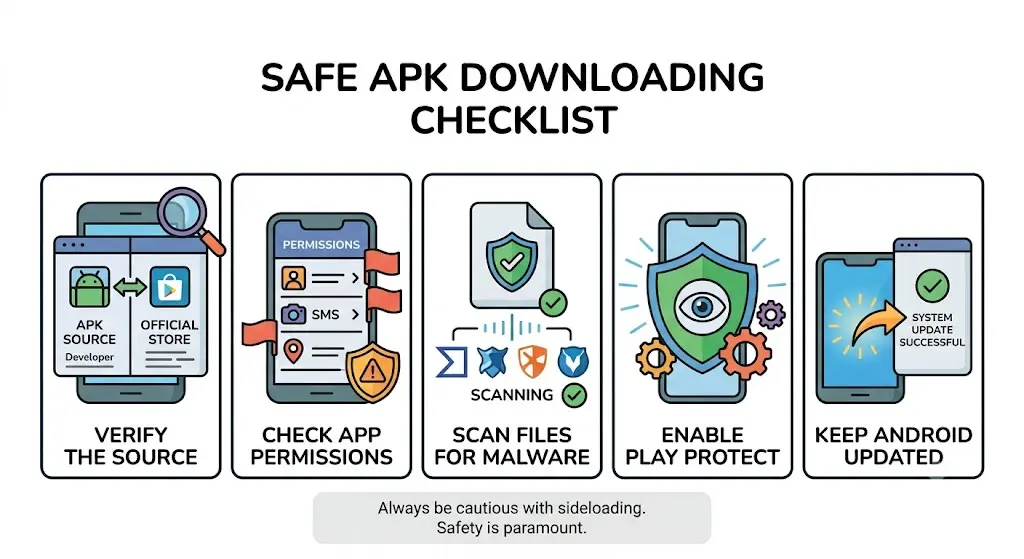
Whether you’re using Apkek.org or any third-party source, the same safety checklist applies.
1. Verify the source
Cross-check the app name and developer against the official Google Play listing, even if you’re not downloading from Play. If the developer name doesn’t match, that’s an immediate red flag.
2. Check app permissions
Before installing, review what the app is asking to access. A flashlight app requesting contacts or SMS permissions is a classic warning sign worth taking seriously.
3. Scan files for malware
Upload the APK to a multi-engine scanner like VirusTotal before installing. It checks the file against dozens of antivirus engines and takes less than a minute.
4. Enable Play Protect
Keep Google Play Protect turned on. It scans apps on your device, including sideloaded ones, and flags anything that matches known malware patterns.
5. Keep Android updated
Security patches close vulnerabilities that malicious APKs try to exploit. Running an outdated OS version increases your risk regardless of where the app came from.
Apkek.org vs Other APK Websites
1. Apkek.org vs APKMirror
APKMirror has a well-documented verification process, including developer signature checks, and is widely cited by the Android community as one of the more trustworthy third-party sources. Apkek.org doesn’t publish a comparable verification process, which puts it a clear step behind on transparency.
2. Apkek.org vs APKPure
APKPure operates its own app with a broader user base and has years of public reputation (positive and negative) to draw on. Apkek.org is smaller and newer to most readers’ radar, with far less independent scrutiny available.
3. Apkek.org vs Uptodown
Uptodown is a long-running, multi-language APK repository with an established editorial and antivirus-scanning process for listed apps. Apkek.org’s content-first, blog-style approach means it hasn’t built out that same infrastructure.
4. Apkek.org vs Google Play Store
This isn’t really a fair fight. Google Play enforces developer verification, automated and manual app review, and Play Protect scanning at scale. Any third-party site, Apkek.org included, is inherently a higher-risk category simply by being outside that ecosystem; that’s true of sideloading in general, not a knock specific to this one site.
Common Risks of Downloading APK Files
Sideloading APKs from any unofficial source carries a few recurring risks: bundled malware or spyware disguised as legitimate apps, outdated versions with unpatched security holes, modified “cracked” apps that skip Play’s review entirely, and fake apps that impersonate popular brands to harvest login credentials. None of these are unique to Apkek.org; they’re inherent to the sideloading model itself, as explained in general terms on Wikipedia’s overview of sideloading.
Tips for Staying Safe When Installing APKs
Stick to a short routine every time: confirm the developer matches the official app, scan the file before opening it, review permissions during install, keep Play Protect on, and avoid apps that ask you to disable existing security features to run. If an app pushes back hard against any of these checks, that pushback is itself the warning sign.
Best Alternatives to Apkek.org
If you want app information with stronger transparency, consider:
- APKMirror — for verified APK downloads with signature checks
- Uptodown — for a long-established, antivirus-scanned library
- Google Play Store — for the highest safety baseline overall
- XDA Developers — for community-vetted app and ROM discussions, including active threads on XDA’s forums
- Official developer websites — often the most direct and verifiable download source for a specific app
Frequently Asked Questions
1. Is Apkek.org free?
Yes, based on available information the site doesn’t charge for access to its articles or listed content. Like most ad-supported blogs, it likely generates revenue through advertising rather than subscriptions.
2. Can APK files contain malware?
Yes. Any APK file, regardless of source, can be modified to include malicious code. Official app stores reduce this risk through automated scanning and developer verification, but third-party sites vary widely in how much vetting they actually do.
3. Is sideloading legal?
Generally yes, in most countries sideloading apps onto your own device is legal. It may violate a specific app’s terms of service, and installing pirated or cracked software separately raises copyright issues, but the act of sideloading itself isn’t illegal in most jurisdictions.
4. Can I uninstall APK apps safely?
Yes. Sideloaded apps uninstall the same way as any Play Store app through your device’s app settings. If you’re worried about leftover files, a reputable cleaner app or a manual check of your storage folders can catch anything the uninstaller misses.
5. Does Apkek.org require registration?
No, based on publicly available descriptions of the site, you can read articles without creating an account. Registration requirements, if any exist for specific interactive features, aren’t a prominent part of the site’s public-facing experience.
Conclusion
So, is Apkek.org safe and legitimate? It’s not flagged as an outright scam, but it’s also not a site with the transparency, verification process, or track record that would earn a strong recommendation. Treat Apkek.org the way you’d treat any mid-sized, ownership-light content site: fine for general reading, but not a source you should trust blindly for downloads or financial decisions.
If you do use Apkek.org, run every APK file through an independent scanner first, keep Play Protect active, and cross-check any earning claims before acting on them. And if you want a genuinely lower-risk experience, the established alternatives above APKMirror, Uptodown, and the Play Store itself currently offer more verifiable safety records than Apkek.org does.