Most websites don’t fail because of bad content they fail because search engines can’t find, understand, or navigate them properly. And more often than not, the root cause comes down to two things: poor URL structure and messy site architecture. If you’ve ever wondered why a competitor with less content is outranking you, or why certain pages on your site never seem to get indexed this is likely where the problem starts.
we’re going to break down exactly what URL structure and site architecture mean, why they matter for SEO, and most importantly what you can do right now to improve both. No jargon walls, no fluff. Just practical, actionable guidance backed by how Google actually works.
1. What Is URL Structure & Site Architecture?

URL Structure Explained
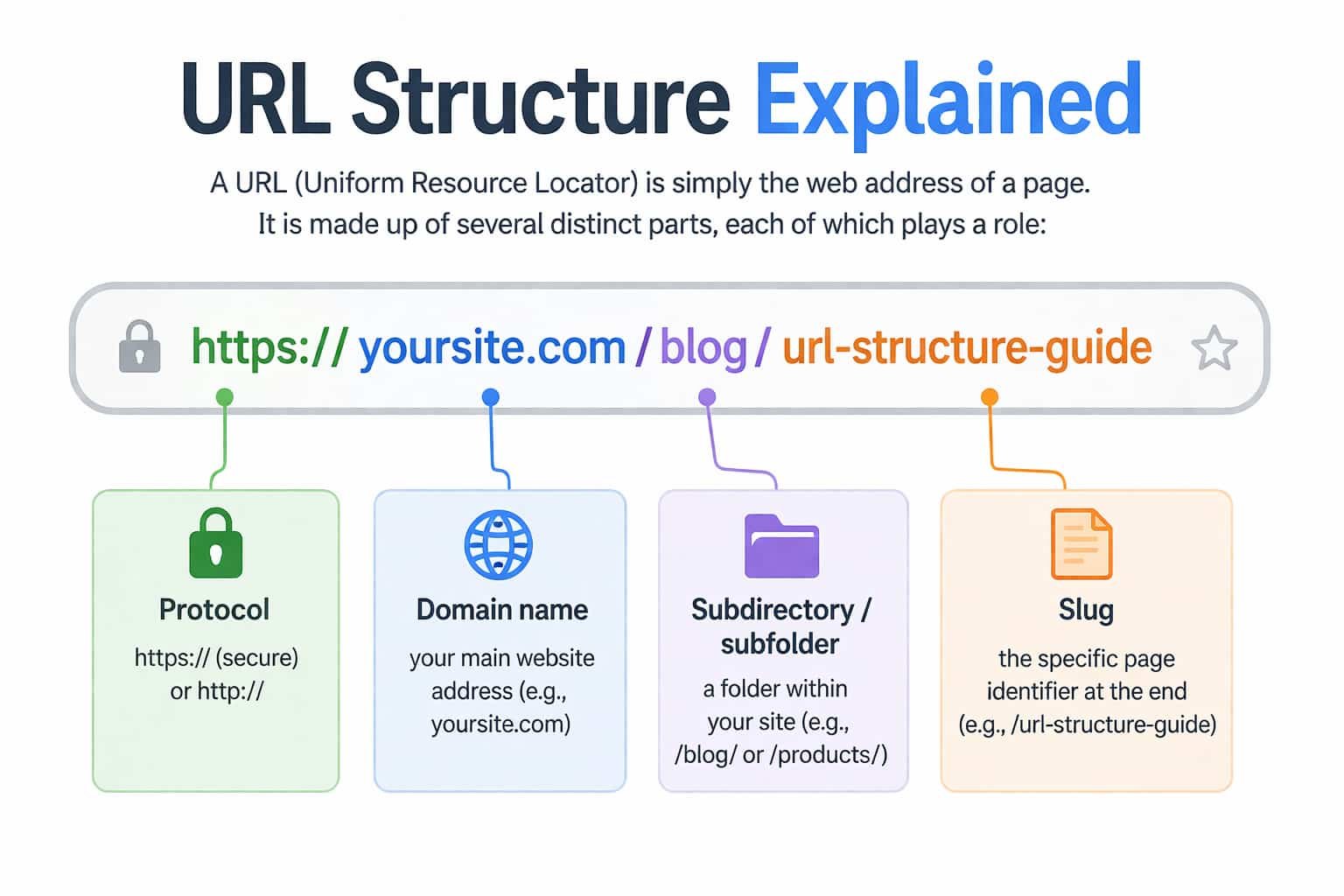
A URL (Uniform Resource Locator) is simply the web address of a page. But it is made up of several distinct parts, each of which plays a role:
- Protocol https:// (secure) or http://
- Domain name your main website address (e.g., yoursite.com)
- Subdirectory / subfolder a folder within your site (e.g., /blog/ or /products/)
- Slug the specific page identifier at the end (e.g., /url-structure-guide)
So a well-structured URL might look like: https://yoursite.com/seo/url-structure-guide
Every part of that URL is readable, logical, and descriptive. Compare that to something like: https://yoursite.com/?p=2847&ref=home — which tells nobody anything.
Site Architecture Explained
Site architecture refers to how all the pages on your website are organized, linked, and presented both to visitors and to search engine crawlers. Think of it like the floor plan of a building. A good floor plan makes it easy to find any room quickly. A bad one leaves you wandering in circles.
At a high level, site architecture covers: how your content is grouped into categories, how pages link to each other internally, how deep users need to go to reach any given page, and how your navigation menus are structured.
Together, URL structure and site architecture form the backbone of technical SEO. Get them right and everything else content, links, speed becomes far more effective.
2. Why URL Structure & Site Architecture Matter for SEO
It’s tempting to think of URLs as just addresses labels that don’t have much impact on how well a page ranks. But that undersells their importance significantly. Here’s why they matter:
Crawlability & Indexing
Google sends bots (called Googlebot) to crawl your site by following links from page to page. If your site architecture is poorly organized with orphaned pages, broken links, or pages buried too deep the crawler may never find all your content. Pages it can’t find can’t be indexed. Pages that aren’t indexed can’t rank.
A clean, logical site structure acts like a well-lit road map for Googlebot. It makes sure every important page is reachable and gets crawled regularly.
Crawl Budget
Google allocates a certain amount of crawl activity to each site this is known as crawl budget. If your site wastes it on low-value pages (duplicates, thin content, junk URLs from session IDs and parameters), your important pages get crawled less frequently. A well-structured site uses crawl budget efficiently.
Internal Linking & Page Authority
Here’s something Google’s John Mueller has said clearly: the number of slashes in a URL does not tell Google how important a page is. It’s the internal linking structure that matters. Pages that receive more internal links from high-authority pages are treated as more important, regardless of how deep they sit in the URL path.
This is why thoughtful internal linking not just a clean URL is what truly determines page hierarchy in Google’s eyes.
User Experience & Click-Through Rate
Users make snap judgments in search results. A clear, readable URL tells someone immediately what to expect before they click which directly influences click-through rate (CTR). A URL like /seo/url-structure-guide is far more reassuring than /index.php?id=44921&cat=7.
3. Types of Site Architecture
Flat Architecture (Recommended)
A flat site architecture is one where any page on your site can be reached from the homepage in four clicks or fewer. This is generally the best setup for SEO because:
- Link authority flows efficiently from high-authority pages (like your homepage) down to content pages
- Google can crawl the full site with minimal resources
- Users can find what they need quickly
Example structure: Homepage -> Category page -> Individual post or product. Simple, clean, effective.
Deep/Hierarchical Architecture (Use With Care)
A deep architecture buries pages many clicks away from the homepage. This is common on large ecommerce sites that haven’t been carefully planned. It hurts SEO because pages buried deep receive less crawl attention and less internal link authority meaning they’re harder to rank.
Silo / Topic Cluster Structure
The silo model groups related content into topical clusters. You have a pillar page covering a broad topic, then multiple supporting pages diving into subtopics all interlinked. This structure signals topical authority to Google and is particularly powerful for content-heavy sites and blogs.
For example, a pillar page on ‘SEO Basics’ would link out to individual posts on keyword research, on-page SEO, link building and all of those posts would link back to the pillar.
4. URL Structure Best Practices
Let’s get into the specifics. Here are the URL structure rules that actually matter — and why each one exists.
Keep URLs Short and Descriptive
Shorter URLs are easier to read, share, and remember. Strip out unnecessary words. Instead of /blog/how-to-improve-the-url-structure-of-your-website-for-seo/, go with /url-structure-seo/. You want every word to earn its place.
Use Hyphens, Not Underscores
Google treats hyphens as word separators. So /url-structure/ is read as two words: ‘url’ and ‘structure.’ Underscores, on the other hand, join words together — so /url_structure/ is read as a single word: ‘urlstructure.’ Always use hyphens.
Include Your Target Keyword in the Slug
The slug (the last part of the URL) should reflect the primary keyword you’re targeting. While Google’s own John Mueller has said keywords in URLs are a minor ranking factor, they still provide context and improve CTR. Don’t stuff keywords, but do be intentional.
Use Lowercase Letters Only
URLs are case-sensitive on most servers. /URL-Structure/ and /url-structure/ could be treated as two separate pages, creating duplicate content issues. Stick to all lowercase across the board.
Avoid Dynamic Parameters Where Possible
Dynamic URLs like /products?color=red&size=M&sort=price-asc create enormous numbers of unique URLs pointing to similar content. This confuses crawlers and can tank your crawl budget. Use static, descriptive URLs instead.
Use Subfolders, Not Subdomains
Subdomains (like blog.yoursite.com) are treated by Google as separate entities from your main domain. This splits your authority. Subfolders (yoursite.com/blog/) keep all authority consolidated under one domain. Unless you have a very strong reason, use subfolders.
Reuse Seasonal URLs Year Over Year
If you have a page for Black Friday deals, don’t create /black-friday-2024/ and then /black-friday-2025/ next year. Use a single, evergreen URL like /black-friday/ and update the content each year. All the links and authority built up around that URL carry forward instead of starting from zero every season.
Avoid Dates in URLs (For Most Content)
Adding a year or date to a URL (/2023/seo-guide/) makes content look outdated immediately, even if you update it. Evergreen URLs hold value longer. The exception is news content, where publication date is part of the content’s identity.
5. How to Build an SEO-Friendly Site Architecture
Building a solid site architecture isn’t just a technical task — it starts with strategy. Here’s a step-by-step approach:
- Start with keyword research — Map your target keywords to page types. What are the broad topics? What are the subtopics? This becomes the blueprint for your categories and content pages.
- Group content into logical categories — Each category should represent a clear topic or product group. Avoid overlap.
- Map the hierarchy visually before building — Sketch it out using a tool like Miro or a simple spreadsheet. You want to see the full structure before writing a single URL.
- Set up navigation menus linking homepage to categories to pages — Your main navigation should link directly to your top-level categories. Category pages should link to individual content or product pages.
- Build internal links with keyword-rich anchor text Don’t just say ‘click here.’ Link using descriptive text like ‘learn more about URL structure best practices.’
- Add breadcrumbs Breadcrumbs improve user navigation and provide structured data signals to Google about page hierarchy. Use schema markup for maximum benefit.
- Create and submit an XML sitemap — A sitemap tells Google every page you want indexed. Submit it via Google Search Console and update it whenever you add or remove significant pages.
The golden rule: any page on your site should be reachable within four clicks from the homepage. If it takes more than that, the page is probably too deep.
6. Common URL Structure Mistakes to Avoid
Even experienced site owners make these mistakes. Here’s what to watch out for:
- Keyword stuffing in the slug /seo-seo-url-seo-structure-seo/ looks manipulative, confuses users, and provides no benefit
- Dynamic URLs with multiple parameters — creates massive duplicate content problems and wastes crawl budget
- Mixing www and non-www, or HTTP and HTTPS pick one canonical version and 301 redirect everything else
- Changing URLs unnecessarily every URL change breaks existing backlinks unless you set up redirects. If a URL is working, leave it alone.
- Deep nesting pages more than 4-5 clicks from the homepage are treated as less important by both users and Google
- Special characters in URLs avoid ?, &, !, *, @, and spaces (which become %20). These cause indexing problems.
- No 301 redirects after URL changes — if you do change a URL, always set up a 301 redirect from old to new immediately
7. Internal Linking: The Hidden Engine of Site Architecture
Here’s something that surprises a lot of people: Google cares more about your internal linking structure than the number of subfolders in your URL. Mueller confirmed this directly — what matters is how quickly Google can get from your homepage to any given page by following links.
That means internal linking isn’t just an SEO afterthought. It’s one of the most powerful tools you have for shaping how Google understands your site.
Hub-and-Spoke Internal Linking
The hub-and-spoke model works perfectly alongside a silo architecture. Your pillar page (hub) links out to all related supporting posts (spokes), and each spoke links back to the hub. This creates a tightly interconnected cluster that signals topical depth to search engines.
Best Practices for Internal Links
- Use descriptive anchor text not ‘click here’ but ‘complete guide to site architecture’
- Link from high-traffic pages to pages you want to rank pass authority intentionally
- Add ‘related posts’ or ‘keep learning’ sections at the bottom of articles
- Audit internal links regularly broken internal links are crawl dead ends
- Add breadcrumb navigation and mark it up with schema.org BreadcrumbList
8. URL Structure & Site Architecture for Ecommerce Sites
Ecommerce sites face unique architectural challenges. When you have thousands of product pages plus filters, facets, and variants keeping a clean structure becomes genuinely difficult. Here’s how to approach it:
Recommended URL Pattern
Use a simple, consistent format like: /category/subcategory/product-name/. For example: /shoes/running/nike-pegasus-40/. Every product URL tells both users and Google exactly where it sits in your product hierarchy.
Handling Faceted Navigation
Faceted navigation (filters like color, size, price range) generates enormous numbers of URL combinations. Left unmanaged, this destroys your crawl budget with near-duplicate pages. Solutions include using canonical tags pointing to the main category page, adding noindex to filter pages, or blocking them via robots.txt depending on whether any filtered pages have enough unique search volume to justify indexing.
9. How to Audit Your Current URL Structure & Site Architecture
Before making changes, you need a clear picture of what you’re working with. Here’s how to audit your existing setup:
Tools to Use
- Google Search Console check index coverage, find crawl errors, and see which URLs are indexed
- Screaming Frog crawl your site like Google does, and see your full URL structure in a spreadsheet
- Ahrefs Site Explorer use the Site Structure report to visualize your hierarchy and find orphan pages
- Lumar / Deepcrawl enterprise-grade crawling with advanced structural analysis
What to Look For
- Orphan pages pages with no internal links pointing to them (Google may never find these)
- Pages buried too deep anything requiring more than 4 clicks to reach from the homepage
- Redirect chains — old URL redirects to another redirect, which redirects to the final URL (wasteful and slow)
- Duplicate content from URL variants same content accessible via multiple URLs
- Inconsistent URL patterns some pages with dates, some without; some with trailing slashes, some without
After identifying issues, prioritize fixes by impact. Orphan pages and redirect chains typically offer the fastest wins.
10. Changing Your URL Structure Without Losing Rankings
Sometimes a URL structure change is unavoidable maybe you’re rebranding, migrating to a new CMS, or correcting years of messy URLs. Here’s how to do it without tanking your rankings:
- Plan every URL change before touching anything create a complete mapping of old URL to new URL, one-to-one.
- Prefer server-side URL rewriting where possible this keeps the same URL visible to Google while changing the underlying structure. It’s the least disruptive option.
- Set up 301 redirects for every URL you change a 301 tells Google ‘permanently moved’ and passes almost all of the original page’s authority to the new URL.
- Update all internal links to point to the new URLs don’t rely on redirects as a permanent solution; update the links themselves.
- Update your XML sitemap submit the updated sitemap in Google Search Console.
- Monitor in Google Search Console watch for crawl errors, coverage drops, and impression changes over the 4 to 6 weeks following the migration.
One important note from Google: a 301 redirect is a stronger signal for URL migration than using canonical tags. If you’re moving content, use redirects not canonicals.
Frequently Asked Questions
What is the best URL structure for SEO?
The best URL structure for SEO is short, descriptive, and uses hyphens to separate words. It includes a relevant target keyword in the slug, avoids dynamic parameters, and sits within a logical folder hierarchy. Example: yoursite.com/seo/url-structure-guide.
Does URL structure affect Google rankings?
Directly, it’s a minor ranking factor. Indirectly, it has a significant impact — through crawlability, user experience, click-through rate, and internal linking efficiency. A clean URL structure makes everything else about your SEO work better.
What is site architecture in SEO?
Site architecture in SEO refers to how your website’s pages are organized, grouped, and interlinked. It determines how easily Google can crawl the site, how authority flows between pages, and how users navigate your content. A well-architected site is both crawler-friendly and user-friendly.
How many subfolders should a URL have?
As few as possible. A flat URL structure — like yoursite.com/category/page/ — is better than a deep one like yoursite.com/section/category/subcategory/topic/page/. Google has confirmed it uses internal links (not URL depth) to determine page importance, but fewer subfolders generally keeps things cleaner and more crawlable.
What happens if I change my URL structure?
If you change URLs without setting up 301 redirects, you will lose the backlinks and authority associated with the old URLs, and potentially see ranking drops. Always implement 301 redirects immediately after any URL change and monitor Google Search Console closely afterward.
Conclusion
URL structure and site architecture aren’t the most glamorous parts of SEO but they are some of the most foundational. Get them right, and you give every other part of your SEO strategy a better chance of working. Get them wrong, and no amount of content or link building will fully compensate.
The good news is that the principles aren’t complicated: keep URLs clean and readable, organize your content logically, link pages together with purpose, and make it easy for both users and Google to find everything on your site within a few clicks.
Start with an audit of your current setup using the tools mentioned above. Identify the most pressing issues orphan pages, redirect chains, inconsistent URL patterns and work through them systematically. Small improvements compound into real ranking gains over time.If you haven’t thought seriously about your URL structure and site architecture before, now is a great time to start. Your future rankings will thank you