Short Summary
In a scroll-heavy, split-second world, product visibility is your secret currency. This article unpacks how every clean crop, every strategic shadow, and every subtle tweak in e-commerce photo editing can steal glances without begging for attention
Introduction
The clear distinction between traditional and online selling becomes noticeable once you focus on one over the other. When you go online, your product doesn’t exist unless somebody sees it. In other words, nothing is real unless someone else acknowledges it.
With traditional selling, people buy through their senses, using a pair of eyes to scan displays in a physical store. In this manner, loyalty is built on tangible trust and what people build a connection with in person. But with digital selling, clicks are your currency, and attention spans become your battlefield.
Think of your product image as the modern equivalent of a shop window on a bustling street. But unlike the old high streets of earlier times, today’s window stretches endlessly — an infinite scroll where only the clearest, sharpest, most optimized visuals survive. And in this competitive terrain, the simplest image tweaks can mean the difference between a bounce and a buy.
Welcome to a sharper lens on how e-commerce image editing translates directly to results.
The Importance of Product Visibility in E-commerce
Product visibility is more than a buzzword in marketing terms. In digital commerce, what customers don’t see, they won’t click. And what they don’t click, they won’t buy. Cliché as it may sound, a picture is worth a thousand words because apparently, images are processed 6x-600x faster than words.
The science behind this is rather straightforward. The occipital lobe, located at the back of your brain, is dedicated almost exclusively to processing visual information. And because it interprets light, color, shapes, movement, and spatial awareness in real-time, we instantly see, understand, and react to it before a conscious thought is formed.
That isn’t mere speculation. Photo quality is an essential part of making purchases, according to 90% of shoppers surveyed on Etsy. So when we talk about e-commerce image editing, we’re not discussing vanity. It’s strategy and product awareness at work.
Channel your best e-commerce image editing practices on the following platforms:
- Marketplaces like Amazon and Lazada, where product image optimization determines shelf rank.
- Your brand website, where your visuals set the tone for perceived value.
- Search engines, where image SEO and structured data elevate your appearance in Google Shopping results.
- Social platforms, where image-led discovery drives virality and shares.
Don’t let the following pitfalls poke a hole in your conversion funnel:
- Dimly lit products.
- Inconsistent backgrounds.
- Uncropped images that cut off branding or skew the proportion.
- Heavy image files that slow down your site speed.
How Product Image Editing Enhances Visibility
Most online sellers make the rookie mistake of uploading photos straight out of their phone gallery, convinced that potential customers will “get the idea”. You wouldn’t post a dating profile picture with poor lighting on a bad hair day, so why would you capitalize on an unedited product photo to boost product awareness?
Online, there is no context. No scent strips to test a perfume, no cloth to judge a fabric’s quality, no scale to feel the weight of a cast-iron skillet in your hand, and certainly no staff to champion its selling points.
How to improve product visibility through image editing?
- Lighting: The Mood Setter and Truth-Teller
- Say you’re rolling out a white shirt for your latest merchandise drop. It might look exactly what it says on your end, but with underexposed lighting, that same shirt might appear dull, gray, and lifeless on the customer’s screen. A well-lit photo with a clear background can do more for your product line item visibility than a thousand hashtags.
- Background: The Silent Frame of Trust
- Look through Amazon’s bestsellers or the top listings on Lazada, and you’ll see a striking pattern: high-definition visuals floating confidently on a white background. Did you know that images with clear subjects and minimal distractions are more likely to be indexed by Google?
- Clarity: The Proxy for Quality
- You can’t trick the brain into thinking an image is clear when it’s not. Mobile photos will reveal their quality without necessary sharpening, while large images compressed last-minute can result in pixelated disasters.
Nothing says “low-budget” faster than poorly edited images. Dial in on these elements as part of your product image optimization strategy, and let your customers know you’ve thought every detail through, visually at least.
Simple Edits That Make a Big Difference
Small edits yield big leaps. A shadow, a slight crop, or a subtle color correction can make a greater impact on your customer, even if they didn’t seem small to you.
Background Removal
Use online marketplaces and search engines to your advantage by choosing clean, consistent backgrounds for your product listings. These are industry-standard choices for boosting store visibility on most selling platforms. Invest in a reliable background remover to get started.
Color Correction
A product not living up to its online appearance belongs to a customer’s greatest nightmares. Authenticity will be your main selling point in the long run. Basic enhancements in e-commerce photo editing, such as improved contrast and clarity, are not a problem as long as you keep your colors honest but vibrant.
Cropping and Framing
How you frame your product tells your customer how much it actually matters. In the art of visual merchandising online, cropping is the closest to body language. Set the stage as you will. Don’t crop it too tightly, nor frame it so far away that it floats in negative space and becomes lost.
Product Image Optimization
Learning how to improve product visibility goes beyond what your customers can see. Heavy file sizes on your online store can slow it down, and this becomes a losing battle against your customers’ short attention spans. Did you know that over 50% of mobile users won’t stick around if a site takes more than three seconds to load? So, shave down those files and watch your bounce rates improve
Before & After: Real Examples of Impactful Edits.
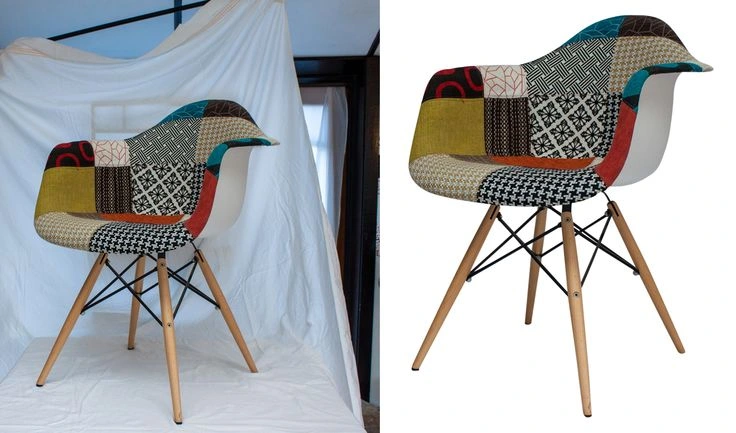
Before editing, the patchwork chair sits in front of a white cloth that looks like something you’d find draped in a sunlit attic. The folds catch the light unevenly, casting shadows that almost compete with the chair itself. The chair doesn’t stand out in the scene.
After the chair is isolated on a pure, white background, every detail becomes bold, vivid, and inviting, easily becoming the centerpiece of the story.
In another example, this time in real estate, we see a dull, stormy-day photo of a Spanish Mediterranean villa turn into something you’d see in a magazine spread. Gloomy gray clouds were replaced with a bright blue sky, reds and oranges burst on the roof to feel sun-kissed, and the potted pine plant at the far left corner was erased with an object removal tool.
The house now looks like it was shot on a bright afternoon by a professional with a DSLR.
Tools and Services to Simplify Editing
For solo entrepreneurs who have yet to establish a proven system, many online editing platforms are waiting to be your next toolbox. Both free and paid options are available depending on your marketing goals. Don’t forget: you are diving into image editing not merely to beautify but to increase store visibility, enhance shape perception, and desire.
Optimize product listings with the following tools:
- FREE
- Canva. An all-rounder for brand creation.
- Pixlr. Great for last-minute yet precise edits.
- Removal.AI. Remove background elements with a single click.
- PAID
- Adobe Lightroom. Make uniform edits for hundreds of photos at once.
- Pixelcut. A product image editing tool tailored for e-commerce minds.
- Fotor. Explore extensive options for retouching photos.
These handy tools can provide you with more than what you need at the start, but eventually, you will need to seek help. If you’re still at the early stages of your business journey, it’s best to do everything in your power to understand every detail, every curve, and every flaw in your product.
Once you start expanding, say, entering marketplaces with strict image rules or doing necessary A/B testing for thumbnails, and you find that creating high-quality images as a one-man team becomes too much to handle, it’s time to consult a professional.
Somewhere between DIY and professional editors lies a third option: AI editing. Platforms like Claid.AI and Pixelz help you avoid bloated agency fees without losing the option to do batch edits. If you’re scaling fast or maintaining multiple product lines, automate what you can. You’ll thank yourself when your product line item visibility scales.
Best Practices for Image SEO and Product Listings
Aesthetics alone don’t make a sale. You’re not here to be remembered for your visuals. You’re here to rank, resonate, and sell. Top-performing e-commerce brands have mastered the art of maximizing product visibility along with sales performance. Just like them, you can optimize product listings the right way with the following:
- File Names
Prioritize short yet descriptive file names that reflect all that is needed to know about the product (e.g., type, key attributes, angle), as file names are the first thing search engines use to analyze the content of your images. For example, a soap product should have a file name like this:
organic-shea-butter-soap-bar-closeup.jpg
Tip: Don’t use underscores. Google treats hyphens as word separators, but not underscores.
- Alt Text
This serves as a primary factor for Google Image SEO. It should inform search engines and screen readers precisely what the image is displaying. Be strategic and keyword-aligned. Instead of saying “best shea butter soap ever”, state it as “handmade organic shea soap with dried lavender and kraft paper wrap”.
- Structured Data
Let Google know you’re selling a product and not just showing a page with pictures. Structured data (via schema.org) is what makes your products show up with:
- Star ratings
- Price
- Stock status
- Images
- Reviews
- Delivery estimates (in some regions)
No coding experience? Platforms like Shopify, WooCommerce, or Wix plugins can add it for you. If your shea soap page has structured data, Google can show your product’s details directly in the SERP (Search Engine Results Page) and include you in Google Shopping and featured snippets.
- Visual Alignment
If your soap is described as “creamy white”, make sure that the viewers aren’t looking at a yellow hue. If it’s a round bar, avoid showing square or irregularly shaped soaps. Customers associate your aesthetic with trust, even if they don’t buy it right away.
- Other Tips
The ideal image format is WebP or optimized JPEG with a file size smaller than 200KB for fast loading times, and can easily be achieved with tools like TinyPNG, Squoosh, or ImageOptim. These technicalities go hand-in-hand with brand consistency. Stick to one aesthetic for easier brand recognition.
Most importantly, understand what the SERP wants. Using product schema markup is non-negotiable to get the results. Pages that implement it have been shown to gain up to 30% higher click-through rates.
When a product listing wears its credentials, it has already done the labor of answering questions and offering reassurance without being asked.
Integrating Image Strategy into Your Conversion Funnel
If you’re building a brand, you can’t afford to guess what works, nor let your products sit in one place and hope that people show up. Visual placement requires a full-funnel image strategy because users engage with visuals across every digital touchpoint. Your
Here are a few other spots where imagery pulls its weight:
- A cleverly-positioned hero image on your homepage can instantly orient the visitor on what you stand for in under three seconds.
- Spark recall and curiosity with remarketing campaigns. Someone has seen your item but didn’t follow through. What else can you show now to add context? A close-up? A person using it? A new angle?
- In email sequences, familiarity matters. Your photos don’t need to be groundbreaking, but they should feel cohesive.
More than anything else, don’t skip the testing part.
Take a single product and test two versions of the same photo. One shot against a plain backdrop, the other staged in a real-life environment. Monitor product performance afterward. What do you notice about how people behave with your product? Do they explore more? Bounce faster? Add to cart? Track these metrics, tweak, and witness your product visibility improve as you go.
Conclusion
You could have the best product in the world, but if it’s buried deep on page 10 of the search results, or your images look confusing or inconsistent, it might as well be invisible.
Product visibility combines SEO and structured data, among other things. Combining these two with a consistent product presentation and thoughtfully edited images nudges a customer closer to a purchase.
By this point, it should be clear: image quality is one of your strongest sales tools. Because in e-commerce, you don’t win by being louder – you win by being clearer.
Take these techniques to heart and make visual merchandising online work for you.