Technical SEO is the process of optimizing a website’s technical elements so search engines can easily crawl, understand, and index its pages. Without proper technical optimization, even high-quality content may struggle to rank in search results.
A structured technical SEO workflow helps identify and fix issues such as crawl errors, slow page speed, poor site structure, and indexing problems. In this guide, you’ll learn a simple step-by-step technical SEO workflow to improve your website’s performance and build a strong foundation for better search rankings.
What is a Technical SEO Workflow?
A technical SEO workflow is a structured process used to improve the technical health of a website so search engines can easily crawl, understand, and index its pages. Instead of fixing issues randomly, SEO professionals follow a clear technical SEO process that includes auditing the website, identifying technical problems, and implementing solutions in a logical order.
Many website owners make the mistake of performing random technical fixes, such as improving page speed or fixing a few broken links without analyzing the overall website structure. While these fixes may help temporarily, they often miss deeper technical issues that affect search visibility. A proper technical SEO checklist ensures that every important element like crawlability, indexing, site architecture, mobile usability, and page performance is reviewed and optimized systematically.
Search engines rely heavily on technical signals to understand how a website should be crawled and indexed. Factors such as clean URL structures, fast loading pages, secure HTTPS connections, proper internal linking, and optimized XML sitemaps help search engines discover and interpret website content more efficiently.
By following a consistent website technical optimization workflow, businesses can improve their site’s crawlability, ensure important pages are indexed correctly, and create a stronger technical foundation for higher search rankings. This structured approach not only fixes existing issues but also helps prevent future technical SEO problems.
Why Technical SEO is Critical for Search Rankings

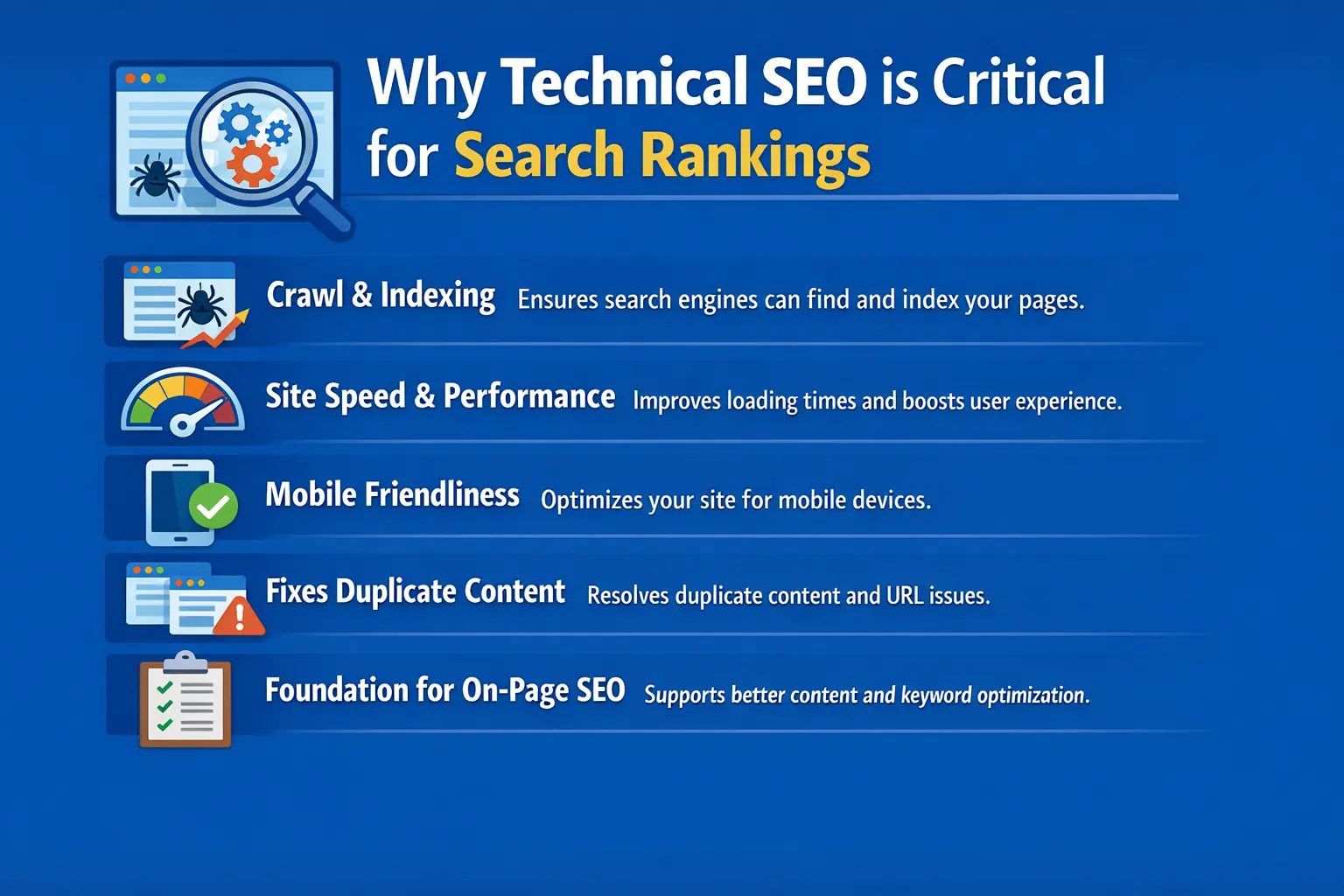
Technical SEO plays a crucial role in how well a website performs in search engines. Even if a website has high-quality content, it may struggle to rank if search engines cannot properly crawl, understand, or index its pages. Strong technical optimization ensures that search engines can access your website easily and evaluate its content correctly.
One of the biggest benefits of technical SEO is that it helps search engines crawl and index pages efficiently. When your website has a clear structure, working internal links, and a properly configured XML sitemap, search engine bots can discover and index important pages faster.
Technical SEO also improves site speed and overall performance. Faster websites provide a better user experience, reduce bounce rates, and meet Google’s performance standards such as Core Web Vitals. Search engines prefer websites that load quickly because they create a smoother experience for users.
Another key factor is mobile friendliness. Since Google uses mobile-first indexing, your website must work properly on smartphones and tablets. A responsive design, readable text, and fast mobile loading speeds help ensure that mobile users can easily access your content.
Technical SEO also helps fix duplicate content issues. Problems like multiple URLs showing the same content, incorrect canonical tags, or parameter-based URLs can confuse search engines. By resolving these issues, you help search engines understand which page should rank in search results.
Most importantly, technical SEO builds a strong foundation for on-page SEO. Once your website is technically optimized, search engines can better evaluate your keywords, content quality, and internal linking strategy.
For example, if a website improves its page speed from 6 seconds to under 2 seconds and fixes indexing errors in Google Search Console, search engines can crawl the site more efficiently. This often leads to faster indexing and improved rankings for important pages.
Complete Technical SEO Workflow (Step-by-Step)
A successful technical SEO workflow follows a structured process used by professional SEO teams to identify and fix technical issues that affect search performance. Instead of making random fixes, this workflow focuses on key stages such as auditing the website, improving crawlability, fixing indexing problems, and monitoring performance. Following these steps helps ensure that search engines can properly crawl, understand, and rank your website
Technical SEO Audit in the Technical SEO Workflow
A technical SEO audit is the first step in any technical SEO workflow. The main purpose of an audit is to evaluate the overall technical health of your website and identify issues that may prevent search engines from properly crawling, indexing, or ranking your pages.During a technical SEO audit, you analyze different technical elements of your website to find problems that could affect search performance. These issues may include pages that are not indexed, broken links that lead to errors, or technical problems that confuse search engines.
Some of the most important things to check during a technical SEO audit include:
- Crawl errors that prevent search engines from accessing pages
- Broken links that lead to 404 error pages
- Duplicate pages that can confuse search engines
- Indexing problems where important pages are not appearing in search results
- Redirect chains that slow down crawling and reduce SEO efficiency
Identifying and fixing these issues helps search engines understand your website better and improves your chances of ranking higher.
To perform a technical SEO audit effectively, SEO professionals commonly use tools such as Google Search Console, Screaming Frog, Ahrefs Site Audit, and SEMrrush. These tools provide detailed reports that highlight technical issues and help guide the optimization process.
Ensure Website Crawlability
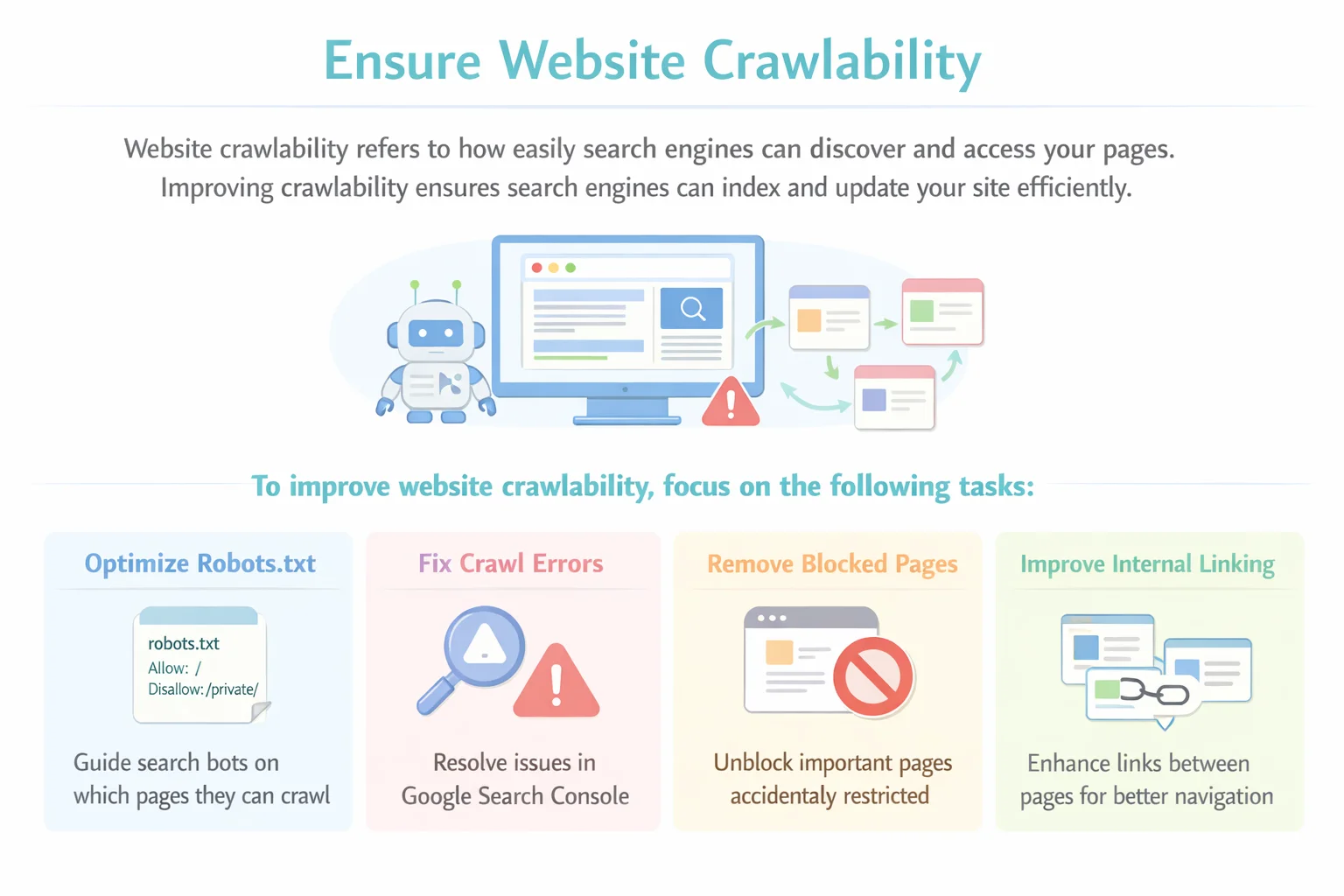
Website crawlability refers to how easily search engines can discover and access the pages on your website. Search engines use automated bots, often called crawlers or spiders, to scan websites and follow links from one page to another. If these bots cannot access your pages properly, those pages may not appear in search results.Improving crawlability ensures that search engines can explore your website efficiently and understand its content. When your website is easy to crawl, search engines can index new pages faster and update existing pages more frequently.
To improve website crawlability, focus on the following tasks:
- Optimize the robots.txt file to guide search engine bots on which pages they can or cannot crawl
- Fix crawl errors that appear in tools like Google Search Console
- Remove accidentally blocked pages that should be accessible to search engines
- Improve internal linking so crawlers can easily navigate between pages
A strong internal linking structure helps search engines discover important content and understand the relationship between different pages on your website.
Tip:
Use crawl reports from SEO tools or Google Search Console to identify important pages that may be blocked or difficult for search engine bots to access. Fixing these issues can significantly improve your website’s visibility in search results.
Fix Indexing Issues
Indexing is the process where search engines store and organize your web pages in their database so they can appear in search results. If a page is not indexed, it will not show up on search engines, no matter how good the content is. That is why fixing indexing issues is an important step in the technical SEO workflow.
Indexing problems can occur for several reasons, such as incorrect noindex tags, duplicate pages, or technical errors that prevent search engines from adding pages to their index. When these issues are not fixed, important pages may remain invisible in search results, which can reduce your website’s organic traffic.
To fix indexing issues, follow this simple checklist:
- Check the Index Coverage report in Google Search Console to see which pages are indexed and which ones have errors.
- Fix incorrect noindex tags that may be blocking important pages from appearing in search results.
- Remove or consolidate duplicate pages so search engines know which version of the page should be indexed.
- Submit an updated XML sitemap to help search engines discover and index important pages more efficiently.
Regularly monitoring indexing status ensures that your key pages remain visible in search engines and continue to perform well in search rankings.
Optimize Website Structure
Website structure, also called site architecture, refers to how pages are organized and connected within your website. A well-structured website helps search engines understand the relationship between different pages and makes it easier for users to navigate your content.
When your website has a clear structure, search engines can crawl pages more efficiently and understand which pages are most important. This improves the chances of those pages ranking higher in search results while also providing a better user experience.
Some best practices for optimizing website structure include:
- Using clear and descriptive URLs that reflect the content of the page
- Maintaining a logical page hierarchy so pages are organized from general topics to more specific ones
- Creating SEO-friendly categories and subcategories to group related content together
- Improving internal linking between related pages to help both users and search engines navigate the website easily
A simple and organized structure makes your website easier to crawl, improves user navigation, and strengthens the overall SEO performance of your site.
Improve Website Speed & Performance
Website speed is a crucial factor for both search rankings and user experience. If a website takes too long to load, visitors may leave before the page fully opens. Search engines also consider page speed as a ranking factor because fast websites provide a better experience for users.
A slow website can lead to higher bounce rates, lower engagement, and reduced chances of ranking well in search results. Improving website performance helps users access content quickly and allows search engines to crawl pages more efficiently.
Here are some common ways to improve website speed and performance:
- Image compression to reduce the size of images without losing quality
- Browser caching to store website data so returning visitors can load pages faster
- CDN (Content Delivery Network) implementation to deliver website content from servers closer to the user
- Minifying CSS and JavaScript files to remove unnecessary code and reduce file size
- Using fast and reliable hosting to ensure stable website performance
To measure and analyze website speed, you can use tools such as:
- Google PageSpeed Insights
- GTmetrix
- Lighthouse
These tools provide performance reports and recommendations that help identify areas where your website speed can be improved
Ensure Mobile Friendliness
Mobile friendliness is a key part of technical SEO because most users now access websites through smartphones. Google uses mobile-first indexing, which means it primarily uses the mobile version of a website to determine rankings in search results. If a website does not perform well on mobile devices, it may struggle to rank even if the desktop version works perfectly.
A mobile-friendly website provides a smooth browsing experience, allowing users to read content easily, navigate pages, and interact with elements without difficulty. Optimizing for mobile not only improves search visibility but also increases user engagement and satisfaction.
To ensure your website is mobile-friendly, follow this checklist:
- Use responsive design so the website automatically adjusts to different screen sizes
- Choose readable fonts that are easy to view on smaller screens
- Use optimized images to reduce loading time on mobile devices
- Add touch-friendly buttons that are easy to tap without zooming
- Ensure fast mobile load time to provide a smooth user experience
Regularly testing your website on mobile devices helps identify usability issues and ensures that visitors can access your content easily from any device.
Implement Structured Data (Schema Markup)
Structured data, also known as Schema Markup, is a type of code added to your website that helps search engines better understand the content on your pages. It provides extra information about your content, such as articles, products, reviews, or FAQs, making it easier for search engines to interpret and display your pages correctly in search results.
When structured data is implemented properly, search engines may show enhanced search listings called rich results. These results often include additional information like ratings, FAQs, images, or other details that make your listing stand out in search results.
Some common types of schema markup include:
- FAQ Schema – Displays frequently asked questions directly in search results
- Article Schema – Helps search engines understand blog posts and articles
- Product Schema – Provides product details such as price, availability, and ratings
- Review Schema – Shows ratings and review information in search listings
Implementing structured data provides several benefits, including:
- Rich results that make your listing more visible in search results
- Higher click-through rates (CTR) because enhanced listings attract more attention from users
Adding schema markup helps search engines better understand your content and can improve how your pages appear in search results.
Fix Duplicate Content Issues
Duplicate content occurs when the same or very similar content appears on multiple URLs. This can confuse search engines because they may not know which version of the page should appear in search results. As a result, ranking signals can get divided between different versions of the same page, which may weaken your SEO performance.
There are several common causes of duplicate content on websites. For example, URL parameters used for filtering or tracking can create multiple versions of the same page. Sometimes websites also have multiple versions of pages, such as different URLs that show identical content.
Another common issue occurs when both HTTP and HTTPS versions of a website are accessible. Similarly, websites may also load with both WWW and non-WWW versions, which can create duplicate pages if not configured properly.
To fix duplicate content issues, you can use several technical solutions:
- Canonical tags to indicate the preferred version of a page to search engines
- Proper redirects (301 redirects) to guide users and search engines to the correct page version
- Parameter handling to control how search engines treat URL parameters
By resolving duplicate content problems, you help search engines clearly understand which pages should be indexed and ranked, improving the overall SEO performance of your website.
Optimize XML Sitemap
An XML sitemap is a file that lists the important pages on your website and helps search engines discover and crawl them more efficiently. It acts as a roadmap for search engine bots, guiding them to the most important pages you want to appear in search results.
Optimizing your XML sitemap ensures that search engines can easily find and index your website content. This is especially helpful for large websites, new websites, or sites with many pages that may not be easily discovered through internal links.
Some best practices for optimizing your XML sitemap include:
- Including only indexable pages so search engines focus on pages that should appear in search results
- Updating the sitemap regularly whenever new pages are added or existing pages are removed
- Submitting the sitemap in Google Search Console to help search engines discover pages faster
- Removing broken or redirected URLs to prevent crawl errors and unnecessary crawling
A well-optimized XML sitemap makes it easier for search engines to crawl and index your website efficiently, improving your overall technical SEO performance.
Monitor Technical SEO Performance
Technical SEO is not a one-time task. Websites change regularly as new pages are added, updates are made, and technical issues appear over time. That’s why ongoing monitoring is essential to ensure your website continues to perform well in search engines.
Regular monitoring helps you quickly identify and fix technical problems before they affect your search rankings. By reviewing technical data frequently, you can keep your website optimized and maintain strong search visibility.
Some key technical SEO metrics you should track include:
- Crawl stats to understand how often search engine bots crawl your website
- Indexing status to confirm that important pages are indexed and visible in search results
- Core Web Vitals to measure user experience factors such as loading speed and visual stability
- Page speed performance to ensure pages load quickly for users
- Technical errors like broken links, crawl errors, or redirect issues
Several SEO tools can help monitor technical performance and detect problems early. Popular tools include:
- Google Search Console – monitors indexing, crawl errors, and search performance
- Ahrefs – provides detailed site audit and technical SEO reports
- SEMrush – identifies technical issues and tracks site health
- Sitebulb – offers advanced technical SEO analysis and crawl reports
By regularly monitoring these metrics and tools, you can maintain a healthy website, fix issues quickly, and ensure your site stays optimized for long-term SEO success.
Technical SEO Workflow Checklist
A technical SEO checklist helps ensure that all important technical elements of your website are properly optimized. Instead of forgetting key tasks, this checklist provides a quick overview of the essential steps required to maintain a technically healthy website.
You can use this checklist regularly to review your website and make sure everything is working correctly for search engines and users.
Technical SEO Workflow Checklist:
Run a technical SEO audit to identify website issues
Fix crawl errors that prevent search engines from accessing pages
Improve indexing so important pages appear in search results
Optimize website structure for better navigation and crawling
Improve page speed and performance for better user experience
Ensure mobile friendliness for mobile-first indexing
Implement schema markup to enhance search visibility
Fix duplicate content issues to avoid confusion for search engines
Optimize the XML sitemap to help search engines discover pages
Monitor technical SEO performance regularly
Following this checklist helps maintain a strong technical foundation, making it easier for search engines to crawl, index, and rank your website effectively.
Best Tools for Technical SEO Workflow
Using the right tools makes it easier to identify technical issues, analyze website performance, and maintain a healthy site. These tools help SEO professionals run audits, monitor crawlability, and fix technical problems that affect search rankings.
Here are some of the most useful tools for a technical SEO workflow:
Screaming Frog
Screaming Frog is a powerful website crawler that scans your website to find technical SEO issues. It helps identify problems such as broken links, duplicate content, missing meta tags, redirect chains, and crawl errors.
Ahrefs Site Audit
Ahrefs Site Audit analyzes the technical health of your website and provides a detailed report of SEO issues. It highlights problems related to crawlability, performance, internal linking, and overall site health.
SEMrush
SEMrush offers a comprehensive site audit tool that detects technical SEO errors and prioritizes issues based on their impact. It also provides recommendations to help fix problems and improve website performance.
Google Search Console
Google Search Console is a free tool from Google that helps monitor how your website performs in search results. It shows indexing status, crawl errors, Core Web Vitals, and other technical issues that may affect visibility.
Google PageSpeed Insights
PageSpeed Insights analyzes website speed and performance on both mobile and desktop devices. It provides detailed suggestions to improve page load time and optimize user experience.
Common Technical SEO Mistakes to Avoid
Even well-designed websites can struggle in search rankings if certain technical SEO mistakes are overlooked. Avoiding these common issues helps ensure that search engines can properly crawl, index, and understand your website.
Here are some technical SEO mistakes you should watch out for:
Blocking Important Pages in robots.txt
The robots.txt file controls which pages search engines can crawl. If important pages are accidentally blocked, search engine bots will not be able to access or index them. Always review your robots.txt file to ensure that only unnecessary pages are restricted.
Missing Canonical Tags
Canonical tags help search engines understand the preferred version of a page when similar or duplicate pages exist. Without canonical tags, search engines may struggle to determine which page should rank, which can dilute ranking signals.
Slow Page Speed
A slow website negatively affects both user experience and search rankings. Pages that take too long to load can increase bounce rates and reduce engagement. Optimizing images, improving hosting, and minimizing unnecessary code can significantly improve page speed.
Broken Internal Links
Internal links help search engines discover pages and understand the structure of your website. Broken internal links lead to error pages and can interrupt the crawling process, making it harder for search engines to navigate your site.
Poor Mobile Experience
Since Google uses mobile-first indexing, websites that are not optimized for mobile devices may struggle to rank well. A poor mobile experience—such as unreadable text, slow loading pages, or difficult navigation—can harm both SEO performance and user engagement.
Avoiding these mistakes helps maintain a technically healthy website and improves your chances of ranking higher in search results.
Frequently Asked Questions (FAQs)
1. What is a technical SEO workflow?
A technical SEO workflow is a structured process used to identify and fix technical issues on a website so search engines can easily crawl, index, and rank its pages.
2. Why is technical SEO important for a website?
Technical SEO helps improve website performance, crawlability, and indexing. This makes it easier for search engines to understand your content and improves your chances of ranking higher.
3. How often should you perform a technical SEO audit?
It is recommended to perform a technical SEO audit every 3–6 months or after major website updates to ensure there are no technical issues affecting rankings.
4. What tools are commonly used for technical SEO?
Popular tools include Google Search Console, Screaming Frog, Ahrefs Site Audit, SEMrush, and Google PageSpeed Insights for detecting and fixing technical SEO problems.
5. What are the most common technical SEO issues?
Common issues include crawl errors, slow page speed, duplicate content, broken links, indexing problems, and poor mobile optimization.
6. Does technical SEO improve website rankings?
Yes. Technical SEO helps search engines crawl and index your website more efficiently, which can improve visibility and support better search rankings.
conclusion
Technical SEO is the foundation of a successful SEO strategy. If your website is not technically optimized, search engines may struggle to crawl and index your content properly, which can affect your rankings.
Following a structured technical SEO workflow helps you consistently identify and fix issues that impact your website’s performance. It ensures that your site remains optimized for both search engines and users.
Regular technical SEO audits and monitoring are also important for maintaining long-term rankings. By implementing this workflow and reviewing your website regularly, you can build a strong technical foundation and improve your chances of achieving sustainable SEO growth